第3名 archify:把大白话变成能点能搜的架构图No. 3 archify: Turn Plain English into Architecture Diagrams You Can Click and Search
星数 69,006,兼容工具榜第 3,MIT 协议。
69,006 stars, No. 3 on the compatible tools list, MIT license.
星数 69,006,兼容工具榜第 3,MIT 协议。
它是什么
archify 是一个基于 Node.js 的架构图渲染和校验工具。它做的事可以概括成:你用自然语言把一个系统描述出来,或者干脆让它去读一个代码库,它把这些变成一张排版规整、可以交互的架构图,直接出现在 AI agent 的对话窗口里。
它生成的不是一张静态图片,而是一个独立的 HTML 文件,能打开、能改、能分享。
能干什么
- 画架构、工作流、时序、数据流、生命周期这几类图
- 节点搜索、上下游依赖追踪
- 架构变更对比:两个版本逐处标出哪些组件和连接被新增、删除、修改、移动
- 导览故事播放:按步骤带着看图,给干系人讲解用
- 导出自包含的 HTML、PNG、SVG
典型用法是让 agent 先给系统拓扑生成一个带类型的中间表示,archify 再把它编译成确定的、可分享的成品。生成之后还能接着对话,比如补一句"加上认证""高亮缓存未命中的路径""换成浅色主题"。
装它是一行命令:npx skills add tt-a1i/archify -g,在支持的 agent 里全局生效,官方说一分钟内搞定。
兼容 DSH 到什么程度
它原生支持 Claude Code、Codex CLI、Cursor、OpenCode 和 DeepSeek Harness。要注意一个区别:针对 DSH 的集成是社区维护的开发者预览版,不是 DeepSeek 官方产品,用之前最好核一下本地工作区路径配置。主仓库那条通用 Skill 协议的路子相对成熟。
谁适合用
- 开发者:梳理手头代码库的整体结构
- 架构师和技术负责人:合并代码前评审架构变更,看清楚动了哪些组件和连接
- 需要把系统讲给团队或外部干系人的人:用导览模式一步步带
版本要求记一下:Node.js 得是 22.19.0 以上,或者 24.0.0 以上。当前版本明确不做的有自动 Mermaid 解析、通用自动布局、托管分享、可视化编辑,想要这些功能会扑空。
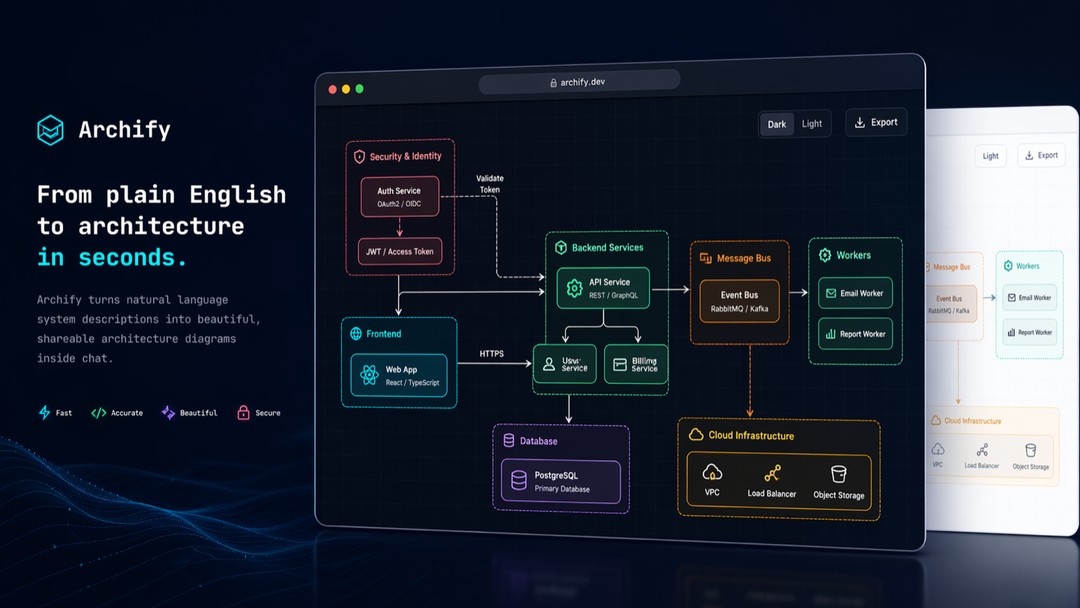
下面这张是它的主视觉,自然语言描述进去,一张分层架构图出来:
图为 archify 把自然语言系统描述转成分层架构图,支持深色浅色主题和导出。
它最实用的功能之一是版本对比,合并前看清变化:
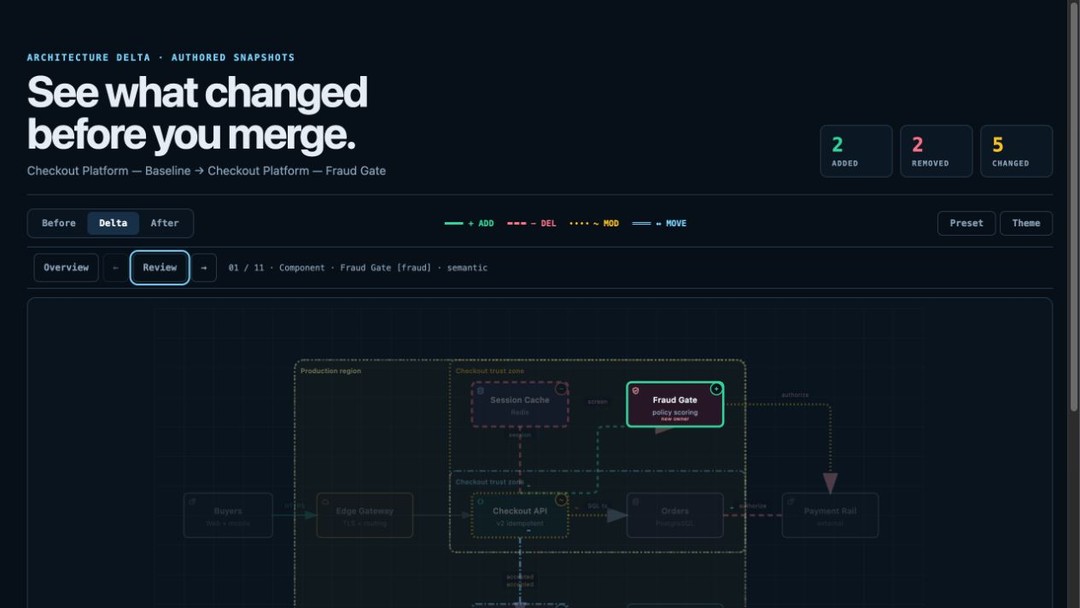
图为 archify 的架构变更对比界面,右上角统计新增 2 处、移除 2 处、修改 5 处。
工作流、时序、数据流这几种图各自长这样:
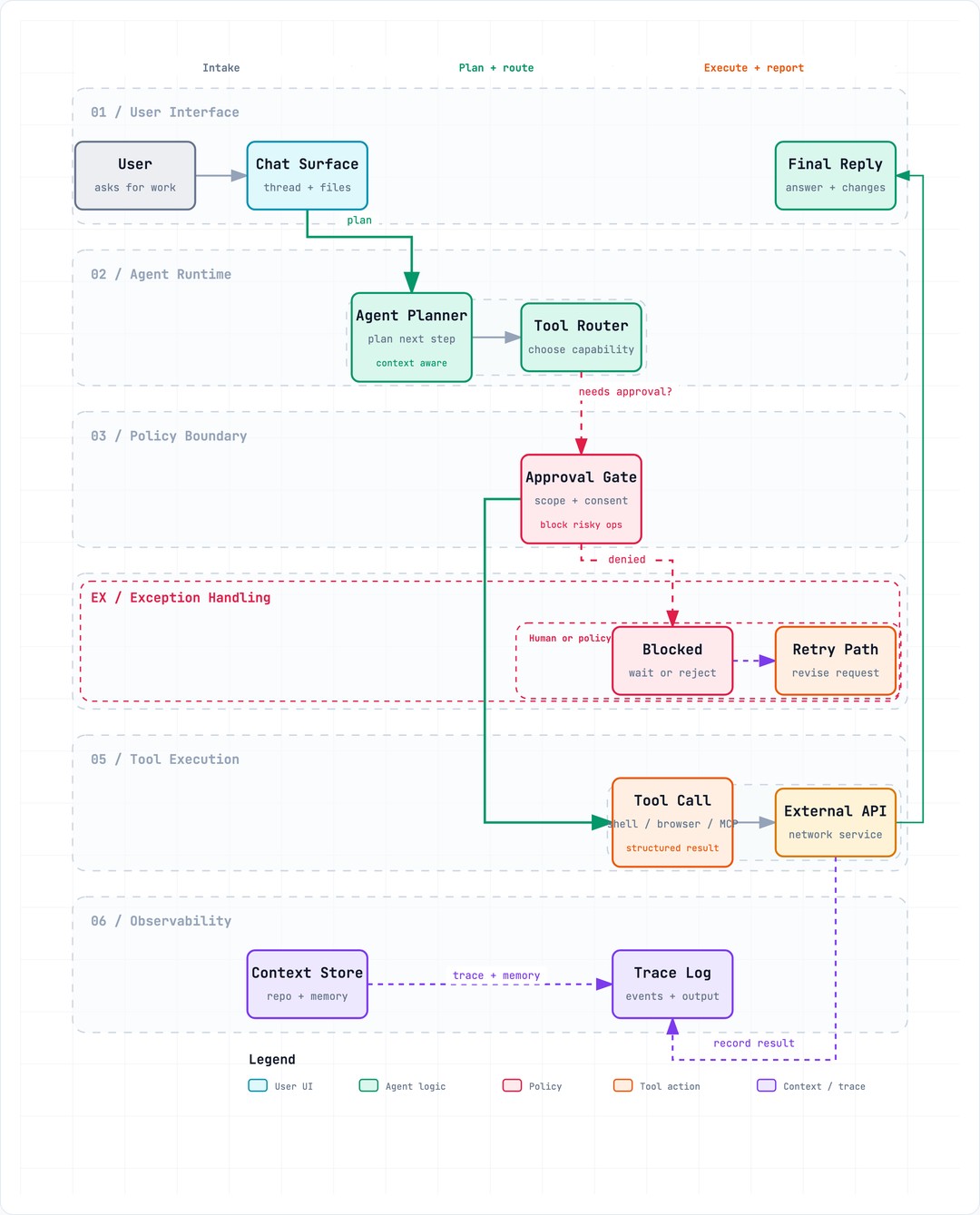
图为 archify 生成的工作流图。
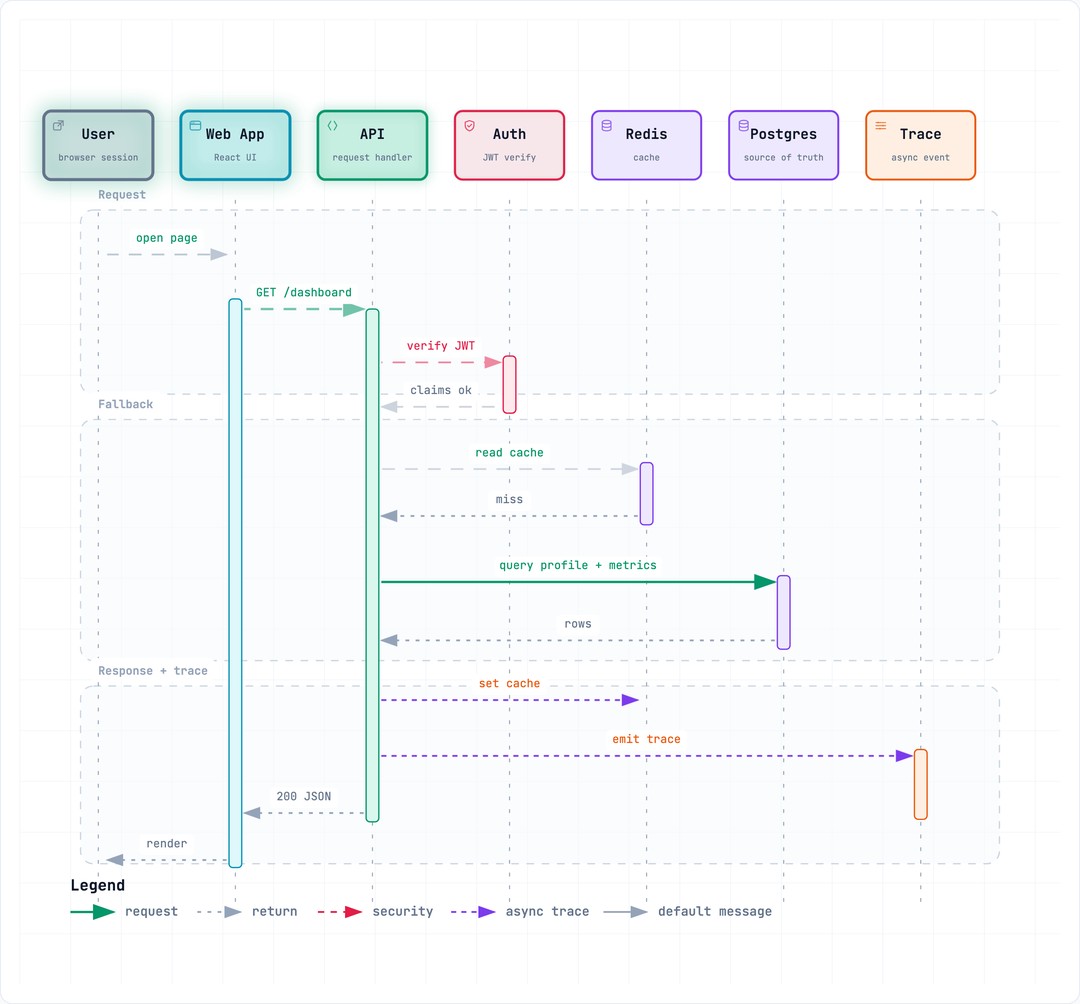
图为 archify 生成的时序图。
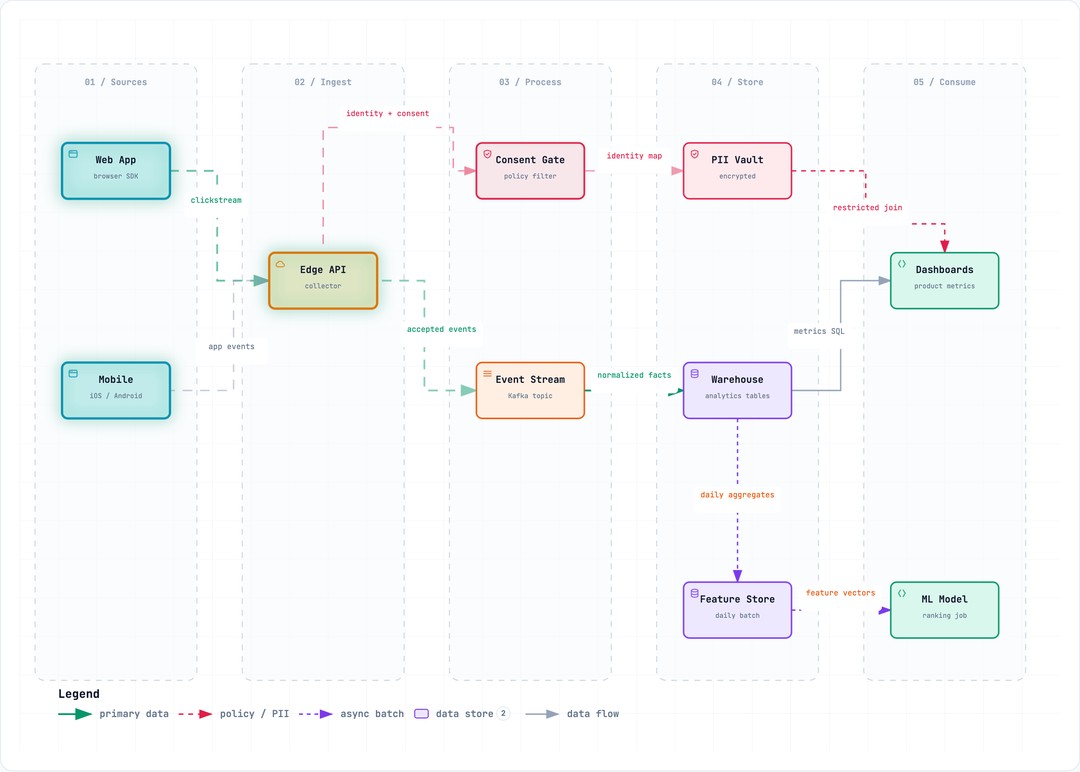
图为 archify 生成的数据流图。
推荐理由
前五里它最"专"——不碰设计、不碰编码,只把架构图这一件事做深,而且做到了可对比版本、可交互、可验证,不只是画得好看。如果你经常要在合并前搞清楚系统结构改了哪儿,或者要把架构讲给别人听,它很顺手。唯一要拎清的是 DSH 那版还是社区预览,生产上别完全指望,走通用 Skill 路径更稳。
数据来源:DSH 插件市场兼容工具榜及 tt-a1i/archify 仓库,星数为 2026 年 9 月 22 日快照。
69,006 stars, No. 3 on the compatible tools list, MIT license.
What it is
archify is a Node.js-based architecture diagram rendering and validation tool. What it does comes down to this: you describe a system in natural language, or simply let it read a codebase, and it turns that into a neatly laid-out, interactive architecture diagram that appears right inside the AI agent's chat window.
What it generates isn't a static image but a standalone HTML file that you can open, edit, and share.
What it can do
- Draw architecture, workflow, sequence, data flow, and lifecycle diagrams
- Node search and upstream/downstream dependency tracing
- Architecture change comparison: two versions with every component and connection marked as added, removed, modified, or moved
- Guided tour playback: walk through the diagram step by step, useful for explaining it to stakeholders
- Export self-contained HTML, PNG, and SVG
The typical usage is to have the agent first generate a typed intermediate representation of the system topology, which archify then compiles into a deterministic, shareable deliverable. After generation you can keep the conversation going, for example adding "add authentication," "highlight the cache-miss path," or "switch to a light theme."
Installing it is one line: npx skills add tt-a1i/archify -g, which takes effect globally in supported agents; the official docs say it's done in under a minute.
How compatible it is with DSH
It natively supports Claude Code, Codex CLI, Cursor, OpenCode, and DeepSeek Harness. One distinction to note: the integration for DSH is a community-maintained developer preview, not an official DeepSeek product, so it's best to double-check your local workspace path configuration before using it. The general Skill protocol route through the main repository is comparatively mature.
Who it's for
- Developers: mapping out the overall structure of the codebase at hand
- Architects and tech leads: reviewing architecture changes before merging code, seeing clearly which components and connections were touched
- Anyone who needs to explain a system to a team or outside stakeholders: using tour mode to walk them through step by step
Note the version requirements: Node.js must be 22.19.0 or higher, or 24.0.0 or higher. What the current version explicitly does not do includes automatic Mermaid parsing, general-purpose auto layout, hosted sharing, and visual editing — if you want those features, you'll come up empty.
Below is its hero visual: natural language goes in, a layered architecture diagram comes out:
The image shows archify converting a natural-language system description into a layered architecture diagram, with dark and light themes and export support.
One of its most practical features is version comparison, so you can see changes clearly before merging:
The image shows archify's architecture change comparison interface, with the top-right corner tallying 2 additions, 2 removals, and 5 modifications.
Workflow, sequence, and data flow diagrams each look like this:
The image shows a workflow diagram generated by archify.
The image shows a sequence diagram generated by archify.
The image shows a data flow diagram generated by archify.
Why it's recommended
Among the top five it is the most specialized — it doesn't touch design, doesn't touch coding, and only goes deep on the single job of architecture diagrams, doing it to the point of comparable versions, interactivity, and verifiability, not just looking good. If you often need to figure out what changed in a system's structure before merging, or explain an architecture to others, it is very handy. The one thing to be clear about is that the DSH version is still a community preview, so don't rely on it entirely in production; going through the general Skill route is more solid.
Data sources: the DSH Plugin Hub compatible tools list and the tt-a1i/archify repository; star counts are a snapshot from September 22, 2026.