Meta 把 Muse 搬上了 Mac:一个能翻你文件、邮件、信息、日历和备忘录的私人 AIMeta Brings Muse to the Mac: a Personal AI That Can Dig Through Your Files, Email, Messages, Calendar and Notes
Meta 发布了 Mac 版 Muse。这是 Muse 头一回能在用户自己的电脑上把活干完——它直接操作本地文件和原生应用,数据本来就存在那儿。月初 Muse 已经上了手机、网页和 WhatsApp,这次等于给它补上桌面这一层。
Meta shipped Muse for Mac. It's the first time Muse can finish a job on a user's own computer — it works directly with local files and native apps, where the data already lives. Earlier this month Muse landed on mobile, the web and WhatsApp, so this fills in the desktop layer.
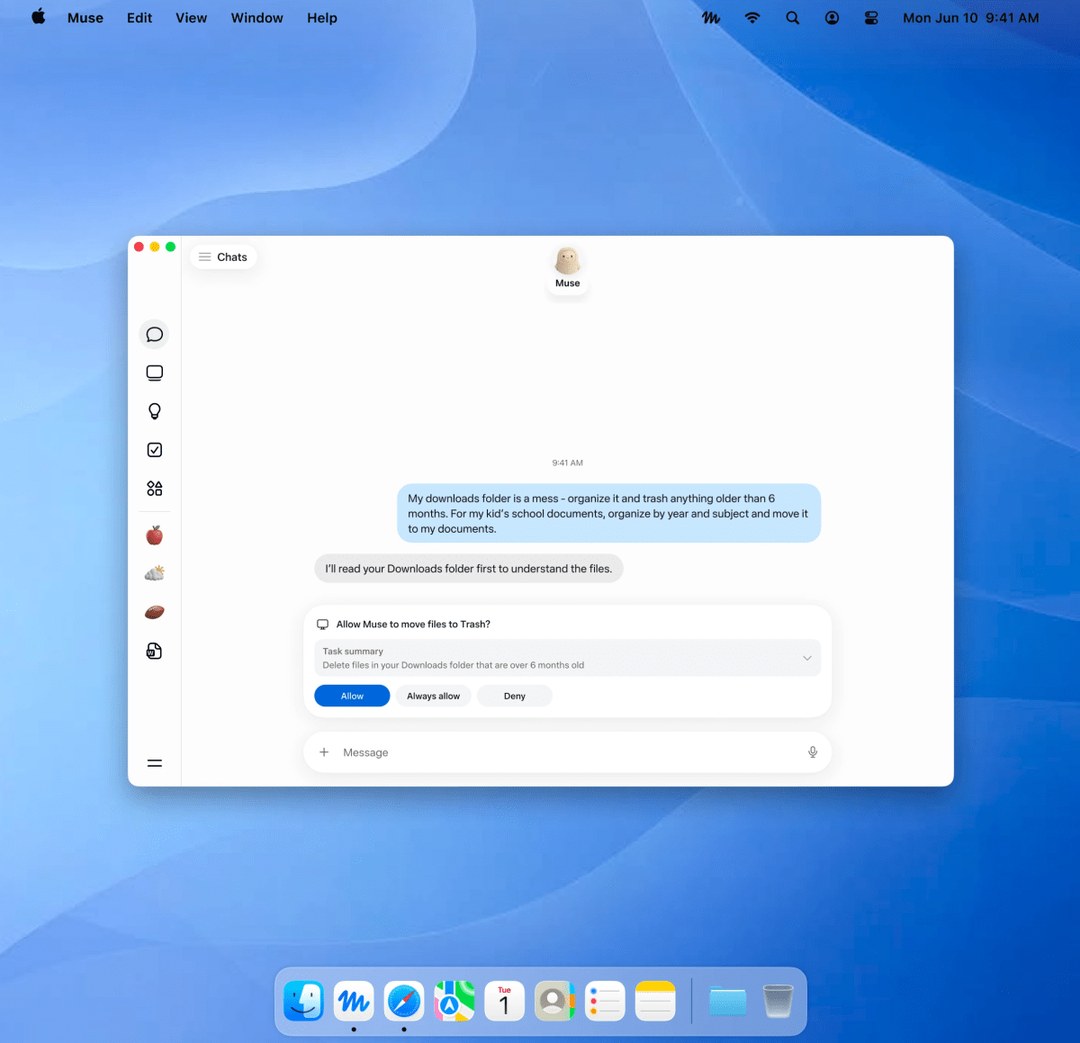
Meta 的 Muse 头一回能直接在你的电脑上动手干活。它读的是本地文件和原生应用里的数据,原本就放在那儿。权限上,访问要你主动开,删东西和发消息都得先过你这一关。目前免费、仅限美国,每周给到 1 亿 tokens。
一句话概览
Meta 发布了 Mac 版 Muse。这是 Muse 头一回能在用户自己的电脑上把活干完——它直接操作本地文件和原生应用,数据本来就存在那儿。月初 Muse 已经上了手机、网页和 WhatsApp,这次等于给它补上桌面这一层。
能落地吗?对普通用户来说能。今天就是个免费的 macOS 下载,暂时只在美国。它是 Meta 托管运营的消费级智能体,不是你能自己架起来的开源模型。
Meta 拿出了什么
扎克伯格在 X 上宣布了这款 Mac 应用,说它能跨应用、文件、日历、备忘录和信息来工作,还补了一句"团队交付得很快"。同一天,Meta 首席 AI 官 Alexandr Wang 也发了这条消息。
Muse 本身不是这周才冒出来的。9 月 8 日它就先在美国上线了 iOS、Android、网页和 WhatsApp。TechCrunch 的报道说,上线之后它很快冲到了美国 App Store 榜首。
Mac 版 Muse 能干些什么
在 Mac 上,Muse 可以在各自的原生应用里操作文件、信息、日历、备忘录和邮件。Meta 给它找的定位是那些要横跨好几个应用的日常杂事:帮你整理文件夹、拿文件里存的信息填完一张表,或者把邮件、信息和备忘录揉成一份当日总结。
真正的变化在"凑上下文"这一步。普通聊天机器人得你自己把信息复制粘贴进提示词;Muse 有可能直接在这台电脑上把散在各处的上下文收齐。一个任务可能同时要用到日历里的一个日程、邮件里的一段往来、文件夹里的一份文档,还有一段信息对话。
Muse 还能异步跑。Meta 的说法是,就算你把桌面窗口关了,智能体照样在后台继续干。你可以在手机上起个头,在笔记本上看进度,或者用 WhatsApp 催它一下——Muse 会在不同设备之间保持同一条线。
权限是怎么管的
能碰本地文件,风险就不一样了,所以这部分最值得看。访问你的电脑需要你主动打开;完全磁盘访问是可选项,不是默认。给它哪些权限由你说了算,随时能在设置里改回来。
凡是会造成破坏、或者往外发东西的动作,都加了闸门。Meta 说删文件、发消息这类敏感操作必须先经过你。落到实际体验上就是:Muse 可以随便整理一个文件夹,但真要删东西之前必须停下来问;它可以起草一份总结,但要发出去之前必须先请示。
Muse 下面那套东西
按 Meta 的发布说明,Muse 由 Muse Spark 驱动,这是 Meta 目前最强的模型,专门为真实场景里的智能体任务做的。同一个模型也撑着 Muse Code——一个支持 macOS 和 Windows 的编程智能体。
云端跑在 Muse Secure VM 上。Muse 在云里有一台属于自己的专用电脑,做了隔离,别人的智能体碰不到它。同一台机器上还跑着一个独立的 Sentinel 智能体,在系统层面跟 Muse 分开。没有 Sentinel 点头,Muse 做的任何事都出不去互联网。
有一点得提前说清楚:Secure VM 隔开的是"你和别的用户",它拦不住 Meta 在运营服务确实需要的时候读取你的数据。Meta 计划在 2026 年晚些时候推出 Muse Confidential VM——整台虚拟机用一把只有你自己持有的密钥加密。另外 Meta 为 Muse 开了公开的漏洞赏金。
关键要点
- Mac 版 Muse 是 Muse 第一个能直接在电脑上动手的版本
- 它在原生应用里操作文件、邮件、信息、日历和备忘录
- 访问要你主动开,完全磁盘访问是选项,设置随时能改
- 删文件、发消息这类动作一律先问你
- 每周免费额度 1 亿 tokens,目前只在美国
本文为原文的完整中文翻译,按整句语义用中文习惯重写,配图取自原文,另补入公开媒体报道与项目仓库的公开截图。原文作者 Michal Sutter,2026 年 9 月 19 日发布。事实与数据均按原文口径翻译,未作补充或删减。
For the first time, Meta's Muse can get real work done right on your computer. It reads local files and data inside native apps — data that was already sitting there. On permissions, access is opt-in, and deletions and messages have to clear you first. Free for now, US-only, with 100 million tokens a week.
The One-Line Summary
Meta shipped Muse for Mac. It's the first time Muse can finish a job on a user's own computer — it works directly with local files and native apps, where the data already lives. Earlier this month Muse landed on mobile, the web and WhatsApp, so this fills in the desktop layer.
Will it ship? For ordinary users, yes. Today it's a free macOS download, US-only for now. It's a consumer agent that Meta hosts and operates, not an open model you can stand up yourself.
What Meta Shipped
Zuckerberg announced the Mac app on X, saying it works across apps, files, calendar, notes and messages, and adding that the team "shipped it fast." The same day, Meta chief AI officer Alexandr Wang posted the news too.
Muse itself didn't appear this week. On September 8 it launched first in the US on iOS, Android, the web and WhatsApp. TechCrunch reported that it quickly shot to the top of the US App Store after launch.
What Muse on Mac Can Do
On the Mac, Muse can work with files, messages, calendar, notes and email inside their respective native apps. Meta positions it for the everyday chores that span several apps: tidying up your folders, filling out a form with information stored in your files, or pulling email, messages and notes into a single daily summary.
The real change is in the "gathering context" step. An ordinary chatbot makes you copy and paste information into the prompt yourself; Muse can potentially round up context scattered across the machine on its own. A single task might need a calendar event, an email thread, a document in a folder and a message conversation all at once.
Muse also runs asynchronously. According to Meta, the agent keeps working in the background even after you close the desktop window. You can kick something off on your phone, watch progress on your laptop, or nudge it over WhatsApp — Muse keeps the same thread across devices.
How Permissions Are Handled
Once local files are in play, the risk profile changes, so this is the part most worth reading. Access to your computer has to be switched on by you; full disk access is optional, not the default. Which permissions it gets is your call, and you can change them back in Settings at any time.
Anything destructive or anything that sends data outward gets a gate. Meta says sensitive operations like deleting files and sending messages have to go through you first. In practice that means: Muse can reorganize a folder freely, but it has to stop and ask before it actually deletes anything; it can draft a summary, but it has to check in before sending it.
What Sits Underneath Muse
Per Meta's release notes, Muse is powered by Muse Spark, Meta's strongest model today, purpose-built for agentic tasks in real-world settings. The same model also backs Muse Code — a coding agent that supports macOS and Windows.
In the cloud it runs on Muse Secure VM. Muse gets its own dedicated, isolated computer in the cloud that other people's agents can't touch. An independent Sentinel agent runs on the same machine, separated from Muse at the system level. Nothing Muse does reaches the internet without Sentinel's approval.
One thing worth saying up front: the Secure VM separates you from other users, but it does not stop Meta from reading your data when it genuinely needs to in order to operate the service. Meta plans to launch Muse Confidential VM later in 2026 — an entire VM encrypted with a key only you hold. Meta has also opened a public bug bounty for Muse.
Key Takeaways
- Muse for Mac is the first version of Muse that can act directly on your computer
- It works with files, email, messages, calendar and notes inside native apps
- Access is opt-in, full disk access is optional, and settings can be changed at any time
- Actions like deleting files and sending messages always ask you first
- 100 million free tokens a week, US-only for now
This is a complete translation of the original article, rewritten sentence by sentence into natural English, with images taken from the original and supplemented by public screenshots from media coverage and project repositories. Original author: Michal Sutter, published September 19, 2026. Facts and figures are translated as stated in the original, with nothing added or removed.