学生最适合用哪款 AI 工具?What AI App Should a Student Actually Use?
每个群聊和学生邮箱里,都有同学为同一份作业力荐另一款 AI 应用——他们的推荐往往也没错,只是专业和课业负担与你不同。本指南不册封总冠军,而是按学生真正要处理的任务拆开问题,让你看清哪款工具值得留在手机主屏幕上。
In every group chat and student inbox, some classmate swears by a different app for an identical assignment — and their pick often makes sense, since their major and course load aren't yours. Rather than anointing a single champion, this guide splits the question along the kinds of work students really face, helping you decide what deserves room on your phone's home screen.
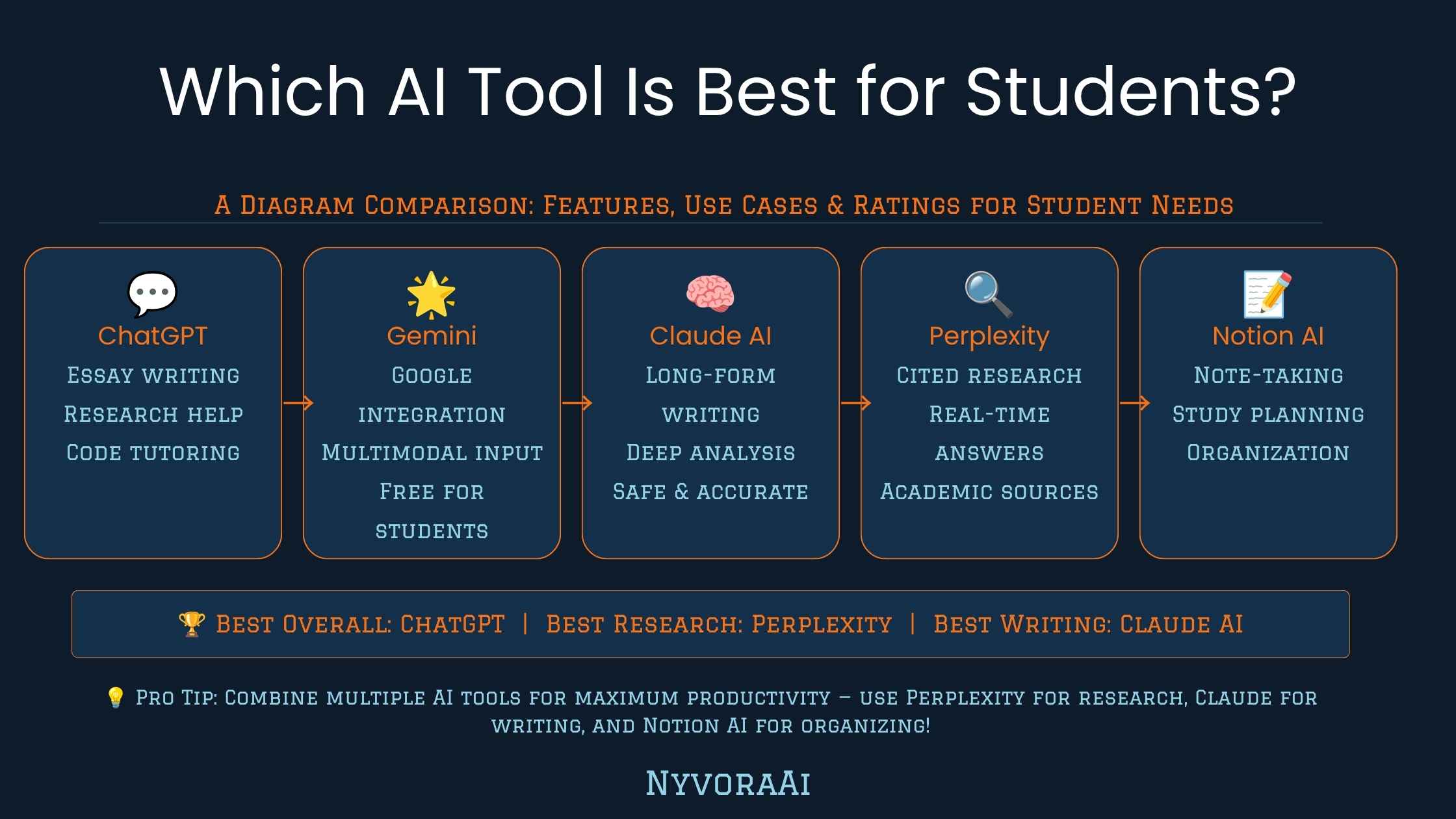
「上学到底该用哪款 AI」听起来简单,其实不然。学生从来不是只干一件事:写论文、赶实验报告、抱佛脚备考、调试代码、做幻灯片,常常一周之内全要来一遍。没有哪款应用能在所有这些事上都拿第一;偏要这么假设,结果只会是对着一款根本不是为该任务设计的工具干生气。
下文的对比顺着学生真正花时间的地方展开,而不是费力找出一款通吃的应用。如果你的课业以写作为主,我们那份 Claude 与 ChatGPT 写作能力对比对这一选择讲得比这里更深。
01简短结论
没有一款应用适合所有学生,答案随任务而变。写论文、讲概念、做学习指南,Claude 和 ChatGPT 都是好手:篇幅长、结构要求高的写作常更推荐 Claude,快速头脑风暴则用 ChatGPT。需要真实、可追溯来源的调研,Perplexity 以及围绕你自己文档工作的笔记工具通常比通用聊天机器人强。数学和编程方面,专为分步解题打造的工具往往比全能助手更可靠。多数学生最后实际轮换使用两到三款工具,各自对上眼前的具体任务。
02答案为何取决于你的课业结构
刷解剖学抽认卡的医预科生、打磨论文论点的英文系学生、调试递归函数的计算机系学生,都算「在用 AI 的学生」,可他们需要的能力几乎完全不重合。通用聊天机器人确实擅长很多类任务,但为单一工作打造的专门工具——文献追踪、数学分步求解、抽认卡生成——在那一件具体工作上通常能压过通才。
实际建议是:别再把「最好的学生 AI」当成某一个产品去找,改为按任务类别配工具。真正稳定从 AI 获益的学生,大多轮换着用两到三款工具,而不是硬让一款应用包办一切。
03按学生任务分类的最佳工具
论文与写作
调研与引用
数学与 STEM 作业
04并排对比:面向学生任务的 AI 工具
| 工具 | 最适合学生的用途 | 优势 | 免费档 |
|---|---|---|---|
| Claude | 长论文、编辑、语气一致的写作 | 在长文档中保持结构与文风统一 | 有 |
| ChatGPT | 头脑风暴、快速讲解、一般问答 | 快速、灵活、插件支持广泛 | 有 |
| Perplexity | 有真实来源的调研 | 每个回答都直接给出引用 | 有 |
| 笔记本式 AI | 用自己的笔记和阅读材料学习 | 回答仅基于你上传的文档 | 有 |
| 数学/STEM 求解应用 | 分步完成的作业题 | 展示完整过程,而非只给最终答案 | 免费增值 |
如果只先挑一款入手,Claude 或 ChatGPT 这类通用助手覆盖的日常任务面最广。等作业需要引用来源时再加调研专用工具;当通用聊天机器人的答案展示过程少到让你不放心时,再配一款专门的数学或编程工具。
05五步选出适合你的工具
- 1
列出你每周真正要做的任务
1 论文、习题集、阅读摘要、演示——记下你时间真正花在哪,而不是你以为自己会在哪用 AI。
- 2
每类主要任务配一款工具
2 一款写作助手、一款调研工具、再加一个数学或编程帮手,几乎能覆盖所有学生的课业。
- 3
只用免费档起步
3 考虑付费升级前,先拿每款工具做你真实的作业——大部分学生需求不花钱就能满足。
- 4
查清学校的 AI 政策
4 有些课程完全禁用 AI,有些只鼓励用来头脑风暴——在把工具用于计分作业之前先弄清规则。
- 5
工具最多控制在两到三款
5 在五款 AI 应用之间来回切换,浪费的时间比省下的还多——只留在日常里真正用得上的。
06用 AI 而不越学术红线
学生最常犯的错不是选了「错」工具,而是把对的工具用出了真实的学术诚信问题。不同学校、不同老师、甚至不同作业之间政策差异极大,所以最稳妥的做法永远是查清这门课的具体规则,而不是默认 AI 在哪儿都被禁、或在哪儿都行。
跨越大多数学术诚信政策的一条普遍安全模式:用 AI 做头脑风暴、检验自己对概念的理解、或给自己写的草稿征求反馈,通常没问题。多数学校明确划定的硬线是:不加说明地把 AI 生成文本完全当作自己的原创提交。
07学生使用 AI 工具的常见错误
- 一款工具包打天下。在展示完整过程上,单个聊天机器人比不过专门的数学求解器;在追踪真实来源上,也比不过引用工具。
- 什么都不核查。AI 会一本正经地给出错误信息——凡是要进计分作业的内容,务必逐条核实。
- 无视学校的 AI 政策。把一门课的规则当成处处适用,是常见且本可避免的错误。
- 免费档还没试就先订阅。多数学生课业确实由免费计划覆盖——只有当你清楚自己需要哪个额外功能时再升级。
- 把 AI 输出当成可直接提交的成品。打草稿、审阅、修改——适用于任何写作工具的纪律在这里同样适用。
08常见问题
综合来看,哪款 AI 工具最适合学生?
做作业选 ChatGPT 还是 Claude 更好?
老师能查出 AI 写的论文吗?
最适合学生的免费 AI 工具是哪款?
做作业用 AI 算作弊吗?
09结语
那么学生到底该用哪款应用?诚实的回答是:不是某一款,而是适合眼前任务的那一款——有意为之去挑选,而不是随大流用朋友碰巧在用的应用。Claude 或 ChatGPT 这类通用助手能满足大多数日常写作与讲解需求;一旦引用变得重要,调研工具就有了位置;当你需要看到真实步骤而非仅最终答案时,专门的数学或编程求解器就更胜一筹。
先从一款通用助手开始,课业真正需要时立刻引入专门工具,在把 AI 用于计分作业前始终先核实学校的具体规则。工具匹配任务、诚实测试、公开使用——这套做法胜过追逐某个月自封「最佳学生 AI」的任何一款应用。
如果课业以写作为主,接下来值得读我们更深入的 Claude AI 与 ChatGPT 写作对比;如果你要做演示或项目需要视觉素材,2026 年最佳 AI 图像生成器盘点对该需求有更详细的介绍。
"What AI app should I really rely on for coursework?" only sounds easy. Students juggle several jobs at once — essays one day, lab reports the next, exam cramming, code debugging, and slide decks, sometimes all packed into a single week. Expecting one app to top every category sets you up for disappointment, because you're handing it work it was never designed to do.
The comparison below follows the way students actually spend their hours instead of hunting for one app that rules them all. If writing dominates your schedule, our head-to-head Claude versus ChatGPT for writing explores that call in more depth than this guide can.
01The Short Version
No app wins for every student; the right pick shifts with the job in front of you. Essays, explanations, and study guides turn out well with either Claude or ChatGPT — Claude gets the nod for long, tightly structured pieces, while ChatGPT shines when you need rapid brainstorming. When assignments call for genuine sources with a paper trail, Perplexity and note apps that work from your own files generally beat plain chatbots. Math and coding are safer in purpose-built solvers that walk through each step, rather than in a do-everything assistant. In practice, most students keep two or three apps rotating, each matched to the work at hand.
02Your Course Load Decides the Answer
A pre-med drilling anatomy flashcards, an English major refining a thesis sentence, and a CS major untangling a recursive function all count as "students using AI," yet the capabilities they require barely overlap. Broad chatbots do a surprising number of things well, but a tool shaped around a single job — chasing citations, solving math step by step, generating flashcards — typically outperforms a jack-of-all-trades on that job.
In practice, give up the search for one product labeled "the top AI for students" and pair apps with categories of work instead. Students who extract steady value tend to rotate two or three tools, rather than stretching a single app across everything.
03Top Tools, Organized by Student Task
Papers & Writing
Research & References
Math & STEM Assignments
Slides & Visual Work
04At a Glance: Tools Against Student Tasks
| App | Where It Helps Students Most | Main Edge | No-Cost Plan |
|---|---|---|---|
| Claude | Lengthy papers, edits, writing with a steady tone | Keeps structure and voice intact through long files | Yes |
| ChatGPT | Ideation, fast explanations, everyday questions | Quick, adaptable, broad plugin ecosystem | Yes |
| Perplexity | Research backed by genuine sources | Citations appear inline with each response | Yes |
| Notebook-type AI apps | Learning from notes and readings you supply | Replies draw solely from files you upload | Yes |
| Math/STEM solver tools | Homework broken into steps | Complete working shown instead of just the result | Freemium |
Starting out? A broad assistant — Claude or ChatGPT — handles the broadest spread of daily work. Bring in a research app the moment cited sources become part of the assignment, and add a math or coding solver when chatbot replies skip too much of the working for your liking.
05A Five-Step Way to Choose
- 1
Write down your real weekly workload
1 Essays, problem sets, reading summaries, slide decks — record where your hours genuinely go, rather than where you imagine AI fitting in.
- 2
Pair each main task type with one app
2 Between a writing helper, a research app, and a math or coding aide, nearly any student schedule is covered.
- 3
Begin on free plans alone
3 Put every app through your actual assignments before paying for anything; the majority of student needs cost nothing to meet.
- 4
Read your institution's AI rules
4 A few courses prohibit AI altogether, while others permit it just for ideation; find out where the line sits before a graded piece depends on it.
- 5
Cap your toolkit at two or three apps
5 Keeping five apps in the air burns more time than it frees; trim until only tools that pull their weight remain.
06Staying on the Right Side of Academic Rules
Students' most frequent error isn't choosing a "bad" app; it's deploying a good one in a way that lands them in genuine academic-integrity trouble. Rules swing wildly from one school, instructor, or even assignment to another, so always verify the exact policy for the exact course instead of assuming AI is universally banned or universally accepted.
Most policies accept a familiar pattern: AI as a sounding board for ideas, a way to test whether you grasp a concept, or a source of comments on a draft you authored yourself. What schools generally refuse is undisclosed AI text handed in as though every word were your own.
07Where Students Go Wrong With AI
- Forcing one app into every job. No general chatbot shows working like a dedicated math solver or traces genuine sources like a citation tool.
- Skipping fact checks altogether. AI delivers misinformation with a straight face, so verify every fact destined for a graded piece.
- Dismissing the institution's AI policy. Carrying one course's rule into every class is a widespread error — and an easy one to avoid.
- Buying a subscription before trying the free plan. Free tiers genuinely handle most student schedules; pay only once a specific missing feature is clear.
- Handing AI output in as a finished piece. Draft, read critically, revise — the discipline every writing tool demands applies here as well.
08Common Questions
What's the best all-around AI app for students?
For school assignments, should I pick ChatGPT or Claude?
Can instructors spot an essay written by AI?
Which free AI option serves students best?
Does using AI on homework count as cheating?
09Wrapping Up
So which app should a student use? The truthful reply: not one app, but the app that fits the work right in front of you, picked on purpose instead of inherited from whatever friends happen to use. Claude or ChatGPT, as broad assistants, meet most daily writing and explanation needs. A research tool justifies its spot the moment citations count. And a dedicated math or coding solver wins when you need the actual steps laid out, not merely the final answer.
Begin with one broad assistant, reach for a specialized app as soon as the workload truly calls for it, and verify your institution's rules before graded work depends on AI. Tools matched to tasks, tested honestly, and used in the open beat chasing whichever single app bills itself that month as "the top AI for students."
When writing dominates your schedule, read our fuller Claude AI versus ChatGPT writing comparison next. If a presentation or project visuals are on your plate, the 2026 roundup of leading AI image generators digs into that particular need.