988hj7tczd-oss/harness-desktop
彩色可定制外观的 DeepSeek Harness 桌面客户端 · Colorful, customizable desktop client for DeepSeek Harness
项目介绍Project Overview
harness-desktop 是 DeepSeek Harness 的开箱即用 Electron 桌面客户端,内置 dsh 引擎,提供流式聊天、任务面板、记忆与技能沉淀、托盘常驻及主题配色定制。适合不想配终端环境、想直接安装即用的用户。注意:macOS/Windows 包未签名,安装可能提示无法验证开发者,且内置引擎仍为 rc 预览版。
harness-desktop is an out-of-the-box Electron desktop client for DeepSeek Harness. It bundles the dsh engine and provides streaming chat, task tracking with retries, memory and skill extraction, system tray support, and customizable themes. Use it when you want a GUI without terminal or environment setup. Caveat: macOS/Windows builds are unsigned, may trigger developer-verification warnings, and the bundled dsh engine is still an rc preview.
请帮我了解并安装插件:【harness-desktop】【https://github.com/988hj7tczd-oss/harness-desktop】把上面这条消息直接发给当前会话里的 DSH,让它帮你了解并安装。安装命令不一定准确,发给 DSH 更稳。Send this message to DSH in your current session. CLI install commands may not be accurate across systems — DSH will figure it out for you.
或使用命令行安装(适合开发者)Or use CLI install (for developers)
命令行安装CLI Install
dsh plugin --profile web add github:988hj7tczd-oss/harness-desktop把 988hj7tczd-oss/harness-desktop 加入你的 DSH 配置(web profile)即可启用。
READMEREADME
harness-desktop — DeepSeek Harness 彩色桌面端(开箱即用版)
开箱即用的 AI 助手工作台 · The out-of-the-box desktop client for DeepSeek Harness. Download, install, double-click, and chat — no terminal, no environment setup.
彩色外观 · 随你配色
把这台工作台调成你的颜色:深色 / 浅色 / 跟随系统三种主题,DeepSeek 蓝 / 绿 / 紫 / 橙四种主题色,再加上字体大小与消息密度——全部即时生效、重启保留,让每一天的 Harness 都换个心情。
截图
启动界面
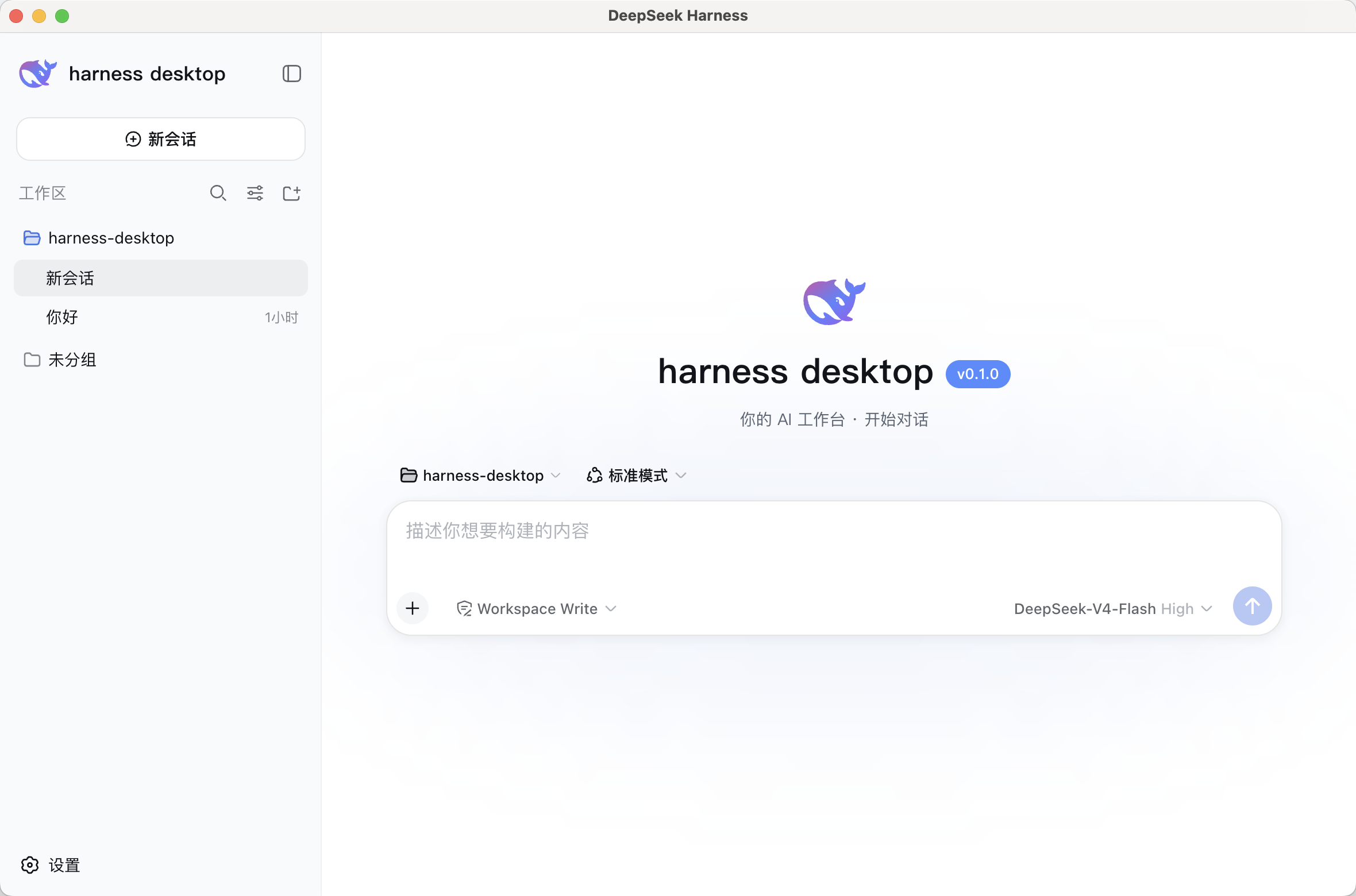
主界面(官方 DeepSeek Harness Web UI 集成 + 品牌)
特性
- 开箱即用:内置 DeepSeek Harness 引擎,装完即聊;首启 4 步向导 3 分钟上手
- 流式聊天:打字机输出 + 思考过程可视化,如 ChatGPT 般顺滑
- 任务面板:任务追踪 / 自动复盘 / 失败重试,一条消息一个任务
- Agent 进化:记忆自动沉淀(偏好/项目约定/成功做法)+ 同类任务自动提炼技能
- 安全:严格 CSP / 单实例锁 / 附件限制 / safeStorage 密钥加密
- 外观(彩色可定制):深色 / 浅色 / 跟随系统主题 × DeepSeek 蓝 / 绿 / 紫 / 橙四种主题色,字体 / 消息密度可调,即时生效
- 托盘常驻:关闭最小化到托盘,后台持续运行
快速开始
安装(三平台)
macOS / Windows / Linux 安装包:GitHub Releases 下载对应平台安装包(dmg / exe / AppImage / deb)
npm 一键安装(自动下载对应平台安装包):
npm install -g harness-desktop
# npm 新版默认拦截安装脚本,如需自动下载安装包加参数:
npm install -g --allow-scripts=harness-desktop harness-desktop
harness-desktop        # 启动安装
Homebrew(macOS):
brew tap 988hj7tczd-oss/harness-desktop
brew install harness-desktop
国内加速(Gitee 镜像):https://gitee.com/jerryweizhihao/harness-desktop
首启
运行 → 4 步向导(欢迎 → 配置 API Key → 选择工作区 → 完成)→ 开始对话
API Key:前往 platform.deepseek.com 获取(示例中所有密钥均为占位符 YOUR_API_KEY)
未提供安装包时可用开发模式运行:
pnpm install
pnpm dev
命令行使用
npm 一键安装 + 启动:
# 安装(自动下载对应平台安装包)
npm install -g harness-desktop
# npm 新版默认拦截安装脚本,如需自动下载加参数:
npm install -g --allow-scripts=harness-desktop harness-desktop

# 启动安装(打开已下载的 dmg/exe/AppImage)
harness-desktop

# 检查是否已下载
harness-desktop --check
Homebrew(macOS):
brew tap 988hj7tczd-oss/harness-desktop
brew install harness-desktop
直接下载安装包:
# macOS (Apple Silicon)
curl -L -o harness-desktop.dmg "https://github.com/988hj7tczd-oss/harness-desktop/releases/download/v0.1.3/harness-desktop-0.1.3-arm64.dmg"
# Windows
curl -L -o harness-desktop.exe "https://github.com/988hj7tczd-oss/harness-desktop/releases/download/v0.1.3/harness-desktop.Setup.0.1.3.exe"
# Linux
curl -L -o harness-desktop.AppImage "https://github.com/988hj7tczd-oss/harness-desktop/releases/download/v0.1.3/harness-desktop-0.1.3.AppImage"
chmod +x harness-desktop.AppImage && ./harness-desktop.AppImage
国内加速(Gitee 镜像):https://gitee.com/jerryweizhihao/harness-desktop
开发指南
pnpm install      # 安装依赖
pnpm dev          # 开发模式:vite + electron(HMR)
pnpm build        # 构建 renderer + main
pnpm test         # 运行单元测试(Vitest)
pnpm typecheck    # TS 类型检查
pnpm dist         # 打包 macOS dmg + Windows exe(输出到 out/)
pnpm dist:mac     # 仅 macOS
pnpm dist:win     # 仅 Windows
提示词工作流说明见 prompts/README.md;macOS 签名与公证流程见 docs/SIGNING.md。
技术栈
- 引擎:DeepSeek Harness
@deepseek-ai/dsh@0.1.1-rc.2(跟踪官方 latest,同步官方功能) - 桌面壳:Electron 43 + electron-builder
- 前端:React 18 + TypeScript + Vite(手写 CSS +
--dsw-*token,无重型 UI 库) - 隔离层:
adapter/独立封装 dsh API,上游变更只改 adapter,renderer 永不见 dsh 原始字段
DSH 生态
- 📦 awesome-dsh-plugin — DeepSeek Harness 插件精选列表(本项目已收录于 Desktop Clients 板块)
- 🖱️ dsh-computer-use — Computer Use 插件:给 harness-desktop 增加"虚拟鼠标真人操作"能力
- 🌐 独立站:aibunkhouse.com · 工具页:aibunkhouse.com/tools
已知限制(诚实标注)
- 未签名:当前 macOS/Windows 产物未做代码签名/公证,安装时系统可能提示"无法验证开发者";签名流程见 docs/SIGNING.md,配证书后即可产出可公开分发版本
- 体积:安装包约 130-230MB(内置完整 dsh 引擎 + Electron 框架)
- 三平台:macOS / Windows / Linux 均已在各自原生环境构建(GitHub Actions 矩阵),Windows 已实机验证可用
- dsh 引擎:处于 rc 预览期,本项目跟踪官方 latest
0.1.1-rc.2
License
非 DeepSeek 官方产品,与 DeepSeek 无附属关系;DeepSeek Harness 为 DeepSeek AI 的开源项目。
相关推荐Related
-
 nexu-io/open-design
🎨 Best DeepSeek Harness Design Plugin. The open-source Claude Design alternative. 🖥️ Local-first desktop app. 🖼️ Your…
nexu-io/open-design
🎨 Best DeepSeek Harness Design Plugin. The open-source Claude Design alternative. 🖥️ Local-first desktop app. 🖼️ Your…
-
 freestylefly/awesome-gpt-image-2
Prompt as Code | GPT-Image2 工业级提示词引擎与模板库,530+ 个案例逆向工程,20+ 套工业级模板,并提炼出Skills,持续更新中
freestylefly/awesome-gpt-image-2
Prompt as Code | GPT-Image2 工业级提示词引擎与模板库,530+ 个案例逆向工程,20+ 套工业级模板,并提炼出Skills,持续更新中
-
 anywhere-labs/dsh-desktop
为 DeepSeek Harness (DSH) 插件生态打造的现代化桌面端解决方案。万物皆「插件」,桌面本身也是「插件」。
anywhere-labs/dsh-desktop
为 DeepSeek Harness (DSH) 插件生态打造的现代化桌面端解决方案。万物皆「插件」,桌面本身也是「插件」。
- Nagi-ovo/voyager Enhancement suite for Gemini, AI Studio, Claude & ChatGPT — plus a prompt manager for any web UI, DeepSeek Harness inclu…
-
 walkinglabs/learn-harness-engineering
Harness engineering beginner tutorial, from 0 to 1
walkinglabs/learn-harness-engineering
Harness engineering beginner tutorial, from 0 to 1
-
 awesome-dsh-plugin/awesome-dsh-plugin
A curated list of plugins for DeepSeek Harness (dsh) · DeepSeek Harness 插件精选列表
awesome-dsh-plugin/awesome-dsh-plugin
A curated list of plugins for DeepSeek Harness (dsh) · DeepSeek Harness 插件精选列表
-
 MemTensor/MemOS
Self-evolving memory OS for LLM & AI Agents: ultra-persistent memory, hybrid-retrieval, and cross-task skill reuse, with…
MemTensor/MemOS
Self-evolving memory OS for LLM & AI Agents: ultra-persistent memory, hybrid-retrieval, and cross-task skill reuse, with…
- yjh051108/dsh-routing-suite dsh-routing-suite — injector + router-standard kit: install the runtime injector first, then the task-aware reasoning-mo…