a903067276-rgb/dsh-hud
DeepSeek Harness(dsh)Web的HUD状态面板插件:在浮动面板中显示git状态、MCP服务器、技能、模型及令牌使用情况。
Project Overview项目介绍
This is a native community-maintained HUD status panel plugin built exclusively for DeepSeek Harness web. It adds a HUD button to the core input toolbar, which opens a panel that displays git project status, connected MCP servers, available skills, token usage stats, and DeepSeek API account balance. The plugin can run as a tab in DSH's native right sidebar for versions 0.1.5 and newer, and automatically falls back to a drag-resizable floating panel on older DSH versions. Installation is done via the official DSH plugin manager with a single terminal command, and requires a restart of dsh web after install completes.
The HUD button on the toolbar includes a live badge that counts uncommitted files, so users can see pending changes at a glance without opening the panel. Panel position and width are saved to browser localStorage, so the same layout is restored automatically when DSH restarts or the panel is reopened. Data refreshes automatically every 30 seconds, and the lightweight git badge continues polling even when the panel is closed. Users must have git CLI available on their system PATH, and pnpm must also be available for the DSH plugin manager to work.
The plugin is zero-dependency, with no build step required since the client bundle is checked directly into the repository. It follows a minimal read-only design, meaning it only displays status data and does not support any git write operations or file changes. It is fully tested on macOS, and expected to work on Linux and Windows though full testing is not yet complete. It is compatible with all recent official DSH versions, with specific tagged branches for older DSH installs, and is released under the free open source MIT license.
这是一个专为 DeepSeek Harness 网页版开发的原生 DSH HUD 状态面板插件,由社区开发者独立维护。它会在输入工具栏添加一个 HUD 按钮,点击即可打开状态面板,展示 git 状态、已连接的 MCP 服务器、当前可用技能、官方使用统计信息以及 DeepSeek 账户余额。支持以官方右侧边栏标签页(DSH 0.1.5+)或可拖动调整大小的悬浮面板两种形态运行。
安装需要通过 DSH 官方的插件配置管理器执行命令,安装后需要重启 dsh web 才能生效,系统路径需要有 pnpm 和 git CLI 可用。工具栏按钮上会实时显示未提交文件数量的徽章,面板内各部分支持折叠展开,位置和宽度会自动保存到 localStorage,下次打开后自动恢复。
插件完全零依赖,没有构建步骤,采用只读设计,仅提供状态概览不支持写入操作。已在 macOS 上完整测试,Linux 和 Windows 预期可用但尚未完成测试。兼容不同版本的 DSH,用户可根据自己的 DSH 版本选择对应分支安装,遵循 MIT 许可免费使用。
请帮我安装这个 DSH 插件。安装前先完成【兼容性检查 + 安全性检查】,检查通过再动手。

插件:dsh-hud(a903067276-rgb/dsh-hud)
仓库:https://github.com/a903067276-rgb/dsh-hud
本站详情页:https://www.yhbd.top/plugins/a903067276-rgb-dsh-hud/
本站登记:类型 plugin · 归类 原生 DSH 插件 · 许可证 MIT · ⭐ 8 · 最近提交 2026-10-01 · 主语言 JavaScript

按下面顺序执行,每步先把结论告诉我,再进入下一步:

【1 兼容性检查】
① 我这边:DSH 版本、Node 版本、操作系统、当前 profile(web / desktop)。
② 读它的 README、package.json、插件 manifest,列出它要求的 DSH 版本 / Node 版本 / 操作系统 / 外部依赖 / 需要另外先装的运行时。
③ 逐条比对,结论只写「满足 / 不满足 / 未知」三种;不满足的给出可行替代方案。
④ 检查是否和我已装的插件冲突:命令名重复、skill / tool 重名、端口占用、重复注册的 MCP server。

【2 安全性检查】
① 仓库可信度:和上面「本站登记」是否一致;star / fork 数、创建时间、最近提交,是否归档或长期停更。
② 安装脚本:逐行看 package.json 的 preinstall / install / postinstall,以及 install.sh、setup.ps1 之类脚本。出现 curl|bash、下载后直接执行、混淆代码、访问与插件功能无关的域名,立刻停下来告诉我,不要继续装。
③ 依赖:列出新增依赖,标出无人维护、或与知名包拼写近似的可疑包(typosquatting)。
④ 权限与副作用:它会读写哪些目录、访问哪些域名、需要哪些 DSH 权限(filesystem / network / shell / clipboard 等),以及怎么卸载和回滚。
⑤ 如果它要求 sudo / 管理员权限,或权限明显超出功能所需,先停下来问我。

【3 安装】
上面两步没有「不满足」和「高危项」时才执行;用官方推荐方式安装,不要自行提权。

【4 汇报】
用表格输出:检查项 / 结论 / 依据 / 是否需要我决策。拿不准的一律写「未知」并说明要我怎么确认——不要猜,也不要替我决定。
Send this message to DSH in your current session: it verifies compatibility and security first (answering met / not met / unknown item by item) and only installs once everything checks out — it will stop and ask you if it finds a high-risk item. The box scrolls; the copy is the full prompt. CLI install commands may not be accurate across systems, so DSH is the safer route.把上面这条消息直接发给当前会话里的 DSH:它会先核对兼容性与安全性(逐条给「满足 / 不满足 / 未知」),确认没问题再安装,有高危项会停下来问你。框内可滚动,复制到的是完整提示词;安装命令不一定准确,发给 DSH 更稳。
- Only 8 stars - very few users, little community feedback星标只有 8,几乎没人在用,遇到问题缺少社区反馈
DSH walks through these 9 checksDSH 会逐条核对这 9 项
Compatibility兼容性
- DSH, Node, OS and profile requirementsDSH 版本 / Node 版本 / 操作系统 / profile 是否满足要求
- External dependencies and runtimes (Electron / Python / Docker, ...)外部依赖与运行时(Electron / Python / Docker 等)是否齐备
- Conflicts with installed plugins: command names, skill / tool names, ports, duplicate MCP registration与已装插件是否冲突:命令名、skill / tool 重名、端口占用、重复 MCP 注册
Security安全性
- Repo matches the facts registered here; archived or abandoned?仓库是否与页面登记一致,是否归档或长期停更
- Safety of preinstall / install / postinstall and install.sh / setup.ps1preinstall / install / postinstall 与 install.sh、setup.ps1 是否安全
- curl|bash, download-then-execute, obfuscation, unrelated domains → stop immediatelycurl|bash、下载即执行、混淆代码、无关域名 → 立刻停止
- Typosquatting or unmaintained packages among the new dependencies新增依赖里有没有 typosquatting 或无人维护的包
- Requested permissions vs. what the feature actually needs申请了哪些权限、是否超出功能所需(filesystem / network / shell / clipboard)
- Any sudo / admin requirement, plus uninstall and rollback是否要求 sudo / 管理员权限,以及卸载与回滚方式
Anything uncertain must be marked unknown with a note on how to confirm it. This site's signal screen is a static snapshot, not a security audit.拿不准的必须标「未知」并说明要我怎么确认。本站的信号筛查是静态快照,不能替代安全审计。
Or use CLI install (for developers)或使用命令行安装(适合开发者)
CLI Install命令行安装
dsh plugin --profile web add "github:a903067276-rgb/dsh-hud#main"把 a903067276-rgb/dsh-hud 加入你的 DSH 配置(web profile)即可启用。
READMEREADME
dsh-hud 📊


A HUD status panel plugin for DeepSeek Harness (dsh) web: one button in the input toolbar opens a floating panel with git status, MCP servers, skills, official usage info and balance.
Unofficial project: independently developed and maintained by a community member, not an official DeepSeek product.
Screenshots

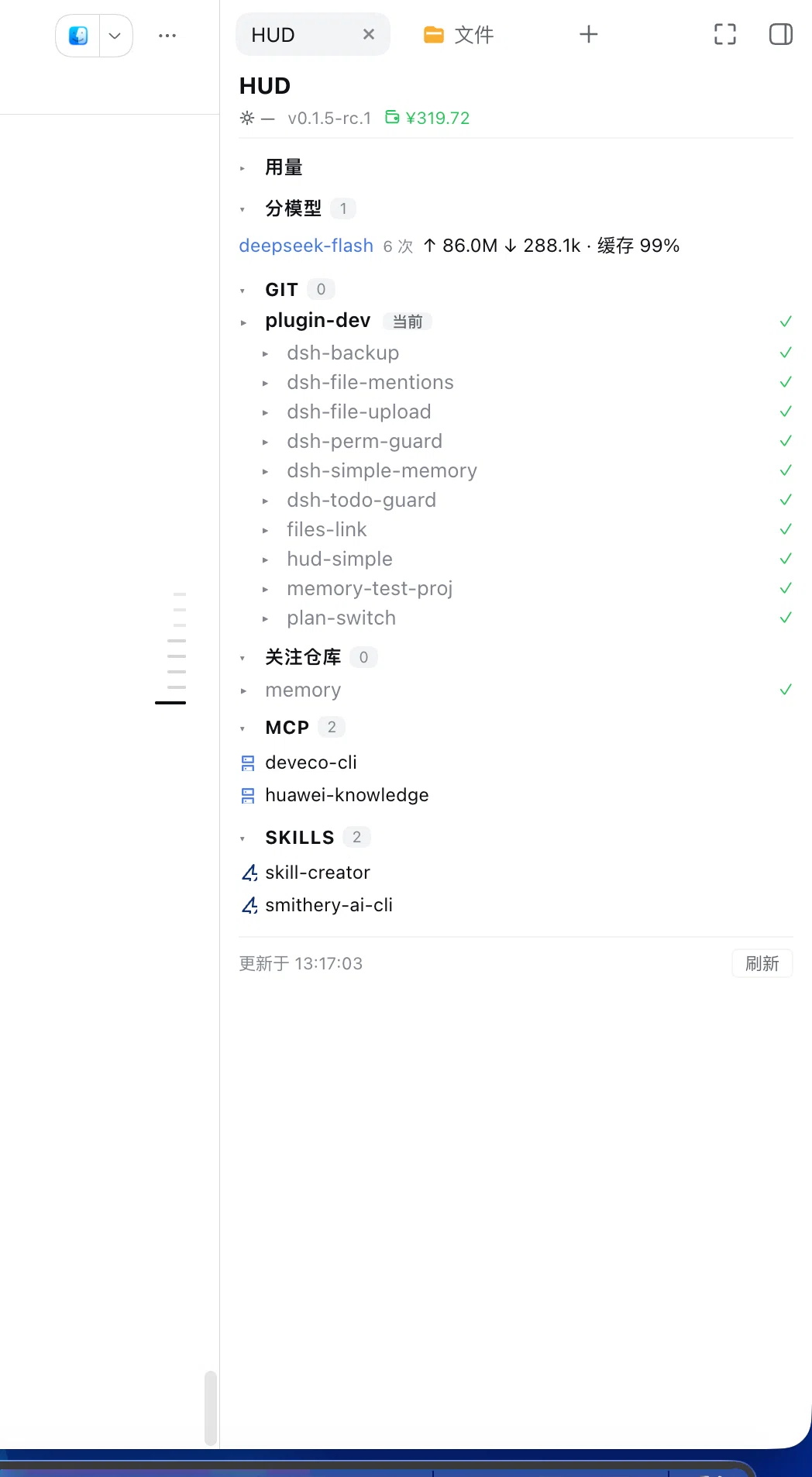
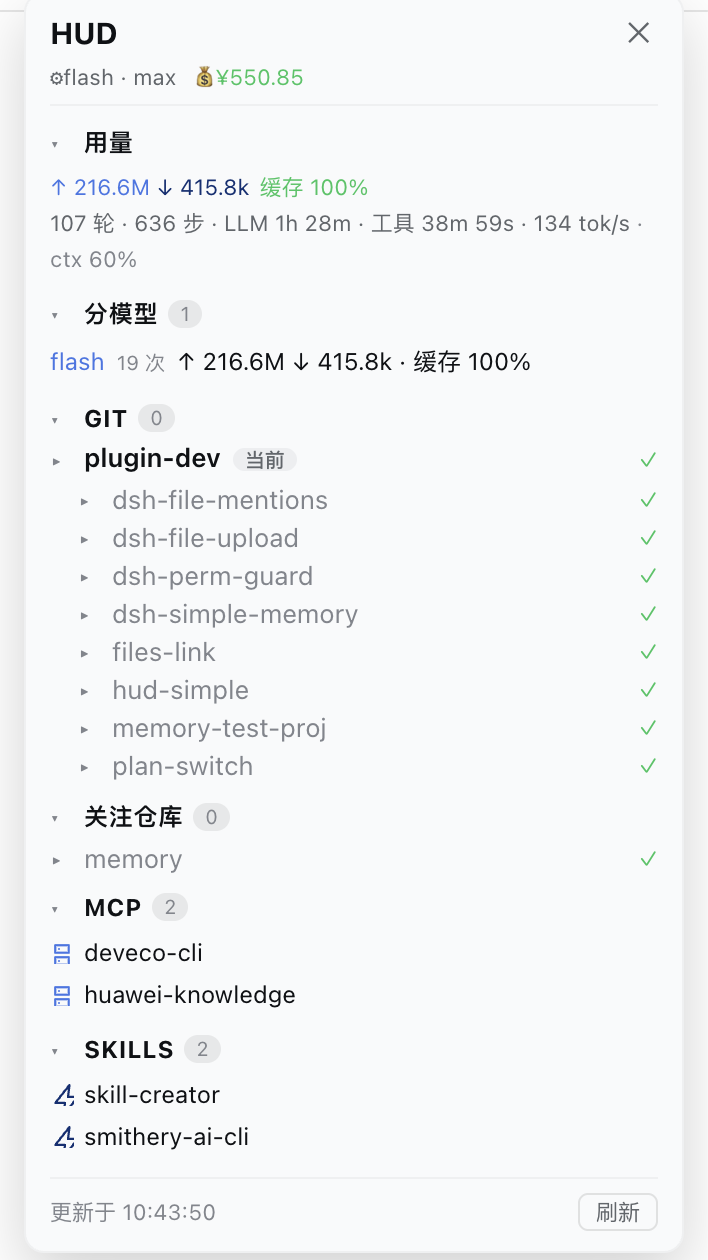
Default form: a tab in the official right sidebar (DSH 0.1.5+), toggled by the HUD button left of the composer — clicking it again collapses the sidebar. It can also run as a floating panel (older hosts fall back automatically) with drag-resizable position and width. The panel shows git status, commit history, watched repos, MCP servers, skills and official usage info (tokens in/out, cache hit rate, per-model breakdown, context usage).
Features
- Git — branch, ahead/behind, unstaged / staged / untracked files (collapsible groups),
per-file
+N/-Nsummaries, click a file to expand its full diff, last 10 commits (commitCount, 1–50; the commit list starts collapsed) - Change-driven folding (2026-09-26) — a clean repo/sub-repo collapses to a single line (with ✓ and ↑↓ unpushed counts); a dirty one auto-expands down to the file level. Once you toggle a repo yourself, your choice wins and is remembered (localStorage)
- Group folding (2026-10-01) — sub-repos under the same workspace / watched repo form a
group: when everything is clean only the parent row remains (with
✓ N repos), and no sub-folder names are listed at all; when something is dirty only the dirty sub-repos are listed and the rest fold into one▸ N more clean reposrow. Clicking the parent row expands the whole group - Refresh on demand (2026-10-01) — file changes go through a cheap fingerprint (one shell
call returning each repo's change count / branch / ahead-behind / HEAD): no full refresh
unless the fingerprint changed; while anything is dirty a full refresh runs at most every
5s so
+/-details stay fresh. Net effect: a clean workspace costs 1 shell call per change (previously one shell call per repo) - MCP — connected MCP servers (derived from
mcp__<server>__<tool>tool names) - Skills — skills available to the current agent
- Official info — current model + reasoning effort, plan mode state, token usage (input / output / cache-hit rate), session stats (turns, steps, LLM & tool time, decode tok/s, context usage %)
- Balance — official DeepSeek account balance, auto-fetched from
GET /user/balanceusing theDEEPSEEK_API_KEYcredential (the key never leaves the host; shows--when unavailable) - Per-model usage — current session's token buckets broken down by model (requests, input, cache, output), so flash/pro usage both remain visible after switching
Showing the opening section of the README — the full document lives in the repository以上为 README 开头摘要,完整文档在仓库内 · View the full README on GitHub →在 GitHub 查看完整 README →
Related相关推荐
-
 chuspeeism/dashi-taskboard
现代化可灵活嵌入的任务面板,支持 Codex、DeepSeek Harness
chuspeeism/dashi-taskboard
现代化可灵活嵌入的任务面板,支持 Codex、DeepSeek Harness
-
 zhoushoujianwork/easyeda-agent
嘉立创EDA专业版(EasyEDA Pro)自动化:给 AI harness 装上画板的「手」—— 一套 typed 原理图/PCB 动作,CLI / Agent Skill / stdio MCP 三形态融合接入。承接嘉立创「不以卖板赚钱…
zhoushoujianwork/easyeda-agent
嘉立创EDA专业版(EasyEDA Pro)自动化:给 AI harness 装上画板的「手」—— 一套 typed 原理图/PCB 动作,CLI / Agent Skill / stdio MCP 三形态融合接入。承接嘉立创「不以卖板赚钱…
-
 morluto/rea
Reverse engineer anything with agents, from app behavior down to native binaries.
morluto/rea
Reverse engineer anything with agents, from app behavior down to native binaries.
-
 gitroomhq/postiz-agent
Postiz Agents CLI - connect it to Claude / OpenClaw / etc, to schedule social media posts 🤖
gitroomhq/postiz-agent
Postiz Agents CLI - connect it to Claude / OpenClaw / etc, to schedule social media posts 🤖
-
 linhay/harmony-next.skills
Offline HarmonyOS NEXT developer skill library for AI coding assistants. Covers API 12–26 declarations, ArkTS/ArkUI, NDK…
linhay/harmony-next.skills
Offline HarmonyOS NEXT developer skill library for AI coding assistants. Covers API 12–26 declarations, ArkTS/ArkUI, NDK…
-
 yzlnew/infra-skills
A collection of specialized agent skills for AI infrastructure development, enabling Claude Code to write, optimize, and…
yzlnew/infra-skills
A collection of specialized agent skills for AI infrastructure development, enabling Claude Code to write, optimize, and…
-
 liceses/dsh-gitbash-preset
DeepSeek Harness 插件:一键安装「极简模式 (Git Bash)」agent preset —— 把 DSH 自带极简模式中的 bash 调用映射到 Git for Windows 的 bash(MSYS),让 Window…
liceses/dsh-gitbash-preset
DeepSeek Harness 插件:一键安装「极简模式 (Git Bash)」agent preset —— 把 DSH 自带极简模式中的 bash 调用映射到 Git for Windows 的 bash(MSYS),让 Window…
-
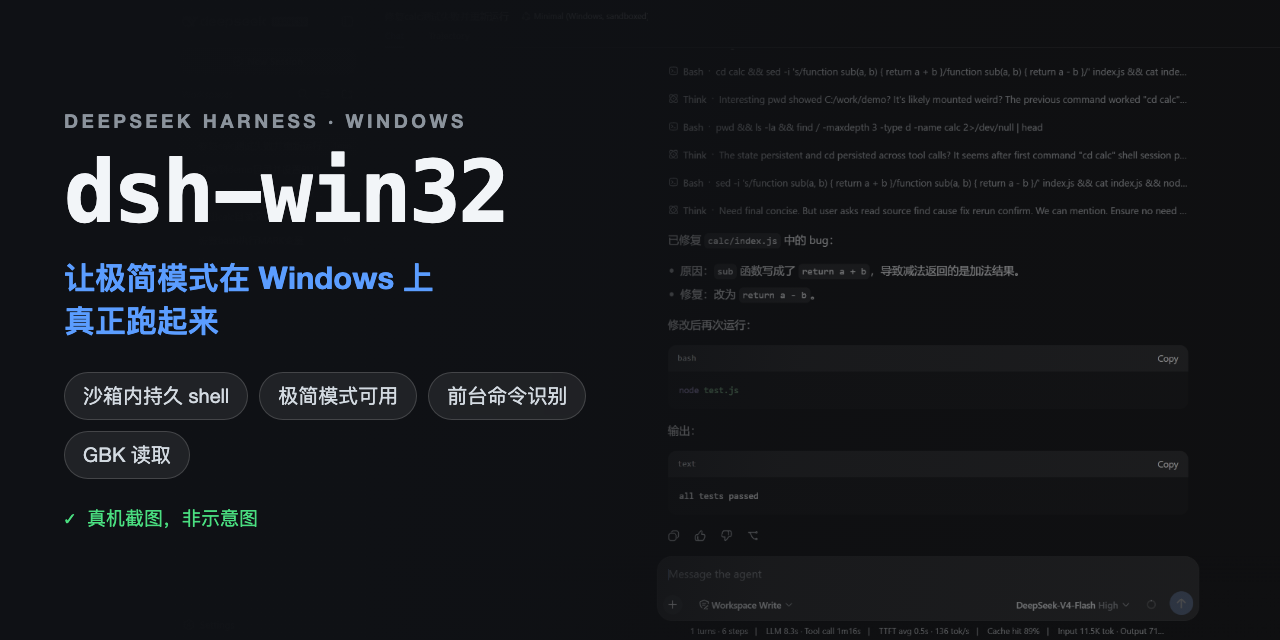 sjh9714/dsh-win32
Fix and diagnose DeepSeek Harness on native Windows. Official PowerShell, Workspace Write, shortcuts, and legacy preset …
sjh9714/dsh-win32
Fix and diagnose DeepSeek Harness on native Windows. Official PowerShell, Workspace Write, shortcuts, and legacy preset …