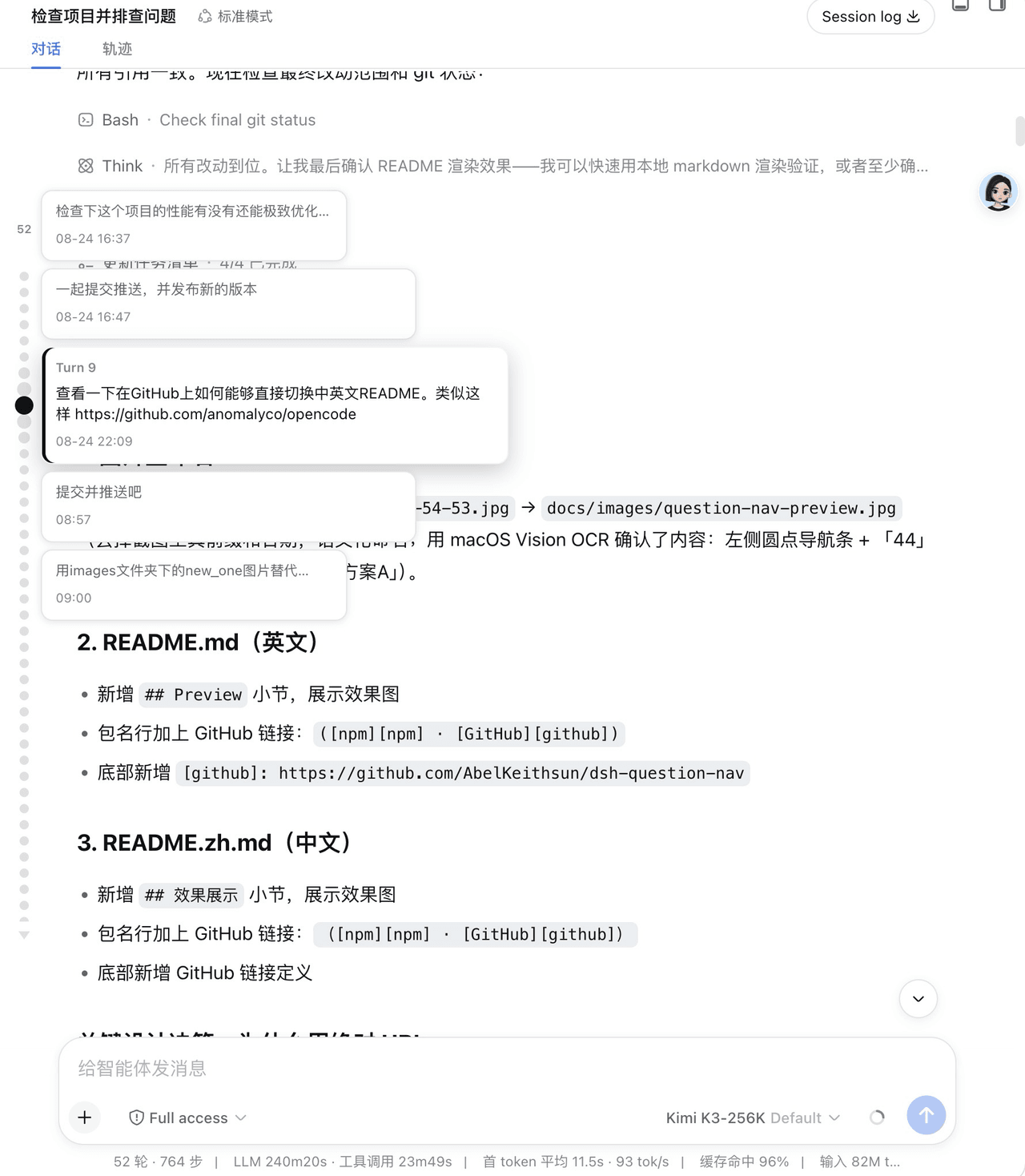
AbelKeithsun/dsh-question-nav
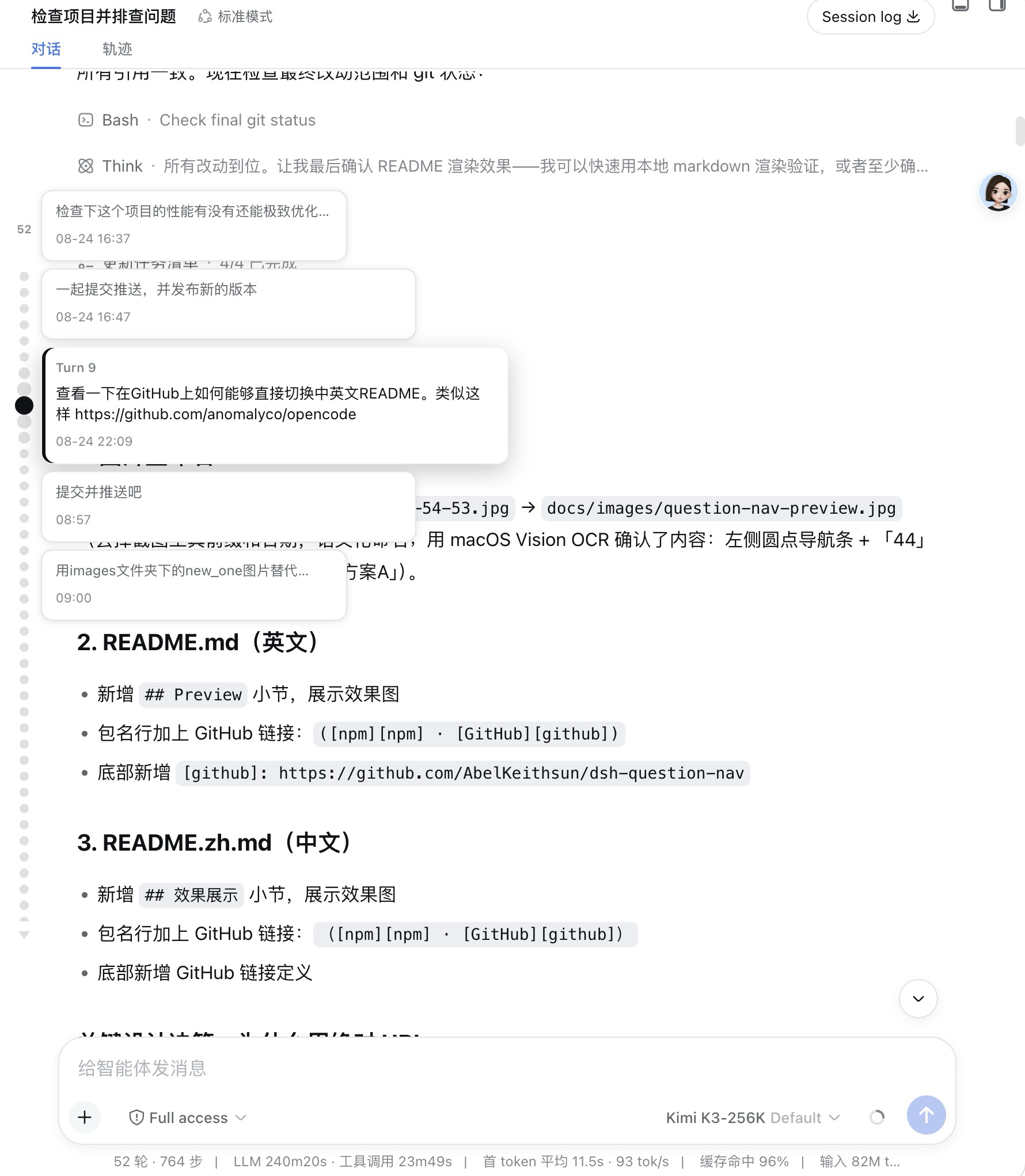
In-session question navigator for the [DeepSeek Harness (DSH) Web GUI][dsh]: a vertical column of small round dots overlaid on the left edge of the conversation column — one dot per user question. Hover a dot to magnify it (together with its two neighbors on each side) and reveal a vertical cascade
catalog descriptioncatalog 简介 / catalog description:In-session question minimap for the DeepSeek Harness Web GUI: a vertical column of round dots overlaid on the left edge of the conversation column, one dot per user question — hover enlarges and shows full text, click jumps to that message.
Project Overview项目介绍
dsh-question-nav is an in-session question navigator plugin for the DeepSeek Harness Web GUI. It renders a vertical dot rail on the configured edge of the conversation column, one dot per user question. Hovering magnifies the dot and its two neighbors on each side, revealing a cascade of full-text question cards with sent times; clicking any dot or card jumps to that turn. The dot column is capped at 60% of conversation height, with configurable per-page counts. Caveat: long sessions require scrolling or paging the rail, and the GUI must be restarted after install.
dsh-question-nav 是 DeepSeek Harness Web GUI 的会话内问题导航插件。它在对话栏左(或右)边缘叠加一列小圆点,每个圆点对应一个提问;悬停放大并弹出含完整问题与发送时间的卡片,点击即跳转。历史通过只读投影读取,不扩展渲染窗口。需注意:点列高度上限为对话区 60%,长会话需滚动或分页,配置改动后需重启 GUI 生效。
请帮我了解并安装插件:【dsh-question-nav】【https://github.com/AbelKeithsun/dsh-question-nav】Send this message to DSH in your current session. CLI install commands may not be accurate across systems — DSH will figure it out for you.把上面这条消息直接发给当前会话里的 DSH,让它帮你了解并安装。安装命令不一定准确,发给 DSH 更稳。
Or use CLI install (for developers)或使用命令行安装(适合开发者)
CLI Install命令行安装
dsh plugin --profile web add @luziyang2026/dsh-question-nav把 AbelKeithsun/dsh-question-nav 加入你的 DSH 配置(web profile)即可启用。
READMEREADME
dsh-question-nav
In-session question navigator for the DeepSeek Harness (DSH) Web GUI: a vertical column of small round dots overlaid on the left edge of the conversation column — one dot per user question. Hover a dot to magnify it (together with its two neighbors on each side) and reveal a vertical cascade of crisp question cards with each question's full text and sent time (clicking any card jumps to it); click a dot to scroll the chat to that question.
It is an external plugin bundle with zero runtime dependencies — the browser
half (lib/client.js) externalizes everything to the DSH shell, so it adds
only a small bundle to the GUI at load time.
Package: @luziyang2026/dsh-question-nav (npm · GitHub).
Preview
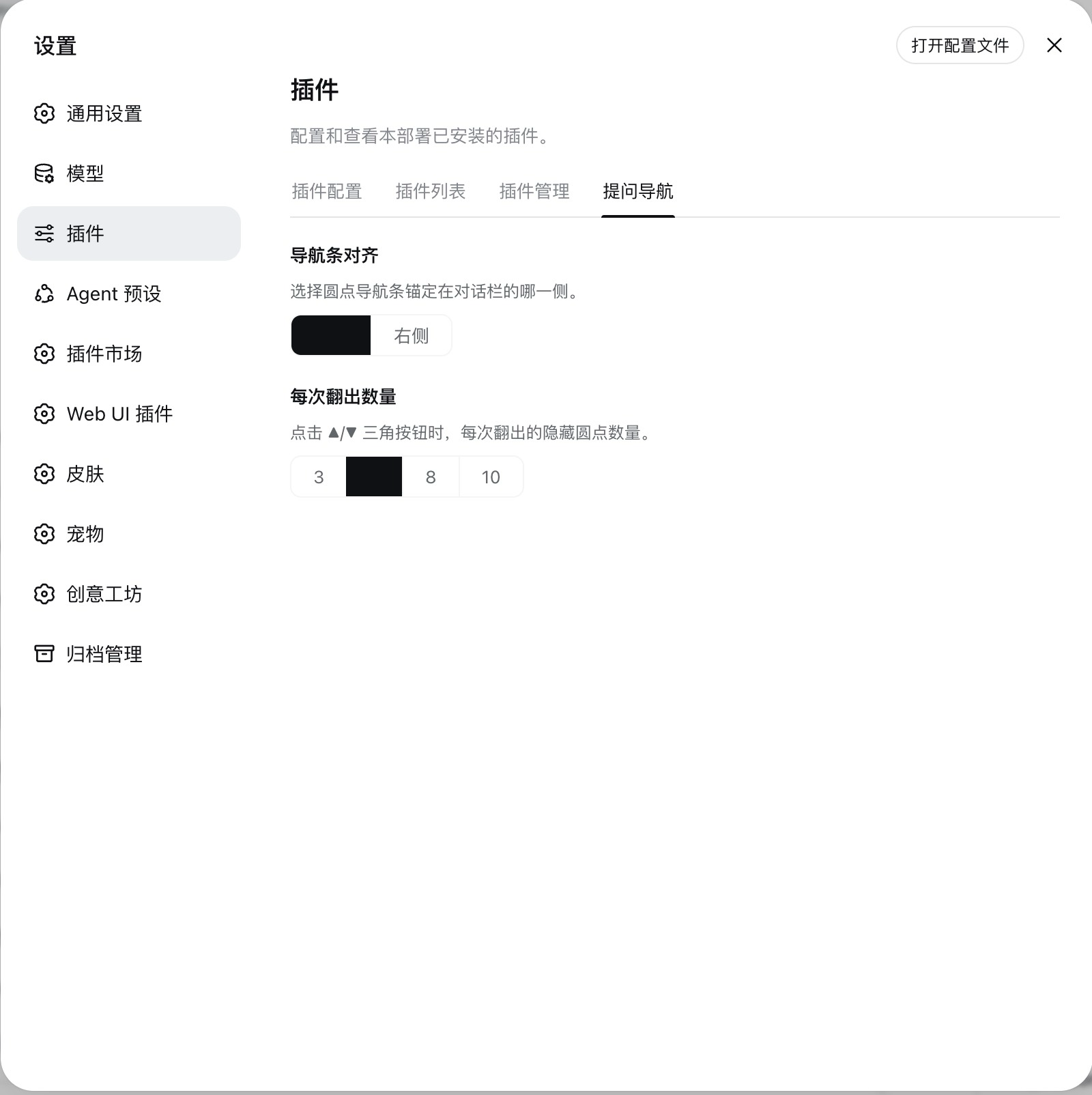
Plugin settings (rail alignment + dots per page):
What it does
- Left-edge dot minimap (embedded, not reserving any width). The rail's anchor edge is configurable — Settings → Plugins → Question Nav → Rail alignment switches it between the left and right edge of the conversation column.
- Height-capped and scrollable: the dot column is vertically centered and uses at most 60% of the conversation height; longer sessions scroll inside that band (wheel over the dots or the gaps between them).
- One dot = one turn that asked a question (strictly aligned with the Trajectory view's turn numbering), with a small count above the dot column.
- Full history, persisted, no render-window expansion: the plugin's host
half registers a
questionIndexsession projection — the projection registry folds the whole event log (read-only, the chat's paged window is never touched), the official projection cache persists it across restarts, and push frames deliver new questions live. - Hover (focus): the dot and its two neighbors on each side magnify
progressively (selected largest), the rail scrolls the selection into view
only when clipped by the band's edges, and a
vertical cascade of five crisp question cards (portal-rendered, no
native-title delay) appears beside the rail — one card per window dot,
stacked top-to-bottom without overlap and centered on the selected dot. Each
card shows the turn's full question text (all of them, when one turn
batched several) and the question's sent time (
HH:MMon the same day,MM-DD HH:MMacross days,YYYY-MM-DD HH:MMacross years). The hierarchy is two-tier: the center card is the focus — full-contrast text, a brand accent bar and a raised shadow — while the four neighbors are clean context cards (same surface, narrower, fewer lines) that light up on hover to show they are clickable too. Clicking any card jumps to that question exactly like clicking its dot. - Click: jumps to that question. Only then does the jump loop page the
window (
loadOlder()) to bring that specific page into view — never the whole history up front. - Paged overflow: when many dots don't fit the 60% band, the native scrollbar is hidden and two small triangle buttons in the dot style appear — ▲ above the dot queue and ▼ below it — each click revealing the next page of hidden dots, which pop in with a short staggered animation as click feedback. The page size is configurable — Settings → Plugins → Question Nav → Dots per page (3 / 5 / 8 / 10, default 5). The triangles themselves are the overflow cue — each appears only while its direction has more dots to reveal (wheel and trackpad still scroll too); hovering never scrolls the band, so the dots stay put while you browse.
- Empty/left areas of the rail pass pointer events through to the conversation (it never blocks the chat).
Requirements
- DeepSeek Harness Web GUI (a runnable DSH profile; the
dshCLI). - Node.js
>= 20(matches the DSH SDK peer range).
Which version to install
The package publishes two lines under the same name, so pick the one that matches the DSH build your GUI runs on:
| npm dist-tag | Version | Targets the DSH | Status |
|---|---|---|---|
latest |
0.7.x |
0.1.1-rc.1 SDK line |
Stable — recommended for everyday use |
alpha |
0.8.0-alpha.x |
0.1.2-alpha.2 SDK line |
Alpha — for the Alpha GUI build |
- Most users install the
latest(stable) line — it tracks the stable DSH release and is safe for daily use. - Running the DSH Alpha GUI (
0.1.2-alpha.2)? Install thealphadist-tag instead. The stable build reads a chat snapshot API (session.getSnapshot().chat) that was removed in the Alpha SDK; thealphabuild reads the live chat through the new conversation service instead. Installing the stable line on an Alpha GUI would leave the strip degraded (projection-only dots). - Not sure which DSH build you have? Check the version in your GUI / with
dsh --version; if it reports0.1.1-rc.x, uselatest; if it reports0.1.2-alpha.x, usealpha.
Install
Install the prebuilt package from npm and add it to a profile. Use the dist-tag that matches your DSH build (see above):
Stable line (DSH 0.1.1-rc.1, most users):
dsh plugin --profile web add @luziyang2026/dsh-question-nav # latest → 0.7.x
Alpha line (DSH 0.1.2-alpha.2 GUI):
dsh plugin --profile web add @luziyang2026/dsh-question-nav@alpha # alpha → 0.8.0-alpha.x
If you prefer a specific version, pin it explicitly:
dsh plugin --profile web add @luziyang2026/dsh-question-nav@0.7.7        # stable pin
dsh plugin --profile web add @luziyang2026/dsh-question-nav@0.8.0-alpha.0 # alpha pin
Then restart the DSH Web GUI to load the new bundle.
Build from source / develop locally
This repository is a standalone plugin project — build it, then add the checkout to a profile as an installable bundle:
pnpm install       # install devDependencies (DSH SDK peers, tsdown, vitest)
pnpm build         # tsc declarations + tsdown client bundle -> lib/
dsh plugin --profile web add ./dsh-question-nav
Development
pnpm typecheck     # tsc --noEmit
pnpm test          # vitest run
pnpm build         # build host lib/index.js + client lib/client.js
How it is built
The client half uses the shared DSH client-bundle preset
(tsdown.client.ts, vendored into this repo), which emits
a window.__ModuleLoader__.load({ id, factory }) closure-factory
artifact with CSS Modules inlined and externals resolved through the loader
module table.
License
MIT.
Related相关推荐
-
 liangmianya/dsh-synapse
A visual, non-linear conversation workspace plugin for DeepSeek Harness ; A canvas-based session explorer and branching …
liangmianya/dsh-synapse
A visual, non-linear conversation workspace plugin for DeepSeek Harness ; A canvas-based session explorer and branching …
-
 alaliqing/claude-paper
📖 Cross-agent research paper toolkit for Claude Code, Codex, OpenCode, and DeepSeek Harness—quick summaries, deep study…
alaliqing/claude-paper
📖 Cross-agent research paper toolkit for Claude Code, Codex, OpenCode, and DeepSeek Harness—quick summaries, deep study…
-
 omdsh-dev/dsh-annotation
DSH Web 选中批注插件:选文字→批注→回车随消息发送;气泡隐藏批注块(零闪烁);回复按 Annotation N 逐条对照(可悬浮芯片)。官方 bundle,零核心改动
omdsh-dev/dsh-annotation
DSH Web 选中批注插件:选文字→批注→回车随消息发送;气泡隐藏批注块(零闪烁);回复按 Annotation N 逐条对照(可悬浮芯片)。官方 bundle,零核心改动
-
 Anionex/dsh-turn-rewind
deepseek harness对话和代码状态回退插件 | DSH — rewind conversation and workspace state, powered by a persistent Change Ledger
Anionex/dsh-turn-rewind
deepseek harness对话和代码状态回退插件 | DSH — rewind conversation and workspace state, powered by a persistent Change Ledger
-
 hanshenmesen/dsh-turn-delete
Delete one complete turn from a DeepSeek Harness session without deleting the session
hanshenmesen/dsh-turn-delete
Delete one complete turn from a DeepSeek Harness session without deleting the session
-
 qkycir-123/dsh-run2skill
Automatically turn successful DeepSeek Harness sessions into reusable, reviewable Agent Skills.
qkycir-123/dsh-run2skill
Automatically turn successful DeepSeek Harness sessions into reusable, reviewable Agent Skills.
-
 Tyan66666/billion-context-dsh
Model-driven context management (Active Context Pruning / ACP) for the DeepSeek Harness — the model decides when and wha…
Tyan66666/billion-context-dsh
Model-driven context management (Active Context Pruning / ACP) for the DeepSeek Harness — the model decides when and wha…
-
 PKUfudawei/dsh-capability-menu
Unified capability menu for DeepSeek Harness: manage exposure level (context footprint) and execution mode of MCP tools …
PKUfudawei/dsh-capability-menu
Unified capability menu for DeepSeek Harness: manage exposure level (context footprint) and execution mode of MCP tools …