afrel1024/dsh-client-ui-aqua-unofficial
DeepSeek Harness 网页界面 Aqua 玻璃拟态主题的非官方社区分支(上游:WYH66666666/DSH-Transparent-UI-Plugin,MIT 许可)。增加了对 DSH rc.7 的兼容性。与 DeepSeek 无关联。
项目介绍Project Overview
Aqua 是 DeepSeek Harness 网页端的玻璃拟态皮肤,提供 Mica 模式与兼容模式两种布局;可设置流体背景或自定义壁纸、调节背景亮度,并附带“粒子鲸鱼”装饰。适用于希望深度美化 DSH Web UI 的用户。注意:此为非官方第三方分支,依赖 DSH rc.7,不属于 @deepseek-ai 官方包,使用需自行承担风险。
Aqua is a glassmorphism skin for the DeepSeek Harness web UI, offering a Mica mode with floating glass cards and a Compatibility mode that keeps the stock layout while applying generic glass. It supports a fluid backdrop or custom wallpaper, adjustable background brightness, and a particle whale decoration. Use it to reskin the DSH web interface. Caveat: this is an unofficial community fork, unaffiliated with DeepSeek, and targets DSH rc.7.
请帮我了解并安装插件:【dsh-client-ui-aqua-unofficial】【https://github.com/afrel1024/dsh-client-ui-aqua-unofficial】把上面这条消息直接发给当前会话里的 DSH,让它帮你了解并安装。安装命令不一定准确,发给 DSH 更稳。Send this message to DSH in your current session. CLI install commands may not be accurate across systems — DSH will figure it out for you.
或使用命令行安装(适合开发者)Or use CLI install (for developers)
命令行安装CLI Install
dsh plugin --profile web add dsh-client-ui-aqua-unofficial把 afrel1024/dsh-client-ui-aqua-unofficial 加入你的 DSH 配置(web profile)即可启用。
READMEREADME
dsh-client-ui-aqua-unofficial
English | 中文
UNOFFICIAL — This is a community third-party fork. It is not an official DeepSeek product, is not affiliated with or endorsed by DeepSeek, and claims no connection to the
@deepseek-aipackage scope. Use at your own risk.Upstream: WYH66666666/DSH-Transparent-UI-Plugin (MIT, (c) 2026 John Wu). This fork adds DSH rc.7 compatibility and rebrands the package as unofficial.
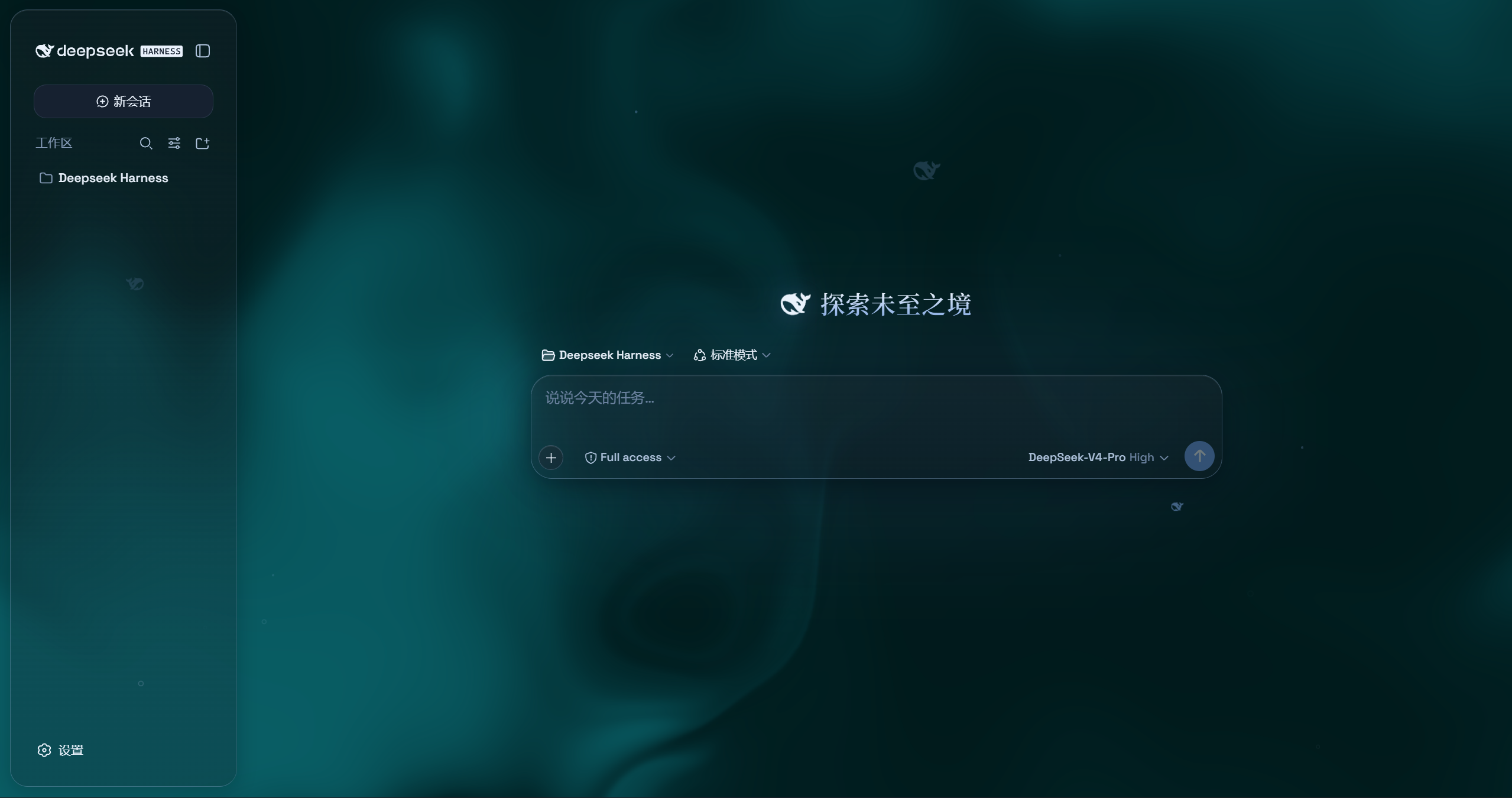
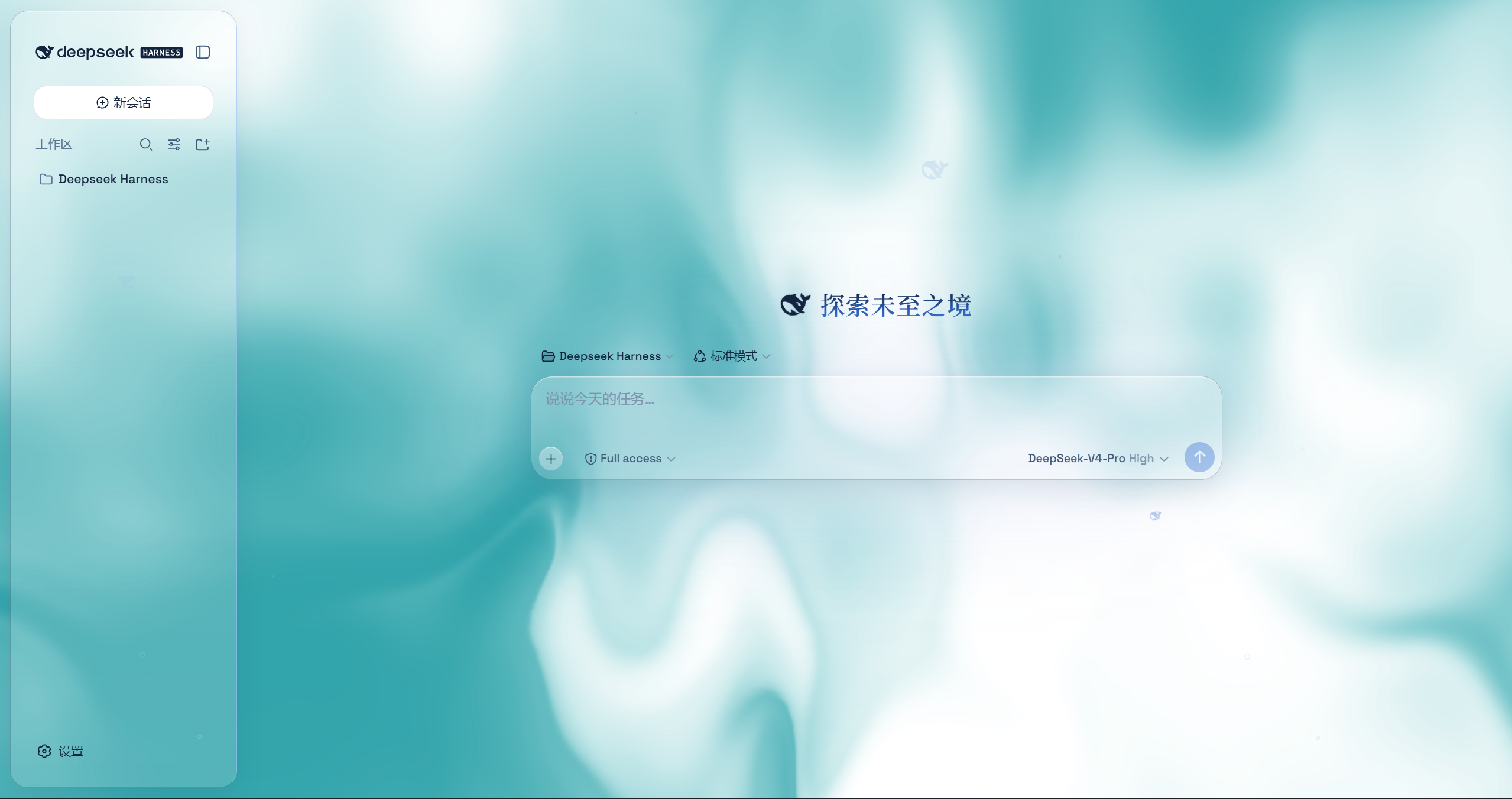
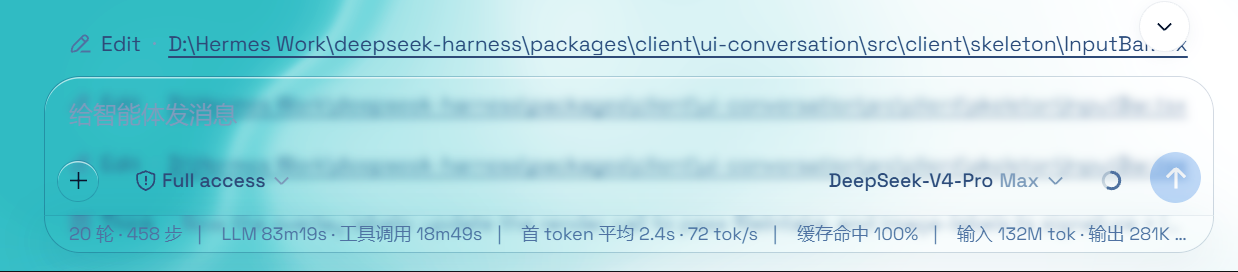
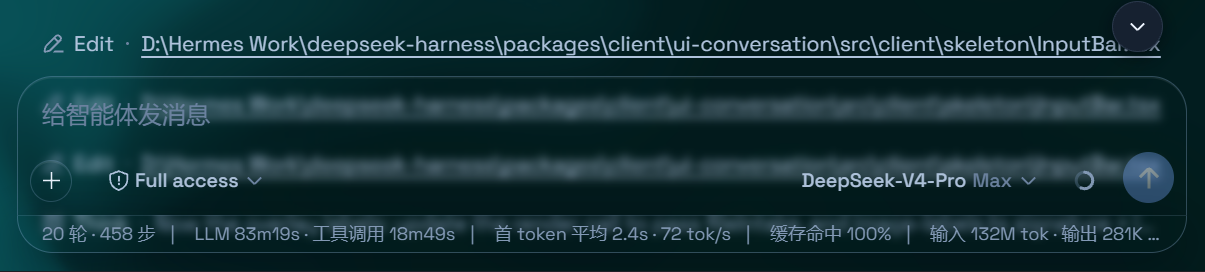
Aqua is a highly customizable glassmorphism theme for the DeepSeek Harness web UI. The header, sidebar, composer, stats line, and trajectory view all become panes of frosted glass. You can set an image or video as wallpaper, and switching it off restores the stock UI exactly — with no source changes to DSH itself.
Features
- Two modes: Mica restyles the layout into floating glass cards (blur and frost adjustable), while Compatibility Mode keeps the stock layout byte-for-byte and only swaps the material to generic glass — other plugins' UI gets the same treatment automatically
- Free backdrop: a living fluid board (hue adjustable) or your own wallpaper (fills the page, aspect preserved, with its own blur and frost); light wallpapers look best in light mode, dark wallpapers in dark mode
- Background brightness: follows the resolved scheme — dark mode darkens (0–50), light mode brightens (50–100), 50 is unchanged
- Particle whale: the deepseek.com/harness centerpiece fish (a 2D port of the site's particle engine), centered in the chat area right of the sidebar — white particles on dark, gray on light, toggleable in settings
- Glossy "Harness" badge: in dark mode the sidebar wordmark wears the official nameplate pill (135° gradient ring + soft glow); light mode keeps the stock plate
- Edge fades: 5px gradient blur bands pinned to the top and bottom of the page, above the chat content — scrolling content melts into the edges; faint white veil on light, faint black on dark
- One switch: off restores the stock UI exactly, and every effect is removed with the plugin
What this fork changes
- DSH rc.7 compatibility (v1.4.0): the Plugins-section card slot became a keyed slot; the master-switch card now registers with
key: 'aqua'and the node half serves theaquasettings namespace so the card still appears in Settings → Plugins. - Unofficial rebrand: package renamed to
dsh-client-ui-aqua-unofficial(no@deepseek-aiscope) and the repository name carries the-unofficialsuffix. - Everything else (theme, settings, wallpapers) is unchanged from upstream v1.3.0.
Installation
Option 1: npm one-liner (recommended)
dsh plugin --profile web add dsh-client-ui-aqua-unofficial
Installs the latest version from npm and registers it as a profile plugin layer (dsh.bundle patch) — works on every platform. Reload the web UI and it is on.
Auto-registration: v1.4.1+ ships the
dsh.bundlepatch inside the package, sodsh plugin addregisters the plugin layer automatically. v1.4.0 needs theui-aquarow added tocordis.patch.ymlby hand.
DSH rc.7: v1.4.0+ targets
@deepseek-ai/dsh-*rc.7 (the Plugins-section card slot became a keyed slot). Earlier versions still run on rc.5/rc.6.
Option 2: GitHub installer (fallback)
No npm account and no git needed (falls back to a plain zip download).
Windows (one command):
powershell -ExecutionPolicy Bypass -Command "Invoke-WebRequest 'https://github.com/afrel1024/dsh-client-ui-aqua-unofficial/raw/main/install.ps1' -OutFile install.ps1; .\install.ps1"
Installs the latest release by default. The script links the plugin into the profile's node_modules and registers ui-aqua in cordis.patch.yml (idempotent — safe to run again).
Pin a version or track the dev branch:
.\install.ps1 -Version 'v1.4.0'   # a specific release
.\install.ps1 -Version 'main'     # the development branch
macOS / Linux (manual, three steps):
git clone --depth 1 https://github.com/afrel1024/dsh-client-ui-aqua-unofficial.git
ln -s "$PWD/dsh-client-ui-aqua-unofficial" "$DSH_HOME/profiles/node_modules/dsh-client-ui-aqua-unofficial"
then append to $DSH_HOME/profiles/web/cordis.patch.yml:
- insert:
    - id: ui-aqua
      name: 'dsh-client-ui-aqua-unofficial'
Usage
Reload the web UI. Aqua is on by default; the master switch lives in Settings → Plugins → Glass theme (same shape as the other plugin cards), and every other control sits directly under Settings → General → Appearance (no title of its own): mode, blur/frost (Mica mode), fluid color, background brightness, backdrop (fluid/wallpaper) with its wallpaper controls, and the particle-whale toggle. With the master switch off, the whole control block under Appearance is hidden.
License
MIT, inherited from the upstream project ((c) 2026 John Wu). See LICENSE.
相关推荐Related
-
 ruvnet/ruflo
🌊 The original agent meta-harness. Deploy intelligent multi-player swarms, coordinate autonomous workflows, and build c…
ruvnet/ruflo
🌊 The original agent meta-harness. Deploy intelligent multi-player swarms, coordinate autonomous workflows, and build c…
-
 Tencent/WeKnora
Open-source LLM knowledge platform: turn raw documents into a queryable RAG, an autonomous reasoning agent, and a self-m…
Tencent/WeKnora
Open-source LLM knowledge platform: turn raw documents into a queryable RAG, an autonomous reasoning agent, and a self-m…
- Nagi-ovo/voyager Enhancement suite for Gemini, AI Studio, Claude & ChatGPT — plus a prompt manager for any web UI, DeepSeek Harness inclu…
-
 freestylefly/awesome-gpt-image-2
Prompt as Code | GPT-Image2 工业级提示词引擎与模板库,470+ 个案例逆向工程,20+ 套工业级模板,并提炼出Skills,持续更新中
freestylefly/awesome-gpt-image-2
Prompt as Code | GPT-Image2 工业级提示词引擎与模板库,470+ 个案例逆向工程,20+ 套工业级模板,并提炼出Skills,持续更新中
-
 EverMind-AI/EverOS
One portable memory layer for every AI agent: local-first, Markdown-native, user-owned, and self-evolving across apps, t…
EverMind-AI/EverOS
One portable memory layer for every AI agent: local-first, Markdown-native, user-owned, and self-evolving across apps, t…
-
 MemTensor/MemOS
Self-evolving memory OS for LLM & AI Agents: ultra-persistent memory, hybrid-retrieval, and cross-task skill reuse, with…
MemTensor/MemOS
Self-evolving memory OS for LLM & AI Agents: ultra-persistent memory, hybrid-retrieval, and cross-task skill reuse, with…
-
 zhu1090093659/dsh-web-ui
Plugin and skin collection for DeepSeek Harness (DSH) Web UI - task board, git graph, right-side panel, remote mobile UI…
zhu1090093659/dsh-web-ui
Plugin and skin collection for DeepSeek Harness (DSH) Web UI - task board, git graph, right-side panel, remote mobile UI…
-
 edison7009/EchoBird
One-click install + model switch:Claude Code,Codex CLI (OpenAI), Grok Build (xAI), DeepSeek Harness, Kimi Code (Moonshot…
edison7009/EchoBird
One-click install + model switch:Claude Code,Codex CLI (OpenAI), Grok Build (xAI), DeepSeek Harness, Kimi Code (Moonshot…