AHGGG/dsh-side-chat
Codex样式的DeepSeek Harness侧边聊天 — 选中文本,在专注的侧边对话中提出后续问题,同时保持主聊天不受干扰。
项目介绍Project Overview
dsh-side-chat 是 DeepSeek Harness 的 Web 客户端插件,允许用户在主对话页内直接对已完成消息中的选中文本发起针对性追问,而无需切换窗口。核心能力是通过首条消息在选中位置创建一个继承完整事件前缀、预设和工作区的 DSH Session 子分支,主对话保持可见且不被切换。适用于需要就地澄清某段内容、补充注释或将多个引用片段附带评论追加到主输入框的场景,触屏设备可通过长按选区在原生工具栏下方的 Side Chat 操作栏触发。请注意:该版本仅兼容 @deepseek-ai/dsh@0.1.0-rc.7,选区必须位于单条已完成消息内,附件和 /side 命令暂不支持,关闭后的 Side Chat 不可重新打开。
dsh-side-chat is a Web client plugin for DeepSeek Harness that lets users ask focused follow-up questions about text selected inside any completed message, without leaving the current conversation. Its core capability is creating a real DSH Session fork at the selected point, inheriting the full event prefix, presets, and workspace, while the main conversation remains visible and unaltered. Use it to clarify a passage, request more detail, or append annotated selections as a numbered capsule to the main composer; touch devices trigger the action bar via long-press. Caveat: this release targets @deepseek-ai/dsh@0.1.0-rc.7 exactly, selections must stay within one completed message, attachments and /side are unsupported, and closed Side Chats cannot be reopened.
请帮我了解并安装插件:【dsh-side-chat】【https://github.com/AHGGG/dsh-side-chat】把上面这条消息直接发给当前会话里的 DSH,让它帮你了解并安装。安装命令不一定准确,发给 DSH 更稳。Send this message to DSH in your current session. CLI install commands may not be accurate across systems — DSH will figure it out for you.
或使用命令行安装(适合开发者)Or use CLI install (for developers)
命令行安装CLI Install
dsh plugin --profile web add @ahggg/dsh-side-chat@latest把 AHGGG/dsh-side-chat 加入你的 DSH 配置(web profile)即可启用。
READMEREADME
dsh-side-chat
Ask a focused follow-up about selected text without leaving your current DeepSeek Harness conversation.
Install
Install DSH rc.7 if it is not already available. Refresh only this package's registry metadata before adding it, so pnpm cannot reuse an older latest value immediately after a release:
npm install --global @deepseek-ai/dsh@0.1.0-rc.7
pnpm cache delete "@ahggg/dsh-side-chat"
dsh plugin --profile web add @ahggg/dsh-side-chat@latest
Start DSH from the project you want the agent to work in:
cd E:\path\to\your-project
dsh web --port 3080
Open the URL printed by DSH. The plugin loads automatically in the Web client.
Local linked development
When dsh plugin --profile web list shows the plugin coming from a link: workspace, DSH loads the Git-ignored lib/client.js, not src/. Rebuild after switching branches or changing client source, then restart the dsh web process:
pnpm install --frozen-lockfile
pnpm build
Use Side Chat
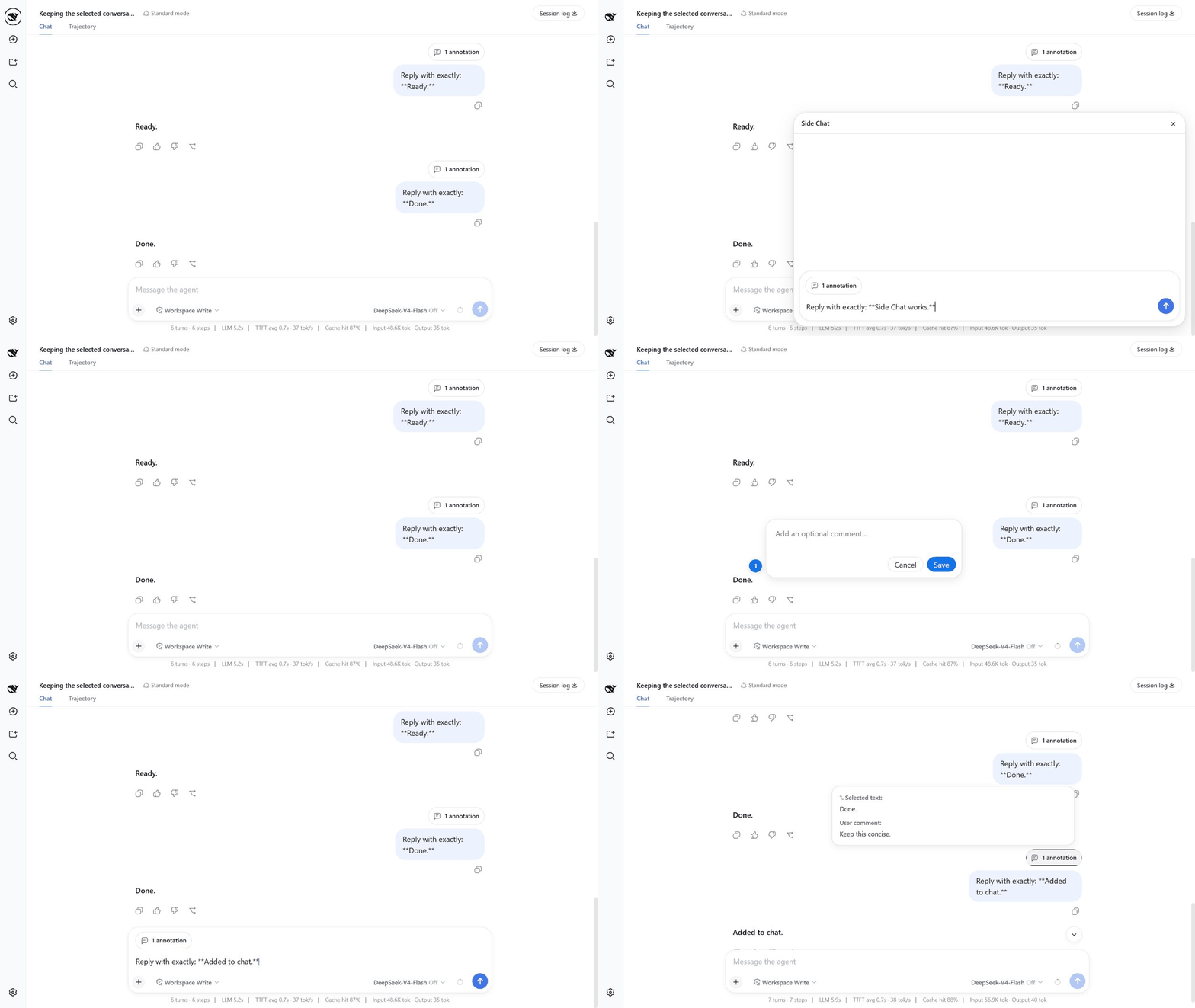
On phones and tablets, long-press text in a completed message to select it. The Side Chat action bar appears below the selection when there is room, leaving the browser's native selection bar above it. Use Add to chat, More details, or Ask in side chat directly from the touch action bar.
- Complete at least one turn in the main conversation.
- Select text inside one completed user or assistant message.
- Click
Add to chatto add an optional comment before attaching the passage to the main composer,More detailsto send an explanation request immediately, orAsk in side chatto write a focused question. - When writing your own message or question, press
Enterto send it. - After a Side Chat reply settles, click
Add to conversationto attach that focused discussion to the main composer as one conversation reference. - Press
Escor click×when you are done.
Useful details:
Shift+Enterinserts a newline.- Use the model control beside Send to choose a provider/model and its available reasoning effort. The choice belongs to Side Chat, does not change the main conversation, and becomes the global default for the next Side Chat.
- After clicking
Add to chat, pressEnteror clickSaveto keep the annotation. Click outside the comment box or clickCancelto discard it. Add to chatkeeps any existing draft text and can collect multiple numbered passages, each with its own optional comment, in one annotation capsule.Add to conversationcaptures the Side Chat's user/assistant history, preserves the main draft, and refreshes the existing reference instead of duplicating it when clicked again.- The input grows with its content and becomes scrollable at its maximum height.
- While a reply is running, the send icon becomes a stop button.
- Assistant replies use DSH's native Markdown rendering.
- Hover over
N annotationsto preview every selected passage and its comment. - Before sending, hover over the annotation capsule and click
×to remove it; after sending, the same capsule appears above the user message. - The main conversation stays visible and is never switched to the child Session.
What happens to the conversation
The first send creates a real DSH Session fork at the selected message. The child inherits the complete event prefix, presets, and workspace. Its initial model choice uses the last accepted Side Chat choice when one is saved, otherwise it snapshots the parent configuration; later model or reasoning-effort changes apply to subsequent child steps without changing or following the parent conversation. Keeping the prefix unchanged is friendly to provider prompt caching, although a cache hit is never guaranteed.
Closing Side Chat stops active work, archives the child Session, and releases its Agent. It does not delete the child's history from disk. The child and copied prefix therefore consume normal DSH Session storage.
The parent and child share the same workspace. File changes, commands, and other tool side effects made in Side Chat are real and are not reverted when the panel closes.
Current limitations
- A selection must stay inside one completed message.
- Attachments and
/sideare not supported yet. - Closed Side Chats cannot be reopened from the panel.
- There is no automatic history cleanup or “keep as normal chat” action.
- An archived child may briefly appear in normal Session lists.
Upgrade or remove
Refresh this package's registry metadata, update to the latest stable version, and restart DSH:
pnpm cache delete "@ahggg/dsh-side-chat"
dsh plugin --profile web update @ahggg/dsh-side-chat --latest
Remove the plugin with:
dsh plugin --profile web remove @ahggg/dsh-side-chat
License
MIT
References
相关推荐Related
-
 nexu-io/open-design
🎨 Best DeepSeek Harness Design Plugin. The open-source Claude Design alternative. 🖥️ Local-first desktop app. 🖼️ Your…
nexu-io/open-design
🎨 Best DeepSeek Harness Design Plugin. The open-source Claude Design alternative. 🖥️ Local-first desktop app. 🖼️ Your…
-
 ruvnet/ruflo
🌊 The original agent meta-harness. Deploy intelligent multi-player swarms, coordinate autonomous workflows, and build c…
ruvnet/ruflo
🌊 The original agent meta-harness. Deploy intelligent multi-player swarms, coordinate autonomous workflows, and build c…
-
 amruthpillai/reactive-resume
A one-of-a-kind resume builder that keeps your privacy in mind. Completely secure, customizable, portable, open-source a…
amruthpillai/reactive-resume
A one-of-a-kind resume builder that keeps your privacy in mind. Completely secure, customizable, portable, open-source a…
-
 esengine/DeepSeek-Reasonix
DeepSeek-native AI coding agent for your terminal. Engineered around prefix-cache stability — leave it running.
esengine/DeepSeek-Reasonix
DeepSeek-native AI coding agent for your terminal. Engineered around prefix-cache stability — leave it running.
-
 volcengine/OpenViking
Self-evolving Context Database for AI Agents. Unify Agent Memory, Knowledge RAG and Skills.
volcengine/OpenViking
Self-evolving Context Database for AI Agents. Unify Agent Memory, Knowledge RAG and Skills.
-
 Molunerfinn/PicGo
:rocket: The Ultimate Image Uploader for Efficient Creators. Supports Obsidian, Typora, VS Code etc. and 60+ image hosti…
Molunerfinn/PicGo
:rocket: The Ultimate Image Uploader for Efficient Creators. Supports Obsidian, Typora, VS Code etc. and 60+ image hosti…
-
 titanwings/distilly
Distilly — Distill how they think into reusable Skills for any Agent or Bot. Formerly Colleague Skill(原同事 Skill).
titanwings/distilly
Distilly — Distill how they think into reusable Skills for any Agent or Bot. Formerly Colleague Skill(原同事 Skill).
-
 titanwings/colleague-skill