Aisland-SJL/dsh-reminder
🔔 为 DeepSeek Harness 提供跨窗口补全与审批通知——弹出式提醒,以 Codex/WorkBuddy 风格将你带回 DSH。
项目介绍Project Overview
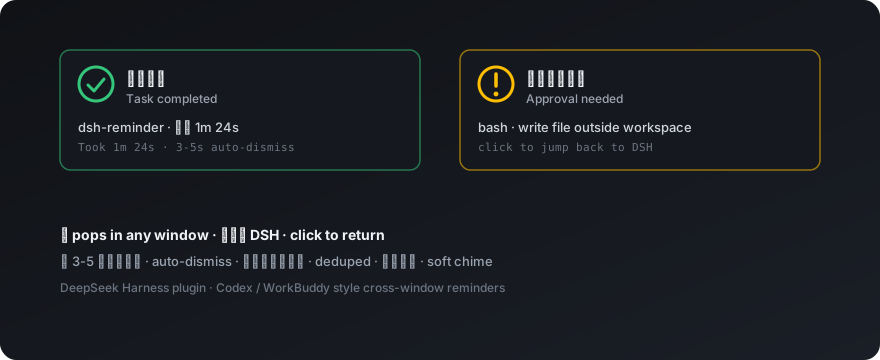
dsh-reminder 是 DeepSeek Harness 的跨窗口提醒插件,通过浏览器通知在任意应用中弹出提示。核心能力:任务完成时显示绿色"已完成"气泡(含会话与耗时),等待审批时显示琥珀色"请批准"气泡(含工具名),点击可聚焦 DSH 窗口。适用于长时间后台任务需要离开时获取状态。注意事项:通知权限需在用户手势下授权,部分浏览器(Chrome)不支持通知操作按钮,需依赖自动关闭。
dsh-reminder is a cross-window reminder plugin for DeepSeek Harness that delivers browser notifications while you work in any application. Core capability: a green "completed" toast (with session and duration) fires on every task finish, and an amber "awaiting approval" toast (with tool name) fires when a tool needs your decision; clicking focuses the DSH window. Use it when background tasks run long enough to leave the screen. Caveat: notification permission must be granted via a user gesture, and some browsers (Chrome page notifications) ignore action buttons, so dismissal relies on auto-close.
请帮我了解并安装插件:【dsh-reminder】【https://github.com/Aisland-SJL/dsh-reminder】把上面这条消息直接发给当前会话里的 DSH,让它帮你了解并安装。安装命令不一定准确,发给 DSH 更稳。Send this message to DSH in your current session. CLI install commands may not be accurate across systems — DSH will figure it out for you.
或使用命令行安装(适合开发者)Or use CLI install (for developers)
命令行安装CLI Install
dsh plugin --profile web add github:Aisland-SJL/dsh-reminder把 Aisland-SJL/dsh-reminder 加入你的 DSH 配置(web profile)即可启用。
READMEREADME
dsh-reminder 🔔
English · 简体中文
A cross-window reminder plugin for DeepSeek Harness — while you work in any other window, it taps you on the shoulder the moment a task finishes or waits for your approval. Codex / WorkBuddy style.
✨ Features
| 🎯 | Feature | Description |
|---|---|---|
| 🟢 | Completion | Pops "Task completed" on every turn end, with session · duration and a green check icon |
| 🟡 | Approval | Pops "Waiting for your approval" with the tool name and an amber alert icon |
| 🎯 | Pops in any window | Notifies even while you work in other apps |
| 🖱️ | Click to return | Clicking focuses the DSH window and opens the session |
| ⏱️ | Auto-dismiss | Gone in 3-5 s (adjustable) |
| 🎵 | Soft chime | A gentle two-note chime (D4→A4) — nothing startling |
| 🔁 | Deduplicated | Never pops twice for the same event |
| 🛡️ | Reminds, never acts | Never approves on your behalf |
🤔 Why
- 😴 Nobody calls you for approvals — the agent waits while you are away; now an amber popup tells you
- 👀 Nobody tells you it's done — no completion signal before; now a green popup tells you
🚀 Quick start
- Install:
dsh plugin --profile web add <dsh-reminder>(ornpm i dsh-reminder), registerdsh-reminderin the profile bundle list, restart the DSH web process - Grant permission: Settings → Reminders → "Enable & test notifications" → Allow — a test popup arrives instantly
- Enjoy: Switch away and work — the popups come to you
⚙️ Settings
| Setting | Default | Description |
|---|---|---|
| Notification permission | unset | One-click grant + test popup |
| Approval reminders | On | Off = no approval popups |
| Completion reminders | On | Off = no completion popups |
| Duration | 3-5 s | Seconds before auto-dismiss |
| Failure alerts | Off (reserved) | Planned for v0.3 |
🏗️ Architecture
One package ships the host Cordis plugin and the web client:
- host: registers the settings namespace plus a plugin-owned Typert Remote (
reminder/getSettings·updateSettings) — plugin namespaces sit outside the web settings allowlist - client: subscribes to the session list and conversation snapshots (turn/end, approval/requested arrive over the mux stream), pops via the Notification API with a Web Audio chime
- Read-only: never mutates DSH core behavior
🔧 Development
pnpm install
pnpm run typecheck   # tsc --noEmit
pnpm test            # node tests/unit/*.test.cjs (16 tests)
pnpm run build       # esbuild: host ESM + single-file client CJS (ModuleLoader handshake) + tsc d.ts
- Artifacts:
lib/index.js(host ESM),lib/client.js(client),lib/types/(.d.ts) - Offline dev: no new dependencies; @deepseek-ai/* types and local esbuild/typescript come from
03_local/codes(not in git)
⚠️ Known limits
- Chrome page notifications reject
actions(ServiceWorker persistent notifications only) — dismiss via auto-close or the hover ✕ - Permission must be requested from a user gesture (browser policy) — the settings button does it in one click
- The chime unlocks on the first click (autoplay policy)
📄 License
相关推荐Related
-
 nexu-io/open-design
🎨 Best DeepSeek Harness Design Plugin. The open-source Claude Design alternative. 🖥️ Local-first desktop app. 🖼️ Your…
nexu-io/open-design
🎨 Best DeepSeek Harness Design Plugin. The open-source Claude Design alternative. 🖥️ Local-first desktop app. 🖼️ Your…
-
 ruvnet/ruflo
🌊 The original agent meta-harness. Deploy intelligent multi-player swarms, coordinate autonomous workflows, and build c…
ruvnet/ruflo
🌊 The original agent meta-harness. Deploy intelligent multi-player swarms, coordinate autonomous workflows, and build c…
-
 amruthpillai/reactive-resume
A one-of-a-kind resume builder that keeps your privacy in mind. Completely secure, customizable, portable, open-source a…
amruthpillai/reactive-resume
A one-of-a-kind resume builder that keeps your privacy in mind. Completely secure, customizable, portable, open-source a…
-
 esengine/DeepSeek-Reasonix
DeepSeek-native AI coding agent for your terminal. Engineered around prefix-cache stability — leave it running.
esengine/DeepSeek-Reasonix
DeepSeek-native AI coding agent for your terminal. Engineered around prefix-cache stability — leave it running.
-
 volcengine/OpenViking
Self-evolving Context Database for AI Agents. Unify Agent Memory, Knowledge RAG and Skills.
volcengine/OpenViking
Self-evolving Context Database for AI Agents. Unify Agent Memory, Knowledge RAG and Skills.
-
 Molunerfinn/PicGo
:rocket: The Ultimate Image Uploader for Efficient Creators. Supports Obsidian, Typora, VS Code etc. and 60+ image hosti…
Molunerfinn/PicGo
:rocket: The Ultimate Image Uploader for Efficient Creators. Supports Obsidian, Typora, VS Code etc. and 60+ image hosti…
-
 titanwings/distilly
Distilly — Distill how they think into reusable Skills for any Agent or Bot. Formerly Colleague Skill(原同事 Skill).
titanwings/distilly
Distilly — Distill how they think into reusable Skills for any Agent or Bot. Formerly Colleague Skill(原同事 Skill).
-
 titanwings/colleague-skill