AlexCHONG8/dsh-viewboost
DeepSeek Harness 插件:右侧预览面板工具栏增强(访达显示/全屏/复制路径/复制文件)+ Token 用量卡
项目介绍Project Overview
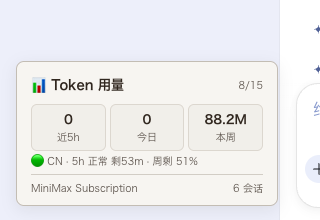
viewboost 是 DSH web profile 的预览面板增强插件,为 aionui 右侧工具栏加入在访达显示、全屏、复制路径、复制文件按钮,并在左下角显示近 5 小时、今日、本周 Token 用量卡,可选接入 MiniMax 配额。适合需要快速定位文件、全屏预览或监控用量时使用。需运行 DSH web profile,Finder 相关功能仅 macOS 完整支持,Linux/Windows 会降级。
viewboost is a DSH plugin for the web profile that enhances the aionui preview toolbar with Reveal in Finder, fullscreen, copy path, and copy-file buttons, plus a Token usage card showing 5-hour, daily, and weekly stats, with optional MiniMax quota. Use it when previewing files and needing quick file actions or usage monitoring. It requires the DSH web profile; Finder features are full on macOS, while Linux and Windows get reduced functionality.
请帮我了解并安装插件:【dsh-viewboost】【https://github.com/AlexCHONG8/dsh-viewboost】把上面这条消息直接发给当前会话里的 DSH,让它帮你了解并安装。安装命令不一定准确,发给 DSH 更稳。Send this message to DSH in your current session. CLI install commands may not be accurate across systems — DSH will figure it out for you.
或使用命令行安装(适合开发者)Or use CLI install (for developers)
命令行安装CLI Install
dsh plugin --profile web add github:AlexCHONG8/dsh-viewboost把 AlexCHONG8/dsh-viewboost 加入你的 DSH 配置(web profile)即可启用。
READMEREADME
viewboost
DeepSeek Harness 右侧预览面板的工具栏增强:在访达显示、全屏、复制路径、复制文件,外加一个 Token 用量卡。




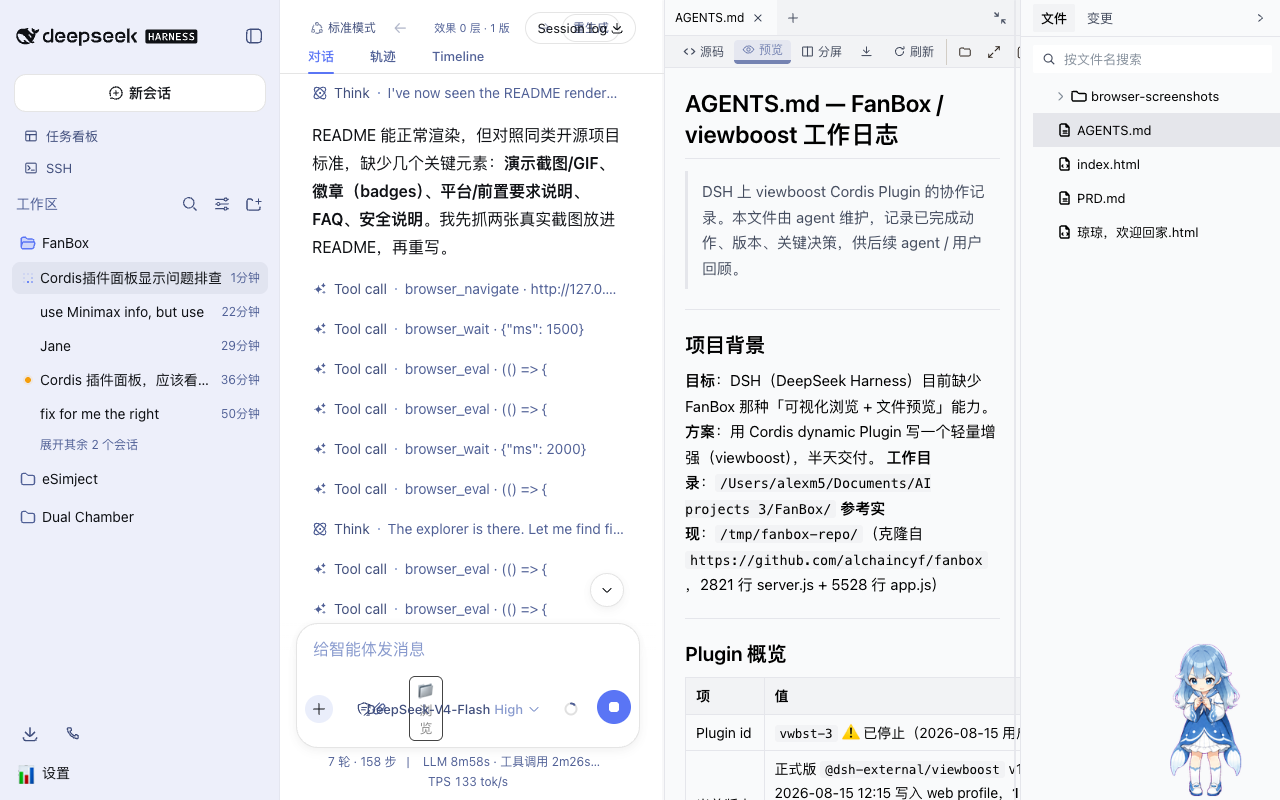
给 DSH 右侧的 aionui 预览面板工具栏加几个按钮,顺手在左下角放一个 Token 用量卡。不碰任何第三方插件源码。
功能
| 按钮 | 干什么 |
|---|---|
| 📁 在访达显示 | 在 macOS Finder 里选中当前预览的文件(open -R) |
| ⤢ 全屏 | 预览面板全屏,按 Esc 退出 |
| 📋 复制路径 | 复制文件绝对路径 |
| ⧉ 复制文件 | 把文件引用放进剪贴板,Finder 里 Cmd+V 就能粘贴复制 |
| 📊 Token 用量 | 左下角卡片:近 5h / 今日 / 本周用量,可选 MiniMax 配额状态 |
工具栏图标用的是 feather SVG,和 FanBox 同一套。
安装
前提:已经跑着一个 DeepSeek Harness 的 web profile。
直接装(推荐):
dsh plugin --profile web add github:AlexCHONG8/dsh-viewboost
或者本地 clone 后装:
git clone https://github.com/AlexCHONG8/dsh-viewboost.git
dsh plugin --profile web add link:/path/to/dsh-viewboost
装完重启 DSH(dsh web)就生效。插件随 profile 自动挂载,不用像动态插件那样每次去 Cordis 面板点「运行」。
用法
- 右侧文件树点开任意文件,预览工具栏会出现 4 个图标按钮
- 📁 Finder 弹出并选中该文件
- 📋 复制完整路径
- ⧉ 文件进剪贴板,切到 Finder 按
Cmd+V粘贴(相当于复制文件) - ⤢ 全屏预览,
Esc退出 - 📊 左下角 Token 用量卡
MiniMax 配额(可选)
往 ~/.dsh/viewboost.env(权限 0600)写:
MINIMAX_CN_API_KEY=sk-cp-...    # 国内版 api.minimaxi.com
# 或
MINIMAX_API_KEY=sk-...          # 国际版 api.minimax.io
卡片底部会显示真实的 Token Plan 状态(5h 滚动窗口 / 周配额剩余、倒计时)。
环境要求
- 需要 DSH 的
webprofile,目标是 aionui 右侧面板布局 - macOS 功能最全(Finder 显示、文件引用剪贴板)
- Linux / Windows:复制路径、全屏、用量卡能用,Finder 相关按钮自动降级
项目结构
viewboost/
├── dsh.plugin.json      # DSH 插件清单 (client.main)
├── cordis.patch.yml     # bundle patch(dsh plugin add 时自动挂载)
├── package.json         # npm 包 + dsh.bundle/client 声明
└── lib/
    ├── index.js         # Host: /viewboost/* HTTP 路由 (fs/subprocess/curl)
    └── client.js        # Client: 工具栏注入 + Token 卡 (module-loader 包装)
实现原理
- Host 声明
inject: ['fs', 'webServer'],注册/viewboost/{list,read,fileUrl,stat,thumb,binary,finder,copyfile,usage,minimax}路由 - Client 用
window.__ModuleLoader__.load()包装,通过fetch('/viewboost/...')调 host - aionui 集成:MutationObserver 把按钮插进
.aionui-preview-col工具栏(刷新按钮旁边),当前文件路径靠拦截/aionui-panel/read|list的 fetch 拿到 - 复制:同步
execCommand('copy')(离屏 textarea,和官方 writeClipboard 一个思路)+ Clipboard API 双保险
迭代过程踩的坑都记在 docs/ITERATION-NOTES.md,想给 DSH 写插件的人可以看看。
特别致谢
灵感来自**花叔(Huashu)**的 FanBox:给 Agent 界面配「可视化浏览 + 文件预览」这个想法,还有工具栏那套 feather SVG 图标,都是从他那儿来的。这个插件算是我照着那份灵感手搓出来的。感谢花叔,没有 FanBox 就没有它。🙏
License
MIT,见 LICENSE。
相关推荐Related
-
 nexu-io/open-design
🎨 Best DeepSeek Harness Design Plugin. The open-source Claude Design alternative. 🖥️ Local-first desktop app. 🖼️ Your…
nexu-io/open-design
🎨 Best DeepSeek Harness Design Plugin. The open-source Claude Design alternative. 🖥️ Local-first desktop app. 🖼️ Your…
-
 freestylefly/awesome-gpt-image-2
Prompt as Code | GPT-Image2 工业级提示词引擎与模板库,530+ 个案例逆向工程,20+ 套工业级模板,并提炼出Skills,持续更新中
freestylefly/awesome-gpt-image-2
Prompt as Code | GPT-Image2 工业级提示词引擎与模板库,530+ 个案例逆向工程,20+ 套工业级模板,并提炼出Skills,持续更新中
-
 anywhere-labs/dsh-desktop
为 DeepSeek Harness (DSH) 插件生态打造的现代化桌面端解决方案。万物皆「插件」,桌面本身也是「插件」。
anywhere-labs/dsh-desktop
为 DeepSeek Harness (DSH) 插件生态打造的现代化桌面端解决方案。万物皆「插件」,桌面本身也是「插件」。
- Nagi-ovo/voyager Enhancement suite for Gemini, AI Studio, Claude & ChatGPT — plus a prompt manager for any web UI, DeepSeek Harness inclu…
-
 walkinglabs/learn-harness-engineering
Harness engineering beginner tutorial, from 0 to 1
walkinglabs/learn-harness-engineering
Harness engineering beginner tutorial, from 0 to 1
-
 awesome-dsh-plugin/awesome-dsh-plugin
A curated list of plugins for DeepSeek Harness (dsh) · DeepSeek Harness 插件精选列表
awesome-dsh-plugin/awesome-dsh-plugin
A curated list of plugins for DeepSeek Harness (dsh) · DeepSeek Harness 插件精选列表
-
 MemTensor/MemOS
Self-evolving memory OS for LLM & AI Agents: ultra-persistent memory, hybrid-retrieval, and cross-task skill reuse, with…
MemTensor/MemOS
Self-evolving memory OS for LLM & AI Agents: ultra-persistent memory, hybrid-retrieval, and cross-task skill reuse, with…
- yjh051108/dsh-routing-suite dsh-routing-suite — injector + router-standard kit: install the runtime injector first, then the task-aware reasoning-mo…