alloevil/dsh-xray
X-ray for your DeepSeek Harness — see what's actually loaded, why, and what it costs you.
项目介绍Project Overview
dsh-xray 是 DeepSeek Harness 的诊断插件,聚焦组合树的可解释性。核心能力:层级归因、补丁冲突检测、声明与实际配置对比、组合快照、运行时依赖图、健康状态、上下文 token 成本估算及对插件的静态安全审计。挂载后可在 /xray 面板查看,并通过 xray_composition 工具让 Agent 自检能力。适用于排查插件归属、版本漂移和服务级联影响。提示:deps/health/cost/shadow 命令及 Agent 工具需先挂载插件;其余静态命令在 dsh 无法启动时也可运行。
dsh-xray is a diagnostic plugin for the DeepSeek Harness that explains the composition tree. Core capability: layer attribution, patch conflict detection, declared-vs-actual diff, composition snapshots, runtime service dependency graphs, plugin health, context token cost, and a static capability audit. When mounted, it serves a /xray panel and registers an xray_composition tool so agents can introspect their own capabilities. Use it to trace plugin origins, version drift, and service cascades. Caveat: deps, health, cost, shadow, and the agent tool require mounting; the remaining commands are static and run even when dsh fails to boot.
请帮我了解并安装插件:【dsh-xray】【https://github.com/alloevil/dsh-xray】把上面这条消息直接发给当前会话里的 DSH,让它帮你了解并安装。安装命令不一定准确,发给 DSH 更稳。Send this message to DSH in your current session. CLI install commands may not be accurate across systems — DSH will figure it out for you.
或使用命令行安装(适合开发者)Or use CLI install (for developers)
命令行安装CLI Install
dsh plugin --profile web add dsh-xray把 alloevil/dsh-xray 加入你的 DSH 配置(web profile)即可启用。
READMEREADME




X-ray for your DeepSeek Harness — see what's actually loaded, why, and what it costs you.
The Problem
dsh --dump-config shows you the composed tree. The plugin panel shows you a flat list. Neither tells you why a plugin is there, what breaks if you disable it, or what it silently costs you.
dsh-xray does.
Static commands work even when dsh cannot boot;
deps/health/cost/shadowand the agent tool need the plugin mounted.

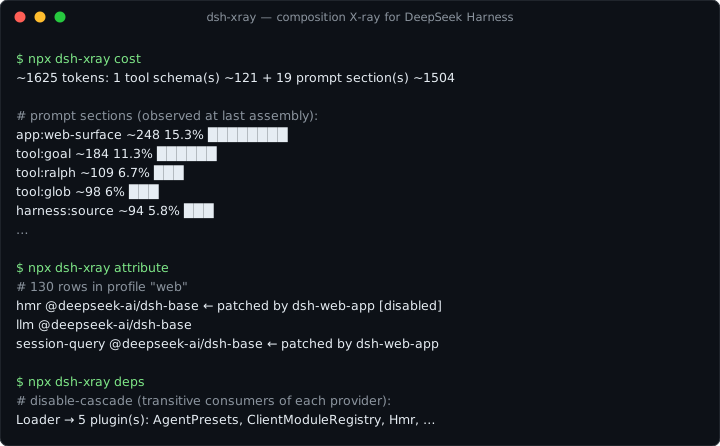
npx dsh-xray attribute   # which layer introduced each row, and who patched it since
npx dsh-xray conflicts   # rows whose fields have multiple writers, and who wins
npx dsh-xray diff        # declared (static layers) vs actual (dump-config) tree
npx dsh-xray snapshot    # content-addressed lockfile of the effective composition
npx dsh-xray deps [svc]  # service dependency graph: providers, consumers, disable-cascade
npx dsh-xray health      # plugin lifecycle health: failed fibers, pending injects, transitions
npx dsh-xray cost        # context cost: prompt sections + tool schemas, estimated tokens
npx dsh-xray shadow      # services provided by multiple plugins
npx dsh-xray audit       # static scan of out-of-tree plugins for sensitive touchpoints

🔍 Layer AttributionWhich layer introduced each active plugin: kernel bundle, profile dependency, 📊 Declared vs. Actual DiffInstalled-but-inactive, uninstalled-but-lingering patch rows — all surfaced. ⚡ Conflict DetectionPlugins patching the same config row, and which one silently wins. 📸 Composition SnapshotExport the effective composition as a lockfile; reproduce it elsewhere. |
🌐 Service Dependency GraphWho provides and consumes each service; what cascades if you disable X. 💊 Runtime HealthPer-plugin fiber lifecycle state, startup failures, transition history. 🤖 Agent Self-IntrospectionThe 🖥️ Web PanelMounted in
What every request actually carries — prompt sections observed at assembly, blended with tool schemas: And when a patch row targets an id that doesn't exist (dsh skips it silently), 🛡️ Capability AuditHeuristic static scan: network egress, shell, filesystem, env, eval. |
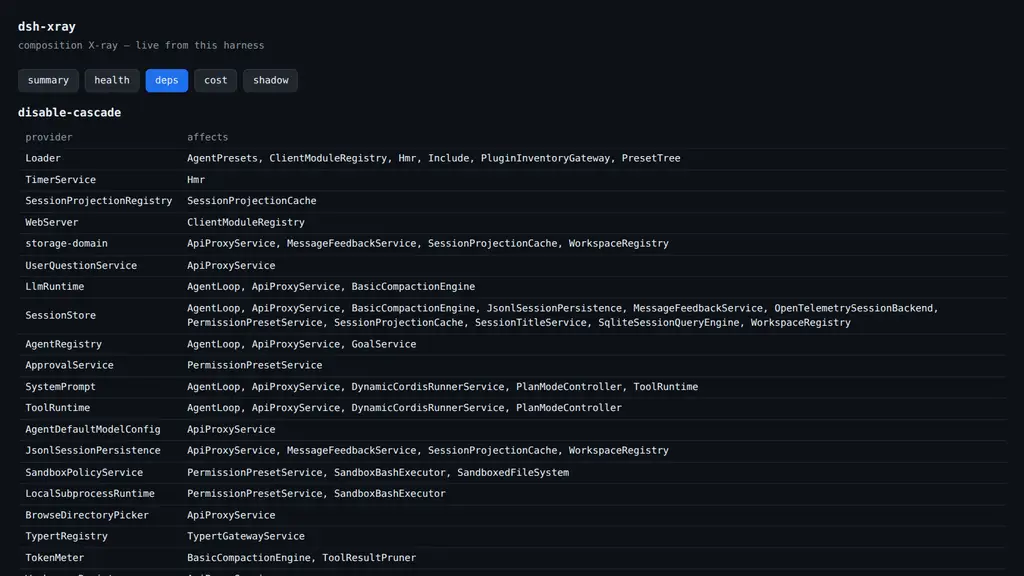

Mounted in the tree, dsh-xray registers an xray_composition tool (view: summary | deps | health | cost | shadow), so an agent can answer:
"What capabilities do I have?" / "What plugin provides X?" / "Why is Y unavailable?"
— about itself.

dsh-xray reads; it never runs.
- Loader
!!jsexpressions in patch files are parsed as opaque markers and never evaluated - The CLI never executes plugin code (
auditis a pattern scan over source text) - The mounted plugin writes only under
$DSH_HOME/xray/ - See SECURITY.md

Two ways to use it — they're independent:
1. Static CLI only (no install into dsh; works even when dsh cannot boot):
npx dsh-xray attribute # requires Node >= 22
2. Mount the plugin (adds the runtime commands, the /xray panel, and the agent tool):
dsh plugin --profile web add dsh-xray
# bundle plugins take effect on the next start — restart dsh web
Verify it took:
dsh --profile web --dump-config | grep dsh-xray   # row present in the composed tree
npx dsh-xray health                               # reads the runtime snapshot
# then open http://localhost:3080/xray for the live panel
Uninstall: dsh plugin --profile web remove dsh-xray.
All commands take --profile <name> (default web) and --json.
| Command | Behavior |
|---|---|
diff |
Exits 1 when the trees disagree |
health |
Exits 1 when any plugin is unhealthy |
attribute, conflicts, snapshot |
Fully static — work even when dsh cannot start |
deps, health |
Read runtime snapshot at $DSH_HOME/xray/runtime.json |

Diagnostic imaging for a running composition — complementary to dsh-doctor (rescue & recovery).
| Feature | Category |
|---|---|
| Layer attribution | 🔍 Inspection |
| Declared vs. actual diff | 🔍 Inspection |
| Conflict detection | 🔍 Inspection |
| Composition snapshot | 📦 Export |
| Service dependency graph | 🌐 Runtime |
| Runtime health | 🌐 Runtime |
| Agent self-introspection | 🤖 AI |
| Capability audit | 🛡️ Security |
| Service shadowing | 🌐 Runtime |
| Context cost | 💰 Optimization |
License
相关推荐Related
-
 ruvnet/ruflo
🌊 The original agent meta-harness. Deploy intelligent multi-player swarms, coordinate autonomous workflows, and build c…
ruvnet/ruflo
🌊 The original agent meta-harness. Deploy intelligent multi-player swarms, coordinate autonomous workflows, and build c…
-
 amruthpillai/reactive-resume
A one-of-a-kind resume builder that keeps your privacy in mind. Completely secure, customizable, portable, open-source a…
amruthpillai/reactive-resume
A one-of-a-kind resume builder that keeps your privacy in mind. Completely secure, customizable, portable, open-source a…
-
 volcengine/OpenViking
Self-evolving Context Database for AI Agents. Unify Agent Memory, Knowledge RAG and Skills.
volcengine/OpenViking
Self-evolving Context Database for AI Agents. Unify Agent Memory, Knowledge RAG and Skills.
-
 Molunerfinn/PicGo
:rocket: The Ultimate Image Uploader for Efficient Creators. Supports Obsidian, Typora, VS Code etc. and 60+ image hosti…
Molunerfinn/PicGo
:rocket: The Ultimate Image Uploader for Efficient Creators. Supports Obsidian, Typora, VS Code etc. and 60+ image hosti…
-
 titanwings/colleague-skill
将冰冷的离别化为温暖的 Skill,欢迎加入数字生命1.0!Transforming cold farewells into warm skills? It's giving rebirth era. Welcome to Digital …
titanwings/colleague-skill
将冰冷的离别化为温暖的 Skill,欢迎加入数字生命1.0!Transforming cold farewells into warm skills? It's giving rebirth era. Welcome to Digital …
-
 nocobase/nocobase
NocoBase is an open-source AI + no-code platform for building business systems fast. Instead of generating everything fr…
nocobase/nocobase
NocoBase is an open-source AI + no-code platform for building business systems fast. Instead of generating everything fr…
-
 Tencent/WeKnora
Open-source LLM knowledge platform: turn raw documents into a queryable RAG, an autonomous reasoning agent, and a self-m…
Tencent/WeKnora
Open-source LLM knowledge platform: turn raw documents into a queryable RAG, an autonomous reasoning agent, and a self-m…
- Nagi-ovo/voyager Enhancement suite for Gemini, AI Studio, Claude & ChatGPT — plus a prompt manager for any web UI, DeepSeek Harness inclu…