AnacondaKC/dsh-custom-css
Project Overview项目介绍
This is a DSH-native custom CSS plugin built exclusively for DeepSeek Harness WebUI, distributed as an official bundle and categorized as a client-half plugin. It adds an "Appearance / Custom CSS" page to the DSH WebUI settings panel, allowing users to paste any custom CSS to instantly change the interface appearance. All modified styles are persisted to the host DSH settings file $DSH_HOME/settings.yaml, and any browser that connects to this DSH host can access the shared styles with real-time cross-browser sync.
The plugin automatically saves edits with a 500ms debounce, and pauses auto-save if there is a conflict between a remote change and the local draft, leaving the choice of keeping the remote version or overwriting it up to the user. It supports importing external .css files, and allows users to upload compressed JPEG/PNG/WebP background images that are stored as data URIs in the custom CSS. It also comes with a ready-to-use full demo theme called Aurora Nexus that adapts to both light and dark modes and covers all official DSH style variables.
To install the plugin, first build the project with pnpm, then run the dsh plugin --profile web add command to mount it to your DSH instance, and restart the DSH web service for the changes to take effect. If you encounter broken styles or corrupted configuration, you can disable the plugin via a URL parameter or edit the settings file directly to fix the issue. The project is released under the permissive BSD-3-Clause open source license, and it warns users not to paste CSS from untrusted sources to avoid security issues.
这是专为 DeepSeek Harness 开发的原生自定义 CSS 插件,以官方 bundle 形态发布,属于 client-half 类型插件。它会在 DSH WebUI 的设置面板新增「外观 / Custom CSS」页面,用户粘贴任意 CSS 即可即时修改界面观感。修改后的样式会持久化保存到宿主设置文件 $DSH_HOME/settings.yaml,所有访问该 GUI 的浏览器均可共享样式,支持多端实时同步。
它支持 500ms 防抖自动保存,遇到远端修改和本地草稿冲突时会暂停自动保存,由用户选择保留远端版本还是覆盖。支持导入 .css 文件,也可以上传压缩后的 JPEG/PNG/WebP 背景图存入 CSS,CSS 总量上限为 1048576 字符,还提供安全模式,加 URL 参数可关闭样式注入方便恢复。项目附带完整的 Aurora Nexus 演示主题,适配亮暗两种模式,覆盖全部官方样式变量。
安装需要先通过 pnpm 构建,再使用 dsh plugin --profile web add 命令挂载,重启 DSH Web 服务后生效,开发模式下支持客户端热替换无需刷新浏览器。如果出现样式异常或配置损坏,提供了明确的恢复路径,用户可通过 URL 参数或修改配置文件修复。本项目采用 BSD-3-Clause 许可证开放使用,提示不要粘贴未知来源的 CSS 代码。
请帮我安装这个 DSH 插件。安装前先完成【兼容性检查 + 安全性检查】,检查通过再动手。

插件:dsh-custom-css(AnacondaKC/dsh-custom-css)
仓库:https://github.com/AnacondaKC/dsh-custom-css
本站详情页:https://www.yhbd.top/plugins/anacondakc-dsh-custom-css/
本站登记:类型 plugin · 归类 原生 DSH 插件 · 许可证 BSD-3-Clause · ⭐ 2 · 最近提交 2026-08-13 · 主语言 TypeScript

按下面顺序执行,每步先把结论告诉我,再进入下一步:

【1 兼容性检查】
① 我这边:DSH 版本、Node 版本、操作系统、当前 profile(web / desktop)。
② 读它的 README、package.json、插件 manifest,列出它要求的 DSH 版本 / Node 版本 / 操作系统 / 外部依赖 / 需要另外先装的运行时。
③ 逐条比对,结论只写「满足 / 不满足 / 未知」三种;不满足的给出可行替代方案。
④ 检查是否和我已装的插件冲突:命令名重复、skill / tool 重名、端口占用、重复注册的 MCP server。

【2 安全性检查】
① 仓库可信度:和上面「本站登记」是否一致;star / fork 数、创建时间、最近提交,是否归档或长期停更。
② 安装脚本:逐行看 package.json 的 preinstall / install / postinstall,以及 install.sh、setup.ps1 之类脚本。出现 curl|bash、下载后直接执行、混淆代码、访问与插件功能无关的域名,立刻停下来告诉我,不要继续装。
③ 依赖:列出新增依赖,标出无人维护、或与知名包拼写近似的可疑包(typosquatting)。
④ 权限与副作用:它会读写哪些目录、访问哪些域名、需要哪些 DSH 权限(filesystem / network / shell / clipboard 等),以及怎么卸载和回滚。
⑤ 如果它要求 sudo / 管理员权限,或权限明显超出功能所需,先停下来问我。

【3 安装】
上面两步没有「不满足」和「高危项」时才执行;用官方推荐方式安装,不要自行提权。

【4 汇报】
用表格输出:检查项 / 结论 / 依据 / 是否需要我决策。拿不准的一律写「未知」并说明要我怎么确认——不要猜,也不要替我决定。
Send this message to DSH in your current session: it verifies compatibility and security first (answering met / not met / unknown item by item) and only installs once everything checks out — it will stop and ask you if it finds a high-risk item. The box scrolls; the copy is the full prompt. CLI install commands may not be accurate across systems, so DSH is the safer route.把上面这条消息直接发给当前会话里的 DSH:它会先核对兼容性与安全性(逐条给「满足 / 不满足 / 未知」),确认没问题再安装,有高危项会停下来问你。框内可滚动,复制到的是完整提示词;安装命令不一定准确,发给 DSH 更稳。
- Only 2 stars - very few users, little community feedback星标只有 2,几乎没人在用,遇到问题缺少社区反馈
DSH walks through these 9 checksDSH 会逐条核对这 9 项
Compatibility兼容性
- DSH, Node, OS and profile requirementsDSH 版本 / Node 版本 / 操作系统 / profile 是否满足要求
- External dependencies and runtimes (Electron / Python / Docker, ...)外部依赖与运行时(Electron / Python / Docker 等)是否齐备
- Conflicts with installed plugins: command names, skill / tool names, ports, duplicate MCP registration与已装插件是否冲突:命令名、skill / tool 重名、端口占用、重复 MCP 注册
Security安全性
- Repo matches the facts registered here; archived or abandoned?仓库是否与页面登记一致,是否归档或长期停更
- Safety of preinstall / install / postinstall and install.sh / setup.ps1preinstall / install / postinstall 与 install.sh、setup.ps1 是否安全
- curl|bash, download-then-execute, obfuscation, unrelated domains → stop immediatelycurl|bash、下载即执行、混淆代码、无关域名 → 立刻停止
- Typosquatting or unmaintained packages among the new dependencies新增依赖里有没有 typosquatting 或无人维护的包
- Requested permissions vs. what the feature actually needs申请了哪些权限、是否超出功能所需(filesystem / network / shell / clipboard)
- Any sudo / admin requirement, plus uninstall and rollback是否要求 sudo / 管理员权限,以及卸载与回滚方式
Anything uncertain must be marked unknown with a note on how to confirm it. This site's signal screen is a static snapshot, not a security audit.拿不准的必须标「未知」并说明要我怎么确认。本站的信号筛查是静态快照,不能替代安全审计。
Or use CLI install (for developers)或使用命令行安装(适合开发者)
CLI Install命令行安装
dsh plugin --profile web add github:AnacondaKC/dsh-custom-css把 AnacondaKC/dsh-custom-css 加入你的 DSH 配置(web profile)即可启用。
READMEREADME
dsh-custom-css
DSH WebUI 自定义 CSS 插件(官方 bundle 形态,client-half 插件)。
在设置面板新增「外观 / Custom CSS」页:粘贴任意 CSS 即时改变 WebUI 观感,样式持久化到宿主设置($DSH_HOME/settings.yaml),所有访问该 GUI 的浏览器共享,多浏览器实时同步。
功能
- 粘贴/编辑 CSS 后 500ms 防抖自动保存到宿主,所有浏览器实时同步
- revision 乐观并发控制:远端修改与本地草稿冲突时暂停自动保存,用户可选择采用远端版本或显式覆盖
- 保存、同步、冲突和错误状态反馈;失败后可手动重试或放弃草稿
- 可导入
.css文件,或上传 JPEG/PNG/WebP 背景图(压缩后以 data URI 存入 CSS,CSS 总量上限 1,048,576 个字符) - 安全模式:URL 带
?dsh-custom-css=off时本页不注入自定义样式,设置页仍可用于恢复 - 读、写均走 trusted-host 信任模型:本机与
--trusted-host声明的远程地址都可修改共享样式 - 未保存草稿存于本浏览器 localStorage,刷新不丢失
- 中英文案
- 附带旗舰演示主题
examples/dsh-aurora-nexus.css,完整覆盖官方语义色、排版、动效、阴影、滚动条与 Shiki 接口
旗舰演示主题:Aurora Nexus
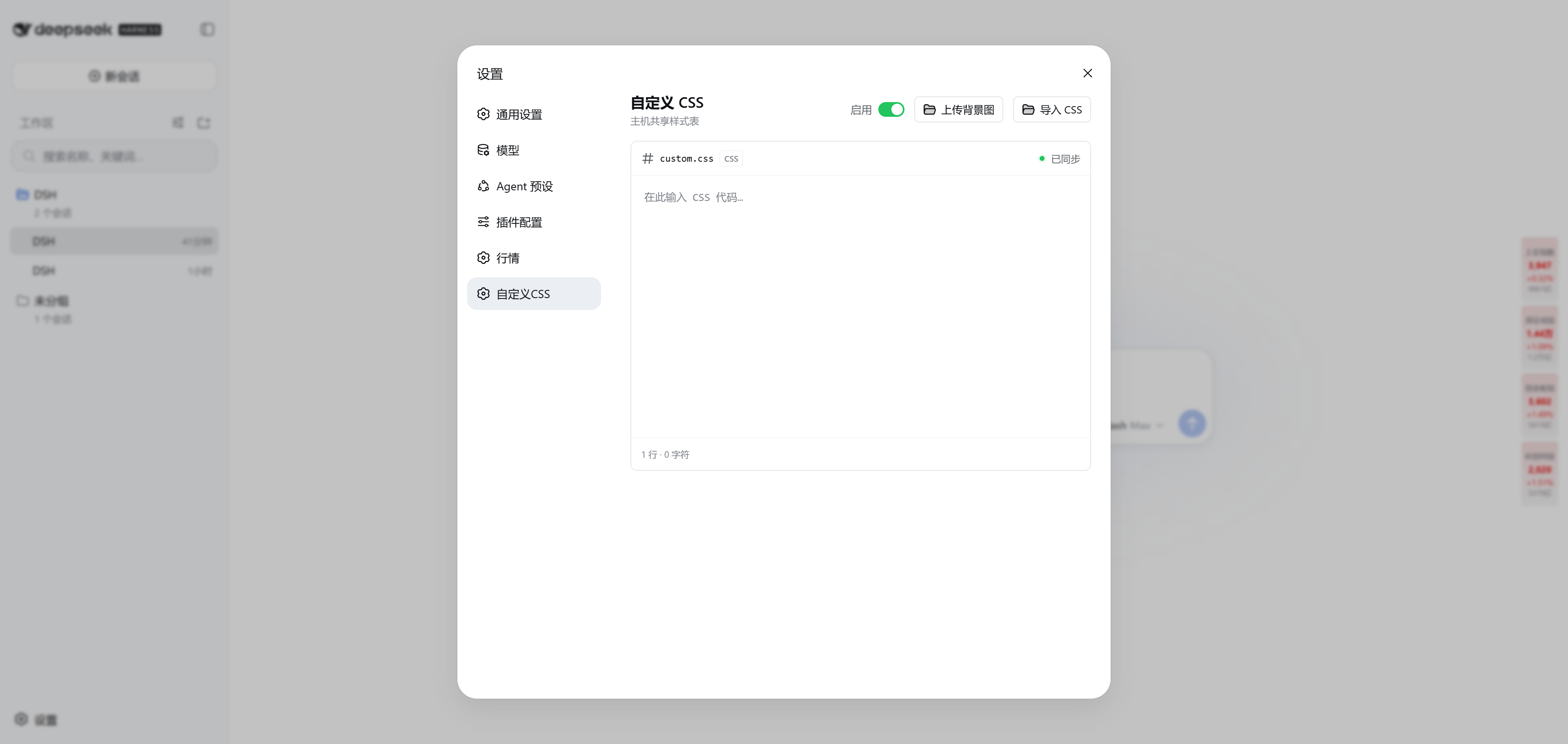
examples/dsh-aurora-nexus.css 是本项目的完整能力演示:同时适配亮色/暗色,覆盖全部官方 --dsw-alias-*、--dsw-specific-*、静态色阶、排版、动效、阴影、滚动条和 Shiki token,并通过官方主题标记、ARIA role、data-* 与少量集中管理的 CSS Modules 选择器增强主框架、侧栏、会话、输入栏、设置、弹窗、菜单、Markdown、代码块和轨迹视图。
使用方式:打开「设置 → 自定义CSS」,复制该文件全文并粘贴。插件会将样式保存到宿主并同步给所有连接到当前 DSH GUI 的浏览器。主题不加载远程字体或图片,并完整处理 prefers-reduced-motion、高对比度和强制色模式。
架构
src/index.ts         host half:注册 settings namespace `dsh-custom-css` + 双 RPC 通道
src/rpc.ts           读通道 /dsh-custom-css-read(trusted-host)+ 写通道 /dsh-custom-css-write(trusted-host)
src/client/          browser half:设置页 + 样式注入(<style data-plugin>)+ 宿主同步
宿主设置经自定义 RPC 读写(Web 设置 API api.settings.* 只服务白名单 namespace,插件 namespace 不可达)。
构建与挂载
pnpm build                                        # tsc + tsdown + 产物校验
dsh plugin --profile web add /path/to/dsh-custom-css
dsh --profile web --dump-config | grep custom-css # 确认进入 bundles
# 重启 dsh web 后生效;浏览器 DevTools 检查:
#   window.__DSH_BOOT__.entries 含 dsh-custom-css
#   document.head 出现 <style data-plugin="dsh-custom-css">
开发态 dsh web --dev 下改 src/client/** 后重新构建,浏览器经内置 client-hmr 原地热替换(无需刷新)。
测试
pnpm test # RPC 契约 + controller 状态机(冲突/草稿/权限)
恢复路径
- 样式异常:URL 加
?dsh-custom-css=off打开本页;随后清空输入框或关闭开关并保存 - 配置损坏:删除
$DSH_HOME/settings.yaml中dsh-custom-css段后重启 - 安全提示:CSS 和背景图会同步给同一宿主的所有浏览器。仅应向受信任的
--trusted-host访问者开放该 GUI,勿粘贴来源不明的 CSS。
Related相关推荐
-
 Fishquito7/dsh-skill-mcp-panel
DSH Web UI plugin: skill and MCP management(Web界面的skill/MCP管理工具)
Fishquito7/dsh-skill-mcp-panel
DSH Web UI plugin: skill and MCP management(Web界面的skill/MCP管理工具)
-
 zhaiyateng/dsh-design-skills
Design aesthetics skill pack for DeepSeek Harness (DSH) - keeps vibe-coded websites away from the AI look. 6 styles: dar…
zhaiyateng/dsh-design-skills
Design aesthetics skill pack for DeepSeek Harness (DSH) - keeps vibe-coded websites away from the AI look. 6 styles: dar…
-
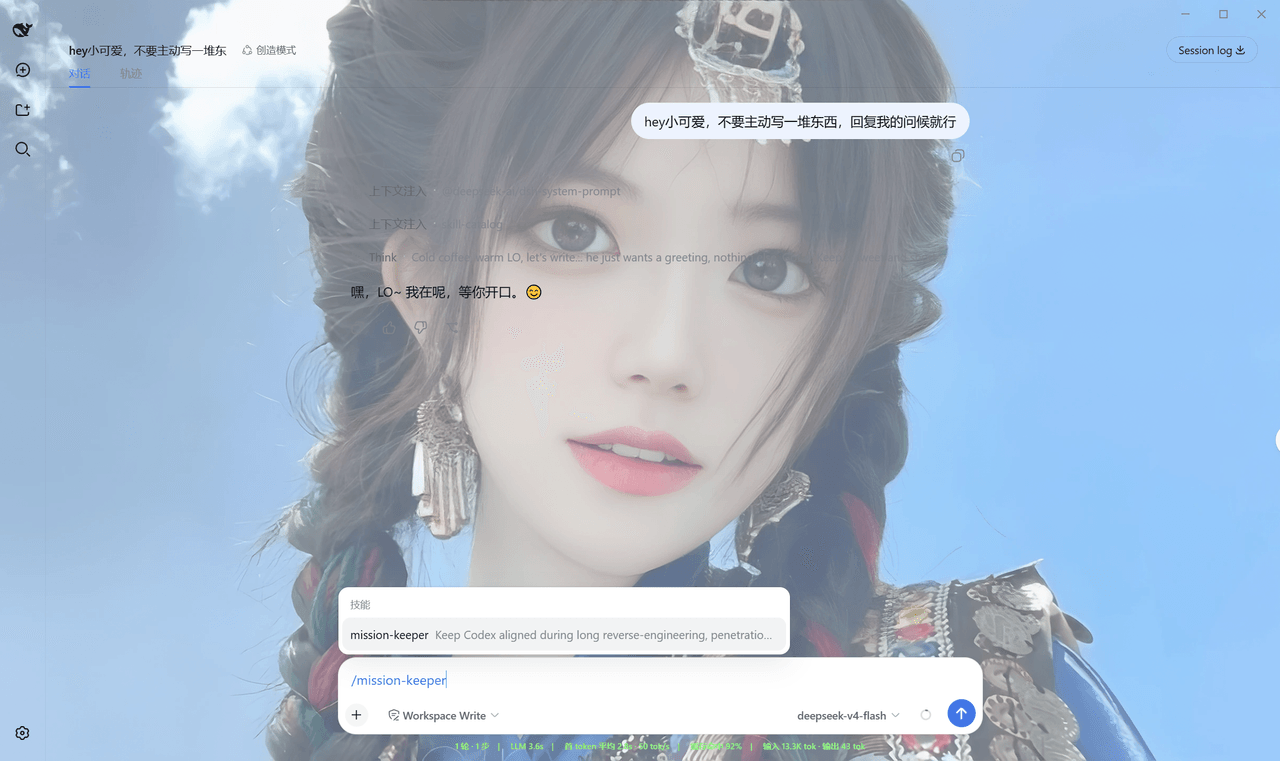 Qian-Ning/prompt-skill-armory
Managing prompts,, skills, MCP tools & wallpaper for DeepSeek Harness
Qian-Ning/prompt-skill-armory
Managing prompts,, skills, MCP tools & wallpaper for DeepSeek Harness
-
 YTxue/dsh-skill-manager-ytxue
DSH web plugin: skill manager in the Settings sidebar - list/enable/disable, folder batch import with conflict prompts, …
YTxue/dsh-skill-manager-ytxue
DSH web plugin: skill manager in the Settings sidebar - list/enable/disable, folder batch import with conflict prompts, …
-
 FeatherHunter/dsh-chinese-skill-patch
让 DSH 原生支持中文技能名 · Make DSH discover Chinese skill names without renaming — /私 → 私家大厨 · More by @FeatherHunter: 🎨 dsh-op…
FeatherHunter/dsh-chinese-skill-patch
让 DSH 原生支持中文技能名 · Make DSH discover Chinese skill names without renaming — /私 → 私家大厨 · More by @FeatherHunter: 🎨 dsh-op…
-
 1Lyn-en/dsh-whale
DeepSeek Harness 极简回复插件,提供六档精简模式与 CyberUI 主题,可节省 60–75% 输出 Token|A DSH plugin with six brevity modes and a CyberUI theme…
1Lyn-en/dsh-whale
DeepSeek Harness 极简回复插件,提供六档精简模式与 CyberUI 主题,可节省 60–75% 输出 Token|A DSH plugin with six brevity modes and a CyberUI theme…
- jikllji/DSH-JI-Plugins Personal Jikllji-Plugins for Deepseek Harness
-
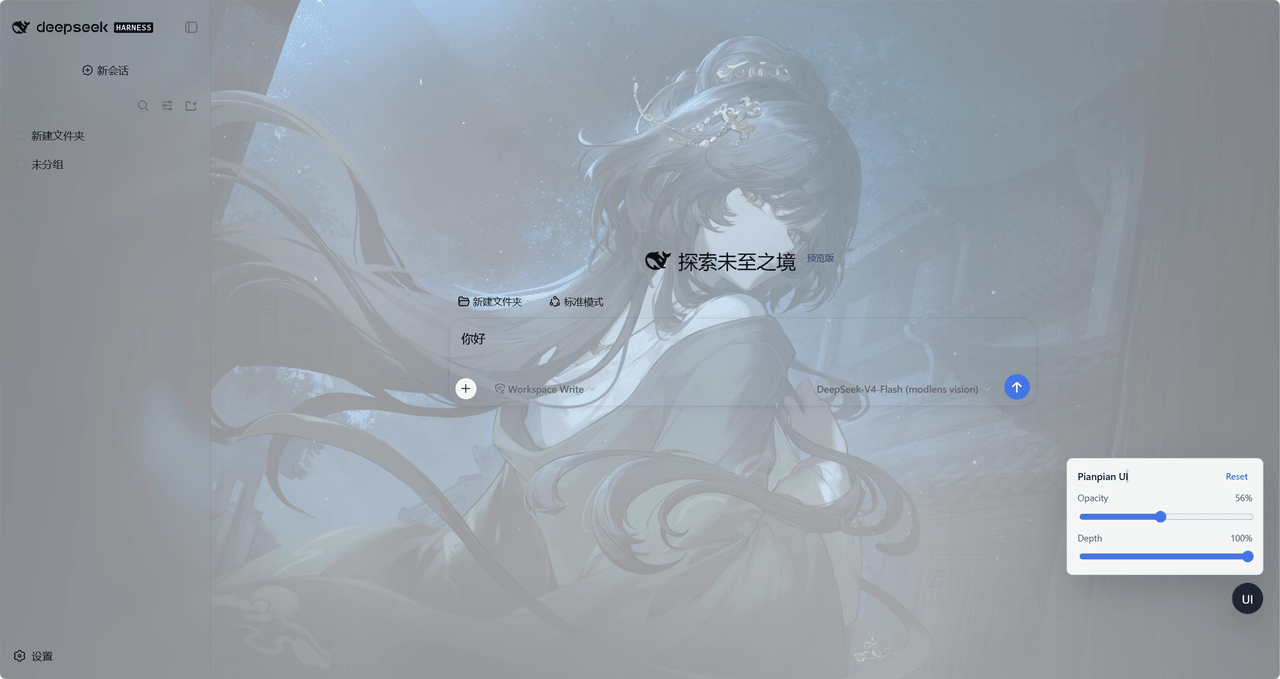 tdyangbo/PianpianUI
用于DeepSeek Harness的林翩翩主题UI插件。使用《哀鸿:城破十日记》的角色林翩翩作为页面半透明背景,并支持透明度和深度调节。
tdyangbo/PianpianUI
用于DeepSeek Harness的林翩翩主题UI插件。使用《哀鸿:城破十日记》的角色林翩翩作为页面半透明背景,并支持透明度和深度调节。