anonRTtty/dsh-api-balance-displayer-plugin
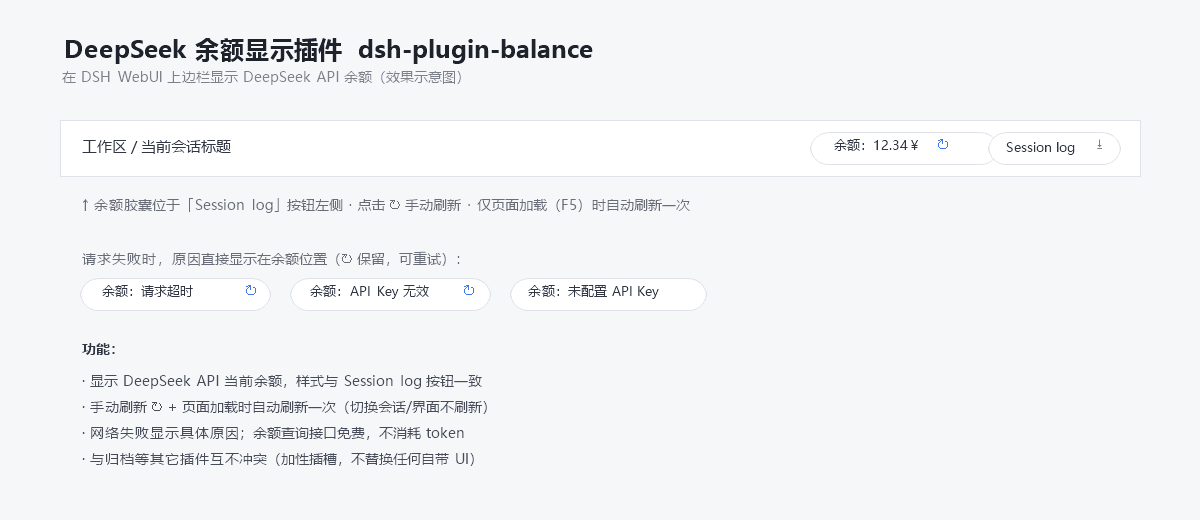
A lightweight, zero-build plugin for DeepSeek Harness (DSH) that shows your DeepSeek API account balance in the web session header, right next to the built-in "Session log" button:
catalog 简介 / catalog descriptioncatalog description:DeepSeek API 余额显示插件 / DeepSeek API balance display for DeepSeek Harness
项目介绍Project Overview
一个零构建的DSH插件,在会话页头部显示DeepSeek API余额,样式与内置“会话日志”按钮一致。支持手动刷新和页面加载时自动刷新,界面随DSH语言本地化,错误原因清晰。适合需要随时查看余额的用户。注意:仅页面加载时自动刷新,切换会话或视图不会触发刷新。
A zero-build DSH plugin that displays your DeepSeek API balance in the session header, styled to match the built-in "Session log" button. It supports manual refresh via a click and auto-refresh on page load, with UI text localized to match DSH's language. Use it when you need quick, at-a-glance balance monitoring during web sessions. Note: auto-refresh only occurs once per page load, not on session or view switches.
请帮我了解并安装插件:【dsh-api-balance-displayer-plugin】【https://github.com/anonRTtty/dsh-api-balance-displayer-plugin】把上面这条消息直接发给当前会话里的 DSH,让它帮你了解并安装。安装命令不一定准确,发给 DSH 更稳。Send this message to DSH in your current session. CLI install commands may not be accurate across systems — DSH will figure it out for you.
或使用命令行安装(适合开发者)Or use CLI install (for developers)
命令行安装CLI Install
dsh plugin --profile web add github:anonRTtty/dsh-api-balance-displayer-plugin把 anonRTtty/dsh-api-balance-displayer-plugin 加入你的 DSH 配置(web profile)即可启用。
READMEREADME
dsh-plugin-balance
A lightweight, zero-build plugin for DeepSeek Harness (DSH) that shows your DeepSeek API account balance in the web session header, right next to the built-in "Session log" button:
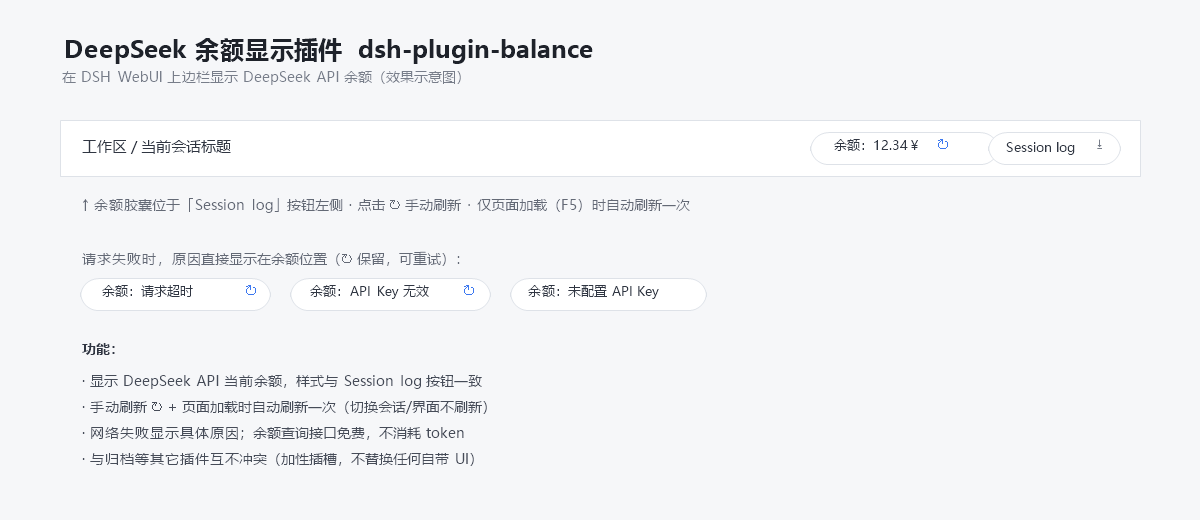
[Balance: 12.34¥ ↻] [Session log]
Features
- Displays the current DeepSeek API balance at the top-right of the session header, styled to match the built-in "Session log" button.
- Manual refresh: click the ↻ button.
- Auto refresh: once per page load (F5) only — switching sessions or views never triggers a refresh.
- Localized UI: the label (
Balance/余额), the loading text, and every error reason follow your DSH UI language (English / Simplified Chinese). - Clear failure reasons: on network or credential errors the capsule shows the concrete reason in the active language (e.g.
Balance: Request timed out,Balance: Invalid API key,Balance: No API key configured). - Free to use: the balance query (
GET https://api.deepseek.com/user/balance) consumes no API tokens. - No conflicts: registered in the additive slot
conversation.session.header.utilities(replaceRisk: none) — it never replaces any built-in UI.
The API key is resolved through DSH's own credential seam (~/.dsh/.credentials.yaml → DEEPSEEK_API_KEY) and never leaves the host process.
Download
Clone:
git clone https://github.com/anonRTtty/dsh-api-balance-displayer-plugin.git
Or download the ZIP: open the repository page → Code → Download ZIP, then extract dsh-plugin-balance/.
Install
Pick one of the three methods — do not mix them (mixing may register the plugin twice). After installing, restart DSH (or let the patch HMR apply), then hard-refresh the browser (
Ctrl+Shift+R).
Method 1 — One-command install (Windows PowerShell, recommended)
No clone needed; the script downloads the release ZIP, copies it into the profile and enables it:
irm https://raw.githubusercontent.com/anonRTtty/dsh-api-balance-displayer-plugin/main/scripts/install.ps1 | iex
Or after cloning/extracting:
cd dsh-plugin-balance
powershell -ExecutionPolicy Bypass -File .\scripts\install.ps1
Non-default profile: powershell -ExecutionPolicy Bypass -File .\scripts\install.ps1 -ProfileName headless
Method 2 — Official CLI (dsh plugin)
dsh plugin --profile web add github:anonRTtty/dsh-api-balance-displayer-plugin
This plugin declares dsh.bundle, so the official command adds it to dsh.profile.bundles and applies the in-package cordis.patch.yml automatically — no manual config editing needed.
Method 3 — Manual install
Copy the whole
dsh-plugin-balance/directory to:C:\Users\Administrator\.dsh\profiles\node_modules\dsh-plugin-balance\Append to the insert list in
C:\Users\Administrator\.dsh\profiles\web\cordis.patch.yml:- insert: - id: dsh-plugin-balance name: dsh-plugin-balanceRestart DSH.
Uninstall
One-command (Windows PowerShell):
irm https://raw.githubusercontent.com/anonRTtty/dsh-api-balance-displayer-plugin/main/scripts/uninstall.ps1 | iex
Or locally: powershell -ExecutionPolicy Bypass -File .\scripts\uninstall.ps1
Or manually: remove the dsh-plugin-balance entry from cordis.patch.yml, delete C:\Users\Administrator\.dsh\profiles\node_modules\dsh-plugin-balance\, then restart DSH.
(If you installed via Method 2, also run dsh plugin --profile web remove dsh-plugin-balance.)
File structure
dsh-plugin-balance/
├── package.json        # package manifest + dsh.bundle (auto-activate via CLI) + dsh.client
├── cordis.patch.yml    # bundle patch (applied automatically on CLI installs)
├── src/
│   ├── index.js        # Host half: /api/plugin.balance route (webServer exact route)
│   └── client.js       # Browser half: localized balance capsule (module-loader bundle)
├── scripts/
│   ├── install.ps1     # Windows one-command install script
│   └── uninstall.ps1   # Windows uninstall script
├── screenshot.png      # Screenshot
├── README.md           # English
├── README.zh-CN.md     # Simplified Chinese
└── LICENSE
Notes
- Balance endpoint:
GET https://api.deepseek.com/user/balance(free, consumes no tokens). The credential is read fromDEEPSEEK_API_KEYin~/.dsh/.credentials.yaml(the same seam the built-in model route uses); the key never leaves the host process. - The host registers the exact route
/api/plugin.balanceviawebServer(same extension point as dsh-plugin-session-delete); the browser fetches it same-origin. - License: MIT
相关推荐Related
-
 nexu-io/open-design
🎨 Best DeepSeek Harness Design Plugin. The open-source Claude Design alternative. 🖥️ Local-first desktop app. 🖼️ Your…
nexu-io/open-design
🎨 Best DeepSeek Harness Design Plugin. The open-source Claude Design alternative. 🖥️ Local-first desktop app. 🖼️ Your…
-
 freestylefly/awesome-gpt-image-2
Prompt as Code | GPT-Image2 工业级提示词引擎与模板库,530+ 个案例逆向工程,20+ 套工业级模板,并提炼出Skills,持续更新中
freestylefly/awesome-gpt-image-2
Prompt as Code | GPT-Image2 工业级提示词引擎与模板库,530+ 个案例逆向工程,20+ 套工业级模板,并提炼出Skills,持续更新中
-
 anywhere-labs/dsh-desktop
为 DeepSeek Harness (DSH) 插件生态打造的现代化桌面端解决方案。万物皆「插件」,桌面本身也是「插件」。
anywhere-labs/dsh-desktop
为 DeepSeek Harness (DSH) 插件生态打造的现代化桌面端解决方案。万物皆「插件」,桌面本身也是「插件」。
- Nagi-ovo/voyager Enhancement suite for Gemini, AI Studio, Claude & ChatGPT — plus a prompt manager for any web UI, DeepSeek Harness inclu…
-
 walkinglabs/learn-harness-engineering
Harness engineering beginner tutorial, from 0 to 1
walkinglabs/learn-harness-engineering
Harness engineering beginner tutorial, from 0 to 1
-
 awesome-dsh-plugin/awesome-dsh-plugin
A curated list of plugins for DeepSeek Harness (dsh) · DeepSeek Harness 插件精选列表
awesome-dsh-plugin/awesome-dsh-plugin
A curated list of plugins for DeepSeek Harness (dsh) · DeepSeek Harness 插件精选列表
-
 MemTensor/MemOS
Self-evolving memory OS for LLM & AI Agents: ultra-persistent memory, hybrid-retrieval, and cross-task skill reuse, with…
MemTensor/MemOS
Self-evolving memory OS for LLM & AI Agents: ultra-persistent memory, hybrid-retrieval, and cross-task skill reuse, with…
- yjh051108/dsh-routing-suite dsh-routing-suite — injector + router-standard kit: install the runtime injector first, then the task-aware reasoning-mo…