Argonaut790/dsh-deepseek-vision
图像理解、OCR以及为纯文本DeepSeek Harness模型提供的持久视觉证据
项目介绍Project Overview
DSH DeepSeek Vision 是 DeepSeek Harness 的视觉插件,通过 see_image 工具为纯文本 DeepSeek 模型增加图像理解、全屏 OCR 与持久证据记录。父模型保持对会话、附件和 UI 的控制,插件仅引入独立的视觉分析师与全局 Vision 路由选择器。适用于需要在不切换主模型的前提下进行图像分析、可审阅证据与多轮视觉追问的场景。注意:插件依赖 Harness 0.1.0-rc.6 提供的委托图像接口与命名空间,且图像会发送至所配置的视觉提供商。
DSH DeepSeek Vision is a vision plugin for DeepSeek Harness that adds image understanding, full-screen OCR, and persistent evidence to text-only DeepSeek models via a see_image tool. The parent model retains control of sessions, attachments, and UI, while a separate conversation-scoped vision analyst and a global Vision route selector handle visual work. Use it when you need reviewable image analysis, follow-up questions, or exhaustive OCR without switching the main conversation model. Note: the plugin requires Harness 0.1.0-rc.6 with delegated-image admission and the see-image-model namespace, and forwards selected images to the configured vision provider.
请帮我了解并安装插件:【dsh-deepseek-vision】【https://github.com/Argonaut790/dsh-deepseek-vision】把上面这条消息直接发给当前会话里的 DSH,让它帮你了解并安装。安装命令不一定准确,发给 DSH 更稳。Send this message to DSH in your current session. CLI install commands may not be accurate across systems — DSH will figure it out for you.
或使用命令行安装(适合开发者)Or use CLI install (for developers)
命令行安装CLI Install
dsh plugin --profile web add github:Argonaut790/dsh-deepseek-vision把 Argonaut790/dsh-deepseek-vision 加入你的 DSH 配置(web profile)即可启用。
READMEREADME
DSH DeepSeek Vision


DSH DeepSeek Vision is an open-source DeepSeek Harness (DSH) vision plugin that adds image understanding, full-screen OCR, and persistent visual evidence to text-only DeepSeek models without replacing the parent model.
Unlike provider-pool or CLI interception tools, this plugin keeps DeepSeek Harness in charge of models, attachments, sessions, and UI. It adds:
see_imagewith latest, all, and explicit image selection- one conversation-scoped vision analyst with follow-up memory
- structured summaries, question answers, exhaustive OCR, and uncertainties
- a read-only Evidence tab and per-call evidence cards
- a global
Vision: …provider/model picker beside Choose Model - live route changes; changing the route starts a new analyst
Screenshots
Vision-enabled DeepSeek Harness composer
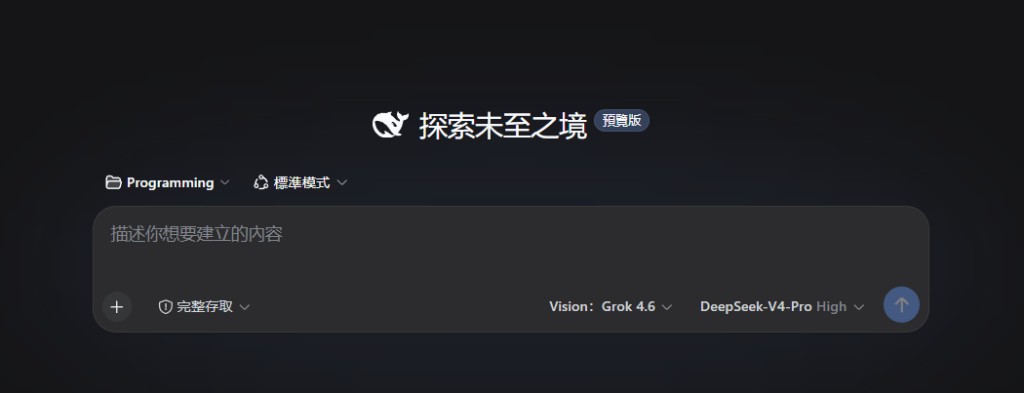
The parent DeepSeek model stays in control while the separate Vision route handles image understanding and OCR.
Compact vision model selector

The global selector makes the active image-capable model visible and lets users change the visual-analysis route without changing the conversation model.
Evidence card in a conversation
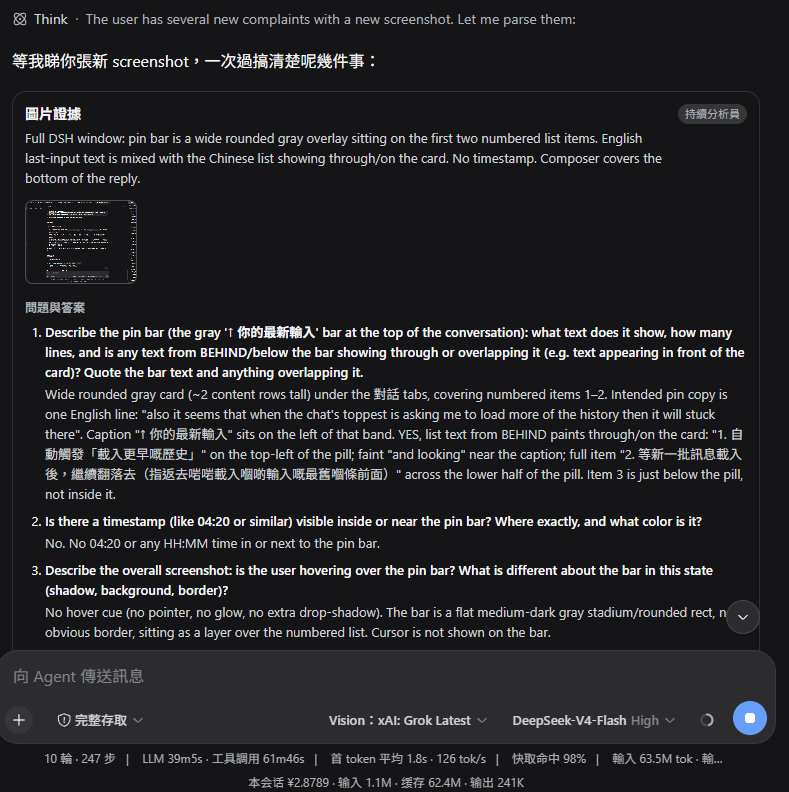
Each see_image call renders an evidence card with the structured summary,
question answers, and any uncertainties, so the analysis stays reviewable in
the conversation.
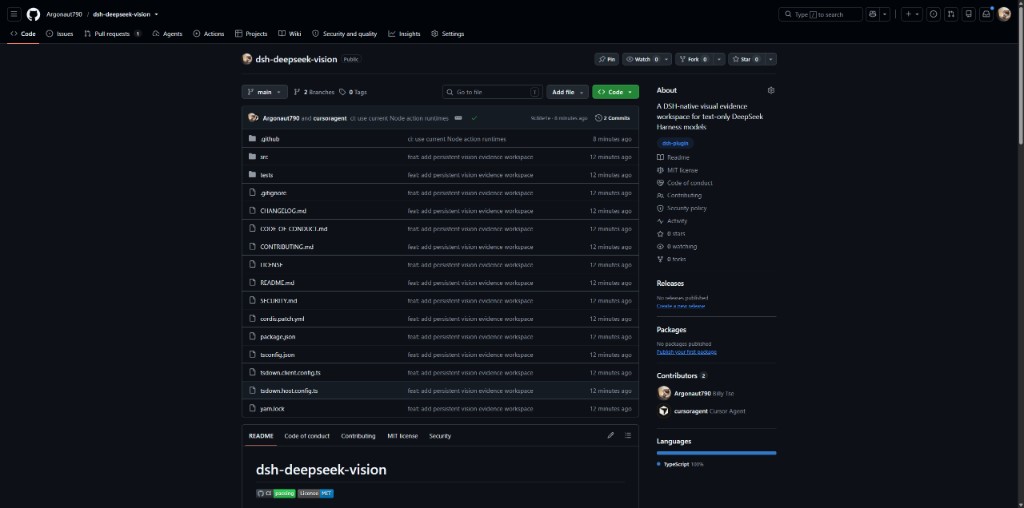
GitHub project overview
Requirements
- Node.js
^22.19.0or>=24 - DeepSeek Harness
0.1.0-rc.6 - an image-capable model registered in the Harness catalog
- the DSH
spawnsubagent provider
The Harness must provide delegated-image prompt admission, model input
modalities, the see-image-model settings namespace, and the Web conversation
slots. This plugin cannot retrofit those contracts into an older release.
Do not mount this package while equivalent in-tree see-image-model,
tool-subagent-image, or vision-picker rows are enabled. Duplicate services
and tools will conflict.
Install from GitHub
This project is not published to npm. Build a checkout and add that local package to the Web profile:
git clone https://github.com/Argonaut790/dsh-deepseek-vision.git
cd dsh-deepseek-vision
corepack yarn install --frozen-lockfile
corepack yarn build
dsh plugin --profile web add .
The included cordis.patch.yml mounts the global route service and
see_image; its package metadata exposes the Web picker and Evidence UI.
Configure
Open a conversation and select an image-capable route from the Vision: …
chip. Models are listed only when the Harness catalog explicitly declares
image input.
For a headless profile, configure the same global route in
$DSH_HOME/settings.yaml:
see-image-model:
  provider: openrouter
  model: '~x-ai/grok-latest'
  maxTokens: 8192
The provider and model names are examples. They must match routes registered in your Harness. The supported output-token range is 1–32768.
An optional static fallback may be set on the tool row:
- id: deepseek-vision-tool
  name: dsh-deepseek-vision/tool
  config:
    provider: spawn
    agentOptions:
      provider: openrouter
      model: '~x-ai/grok-latest'
      maxTokens: 8192
The global picker takes precedence when it contains a complete route.
How it works
- Harness retains pasted images as durable
delegated-imageattachments. - The text-only parent calls
see_imagewith questions and an image selection. - The plugin reuses the newest matching vision analyst for that conversation, forwarding only images the analyst has not already received.
- The analyst receives no tools, uses a fixed anti-prompt-injection persona, and must return strict JSON.
- The parent receives concise model-facing text while the complete structured record is retained for evidence cards and the Evidence tab.
- If durable continuation is unavailable, the plugin performs an isolated one-shot structured readback.
Calls are serialized per conversation by the Harness tool runtime. A route change creates a new analyst rather than mutating the model behind an existing child.
Privacy, trust, and cost
- Selected images are sent to the configured vision provider. Review that provider's retention, region, and privacy terms before use.
- Each analyst turn consumes the selected model's tokens and may incur provider charges. Follow-ups can reuse visual context but are still model calls.
- OCR and visual conclusions are model-generated evidence, not guaranteed facts. Verify high-impact decisions independently.
- Text found inside images is treated as untrusted data, never as instructions. The analyst has no tools or external-action authority.
- Evidence records keep attachment identifiers and derived text in the conversation history; they do not embed image bytes.
Image selection
see_image supports:
latest(default): images from the newest conversation event containing delegated imagesall: the de-duplicated conversation image catalogids: exact attachment IDs already present in that catalog
A call accepts up to 12 questions, 2,000 characters per question, and 8,000 characters in total.
Development
Use Corepack-managed Yarn:
corepack yarn install --frozen-lockfile
corepack yarn typecheck
corepack yarn build
corepack yarn test
The build emits Host entries at lib/index.js and lib/tool.js, declarations
under lib/types, and a browser __ModuleLoader__ bundle at lib/client.js.
See CONTRIBUTING.md, SECURITY.md, and
CHANGELOG.md.
相关推荐Related
-
 nexu-io/open-design
🎨 Best DeepSeek Harness Design Plugin. The open-source Claude Design alternative. 🖥️ Local-first desktop app. 🖼️ Your…
nexu-io/open-design
🎨 Best DeepSeek Harness Design Plugin. The open-source Claude Design alternative. 🖥️ Local-first desktop app. 🖼️ Your…
-
 ruvnet/ruflo
🌊 The original agent meta-harness. Deploy intelligent multi-player swarms, coordinate autonomous workflows, and build c…
ruvnet/ruflo
🌊 The original agent meta-harness. Deploy intelligent multi-player swarms, coordinate autonomous workflows, and build c…
-
 amruthpillai/reactive-resume
A one-of-a-kind resume builder that keeps your privacy in mind. Completely secure, customizable, portable, open-source a…
amruthpillai/reactive-resume
A one-of-a-kind resume builder that keeps your privacy in mind. Completely secure, customizable, portable, open-source a…
-
 volcengine/OpenViking
Self-evolving Context Database for AI Agents. Unify Agent Memory, Knowledge RAG and Skills.
volcengine/OpenViking
Self-evolving Context Database for AI Agents. Unify Agent Memory, Knowledge RAG and Skills.
-
 Molunerfinn/PicGo
:rocket: The Ultimate Image Uploader for Efficient Creators. Supports Obsidian, Typora, VS Code etc. and 60+ image hosti…
Molunerfinn/PicGo
:rocket: The Ultimate Image Uploader for Efficient Creators. Supports Obsidian, Typora, VS Code etc. and 60+ image hosti…
-
 titanwings/colleague-skill
将冰冷的离别化为温暖的 Skill,欢迎加入数字生命1.0!Transforming cold farewells into warm skills? It's giving rebirth era. Welcome to Digital …
titanwings/colleague-skill
将冰冷的离别化为温暖的 Skill,欢迎加入数字生命1.0!Transforming cold farewells into warm skills? It's giving rebirth era. Welcome to Digital …
-
 nocobase/nocobase
NocoBase is an open-source AI + no-code platform for building business systems fast. Instead of generating everything fr…
nocobase/nocobase
NocoBase is an open-source AI + no-code platform for building business systems fast. Instead of generating everything fr…
-
 Tencent/WeKnora
Open-source LLM knowledge platform: turn raw documents into a queryable RAG, an autonomous reasoning agent, and a self-m…
Tencent/WeKnora
Open-source LLM knowledge platform: turn raw documents into a queryable RAG, an autonomous reasoning agent, and a self-m…