AskTheWay/dsh-auto-memory
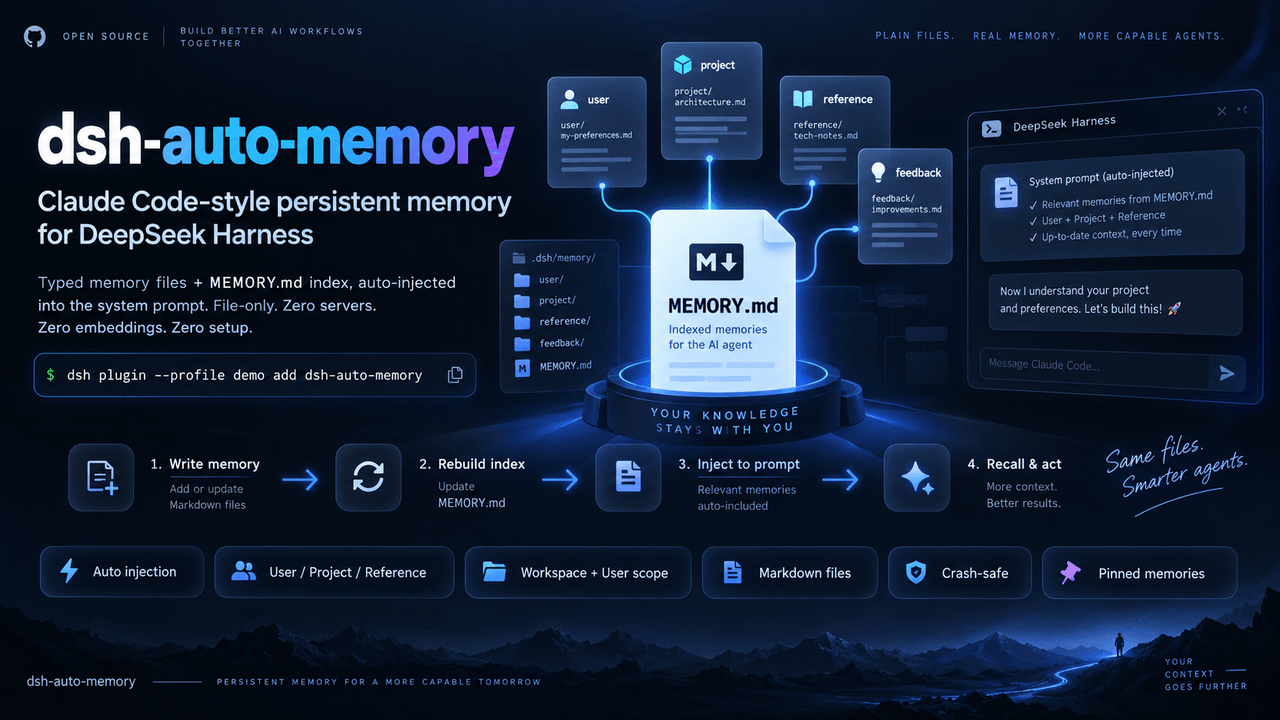
Claude Code-style auto-memory plugin for DeepSeek Harness (dsh): typed memory files + MEMORY.md index auto-injected into the system prompt. File-only, no external services.
Project Overview项目介绍
dsh-auto-memory is a native persistent-memory plugin built exclusively for DeepSeek Harness (DSH), installed into a chosen profile with a single command such as dsh plugin --profile demo add dsh-auto-memory and activated on the next restart of that profile. It exposes six typed tools — memory_write, memory_read, memory_list, memory_delete, memory_prune, and memory_delete_all — that store memories as ordinary Markdown files under $DSH_HOME/memory/, classified as user, feedback, project, or reference, and scoped across workspace and user layers to prevent cross-project leakage. A dynamic system-prompt section (order 4000) is re-evaluated on every step, byte-budgeted, and injects zero bytes when the store is empty, so Claude Code-style recall works without external services, embeddings, databases, or servers.
In a typical workflow the model is told "Remember: I'm a Python backend engineer preparing for interviews"; tomorrow, in a fresh session, asking "what do you know about me?" causes memory_read to resolve [[name]] cross-links one level deep and surface the stored summary. When autoSummarize: true is set, a silent background LLM pass at root-session end extracts durable new facts, deduplicates them, and files them as memories. The target audience is any individual or team that relies on DSH for long-running coding sessions and wants automatic, hands-off context recovery comparable to Claude Code without configuring third-party MCP servers.
Dependencies are minimal: @deepseek-ai/dsh >= 0.1.5-rc.2, Node ^22.19 || >=24, and exactly one runtime package, yaml, with an installed footprint of roughly 15 kB; the license is MIT. Configuration is wholesale-replaced under the profile's cordis.patch.yml, exposing maxBytes (default 4096), memoryDir (default $DSH_HOME/memory), and enableUserScope. First-run caveats: source installs need npm install && npm run build before dsh plugin add /abs/path; bulk memory_delete_all requires explicit human approval via tools/pre-execute; budget truncation is currently positional rather than relevance-ranked, so pinned probes retain at least 80% at half budget while ordinary probes degrade as N grows — full relevance ranking remains on the roadmap.
dsh-auto-memory 是一款面向 DeepSeek Harness(DSH)的原生持久记忆插件,以 dsh plugin add dsh-auto-memory 命令安装到指定 profile(例如 demo)后即可生效。它提供 memory_write、memory_read、memory_list、memory_delete、memory_prune 与 memory_delete_all 六个工具,将记忆以普通 Markdown 文件的形式落地于 $DSH_HOME/memory/ 目录,并按 user / feedback / project / reference 四类组织,支持 workspace 与 user 双层作用域以避免跨项目泄漏。每次模型请求都会重新评估系统提示中的索引区,并在内容为空时注入 0 字节。
典型用法是让代理在日常对话中调用 memory_write 记录偏好与项目背景,并在新会话中通过 memory_read 触发 [[name]] 交叉链接展开,使上下文自动恢复;启用 autoSummarize 后,根会话结束时会异步抽取持久事实做去重归档。插件还内置了过零读取的软隐藏淘汰、由 tools/pre-execute 人工确认的批量删除防护,以及 deterministic eval 层保障的字节预算、锁定自愈与 {{ 注入清洗。它适合任何长期使用 DSH、又希望拥有类 Claude Code 自动记忆体验的个人或团队。
依赖方面,仅要求 @deepseek-ai/dsh >= 0.1.5-rc.2 与 Node ^22.19 || >=24,运行时仅额外引入 yaml 一个依赖,安装体积约 15 kB,许可证为 MIT。安装时若通过源码需执行 npm install && npm run build && dsh plugin --profile demo add /abs/path,并可通过 cordis.patch.yml 覆盖 maxBytes(默认 4096)、memoryDir、enableUserScope 等配置。已知限制:当前按索引顺序截断,相关性排序尚未实现,pinned 探针在半数预算下保留率可达 80% 以上,普通探针仍会随记忆数下降。
请帮我安装这个 DSH 插件。安装前先完成【兼容性检查 + 安全性检查】,检查通过再动手。

插件:dsh-auto-memory(AskTheWay/dsh-auto-memory)
仓库:https://github.com/AskTheWay/dsh-auto-memory
本站详情页:https://www.yhbd.top/plugins/asktheway-dsh-auto-memory/
本站登记:类型 plugin · 归类 原生 DSH 插件 · 许可证 MIT · ⭐ 75 · 最近提交 2026-09-28 · 主语言 TypeScript

按下面顺序执行,每步先把结论告诉我,再进入下一步:

【1 兼容性检查】
① 我这边:DSH 版本、Node 版本、操作系统、当前 profile(web / desktop)。
② 读它的 README、package.json、插件 manifest,列出它要求的 DSH 版本 / Node 版本 / 操作系统 / 外部依赖 / 需要另外先装的运行时。
③ 逐条比对,结论只写「满足 / 不满足 / 未知」三种;不满足的给出可行替代方案。
④ 检查是否和我已装的插件冲突:命令名重复、skill / tool 重名、端口占用、重复注册的 MCP server。

【2 安全性检查】
① 仓库可信度:和上面「本站登记」是否一致;star / fork 数、创建时间、最近提交,是否归档或长期停更。
② 安装脚本:逐行看 package.json 的 preinstall / install / postinstall,以及 install.sh、setup.ps1 之类脚本。出现 curl|bash、下载后直接执行、混淆代码、访问与插件功能无关的域名,立刻停下来告诉我,不要继续装。
③ 依赖:列出新增依赖,标出无人维护、或与知名包拼写近似的可疑包(typosquatting)。
④ 权限与副作用:它会读写哪些目录、访问哪些域名、需要哪些 DSH 权限(filesystem / network / shell / clipboard 等),以及怎么卸载和回滚。
⑤ 如果它要求 sudo / 管理员权限,或权限明显超出功能所需,先停下来问我。

【3 安装】
上面两步没有「不满足」和「高危项」时才执行;用官方推荐方式安装,不要自行提权。

【4 汇报】
用表格输出:检查项 / 结论 / 依据 / 是否需要我决策。拿不准的一律写「未知」并说明要我怎么确认——不要猜,也不要替我决定。
Send this message to DSH in your current session: it verifies compatibility and security first (answering met / not met / unknown item by item) and only installs once everything checks out — it will stop and ask you if it finds a high-risk item. The box scrolls; the copy is the full prompt. CLI install commands may not be accurate across systems, so DSH is the safer route.把上面这条消息直接发给当前会话里的 DSH:它会先核对兼容性与安全性(逐条给「满足 / 不满足 / 未知」),确认没问题再安装,有高危项会停下来问你。框内可滚动,复制到的是完整提示词;安装命令不一定准确,发给 DSH 更稳。
- This site's static screen found no obvious risk signal (stars, license, activity, manifest)本站静态筛查没发现明显风险信号(星标、许可证、更新活跃度、清单完整度)
DSH walks through these 9 checksDSH 会逐条核对这 9 项
Compatibility兼容性
- DSH, Node, OS and profile requirementsDSH 版本 / Node 版本 / 操作系统 / profile 是否满足要求
- External dependencies and runtimes (Electron / Python / Docker, ...)外部依赖与运行时(Electron / Python / Docker 等)是否齐备
- Conflicts with installed plugins: command names, skill / tool names, ports, duplicate MCP registration与已装插件是否冲突:命令名、skill / tool 重名、端口占用、重复 MCP 注册
Security安全性
- Repo matches the facts registered here; archived or abandoned?仓库是否与页面登记一致,是否归档或长期停更
- Safety of preinstall / install / postinstall and install.sh / setup.ps1preinstall / install / postinstall 与 install.sh、setup.ps1 是否安全
- curl|bash, download-then-execute, obfuscation, unrelated domains → stop immediatelycurl|bash、下载即执行、混淆代码、无关域名 → 立刻停止
- Typosquatting or unmaintained packages among the new dependencies新增依赖里有没有 typosquatting 或无人维护的包
- Requested permissions vs. what the feature actually needs申请了哪些权限、是否超出功能所需(filesystem / network / shell / clipboard)
- Any sudo / admin requirement, plus uninstall and rollback是否要求 sudo / 管理员权限,以及卸载与回滚方式
Anything uncertain must be marked unknown with a note on how to confirm it. This site's signal screen is a static snapshot, not a security audit.拿不准的必须标「未知」并说明要我怎么确认。本站的信号筛查是静态快照,不能替代安全审计。
Or use CLI install (for developers)或使用命令行安装(适合开发者)
CLI Install命令行安装
dsh plugin --profile demo add dsh-auto-memory把 AskTheWay/dsh-auto-memory 加入你的 DSH 配置(web profile)即可启用。
READMEREADME
dsh-auto-memory





Your dsh agent forgets everything you tell it. Every. Single. Session.
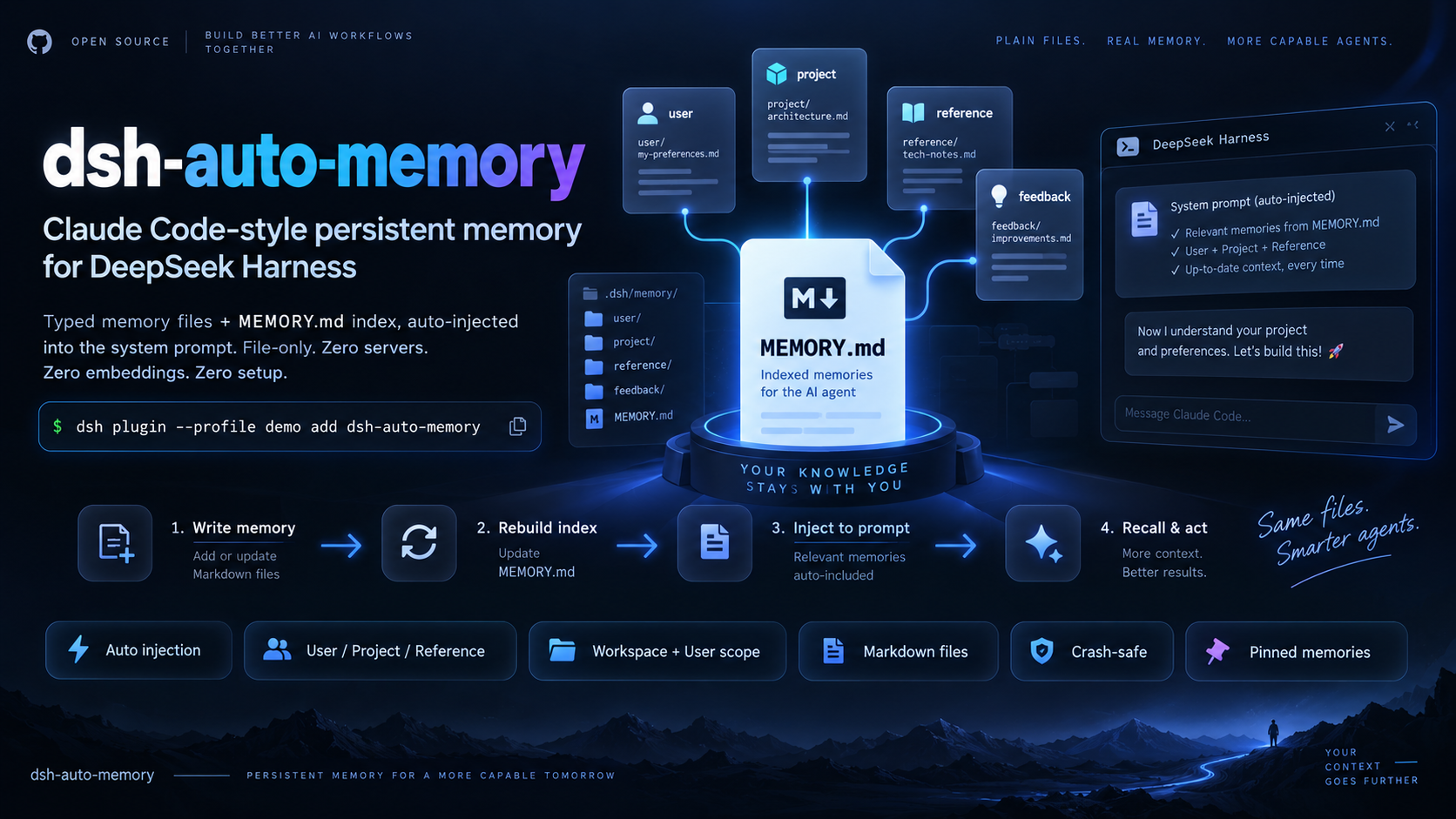
Fix it with one command. Claude Code-style persistent memory for DeepSeek Harness — native, zero servers, zero embeddings, zero setup.
dsh plugin --profile demo add dsh-auto-memory
Say "Remember: I'm a Python backend engineer preparing for interviews" today — open a brand-new session tomorrow, ask "what do you know about me?", and it remembers.
What's new in 0.3.0 (P2)
- Pinned memories (
pinned: trueon memory_write): pinned entries lead the index, survive budget truncation, and are exempt from staleness eviction — a trust anchor the user controls. - Eval-driven fix: the injection budget now covers the whole section (index + guidance); it used to overshoot by ~800 bytes. Caught by the new deterministic evaluation layer on its first run.
- Deterministic eval layer (evals/) in CI: injection budget curves, eviction zero-misfire, link-expansion bounds, and a signal-to-noise characterization — which pinned-priority truncation then improved from 38% → ≥80% probe retention under half-budget pressure. Same budget, better memories.
What's new in 0.2.0 (P1)
- Auto-consolidation (
autoSummarize: true): when a root session ends, a background LLM pass extracts durable new facts from the session and files them as memories — deduplicated, capped, fully silent on failure. Claude Code doesn't do this automatically. - Forgetting & eviction: every memory carries lifecycle metadata
(created/updated/reads);
memory_readcounts references;staleAfterDayssoft-hides zero-reference stale memories from the injected index (files kept);memory_prunelists (dry-run) or deletes aged memories. - Recall expansion:
memory_readresolves[[name]]cross-links one level and attaches linked summaries. memory_delete_all— guarded bytools/pre-executehuman approval: the model cannot self-confirm irreversible bulk deletes.- Hardened by a second adversarial review (11 agents): single-lock
clear(no concurrent-write escape), conditional index rebuild ontouch(no O(N) amplification), session-start stale refresh, subagent capture cleanup, abortable consolidation.
Showing the opening section of the README — the full document lives in the repository以上为 README 开头摘要,完整文档在仓库内 · View the full README on GitHub →在 GitHub 查看完整 README →
Related相关推荐
-
 mindscale-noah/MindMemOS
- Amakurai/dsh-liketavern A DeepSeek Harness (dsh) plugin — turns dsh web into a SillyTavern-style roleplay frontend: character cards, prompt pres…
-
 Aik358/dsh-auto-memory
Proactive associative memory for DSH: system-prompt recall before the model speaks, three-layer auto-consolidation, skil…
Aik358/dsh-auto-memory
Proactive associative memory for DSH: system-prompt recall before the model speaks, three-layer auto-consolidation, skil…
- lna-lab/distill-kura 蒸留蔵 — distilled long-term memory for agents: recall by meaning, writing gated by evidence, one kura per agent mode. Ship…
-
 fishzjp/qa-skills
让 AI 像资深测试工程师一样工作:面向 AI Agent 的测试工程 Skill 框架——11 Skills + 共享知识库 + 类型决策矩阵(Claude Code / dsh 等 Agent 可用)
fishzjp/qa-skills
让 AI 像资深测试工程师一样工作:面向 AI Agent 的测试工程 Skill 框架——11 Skills + 共享知识库 + 类型决策矩阵(Claude Code / dsh 等 Agent 可用)
-
 WeirdSky924/agent-handoff-skill
Use this cross-platform skill in Codex or Claude Code to establish repository-local continuity memory so a future agent …
WeirdSky924/agent-handoff-skill
Use this cross-platform skill in Codex or Claude Code to establish repository-local continuity memory so a future agent …
- oliblue-evan/dsh-roleplay-preset DeepSeek 深度调校的沉浸式角色扮演 Agent 预设(dsh)——零工具纯对话、酒馆式演出格式、文件记忆库
-
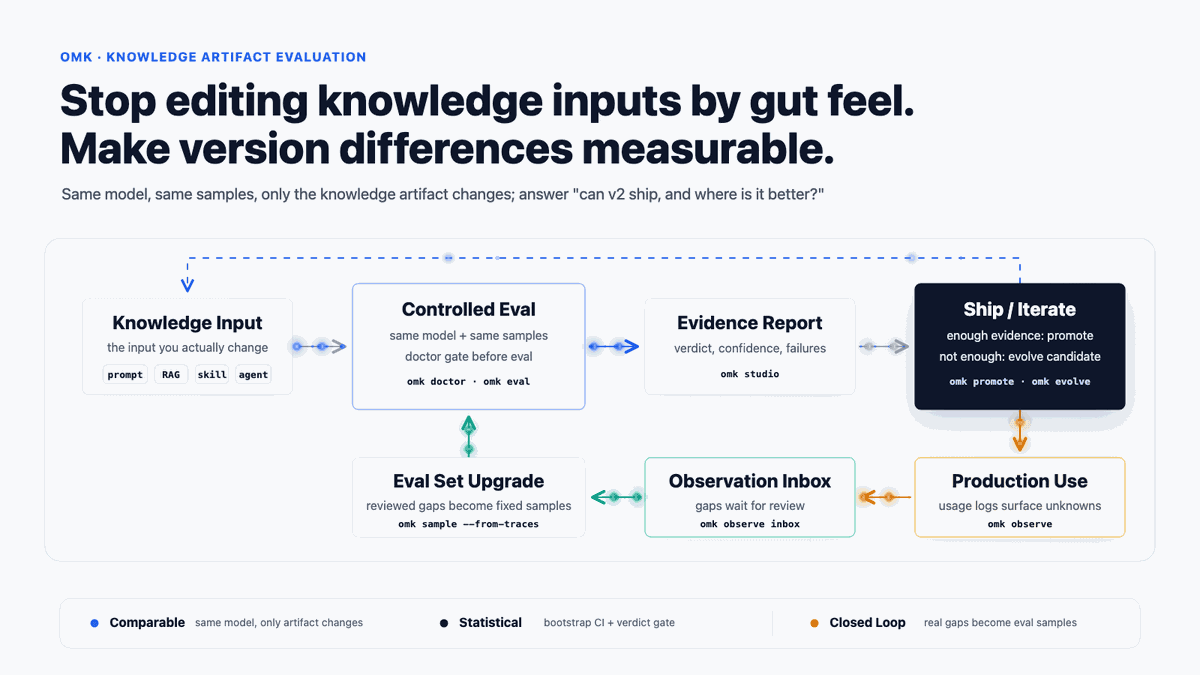 lizhiyao/oh-my-knowledge
OMK — Evidence-backed evaluation and observability for prompts, RAG, skills, agents, and workflows. Native Codex, Claude…
lizhiyao/oh-my-knowledge
OMK — Evidence-backed evaluation and observability for prompts, RAG, skills, agents, and workflows. Native Codex, Claude…