
better-er/dsh-classic-coding
为了在 AI 编程的高度发展的今天,保护古法编程这一非物质文化遗产,dsh·古法编程插件被开发出来,让你可以在 DeepSeek Harness 中继续体验大脑的思考能力。
catalog 简介 / catalog descriptioncatalog description:dsh·古法编程插件
项目介绍Project Overview
dsh·古法编程插件是 DSH 客户端/主机双半身插件,宿主端通过 /classic-coding 独立 RPC 通道对接 ctx.fs,暴露 describe、listDir、readFile、writeFile 四个端点,客户端在对话右侧滑出 Monaco 编辑器与懒加载文件树,支持多 Tab、Ctrl+S 保存、明暗主题自动适配。适用于边聊 AI 边直接编辑本地工作区代码的场景。注意:客户端 factory 必须以 return module.exports 结尾,否则 DSH 将启动失败。
dsh-classic-coding is a DSH client/host dual-side plugin. The host registers a dedicated /classic-coding RPC channel against ctx.fs, exposing describe, listDir, readFile, and writeFile endpoints, while the client slides a Monaco editor plus a lazy-loaded file tree into the right side of the chat. It supports multi-tab editing, Ctrl+S saving, and automatic light/dark theme adaptation. Use it to edit local workspace files directly alongside AI conversations. Note: the client factory must end with return module.exports, otherwise DSH will fail loudly at startup.
请帮我了解并安装插件:【dsh-classic-coding】【https://github.com/better-er/dsh-classic-coding】把上面这条消息直接发给当前会话里的 DSH,让它帮你了解并安装。安装命令不一定准确,发给 DSH 更稳。Send this message to DSH in your current session. CLI install commands may not be accurate across systems — DSH will figure it out for you.
或使用命令行安装(适合开发者)Or use CLI install (for developers)
命令行安装CLI Install
dsh plugin --profile web add github:better-er/dsh-classic-coding把 better-er/dsh-classic-coding 加入你的 DSH 配置(web profile)即可启用。
READMEREADME
dsh·古法编程插件
为了在 AI 编程的高度发展的今天,保护古法编程这一非物质文化遗产,dsh·古法编程插件被开发出来,让你可以在 DeepSeek Harness 中继续体验大脑的思考能力。
功能
在 DSH 对话界面右侧滑出一个 Monaco 编辑器 + 文件树面板,直接在对话里改本地工作区代码,不用切到外部编辑器。
- 侧栏底部「⌨️ 古法编程」按钮,点击展开/收起编辑器面板。
- 文件树左侧 250px,懒加载目录、支持折叠/展开,过滤
.git/node_modules等。 - Monaco 编辑器(CDN 动态加载),多文件 Tab、语法高亮、
Ctrl+S保存。 - 底部状态栏显示当前文件路径和保存结果。
- 点击遮罩 / 按
Esc/ 点 × 关闭面板,随 DSH 明/暗主题自动适配。 - 侧栏收起成窄 rail 时自动切换为单图标按钮,展开时恢复完整两行结构。
- 消息流里的文件按钮(工具行路径、产物区文件)后跟一个「古法编程」尾巴:点击尾巴即可在插件内打开该文件,点击按钮本身保持原有外部打开行为。
截图
侧边栏开关

侧栏底部的「⌨️ 古法编程」按钮,点击展开/收起编辑器面板。
消息流文件按钮的古法编程后缀
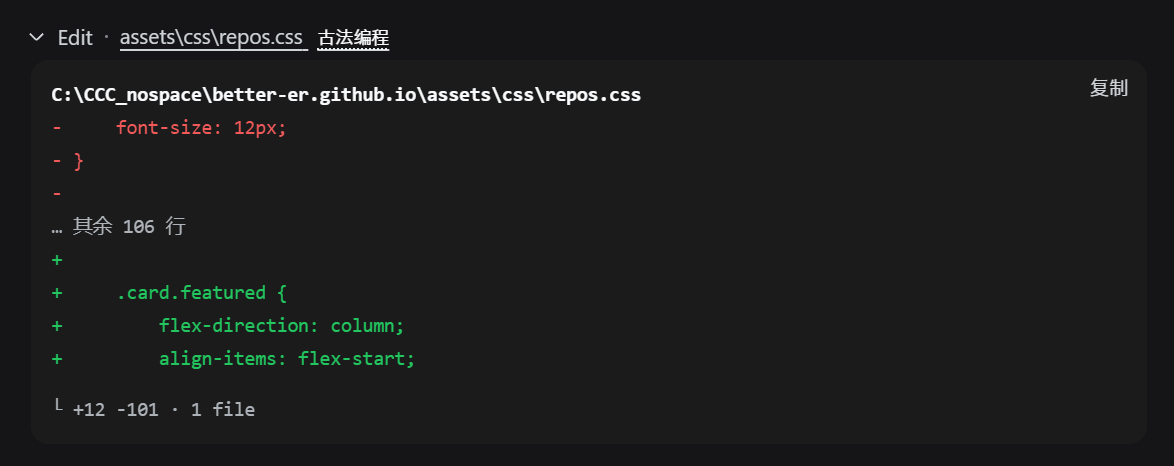
消息流中工具行路径与产物区文件按钮后追加的「古法编程」尾巴:点击尾巴在插件内打开,点击按钮本身保持外部打开。
编辑器面板
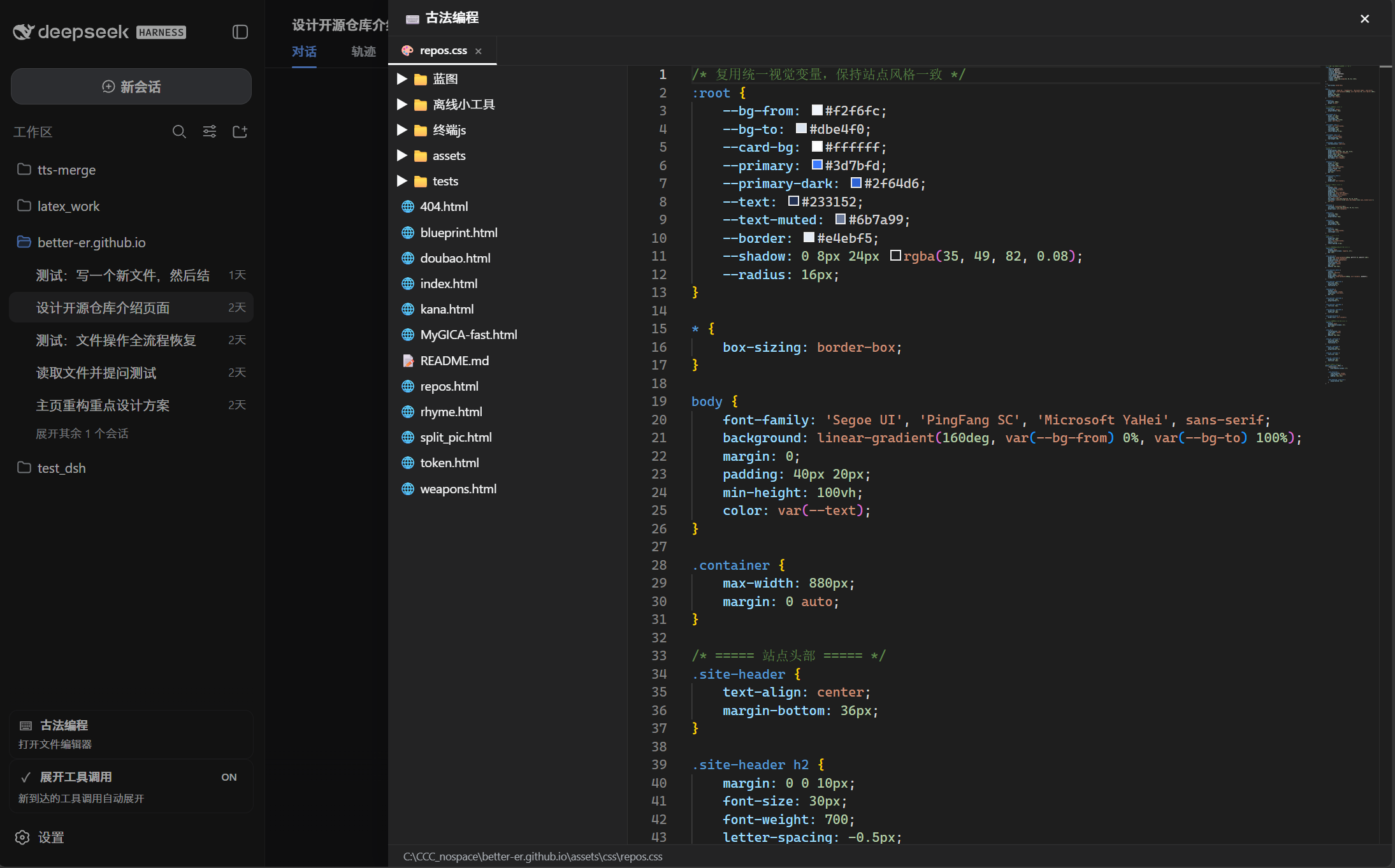
右侧滑入的完整编辑面板:左侧文件树、顶部多文件 Tab、中部 Monaco 编辑器、底部状态栏。
要求
- 是标准形态的 dsh 客户端插件(声明
dsh.client、导出./client)。 - 同时声明了
dsh.bundle,因此也是一个自挂载的 bundle 层插件:用dsh plugin --profile <name> add从 GitHub 安装后,会被自动识别为 profile layer 并挂载,无需手工写组合 entry。 - Host 端通过
ctx.connection.rpc.handle('/classic-coding', ...)注册独立 RPC 通道(/api共享通道的唯一拦截器槽位已被官方 gateway 占用,插件端点必须走 handle 独立通道),提供describe/listDir/readFile/writeFile四个端点,底层走 DSH 内置的ctx.fs文件系统服务。
安装
dsh plugin --profile web add github:better-er/dsh-classic-coding
一条命令装完即生效(自动挂载,重启 DSH web 后启用),无需手工编辑任何组合文件。
卸载
dsh plugin --profile web remove dsh-classic-coding
彻底移除,重启 DSH web 后不再加载。
构建与原理
DSH 客户端 + 主机双半身插件:Host 端注册文件系统 RPC,Client 端提供编辑器 UI。
- 无构建:
lib/client.js(dsh.client.platform: "web"、exports["./client"] → ./lib/client.js)与lib/index.js均为源码即产物。 - UI 挂载点:
sidebar.footer.action(触发按钮)+shell.overlay(编辑器面板)两个插槽注入。 - 样式:DSH 主题 CSS 变量(
--dsw-alias-*),明暗主题自适应;data-ds-dark-theme属性变化时实时跟随切换 Monaco 主题。 - 编辑器:Monaco Editor 经 CDN 动态加载,React 组件从 loader 的 module table 获取,不引入任何额外 npm 依赖。
- 硬性约束:
lib/client.js的factory必须以return module.exports结尾,否则模块导出为undefined,DSH 启动即 fail-loud。
License
相关推荐Related
-
 nexu-io/open-design
🎨 Best DeepSeek Harness Design Plugin. The open-source Claude Design alternative. 🖥️ Local-first desktop app. 🖼️ Your…
nexu-io/open-design
🎨 Best DeepSeek Harness Design Plugin. The open-source Claude Design alternative. 🖥️ Local-first desktop app. 🖼️ Your…
-
 ruvnet/ruflo
🌊 The original agent meta-harness. Deploy intelligent multi-player swarms, coordinate autonomous workflows, and build c…
ruvnet/ruflo
🌊 The original agent meta-harness. Deploy intelligent multi-player swarms, coordinate autonomous workflows, and build c…
-
 amruthpillai/reactive-resume
A one-of-a-kind resume builder that keeps your privacy in mind. Completely secure, customizable, portable, open-source a…
amruthpillai/reactive-resume
A one-of-a-kind resume builder that keeps your privacy in mind. Completely secure, customizable, portable, open-source a…
-
 esengine/DeepSeek-Reasonix
DeepSeek-native AI coding agent for your terminal. Engineered around prefix-cache stability — leave it running.
esengine/DeepSeek-Reasonix
DeepSeek-native AI coding agent for your terminal. Engineered around prefix-cache stability — leave it running.
-
 volcengine/OpenViking
Self-evolving Context Database for AI Agents. Unify Agent Memory, Knowledge RAG and Skills.
volcengine/OpenViking
Self-evolving Context Database for AI Agents. Unify Agent Memory, Knowledge RAG and Skills.
-
 Molunerfinn/PicGo
:rocket: The Ultimate Image Uploader for Efficient Creators. Supports Obsidian, Typora, VS Code etc. and 60+ image hosti…
Molunerfinn/PicGo
:rocket: The Ultimate Image Uploader for Efficient Creators. Supports Obsidian, Typora, VS Code etc. and 60+ image hosti…
-
 titanwings/colleague-skill
将冰冷的离别化为温暖的 Skill,欢迎加入数字生命1.0!Transforming cold farewells into warm skills? It's giving rebirth era. Welcome to Digital …
titanwings/colleague-skill
将冰冷的离别化为温暖的 Skill,欢迎加入数字生命1.0!Transforming cold farewells into warm skills? It's giving rebirth era. Welcome to Digital …
-
 nocobase/nocobase
NocoBase is an open-source AI + no-code platform for building business systems fast. Instead of generating everything fr…
nocobase/nocobase
NocoBase is an open-source AI + no-code platform for building business systems fast. Instead of generating everything fr…