bill9109/dsh-conversation-share
Install: dsh plugin --profile web add github:bill9109/dsh-conversation-share
catalog 简介 / catalog descriptioncatalog description:分享任意段落的 DSH 对话
项目介绍Project Overview
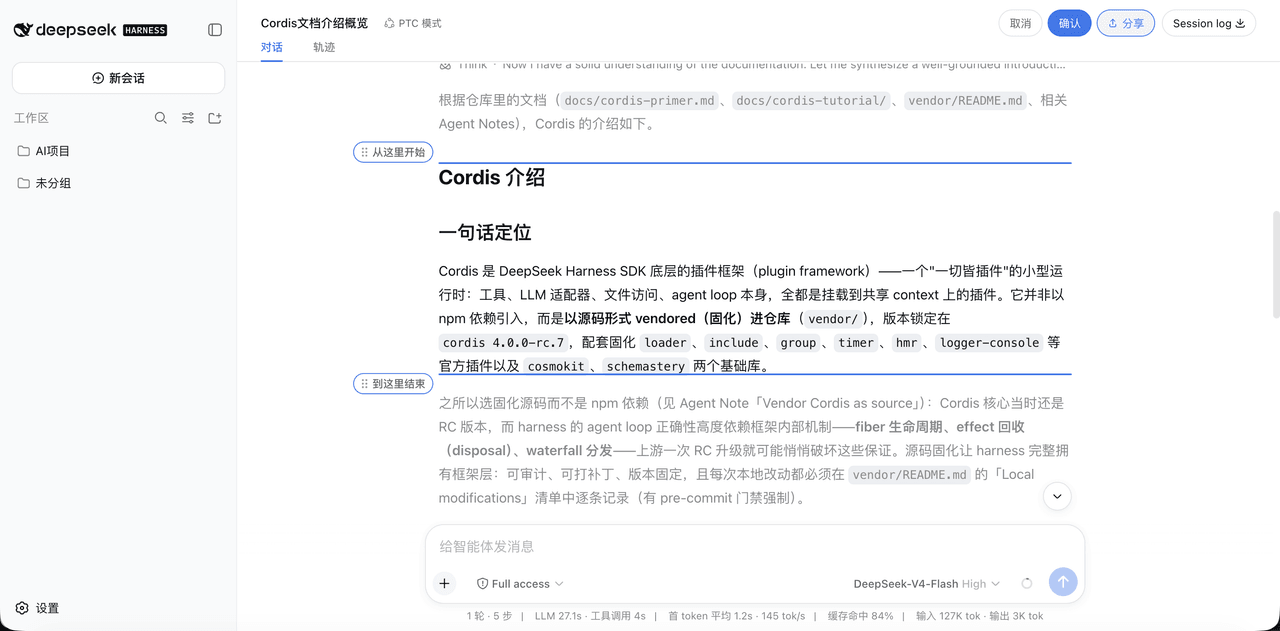
dsh-conversation-share 是 DSH Web 端的会话分享插件。它在 Session log 旁提供分享按钮,可拖动两个磁性吸附的标记精确框选对话范围,吸附到消息行、Markdown 块、文本行或内容按钮边缘,并将所选片段渲染为带品牌页脚的 PNG 长图,支持预览、下载与复制。适合在需要把一段 DSH 对话导出为可分享图片时使用。注意:长内容需分块渲染,极长选区可能稍慢;且安装或升级后必须重启 web 并强制刷新浏览器才能生效。
dsh-conversation-share is a DSH Web plugin for sharing conversation snippets. It adds a share button next to the Session log control; two draggable, magnetically snapping markers let users bracket an exact range (snapping to message rows, markdown blocks, text lines, or content buttons), then render the selection as a single PNG long image with a DeepSeek Harness branded footer. Use it when a meaningful slice of a DSH conversation needs to be exported as a sharable image with preview, download, and copy-to-clipboard options. Caveats: extra-long selections are stitched from chunks and may take time, and a web restart plus hard refresh are required after install, upgrade, or removal.
请帮我了解并安装插件:【dsh-conversation-share】【https://github.com/bill9109/dsh-conversation-share】把上面这条消息直接发给当前会话里的 DSH,让它帮你了解并安装。安装命令不一定准确,发给 DSH 更稳。Send this message to DSH in your current session. CLI install commands may not be accurate across systems — DSH will figure it out for you.
或使用命令行安装(适合开发者)Or use CLI install (for developers)
命令行安装CLI Install
dsh plugin --profile web add github:bill9109/dsh-conversation-share把 bill9109/dsh-conversation-share 加入你的 DSH 配置(web profile)即可启用。
READMEREADME
dsh-conversation-share




Install: dsh plugin --profile web add github:bill9109/dsh-conversation-share
Render a selected range of a DeepSeek Harness conversation into a PNG long image with a branded footer, ready to share.
Why this exists
Conversation history lives inside the DSH Web UI, and sharing a meaningful part of it usually means screenshots spliced by hand — cropped, misaligned, with no brand or context. This plugin lets you pick an exact range of a conversation with two draggable, magnetically snapping markers and render it into a single polished PNG long image with a DeepSeek Harness branded footer.
Screenshots
Features
- Share capsule to the left of the Session log button in the top-right corner (same style as log; clicking activates a blue highlight, with
[Cancel][Confirm]expanding to its left) - Two draggable range markers (horizontal labels: "Start here" / "End here") with magnetic snapping
- Snap points = semantic message rows + markdown blocks (p/pre/ul/li/table/headings) + visual boxes (code blocks/cards) + content-level buttons (artifact file chips) + every text line inside paragraphs
- The start handle snaps to an element's top edge, the end handle to its bottom edge; the two handles cannot cross
- Snap hint = light blue translucent rounded-rect fill (flat style)
- Scrolling model: handles follow the pointer 1:1 within the viewport without scrolling; only when the pointer enters the top/bottom edge zones (64px) does the page scroll (clamped penetration depth, frame-rate independent), stopping when it leaves; clicking does not scroll (a real drag of ≥8px is required)
- Capture: 40pt theme-background padding (symmetric on all sides) + a DeepSeek Harness brand icon at the bottom (with the BETA badge text); extra-long content is rendered in chunks and stitched together to bypass the canvas height limit
- Preview modal: image width adapts, vertical scroll to review, download PNG, copy image
Usage
- Click the share capsule next to the Session log button in the top-right corner; it activates (blue highlight) and the
[Cancel][Confirm]controls appear - Drag the two range markers to select the conversation range — they snap to message rows, markdown blocks, and line-level text; the start handle snaps to a top edge, the end handle to a bottom edge
- Click Confirm to render the selection into a PNG long image (extra-long content is chunked and stitched automatically)
- Review the result in the preview modal: download the PNG or copy the image to the clipboard
Install
Install into the web profile with the standard dsh plugin mechanism (no source changes, no manual package.json edits):
dsh plugin --profile web add github:bill9109/dsh-conversation-share

# Or pin a branch/commit
dsh plugin --profile web add github:bill9109/dsh-conversation-share#main

# Or install from a local checkout (development — rebuild and it takes effect)
dsh plugin --profile web add /path/to/your/dsh-conversation-share
Internally the command runs pnpm add <spec> in the profile directory and automatically appends packages that declare dsh.bundle to dsh.profile.bundles. The repository ships its build output (lib/), so no consumer-side build is needed.
After installing, restart web and hard-refresh the browser (Cmd+Shift+R) — old tabs do not load the new bundle.
Upgrade
dsh plugin --profile web update github:bill9109/dsh-conversation-share
For a local-path installation, run add again against the replacement checkout, then restart web and hard-refresh.
Uninstall
dsh plugin --profile web remove @bill9109/dsh-conversation-share
The command runs pnpm remove <pkg> in the profile directory and removes it from dsh.profile.bundles. After uninstalling, restart web and hard-refresh the browser.
Troubleshooting
| Symptom | Resolution |
|---|---|
| Share capsule does not appear | The plugin only loads after restarting web and hard-refreshing the browser; verify the bundle row exists in the profile (`dsh --profile web --dump-config |
| Handles cannot cross or snap oddly | That is by design — the start handle snaps to top edges, the end handle to bottom edges, and they cannot cross; drag past an element to flip which edge binds |
| The page scrolls while dragging | Scrolling only happens in the 64px top/bottom edge zones; drag within the viewport to move the handle 1:1 without scrolling |
| Confirm does nothing / blank image | Ensure the selection covers at least one message; the capture pipeline chunks and stitches extra-long content, so very long ranges may take a moment |
| Copied image is missing from the clipboard | The browser may have blocked clipboard image writes; use Download PNG instead |
Directory structure
dsh-conversation-share/
├── src/
│   ├── index.ts              # host half of the plugin (no-op)
│   ├── client/               # browser half (client bundle entry src/client/index.ts)
│   │   ├── index.ts          # apply(ctx): mounts the share flow
│   │   ├── controller.ts     # share button / cancel-confirm / mode switching / capture orchestration
│   │   ├── markers.ts        # range marker handles (snapping, scrolling, state machine)
│   │   ├── snap-targets.ts   # snap-target collection (rows/blocks/line-level text/content buttons + position dedup)
│   │   ├── capture.ts        # capture pipeline (chunking, cropping, stitching, branded footer)
│   │   ├── brand.ts          # brand SVG clone (var() baking + clip-path neutralization)
│   │   ├── modal.ts          # preview modal + download/copy
│   │   └── dom.ts / theme.ts / icons.ts / toast.ts
│   └── vendor/html-to-image/ # vendored html-to-image 1.11.13 (MIT, see its LICENSE)
├── scripts/build.mjs         # build script (links DSH checkout deps → tsc → tsdown)
├── lib/                      # build output (client.js is the browser bundle, committed)
├── package.json              # dsh.bundle + dsh.client declarations
├── cordis.patch.yml          # bundle patch (inserts the conversation-share plugin)
└── tsconfig.json / tsdown.config.mjs
Build
Requires a DSH checkout (the official repository or a snapshot directory both work):
DSH_CHECKOUT=/path/to/dsh-checkout node scripts/build.mjs
# or via pnpm:
DSH_CHECKOUT=/path/to/dsh-checkout pnpm run build
The script temporarily symlinks the DSH checkout's node_modules into this directory (cleaned up automatically when the build ends) and runs tsc (type check) then tsdown (producing lib/index.js + lib/client.js).
Development and verification
pnpm run check     # tsc --noEmit
DSH_CHECKOUT=/path/to/dsh-checkout pnpm run build   # -> lib/ (committed)
lib/ is committed so consumers install without building. Changes to the share flow (markers, snapping, capture, preview) should be exercised against a live web profile and the built bundle committed in the same change.
Release
Make sure the build output is up to date:
DSH_CHECKOUT=/path/to/dsh-checkout node scripts/build.mjsBump the version, update
CHANGELOG.md, commit and push tomain, and tag the release:git add . && git commit -m "release v0.1.x" && git push origin main git tag v0.1.x && git push origin v0.1.x
Community and About
- Use GitHub Issues for reproducible bugs, focused feature requests, and usage questions.
- Read CONTRIBUTING.md before proposing changes; report vulnerabilities privately via SECURITY.md.
- Follow releases and compatibility notes in CHANGELOG.md.
License
BSD-3-Clause (the vendored html-to-image is MIT, see src/vendor/html-to-image/LICENSE).
相关推荐Related
-
 nexu-io/open-design
🎨 Best DeepSeek Harness Design Plugin. The open-source Claude Design alternative. 🖥️ Local-first desktop app. 🖼️ Your…
nexu-io/open-design
🎨 Best DeepSeek Harness Design Plugin. The open-source Claude Design alternative. 🖥️ Local-first desktop app. 🖼️ Your…
-
 ruvnet/ruflo
🌊 The original agent meta-harness. Deploy intelligent multi-player swarms, coordinate autonomous workflows, and build c…
ruvnet/ruflo
🌊 The original agent meta-harness. Deploy intelligent multi-player swarms, coordinate autonomous workflows, and build c…
-
 amruthpillai/reactive-resume
A one-of-a-kind resume builder that keeps your privacy in mind. Completely secure, customizable, portable, open-source a…
amruthpillai/reactive-resume
A one-of-a-kind resume builder that keeps your privacy in mind. Completely secure, customizable, portable, open-source a…
-
 volcengine/OpenViking
Self-evolving Context Database for AI Agents. Unify Agent Memory, Knowledge RAG and Skills.
volcengine/OpenViking
Self-evolving Context Database for AI Agents. Unify Agent Memory, Knowledge RAG and Skills.
-
 Molunerfinn/PicGo
:rocket: The Ultimate Image Uploader for Efficient Creators. Supports Obsidian, Typora, VS Code etc. and 60+ image hosti…
Molunerfinn/PicGo
:rocket: The Ultimate Image Uploader for Efficient Creators. Supports Obsidian, Typora, VS Code etc. and 60+ image hosti…
-
 titanwings/colleague-skill
将冰冷的离别化为温暖的 Skill,欢迎加入数字生命1.0!Transforming cold farewells into warm skills? It's giving rebirth era. Welcome to Digital …
titanwings/colleague-skill
将冰冷的离别化为温暖的 Skill,欢迎加入数字生命1.0!Transforming cold farewells into warm skills? It's giving rebirth era. Welcome to Digital …
-
 nocobase/nocobase
NocoBase is an open-source AI + no-code platform for building business systems fast. Instead of generating everything fr…
nocobase/nocobase
NocoBase is an open-source AI + no-code platform for building business systems fast. Instead of generating everything fr…
-
 Tencent/WeKnora
Open-source LLM knowledge platform: turn raw documents into a queryable RAG, an autonomous reasoning agent, and a self-m…
Tencent/WeKnora
Open-source LLM knowledge platform: turn raw documents into a queryable RAG, an autonomous reasoning agent, and a self-m…