Braidy-Wu/dsh-conversation-minimap
ChatGPT风格基于提示的对话迷你地图,用于DSH Web GUI(鱼眼悬停、边缘淡出、点击跳转)
项目介绍Project Overview
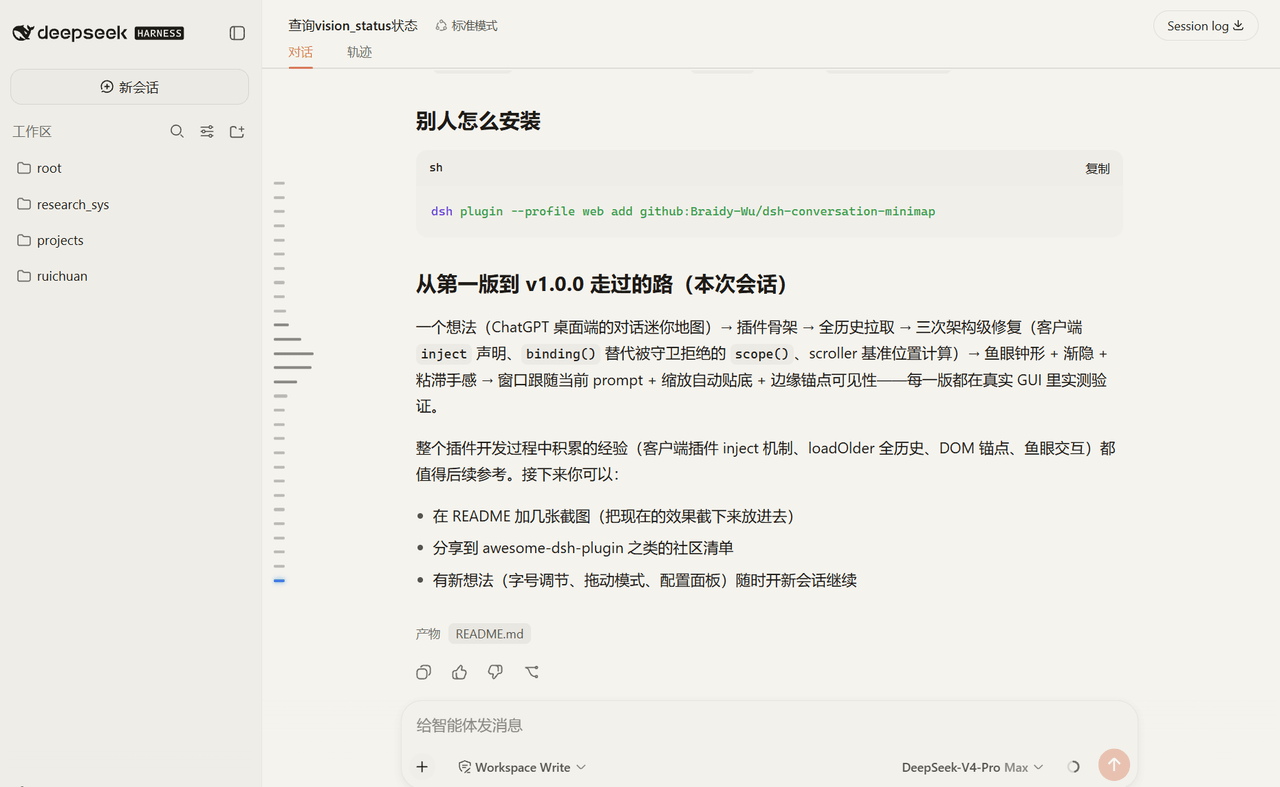
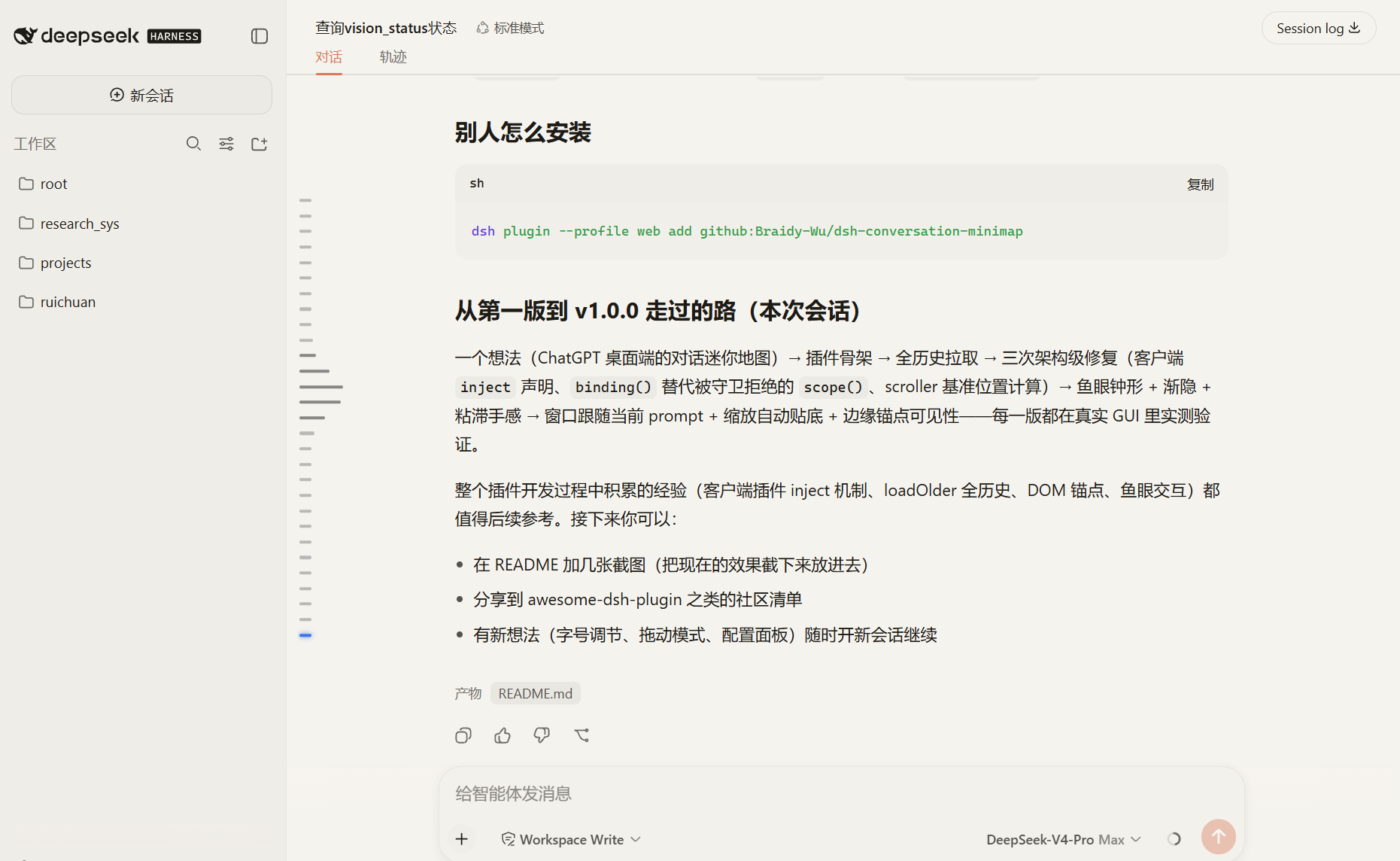
基于提示词的对话迷你地图插件,为DSH Web界面提供类似桌面端的导航侧栏。核心能力包括锚点、鱼眼放大、边缘淡出、位置跟踪及点击滚动定位。适用于长对话快速导航。注意:需通过官方API加载完整历史,且仅在满足最小提示词数量时显示。
A prompt-based conversation minimap plugin for the DSH Web GUI, adding a desktop-style navigation rail. Core capabilities include evenly spaced anchors, fish-eye magnification, edge fading, position tracking, and click-to-scroll with a 2-second highlight. Use it for quick navigation in long conversations. Note: it loads full history via the official API and only appears after a configurable minimum number of prompts.
请帮我了解并安装插件:【dsh-conversation-minimap】【https://github.com/Braidy-Wu/dsh-conversation-minimap】把上面这条消息直接发给当前会话里的 DSH,让它帮你了解并安装。安装命令不一定准确,发给 DSH 更稳。Send this message to DSH in your current session. CLI install commands may not be accurate across systems — DSH will figure it out for you.
或使用命令行安装(适合开发者)Or use CLI install (for developers)
命令行安装CLI Install
dsh plugin --profile web add dsh-conversation-minimap把 Braidy-Wu/dsh-conversation-minimap 加入你的 DSH 配置(web profile)即可启用。
READMEREADME
dsh-conversation-minimap
English | 中文
A DeepSeek Harness (DSH) Web GUI plugin: Prompt-based Conversation Minimap — a ChatGPT-desktop-style navigation rail for long conversations.
- Anchors: one capsule per user prompt, evenly spaced, centered in the rail
- Fish-eye: bars magnify on a Gaussian bell curve toward the right under the cursor (44px peak), stay magnified while the pointer moves inside the enlarged area, slide smoothly
- Edge fade: the rail fades at the top/bottom via a mask — overflowing anchors fade out and never exceed the rail bounds
- Position tracking: a blue glowing highlight follows the current prompt (switches when the prompt's center crosses the viewport center); after window resizes the view snaps back to the bottom and the visible anchors always follow where you are
- Interaction: hover shows the full prompt preview; click smooth-scrolls to that message and highlights it for 2s (no stuck highlights on rapid clicks)
- Full history: pulls the entire conversation via the official
loadOlderAPI, so every prompt in a long conversation is reachable
Installation
Option 1 — npm (recommended)
dsh plugin --profile web add dsh-conversation-minimap
Option 2 — from GitHub
dsh plugin --profile web add github:Braidy-Wu/dsh-conversation-minimap
Restart dsh web.
Configuration (cordis.patch.yml, all optional — restart dsh web after changes)
- insert:
    - id: conversation-minimap
      name: dsh-conversation-minimap
      config:
        enabled: true    # master switch (false = never loads)
        minPrompts: 4    # show the rail once the session has at least this many user prompts (default 4, range 0-100)
        anchorSize: 3    # anchor bar height in px (default 3, range 2-8)
How it works
- Data: pulls full history through the official
ctx.sessions+conversation.loadOlder()API; observes the rendered conversation DOM — user messages carrydata-chat-flow-kind="user"(andsteering), jump targets use the rows'data-chat-anchor-key(the same mechanism the official UI scrolls by) - Mounting: an absolutely positioned seat on the conversation viewport wrapper — no layout impact; edge clipping + mask fade
- Updates: MutationObserver on the message list (debounced + key-set diff, no jitter while streaming); polling handles session switches; nothing renders during history sync — the full rail appears at once
- Safety: everything is guarded by try/catch; any unexpected failure only disables the minimap, never the GUI
A plain-vanilla-JS client plugin (inject: ['sessions'], mirroring the dsh-theme-plugin shape) with no build step and no dependencies.
Development
node --check client.js index.js   # syntax check
# smoke test: test/smoke.html + python3 -m http.server
License
MIT
相关推荐Related
-
 nexu-io/open-design
🎨 Best DeepSeek Harness Design Plugin. The open-source Claude Design alternative. 🖥️ Local-first desktop app. 🖼️ Your…
nexu-io/open-design
🎨 Best DeepSeek Harness Design Plugin. The open-source Claude Design alternative. 🖥️ Local-first desktop app. 🖼️ Your…
-
 freestylefly/awesome-gpt-image-2
Prompt as Code | GPT-Image2 工业级提示词引擎与模板库,530+ 个案例逆向工程,20+ 套工业级模板,并提炼出Skills,持续更新中
freestylefly/awesome-gpt-image-2
Prompt as Code | GPT-Image2 工业级提示词引擎与模板库,530+ 个案例逆向工程,20+ 套工业级模板,并提炼出Skills,持续更新中
-
 anywhere-labs/dsh-desktop
为 DeepSeek Harness (DSH) 插件生态打造的现代化桌面端解决方案。万物皆「插件」,桌面本身也是「插件」。
anywhere-labs/dsh-desktop
为 DeepSeek Harness (DSH) 插件生态打造的现代化桌面端解决方案。万物皆「插件」,桌面本身也是「插件」。
- Nagi-ovo/voyager Enhancement suite for Gemini, AI Studio, Claude & ChatGPT — plus a prompt manager for any web UI, DeepSeek Harness inclu…
-
 walkinglabs/learn-harness-engineering
Harness engineering beginner tutorial, from 0 to 1
walkinglabs/learn-harness-engineering
Harness engineering beginner tutorial, from 0 to 1
-
 awesome-dsh-plugin/awesome-dsh-plugin
A curated list of plugins for DeepSeek Harness (dsh) · DeepSeek Harness 插件精选列表
awesome-dsh-plugin/awesome-dsh-plugin
A curated list of plugins for DeepSeek Harness (dsh) · DeepSeek Harness 插件精选列表
-
 MemTensor/MemOS
Self-evolving memory OS for LLM & AI Agents: ultra-persistent memory, hybrid-retrieval, and cross-task skill reuse, with…
MemTensor/MemOS
Self-evolving memory OS for LLM & AI Agents: ultra-persistent memory, hybrid-retrieval, and cross-task skill reuse, with…
- yjh051108/dsh-routing-suite dsh-routing-suite — injector + router-standard kit: install the runtime injector first, then the task-aware reasoning-mo…