byh819-png/dsh-client-ui-notify
Ringtone notifications for DeepSeek Harness: alerts are triggered when the conversation ends and when authorization is required (either with a built-in tone, TTS voice, or custom audio). **DeepSeek Harness 网页端铃声提醒插件:回答完成或需要授权时响铃提醒,支持内置铃声 / 文字转语音 / 自定义音频。
项目介绍Project Overview
DSH 客户端的音效提醒插件,在会话答案完成或需要授权时发出铃声、显示右下角弹窗,并可触发浏览器系统通知。提供内置合成铃声、语音朗读和自定义音频(http(s)/data/本地上传,≤1MB),设置项注册在 General 中,通过 ui-notify 命名空间持久化。适用于后台会话可能错过的场景。限制:用户音频路由仅监听 loopback,LAN 部署经 trustedHosts 时上传/下载会返回 403。
A sound-alert plugin for the DSH web client that plays a ringtone, shows a bottom-right popup, and can fire a browser system notification when a session's answer completes or it needs authorization. It adds a General-settings row with a master switch, a system-notification toggle, two event switches, and a sound-type selector supporting a built-in chime, TTS, and custom audio (http(s)/data URL or uploaded file ≤1MB). Use it when a background session must not finish unnoticed. The custom-audio route is loopback-only and returns 403 behind trustedHosts.
请帮我了解并安装插件:【dsh-client-ui-notify】【https://github.com/byh819-png/dsh-client-ui-notify】把上面这条消息直接发给当前会话里的 DSH,让它帮你了解并安装。安装命令不一定准确,发给 DSH 更稳。Send this message to DSH in your current session. CLI install commands may not be accurate across systems — DSH will figure it out for you.
或使用命令行安装(适合开发者)Or use CLI install (for developers)
命令行安装CLI Install
dsh plugin --profile web add github:byh819-png/dsh-client-ui-notify把 byh819-png/dsh-client-ui-notify 加入你的 DSH 配置(web profile)即可启用。
READMEREADME
@deepseek-ai/dsh-client-ui-notify
English | 中文
Sound-alert plugin for the web client: rings, shows a bottom-right popup, and can send a browser system notification when a session's answer completes and when a session needs authorization, so a background conversation cannot finish unnoticed.
The browser half provides ctx.notify (a NotifyRuntime), registers a preference row into the settings General section, and registers the popup into the shell's floating overlay seat; the Host half exposes the durable ui-notify settings namespace the row reads and writes through ctx.settingsScope, stored in the user-settings document ($DSH_HOME/settings.yaml by default).
Alert events
The runtime observes ctx.sessions.list and rings in two situations, both gated by the master switch and their own toggle:
- Answer complete — a session's
runningbit flips true → false (the sidebar's green "done" reminder, current session included). - Authorization needed — a session's
pendingInteractionappears (approval, plan review, or ask-user question).
The first list snapshot only records observed state (a session already idle at load rings nothing), and connection/reset re-baselines so reconnect status replay cannot ring.
Popup notification
With the System notification toggle on, every ring also sends a browser Notification API notification (title = the edge, body = the session label), visible even while the tab is in the background — unlike the in-page popup. Enabling the toggle requests the browser's Notification permission (the switch click is the user gesture); permission must be granted for notifications to fire, and denied or unsupported browsers refuse the toggle with an inline message. The sender degrades to a no-op without granted permission, so it never throws from an event handler.
Alert methods
- Built-in ringtone — a two-tone chime synthesized at build time, embedded as a base64 data URI in the client bundle (
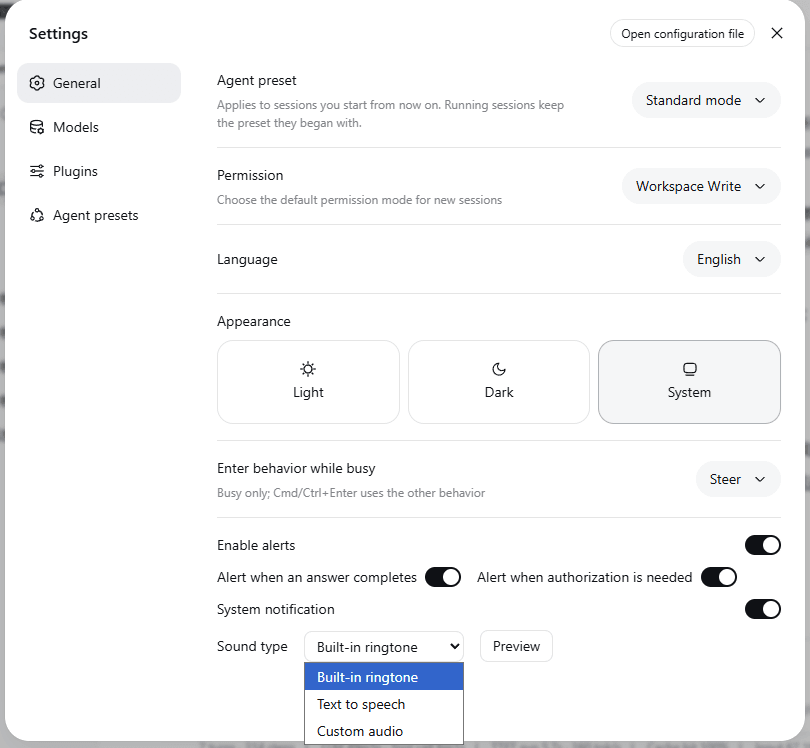
src/client/builtin-ringtone.ts), so no extra asset route exists. - Text to speech —
speechSynthesis.speakreads the configured text aloud (skipped when the text is empty). - Custom audio — plays an http(s) URL or a data URL, or a local file the row uploads to the host (≤ 1MB).
The uploaded file lands under
$DSH_HOME/storages/ui-notify/audio/, read and written through the trust-fenced/_dsh-ui-notify/audio/<id>.<ext>webServer route (the same browser-trust fence as/api, loopback-only); the durable setting stores just the served URL — file bytes never enter the settings document. Common audio formats are supported (wav, mp3, ogg, mp4, m4a, webm, aac, flac, aiff, wma, mid).
Playback degrades to a no-op when the platform capability is absent, so a misconfigured alert never throws from an event handler. The row's Preview button plays the current method immediately.
On every host activation, a retention sweep removes stored audio files the current setting no longer references (a hand-edited customAudioUrl, an upload whose settings write never landed, or a failed eager cleanup) — only files matching the canonical <uuid>.<ext> id pattern are ever touched.
Settings Window
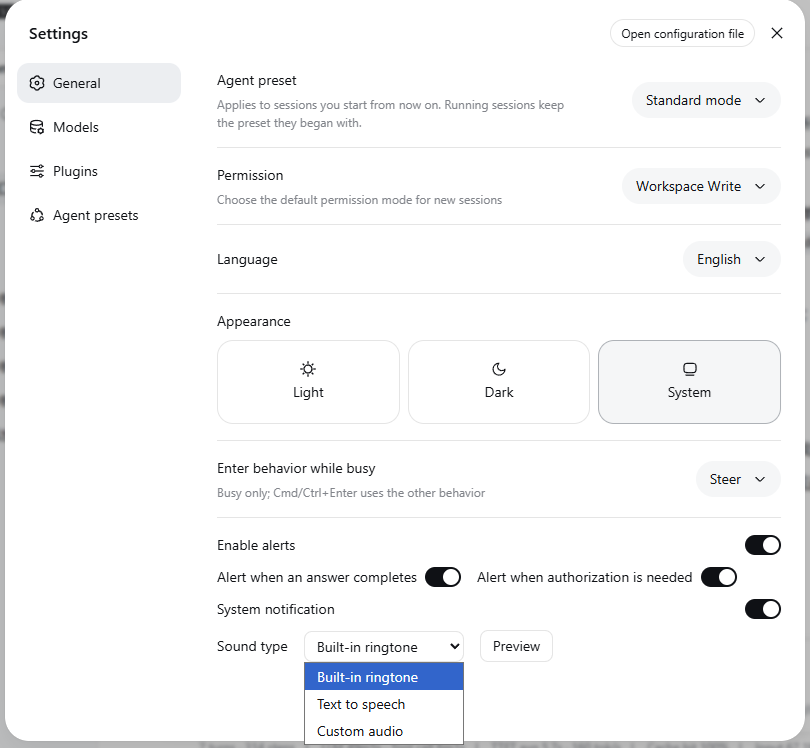
The General settings row adds the Enable alerts master switch, the System notification switch, the two event switches (alert when an answer completes / alert when authorization is needed), the Sound type selector, the method-specific input fields, and the Preview button. Every control writes exactly one field through the injected setField face; the row never touches the settings transport itself. The Host half registers the namespace only when the settings provider is composed, so a deployment without one shows no row and no namespace.
Installation
Quick start: download the installer (zip), extract it, and run install.ps1 on Windows or bash install.sh on macOS/Linux; restart dsh web and you are done.
Manual installation:
Copy the plugin directory (
package.json+lib/) to$DSH_HOME/profiles/node_modules/@deepseek-ai/dsh-client-ui-notify/($DSH_HOMEdefaults to~/.dsh).Append the loader row to
$DSH_HOME/profiles/web/cordis.patch.yml(or the profile that serves the web UI):- insert: - id: ui-notify name: '@deepseek-ai/dsh-client-ui-notify'Restart
dsh weband refresh the browser; the notification settings (Enable alerts, System notification, and the two event toggles) appear under Settings → General.
To uninstall: delete the copied directory and the ui-notify rows from cordis.patch.yml.
The plugin is a plain npm package; its runtime dependencies (cordis, dsh-settings, …) come from dsh's built-in closure, so no extra install is needed.
Model Experience
None, as the plugin plays browser sounds; nothing here reaches a model request.
KV Cache effect
None; this package neither assembles nor sends a provider request.
Known Limitations and Deferred Work
- User-audio route is loopback-only — a LAN deployment that serves the browser through
trustedHostsgets 403 on uploads/downloads (playback of http(s)/data URLs is unaffected); wiring the route into the trusted-host list is deferred. - TTS voices follow the browser — no voice/rate/pitch controls exist; the text field is the only TTS input.
- One text for both events — the TTS method speaks the same text whether an answer completed or authorization is needed.
相关推荐Related
-
 ruvnet/ruflo
🌊 The original agent meta-harness. Deploy intelligent multi-player swarms, coordinate autonomous workflows, and build c…
ruvnet/ruflo
🌊 The original agent meta-harness. Deploy intelligent multi-player swarms, coordinate autonomous workflows, and build c…
-
 amruthpillai/reactive-resume
A one-of-a-kind resume builder that keeps your privacy in mind. Completely secure, customizable, portable, open-source a…
amruthpillai/reactive-resume
A one-of-a-kind resume builder that keeps your privacy in mind. Completely secure, customizable, portable, open-source a…
-
 volcengine/OpenViking
Self-evolving Context Database for AI Agents. Unify Agent Memory, Knowledge RAG and Skills.
volcengine/OpenViking
Self-evolving Context Database for AI Agents. Unify Agent Memory, Knowledge RAG and Skills.
-
 Molunerfinn/PicGo
:rocket: The Ultimate Image Uploader for Efficient Creators. Supports Obsidian, Typora, VS Code etc. and 60+ image hosti…
Molunerfinn/PicGo
:rocket: The Ultimate Image Uploader for Efficient Creators. Supports Obsidian, Typora, VS Code etc. and 60+ image hosti…
-
 titanwings/colleague-skill
将冰冷的离别化为温暖的 Skill,欢迎加入数字生命1.0!Transforming cold farewells into warm skills? It's giving rebirth era. Welcome to Digital …
titanwings/colleague-skill
将冰冷的离别化为温暖的 Skill,欢迎加入数字生命1.0!Transforming cold farewells into warm skills? It's giving rebirth era. Welcome to Digital …
-
 nocobase/nocobase
NocoBase is an open-source AI + no-code platform for building business systems fast. Instead of generating everything fr…
nocobase/nocobase
NocoBase is an open-source AI + no-code platform for building business systems fast. Instead of generating everything fr…
-
 Tencent/WeKnora
Open-source LLM knowledge platform: turn raw documents into a queryable RAG, an autonomous reasoning agent, and a self-m…
Tencent/WeKnora
Open-source LLM knowledge platform: turn raw documents into a queryable RAG, an autonomous reasoning agent, and a self-m…
- Nagi-ovo/voyager Enhancement suite for Gemini, AI Studio, Claude & ChatGPT — plus a prompt manager for any web UI, DeepSeek Harness inclu…