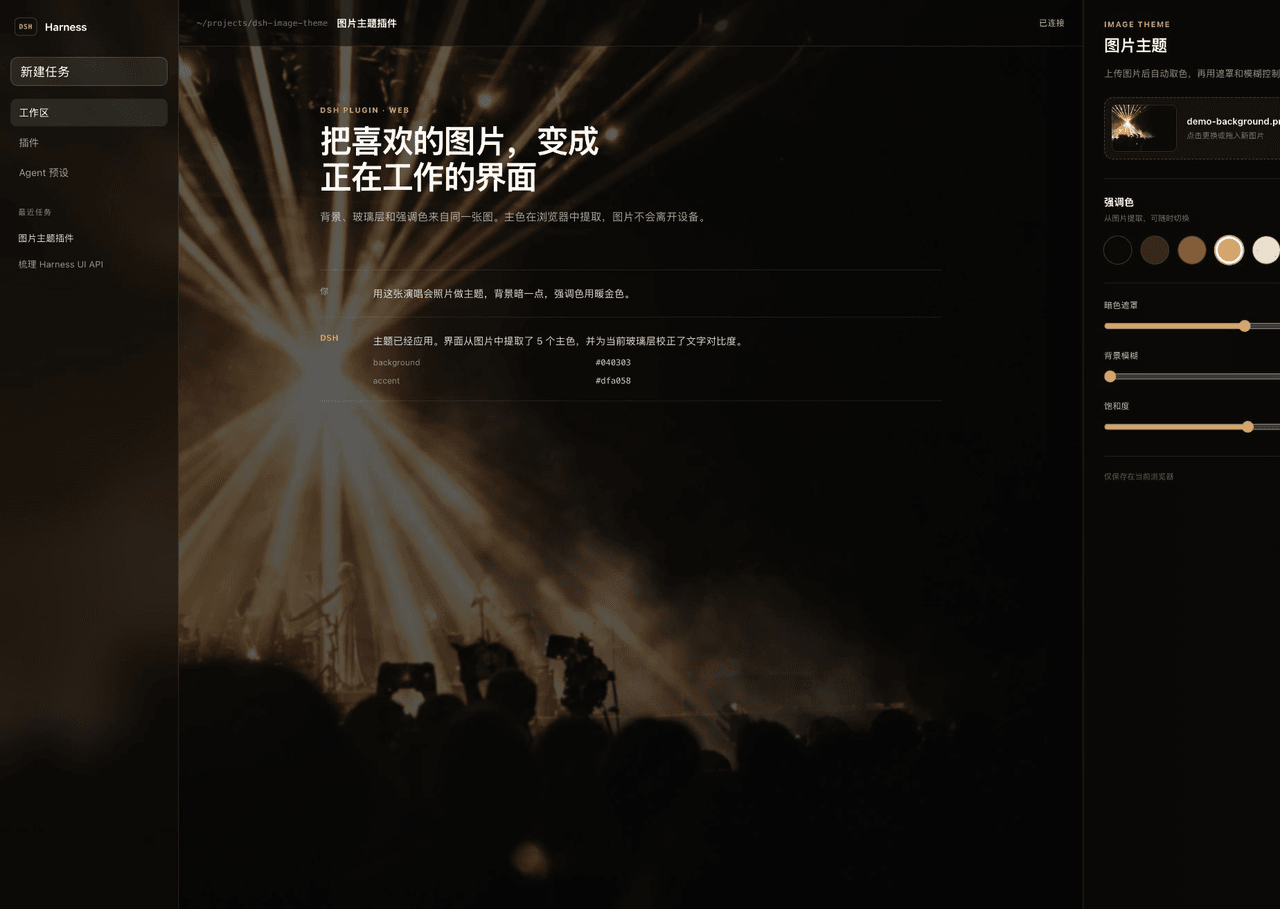
Carpon39038/dsh-image-theme
面向DeepSeek Harness的Warp风格图像主题插件:上传背景图,提取配色,应用玻璃UI效果。
项目介绍Project Overview
DSH 图片主题插件为 DeepSeek Harness 网页端提供图片背景主题。上传图片后,它在浏览器内用 Lab 空间 k-means 提取五色,生成玻璃质感界面并可选强调色,同时校正文字对比度。适合想自定义壁纸与配色时使用;仅支持网页端,数据按浏览器本地保存,不同步。
DSH Image Theme is a plugin for the DeepSeek Harness web client that creates an image-based theme. It extracts five dominant colors in the browser using Lab-space k-means, builds translucent glass surfaces, lets users pick an accent color, corrects contrast, and uses the image as a full-window background. Use it to customize the client with a local wallpaper; it is web-only, and images/settings stay in the browser and do not sync.
请帮我了解并安装插件:【dsh-image-theme】【https://github.com/Carpon39038/dsh-image-theme】把上面这条消息直接发给当前会话里的 DSH,让它帮你了解并安装。安装命令不一定准确,发给 DSH 更稳。Send this message to DSH in your current session. CLI install commands may not be accurate across systems — DSH will figure it out for you.
或使用命令行安装(适合开发者)Or use CLI install (for developers)
命令行安装CLI Install
dsh plugin --profile web add github:Carpon39038/dsh-image-theme把 Carpon39038/dsh-image-theme 加入你的 DSH 配置(web profile)即可启用。
READMEREADME
DSH Image Theme
A Warp-inspired image theme plugin for the DeepSeek Harness web client.
Upload or drag in a picture and the plugin will:
- extract five dominant colors in CIE Lab space;
- turn the darkest image color into translucent glass surfaces;
- let you choose one extracted color as the DSH accent;
- correct text and accent contrast before applying theme tokens;
- use the original image as the full-window background.
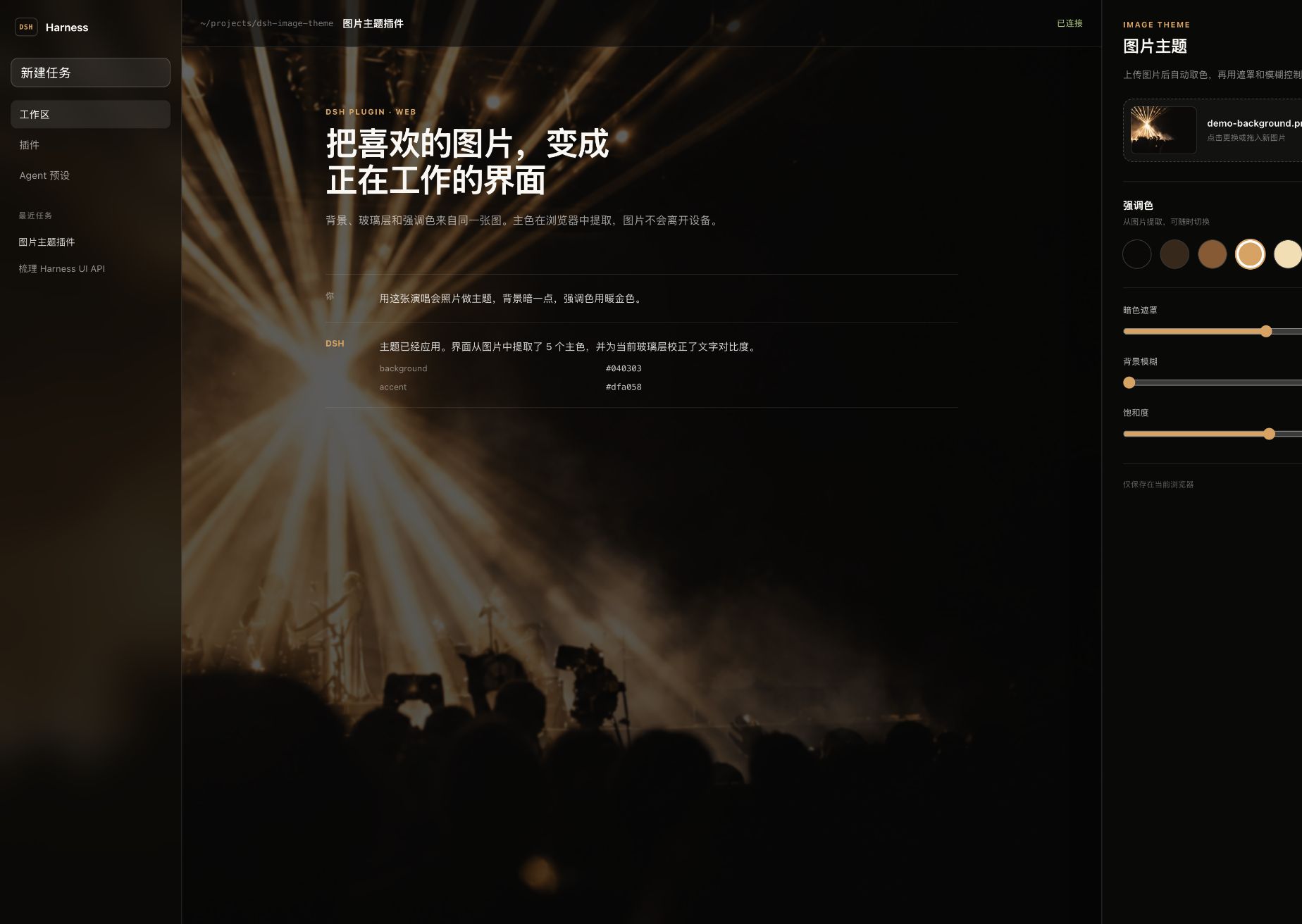
Features
- Full-bleed background image with adjustable dark overlay, blur, saturation, and position.
- Deterministic five-color Lab k-means palette extraction in the browser.
- Live DSH token overrides through
ctx.theme.overrideTokens()—no hard-coded edits to the host UI. - A dedicated Settings → Image theme section with drag-and-drop upload and palette controls.
- Browser-local privacy: the image is stored as a Blob in IndexedDB and settings are stored in
localStorage; nothing is uploaded. - The plugin can be disabled without losing the selected image or settings.
- Responsive settings UI and reduced-motion support.
Install
The repository includes prebuilt lib/ artifacts, so a DSH profile can install it directly from GitHub:
dsh plugin --profile <profile-name> add github:Carpon39038/dsh-image-theme
Restart or refresh the DSH web client, then open Settings → Image theme.
To install a local checkout while developing:
pnpm install
pnpm build
dsh plugin --profile <profile-name> add link:$PWD
The included .npmrc disables automatic peer installation. This is intentional: DSH supplies the client runtime and UI services, while the current public RC packages still reference workspace-only transitive packages that are not published to npm.
How it works
Palette extraction
The browser downsamples the image to at most 96 × 96, samples at most 6,000 opaque pixels, converts RGB to CIE Lab, and runs deterministic k-means with farthest-point seeding. Five clusters are sorted by population.
This follows the same broad model as Warp's open-source theme creator, which uses Lab-space Hamerly k-means with k = 5. This implementation is written independently for the browser and uses deterministic seeding so the same pixels always produce the same palette.
Theme mapping
The plugin keeps the image, the dark surface color, the foreground, and the accent as separate roles:
image → five-color palette → darkest color → near-black glass surfaces
                           ↘ selected color → contrast-safe accent
It overrides DSH's public alias tokens, including:
--dsw-alias-bg-base--dsw-alias-bg-layer-1--dsw-alias-bg-layer-2--dsw-alias-bg-overlay--dsw-alias-border-l1/--dsw-alias-border-l2--dsw-alias-brand-primary--dsw-alias-label-primary/--dsw-alias-label-secondary--dsw-specific-sidebar-fill
Every override contains both light and dark values, as required by the DSH theme runtime.
Background rendering
A plugin-owned fixed backdrop sits behind the DSH root. The application tokens stay translucent, allowing the image to show through while the overlay and surface opacity protect readability. Unloading or disabling the plugin disposes the token layer and removes the backdrop cleanly.
Development
Requirements: Node.js 22+ and pnpm 10+.
pnpm install
pnpm typecheck
pnpm test
pnpm build
The interactive design preview is in playground/:
cd playground
npm install
npm run dev
The preview imports the same palette and role-mapping modules used by the real plugin. Its generated concert background is a clean demonstration asset, not a copy of Warp UI.
Project layout
src/client/palette.ts          Lab conversion and deterministic k-means
src/client/theme.ts            DSH token and contrast mapping
src/client/controller.ts       lifecycle, persistence, backdrop, token disposal
src/client/storage.ts          IndexedDB image + localStorage settings
src/client/ImageThemeSection.tsx
                               DSH settings page
playground/                    runnable interactive visual preview
Compatibility
The initial version targets the DSH web plugin APIs inspected at deepseek-harness 0.1.0-rc.5. DSH is still moving quickly; check the theme and settings-slot contracts when upgrading to a newer release.
The plugin is web-only. Images and preferences are local to each browser profile and are not synchronized between devices.
Credits
- DeepSeek Harness for the plugin, settings-slot, and theme-token APIs.
- Warp for the open-source theme-creator reference and the separation of image, background, foreground, accent, and opacity roles.
License
相关推荐Related
-
 nexu-io/open-design
🎨 Best DeepSeek Harness Design Plugin. The open-source Claude Design alternative. 🖥️ Local-first desktop app. 🖼️ Your…
nexu-io/open-design
🎨 Best DeepSeek Harness Design Plugin. The open-source Claude Design alternative. 🖥️ Local-first desktop app. 🖼️ Your…
-
 freestylefly/awesome-gpt-image-2
Prompt as Code | GPT-Image2 工业级提示词引擎与模板库,530+ 个案例逆向工程,20+ 套工业级模板,并提炼出Skills,持续更新中
freestylefly/awesome-gpt-image-2
Prompt as Code | GPT-Image2 工业级提示词引擎与模板库,530+ 个案例逆向工程,20+ 套工业级模板,并提炼出Skills,持续更新中
-
 anywhere-labs/dsh-desktop
为 DeepSeek Harness (DSH) 插件生态打造的现代化桌面端解决方案。万物皆「插件」,桌面本身也是「插件」。
anywhere-labs/dsh-desktop
为 DeepSeek Harness (DSH) 插件生态打造的现代化桌面端解决方案。万物皆「插件」,桌面本身也是「插件」。
- Nagi-ovo/voyager Enhancement suite for Gemini, AI Studio, Claude & ChatGPT — plus a prompt manager for any web UI, DeepSeek Harness inclu…
-
 walkinglabs/learn-harness-engineering
Harness engineering beginner tutorial, from 0 to 1
walkinglabs/learn-harness-engineering
Harness engineering beginner tutorial, from 0 to 1
-
 awesome-dsh-plugin/awesome-dsh-plugin
A curated list of plugins for DeepSeek Harness (dsh) · DeepSeek Harness 插件精选列表
awesome-dsh-plugin/awesome-dsh-plugin
A curated list of plugins for DeepSeek Harness (dsh) · DeepSeek Harness 插件精选列表
-
 MemTensor/MemOS
Self-evolving memory OS for LLM & AI Agents: ultra-persistent memory, hybrid-retrieval, and cross-task skill reuse, with…
MemTensor/MemOS
Self-evolving memory OS for LLM & AI Agents: ultra-persistent memory, hybrid-retrieval, and cross-task skill reuse, with…
- yjh051108/dsh-routing-suite dsh-routing-suite — injector + router-standard kit: install the runtime injector first, then the task-aware reasoning-mo…