CLICGGER-TYPES/dsh-piggy
🐖 DeepSeek Harness 养成插件,也可作为 Windows/Linux/macOS 桌面宠物运行;支持成长、学习、打工、钓鱼、图鉴与换肤
Project Overview项目介绍
dsh-piggy is a DeepSeek Harness-native plugin built around raising a virtual pig, and the same package also ships as an Electron desktop application that runs independently on Windows, Linux, and macOS. Inside DSH it is installed with dsh plugin --profile web add dsh-piggy, or by cloning the repository and pointing the same command at a local path before restarting and refreshing the harness; the standalone builds are distributed from GitHub Releases as Windows setup.exe and portable.exe installers, a Linux AppImage, and macOS arm64 or x64 dmg images. The project uses a bundle-manifest and does not register any model tool, inject pet state into conversations, or spend tokens, so the pig remains a self-contained ambient companion.
Gameplay is driven by an Animal-Crossing-style App main menu opened with a right-click: left-click pets the pig, dragging repositions it on the desktop, and clicking the cardboard box three times in a row adopts the animal on first encounter. The pig grows through stages that include school, part-time work, travel, fishing, and illness, while finishing jobs such as chef or astronaut unlocks corresponding career outfits. Built-in skins ship with the package, and players can also author or import their own SVG skin packs following the dedicated creating-skins guide, with reference art contributions credited to @1nuooiscute.
Development depends on esbuild 0.28.2, typescript 5.9.3, and @types/node 20.19.43, and exposes build, test, and typecheck npm scripts described in docs/DEVELOPMENT.md. The macOS build is unsigned, so first launch requires right-clicking the app in Finder and choosing Open; in-app self-update from v0.2.0 covers the Windows installer and the Linux AppImage, while the Windows portable build and macOS bundles must be replaced manually from the release page. The v0.2.1 desktop shell fixes a security issue in an update dependency, which existing desktop users must upgrade. The repository is released under the MIT License.
dsh-piggy 是一款以养成小猪为核心的 DSH 原生插件,同时提供可在 Windows、Linux 与 macOS 上独立运行的 Electron 桌面版。DSH 安装方式为 dsh plugin --profile web add dsh-piggy,也支持从本地 GitHub 源码目录加载;桌面版则在 GitHub Releases 下载 setup.exe、AppImage 或对应架构的 dmg。它不依赖任何模型工具,不向对话注入宠物状态,也不消耗 token。游戏以动森风格的 App 主菜单呈现全部玩法。
养成流程围绕右键主菜单展开:左键可抚摸小猪,拖动可调整位置,首次遇到纸箱时连续点击三次即可把小猪接回家。猪会经历成长、上学、打工、旅行、钓鱼和生病等阶段,完成厨师或宇航员等工作还能解锁职业外观。玩家既可使用内置免费皮肤,也能按照自定义皮肤制作教程导入自己的 SVG 皮肤包。商店与背包中的装扮入口暂被隐藏,但已有装扮和穿戴记录会保留。
开发环境使用 npm 安装 esbuild、typescript 与 @types/node,提供 build、test 与 typecheck 脚本。macOS 包未签名,首次启动需在访达中右键选择"打开"。从 v0.2.0 起,Windows 安装版与 Linux AppImage 支持在 App 内更新外壳,而便携版与 macOS 版仍需手动替换。v0.2.1 的桌面外壳修复了更新依赖的安全问题。项目采用 MIT 许可,美术风格参考 animal-island-ui。
请帮我安装这个 DSH 插件。安装前先完成【兼容性检查 + 安全性检查】,检查通过再动手。

插件:dsh-piggy(CLICGGER-TYPES/dsh-piggy)
仓库:https://github.com/CLICGGER-TYPES/dsh-piggy
本站详情页:https://www.yhbd.top/plugins/clicgger-types-dsh-piggy/
本站登记:类型 client · 归类 原生 DSH 插件 · 许可证 NOASSERTION · ⭐ 11 · 最近提交 2026-10-03 · 主语言 JavaScript

按下面顺序执行,每步先把结论告诉我,再进入下一步:

【1 兼容性检查】
① 我这边:DSH 版本、Node 版本、操作系统、当前 profile(web / desktop)。
② 读它的 README、package.json、插件 manifest,列出它要求的 DSH 版本 / Node 版本 / 操作系统 / 外部依赖 / 需要另外先装的运行时。
③ 逐条比对,结论只写「满足 / 不满足 / 未知」三种;不满足的给出可行替代方案。
④ 检查是否和我已装的插件冲突:命令名重复、skill / tool 重名、端口占用、重复注册的 MCP server。

【2 安全性检查】
① 仓库可信度:和上面「本站登记」是否一致;star / fork 数、创建时间、最近提交,是否归档或长期停更。
② 安装脚本:逐行看 package.json 的 preinstall / install / postinstall,以及 install.sh、setup.ps1 之类脚本。出现 curl|bash、下载后直接执行、混淆代码、访问与插件功能无关的域名,立刻停下来告诉我,不要继续装。
③ 依赖:列出新增依赖,标出无人维护、或与知名包拼写近似的可疑包(typosquatting)。
④ 权限与副作用:它会读写哪些目录、访问哪些域名、需要哪些 DSH 权限(filesystem / network / shell / clipboard 等),以及怎么卸载和回滚。
⑤ 如果它要求 sudo / 管理员权限,或权限明显超出功能所需,先停下来问我。

【3 安装】
上面两步没有「不满足」和「高危项」时才执行;用官方推荐方式安装,不要自行提权。

【4 汇报】
用表格输出:检查项 / 结论 / 依据 / 是否需要我决策。拿不准的一律写「未知」并说明要我怎么确认——不要猜,也不要替我决定。
Send this message to DSH in your current session: it verifies compatibility and security first (answering met / not met / unknown item by item) and only installs once everything checks out — it will stop and ask you if it finds a high-risk item. The box scrolls; the copy is the full prompt. CLI install commands may not be accurate across systems, so DSH is the safer route.把上面这条消息直接发给当前会话里的 DSH:它会先核对兼容性与安全性(逐条给「满足 / 不满足 / 未知」),确认没问题再安装,有高危项会停下来问你。框内可滚动,复制到的是完整提示词;安装命令不一定准确,发给 DSH 更稳。
- 11 stars - an early-stage project星标 11,属于早期项目
- Desktop client: installation downloads an executable - verify the publisher and checksums桌面客户端:安装会下载可执行文件,请核对发布者与校验和
DSH walks through these 9 checksDSH 会逐条核对这 9 项
Compatibility兼容性
- DSH, Node, OS and profile requirementsDSH 版本 / Node 版本 / 操作系统 / profile 是否满足要求
- External dependencies and runtimes (Electron / Python / Docker, ...)外部依赖与运行时(Electron / Python / Docker 等)是否齐备
- Conflicts with installed plugins: command names, skill / tool names, ports, duplicate MCP registration与已装插件是否冲突:命令名、skill / tool 重名、端口占用、重复 MCP 注册
Security安全性
- Repo matches the facts registered here; archived or abandoned?仓库是否与页面登记一致,是否归档或长期停更
- Safety of preinstall / install / postinstall and install.sh / setup.ps1preinstall / install / postinstall 与 install.sh、setup.ps1 是否安全
- curl|bash, download-then-execute, obfuscation, unrelated domains → stop immediatelycurl|bash、下载即执行、混淆代码、无关域名 → 立刻停止
- Typosquatting or unmaintained packages among the new dependencies新增依赖里有没有 typosquatting 或无人维护的包
- Requested permissions vs. what the feature actually needs申请了哪些权限、是否超出功能所需(filesystem / network / shell / clipboard)
- Any sudo / admin requirement, plus uninstall and rollback是否要求 sudo / 管理员权限,以及卸载与回滚方式
Anything uncertain must be marked unknown with a note on how to confirm it. This site's signal screen is a static snapshot, not a security audit.拿不准的必须标「未知」并说明要我怎么确认。本站的信号筛查是静态快照,不能替代安全审计。
Or use CLI install (for developers)或使用命令行安装(适合开发者)
CLI Install命令行安装
dsh plugin --profile web add dsh-piggy把 CLICGGER-TYPES/dsh-piggy 加入你的 DSH 配置(web profile)即可启用。
READMEREADME

dsh-piggy
一只住在 DeepSeek Harness 里,也能独立住在桌面上的猪。
它会长大、上学、打工、旅行、钓鱼、生病,也会跟你搭话。界面采用动森风格的 App 主菜单,全部玩法都能用鼠标完成。
欢迎一起画猪。 目前项目还缺形态、动作和皮肤等美术资源;如果你有喜欢的猪猪形象,欢迎提交 Pull Request,我会认真看并合并合适的作品。也欢迎 Fork 项目,做一只完全符合自己喜好的猪。自定义皮肤可从制作教程开始。
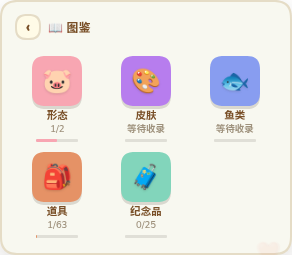
- 完整养成:照顾、成长、学习、工作、旅行、收藏和晋升形态
- 桌面版:Windows、Linux 和 macOS 可独立运行
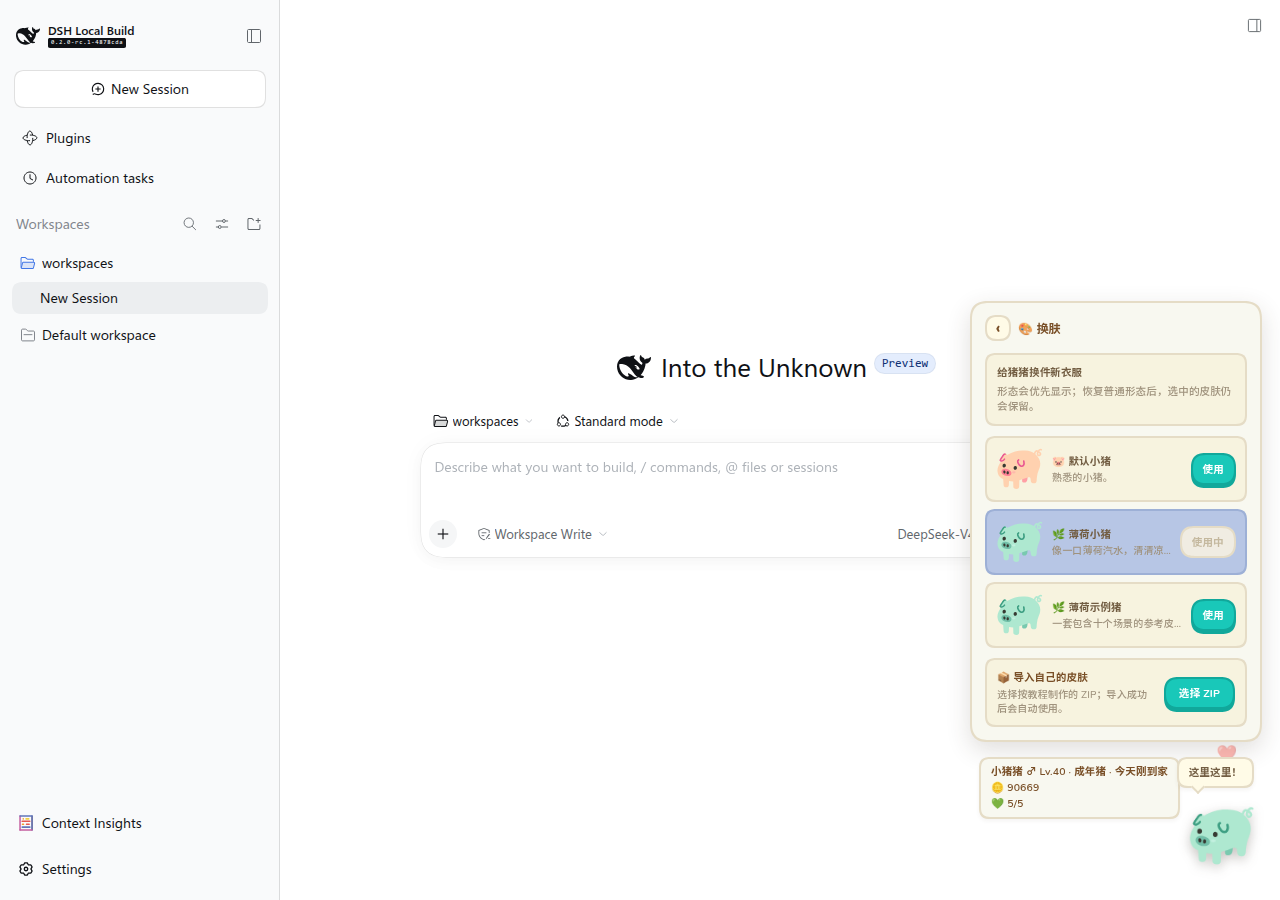
- 角色外观:完成厨师或宇航员工作解锁职业外观,另有免费内置皮肤,也可导入自己的 SVG 皮肤包
- 零 token:不注册模型工具,不向对话注入宠物状态

安装
DSH 插件
dsh plugin --profile web add dsh-piggy
安装后重启 DSH,再刷新页面。
在按 dsh-plugin-* 搜索的社区目录中,也可安装 dsh-plugin-piggy:dsh plugin --profile web add dsh-plugin-piggy。它加载同一个游戏,每个 profile 安装其中一个即可。
如果想直接使用 GitHub 源码,可以克隆本仓库,再执行 dsh plugin --profile web add /path/to/dsh-piggy。
桌面版
从 GitHub Releases 下载对应系统的文件:
- Windows:
setup.exe安装版或portable.exe便携版 - Linux:
AppImage - macOS:按芯片选择
arm64.dmg或x64.dmg
macOS 包暂未签名,第一次打开请在访达中右键应用并选择“打开”。更多安装与存档说明见桌面版指南。
主菜单「更新」会分别显示游戏版本和桌面外壳版本。游戏包可在 App 内更新;桌面外壳从 v0.2.0 起,Windows 安装版和 Linux AppImage 可在 App 内下载并重启安装。Windows 便携版、未签名 macOS 版需到发布页手动替换;旧版外壳需先手动升级一次。详见更新说明。
v0.27.1 的桌面外壳 v0.2.1 修复了更新依赖的安全问题;已有桌面版需要升级外壳,单独更新游戏包不会替换该依赖。
商店和背包中的「装扮」入口暂时隐藏,已有装扮和穿戴记录会保留;后续会重新设计展示方式。
开始玩
右键小猪打开主菜单,左键摸摸它,拖动可以换位置。第一次见到纸盒时连续点三下,把猪接回家。
详细玩法、体型、美术图标设置和命令见玩法指南。换肤可直接阅读玩家换肤教程,制作皮肤从自定义皮肤制作教程开始。
文档
开发
npm install --no-save --package-lock=false esbuild@0.28.2 typescript@5.9.3 @types/node@20.19.43
npm run build
npm test
npm run typecheck
开发环境、桌面打包、HTTP 接口和目录说明见开发指南。
致谢与许可
特别感谢 @1nuoiscute 贡献猪猪王原型、恶魔猪、肥猪体型与胖胖猪动作立绘。视觉风格参考 animal-island-ui,玩法数值参考资料见 THIRD-PARTY.md。项目采用 MIT License。
Related相关推荐
-
 MemTensor/memmy-agent
🍙 A personal AI agent & local memory hub for all AI agents, gives every AI one shared, fully controlled memory and per…
MemTensor/memmy-agent
🍙 A personal AI agent & local memory hub for all AI agents, gives every AI one shared, fully controlled memory and per…
-
 OpenPetsHQ/openpets
Local first, desktop companion platform with animated pets, plugin SDK and coding-agent integrations.
OpenPetsHQ/openpets
Local first, desktop companion platform with animated pets, plugin SDK and coding-agent integrations.
-
 QCYTSN/dsh-dafeiyu
Desktop-native BigFish companion for DeepSeek Harness — real Agent status, always on top on Windows.
QCYTSN/dsh-dafeiyu
Desktop-native BigFish companion for DeepSeek Harness — real Agent status, always on top on Windows.
-
 vlln/whale-girl
DSH Web GUI 桌面宠物插件(QQ 宠物形态):右下角悬浮、可拖拽/投喂/玩耍的积累型伙伴。
vlln/whale-girl
DSH Web GUI 桌面宠物插件(QQ 宠物形态):右下角悬浮、可拖拽/投喂/玩耍的积累型伙伴。
-
 ChisaAlter/WhaleIsle
鲸屿 Whale Isle · DeepSeek Harness 社区增强桌面版:官方核心功能齐备,扩展主题壁纸、鲸鱼娘桌宠、用量统计与手机远程连接。Community-enhanced DeepSeek Harness desktop c…
ChisaAlter/WhaleIsle
鲸屿 Whale Isle · DeepSeek Harness 社区增强桌面版:官方核心功能齐备,扩展主题壁纸、鲸鱼娘桌宠、用量统计与手机远程连接。Community-enhanced DeepSeek Harness desktop c…
-
 Sutera-Diffusus/dsh-whale-musume
DeepSeek Harness 桌宠插件:元气鲸鱼娘看板娘陪你写代码 🐋 支持 DSH 桌面端 0.2.0-rc.2 与旧版 Web(desktop pet / mascot,local-first)
Sutera-Diffusus/dsh-whale-musume
DeepSeek Harness 桌宠插件:元气鲸鱼娘看板娘陪你写代码 🐋 支持 DSH 桌面端 0.2.0-rc.2 与旧版 Web(desktop pet / mascot,local-first)
-
 Yi-111-a/dsh-jingling
dsh · dsh-plugin · deepseek · deepseek-harness · deepseek-harness-plugin · ai-companion · desktop-pet · character-card ·…
Yi-111-a/dsh-jingling
dsh · dsh-plugin · deepseek · deepseek-harness · deepseek-harness-plugin · ai-companion · desktop-pet · character-card ·…
-
 xiaoshihou514/dsh-desktop-pet
DeepSeek Harness:鲸鱼娘桌宠!
xiaoshihou514/dsh-desktop-pet
DeepSeek Harness:鲸鱼娘桌宠!