cocofhu/dsh-testsuite
给 DeepSeek Harness 插件准备可复用的在线测试环境。按版本预构建 runtime 镜像,在管理台登记后创建 Docker 容器,注入 API Key、提供方、模型和预装插件,然后打开 dsh web。
catalog descriptioncatalog 简介 / catalog description:testsuite of dsh plugins
Project Overview项目介绍
dsh-testsuite provisions reusable online test environments for DeepSeek Harness plugins. It ships per-version runtime images; the web control plane registers them, then creates, starts, stops, restarts, or destroys Docker containers, injecting API key, provider, model, and preinstalled plugins before opening dsh Web. Kubernetes mode is also supported. REST and an embedded MCP endpoint expose the same capabilities for AI agents. Caution: the control plane has no authentication, so never expose its port to the public internet.
dsh-testsuite 为 DeepSeek Harness 插件提供可复用在线测试环境。按版本预构建 runtime 镜像并登记,Web 控制台可创建、启停、重启、销毁 Docker 容器,自动注入 API Key、提供方、模型与预装插件,端口就绪后直跳 dsh Web。也支持 Kubernetes 部署。同步暴露 REST API 与 MCP 端点,便于 AI Agent 操作。需注意:控制面无认证,绝不可将端口暴露公网。
请帮我了解并安装插件:【dsh-testsuite】【https://github.com/cocofhu/dsh-testsuite】Send this message to DSH in your current session. CLI install commands may not be accurate across systems — DSH will figure it out for you.把上面这条消息直接发给当前会话里的 DSH,让它帮你了解并安装。安装命令不一定准确,发给 DSH 更稳。
Or use CLI install (for developers)或使用命令行安装(适合开发者)
CLI Install命令行安装
dsh plugin --profile web add github:cocofhu/dsh-testsuite把 cocofhu/dsh-testsuite 加入你的 DSH 配置(web profile)即可启用。
READMEREADME
dsh-testsuite


给 DeepSeek Harness 插件准备可复用的在线测试环境。按版本预构建 runtime 镜像,在管理台登记后创建 Docker 容器,注入 API Key、提供方、模型和预装插件,然后打开 dsh web。
本项目是非官方工具,不是 DeepSeek Harness 的官方产品。
怎么工作
- 控制面(本仓库 Go 服务 + Web UI):登记镜像,创建 / 启停 / 重启 / 销毁环境,看日志。
- Runtime 镜像(每版本一份
image/<ver>/Dockerfile):在平台外用make image构建,或从 GitHub Release 推到 GHCR。已发布 tag 默认冻结。说明见 docs/images.md。
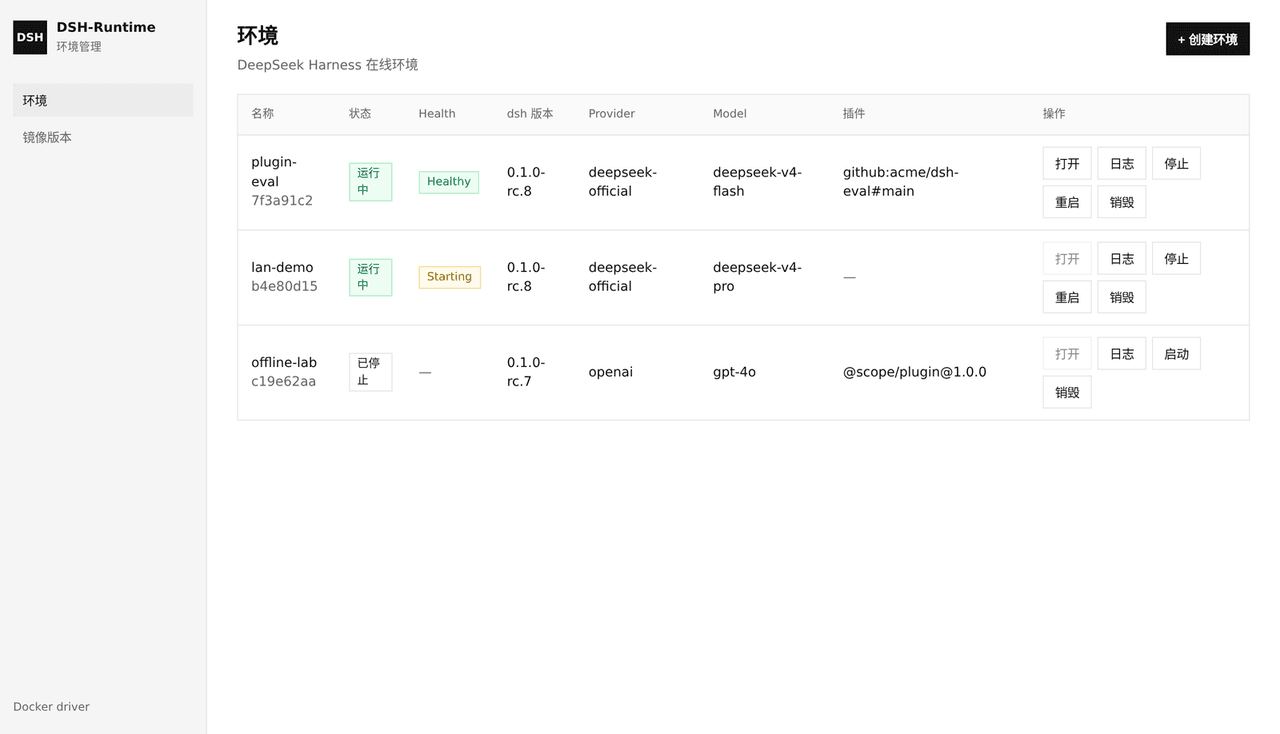
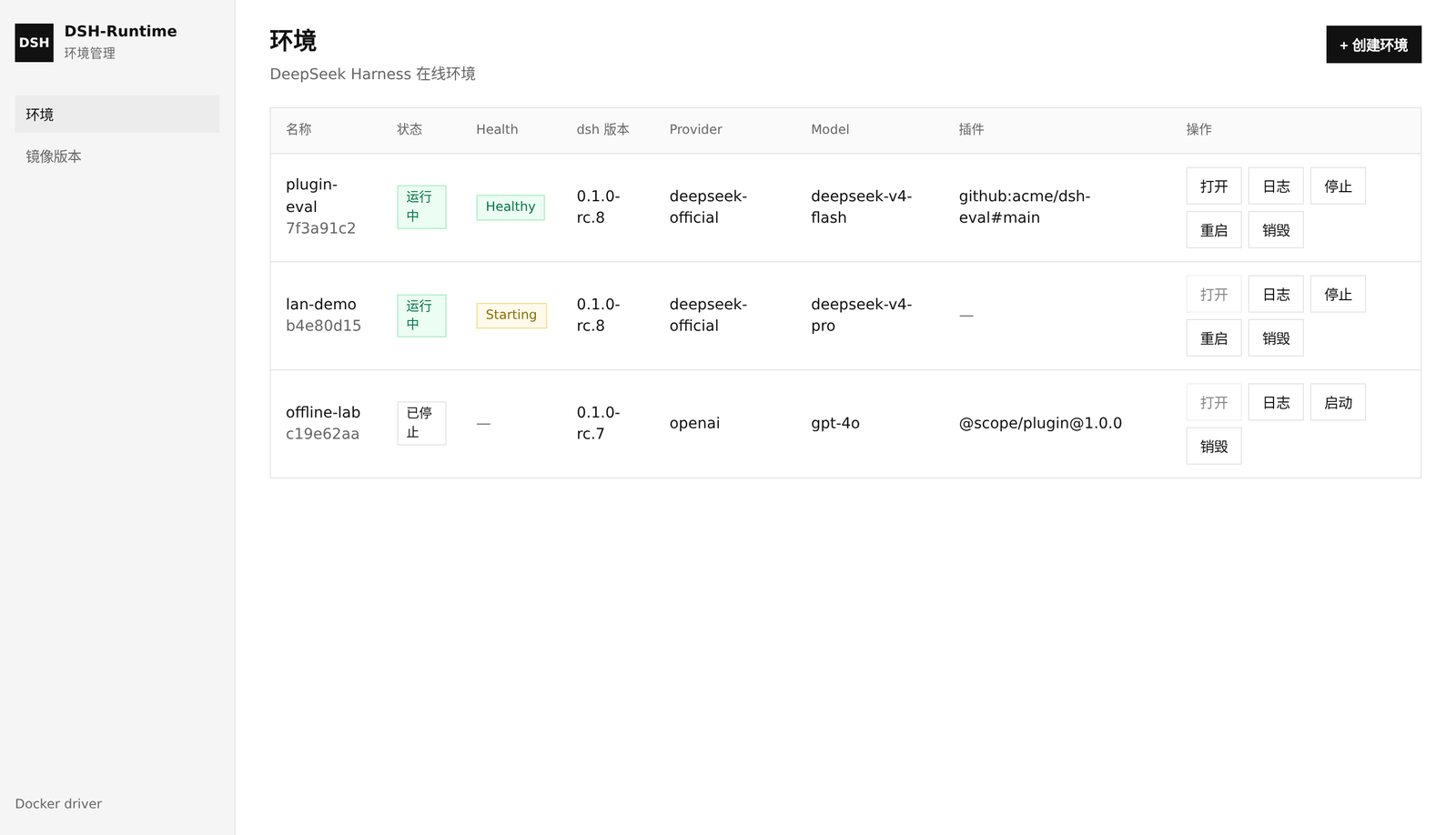
每个环境把容器内 3080 映射到宿主机随机端口。容器进入 running 后还会探测端口,Health 变为 Healthy 才允许「打开」(dsh Web 是根路径 SPA,启动还要几秒)。
镜像预先构建好,创建环境只选已登记镜像并注入配置。默认用 Docker;也可把 runtime 设为 kubernetes,由控制面在集群里创建 Deployment / Service / Ingress(见下方)。控制面不执行 docker build。 Docker 模式下,登记镜像时若本机没有该 tag,会从 GHCR 自动 pull。
快速开始
需要 Docker 和 Go 1.25+。
make image DSH_VERSION=0.1.1-rc.2    # 在平台外打 runtime;细节见 docs/images.md
cp config.example.yaml config.yaml   # 本地配置,不要提交
make run                             # 控制面 http://127.0.0.1:8090
- 打开「镜像版本」,选版本登记(本机没有会从 GHCR 自动 pull)。也可只 pull、稍后登记:
docker pull ghcr.io/cocofhu/dsh-testsuite-runtime:0.1.1-rc.2。 - 在「模型预设」填提供方、模型和 API 密钥(密钥只存在本机
data/)。 - 回到「环境」,创建并等待 Health 变为 Healthy,再点「打开」。
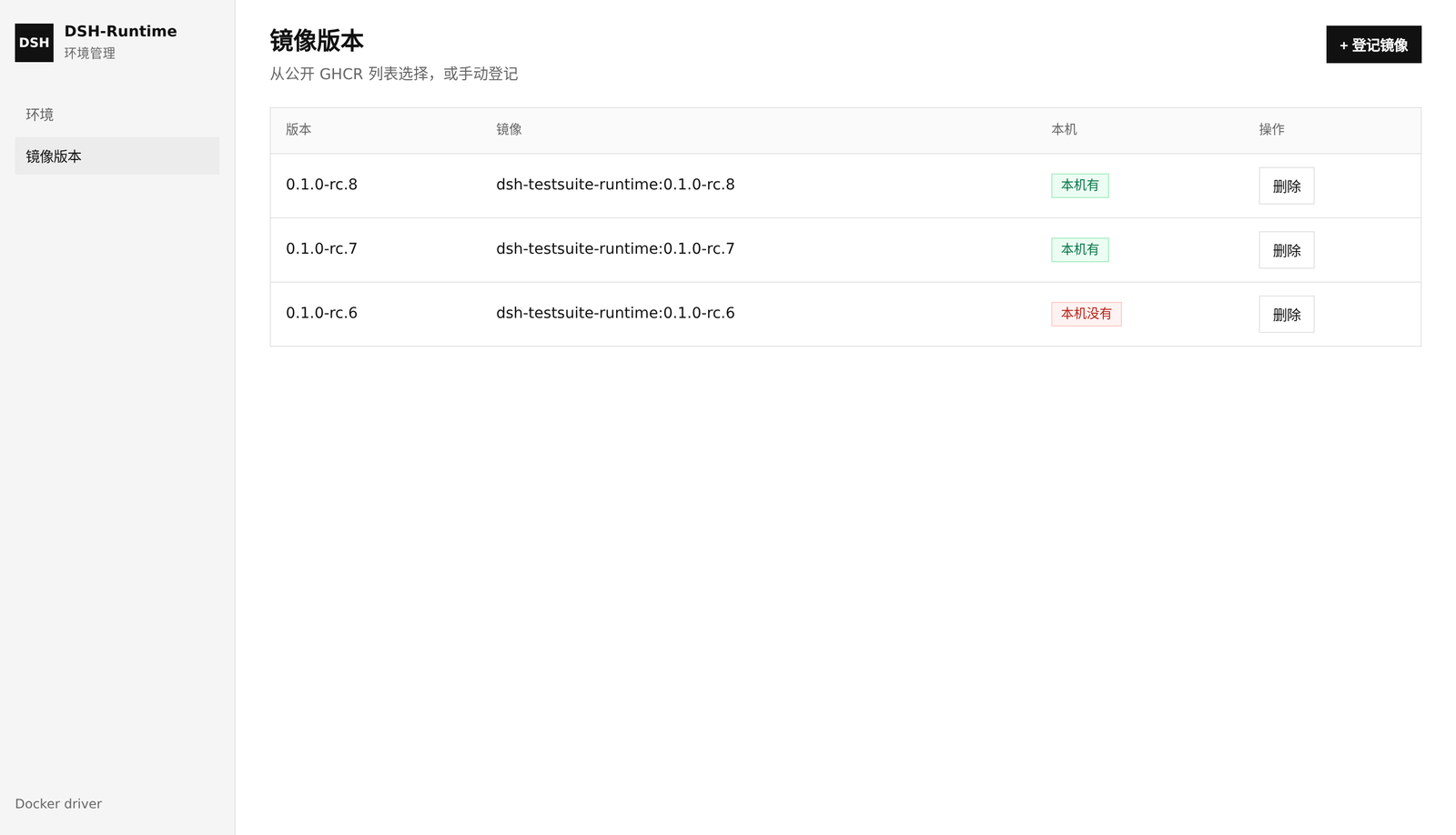
首次推到 GHCR 的包默认是 private,需要在 GitHub Packages 设为 public。
用 Compose 把控制面也跑进容器(需挂 docker.sock;runtime 仍在宿主机构建或 pull):
make image DSH_VERSION=0.1.1-rc.2
docker compose up --build
创建环境
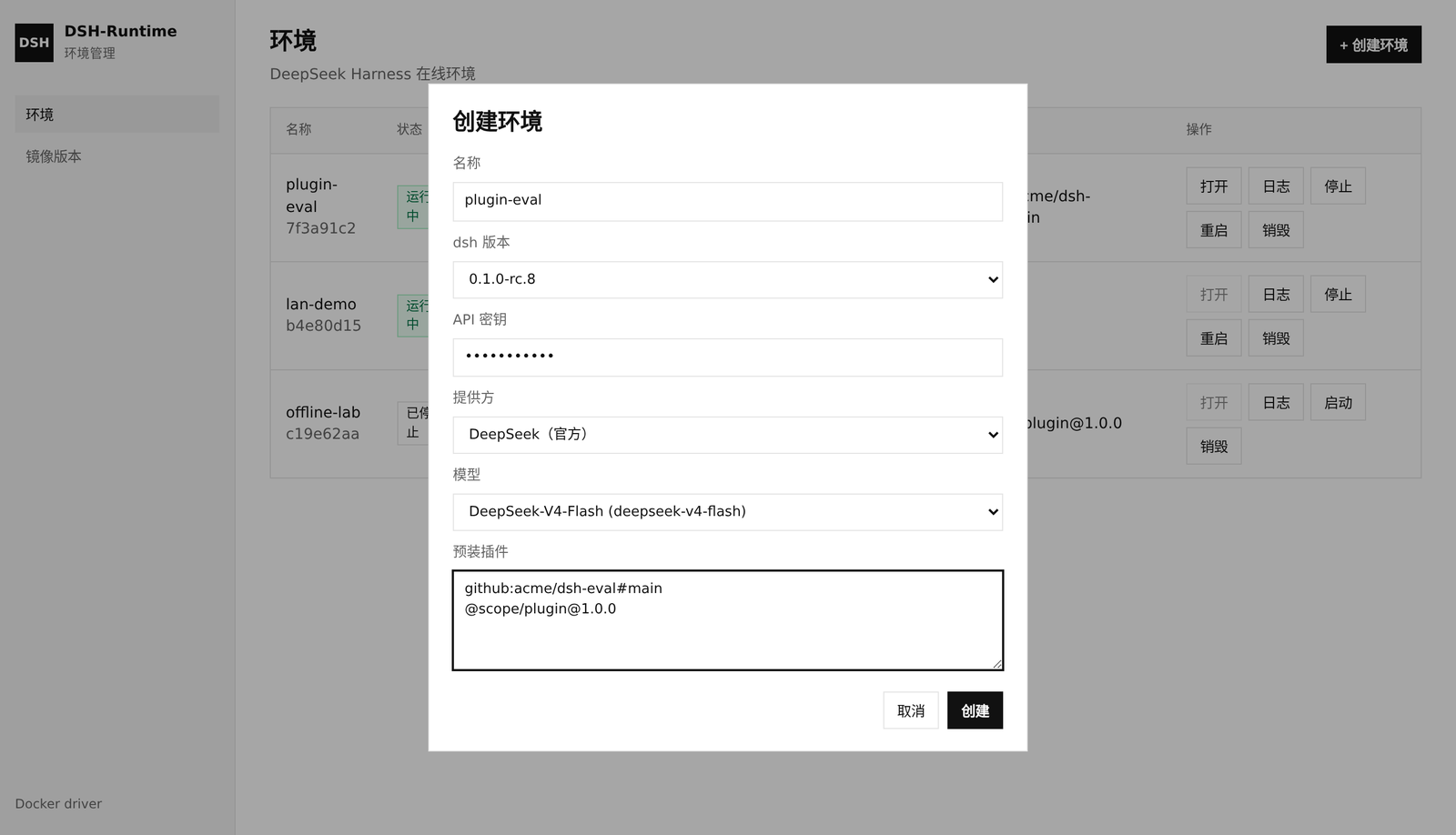
| 字段 | 说明 |
|---|---|
| dsh 版本 | 只能选「镜像版本」里已登记的条目 |
| 模型预设 | 在「模型预设」页在线填写(含 API 密钥)。创建环境时选预设即带上密钥,或选「手动填写」 |
| API 密钥 | 预设里保存;手动创建时现填。注入为 DSH_API_KEY;官方 provider 同时设 DEEPSEEK_API_KEY。列表只显示末 4 位 |
| Provider / Model | 写在预设里,或「手动填写」时现选。仅「自定义…」才填 Provider ID / API 地址 |
| 预装插件 | 每行一个 pnpm 源,如 github:owner/plugin#main。git 源的 prepare 会由 runtime 写入 profile 的 allowBuilds |
空闲 TTL 默认 2 小时(limits.idleTTL),超时会销毁容器和该环境的 $DSH_HOME。列表显示剩余 TTL,点「续期 6h」会从当前到期时间再延 6 小时。
控制面默认无认证,不要把 :8090 裸暴露到公网。config.yaml 和 data/ 含密钥,已 gitignore。
Kubernetes
把 runtime 设为 kubernetes 后,每个环境是同命名空间里的 Deployment + Service + Ingress,不再映射宿主机随机端口。
kubernetes.envHostTemplate必填,且必须包含{id}。控制面用它生成「打开」链接和DSH_TRUSTED_HOST。dsh Web 是根路径 SPA,需要每个环境一个主机名(自备通配 DNS),例如env-{id}.example.com。namespace留空则使用 in-cluster 当前命名空间;集群外可填kubeconfig。ingressClass可选(例如nginx)。未填则用集群默认 IngressClass。- 登记镜像只写目录;kubelet 拉镜像。填写
kubernetes.storageClass后,/data/dsh与/workspace挂在同一块 PVC 的home/workspace子目录;销毁环境时删除 PVC(不保留、不按名复用卷)。未填 storageClass 时退回 emptyDir。 docker.cpuCores/docker.memoryMB是容器 limit。可选的kubernetes.cpuRequest/kubernetes.memoryRequest只影响调度预留;不填则 request 等于 limit。- 控制面 ServiceAccount 需要对本命名空间的
deployments、pods、pods/log、services、secrets、ingresses的读写权限。
runtime: kubernetes
server:
  publicHost: testsuite.example.com
docker:
  imageRepository: ghcr.io/cocofhu/dsh-testsuite-runtime
kubernetes:
  envHostTemplate: "env-{id}.example.com"
  ingressClass: nginx
远程访问
从浏览器访问这台机器的 IP 时:
docker.bindIP设为0.0.0.0,否则端口只绑在 127.0.0.1,外网会ERR_EMPTY_RESPONSE/ 连不上。server.publicHost填这台机器的 IP 或域名(也可用DSHTS_PUBLIC_HOST)。「打开」链接和容器内dsh --trusted-host都用它。- 上游 dsh 拒绝
--host 0.0.0.0。runtime 让 dsh 听127.0.0.1:3081,entrypoint 再用 TCP 代理转到容器3080给docker -p。 - 用 IP + HTTP 打开时浏览器不是 secure context,没有
crypto.randomUUID。镜像会注入 polyfill(与社区 dsh-web-lan-access 同一思路),并把设置 / 凭证 API 放到--trusted-host上,否则模型页会报settings are unavailable in this browser。
cp config.example.yaml config.yaml
# 编辑 server.publicHost
export PATH="/usr/local/go/bin:$PATH"
go run ./cmd/dsh-testsuite -config config.yaml
API
GET    /healthz
GET    /api/providers
GET    /api/presets
POST   /api/presets                 { name, provider, model, apiKey, baseURL?, api? }
PUT    /api/presets/:id             apiKey 留空则不改密钥
DELETE /api/presets/:id
GET    /api/images
GET    /api/images/remote           内置可选版本列表
POST   /api/images                  { "version": "0.1.1-rc.2", "ref"?: "...", "pull"?: true }
                                    默认 pull=true;短名会 pull GHCR 再 tag 成本地 imageRepository:version
DELETE /api/images/:version
POST   /api/environments            { name, dshVersion, presetId? } 或手动 { apiKey, provider, model, ... }
GET    /api/environments
GET    /api/environments/:id
POST   /api/environments/:id/start
POST   /api/environments/:id/stop
POST   /api/environments/:id/restart
POST   /api/environments/:id/renew    到期时间再延 6 小时
DELETE /api/environments/:id
GET    /api/environments/:id/logs
MCP
控制面同进程同端口内嵌 MCP(Model Context Protocol)Streamable HTTP 端点,把上表全部能力以 MCP 工具暴露给 AI Agent:
http://<host>:8090/mcp
支持 initialize / ping / tools/list / tools/call(Streamable HTTP,协议版本 2025-03-26 及以上)。工具面与 REST 完全等价、共用同一份存储——Agent 经 MCP 创建的环境立即可在 Web UI / REST 中看到,反之亦然。
| 分类 | 工具 |
|---|---|
| 环境(9) | list_environments create_environment get_environment start_environment stop_environment restart_environment renew_environment(+6h)destroy_environment get_environment_logs(tail 可选) |
| 镜像(4) | list_images list_remote_images register_image(pull 默认 true)delete_image |
| 预设(4) | list_presets create_preset update_preset(apiKey 留空不改)delete_preset |
| Provider(1) | list_providers |
参数带 JSON Schema 描述,Agent 可零文档发现;not found / conflict / 参数校验等错误都映射为 MCP tool error(isError: true)并保留原始错误文本。密钥规则与 REST 一致:任何工具响应只回显末 4 位。
MCP 客户端配置示例(Claude Code 等 Streamable HTTP 客户端通用):
{
  "mcpServers": {
    "dsh-testsuite": {
      "type": "http",
      "url": "http://<host>:8090/mcp"
    }
  }
}
⚠️ 安全提示:与 REST 控制面一致,
/mcp没有任何认证。绝不要把该端口暴露到公网;请通过内网 / 端口转发访问,否则任何能连到该端口的人都可以读取容器日志、用已存的密钥创建环境,甚至销毁全部环境。
配置
见 config.example.yaml。docker.imageRepository 只在登记时没填 ref 时用来拼默认 仓库:版本。
参与贡献
见 CONTRIBUTING.md。安全问题请按 SECURITY.md 私下报告。
许可证
Related相关推荐
-
 chuspeeism/dashi-taskboard
现代化可灵活嵌入的任务面板,支持 Codex、DeepSeek Harness
chuspeeism/dashi-taskboard
现代化可灵活嵌入的任务面板,支持 Codex、DeepSeek Harness
-
 ccch1mneyyy/working-activity
Lively Working-line extension for pi CLI and DSH
ccch1mneyyy/working-activity
Lively Working-line extension for pi CLI and DSH
-
 Aisland-SJL/dsh-worktable
🖥️ Agent-project workbench for DeepSeek Harness — sidebar app drawer + dockable split workspace + a live control room w…
Aisland-SJL/dsh-worktable
🖥️ Agent-project workbench for DeepSeek Harness — sidebar app drawer + dockable split workspace + a live control room w…
-
 zhoushoujianwork/easyeda-agent
嘉立创EDA专业版(EasyEDA Pro)自动化:给 AI harness 装上画板的「手」—— 一套 typed 原理图/PCB 动作,CLI / Agent Skill / stdio MCP 三形态融合接入。承接嘉立创「不以卖板赚钱…
zhoushoujianwork/easyeda-agent
嘉立创EDA专业版(EasyEDA Pro)自动化:给 AI harness 装上画板的「手」—— 一套 typed 原理图/PCB 动作,CLI / Agent Skill / stdio MCP 三形态融合接入。承接嘉立创「不以卖板赚钱…
-
 morluto/rea
Reverse engineer anything with agents, from app behavior down to native binaries.
morluto/rea
Reverse engineer anything with agents, from app behavior down to native binaries.
-
 linhay/harmony-next.skills
Offline HarmonyOS NEXT developer skill library for AI coding assistants. Covers API 12–26 declarations, ArkTS/ArkUI, NDK…
linhay/harmony-next.skills
Offline HarmonyOS NEXT developer skill library for AI coding assistants. Covers API 12–26 declarations, ArkTS/ArkUI, NDK…
- pax-beehive/dsh-hub-cli Open-source CLI, schemas, resolver, and DSH agent tools for DSH Plugin Hub
- ericshang98/Perfect-Web-Clone Pixel-perfect clones of any webpage. Paste a URL, get a measured Vite + React replica.