codeMonkey-Pine/dsh-wallpaper
Wallpaper Engine 壁纸联动插件
项目介绍Project Overview
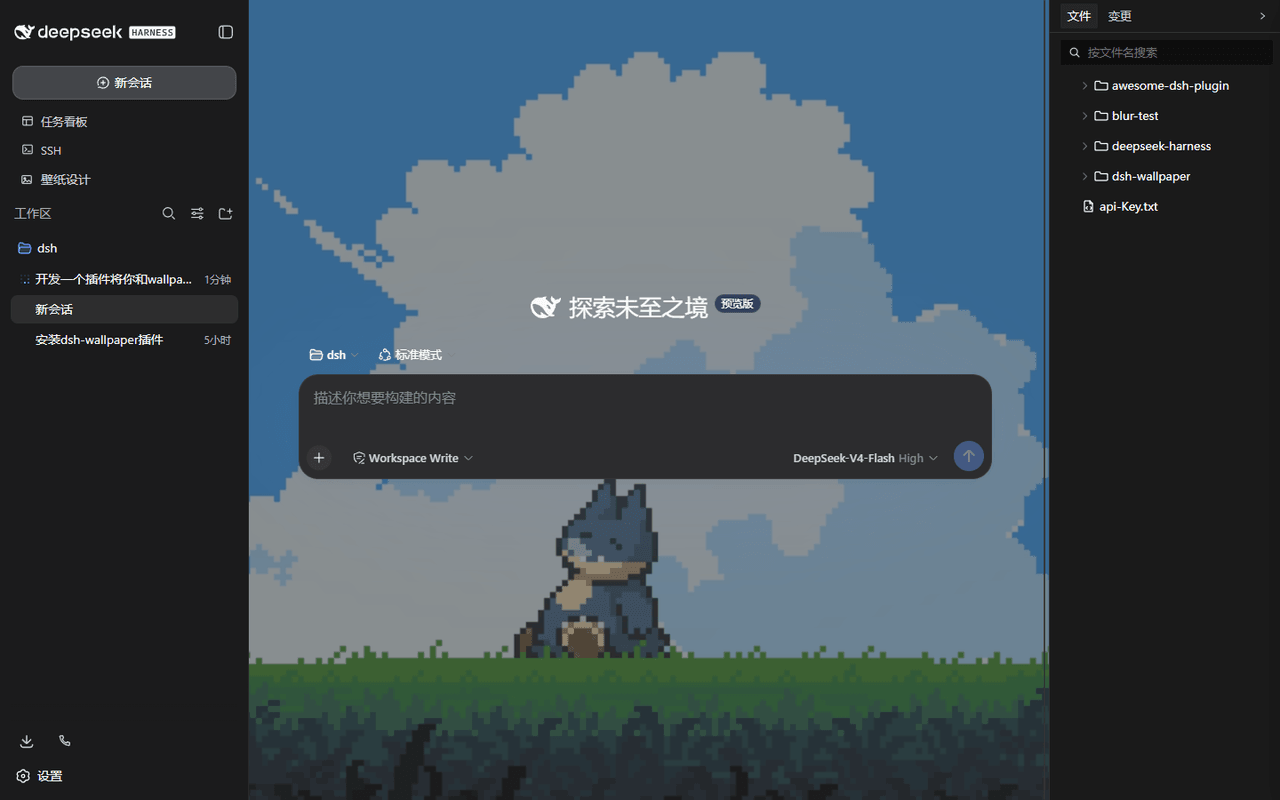
dsh-wallpaper 是 DSH 的皮肤插件,将本机 Wallpaper Engine 壁纸库接入 Web GUI 页面背景:图片原图、视频静音循环、网页壁纸 iframe 加载,场景壁纸自动降级为静态预览。侧边栏"壁纸设计"面板可调节不透明度、作用域、模糊、暗角、视差、轮播等并自动恢复。适用于需要将 WE 创意工坊资产用于研究 / 演示界面的场景。注意:该插件仅作用于 DSH GUI,不修改 Windows 桌面壁纸,且场景壁纸的粒子特效无法在网页还原。
dsh-wallpaper is a DSH skin plugin that feeds a local Wallpaper Engine library into the Web GUI as a page background. It renders images natively, loops muted videos, and iframes web wallpapers, while scene wallpapers degrade to softened static previews. A sidebar "壁纸设计" panel exposes opacity, scope, blur, vignette, fps, mouse parallax, carousel, and theme linkage, with localStorage persistence. Agent tools wallpaper_scan/list/set/config are bundled. Use it to reuse WE workshop assets for research or demo interfaces. Caveat: it only affects the DSH GUI (not the Windows desktop), and scene-particle effects cannot be reproduced in the browser.
请帮我了解并安装插件:【dsh-wallpaper】【https://github.com/codeMonkey-Pine/dsh-wallpaper】把上面这条消息直接发给当前会话里的 DSH,让它帮你了解并安装。安装命令不一定准确,发给 DSH 更稳。Send this message to DSH in your current session. CLI install commands may not be accurate across systems — DSH will figure it out for you.
或使用命令行安装(适合开发者)Or use CLI install (for developers)
命令行安装CLI Install
dsh plugin --profile web add dsh-wallpaper把 codeMonkey-Pine/dsh-wallpaper 加入你的 DSH 配置(web profile)即可启用。
READMEREADME
dsh-wallpaper — Wallpaper Engine 壁纸联动插件


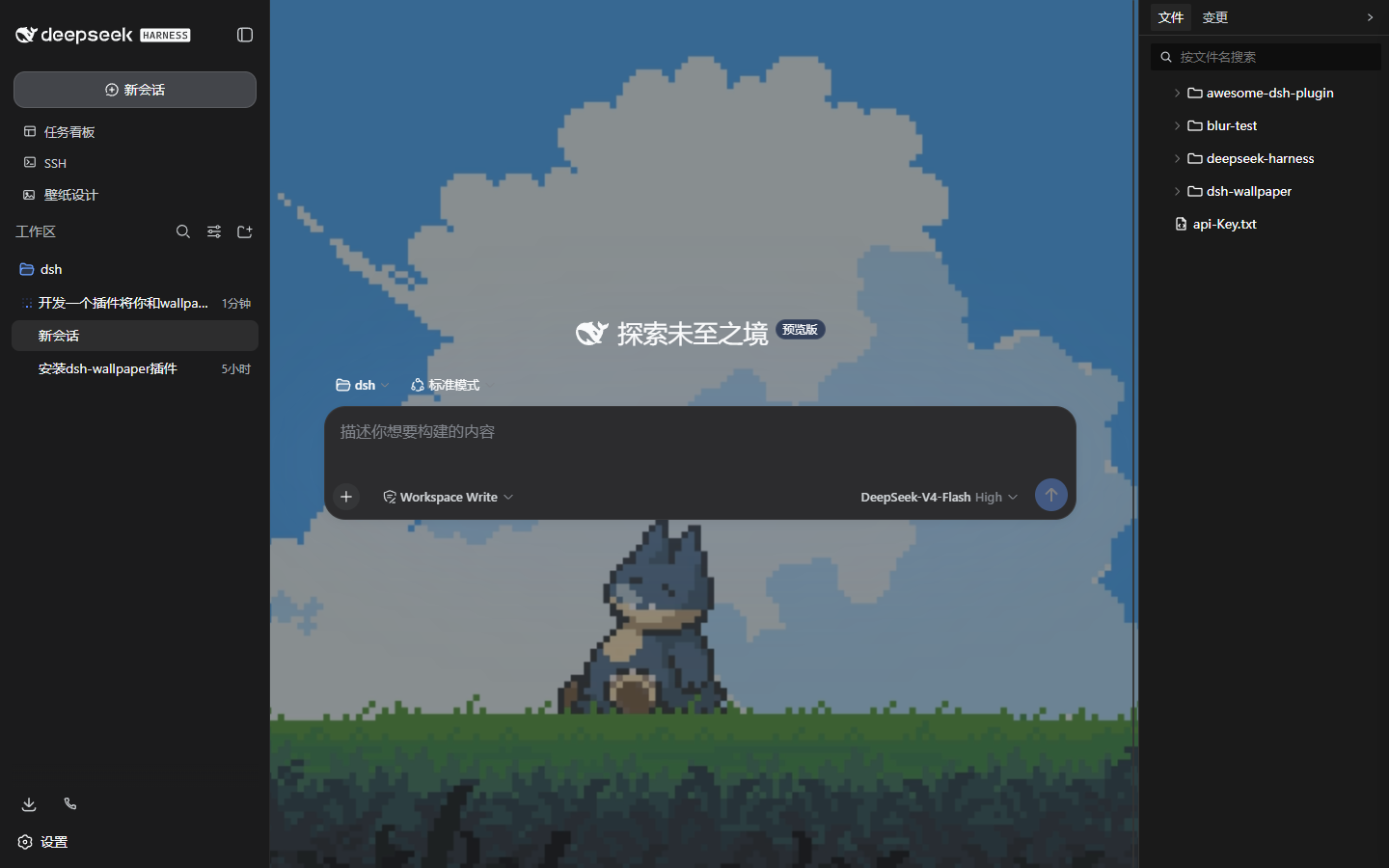
把本机 Wallpaper Engine 下载的壁纸设为 DSH Web GUI 的页面背景:图片 / 视频 / 网页壁纸按原样渲染,场景壁纸自动柔化为静态预览。侧边栏「壁纸设计」入口 + 右侧面板实时调节。
截图
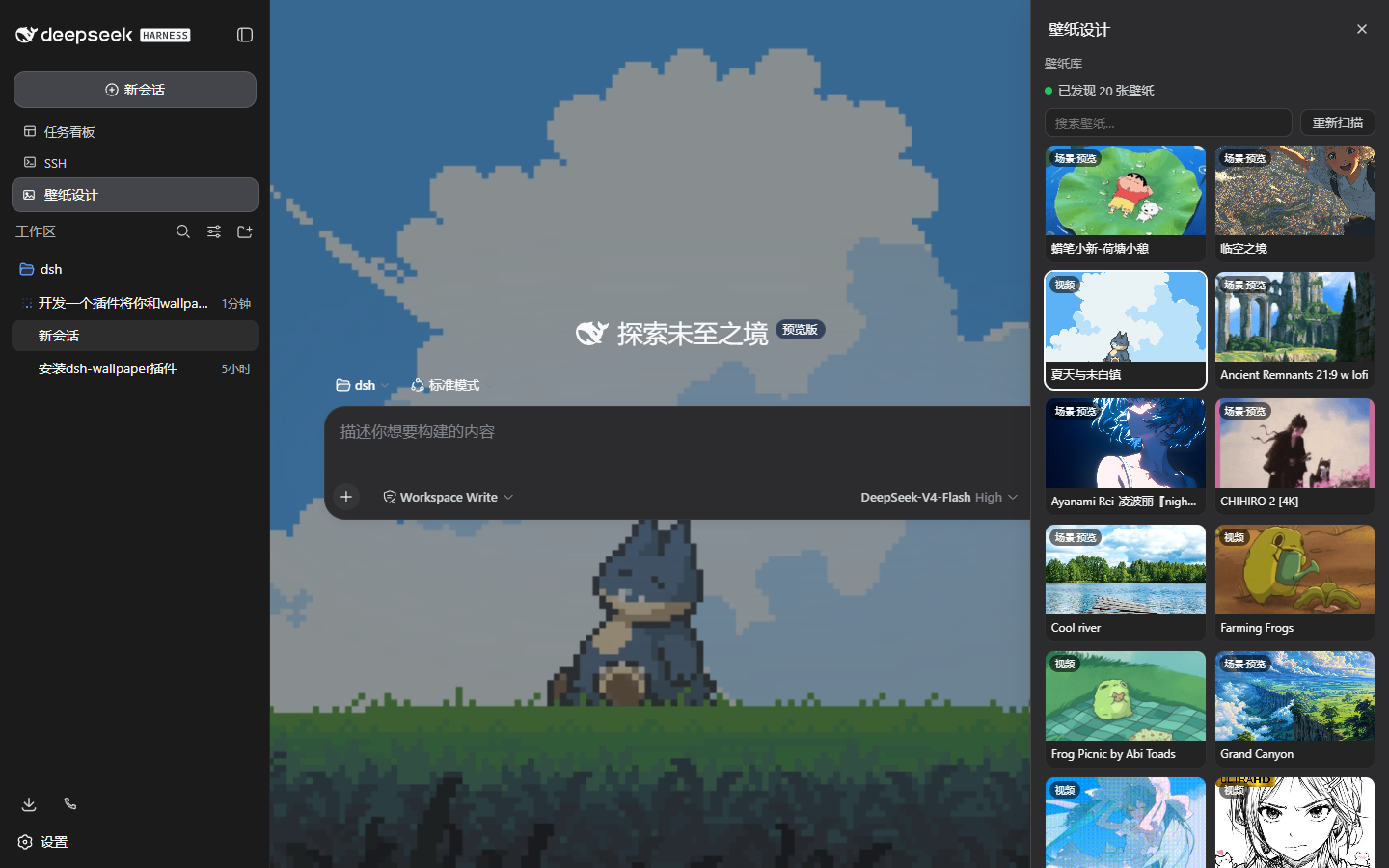
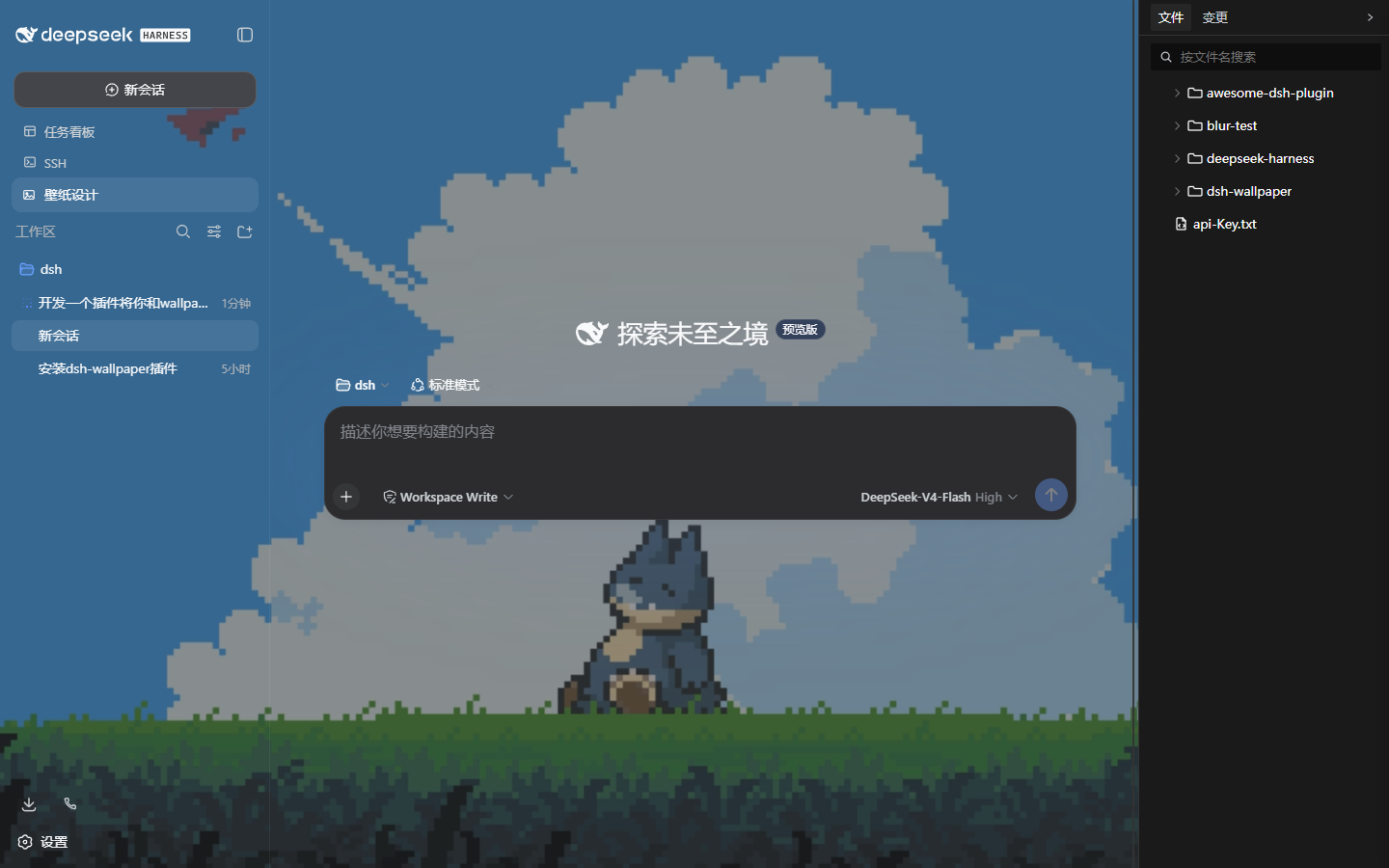
| 主内容区(视频壁纸) | 壁纸设计面板 | 整页模式 |
|---|---|---|
 |
 |
 |
功能
- 壁纸库:扫描 Steam 创意工坊
431960与本地projects,解析project.json(无则按扩展名识别),标记 WE 当前壁纸 - 渲染:图片原图填充;视频自动静音循环(支持 Range 拖动);网页壁纸 iframe 加载并透传
ws/fps/resolution;场景壁纸柔化静态预览(优化开关:模糊 + 降不透明度 + 暗角) - 壁纸设计面板:不透明度、作用范围(整页 / 主内容区)、填充模式、高斯模糊、暗角遮罩、帧率限制、失焦暂停、鼠标视差、点击穿透、多壁纸轮播、主题联动;设置存
localStorage自动恢复 - Agent 工具:
wallpaper_scan/wallpaper_list/wallpaper_set/wallpaper_config
安装
dsh plugin --profile web add dsh-wallpaper
重启 dsh web 后,侧边栏出现「壁纸设计」入口;点击选择壁纸即应用,面板内可实时调节全部效果。自定义 WE 安装路径:面板「壁纸来源路径…」或 wallpaper_config(持久化到 ~/.dsh/dsh-wallpaper.json)。
Agent 工具
| 工具 | 说明 |
|---|---|
wallpaper_scan |
重新扫描壁纸库 |
wallpaper_list [query] |
列出壁纸(id / 标题 / 类型 / 来源 / 当前 / 分辨率) |
wallpaper_set <id> [opacity] [scope] |
设置 GUI 期望壁纸(浏览器下次加载应用) |
wallpaper_config |
指定 Steam 根目录 / WE 安装目录 |
限制
- 壁纸只作用于本机 GUI 页面(API 均为 loopback-only),不改变 Windows 桌面壁纸
- 场景壁纸的粒子 / 特效无法移植到网页,降级为预览图
- 视频壁纸播放原始文件,帧率限制作用于视差 / 轮播等效果循环
English
dsh-wallpaper lets the DSH web GUI use your local Wallpaper Engine library as a page background. Image / video / web wallpapers render natively; scene wallpapers degrade to a softened static preview. A sidebar 壁纸设计 panel tunes opacity, scope (whole page vs main column), blur, vignette, fps, parallax, carousel and theme linkage; agent tools wallpaper_scan/list/set/config are included. Install: dsh plugin --profile web add dsh-wallpaper.
License
相关推荐Related
-
 nexu-io/open-design
🎨 Best DeepSeek Harness Design Plugin. The open-source Claude Design alternative. 🖥️ Local-first desktop app. 🖼️ Your…
nexu-io/open-design
🎨 Best DeepSeek Harness Design Plugin. The open-source Claude Design alternative. 🖥️ Local-first desktop app. 🖼️ Your…
-
 ruvnet/ruflo
🌊 The original agent meta-harness. Deploy intelligent multi-player swarms, coordinate autonomous workflows, and build c…
ruvnet/ruflo
🌊 The original agent meta-harness. Deploy intelligent multi-player swarms, coordinate autonomous workflows, and build c…
-
 Molunerfinn/PicGo
:rocket: The Ultimate Image Uploader for Efficient Creators. Supports Obsidian, Typora, VS Code etc. and 60+ image hosti…
Molunerfinn/PicGo
:rocket: The Ultimate Image Uploader for Efficient Creators. Supports Obsidian, Typora, VS Code etc. and 60+ image hosti…
-
 Tencent/WeKnora
Open-source LLM knowledge platform: turn raw documents into a queryable RAG, an autonomous reasoning agent, and a self-m…
Tencent/WeKnora
Open-source LLM knowledge platform: turn raw documents into a queryable RAG, an autonomous reasoning agent, and a self-m…
- Nagi-ovo/voyager Enhancement suite for Gemini, AI Studio, Claude & ChatGPT — plus a prompt manager for any web UI, DeepSeek Harness inclu…
-
 freestylefly/awesome-gpt-image-2
Prompt as Code | GPT-Image2 工业级提示词引擎与模板库,470+ 个案例逆向工程,20+ 套工业级模板,并提炼出Skills,持续更新中
freestylefly/awesome-gpt-image-2
Prompt as Code | GPT-Image2 工业级提示词引擎与模板库,470+ 个案例逆向工程,20+ 套工业级模板,并提炼出Skills,持续更新中
-
 tt-a1i/archify
Agent skill for beautiful, verifiable architecture, workflow, sequence, data-flow, and lifecycle diagrams—self-contained…
tt-a1i/archify
Agent skill for beautiful, verifiable architecture, workflow, sequence, data-flow, and lifecycle diagrams—self-contained…
-
 EverMind-AI/EverOS
One portable memory layer for every AI agent: local-first, Markdown-native, user-owned, and self-evolving across apps, t…
EverMind-AI/EverOS
One portable memory layer for every AI agent: local-first, Markdown-native, user-owned, and self-evolving across apps, t…