d-ouyang/dsh-plugin-md-outline
DeepSeek Harness 插件:概述并检查 Markdown 文档结构(标题树、跳级标题、重复标题、未闭合代码块)。
项目介绍Project Overview
这是一个 DeepSeek Harness 插件,新增 md_outline 工具,用于为 Markdown 文档生成带行号的嵌套标题树,并检查标题跳级、重复标题、缺失或多个 H1、未闭合代码围栏等结构问题。适用于审阅书稿、技能集、规格说明等长文档,或批量扫描目录。需配合 dsh CLI 使用,仅分析 Markdown 结构,不校验内容语义。
This is a DeepSeek Harness plugin that adds an md_outline tool. It generates a nested Markdown heading tree with line numbers and lints structural issues: heading-level skips, duplicate headings, missing or multiple H1s, and unclosed code fences. Use it when auditing long documents such as book drafts, skill sets, or specs, or when scanning directories. It requires the dsh CLI and checks structure only, not content semantics.
请帮我了解并安装插件:【dsh-plugin-md-outline】【https://github.com/d-ouyang/dsh-plugin-md-outline】把上面这条消息直接发给当前会话里的 DSH,让它帮你了解并安装。安装命令不一定准确,发给 DSH 更稳。Send this message to DSH in your current session. CLI install commands may not be accurate across systems — DSH will figure it out for you.
或使用命令行安装(适合开发者)Or use CLI install (for developers)
命令行安装CLI Install
dsh plugin add https://github.com/d-ouyang/dsh-plugin-md-outline.git把 d-ouyang/dsh-plugin-md-outline 加入你的 DSH 配置(web profile)即可启用。
READMEREADME
dsh-plugin-md-outline
🇨🇳 中文文档 | 🇺🇸 English
A minimal but practical DeepSeek Harness plugin that adds an md_outline tool.
It outlines and lints Markdown documents: a nested heading tree plus structural
warnings that are tedious to check by hand and easy to get wrong in long docs
(book drafts, skill sets, specs).
Topic:
dsh-plugin— add this topic to the GitHub repo so the ecosystem can discover it (see Publishing thedsh-plugintopic below).
What it does
| Check | Why it matters |
|---|---|
| Heading tree (H1–H6, with line numbers) | Navigate and audit long documents at a glance. |
| Heading-level skips (e.g. H1 → H3) | Catches broken document hierarchy. |
| Duplicate heading text | Flags accidental repeats that break anchors/TOC. |
| Missing H1 / multiple H1 | Enforces a single document title. |
| Unclosed code fences | The classic long-doc bug — a fence left open makes everything after it "code". Headings inside fences are correctly ignored. |
Preview
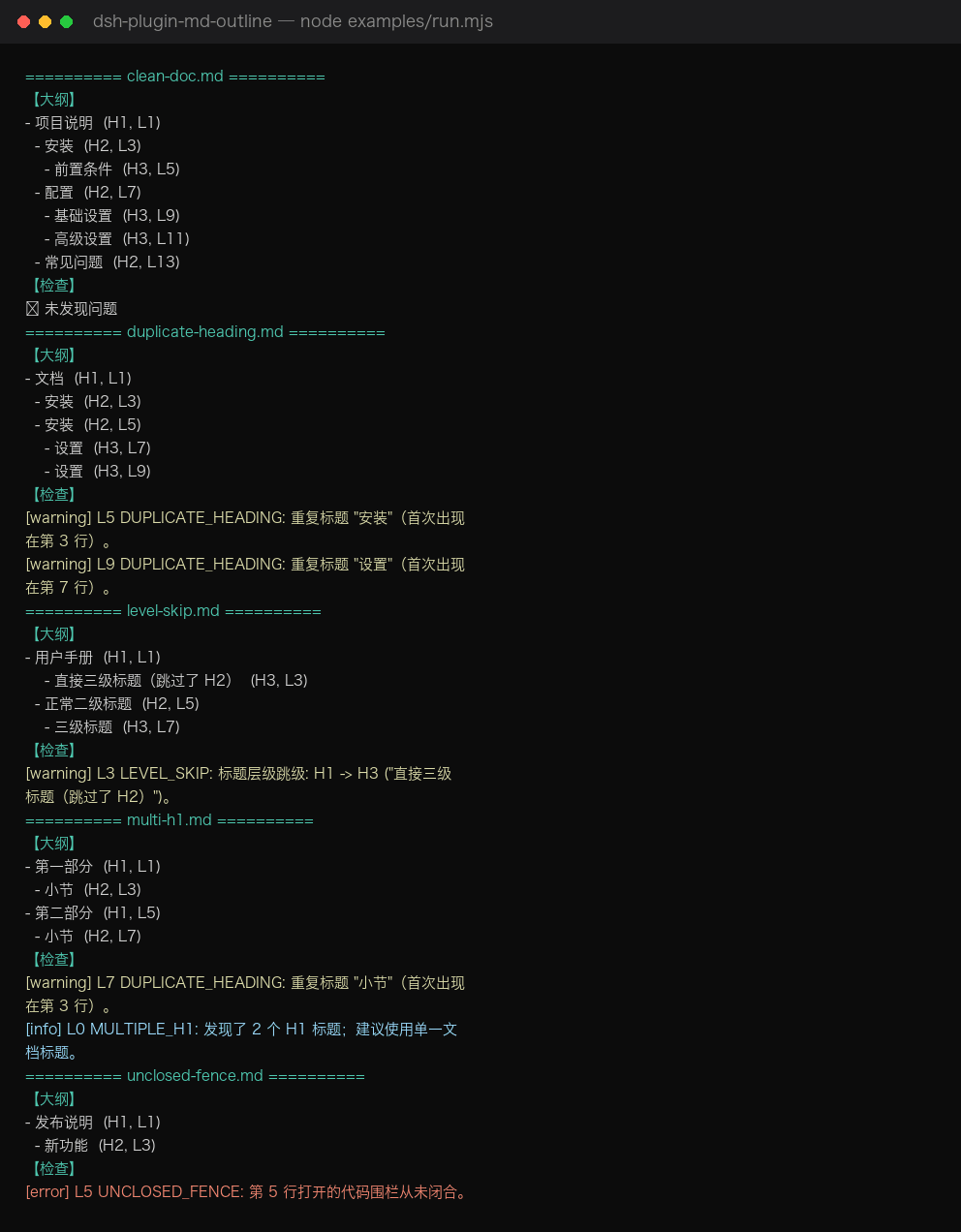
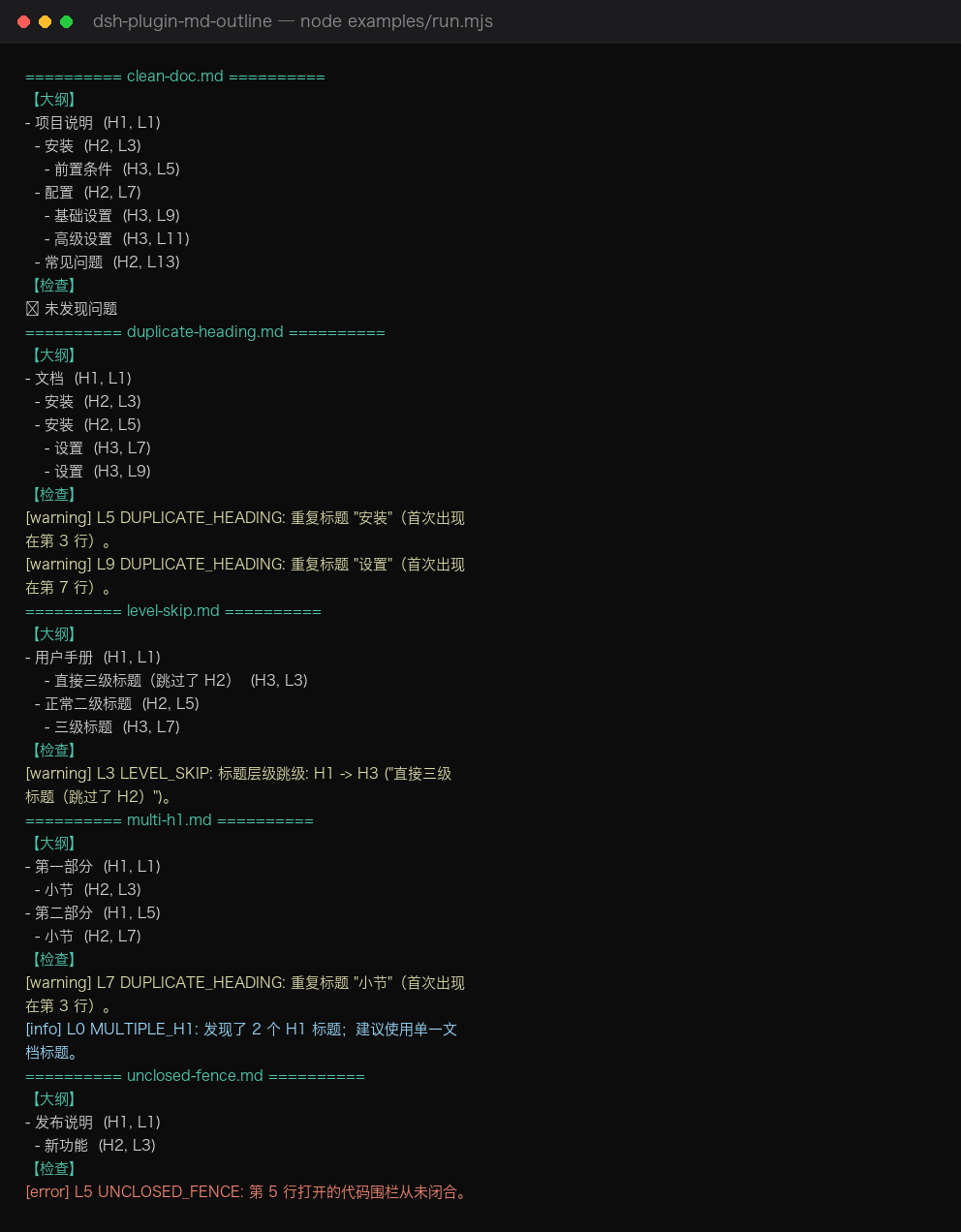
Terminal preview from node examples/run.mjs (covers all 5 sample docs
— clean, level skip, duplicate headings, multiple H1, unclosed fence):
What a bad doc looks like — examples/level-skip.md
The left side is the source as written; the right side is what md_outline reports.
The H1 → H3 jump on line 3 is flagged with line number and reason.
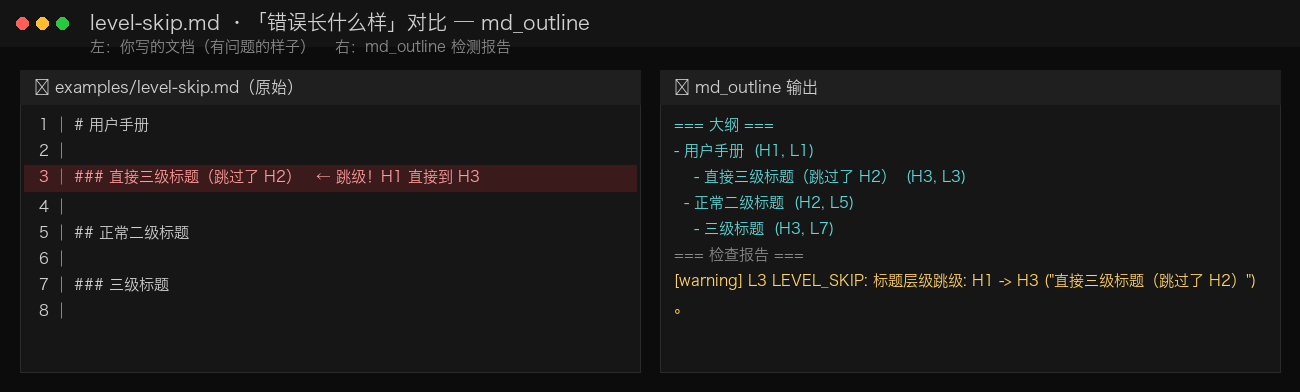
To regenerate: python3 docs/gen_screenshot.py (writes docs/screenshot.png).
Install
One-click install (any machine, any profile):
dsh plugin add https://github.com/d-ouyang/dsh-plugin-md-outline.git
dsh --profile demo --dump-config | grep -i md-outline   # confirm the layer is present
Requires the dsh CLI (DeepSeek Harness). This plugin is plain ESM JavaScript:
no build step, no allowBuilds prompt, installs straight from a git repo.
Local checkout also works:
dsh plugin --profile demo add /path/to/dsh-plugin-md-outline
To remove:
dsh plugin remove dsh-plugin-md-outline
Usage
In the Web UI (or any surface with tools), just ask the model:
Outline
~/book/draft.mdand tell me about structural issues.
Or call it directly in Code Mode:
await tools.md_outline({ path: '~/book/draft.md', mode: 'both' })
await tools.md_outline({ path: '~/skills', mode: 'lint', recursive: true })
await tools.md_outline({ path: '~/notes/spec.md', mode: 'outline', maxDepth: 2 })
Parameters
| Name | Type | Required | Notes |
|---|---|---|---|
path |
string | yes | A .md/.markdown/.mdx file, or a directory. |
mode |
'outline' | 'lint' | 'both' |
no | Default both. |
maxDepth |
number (1–6) | no | Limit outline nesting. |
recursive |
boolean | no | Scan subdirectories when path is a dir (default true). |
The canonical return value is structured ({ files, summary }) for programmatic
use in Code Mode; the model-facing card shows the human-readable summary.
How it is built (cookbook recap)
This plugin follows the official authoring path:
- Tool contract —
docs/user/develop/basic/tool.mdanddocs/cookbook/adding-a-tool.md:defineTool({ name, description, parameters, output, execute })registered viactx.tools.register(...). - Bundle packaging —
docs/user/develop/basic/publish.md: a bundle is an npm package with adsh.bundlemanifest and acordis.patch.ymllayer that inserts the plugin row by package name. - No build — written in plain ESM JavaScript so a
github:install loads without running anypreparescript.
dsh-plugin-md-outline/
├── package.json        # dsh.bundle manifest + peer dep on @deepseek-ai/dsh-tools
├── cordis.patch.yml    # the layer applied when a profile adds this bundle
├── index.js            # plugin entry: name / inject / apply -> registers md_outline
├── md-outline-core.js  # pure, dependency-free analysis (unit-tested)
├── test.mjs            # `node test.mjs` validates the core logic
├── examples/           # sample docs + run.mjs (real output shown in docs/USAGE.md)
├── docs/USAGE.md       # 🇨🇳 full usage guide with real test results
├── README.md
└── README.zh-CN.md
Develop
node test.mjs                 # unit-test the pure logic
node examples/run.mjs         # run all sample docs and print real outlines + warnings
node --check index.js        # syntax check the plugin entry
See docs/USAGE.md (中文) for the full usage guide and real test output.
The runtime contract depends on @deepseek-ai/dsh-tools being present in the dsh
installation (it is — the harness itself uses it). Declared as a peerDependency,
so it is never fetched from a registry.
Publishing the dsh-plugin topic
The dsh-plugin GitHub topic is what makes community plugins discoverable. Add it
in repo Settings → Topics, or via the API once the repo exists:
# after `git push`, set the topic through the GitHub API (needs a token)
curl -X PUT -H "Authorization: Bearer $GITHUB_TOKEN" \
  -H "Accept: application/vnd.github+json" \
  https://api.github.com/repos/d-ouyang/dsh-plugin-md-outline/topics \
  -d '{"names":["dsh-plugin","markdown","deepseek-harness"]}'
License
MIT
相关推荐Related
-
 nexu-io/open-design
🎨 Best DeepSeek Harness Design Plugin. The open-source Claude Design alternative. 🖥️ Local-first desktop app. 🖼️ Your…
nexu-io/open-design
🎨 Best DeepSeek Harness Design Plugin. The open-source Claude Design alternative. 🖥️ Local-first desktop app. 🖼️ Your…
-
 freestylefly/awesome-gpt-image-2
Prompt as Code | GPT-Image2 工业级提示词引擎与模板库,530+ 个案例逆向工程,20+ 套工业级模板,并提炼出Skills,持续更新中
freestylefly/awesome-gpt-image-2
Prompt as Code | GPT-Image2 工业级提示词引擎与模板库,530+ 个案例逆向工程,20+ 套工业级模板,并提炼出Skills,持续更新中
-
 anywhere-labs/dsh-desktop
为 DeepSeek Harness (DSH) 插件生态打造的现代化桌面端解决方案。万物皆「插件」,桌面本身也是「插件」。
anywhere-labs/dsh-desktop
为 DeepSeek Harness (DSH) 插件生态打造的现代化桌面端解决方案。万物皆「插件」,桌面本身也是「插件」。
- Nagi-ovo/voyager Enhancement suite for Gemini, AI Studio, Claude & ChatGPT — plus a prompt manager for any web UI, DeepSeek Harness inclu…
-
 walkinglabs/learn-harness-engineering
Harness engineering beginner tutorial, from 0 to 1
walkinglabs/learn-harness-engineering
Harness engineering beginner tutorial, from 0 to 1
-
 awesome-dsh-plugin/awesome-dsh-plugin
A curated list of plugins for DeepSeek Harness (dsh) · DeepSeek Harness 插件精选列表
awesome-dsh-plugin/awesome-dsh-plugin
A curated list of plugins for DeepSeek Harness (dsh) · DeepSeek Harness 插件精选列表
-
 MemTensor/MemOS
Self-evolving memory OS for LLM & AI Agents: ultra-persistent memory, hybrid-retrieval, and cross-task skill reuse, with…
MemTensor/MemOS
Self-evolving memory OS for LLM & AI Agents: ultra-persistent memory, hybrid-retrieval, and cross-task skill reuse, with…
- yjh051108/dsh-routing-suite dsh-routing-suite — injector + router-standard kit: install the runtime injector first, then the task-aware reasoning-mo…