DDDMUC/dsh-edit-turn
Edit any user turn in DeepSeek Harness and re-run it: an inline editor rolls the conversation back through the official surface-replace contract, then re-prompts the agent with the revised text. The append-only session log is never rewritten.
Project Overview项目介绍
dsh-edit-turn is a native DeepSeek Harness plugin that fills a missing in-place edit action for any single turn of an ongoing conversation. It is installed through the official loader via dsh plugin --profile web add dsh-edit-turn, or from a local checkout for development, and it activates after the corresponding profile's DSH process is restarted. On hover, every user message reveals an edit icon; clicking it opens a rounded editor directly underneath that row, prefilled with the original text, and saving it appends a single replacement event carrying surfaceOp: { op: 'replace', startSeq, endSeq } to the append-only session log. The shadowed node disappears from deriveMessages() so the model sees only the rewritten wording, yet the original bytes remain untouched in the journal, and the response below it plus everything after stays in place without re-invoking the model.
Typical workflow covers fixing a mis-typed prompt or a question that went off-track: save once and only that one user bubble is rewritten, while later turns keep their original assistant replies; toggling rerun: true additionally calls ctx.sessionController.prompt() so the assistant answers again on the new text. Assistant turns can be edited too, but because the official format forbids assistant/message from carrying sourceEventSeqs, the plugin falls back by rolling forward into a brand-new turn, appending an empty developer/message carrier followed by an assistant message holding the rewritten copy, stamped with source.editedBy; tool calls and thinking traces inside an edited reply cannot be preserved. Keyboard handling mirrors the platform input box: Enter saves, Shift+Enter inserts a newline, Esc cancels, and both isComposing and keyCode 229 are filtered so Chinese IME selection never triggers a save. The intended audience is heavy DSH users who want ChatGPT- or Claude-style one-click rewrites inside long sessions.
Runtime requires host peers dsh-settings and dsh-tools resolved by the DSH loader, a direct dependency on @deepseek-ai/schemastery, and client packages dsh-client-locale, dsh-client-ui-chat, dsh-client-ui-conversation, and dsh-client-ui-primitives; engine compatibility is dsh.engines.dsh >= 0.1.6-alpha.2. The editor carries its own opaque --dshet-panel surface, dark mode keys off body[data-ds-dark-theme], and a backdrop-filter blends with skin backgrounds while leaving plugin chrome alone. All routes are bound to the local loopback with Host and Origin checks. First-run caveats: link-installed checkouts whose node_modules is an npx-cache symlink must be reinstalled with npm install --omit=dev --legacy-peer-deps, sessions broken by reply edits in 0.2.0–0.2.3 can be repaired with tools/repair-session.mjs, and the diagnostics route GET /dsh-edit-turn/debug plus npm run probe:loaded [port] help confirm whether the host and browser halves actually loaded. The license is MIT.
dsh-edit-turn 是面向 DeepSeek Harness(DSH)的原生插件,专门补齐"就地编辑某一轮对话"这一缺失动作。安装走官方命令 dsh plugin --profile web add dsh-edit-turn,也可从本地目录挂载;插件以 profile 形式加载,安装后需重启该 profile 对应的 DSH 进程。悬停任意用户消息会出现编辑按钮,点击后在该消息下方就地展开圆角编辑器(Enter 保存、Shift+Enter 换行、Esc 取消,并兼容中文输入法),保存即向事件流追加一条符合官方 surface-replace 契约的 surfaceOp: { op: 'replace', startSeq, endSeq } 替换事件,旧措辞从 deriveMessages() 中消失但原始字节保留在 append-only 会话日志里,默认不重跑模型。
典型用法是修正说错的提示词或问偏的问题:保存后仅该条消息被改写,它下方的助手回复及后续对话原样保留;配置 rerun: true 时按官方 sessionController.prompt() 立刻重答。模型回答也可编辑——因官方禁止 assistant/message 携带 sourceEventSeqs,插件采用"回退到末尾 + 新开 turn 追加助手消息"的回退写法,附带 source.editedBy 标记;工具调用与思考过程不可保留。它适合重度依赖 DSH 长会话、又希望像 ChatGPT / Claude 那样随手改一句再继续的用户。
运行时依赖宿主提供 dsh-settings 与 dsh-tools(peer,由 DSH 加载器解析),直接依赖为 @deepseek-ai/schemastery,客户端 UI 包为 dsh-client-locale、dsh-client-ui-chat、dsh-client-ui-conversation、dsh-client-ui-primitives;要求 dsh.engines.dsh >= 0.1.6-alpha.2。编辑器自带 --dshet-panel 不透明表面,暗色走 body[data-ds-dark-theme],皮肤仍可透出。路由仅监听本机回环并校验 Host/Origin。许可为 MIT。
请帮我安装这个 DSH 插件。安装前先完成【兼容性检查 + 安全性检查】,检查通过再动手。

插件:dsh-edit-turn(DDDMUC/dsh-edit-turn)
仓库:https://github.com/DDDMUC/dsh-edit-turn
本站详情页:https://www.yhbd.top/plugins/dddmuc-dsh-edit-turn/
本站登记:类型 plugin · 归类 原生 DSH 插件 · 许可证 MIT · ⭐ 3 · 最近提交 2026-10-03 · 主语言 JavaScript

按下面顺序执行,每步先把结论告诉我,再进入下一步:

【1 兼容性检查】
① 我这边:DSH 版本、Node 版本、操作系统、当前 profile(web / desktop)。
② 读它的 README、package.json、插件 manifest,列出它要求的 DSH 版本 / Node 版本 / 操作系统 / 外部依赖 / 需要另外先装的运行时。
③ 逐条比对,结论只写「满足 / 不满足 / 未知」三种;不满足的给出可行替代方案。
④ 检查是否和我已装的插件冲突:命令名重复、skill / tool 重名、端口占用、重复注册的 MCP server。

【2 安全性检查】
① 仓库可信度:和上面「本站登记」是否一致;star / fork 数、创建时间、最近提交,是否归档或长期停更。
② 安装脚本:逐行看 package.json 的 preinstall / install / postinstall,以及 install.sh、setup.ps1 之类脚本。出现 curl|bash、下载后直接执行、混淆代码、访问与插件功能无关的域名,立刻停下来告诉我,不要继续装。
③ 依赖:列出新增依赖,标出无人维护、或与知名包拼写近似的可疑包(typosquatting)。
④ 权限与副作用:它会读写哪些目录、访问哪些域名、需要哪些 DSH 权限(filesystem / network / shell / clipboard 等),以及怎么卸载和回滚。
⑤ 如果它要求 sudo / 管理员权限,或权限明显超出功能所需,先停下来问我。

【3 安装】
上面两步没有「不满足」和「高危项」时才执行;用官方推荐方式安装,不要自行提权。

【4 汇报】
用表格输出:检查项 / 结论 / 依据 / 是否需要我决策。拿不准的一律写「未知」并说明要我怎么确认——不要猜,也不要替我决定。
Send this message to DSH in your current session: it verifies compatibility and security first (answering met / not met / unknown item by item) and only installs once everything checks out — it will stop and ask you if it finds a high-risk item. The box scrolls; the copy is the full prompt. CLI install commands may not be accurate across systems, so DSH is the safer route.把上面这条消息直接发给当前会话里的 DSH:它会先核对兼容性与安全性(逐条给「满足 / 不满足 / 未知」),确认没问题再安装,有高危项会停下来问你。框内可滚动,复制到的是完整提示词;安装命令不一定准确,发给 DSH 更稳。
- Only 3 stars - very few users, little community feedback星标只有 3,几乎没人在用,遇到问题缺少社区反馈
DSH walks through these 9 checksDSH 会逐条核对这 9 项
Compatibility兼容性
- DSH, Node, OS and profile requirementsDSH 版本 / Node 版本 / 操作系统 / profile 是否满足要求
- External dependencies and runtimes (Electron / Python / Docker, ...)外部依赖与运行时(Electron / Python / Docker 等)是否齐备
- Conflicts with installed plugins: command names, skill / tool names, ports, duplicate MCP registration与已装插件是否冲突:命令名、skill / tool 重名、端口占用、重复 MCP 注册
Security安全性
- Repo matches the facts registered here; archived or abandoned?仓库是否与页面登记一致,是否归档或长期停更
- Safety of preinstall / install / postinstall and install.sh / setup.ps1preinstall / install / postinstall 与 install.sh、setup.ps1 是否安全
- curl|bash, download-then-execute, obfuscation, unrelated domains → stop immediatelycurl|bash、下载即执行、混淆代码、无关域名 → 立刻停止
- Typosquatting or unmaintained packages among the new dependencies新增依赖里有没有 typosquatting 或无人维护的包
- Requested permissions vs. what the feature actually needs申请了哪些权限、是否超出功能所需(filesystem / network / shell / clipboard)
- Any sudo / admin requirement, plus uninstall and rollback是否要求 sudo / 管理员权限,以及卸载与回滚方式
Anything uncertain must be marked unknown with a note on how to confirm it. This site's signal screen is a static snapshot, not a security audit.拿不准的必须标「未知」并说明要我怎么确认。本站的信号筛查是静态快照,不能替代安全审计。
Or use CLI install (for developers)或使用命令行安装(适合开发者)
CLI Install命令行安装
dsh plugin --profile web add dsh-edit-turn把 DDDMUC/dsh-edit-turn 加入你的 DSH 配置(web profile)即可启用。
READMEREADME
dsh-edit-turn
DeepSeek Harness 的「编辑某一轮」插件 —— 点用户消息旁的编辑按钮,就地改写那一句。保存即生效:改后的内容成为模型后续读到的版本,这一条消息下面的对话原样不动。 改写走官方 surface-replace 契约(一条替换事件同时完成"删旧 + 立新",被替换的内容从模型上下文里消失),保存本身永不调用模型。会话日志是 append-only 的,原始字节一个都不改写。
中文
为什么需要它
DSH 的会话日志是 append-only 的事件流:说错的提示词、问偏的问题,会一直留在模型上下文里污染后续每一轮。官方只有整段摘要式的「压缩」(/compact),没有「改一下我刚才那句话然后重来」这条路——而这恰恰是 ChatGPT / Claude 里最常用的动作。
这个插件把它补上:
- 悬停任意一条你自己发过的消息,右侧出现编辑按钮;
- 点击后在该消息下方就地展开编辑器,预填原文;
- 保存后:只有这一条消息被替换——旧措辞从模型上下文里消失,改后的内容占住它的位置(因此后续每一轮读到的都是改后的版本);
- 它下面的助手回复、以及之后的全部对话,原样保留,不重跑、不清空;
- 装了姊妹插件 dsh-rerun-turn 时,编辑器里会多一个「重跑」:先保存这次修改,再让它用改后的提示词重新生成这一轮(后续轮次逐事件重放回来,不丢)。
特性
- 官方 seam,不改日志 —— 回退 = 追加一条带
surfaceOp: { op: 'replace', startSeq, endSeq }的替换事件。原始事件全部留在会话文件里,只是不再进入deriveMessages()。与官方/compact用的是同一套契约。 - 改写内容就是载体本身 —— 提示词编辑落下的是一条
user/message替换事件,内容就是你改后的那句话。它既让模型读到你改后的版本,也在转录里显示成你自己的气泡;平台不会把它当成新输入去回答(这一点踩过坑:追加一条 user 消息会触发平台自动回答,越改越多)。 - 窗口最小化 —— 提示词编辑只遮蔽目标那一格(
shadowed = [target.seq]);回复编辑才需要"到末尾"的窗口(回答变了,建立在它之上的一切都不再成立),因此助手消息(内含 tool_use)与它产生的 tool/result 永远一起走,不可能留下悬空的调用/结果对。 - 保存永不调用模型 —— 保存只写上下文,不产生任何模型调用。"改完立刻重答"是另一件事,交给姊妹插件 dsh-rerun-turn(它遮蔽该轮、用表面上的提示词重新生成、再把后续轮次逐事件重放回来);本插件只在它装着时提供一个「重跑」按钮转发过去。
- 模型回答也能编辑 —— 回答无法被"替换":官方格式禁止
assistant/message携带sourceEventSeqs(已在真实校验器上验证)。做法是回退该回答及其后的内容,再追加一条带改写文本的助手消息——模型会把改写后的内容当成自己说过的话,对话可以继续。source.editedBy会如实记录这段文字由插件写入。 - 改过的那条还能再改 —— 它仍然显示在原来的位置(由插件渲染成气泡),悬停就有编辑按钮。
- 一次点击即执行 —— 保存后不再有二次确认(
confirm: true可恢复两步确认,确认步里会写明这次保存会丢弃什么)。编辑器本身已经是用户主动打开的动作,保存的后果在 README 与确认步里说明,输入框本身保持干净。 - 中英双语 UI,跟随 DSH 当前语言。
- 皮肤友好 —— 编辑器面板自带不透明表面(
--dshet-panel)而不是借用主题的表面色变量。皮肤的本意就是让表面半透明、把插画透出来,而它只会给自己的元素补可读背景,插件类名不在其中;借用皮肤变量的面板会变成全透明,文字直接压在插画上。暗色分支走官方属性body[data-ds-dark-theme](与dsh-client-ui-theme及多个官方 UI 包一致),并用backdrop-filter与皮肤融合。 - 宿主路由只限本机回环,并校验
Host与Origin。
安装
dsh plugin --profile web add dsh-edit-turn
从本地目录安装(开发用):
dsh plugin --profile web add /path/to/dsh-edit-turn
安装后重启该 profile 对应的 DSH 进程即可生效。
使用
- 把鼠标移到你想改的那条用户消息上,点右侧的编辑图标(铅笔)。
- 消息下方展开编辑器,原文已预填。改完点「保存」——一次点击即执行:旧措辞从模型上下文里移除,改后的内容占住它的位置,不叫模型。装了
dsh-rerun-turn时旁边还有一个「重跑」:先保存,再让那一轮用改后的内容重新生成(后续轮次不丢)。 - 编辑器收起,那条消息就地变成你改后的内容;它下面的回复与之后的对话原样不动。
Showing the opening section of the README — the full document lives in the repository以上为 README 开头摘要,完整文档在仓库内 · View the full README on GitHub →在 GitHub 查看完整 README →
Related相关推荐
-
 alaliqing/claude-paper
📖 Cross-agent research paper toolkit for Claude Code, Codex, OpenCode, and DeepSeek Harness—quick summaries, deep study…
alaliqing/claude-paper
📖 Cross-agent research paper toolkit for Claude Code, Codex, OpenCode, and DeepSeek Harness—quick summaries, deep study…
-
 qkycir-123/dsh-run2skill
Automatically turn successful DeepSeek Harness sessions into reusable, reviewable Agent Skills.
qkycir-123/dsh-run2skill
Automatically turn successful DeepSeek Harness sessions into reusable, reviewable Agent Skills.
-
 PKUfudawei/dsh-capability-menu
一个面向 DeepSeek Harness 的统一能力管理插件,为 Tools/Skills 提供常驻、按需、禁用三档暴露策略,以减少上下文占用并支持运行时动态发现与执行。
PKUfudawei/dsh-capability-menu
一个面向 DeepSeek Harness 的统一能力管理插件,为 Tools/Skills 提供常驻、按需、禁用三档暴露策略,以减少上下文占用并支持运行时动态发现与执行。
-
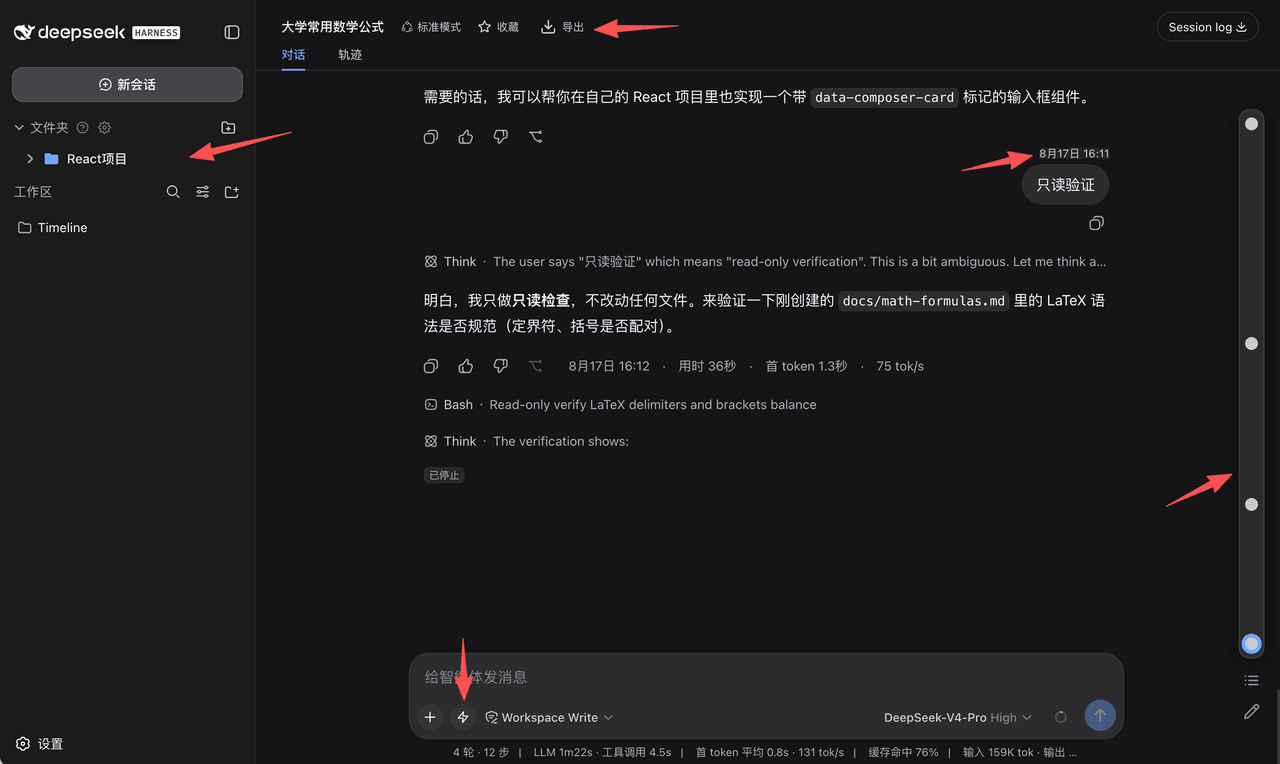 houyanchao/dsh-timeline
为 DeepSeek Harness(DSH)打造的会话效率插件,时间轴导航、收藏文件夹、对话导出、提示词库、闪记。
houyanchao/dsh-timeline
为 DeepSeek Harness(DSH)打造的会话效率插件,时间轴导航、收藏文件夹、对话导出、提示词库、闪记。
-
 a735624258/dsh-skill-picker
DeepSeek Harness 技能选择器:在输入框旁点选技能,自动插入官方 /技能名 手势,随消息一起发送
a735624258/dsh-skill-picker
DeepSeek Harness 技能选择器:在输入框旁点选技能,自动插入官方 /技能名 手势,随消息一起发送
- PerryLink/dsh-output-styles Claude Code outputStyles for DeepSeek Harness - session-scoped, durable, runtime-switchable model output styles (/style …
-
 Chael-Chael/dsh-reference-anything
The best DeepSeek Harness plugin for referencing anything — enhanced @ menu for commands, skills, files, agent sessions,…
Chael-Chael/dsh-reference-anything
The best DeepSeek Harness plugin for referencing anything — enhanced @ menu for commands, skills, files, agent sessions,…
- omdsh-dev/dsh-plugin-skills Agent skills for building and testing DeepSeek Harness plugins — from scaffolding a new plugin package to choosing the r…