dingyi222666/dsh-focus-chat
为 dsh 提供新的「聚焦会话」精简会话视图,更轻松易于阅读,只关注最终产出结果。
项目介绍Project Overview
DSH 网页界面的 focus chat 标签页插件。它把一轮助手回合折叠为单行摘要,汇总思考时长、上下文加载、文件读写与命令执行等动作,背景任务结算归入"后台任务"分段,文件操作不显示失败计数;中途中断会按段落拆分并标注时长,停止的回合显示"Stopped after X"。点击摘要可展开与原聊天相同的工具卡、思考、上下文注入、生成文件与复制/派生操作。需要概览时切换此标签,回到完整记录切回原视图。注意:不渲染第三方插件在聊天视图添加的工具卡扩展,文件内联链接需启用 file-mentions 服务。
A DSH web GUI plugin that adds a focus chat tab, collapsing each assistant turn into a single summary line covering thinking time, loaded context, file reads/writes, and command runs. Background-task notices fold into an N background jobs segment, file operations omit failure counts, mid-turn interjections split the fold into timed stretches, and stopped turns read Stopped after X. Click any line to expand full tool cards, thinking, context injections, produced files, and copy or fork actions rendered like standard chat rows. Use it for a quick "what happened?" view, then switch back to the full transcript. Caveat: third-party tool-card extensions registered in the chat view are not rendered here, and inline file links require the optional file-mentions service.
请帮我了解并安装插件:【dsh-focus-chat】【https://github.com/dingyi222666/dsh-focus-chat】把上面这条消息直接发给当前会话里的 DSH,让它帮你了解并安装。安装命令不一定准确,发给 DSH 更稳。Send this message to DSH in your current session. CLI install commands may not be accurate across systems — DSH will figure it out for you.
或使用命令行安装(适合开发者)Or use CLI install (for developers)
命令行安装CLI Install
dsh plugin --profile web add @dingyi222666/dsh-focus-chat把 dingyi222666/dsh-focus-chat 加入你的 DSH 配置(web profile)即可启用。
READMEREADME
dsh-focus-chat

English | 中文
A plugin for the dsh web GUI that adds a focus chat tab — a condensed, Claude Code–style way to read a conversation.
Screenshots
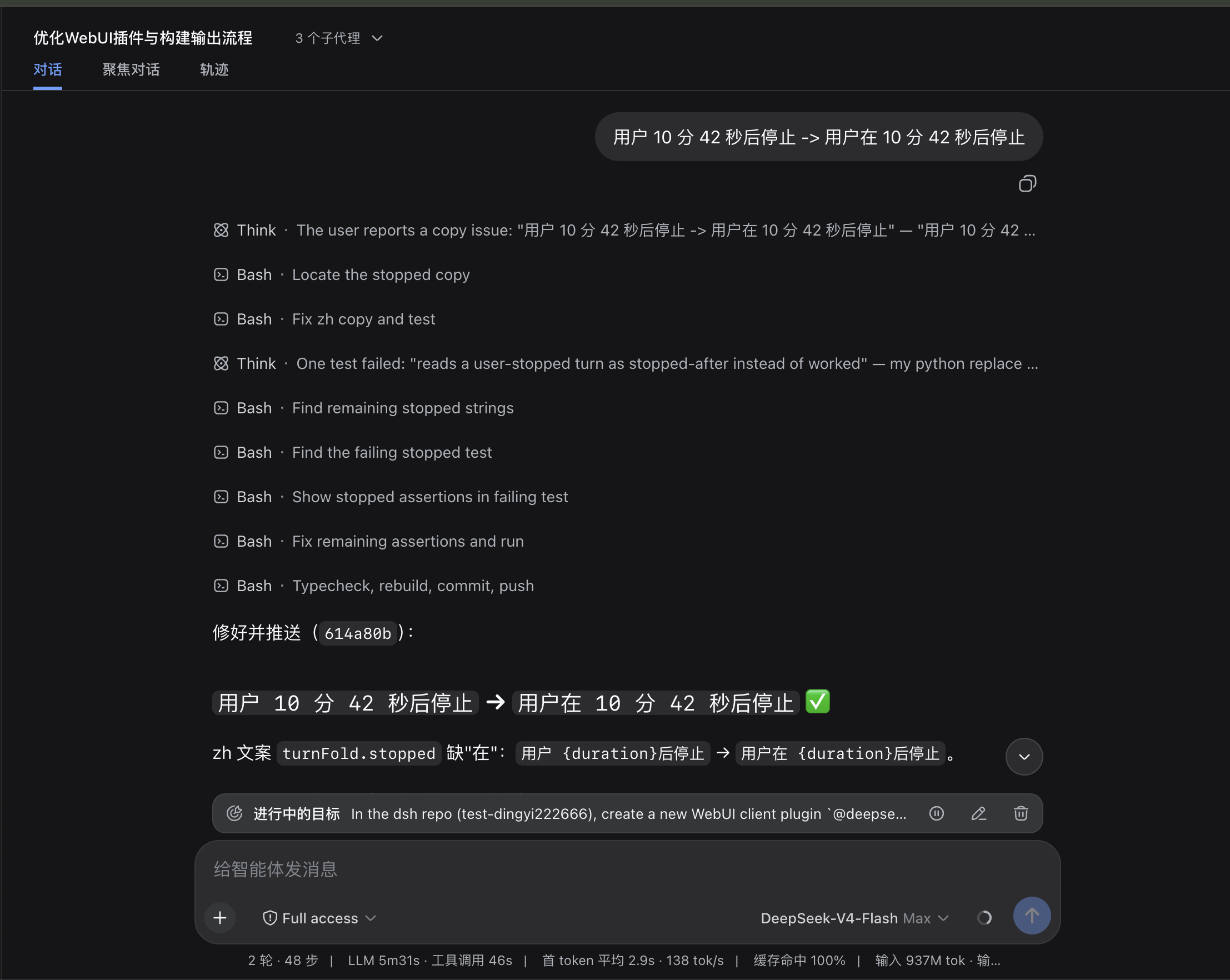
| Off — the normal chat view | On — the focus chat view |
|---|---|
 |
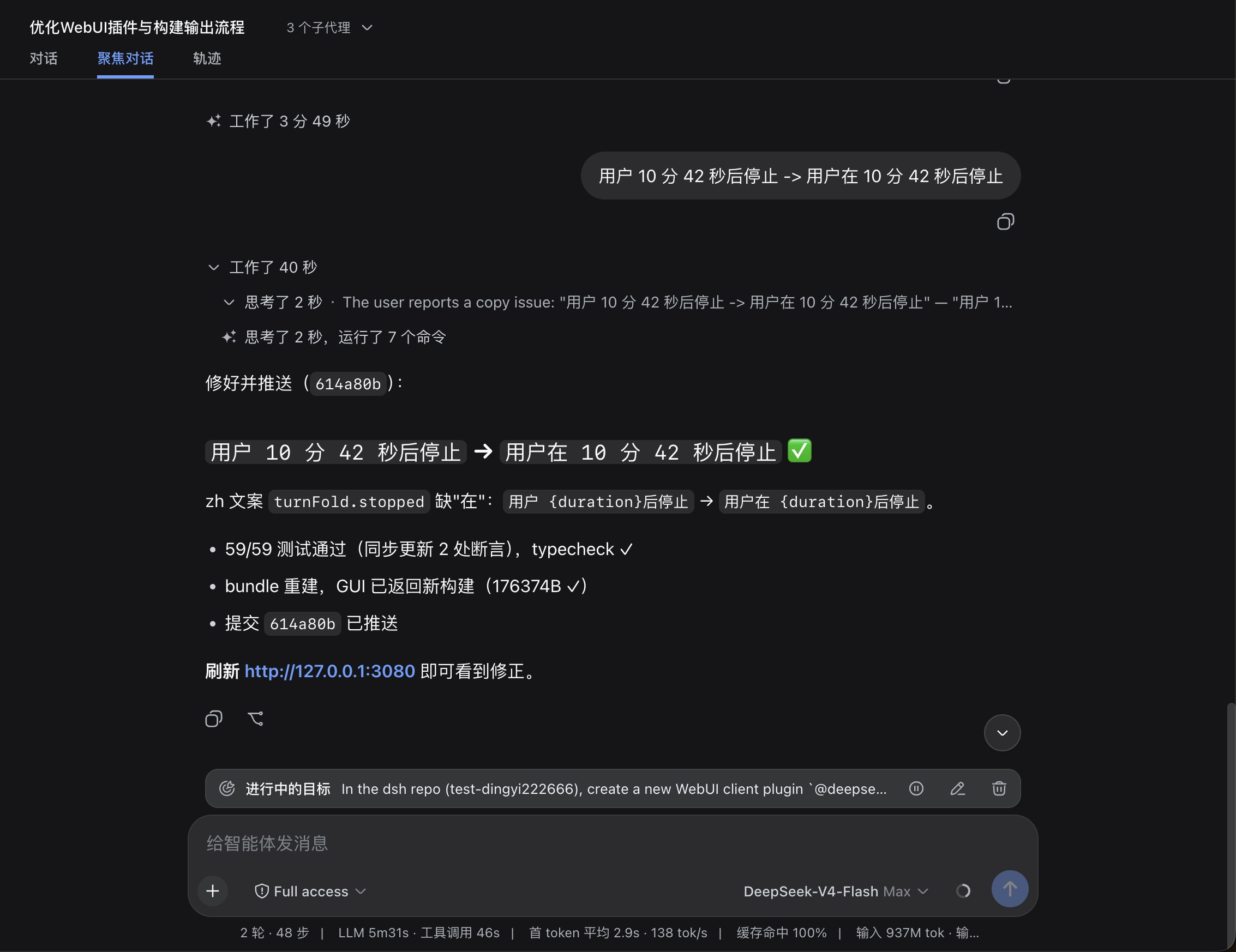 |
Instead of watching every step live, one assistant turn collapses into a single summary line:
Thought for 36s, loaded 3 context items, ran 2 shell commands, edited 8 files, read 17 files, listed 18 directories
…and the whole turn can fold into one Worked for Xm Ys line. Click any line to expand the full detail — tool cards, thinking, context injections, produced files, copy/fork actions — all drawn the same way as the normal chat rows. Your mid-turn interjections split the fold into per-stretch lines, each carrying its own duration, and a stopped turn reads Stopped after X instead of "worked". A background-task settlement — a tool-jobs notice injection like bash pnpm install [status: completed] — classifies into the summary line's N background jobs segment instead of riding it as a verbatim injected … account; expanding the line still shows the full notice body. File operations (edits / reads) never carry a failure tally on the summary line — edited N files reads the outcome — only command execution and other tools annotate failures.
Switch to it whenever you want the "what happened?" view, and flip back for the full transcript.
Install
# Install from npm (requires dsh >= 0.1.0-rc.6)
dsh plugin --profile web add @dingyi222666/dsh-focus-chat
# Restart dsh web; the tab mounts automatically
dsh web
Then open the Focus chat tab in any conversation.
Notes:
dsh pluginbehaves like adding a dependency to your web profile. A bundle plugin is loaded once its full package name appears in the profile'sdsh.profile.bundleslist (adds automatically on recent dsh builds; add it manually if your build does not); the bundle patch applies on the next boot.- With the repo source-launched CLI, run the args through the bin directly (
node --import tsx/esm apps/cli/src/bin.ts ...).
Why a separate tab, and not a patch into the chat view?
Short answer: the chat view's internals aren't open to third-party plugins — by design — and this plugin deliberately never touches dsh's own source. Concretely:
- Keyed slots are owned, not shared. The chat's rows render through slots like
conversation.chat.node,tool.call.toolview, andconversation.chat.turnTail. Those slots are declared by the chat entries themselves, and the slot system rejects a second declaration at load time — the conflict is the design speaking. A plugin cannot insert its own rows into the chat transcript, and cannot even declare the chat's own slots. - Plugins can't reuse the chat's renderer code. Importing values from another plugin package across the bundle boundary is forbidden (the bundle purity gate), so there's no way to borrow the chat's components — every row has to be drawn from the shared primitives and the public snapshot.
- The only legal insertion point is the
conversation.viewlist slot — the whole message surface. That's why the plugin ships its own complete view instead of changing how the chat view displays.
If you want the chat view itself to behave differently, that's an in-repo change to the chat package — exactly what this plugin avoids.
What's missing
Focus chat is a faithful reading surface, not a second chat view:
- No Inspect / details-panel deep links. The chat's Inspect affordance needs internals plugins can't touch. The tool cards render the same content, just without the jump-to-details button.
- Third-party tool-card extensions don't render here. Cards that other plugins add to the chat view won't appear in the focus view; the built-in card renderers are used instead.
- Folding is per consecutive tool-run. Any visible content between two runs (a reply, a command, your interjection) keeps them separate.
- Inline file links need the optional file-mentions service — the same off switch the chat view uses.
Development
yarn run build— builds the browser bundle and the Node half.src/client/focus-model.ts— the pure logic (folding, merging, row models);src/client/FocusView.tsx— the view.yarn test— behavior tests;yarn run typecheck— type gate.- A
--devdsh webserver hot-reloads rebuilt bundles —yarn run buildalone is usually enough to see changes.
Model Experience
None. The view is a pure client derivation over the already-logged conversation snapshot; nothing here reaches a model request.
KV Cache effect
None; this package neither assembles nor sends provider requests.
相关推荐Related
-
 nexu-io/open-design
🎨 Best DeepSeek Harness Design Plugin. The open-source Claude Design alternative. 🖥️ Local-first desktop app. 🖼️ Your…
nexu-io/open-design
🎨 Best DeepSeek Harness Design Plugin. The open-source Claude Design alternative. 🖥️ Local-first desktop app. 🖼️ Your…
-
 ruvnet/ruflo
🌊 The original agent meta-harness. Deploy intelligent multi-player swarms, coordinate autonomous workflows, and build c…
ruvnet/ruflo
🌊 The original agent meta-harness. Deploy intelligent multi-player swarms, coordinate autonomous workflows, and build c…
-
 amruthpillai/reactive-resume
A one-of-a-kind resume builder that keeps your privacy in mind. Completely secure, customizable, portable, open-source a…
amruthpillai/reactive-resume
A one-of-a-kind resume builder that keeps your privacy in mind. Completely secure, customizable, portable, open-source a…
-
 esengine/DeepSeek-Reasonix
DeepSeek-native AI coding agent for your terminal. Engineered around prefix-cache stability — leave it running.
esengine/DeepSeek-Reasonix
DeepSeek-native AI coding agent for your terminal. Engineered around prefix-cache stability — leave it running.
-
 volcengine/OpenViking
Self-evolving Context Database for AI Agents. Unify Agent Memory, Knowledge RAG and Skills.
volcengine/OpenViking
Self-evolving Context Database for AI Agents. Unify Agent Memory, Knowledge RAG and Skills.
-
 Molunerfinn/PicGo
:rocket: The Ultimate Image Uploader for Efficient Creators. Supports Obsidian, Typora, VS Code etc. and 60+ image hosti…
Molunerfinn/PicGo
:rocket: The Ultimate Image Uploader for Efficient Creators. Supports Obsidian, Typora, VS Code etc. and 60+ image hosti…
-
 titanwings/distilly
Distilly — Distill how they think into reusable Skills for any Agent or Bot. Formerly Colleague Skill(原同事 Skill).
titanwings/distilly
Distilly — Distill how they think into reusable Skills for any Agent or Bot. Formerly Colleague Skill(原同事 Skill).
-
 titanwings/colleague-skill