dingyi222666/dsh-session-notification
提供会话完成等四种状态的通知响应,支持浏览器提示和提示词
项目介绍Project Overview
dsh-session-notification 是 DSH Web 的通知插件。它通过监听会话快照(无轮询)触发四种事件:会话完成、失败、提问、权限请求,支持内置合成音效或自定义音频(≤1MB,本地存储)、音量调节(0–200%)以及浏览器系统通知。使用时需在设置中开启相应开关。注意:浏览器通知默认关闭,需用户授权;未打开过的会话失败时仍会报为完成。
dsh-session-notification is a DSH Web plugin that delivers alerts when sessions end. It classifies four event kinds—session completed, failed, question requested, and permission requested—by observing the session snapshot, then dispatches synthesized Web Audio sounds or browser system notifications. Use it to stay aware of background work via the Notifications settings section. Note: browser notifications are off by default and require user-granted permission, and sessions never opened are always reported as completed.
请帮我了解并安装插件:【dsh-session-notification】【https://github.com/dingyi222666/dsh-session-notification】把上面这条消息直接发给当前会话里的 DSH,让它帮你了解并安装。安装命令不一定准确,发给 DSH 更稳。Send this message to DSH in your current session. CLI install commands may not be accurate across systems — DSH will figure it out for you.
或使用命令行安装(适合开发者)Or use CLI install (for developers)
命令行安装CLI Install
dsh plugin --profile web add @dingyi222666/dsh-session-notification把 dingyi222666/dsh-session-notification 加入你的 DSH 配置(web profile)即可启用。
READMEREADME
dsh-session-notification

English | 中文
A notification plugin for the dsh web GUI. When a session finishes, hits an error, asks you a question, or needs your permission, you get a heads-up: a sound plays, and when you step away from the tab a system notification keeps you in the loop.
Screenshots
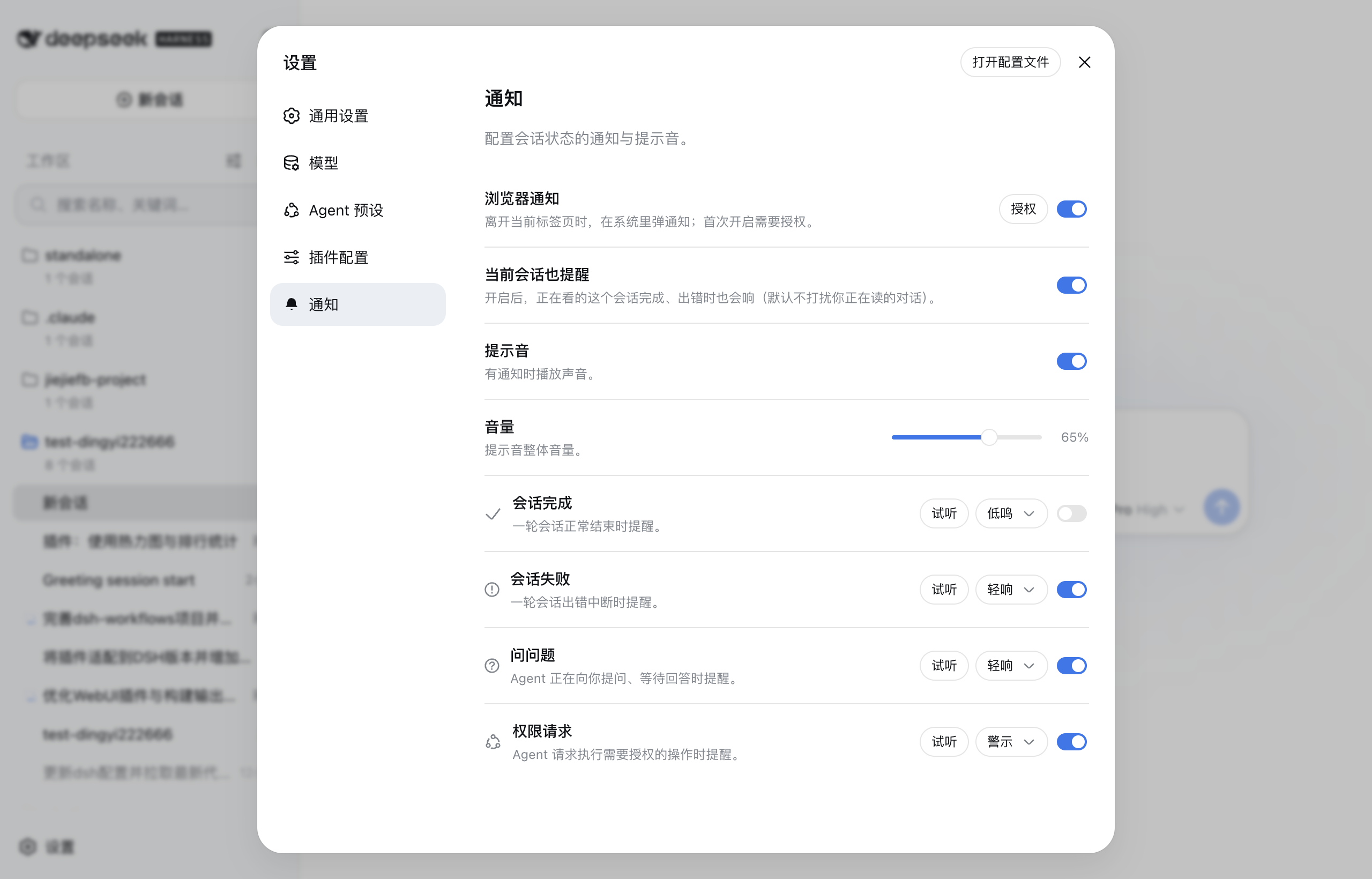
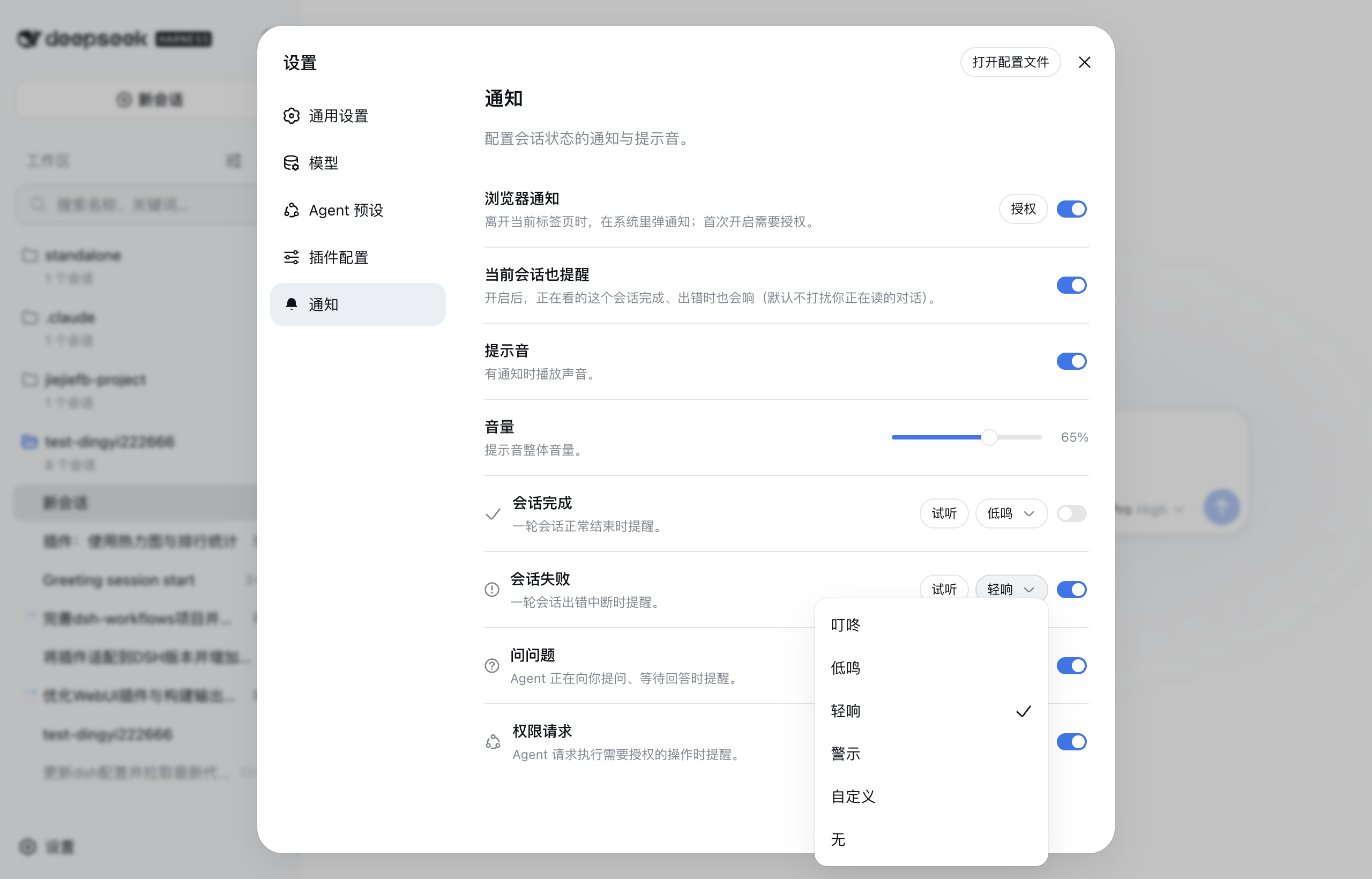
| The settings panel with the Notifications entry in the sidebar and the section content | The sound picker for each kind (the official dropdown) |
|---|---|
 |
 |
Install
# Install from npm (requires dsh >= 0.1.1-rc.2)
dsh plugin --profile web add @dingyi222666/dsh-session-notification
# Restart dsh web for it to take effect
dsh web
Everything lives in this plugin — no harness (host) changes:
- The settings section is registered through the client slot system (
settings.section), exactly like official sections. - Preferences persist in the browser (localStorage) and sync across tabs; nothing requires the host's
WEB_SETTINGS_NAMESPACESor any other host-package change. (The node half still reserves thedsh-session-notificationnamespace host-side through the settings seam; that reservation is inert without exposure.) - The settings shell maps only its own section ids to nav icons, so the Notifications nav row shows the shell's default gear.
The four notification kinds
| Kind | When it fires | Default sound |
|---|---|---|
| Session completed | A turn ends normally (turn/end completed) |
chime |
| Session failed | A turn breaks with an error, or the host reports an agent error | fault |
| Question asked | The agent is waiting for your answer (question/requested) |
pop |
| Permission requested | The agent requests an authorized operation (approval/requested) |
alert |
Each kind can be enabled or disabled and reassigned to any of the four built-in sound effects (or muted). The four sounds are synthesized with Web Audio — no audio files are shipped — and the master volume is adjustable with the official-style slider (0–100%). A fixed loudness boost (~+6 dB) with a soft limiter on the playback chain makes every sound noticeably louder without distortion; custom audio feeds the same chain.
Custom audio
Beyond the four built-in sounds, each kind accepts your own audio file (mp3/ogg/wav, up to 1 MB): pick Custom audio on a kind's row to upload one, and it replaces the built-in for that kind — with a Replace and remove affordance, plus the Custom audio in use tag. Custom files are stored browser-locally (they are device media, not shared preferences).
Browser notifications & the quiet default
Browser (system-level) notifications are off by default; turning the switch on asks for the browser's permission first (a user gesture). Once granted, a notification is shown when the event's session is not the one you are reading, or when the tab is in the background. Notifications carry the page's own icon (the favicon the harness serves). A completed session's notification carries its final reply text (the last assistant message). The Test notification button in the section sends one immediately to verify the channel once permission is granted. The session you are reading stays quiet by default — its own events don't interrupt you; flip the Alert for the current session toggle if you want it to alert too.
The Notifications settings section
The plugin registers a Notifications section in the settings panel (Settings ⚙ → Notifications):
- Browser notifications master switch (+ permission state and an enable button),
- Alert for the current session toggle (opt in to being alerted while reading that session),
- Sound master switch,
- Volume slider (0–100%),
- one row per notification kind: enable switch, custom-audio upload, sound picker (the official dropdown menu), and a Preview button,
- a Test notification button on the browser-notifications row (verifies the OS channel once permission is granted).
Preferences are stored browser-locally (localStorage) under the dsh-session-notification key — no host settings-namespace exposure required — so they persist across sessions and sync across tabs, and never depend on a harness change.
How it works
The browser half watches the sessions list snapshot and each session's conversation snapshot — no polling, no new wire channels:
- A session's
runningedge true→false ends a run; the run is classified failed when a newturn-errornode or a hostagent-errorappeared during it, otherwise completed (a failure that a retry recovered reads as completed). - A pending-interaction edge (
question/approval) raises the question / permission kinds, with the question text or the tool name+reason in the notification body. - Sessions already idle (or already pending) when the plugin loads raise nothing.
Development
yarn run build— builds the browser bundle (lib/client.js) and the Node half (lib/index.js/lib/invariant.js).src/client/notification-service.ts— the engine (classification) and dispatcher (gating);src/client/settings-store.ts— the settings section bridge;src/client/NotificationsSection.tsx— the section UI;src/client/sounds.ts+src/client/custom-audio.ts— the built-in and custom sounds.yarn test— behavior tests;yarn run typecheck— type gate.- Node-half changes need a
dsh webrestart; browser-bundle changes need a rebuild (yarn run build) — a--devserver hot-reloads them.
Known limitations
- Failure detection reads the conversation snapshot, which the client only maintains for sessions that have been opened; a session that runs without ever being opened notifies as completed even on failure.
- Browser notifications require permission, and sound playback requires the page to have user activation (the browser's autoplay policy) — both are normal for browser apps and resolve as soon as the user interacts with the GUI.
- Custom audio files live in the browser (localStorage), so they do not follow you across browsers or profiles.
- The browser half is event-driven from the sessions list; it does not observe the raw event stream, so a run that starts and finishes between two list snapshots could in principle be missed (the host sends a status flip per edge, so this does not happen in practice).
Model Experience
None. The plugin is a pure client-side observer over the already-logged session state; nothing here reaches a model request.
KV Cache effect
None; this package neither assembles nor sends provider requests.
相关推荐Related
-
 nexu-io/open-design
🎨 Best DeepSeek Harness Design Plugin. The open-source Claude Design alternative. 🖥️ Local-first desktop app. 🖼️ Your…
nexu-io/open-design
🎨 Best DeepSeek Harness Design Plugin. The open-source Claude Design alternative. 🖥️ Local-first desktop app. 🖼️ Your…
-
 ruvnet/ruflo
🌊 The original agent meta-harness. Deploy intelligent multi-player swarms, coordinate autonomous workflows, and build c…
ruvnet/ruflo
🌊 The original agent meta-harness. Deploy intelligent multi-player swarms, coordinate autonomous workflows, and build c…
-
 amruthpillai/reactive-resume
A one-of-a-kind resume builder that keeps your privacy in mind. Completely secure, customizable, portable, open-source a…
amruthpillai/reactive-resume
A one-of-a-kind resume builder that keeps your privacy in mind. Completely secure, customizable, portable, open-source a…
-
 esengine/DeepSeek-Reasonix
DeepSeek-native AI coding agent for your terminal. Engineered around prefix-cache stability — leave it running.
esengine/DeepSeek-Reasonix
DeepSeek-native AI coding agent for your terminal. Engineered around prefix-cache stability — leave it running.
-
 volcengine/OpenViking
Self-evolving Context Database for AI Agents. Unify Agent Memory, Knowledge RAG and Skills.
volcengine/OpenViking
Self-evolving Context Database for AI Agents. Unify Agent Memory, Knowledge RAG and Skills.
-
 Molunerfinn/PicGo
:rocket: The Ultimate Image Uploader for Efficient Creators. Supports Obsidian, Typora, VS Code etc. and 60+ image hosti…
Molunerfinn/PicGo
:rocket: The Ultimate Image Uploader for Efficient Creators. Supports Obsidian, Typora, VS Code etc. and 60+ image hosti…
-
 titanwings/distilly
Distilly — Distill how they think into reusable Skills for any Agent or Bot. Formerly Colleague Skill(原同事 Skill).
titanwings/distilly
Distilly — Distill how they think into reusable Skills for any Agent or Bot. Formerly Colleague Skill(原同事 Skill).
-
 titanwings/colleague-skill