directwire/culmen
persona/v1 — 通用智能体人格格式:定义有记忆、会成长、有关系的 AI 如何落盘、迁移、在任意实现(Claude CLI / OpenClaw / Hermes / 自建运行时)间互换。
Project Overview项目介绍
This repository, "Persona State Format · persona/v1," is a standardized AI persona file format extracted from the AN AI engine, designed to package identity, memory, relationships, state, growth, and assembly layers into a single portable directory layout. It defines schemas, ships a runnable example (examples/anai-sample, ANAI's 7-day persona with slot system, growth file, and ledger), and includes tools/validate.py plus a spec/ documentation set covering state files, append-logs, bundles, and pluggability. The project is explicitly positioned as a format rather than a protocol: it carries no threat model, no signing, no encryption, and explicitly rejects lock-in — modifications are free, and the format simply keeps describing whatever shape the persona evolves into.
Integration is handled through a three-layer pluggability model of declaration, contract, and degradation, where persona.config.json declares all external dependencies inside slots with unified headers (plugin, interface, required), while settings carries only slot-feeding parameters. A neutral persona-backend with retrieve, capture, and session skills is described in spec 04, and adapters map runtime hooks onto it: Claude CLI connects via an MCP server exposing memory_search plus state/memories resources, OpenClaw uses a kind: memory plugin with before_prompt_build and agent_end hooks, Hermes plugs a MemoryProvider with prefetch, sync_otton, and on_session_end events, and a self-built CLI/TUI reads the state directory directly. Validation tooling, hash-chain checks (sha256, 20 events re-hashed consistently), and a chat contract list, ready for cross-runtime migration. A bundled CLI/TUI reads the state directory directly in the OpenClaw style. persona-backend ships under runtime/persona_backend/ with 22 green tests and a real DeepSeek end-to-end pass.
The intended workflow begins at QUICKSTART.md, where new users run python tools/validate.py examples/anai-sample and see RESULT: PASS, then call persona setup all to auto-wire Claude Code, OpenClaw, and Hermes (uninstalled ones are skipped), and persona chat --dir examples/anai-sample for either live interaction with an API key or offline dry-run. Dependencies are Python 3 and optional API keys, with secrets excluded from export bundles by default; first-run without keys falls back to offline rehearsal, ledger tampering raises a warning rather than failure, and unknown memory categories emit warnings instead of being rejected. License is MIT, 3 GitHub stars, and the roadmap covers an ANAI Android Room DB → state directory bridge plus a phone-side "export persona package" feature.
此仓库是"Persona State Format · persona/v1",一套从中立的 AN AI 引擎抽出的标准化 AI 人格文件格式。它将身份、记忆、关系、状态、成长与装配层装入统一目录,支持在任意运行时之间导出、迁移与互换,并随仓附带 schemas、examples/anai-sample、tools/validate.py 与 spec 文档。
格式通过插槽系统实现跨运行时接入:persona.config.json 用 slots 声明 chat、web_search 等外部依赖,标注 plugin、interface 与 required 字段,由契约注册表解析消费方能力,缺组件时降级而非报错。可插拔性不仅指换模型字段,而是声明/契约/降级三层架构,让中性后端被多套前端复用。
工作流包含五步:阅读 QUICKSTART、用 python tools/validate.py examples/anai-sample 校验、运行 persona setup all 自动接线 Claude CLI / OpenClaw / Hermes、调用 persona chat 离线或在线对话、按需打包迁移。运行时适配进度:Claude CLI 的 MCP server 与 hooks 已实跑,Hermes MemoryProvider 闭环通过,OpenClaw memory 插件部分跑通,session_end 待 Linux/macOS 补完;AN AI Android Room DB 迁移工具列入路线。许可为 MIT,需 Python 3 与 API 密钥;首次运行无密钥会进入离线演练模式。
请帮我安装这个 DSH 插件。安装前先完成【兼容性检查 + 安全性检查】,检查通过再动手。

插件:culmen(directwire/culmen)
仓库:https://github.com/directwire/culmen
本站详情页:https://www.yhbd.top/plugins/directwire-culmen/
本站登记:类型 plugin · 归类 多平台兼容工具(非 DSH 原生) · 许可证 MIT · ⭐ 3 · 最近提交 2026-08-18 · 主语言 Python · 未检测到 DSH 插件清单

按下面顺序执行,每步先把结论告诉我,再进入下一步:

【1 兼容性检查】
① 我这边:DSH 版本、Node 版本、操作系统、当前 profile(web / desktop)。
② 读它的 README、package.json、插件 manifest,列出它要求的 DSH 版本 / Node 版本 / 操作系统 / 外部依赖 / 需要另外先装的运行时。
③ 逐条比对,结论只写「满足 / 不满足 / 未知」三种;不满足的给出可行替代方案。
④ 检查是否和我已装的插件冲突:命令名重复、skill / tool 重名、端口占用、重复注册的 MCP server。

【2 安全性检查】
① 仓库可信度:和上面「本站登记」是否一致;star / fork 数、创建时间、最近提交,是否归档或长期停更。
② 安装脚本:逐行看 package.json 的 preinstall / install / postinstall,以及 install.sh、setup.ps1 之类脚本。出现 curl|bash、下载后直接执行、混淆代码、访问与插件功能无关的域名,立刻停下来告诉我,不要继续装。
③ 依赖:列出新增依赖,标出无人维护、或与知名包拼写近似的可疑包(typosquatting)。
④ 权限与副作用:它会读写哪些目录、访问哪些域名、需要哪些 DSH 权限(filesystem / network / shell / clipboard 等),以及怎么卸载和回滚。
⑤ 如果它要求 sudo / 管理员权限,或权限明显超出功能所需,先停下来问我。

【3 安装】
上面两步没有「不满足」和「高危项」时才执行;用官方推荐方式安装,不要自行提权。

【4 汇报】
用表格输出:检查项 / 结论 / 依据 / 是否需要我决策。拿不准的一律写「未知」并说明要我怎么确认——不要猜,也不要替我决定。
Send this message to DSH in your current session: it verifies compatibility and security first (answering met / not met / unknown item by item) and only installs once everything checks out — it will stop and ask you if it finds a high-risk item. The box scrolls; the copy is the full prompt. CLI install commands may not be accurate across systems, so DSH is the safer route.把上面这条消息直接发给当前会话里的 DSH:它会先核对兼容性与安全性(逐条给「满足 / 不满足 / 未知」),确认没问题再安装,有高危项会停下来问你。框内可滚动,复制到的是完整提示词;安装命令不一定准确,发给 DSH 更稳。
- Only 3 stars - very few users, little community feedback星标只有 3,几乎没人在用,遇到问题缺少社区反馈
- No DSH plugin manifest detected - it may only carry the dsh-plugin topic, so the install method must be confirmed on the spot未检测到 DSH 插件清单:可能只是打了 dsh-plugin 话题,安装方式要现场确认
- Not DSH-native: a multi-platform tool that may require Node / Electron or another runtime first非 DSH 原生,是多平台兼容工具:可能要先装 Node / Electron 等运行时
DSH walks through these 9 checksDSH 会逐条核对这 9 项
Compatibility兼容性
- DSH, Node, OS and profile requirementsDSH 版本 / Node 版本 / 操作系统 / profile 是否满足要求
- External dependencies and runtimes (Electron / Python / Docker, ...)外部依赖与运行时(Electron / Python / Docker 等)是否齐备
- Conflicts with installed plugins: command names, skill / tool names, ports, duplicate MCP registration与已装插件是否冲突:命令名、skill / tool 重名、端口占用、重复 MCP 注册
Security安全性
- Repo matches the facts registered here; archived or abandoned?仓库是否与页面登记一致,是否归档或长期停更
- Safety of preinstall / install / postinstall and install.sh / setup.ps1preinstall / install / postinstall 与 install.sh、setup.ps1 是否安全
- curl|bash, download-then-execute, obfuscation, unrelated domains → stop immediatelycurl|bash、下载即执行、混淆代码、无关域名 → 立刻停止
- Typosquatting or unmaintained packages among the new dependencies新增依赖里有没有 typosquatting 或无人维护的包
- Requested permissions vs. what the feature actually needs申请了哪些权限、是否超出功能所需(filesystem / network / shell / clipboard)
- Any sudo / admin requirement, plus uninstall and rollback是否要求 sudo / 管理员权限,以及卸载与回滚方式
Anything uncertain must be marked unknown with a note on how to confirm it. This site's signal screen is a static snapshot, not a security audit.拿不准的必须标「未知」并说明要我怎么确认。本站的信号筛查是静态快照,不能替代安全审计。
Or use CLI install (for developers)或使用命令行安装(适合开发者)
CLI Install命令行安装
dsh plugin --profile web add github:directwire/culmen把 directwire/culmen 加入你的 DSH 配置(web profile)即可启用。
READMEREADME
Persona State Format · persona/v1
通用智能体人格格式——从 ANAI 引擎提取的标准化格式。定义一个有记忆、会成长、有关系的 AI 的完整人格如何落盘、如何迁移、如何在任意实现(Claude CLI / OpenClaw / Hermes / 自建运行时)之间互换。
不是又一份设计文档。这是可迁移的格式本体:
schemas/是机器可读的格式定义,examples/anai-sample/是一份真实跑通的示例人格(安奈 7 日,含插槽系统、成长档案与账本),tools/validate.py检查格式合规。
这是什么、不是什么
这是格式,不是协议。
- 格式定义"数据长什么样":schema、结构、命名、语义、版本。
- 协议定义"数据怎么交换、怎么被信任":握手、完整性、认证、威胁模型。
本格式不需要威胁模型。它不为防篡改、不为加密、不为锁任何人而存在——它的全部目的是让一个人格可以被导出、迁移、在任意实现间互换。修改是自由的:改了之后的世界长什么样,格式照样定义,没有人警告你。
一个 AI = 一个完整人格
这个格式装的不只是配置,是整个人格:
- 身份(你是谁)——
persona.json:bio、性格、说话方式、背景、边界,以及你面对的是谁 - 记忆(你经历了什么)——
memories/+state.json.growth的多级压缩:从一条碎片到"人生摘要" - 关系(你和我多亲近)——
relationship+ledger/:亲密阶段、解锁、每次关系的推进、我们的故事 - 状态(你此刻怎么样)——
mood、preferences:心情与偏好 - 成长(你变成了什么样)——
growth.traits:性格演化轨迹 - 装配(你跑在什么上)——
persona.config.json:模型、工具、引擎全部是插槽
模型会换、框架会换,人格不随它们变——这就是格式的核心资产。
可插拔性(设计核心)
可插拔不是"能改 model 字段",而是三层架构:声明 / 契约 / 降级。
- 声明:
persona.config.json一切外部依赖收进slots,统一 header(plugin/interface/required)。settings只放喂给插槽的参数。 - 契约:每个插槽声明
interface: name@N,语义在契约注册表(spec/04 §3)。引擎类槽位的契约 = "它落盘的数据遵守哪个 schema"——格式定义数据,引擎是插座。 - 降级:
required标记必需/可降级。消费方据此评估"我能跑这个人格吗",缺组件明确报告或静默降级。
"slots": {
  "chat":      { "plugin": "deepseek", "model": "deepseek-v4-flash", "interface": "chat/completions@1", "required": true },
  "web_search": { "plugin": "duckduckgo", "api_key_ref": "secrets:zhipu", "interface": "search@1", "required": false }
}
让格式真的跑起来:三个主流运行时全都有"内存插槽 + 回合前后钩子 + 工具 schema"这套抽象。实现一个格式原生的人格后端(persona-backend),三种运行时各一层薄接线都插到它上面——一个中性后端,N 个前端:
| 运行时 | 接线方式 | 钩子映射 |
|---|---|---|
| Claude CLI | MCP server | memory_search 工具 + state/memories 资源 |
| OpenClaw | kind: memory 插件 |
before_prompt_build→召回 · agent_end→捕获 |
| Hermes | MemoryProvider |
prefetch→召回 · sync_turn→捕获 · on_session_end→日记 |
| 自建 CLI/TUI | 参考运行时 | 直接读状态目录(OpenClaw 式) |
详见 spec/04-pluggability.md。
目录布局
persona/                        # 格式根目录
├── manifest.json               # 自描述:format/persona_id/内容清单
├── persona.json                # identity 层 · 你是谁 + 你面对的是谁
├── persona.config.json         # config 层 · 插槽系统(换模型/工具/引擎才动)
├── state.json                  # state 层 · 成长档案 + 关系 + 心情
├── memories/  fragments.ndjson · index.json(可选缓存)
├── chat/      2026-08-17.ndjson(按日分片,append-only)
├── diary/     2026-08-17.md(人类可读,首行含 mood)
├── ledger/    events.ndjson(关系事件账本)· chain.sha256(可选)
├── skills/    技能声明(带接口契约,可插拔)
├── assets/    二进制(相对引用)
└── secrets/   密钥(默认不进导出包)
Showing the opening section of the README — the full document lives in the repository以上为 README 开头摘要,完整文档在仓库内 · View the full README on GitHub →在 GitHub 查看完整 README →
Related相关推荐
-
 Renzic-Stone/DSH-EasyRewrite
DSH Web内目前最无感的消息撤回、重编辑插件,原版体验,兼容性强,功能简单可开关,设置丰富,现代化轻量ui框架。The most seamless message recall & re-edit plugin for DSH Web …
Renzic-Stone/DSH-EasyRewrite
DSH Web内目前最无感的消息撤回、重编辑插件,原版体验,兼容性强,功能简单可开关,设置丰富,现代化轻量ui框架。The most seamless message recall & re-edit plugin for DSH Web …
-
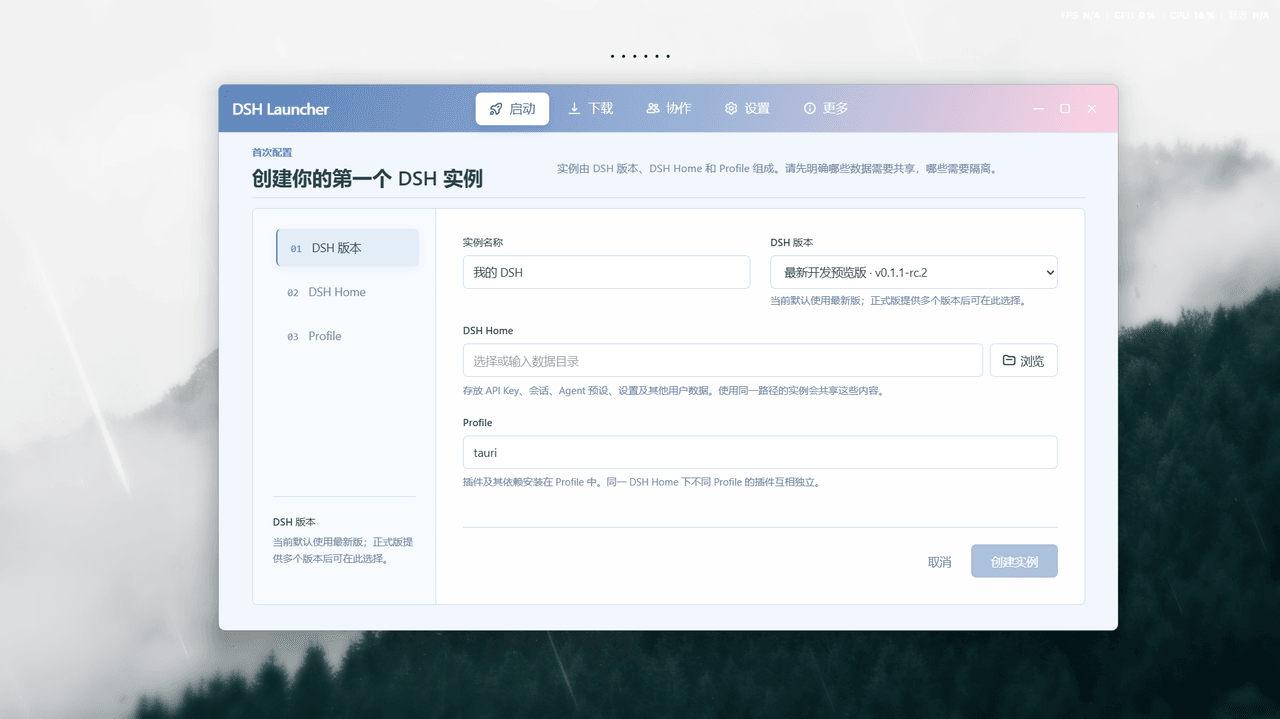 baihejiangnan/deepseek-harness-desktop
DeepSeek Harness 三端兼容桌面启动器:多实例完全隔离、并行协作,协作画布编排 Agent 工作流;便携版 Exe 一键启动、仅约 20M;双隔离机制让兼容性极强
baihejiangnan/deepseek-harness-desktop
DeepSeek Harness 三端兼容桌面启动器:多实例完全隔离、并行协作,协作画布编排 Agent 工作流;便携版 Exe 一键启动、仅约 20M;双隔离机制让兼容性极强
-
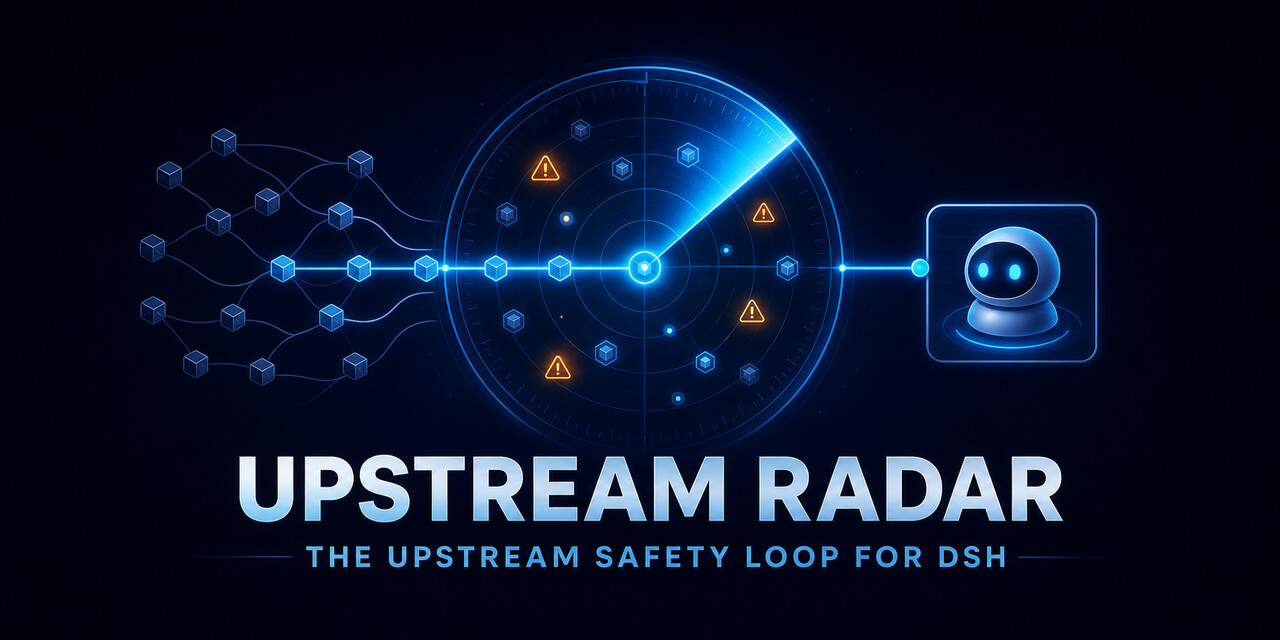 MicroMilo/upstream-radar
Always-on compatibility testing for DeepSeek Harness plugins: exact releases, isolated runners, and fixable upstream iss…
MicroMilo/upstream-radar
Always-on compatibility testing for DeepSeek Harness plugins: exact releases, isolated runners, and fixable upstream iss…
-
 gezi-wen/sage-mem
File-based cross-session memory for DeepSeek Harness (DSH) — every memory is a plain Markdown file. 纯 Markdown 存储,无数据库、无…
gezi-wen/sage-mem
File-based cross-session memory for DeepSeek Harness (DSH) — every memory is a plain Markdown file. 纯 Markdown 存储,无数据库、无…
-
 polarskicpl/dsh-codex-migrate
Migrate Codex CLI conversations / MCP servers / memories into DeepSeek Harness | 把 Codex CLI 的对话、MCP、记忆迁移到 DeepSeek Harn…
polarskicpl/dsh-codex-migrate
Migrate Codex CLI conversations / MCP servers / memories into DeepSeek Harness | 把 Codex CLI 的对话、MCP、记忆迁移到 DeepSeek Harn…
- artec/clat Cmd-Line Agent, a Rust foundation compatible with the DeepSeek Harness framework. 命令行智能体,兼容深度探索驾具的 Rust 基座。
- peterwangze/dsh-novel-writing DSH (DeepSeek Harness) 自动化小说写作发布流水线插件:claude-writing-workflow 迁移版 agent 预设 + 小说工作台(可视化/实时渲染/章节编辑)+ 多平台发布配置与数据驱动优化闭环
-
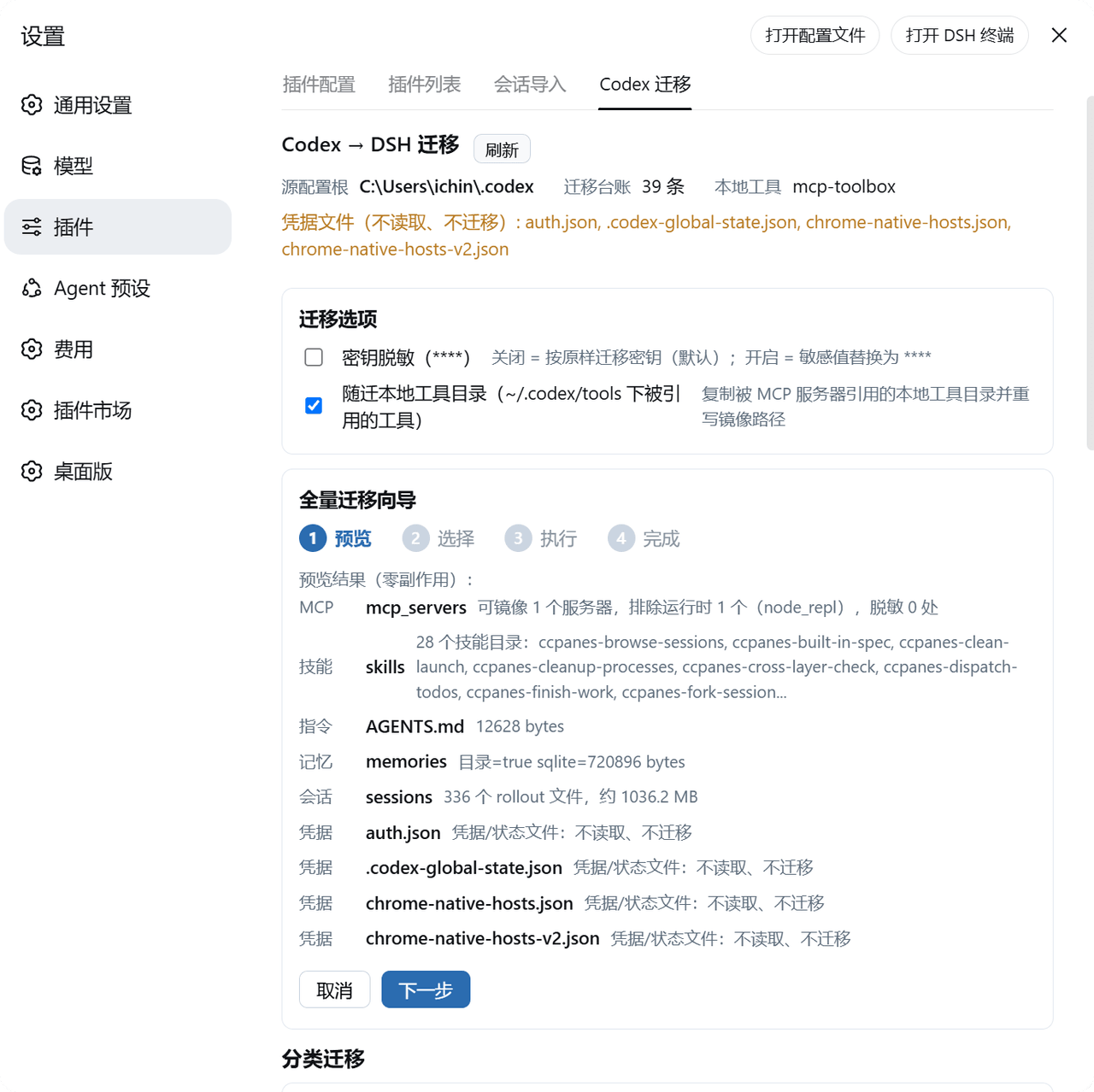 BigBlueBaby/codex2dsh
把 Codex(OpenAI Codex CLI / Desktop)的 MCP 服务器、技能、全局指令、记忆与会话历史一键迁移进 DeepSeek Harness(DSH)——可视化面板 + CLI,源码只读、dry-run 预览、密钥按…
BigBlueBaby/codex2dsh
把 Codex(OpenAI Codex CLI / Desktop)的 MCP 服务器、技能、全局指令、记忆与会话历史一键迁移进 DeepSeek Harness(DSH)——可视化面板 + CLI,源码只读、dry-run 预览、密钥按…