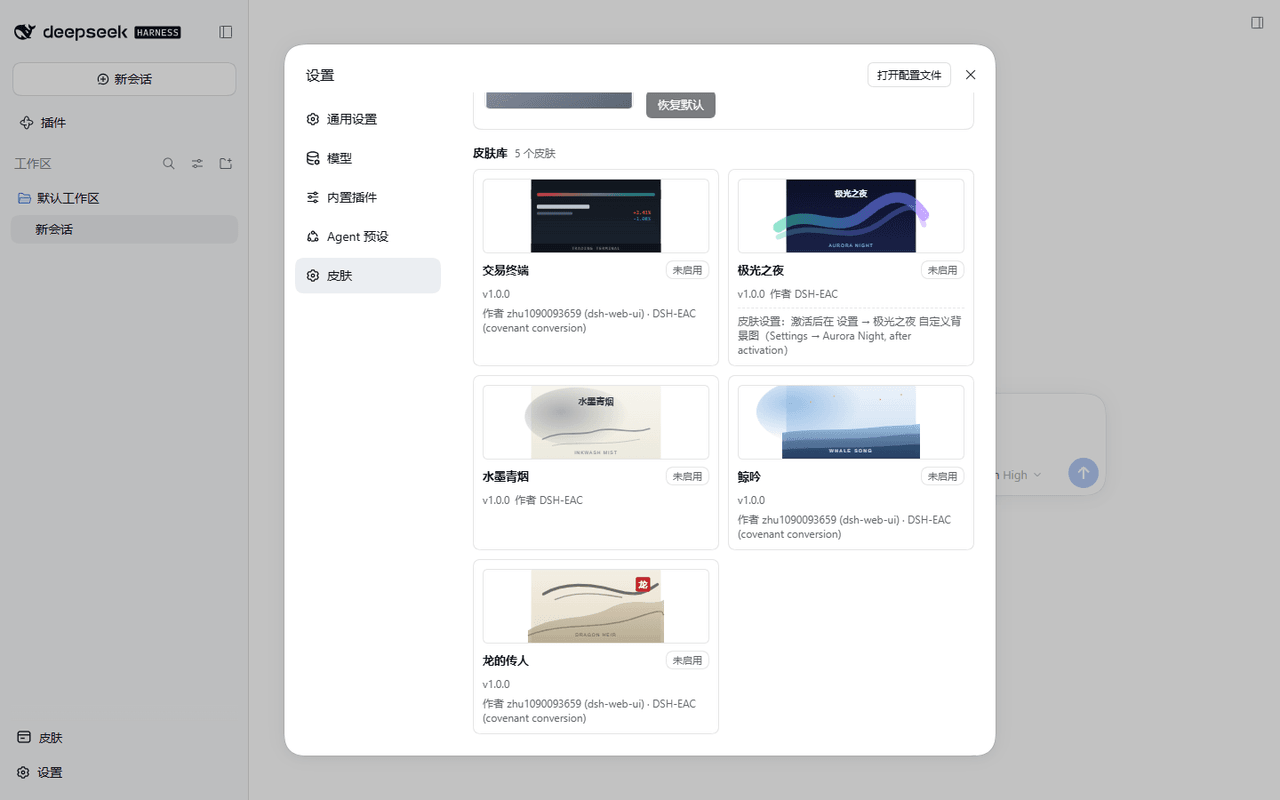
DSH-EAC/dsh-ui-skin-loader
DSH UI 皮肤加载器——弱约束公约 dsh.ecosystem.ui-skin-loader/v1 的参考实现:一个加载器加十三款皮肤(2 款内置示例 + 11 款公约化迁移),装入 DSH 后即可在设置里一键换肤、随时彻底还原。
catalog descriptioncatalog 简介 / catalog description:DSH UI Skin Loader / DSH UI 皮肤加载器
Project Overview项目介绍
dsh-ui-skin-loader is the reference implementation of the dsh.ecosystem.ui-skin-loader/v1 weak convention, published as a skin loader built explicitly for the DSH (DeepSeek Harness) desktop client. The package targets only two precise host versions, @deepseek-ai/dsh 0.1.7-rc.2 and 0.2.0-rc.2, and the bundled @dsh-eac/ui-skin-loader plus 13 skin packages ship as 14 npm tarballs that the dsh CLI installs into the running client. Once mounted, users open DSH's settings panel and swap skins with one click while the loader enforces global mutual exclusion, persistence, cross-tab synchronization, fault isolation, and a pixel-identical rollback when a skin is deactivated.
The typical workflow starts by cloning the repository, running pnpm install and pnpm build under pnpm 11 on Node.js 24 or newer, then executing npm pack --pack-destination dist inside packages/loader and each packages/skins/<id> directory to produce the 14 installable tarballs. After that the operator installs those local tarballs through DSH itself, opens Settings, and switches among 极光之夜, 水墨青烟, 交易终端, 龙的传人, 鲸吟, 蓝色幻想, 深海女仆工坊, 初音未来, Minecraft 方块世界, QQ2008 怀旧版, 同花顺风格, Windows XP (Luna), and 鲸鱼娘昼夜工坊; skins stay side-effect-free until activation, then fully tear down on switch or disable. The target audience is plugin authors who want a single switcher console plus a canonical registration protocol, and DSH operators porting upstream dsh-web-ui themes or external repositories onto the desktop client.
Dependency-wise the engineering skeleton (loader wiring, manifest, session adapter, build, tests) is MIT-licensed by DSH EAC 揽尽万象, while the eleven migrated skins ship under their upstream notices pinned to immutable Git objects. Ten skins descend from @linxin666/dsh-client-ui-skin-* 0.1.11 under MIT AND BSD-3-Clause, and the two community skins (深海女仆工坊, 鲸鱼娘昼夜工坊) are MIT AND CC-BY-NC-SA-4.0 restricted to non-commercial use. Limits: host API is authoritative via docs/api-notes.md, TypeScript runs through Node 24 native type-stripping so enums, namespaces, decorators, and parameter properties are forbidden, the 0.2.0-rc.2 round was validated by interface-contract tests only and is not equivalent to fresh on-device acceptance, and the unrelated dsh-theme-endfield theme is intentionally deferred as a feature plugin rather than a pure skin.
dsh-ui-skin-loader 是面向 DSH(DeepSeek Harness)桌面客户端的皮肤加载器参考实现,遵循弱约束公约 dsh.ecosystem.ui-skin-loader/v1,仅声明适配 @deepseek-ai/dsh 的 0.1.7-rc.2 与 0.2.0-rc.2 两个精确版本。它把加载器 @dsh-eac/ui-skin-loader 与十三款皮肤打成 14 个 tarball,由 dsh CLI 驱动安装;安装后即可在设置里一键换肤、全局互斥切换并彻底还原。
典型工作流是:克隆仓库后用 pnpm 11 在 Node ≥ 24 中 pnpm install 与 pnpm build,再在 packages/loader 和每个 packages/skins/<id> 目录执行 npm pack --pack-destination dist;随后在 DSH 客户端里安装 14 个本地 tarball,于设置面板选择皮肤,未激活时皮肤零副作用,激活后才产生可见效果。适合希望统一分发视觉主题、给 DSH 装换肤控制台、或把上游 dsh-web-ui / 外部仓库的皮肤迁移到桌面端的开发者与设计者使用。
依赖方面,工程骨架为 MIT 许可并由 cordis 服务接线;迁移皮肤随包附 THIRD-PARTY-NOTICES.md、LICENSE 与 NOTICE,其中蓝色幻想、交易终端等十款来自 dsh-web-ui @linxin666/dsh-client-ui-skin-* 0.1.11(MIT AND BSD-3-Clause),深海女仆工坊与鲸鱼娘昼夜工坊为 MIT AND CC-BY-NC-SA-4.0 限非商业使用。宿主 API 形态以 docs/api-notes.md 为权威依据,TypeScript 源码由 Node 24 原生 type-stripping 执行,禁用 enum、命名空间与装饰器;公约为弱约束,存在边角差异,需先核对 README 与验证矩阵。
请帮我安装这个 DSH 插件。安装前先完成【兼容性检查 + 安全性检查】,检查通过再动手。

插件:dsh-ui-skin-loader(DSH-EAC/dsh-ui-skin-loader)
仓库:https://github.com/DSH-EAC/dsh-ui-skin-loader
本站详情页:https://www.yhbd.top/plugins/dsh-eac-dsh-ui-skin-loader/
本站登记:类型 plugin · 归类 原生 DSH 插件 · 许可证 MIT · ⭐ 15 · 最近提交 2026-10-03 · 主语言 TypeScript · 未检测到 DSH 插件清单

按下面顺序执行,每步先把结论告诉我,再进入下一步:

【1 兼容性检查】
① 我这边:DSH 版本、Node 版本、操作系统、当前 profile(web / desktop)。
② 读它的 README、package.json、插件 manifest,列出它要求的 DSH 版本 / Node 版本 / 操作系统 / 外部依赖 / 需要另外先装的运行时。
③ 逐条比对,结论只写「满足 / 不满足 / 未知」三种;不满足的给出可行替代方案。
④ 检查是否和我已装的插件冲突:命令名重复、skill / tool 重名、端口占用、重复注册的 MCP server。

【2 安全性检查】
① 仓库可信度:和上面「本站登记」是否一致;star / fork 数、创建时间、最近提交,是否归档或长期停更。
② 安装脚本:逐行看 package.json 的 preinstall / install / postinstall,以及 install.sh、setup.ps1 之类脚本。出现 curl|bash、下载后直接执行、混淆代码、访问与插件功能无关的域名,立刻停下来告诉我,不要继续装。
③ 依赖:列出新增依赖,标出无人维护、或与知名包拼写近似的可疑包(typosquatting)。
④ 权限与副作用:它会读写哪些目录、访问哪些域名、需要哪些 DSH 权限(filesystem / network / shell / clipboard 等),以及怎么卸载和回滚。
⑤ 如果它要求 sudo / 管理员权限,或权限明显超出功能所需,先停下来问我。

【3 安装】
上面两步没有「不满足」和「高危项」时才执行;用官方推荐方式安装,不要自行提权。

【4 汇报】
用表格输出:检查项 / 结论 / 依据 / 是否需要我决策。拿不准的一律写「未知」并说明要我怎么确认——不要猜,也不要替我决定。
Send this message to DSH in your current session: it verifies compatibility and security first (answering met / not met / unknown item by item) and only installs once everything checks out — it will stop and ask you if it finds a high-risk item. The box scrolls; the copy is the full prompt. CLI install commands may not be accurate across systems, so DSH is the safer route.把上面这条消息直接发给当前会话里的 DSH:它会先核对兼容性与安全性(逐条给「满足 / 不满足 / 未知」),确认没问题再安装,有高危项会停下来问你。框内可滚动,复制到的是完整提示词;安装命令不一定准确,发给 DSH 更稳。
- 15 stars - an early-stage project星标 15,属于早期项目
- No DSH plugin manifest detected - it may only carry the dsh-plugin topic, so the install method must be confirmed on the spot未检测到 DSH 插件清单:可能只是打了 dsh-plugin 话题,安装方式要现场确认
DSH walks through these 9 checksDSH 会逐条核对这 9 项
Compatibility兼容性
- DSH, Node, OS and profile requirementsDSH 版本 / Node 版本 / 操作系统 / profile 是否满足要求
- External dependencies and runtimes (Electron / Python / Docker, ...)外部依赖与运行时(Electron / Python / Docker 等)是否齐备
- Conflicts with installed plugins: command names, skill / tool names, ports, duplicate MCP registration与已装插件是否冲突:命令名、skill / tool 重名、端口占用、重复 MCP 注册
Security安全性
- Repo matches the facts registered here; archived or abandoned?仓库是否与页面登记一致,是否归档或长期停更
- Safety of preinstall / install / postinstall and install.sh / setup.ps1preinstall / install / postinstall 与 install.sh、setup.ps1 是否安全
- curl|bash, download-then-execute, obfuscation, unrelated domains → stop immediatelycurl|bash、下载即执行、混淆代码、无关域名 → 立刻停止
- Typosquatting or unmaintained packages among the new dependencies新增依赖里有没有 typosquatting 或无人维护的包
- Requested permissions vs. what the feature actually needs申请了哪些权限、是否超出功能所需(filesystem / network / shell / clipboard)
- Any sudo / admin requirement, plus uninstall and rollback是否要求 sudo / 管理员权限,以及卸载与回滚方式
Anything uncertain must be marked unknown with a note on how to confirm it. This site's signal screen is a static snapshot, not a security audit.拿不准的必须标「未知」并说明要我怎么确认。本站的信号筛查是静态快照,不能替代安全审计。
Or use CLI install (for developers)或使用命令行安装(适合开发者)
CLI Install命令行安装
dsh plugin --profile web add github:DSH-EAC/dsh-ui-skin-loader把 DSH-EAC/dsh-ui-skin-loader 加入你的 DSH 配置(web profile)即可启用。
READMEREADME
dsh-ui-skin-loader


DSH UI 皮肤加载器——弱约束公约 dsh.ecosystem.ui-skin-loader/v1 的参考实现:一个加载器加十三款皮肤(2 款内置示例 + 11 款公约化迁移),装入 DSH 后即可在设置里一键换肤、随时彻底还原。
| 字段 | 值 |
|---|---|
| 公约 | dsh.ecosystem.ui-skin-loader/v1(公约仓库) |
| 适配宿主 | @deepseek-ai/dsh 0.1.7-rc.2 或 0.2.0-rc.2 |
| 运行时 | Node.js >= 24(源码经 Node 原生 type-stripping 直接执行) |
| 当前版本 | 1.2.0(CHANGELOG) |
它是什么
0.2.0-rc.2 的适配覆盖全部 13 款皮肤:保留原 adapter、稳定 ID、设置命名空间和视觉源码,增加真实官方发布产物的接口契约测试。此轮验证不等同于新版 Desktop 实机验收;材料版本及验证边界见 docs/api-notes.md 和 docs/verification.md。
- 加载器(
@dsh-eac/ui-skin-loader):皮肤发现登记、全局互斥切换、持久化与跨重启恢复、故障隔离(激活抛错回滚 / 关闭超时如实标记疑似残留)、跨标签页同步,以及设置页里的换肤控制台(亮暗双案自适应)。 - 皮肤:一个遵循公约的皮肤插件在未激活时零副作用(只登记元数据),激活后才产生可见副作用,被换走或停用时彻底关闭——宿主观感与它从未激活时逐像素一致。v1.0.0 的五款皮肤经实机验证矩阵逐款验收;v1.1.0 新增的七款迁移皮肤经类型检查、lint、单元测试、构建与打包冒烟验证(实机验收清单见
docs/verification.md)。
皮肤清单(13 款)
| 皮肤 | 包 | 皮肤 id | 许可 | 来源 |
|---|---|---|---|---|
| 极光之夜 | @dsh-eac/skin-aurora |
dsh-eac.skin.aurora |
MIT | 内置示例(本仓原创,带自定义设置面) |
| 水墨青烟 | @dsh-eac/skin-inkwash |
dsh-eac.skin.inkwash |
MIT | 内置示例(本仓原创,无设置面) |
| 交易终端 | @dsh-eac/skin-trading |
dsh-eac.skin.trading |
MIT AND BSD-3-Clause | dsh-web-ui @linxin666/dsh-client-ui-skin-trading 0.1.11 |
| 龙的传人 | @dsh-eac/skin-dragon-heir |
dsh-eac.skin.dragon-heir |
MIT AND BSD-3-Clause | dsh-web-ui @linxin666/dsh-client-ui-skin-dragon-heir 0.1.11 |
| 鲸吟 | @dsh-eac/skin-whale-song |
dsh-eac.skin.whale-song |
MIT AND BSD-3-Clause | dsh-web-ui @linxin666/dsh-client-ui-skin-whale-song 0.1.11(具象人物插画按 IP 裁定移除,见 CHANGELOG) |
| 蓝色幻想 | @dsh-eac/skin-blue-fantasy |
dsh-eac.skin.blue-fantasy |
MIT AND BSD-3-Clause | dsh-web-ui @linxin666/dsh-client-ui-skin-blue-fantasy 0.1.11(DreamSkin 画作,MIT © powerdog996) |
| 深海女仆工坊 | @dsh-eac/skin-maid-atelier |
dsh-eac.skin.maid-atelier |
MIT AND CC-BY-NC-SA-4.0 | @dsh-external/dsh-client-ui-skin-maid-atelier 0.0.1(非商业) |
| 初音未来 · 电子歌姬 | @dsh-eac/skin-miku |
dsh-eac.skin.miku |
MIT AND BSD-3-Clause | dsh-web-ui @linxin666/dsh-client-ui-skin-miku 0.1.11 |
| Minecraft 方块世界 | @dsh-eac/skin-minecraft |
dsh-eac.skin.minecraft |
MIT AND BSD-3-Clause | dsh-web-ui @linxin666/dsh-client-ui-skin-minecraft 0.1.11 |
| QQ2008 怀旧版 | @dsh-eac/skin-qq98 |
dsh-eac.skin.qq98 |
MIT AND BSD-3-Clause | dsh-web-ui @linxin666/dsh-client-ui-skin-qq98 0.1.11 |
| 同花顺风格 | @dsh-eac/skin-ths |
dsh-eac.skin.ths |
MIT AND BSD-3-Clause | dsh-web-ui @linxin666/dsh-client-ui-skin-ths 0.1.11 |
| Windows XP (Luna) | @dsh-eac/skin-xp |
dsh-eac.skin.xp |
MIT AND BSD-3-Clause | dsh-web-ui @linxin666/dsh-client-ui-skin-xp 0.1.11 |
| 鲸鱼娘昼夜工坊 | @dsh-eac/skin-deep-whale-day-night |
dsh-eac.skin.deep-whale-day-night |
MIT AND CC-BY-NC-SA-4.0 | GGBond2424648901/deep-whale-day-night-theme 0.1.12(固定 commit,非商业) |
Showing the opening section of the README — the full document lives in the repository以上为 README 开头摘要,完整文档在仓库内 · View the full README on GitHub →在 GitHub 查看完整 README →
Related相关推荐
-
 magian1127/deepseek-harness-zh_pro
DeepSeek Harness (DSH) plugin: A comprehensive enhancement plugin with UI polish, layout tweaks, prompt injection, and …
magian1127/deepseek-harness-zh_pro
DeepSeek Harness (DSH) plugin: A comprehensive enhancement plugin with UI polish, layout tweaks, prompt injection, and …
-
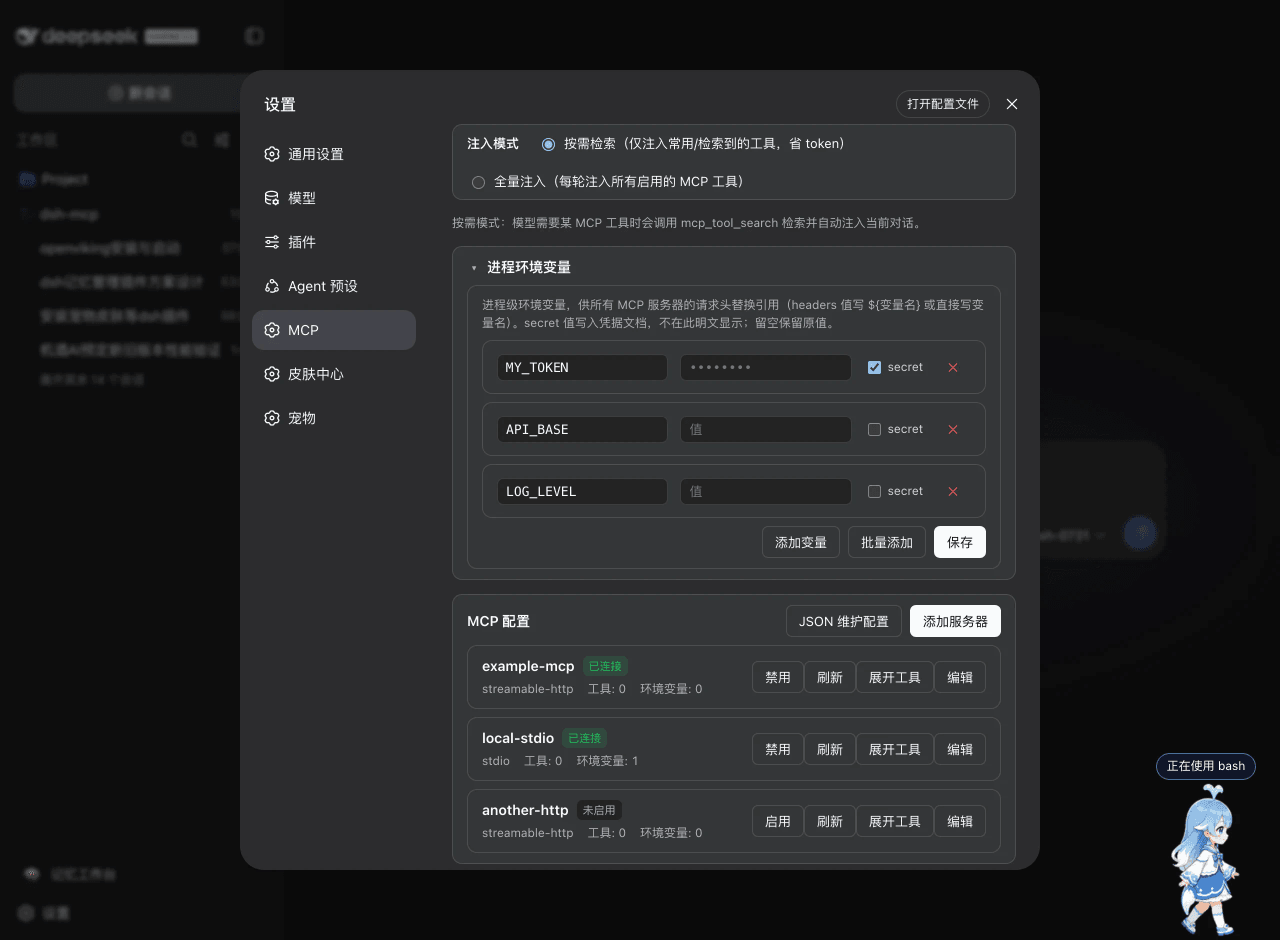 ArvinQi/dsh-mcp
DeepSeek Harness 的 MCP 服务器管理插件:可视化界面管理 + 按需热注入,OAuth 鉴权支持,环境变量配置。
ArvinQi/dsh-mcp
DeepSeek Harness 的 MCP 服务器管理插件:可视化界面管理 + 按需热注入,OAuth 鉴权支持,环境变量配置。
- yu-wenchao/dsh-opencode-free-models 无限免费额度的deepseek harnes 免费模型插件-免费api-DeepSeek Harness (DSH) 插件 — 在聊天界面里实时展示 OpenCode Zen 的最新免费模型,无需登录、无需密钥,直接在模型选择器选用即可对话…
-
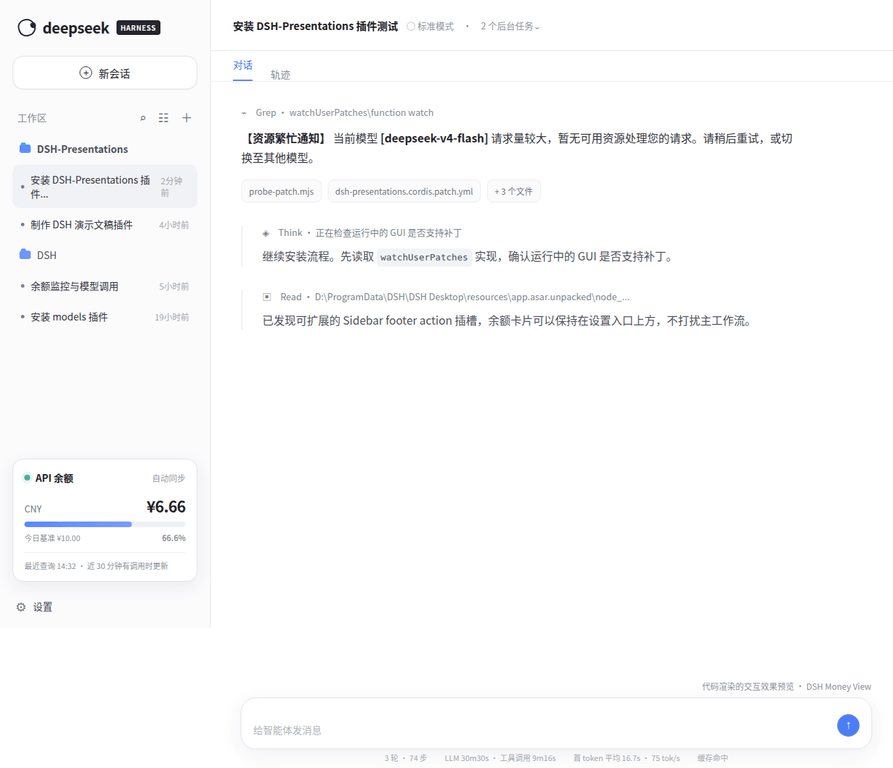 tyche66/DSH-money-view
DeepSeek Harness 社区插件:在侧栏实时显示 API 余额、每日基准与剩余进度,按官方缓存节奏智能查询,密钥不进前端。
tyche66/DSH-money-view
DeepSeek Harness 社区插件:在侧栏实时显示 API 余额、每日基准与剩余进度,按官方缓存节奏智能查询,密钥不进前端。
- yjh051108/dsh-routing-suite dsh-routing-suite — injector + router-standard kit: install the runtime injector first, then the task-aware reasoning-mo…
- xiaobright/dsh-anchored-standard Two-phase DeepSeek Harness preset: Minimal-aligned bootstrap, then full Standard tools (Project2 98/99)
-
 jingyunstudio/jingyun-dsh
基于 Jingyun Studio + DeepSeek Harness (DSH) 打造的一站式 AI 商业化桌面客户端,一个将 AI 智能体 / 技能 / 工作流转化为可交易商品的完整商业化平台客户端。 井云为 DSH 注入了完整的商…
jingyunstudio/jingyun-dsh
基于 Jingyun Studio + DeepSeek Harness (DSH) 打造的一站式 AI 商业化桌面客户端,一个将 AI 智能体 / 技能 / 工作流转化为可交易商品的完整商业化平台客户端。 井云为 DSH 注入了完整的商…
-
 Unclecheng-li/DeepSec
DeepSec — AI Security Offense & Defense Platform. Shield audits AI-generated code for hallucinated packages, missing saf…
Unclecheng-li/DeepSec
DeepSec — AI Security Offense & Defense Platform. Shield audits AI-generated code for hallucinated packages, missing saf…