faith1688/dsh-usage-meter-harness
A real-time usage / cost / balance meter plugin for DeepSeek Harness (DSH). See tokens, spending and real wallet balance right next to the chat input — for the official DeepSeek models and any custom model registered in DSH.
catalog 简介 / catalog descriptioncatalog description:专为 DeepSeek API 打造的实时用量 / 费用 / 余额计量插件 —— 在聊天输入框旁直接看到 tokens、花费与真实余额。
项目介绍Project Overview
这是 DSH 的实时用量/费用/余额计量插件,在聊天输入旁显示 token、花费与钱包余额,支持官方 DeepSeek 及 DSH 中注册的自定义模型;内置多套计费模板、峰谷价、每模型定价、预算与余额。需要查看会话成本、token 构成或设置预算时使用。注意:自定义模型需自行配置单价与余额,真实钱包余额仅 DeepSeek 官方模型可用。
A real-time usage, cost, and balance meter plugin for DSH that shows tokens, spending, and wallet balance next to the chat input for official DeepSeek models and any custom model registered in DSH. It provides billing templates, peak/off-peak pricing, per-model prices, budgets, and balance tracking. Use it to monitor session cost and token breakdown. Note: custom models require manual prices, and real wallet balance is available only for official DeepSeek models.
请帮我了解并安装插件:【dsh-usage-meter-harness】【https://github.com/faith1688/dsh-usage-meter-harness】把上面这条消息直接发给当前会话里的 DSH,让它帮你了解并安装。安装命令不一定准确,发给 DSH 更稳。Send this message to DSH in your current session. CLI install commands may not be accurate across systems — DSH will figure it out for you.
或使用命令行安装(适合开发者)Or use CLI install (for developers)
命令行安装CLI Install
dsh plugin --profile web add --verbose github:faith1688/dsh-usage-meter-harness把 faith1688/dsh-usage-meter-harness 加入你的 DSH 配置(web profile)即可启用。
READMEREADME
dsh-usage-meter-harness
A real-time usage / cost / balance meter plugin for DeepSeek Harness (DSH). See tokens, spending and real wallet balance right next to the chat input — for the official DeepSeek models and any custom model registered in DSH.
Install
Prerequisite (methods 1 & 2): the DSH CLI itself runs on pnpm — install it once per machine:
npm install -g pnpm(orcorepack enable), then verify withpnpm --version.
Pick one of the three methods. Methods 1 and 2 need pnpm (a one-time machine
setup used by the DSH CLI itself): npm install -g pnpm or corepack enable.
Method 1 — npm registry via DSH CLI (needs pnpm)
dsh plugin --profile web add --verbose @faith1688/dsh-usage-meter-harness@latest
(--verbose shows the install progress; drop it if you prefer a quiet install.
@latest explicitly requests the newest release — always install this way.)
Method 2 — GitHub via DSH CLI (needs pnpm)
dsh plugin --profile web add --verbose github:faith1688/dsh-usage-meter-harness
(--verbose shows the install progress.)
Method 3 — one-line installer, no pnpm (recommended)
npx -y @faith1688/dsh-usage-meter-harness@latest
One command: installs into the DSH web profile and registers the bundle (idempotent).
(@latest explicitly requests the newest release — always install this way.)
Prefer not to use npx? The same logic ships as scripts in the repo:
Windows (cmd):
curl -fsSL https://raw.githubusercontent.com/faith1688/dsh-usage-meter-harness/main/scripts/install.cmd -o "%TEMP%\um-install.cmd" && "%TEMP%\um-install.cmd"
Linux / macOS:
curl -fsSL https://raw.githubusercontent.com/faith1688/dsh-usage-meter-harness/main/scripts/install.sh | sh
The script does everything for you: cd into the DSH web profile, installs the
package with visible progress, and registers the bundle in dsh.profile.bundles
(idempotent — safe to re-run after upgrades).
Note: Method 3 uses plain
npmand does not do pnpm coordination. If your profile is managed with pnpm (the default fordsh plugin), prefer Method 1.
After any method: restart dsh web.
Updating
Two cases — pick the right one:
Fresh install (never had the plugin), or the npx method: just run the
install command; it always fetches the latest release.
Upgrading an existing install (plugin already present): the profile's
package.json / pnpm-lock.yaml may be pinned to an old version, and a bare
add can be skipped by pnpm as "already satisfied". Always ask for the new
version explicitly:
dsh plugin --profile web add @faith1688/dsh-usage-meter-harness@latest
or, from inside the profile directory (~/.dsh/profiles/web):
pnpm update @faith1688/dsh-usage-meter-harness
(You may also pin an exact version, e.g. ...@1.0.28.)
After updating: restart dsh web (or reload the browser page). Note that
restarting alone never fetches a new version — it only reloads what is already
in node_modules.
Why this never duplicates the mount entry and never touches your config:
- The mount entry lives inside the package (
cordis.patch.yml, thedsh.bundlemechanism). Every release ships its own complete entry; DSH reads it from the installed package at startup — installing a newer package automatically brings the correct entry with it. - Installers only edit the profile's
package.json(dsh.profile.bundles, de-duplicated) andnode_modules. They never write the profile-rootcordis.patch.yml, so anything you added there yourself (or your other plugin configs) stays untouched. - A duplicate mount entry can only happen if you manually added the same
idto the profile-rootcordis.patch.ymlyourself — the installers never do that.
Features
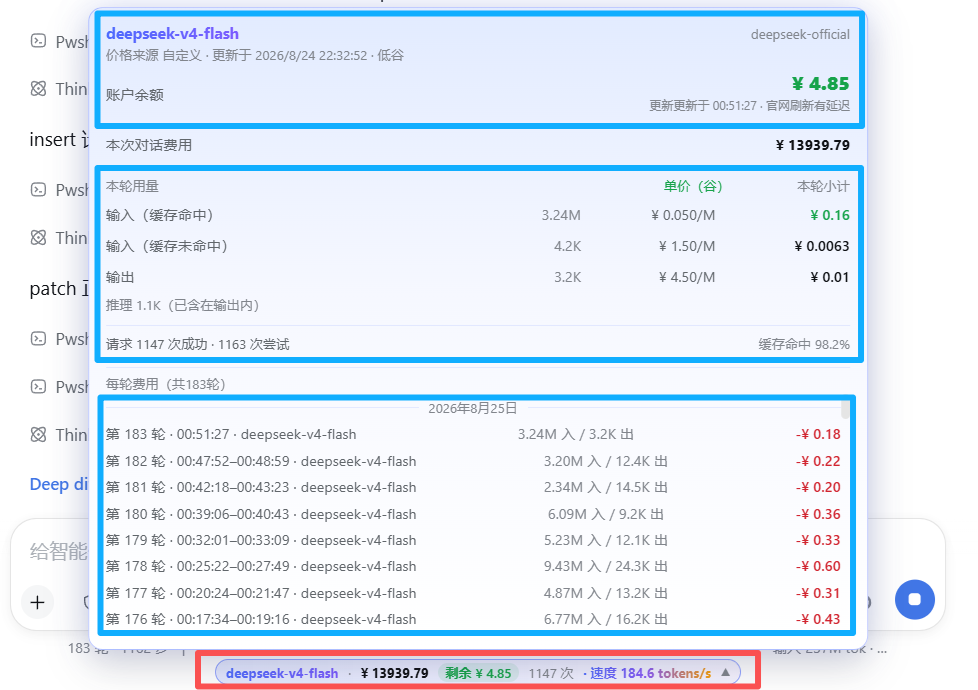
Conversation usage card (next to the chat input)
| Feature | Description |
|---|---|
| Live cost | Session cost in CNY or USD, updated every step |
| Token breakdown | Input (miss) / cache hit / cache write / output |
| Turn usage panel | Per-turn subtotals with unit prices tagged peak/off-peak |
| Token speed | Live tokens/s while streaming; resets cleanly when output stops or tools run |
| Cache hit rate | Share of cached tokens for the session |
| Account balance | Real DeepSeek wallet balance; local-ledger estimate for other providers |
| Budget & remaining | Set a budget, see used / remaining / over-budget |
Billing engine
| Feature | Description |
|---|---|
| 6 billing templates | Basic · Cache hit/miss · Peak/off-peak (DeepSeek official hours) · Cache write+hit · Combined input+output · Batch half price |
| Custom price rows | Up to 4 user-defined rows; the popup mirrors your setup verbatim |
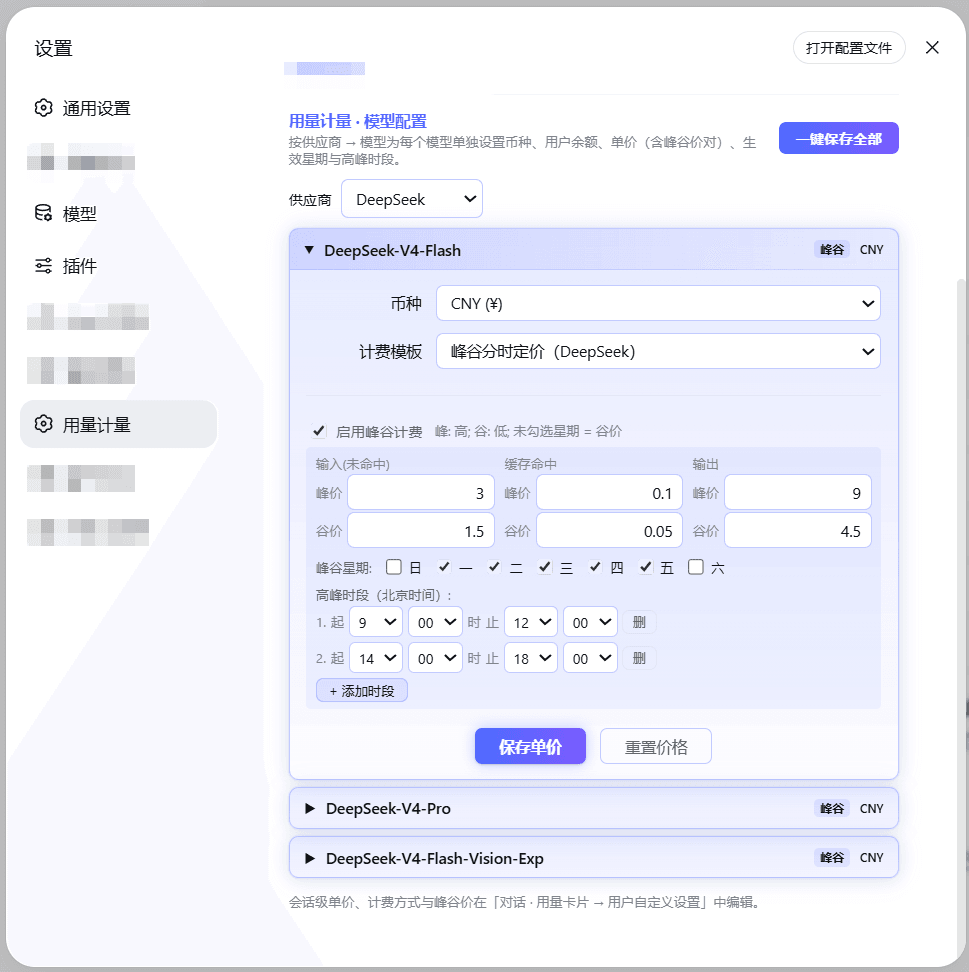
| Peak/off-peak billing | Beijing-time weekday + hour windows, cross-midnight supported; each request is billed by its start time |
| Per-model pricing | Currency (CNY/USD), unit prices and balance per model |
| Shared provider wallet | One balance shared by all models of a provider — single checkbox |
| Official price prefill | DeepSeek official models come pre-filled with official prices and the official peak schedule |
| Built-in price table | 137 models across 19 vendors bundled; optional LiteLLM-shaped remote price source |
| Exchange rate | USD→CNY fetched automatically, refreshed when older than 24 h |
| Legacy migration | Old manual initial-balance/top-up settings migrate into provider wallets automatically |
Settings & UX
| Feature | Description |
|---|---|
| Bilingual UI | 中文 / English switch at the top-right of the settings page; applies everywhere instantly (popup included). Display only — saved data never changes |
| In-use lock | While a model is generating, its editor is locked so a running turn keeps consistent prices |
| WYSIWYG popup | Usage-card rows are copied verbatim from your template selection |
| Non-intrusive | Standard DSH cordis plugin; touches no other plugin and no DSH core files |
Supported models
- DeepSeek official models (
deepseek-chat,deepseek-reasoner, …): official prices pre-filled; real wallet balance via API Key. - Any custom model registered in DSH (OpenAI-compatible providers, Ollama, OpenRouter, …): set unit prices and balance yourself; everything else works the same.
Screenshots
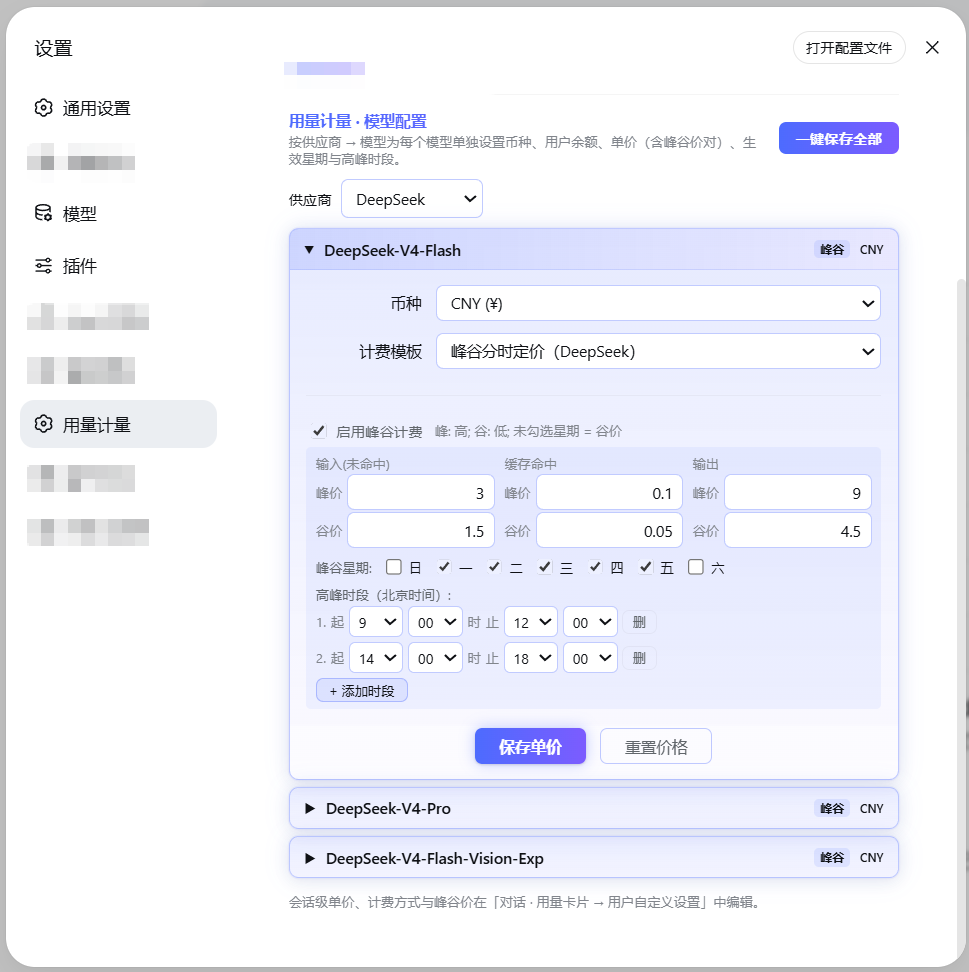
Settings page:
Usage popup:
Configuration
All settings live in the usage-meter settings namespace and can be edited
directly in the plugin UI:
| Key | Type | Default | Description |
|---|---|---|---|
currency |
string | CNY |
Display currency |
budget |
number | – | Session budget; shows "remaining" when set |
priceSourceUrl |
string | – | LiteLLM-shaped price JSON URL; optional |
refreshIntervalMs |
number | 4 h | Price / balance / rate refresh interval |
deepseekApiKey |
secret | – | Only used to query the DeepSeek balance (stored AES-encrypted; never read from the DEEPSEEK_API_KEY env var) |
Compatibility
- Node.js ≥ 22.
- Peer versions track the supported DSH releases (see
package.json); updating DSH does not break the plugin, and it never modifies your other plugins.
License
MIT © faith1688
Privacy
- The plugin makes no telemetry and no analytics calls.
- Network requests are limited to two optional ones: querying the official DeepSeek balance API with the API key you configure yourself, and fetching a public USD→CNY exchange rate. Nothing else leaves your machine.
- The source is MIT-licensed and fully readable on GitHub.
相关推荐Related
-
 nexu-io/open-design
🎨 Best DeepSeek Harness Design Plugin. The open-source Claude Design alternative. 🖥️ Local-first desktop app. 🖼️ Your…
nexu-io/open-design
🎨 Best DeepSeek Harness Design Plugin. The open-source Claude Design alternative. 🖥️ Local-first desktop app. 🖼️ Your…
-
 freestylefly/awesome-gpt-image-2
Prompt as Code | GPT-Image2 工业级提示词引擎与模板库,530+ 个案例逆向工程,20+ 套工业级模板,并提炼出Skills,持续更新中
freestylefly/awesome-gpt-image-2
Prompt as Code | GPT-Image2 工业级提示词引擎与模板库,530+ 个案例逆向工程,20+ 套工业级模板,并提炼出Skills,持续更新中
-
 anywhere-labs/dsh-desktop
为 DeepSeek Harness (DSH) 插件生态打造的现代化桌面端解决方案。万物皆「插件」,桌面本身也是「插件」。
anywhere-labs/dsh-desktop
为 DeepSeek Harness (DSH) 插件生态打造的现代化桌面端解决方案。万物皆「插件」,桌面本身也是「插件」。
- Nagi-ovo/voyager Enhancement suite for Gemini, AI Studio, Claude & ChatGPT — plus a prompt manager for any web UI, DeepSeek Harness inclu…
-
 walkinglabs/learn-harness-engineering
Harness engineering beginner tutorial, from 0 to 1
walkinglabs/learn-harness-engineering
Harness engineering beginner tutorial, from 0 to 1
-
 awesome-dsh-plugin/awesome-dsh-plugin
A curated list of plugins for DeepSeek Harness (dsh) · DeepSeek Harness 插件精选列表
awesome-dsh-plugin/awesome-dsh-plugin
A curated list of plugins for DeepSeek Harness (dsh) · DeepSeek Harness 插件精选列表
-
 MemTensor/MemOS
Self-evolving memory OS for LLM & AI Agents: ultra-persistent memory, hybrid-retrieval, and cross-task skill reuse, with…
MemTensor/MemOS
Self-evolving memory OS for LLM & AI Agents: ultra-persistent memory, hybrid-retrieval, and cross-task skill reuse, with…
- yjh051108/dsh-routing-suite dsh-routing-suite — injector + router-standard kit: install the runtime injector first, then the task-aware reasoning-mo…