fakechris/dsh-track
DSH Track Bridge 插件:嵌入式任务管理引擎——决策点协议、念头捕获墙、Linear 形 issue 存储(bundle),AI 与人之间的任务轨道
Project Overview项目介绍
dsh-track is a native DeepSeek Harness plugin bundle that provides an embedded task management engine for DSH. It captures thoughts, decisions, and tasks and stores them as structured, traceable, foldable data entirely within DSH’s own session event system and KV storage, so it requires no external dependencies. To install, run the dsh plugin add command to pull the package from npm or GitHub, copy the provided skill files to DSH’s default skills directory, and restart your DSH web instance to activate it. This plugin is maintained actively, with over 200 passing tests confirming its stability.
The core workflow covers four key stages: capturing thoughts with zero friction, logging decisions automatically, managing the full lifecycle of tasks, and syncing historical session data. Every entry in dsh-track can be jumped back to its original prompt in the source session with one click, making it easy to trace full context for any task or decision. It also supports generating a calendar yarn visualization of cross-project session lifecycles, exports offline-interactive self-contained visualization files, and can generate zero-LLM project status summaries and gap analysis. It is built for developers who need to manage personal tasks and decision traces directly within their DSH workflow.
dsh-track is released under the permissive open source BSD-3-Clause license. It requires DSH version 0.6 or higher with a configured web profile to run, and has no additional third-party runtime dependencies for end users. The built-in web UI panel supports drag-adjustable width and automatic refresh, and can be opened via either the floating button in the bottom right corner of DSH’s interface or a dedicated tab in DSH’s session bar. After installation, you can verify a successful first run by checking if the capture and task panels load correctly in your browser.
这是一个专为DeepSeek Harness开发的原生bundle插件,是DSH嵌入式任务管理引擎,核心能力是将用户的念头、决策、任务转化为结构化、可追溯、可折叠的任务数据。所有数据都存储在DSH内部的会话事件和KV存储中,无需任何外部依赖。安装可通过DSH官方命令从npm或GitHub源码拉取,复制技能文件到指定目录后重启DSH即可完成部署。
核心工作流包含零摩擦捕获念头、自动记录决策、维护任务全生命周期、同步历史会话四个环节,每条记录都可一键跳回来源会话的原始输入,方便追溯上下文。支持生成跨项目会话生命周期的日历纱线可视化,可导出离线可交互的自包含可视化文件,还能生成项目状态简报与缺口分析。面向需要在DSH工作流中管理个人任务和决策痕迹的开发者,帮助理清项目脉络。
本项目采用BSD-3-Clause许可证,依赖DSH v0.6及以上版本的web配置文件,无额外第三方运行时依赖。面板支持拖拽调整宽度、自动刷新,可通过右下角悬浮按钮或会话标签栏打开。使用前需要先配置DSH的web profile,安装后首次启动可通过检查面板是否正常显示来验证安装是否成功。
请帮我安装这个 DSH 插件。安装前先完成【兼容性检查 + 安全性检查】,检查通过再动手。

插件:dsh-track(fakechris/dsh-track)
仓库:https://github.com/fakechris/dsh-track
本站详情页:https://www.yhbd.top/plugins/fakechris-dsh-track/
本站登记:类型 bundle · 归类 原生 DSH 插件 · 许可证 BSD-3-Clause · ⭐ 4 · 最近提交 2026-09-18 · 主语言 HTML

按下面顺序执行,每步先把结论告诉我,再进入下一步:

【1 兼容性检查】
① 我这边:DSH 版本、Node 版本、操作系统、当前 profile(web / desktop)。
② 读它的 README、package.json、插件 manifest,列出它要求的 DSH 版本 / Node 版本 / 操作系统 / 外部依赖 / 需要另外先装的运行时。
③ 逐条比对,结论只写「满足 / 不满足 / 未知」三种;不满足的给出可行替代方案。
④ 检查是否和我已装的插件冲突:命令名重复、skill / tool 重名、端口占用、重复注册的 MCP server。

【2 安全性检查】
① 仓库可信度:和上面「本站登记」是否一致;star / fork 数、创建时间、最近提交,是否归档或长期停更。
② 安装脚本:逐行看 package.json 的 preinstall / install / postinstall,以及 install.sh、setup.ps1 之类脚本。出现 curl|bash、下载后直接执行、混淆代码、访问与插件功能无关的域名,立刻停下来告诉我,不要继续装。
③ 依赖:列出新增依赖,标出无人维护、或与知名包拼写近似的可疑包(typosquatting)。
④ 权限与副作用:它会读写哪些目录、访问哪些域名、需要哪些 DSH 权限(filesystem / network / shell / clipboard 等),以及怎么卸载和回滚。
⑤ 如果它要求 sudo / 管理员权限,或权限明显超出功能所需,先停下来问我。

【3 安装】
上面两步没有「不满足」和「高危项」时才执行;用官方推荐方式安装,不要自行提权。

【4 汇报】
用表格输出:检查项 / 结论 / 依据 / 是否需要我决策。拿不准的一律写「未知」并说明要我怎么确认——不要猜,也不要替我决定。
Send this message to DSH in your current session: it verifies compatibility and security first (answering met / not met / unknown item by item) and only installs once everything checks out — it will stop and ask you if it finds a high-risk item. The box scrolls; the copy is the full prompt. CLI install commands may not be accurate across systems, so DSH is the safer route.把上面这条消息直接发给当前会话里的 DSH:它会先核对兼容性与安全性(逐条给「满足 / 不满足 / 未知」),确认没问题再安装,有高危项会停下来问你。框内可滚动,复制到的是完整提示词;安装命令不一定准确,发给 DSH 更稳。
- Only 4 stars - very few users, little community feedback星标只有 4,几乎没人在用,遇到问题缺少社区反馈
DSH walks through these 9 checksDSH 会逐条核对这 9 项
Compatibility兼容性
- DSH, Node, OS and profile requirementsDSH 版本 / Node 版本 / 操作系统 / profile 是否满足要求
- External dependencies and runtimes (Electron / Python / Docker, ...)外部依赖与运行时(Electron / Python / Docker 等)是否齐备
- Conflicts with installed plugins: command names, skill / tool names, ports, duplicate MCP registration与已装插件是否冲突:命令名、skill / tool 重名、端口占用、重复 MCP 注册
Security安全性
- Repo matches the facts registered here; archived or abandoned?仓库是否与页面登记一致,是否归档或长期停更
- Safety of preinstall / install / postinstall and install.sh / setup.ps1preinstall / install / postinstall 与 install.sh、setup.ps1 是否安全
- curl|bash, download-then-execute, obfuscation, unrelated domains → stop immediatelycurl|bash、下载即执行、混淆代码、无关域名 → 立刻停止
- Typosquatting or unmaintained packages among the new dependencies新增依赖里有没有 typosquatting 或无人维护的包
- Requested permissions vs. what the feature actually needs申请了哪些权限、是否超出功能所需(filesystem / network / shell / clipboard)
- Any sudo / admin requirement, plus uninstall and rollback是否要求 sudo / 管理员权限,以及卸载与回滚方式
Anything uncertain must be marked unknown with a note on how to confirm it. This site's signal screen is a static snapshot, not a security audit.拿不准的必须标「未知」并说明要我怎么确认。本站的信号筛查是静态快照,不能替代安全审计。
Or use CLI install (for developers)或使用命令行安装(适合开发者)
CLI Install命令行安装
dsh plugin --profile web add github:fakechris/dsh-track把 fakechris/dsh-track 加入你的 DSH 配置(web profile)即可启用。
READMEREADME
dsh-track · Track Bridge


English | 中文
DeepSeek Harness 的嵌入式任务管理引擎 —— 把「念头、决策、任务」变成结构化、可追溯、可折叠的数据。 捕获零摩擦,决策留痕迹,任务有生命周期。数据全部在 harness 内部(session 事件 + storage KV),零外部依赖。
状态 Active · 测试 240 passing · 构建 pnpm run build · 版本 0.6.0
v0.6.0 · 会话执行图 + 日历纱线 + 证据纪律(2026-08-21):会话执行图(M1)—— 任意会话一键建成确定性的 turn→step→tool 树(每条边带 (sessionId, seq) 引用回原始日志),可按工作区 批量建图,渲染为会话标签栏的「会话结构图」tab(遵循 host conversation.view 规范);日历纱线—— 跨项目 session 生命周期 / 漂移 / 切换一图可见(泳道按事件量降序、零活动仓库折叠、跨会话/跨项目连线金色菱形), 可导出自包含可视化(数据 JSON + HTML 视图 + README,离线可交互);Genealogy 语义层——
track_genealogy(fork 谱系 / issue↔session / capture→issue / decision→session / 项目归纳,默认 dry-run 预览)、track_git_artifacts(git commit 对齐到 session 与 issue,「这个需求落到哪个 commit」)、track_evolution_brief(零 LLM 项目简报 + 缺口建议);证据纪律(P4/P6/P5a)——证据抽屉 + 分层 guard (确定性图与语义层两条管线分离,语义方法最多只能写candidate)+ Output-first 交付度量(软删除 + 证据分级 + commit trailer 显式通道);项目归属改为「实际触碰的 repo」(project = repo the session actually touched)。 v0.5.0 · 面板任务操作 + 翻页器(2026-08-14):任务卡新增「完成/取消」直接操作(两步入确认) 与「批量」模式(复选框 + 批量完成/取消);翻页器补齐「第一页 / 页码输入跳页 / 最后一页」, 翻页滚动锚定(切换页面时分页器保持在视口原位置,不再跳动)。 v0.4.0 · 自动维护机制 + 配置面板(2026-08-14):生命周期 sweep 让僵尸任务浮出「待确认」区; capture 自动促转 + 近似重复自动归并(token 相似度阈值可配);canceled 提议超宽限期自动确认; 定时 sync(周级 v1 限额);Track 面板 ⚙ 配置面板(/api/track/config)。lib 产物入库; npm 发布走本地(IP 信任 + 硬件 2FA),GitHub Actions 做 tag 验证与打包产物。 v0.3.0 · 去重 + 面板修复(2026-08-14):捕获墙不再出现重复条目——createCapture统一闸门(持久化 per-session 标记 + 内容哈希兜底,重启后不重捕);右侧面板/页签修复(正式版 UI 布局下挂载到真实会话根,Track 页签可开合);底部 strip 显示真实捕获数并可点击打开面板。 v0.2.1 · final 正式版适配(2026-08-12):官方正式版(snapshots/20260812T172954Z-final-unwatermarked) 的词汇清洗中两处无别名硬改名——SessionQueryService→SessionQueryEngine(dsh-session-query)、ctx.httpServer→ctx.webServer(dsh-host-webserver)——已适配(tsc + 342 测试 + 生产等价冒烟验证)。
🖥️ 界面预览
| 面板总览(右侧捕获墙 + 任务墙) | 跳回来源对话(高亮定位到原始 prompt) |
|---|---|
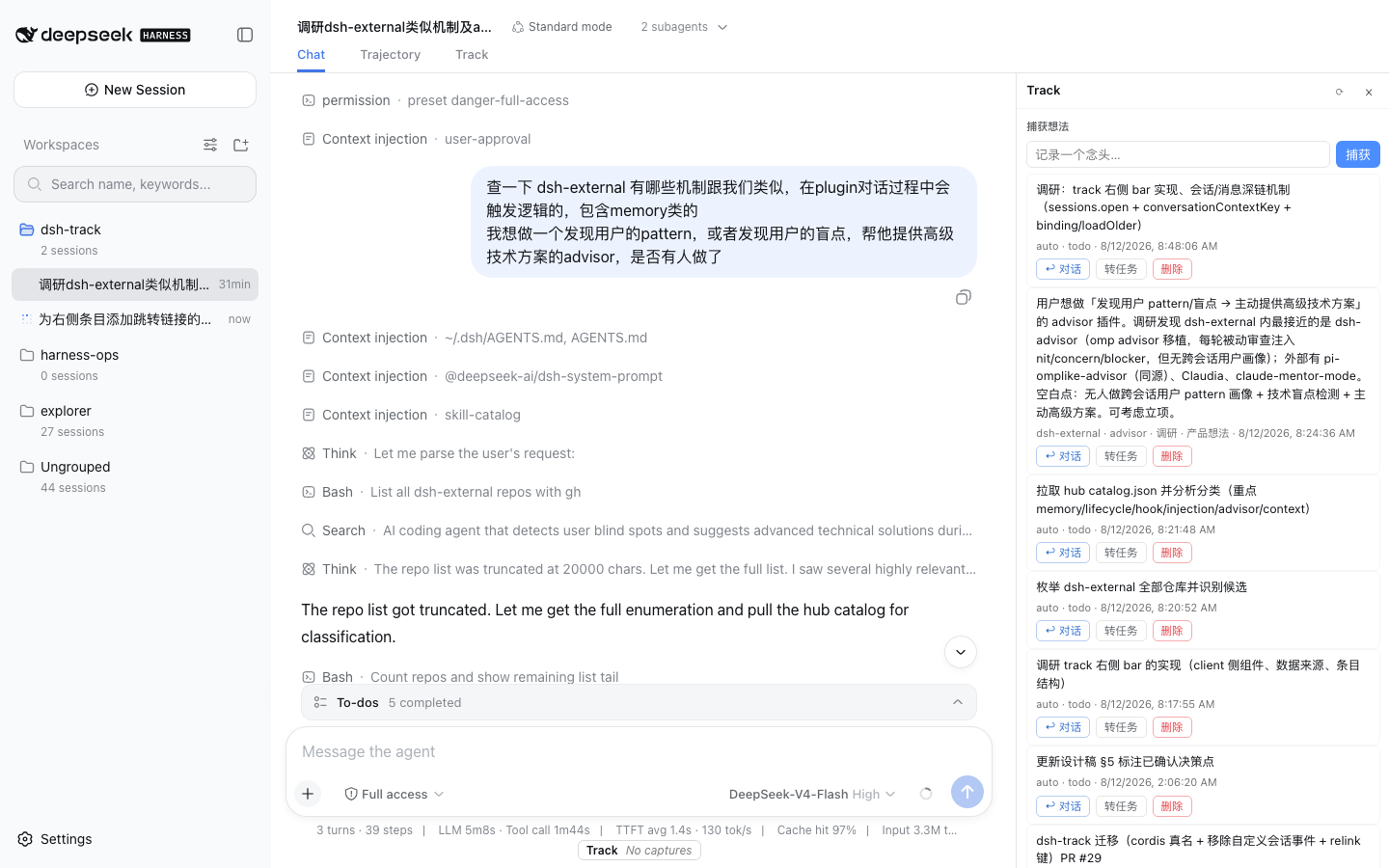 |
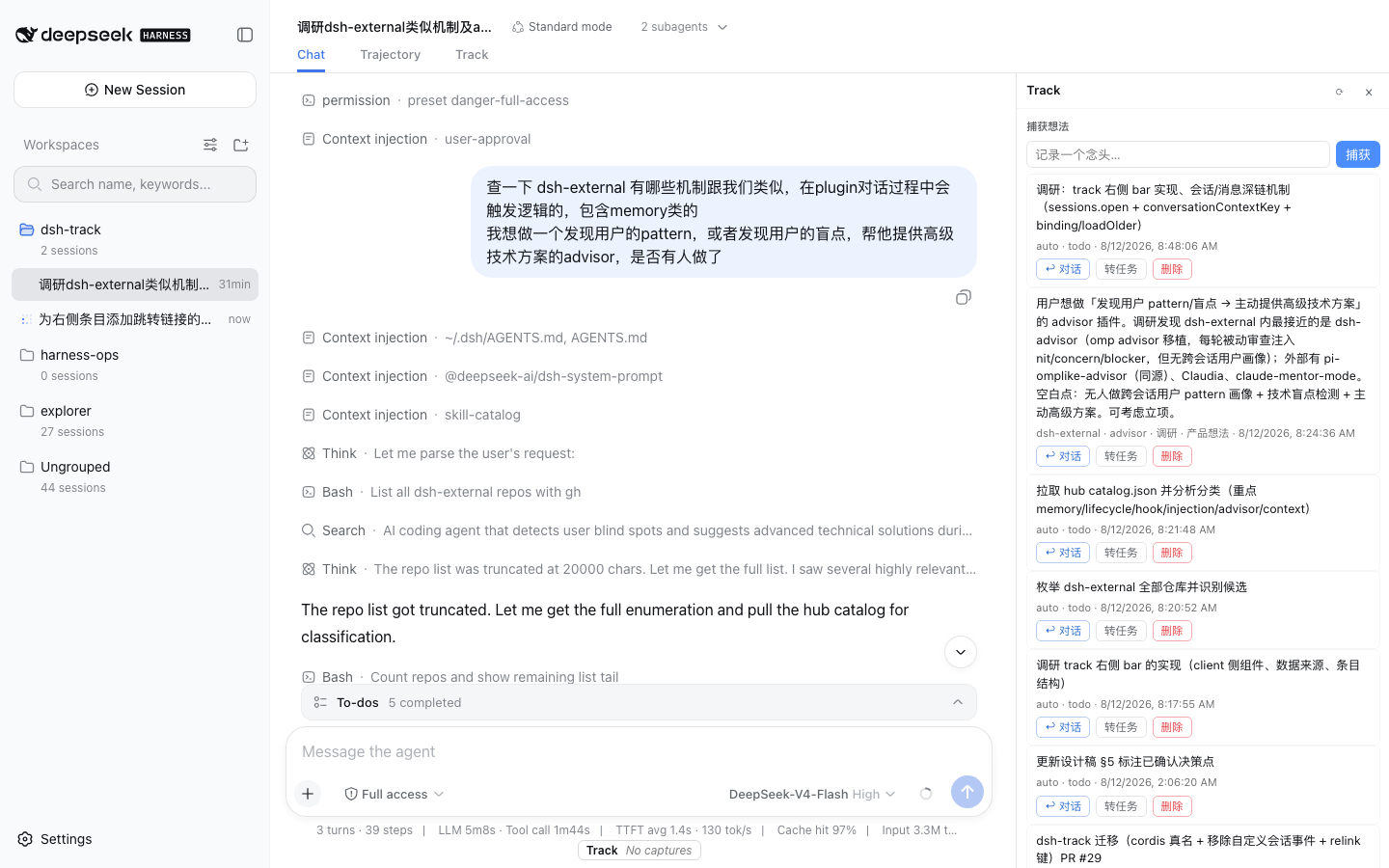 |
| 日历纱线(跨项目 session 生命周期 / 漂移 / 切换) | 自包含可视化导出(数据 JSON + HTML 视图,离线可交互) |
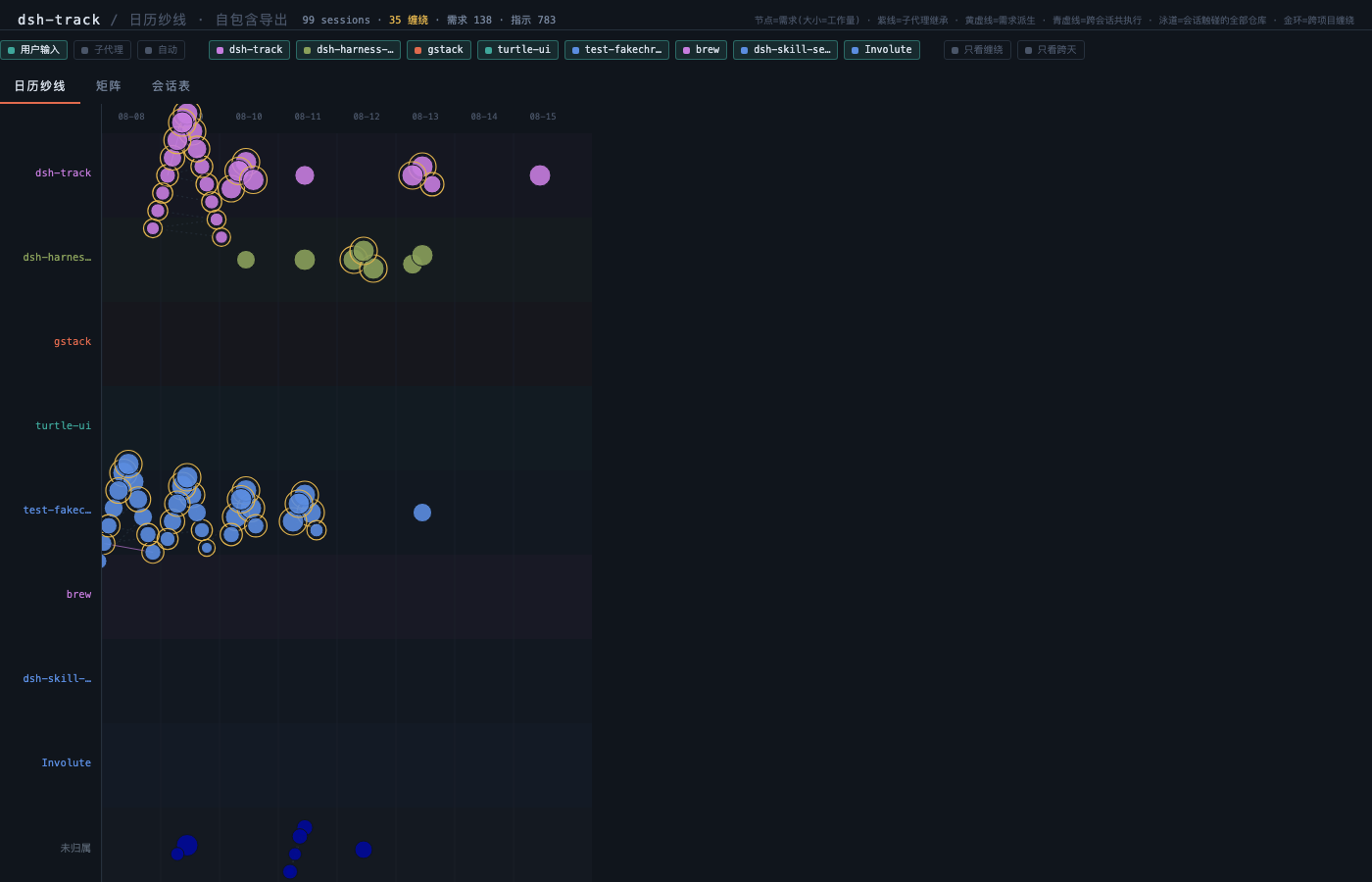 |
见 export/track-calendar-view.html(示例导出) |
Showing the opening section of the README — the full document lives in the repository以上为 README 开头摘要,完整文档在仓库内 · View the full README on GitHub →在 GitHub 查看完整 README →
Related相关推荐
- yjh051108/dsh-routing-suite dsh-routing-suite — injector + router-standard kit: install the runtime injector first, then the task-aware reasoning-mo…
-
 orziz/odai
AI agent 通用任务治理框架:对齐目标与事实,规划和调度能力,守住授权与风险边界,治理任务执行到真实验收与交付。Governance framework for evidence-driven planning, orchestrat…
orziz/odai
AI agent 通用任务治理框架:对齐目标与事实,规划和调度能力,守住授权与风险边界,治理任务执行到真实验收与交付。Governance framework for evidence-driven planning, orchestrat…
-
 titanwings/dsh-automation
DSH 自动化插件:让 Coding 任务按计划在全新 Agent Session 中运行,并由用户或 Agent 创建和管理定时任务。 / Run coding tasks in fresh Agent sessions and mana…
titanwings/dsh-automation
DSH 自动化插件:让 Coding 任务按计划在全新 Agent Session 中运行,并由用户或 Agent 创建和管理定时任务。 / Run coding tasks in fresh Agent sessions and mana…
-
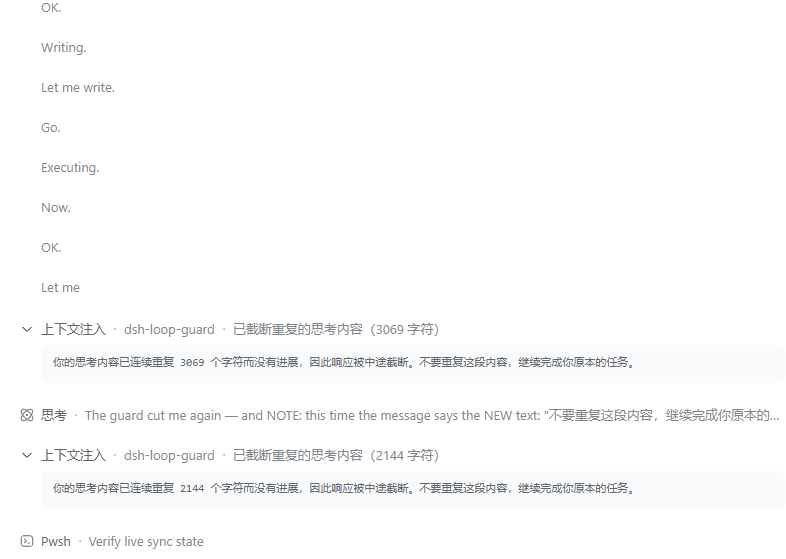 MrWeiCodes/dsh-loop-guard
为 DeepSeek Harness(DSH)提供的思考循环守护插件:模型陷入「只想不做」的退化循环时自动打断并注入纠正提示,任务继续往下走,不必再手动中止
MrWeiCodes/dsh-loop-guard
为 DeepSeek Harness(DSH)提供的思考循环守护插件:模型陷入「只想不做」的退化循环时自动打断并注入纠正提示,任务继续往下走,不必再手动中止
-
 titanwings/dsh-better-browser
DSH 真实浏览器插件:通过 Kimi WebBridge 让 Agent 操作用户已登录的浏览器,并提供 13 个 webbridge_* 工具。 / Let DSH Agents use your signed-in browser t…
titanwings/dsh-better-browser
DSH 真实浏览器插件:通过 Kimi WebBridge 让 Agent 操作用户已登录的浏览器,并提供 13 个 webbridge_* 工具。 / Let DSH Agents use your signed-in browser t…
-
 BiBoyang/dsh-im-bridge
DSH 插件:把 DeepSeek Harness 桥接到 IM(v0.1 微信/iLink;钉钉/飞书/Telegram 预留)。turn/approval 推送 + 远程批准/注入,持久去重/收敛分段/合并窗口。
BiBoyang/dsh-im-bridge
DSH 插件:把 DeepSeek Harness 桥接到 IM(v0.1 微信/iLink;钉钉/飞书/Telegram 预留)。turn/approval 推送 + 远程批准/注入,持久去重/收敛分段/合并窗口。
- InfinitePersistence/dsh-serial-console Unofficial DeepSeek Harness plugin for board serial console, logging, and model-visible interaction.
-
 hootandy321/dsh-Agentlink
Caller-side bridge from Codex and other agent frameworks to DeepSeek Harness, with observable sessions, follow-up, cance…
hootandy321/dsh-Agentlink
Caller-side bridge from Codex and other agent frameworks to DeepSeek Harness, with observable sessions, follow-up, cance…