FleetingEcho/dsh-powerdesk
DSH 的 IDE 工作台插件。快速终端(基于 Rust PTY 上的 restty/WebGPU)、CodeMirror 6 编辑器、文件浏览器、Markdown 笔记、沙盒浏览器和 ripgrep 搜索——全部作为可停靠右侧和底部面板中的标签页呈现。可通过您自己的 React 组件进行扩展。
项目介绍Project Overview
dsh-powerdesk 是 DSH 网页插件,在可停靠的右侧与底部面板中提供终端、文件浏览、笔记、CodeMirror 编辑器、沙箱浏览器和日历。适合在聊天界面内直接编辑文件、运行命令、记笔记与查日程。终端在 macOS 和 Linux x64 开箱即用,其他平台首次使用需 Rust 工具链构建 PTY。
dsh-powerdesk is a DSH web plugin that adds a dockable IDE workbench with a GPU-accelerated Rust-PTY terminal, file explorer, notes, CodeMirror 6 editor, sandboxed browser, and SQLite calendar in right and bottom panels. Use it to edit files, run commands, take notes, and manage schedules without leaving the DSH chat UI. The terminal ships prebuilt for macOS and Linux x64; other platforms build the Rust PTY on first use.
请帮我了解并安装插件:【dsh-powerdesk】【https://github.com/FleetingEcho/dsh-powerdesk】把上面这条消息直接发给当前会话里的 DSH,让它帮你了解并安装。安装命令不一定准确,发给 DSH 更稳。Send this message to DSH in your current session. CLI install commands may not be accurate across systems — DSH will figure it out for you.
或使用命令行安装(适合开发者)Or use CLI install (for developers)
命令行安装CLI Install
dsh plugin --profile web add https://github.com/FleetingEcho/dsh-powerdesk.git把 FleetingEcho/dsh-powerdesk 加入你的 DSH 配置(web profile)即可启用。
READMEREADME
dsh-powerdesk
English | 简体中文
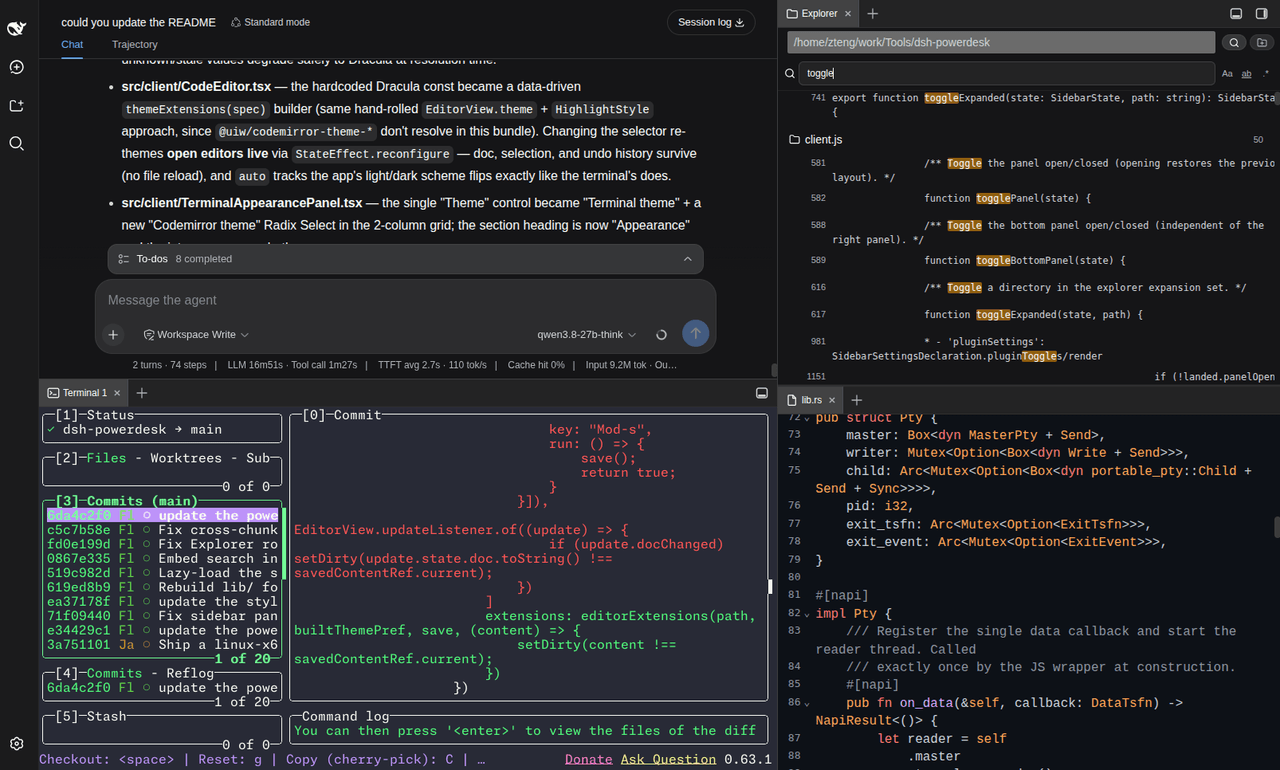
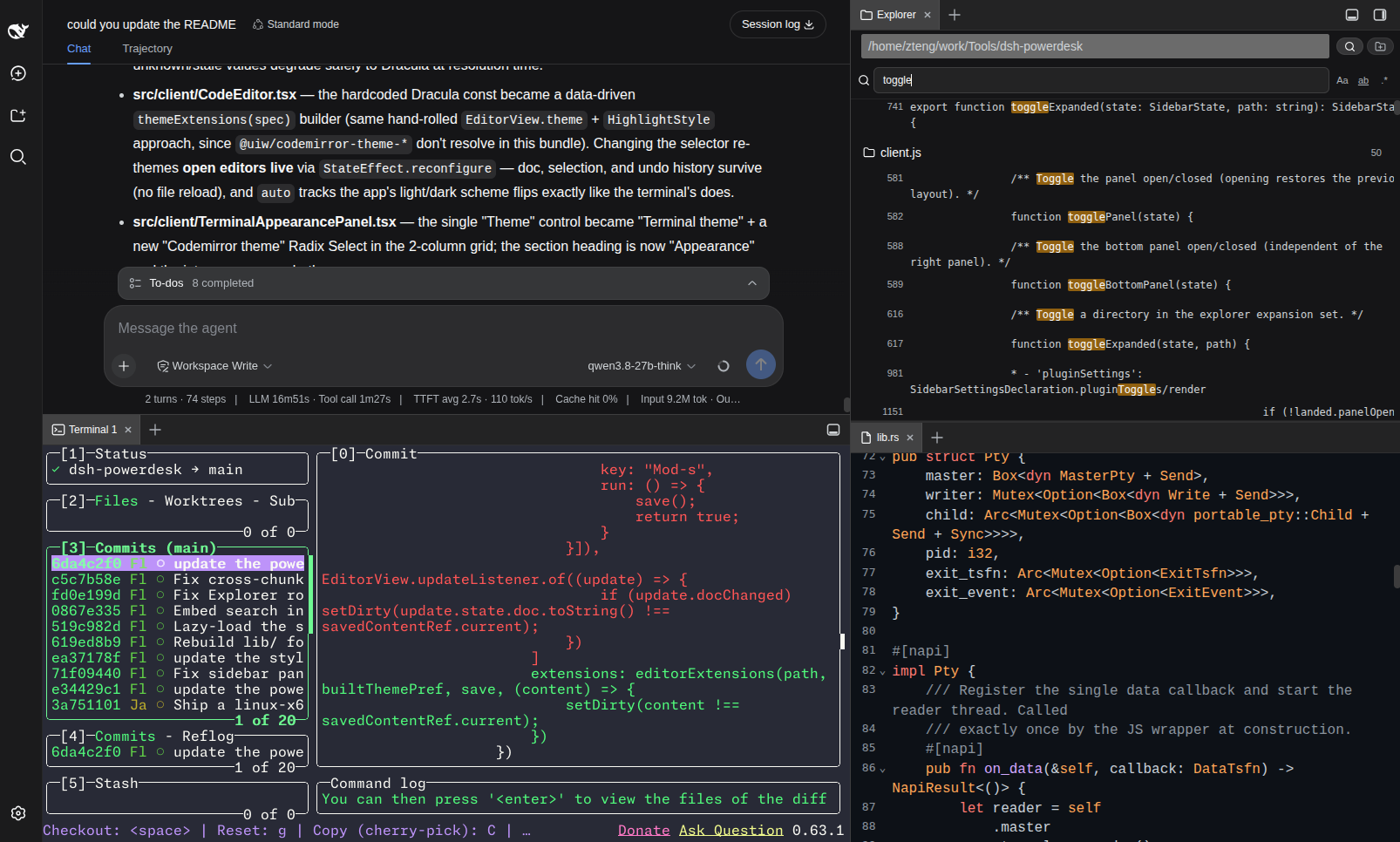
A DSH web plugin that adds a small IDE workbench to the DSH web UI: a GPU-accelerated terminal, a file explorer, a notes app, a code editor, a sandboxed browser, and a calendar — all self-contained, in a dockable right panel and a dockable bottom panel (VSCode-style dual workbench, with drag-to-split and drag-between-panels).
- Terminal — rendered with restty
(WebGPU/WebGL2 + WASM VT, Ghostty-lineage) and backed by a Rust PTY
(napi-rs + portable-pty)
instead of the C++
node-ptythe stock terminal uses. - Explorer — a directory tree over any local folder you bookmark (picked via a built-in folder-browser modal, not a text field). Click a file to open it in the editor; each file row has quick "copy relative path" (for @-mentioning in chat) and "copy absolute path" actions.
- Notes — bind one local folder and browse/edit only its
.mdfiles as a recursive tree, with inline create / rename / delete for both notes and folders. The editor is embedded in the same tab (tree left, editor right). - Editor — CodeMirror 6 with syntax highlighting for TS/JS/Python/JSON/CSS/HTML/Markdown/Rust/YAML, a selectable CodeMirror theme (Dracula by default), soft line-wrapping, and Cmd/Ctrl+S save. Opens automatically when you click a file in Explorer or Notes.
- Browser — a sandboxed iframe behind an address bar, with an
embeddability probe that explains
X-Frame-Options/frame-ancestorsrefusals instead of showing a blank "refused to connect" frame. - Calendar — a schedule-x calendar (Month / Week
/ Day) over a local SQLite database (a new Rust napi module with bundled
SQLite, sibling to the PTY crate), lazy-loaded so it never weighs down
startup. Events persist at
<profile-dir>/powerdesk-calendar.db.
All six surface as tabs in the plugin's own sidebar — a right panel (width freely draggable, no cap) and a bottom panel (height draggable, spans the full window width including under the right panel).
Why Powerdesk
- A genuinely fast terminal — restty (WebGPU/WebGL2 + a WASM VT, Ghostty-lineage) over a Rust PTY (napi-rs + portable-pty), not the C++
node-ptythe stock terminal uses — so terminal I/O is substantially faster and lighter. - A full IDE without leaving the chat — ripgrep content search, a CodeMirror 6 editor, a file explorer, notes, and a sandboxed browser, all as tabs in dockable right + bottom panels. Never context-switch out of the DSH page.
- Two-panel VSCode-style workbench — drag any tab to a pane edge to split it, or between the right and bottom panels to move it entirely; two split trees sharing one drag-and-drop system.
- Zero-build install —
lib/and the macOS / Linux-x64 Rust PTY binaries are committed, sodsh plugin addjust copies files: no build step, no Rust toolchain, noallowBuildsentry. - Build your own tabs — ship a React component + a
powerdesk.jsonas a.tgzand it mounts as a sidebar tab; a template (templates/extension/) gets you topnpm packin minutes. - Sandboxed by default — the browser tab runs without
allow-same-origin, refuses loopback addresses, and probesX-Frame-Options/frame-ancestorsto explain refusals instead of showing a blank frame.
Quick install
dsh plugin --profile web add https://github.com/FleetingEcho/dsh-powerdesk.git
Requires DSH >=0.0.1 with the dsh CLI on your PATH. Hard-refresh the browser (Cmd/Ctrl+Shift+R) after installing. The terminal works out of the box on macOS (both architectures) and Linux x86_64; other platforms build the Rust PTY once on first use (see Install).
Requirements
- DSH
>=0.0.1with thedshCLI on yourPATH(dsh --version). Loads into a DSH profile (defaultweb). - Node.js 20+ and pnpm 9+ if you install from source.
- A Rust toolchain (
rustup) — only if your platform has no committed prebuilt binary yet; macOS users never need Rust.
The PTY addon is looked up by platform triple (src/rust-pty-deps.ts). Three triples have a binary committed to the repo and shipped with every install; the rest build from source on first use:
| OS | Arch | Triple | Prebuilt? |
|---|---|---|---|
| macOS | Apple Silicon | darwin-arm64 |
✅ committed |
| macOS | Intel | darwin-x64 |
✅ committed |
| Linux | x86_64 (glibc) | linux-x64-gnu |
✅ committed |
| Linux | aarch64 (glibc) | linux-arm64-gnu |
build from source |
| Windows | x86_64 | win32-x64-msvc |
build from source |
| Windows | ARM64 | win32-arm64-msvc |
build from source |
Install
Pick one channel — do not enable both (they would double-mount the host half and render two sidebars). No npm package is published yet, so both install straight from the GitHub repo.
Option A — from GitHub (recommended)
dsh plugin --profile web add https://github.com/FleetingEcho/dsh-powerdesk.git
The repo is public, so the plain HTTPS URL works anonymously. pnpm reads the package name out of the repo, so no dsh-powerdesk@ prefix is needed — though dsh-powerdesk@<url> lets you pin a branch or tag (...git#my-branch). Prefer SSH? git+ssh://git@github.com/FleetingEcho/dsh-powerdesk.git works too (needs an SSH key on GitHub).
lib/ (the built client/host JS) and the macOS / Linux-x64 Rust PTY binaries are committed, so there's no build step and no allowBuilds entry — the terminal works immediately on those platforms.
Windows or Linux ARM64: build the Rust PTY once
cd ~/.dsh/profiles/web/node_modules/dsh-powerdesk
pnpm build:rust       # needs the Rust toolchain (rustup); cargo build --release
Option B — from source (for development)
git clone https://github.com/FleetingEcho/dsh-powerdesk.git
cd dsh-powerdesk
pnpm install
pnpm build            # tsc (lib/types) + tsdown (lib/*.js + the lazy chunks)
pnpm build:rust       # cargo build --release → prebuilt/<triple>/dsh_powerdesk_pty.node
pnpm test             # vitest (optional sanity check)

# Register the local checkout with your DSH profile.
# Use an ABSOLUTE path (link:. resolves relative to the profile dir and breaks):
dsh plugin --profile web add "dsh-powerdesk@link:$PWD"
After either option: hard-refresh the browser (Cmd/Ctrl+Shift+R). Client-half changes hot-reload without a DSH restart; host-half changes (src/*.ts, including the Rust PTY layer) need a DSH restart (pm2 restart dsh-web, or dsh web).
Use
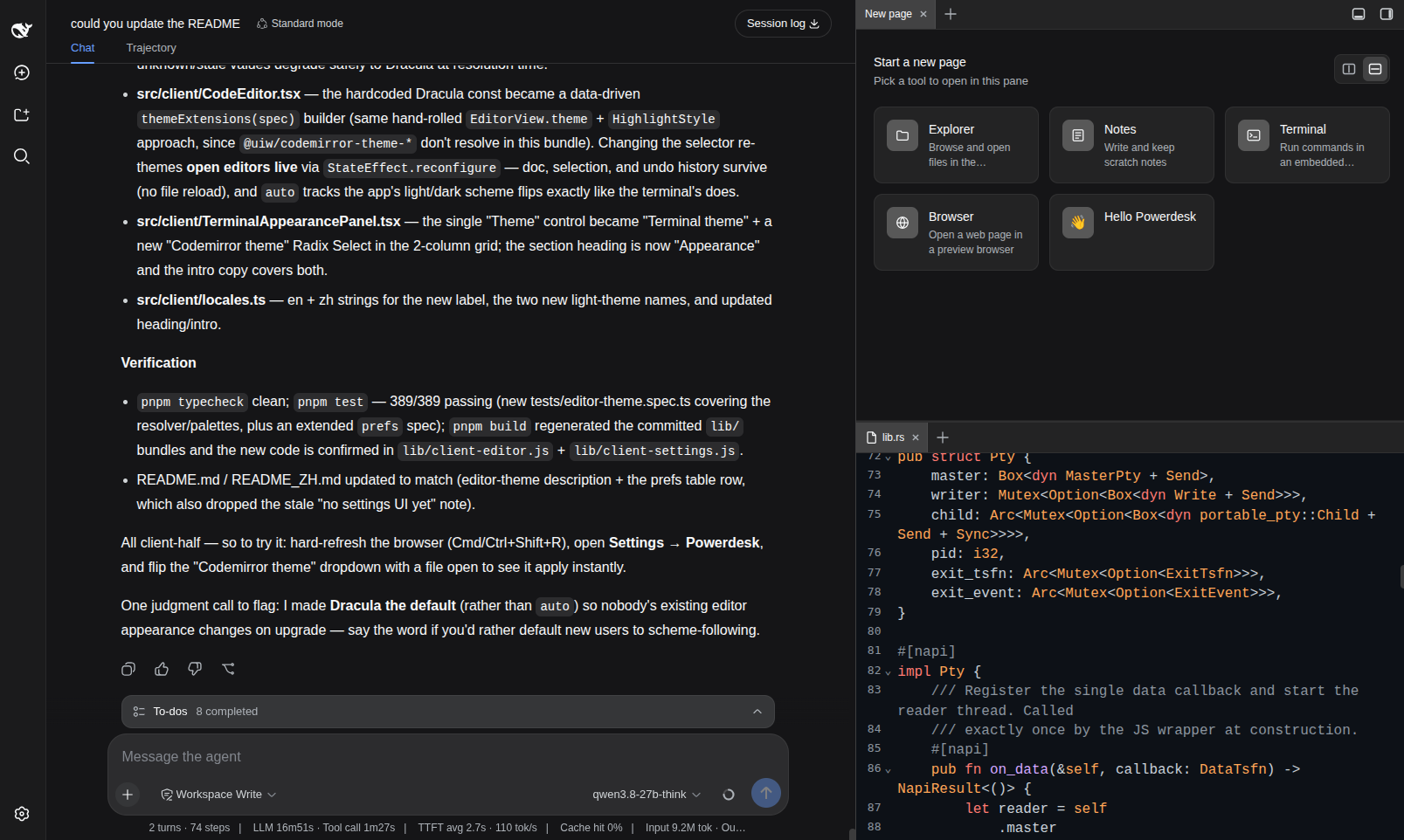
Click the toggle cluster at the top-right corner of the window — one button opens/collapses the right panel, the other the bottom panel. Drag a tab to a pane's edge to split it, to its center to merge/reorder, or from one panel to the other to move it entirely. Every open tab stays mounted while inactive, so switching tabs never drops a terminal's connection or an editor's undo history.
Terminal
Opens in the active conversation's working directory; open multiple per session up to the configured quota (tab title shows the index: Terminal 1, Terminal 2, …). The toolbar has a copy action. Font family / weight / size and the terminal theme are stored prefs — edit them from Settings → Powerdesk. If the native PTY binary is missing or fails to load, the terminal shows a repair banner with the exact command to run (see Repair).
Explorer
Click the folder-name button in the header to open a folder-browser modal (click through subdirectories, "Select this folder"). Add multiple folder bookmarks and switch between them from the same button. Click a directory row to expand it, a file row to open it in the editor (opening a file auto-splits Explorer into its own pane once, so the editor doesn't stack on top). Hovering a file row reveals: @ copies the path relative to the bookmark root (for @-mentioning in chat), and a copy icon copies the absolute path.
Notes
First use prompts you to bind a folder (rebindable any time by clicking the folder name). Notes recursively lists every .md / .markdown file under it — directories with no markdown anywhere under them are pruned — and renders the tree (left) next to an inline editor (right, resizable via the divider), both in the one tab. Header actions: new note, new folder; per-file actions (hover): rename, delete (deleting a folder is recursive).
Editor
Not opened directly — it's what Explorer and Notes open files into. CodeMirror 6 with syntax highlighting for TypeScript/JavaScript, Python, JSON, CSS, HTML, Markdown, Rust, and YAML; a selectable CodeMirror theme (Dracula by default), picked in Settings → Powerdesk and re-applied live to any open editor (auto follows the app's light/dark scheme). Soft line-wrapping; Cmd/Ctrl+S to write back. The tab shows a dirty dot while there are unsaved edits.
Browser
Type a URL in the address bar and press Enter. Back / forward / refresh / open-in-browser buttons line the bar.
- Sandbox — the iframe runs without
allow-same-origin(the visited page cannot read the GUI's storage or reach its API) and withoutallow-top-navigation. A temporary unlock button drops the sandbox for trusted sites; a red status bar warns while it's off. - Address bar — only
http/httpsare accepted;javascript:,data:,file:are refused. Loopback addresses (localhost,127.0.0.0/8,::1,0.0.0.0) are refused so a browsed page cannot probe your local services. - Embed refusals — when a site sets
X-Frame-Options/ aframe-ancestorsCSP that blocks embedding, the plugin probes the headers first and shows a reason panel with "Open in browser" and "Load anyway" instead of a blank frame. This is a browser-enforced, per-site restriction; "Open in browser" is the only way to view such a site from here. - External links — the browser tab claims
http://external-link clicks (so an http link in chat opens in the sidebar);https://is left to the system browser.
Calendar
A schedule-x calendar (Month / Week / Day views) over a local SQLite database. Click New event to create (title via prompt), drag to move/resize, click an event to confirm-delete. The DB lives at <profile-dir>/powerdesk-calendar.db, so events survive restarts and plugin updates. The tab is lazy-loaded — schedule-x + its preact runtime only download on first open, never at startup — and degrades to a repair banner when the platform's SQLite native binary is missing.
Settings
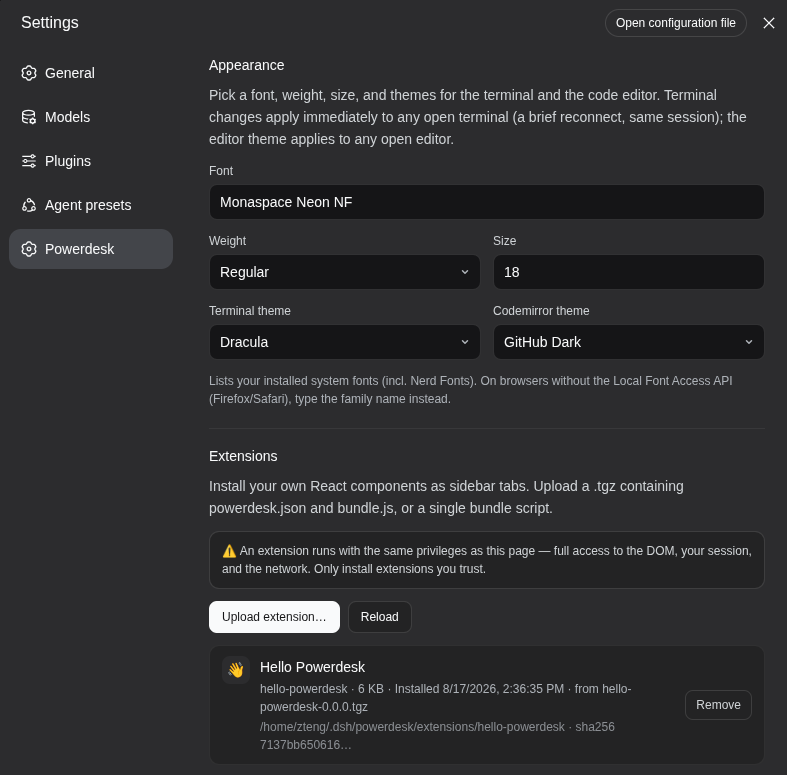
Settings → Powerdesk shows a card per tab type with an enable toggle — switching a tab type off hides it from every pane's + menu and makes openTab a no-op for it (persisted in localStorage). Clicking a card's body opens that surface.
Below the cards, an Appearance block holds the terminal font family / weight / size and the two theme selectors — the Terminal theme and the Codemirror theme — each with a "System default" option that follows the app's light/dark scheme. Changing either re-applies live to any open terminal / editor.
Update
# Option A (GitHub channel) — pnpm pins the resolved commit, so remove + re-add to upgrade:
dsh plugin --profile web remove dsh-powerdesk
dsh plugin --profile web add https://github.com/FleetingEcho/dsh-powerdesk.git

# Option B (source) — pull, rebuild, restart only if you touched the host half:
git pull && pnpm install && pnpm build && pnpm build:rust
Then hard-refresh the browser. Host-half changes need a DSH restart; the client half only needs a hard-refresh.
Uninstall
dsh plugin --profile web remove dsh-powerdesk
# Source channel: also revert any `link:` dependency you added to the profile, then `pnpm install`.
Hard-refresh (or restart DSH) for the mount row to drop.
Repair
If the terminal shows "Rust PTY loading failed" — the native PTY binary is missing, corrupt, or built for the wrong platform — rebuild it in place (no reinstall):
cd ~/.dsh/profiles/web/node_modules/dsh-powerdesk   # GitHub channel
#   — or your local dsh-powerdesk checkout            # source channel
pnpm build:rust                                      # needs the Rust toolchain (rustup)
Then hard-refresh and restart DSH (the host half re-reads the binary on startup).
Install troubleshooting
The plugin installs but does not load — check that the bundle row was added; dsh.profile.bundles must list dsh-powerdesk alongside the dependency:
cat ~/.dsh/profiles/web/package.json
If the dependency is present but the bundle row is not, the plugin mounts as a plain dependency and never loads — that's the symptom of a broken link: install (see Option B's note); re-add with an absolute path or the git URL. Host-half changes only take effect after a DSH restart.
Configuration
Plugin config (in dsh.profile.bundles)
dsh-powerdesk:
  terminalsPerSession: 3      # max live terminals per conversation session
  reconnectGraceMs: 30000     # keep a dropped pty alive this long for reconnect
  shell: ''                   # override the interactive shell (auto-detected if '')
  extensionsEnabled: false   # allow user-installed extensions (see Extensions)
  extensionsDir: ''           # where they live ('' = ~/.dsh/powerdesk/extensions)
User prefs (localStorage, no host round-trip)
| Pref | Storage key | Notes |
|---|---|---|
| Terminal font family / weight / size / theme; CodeMirror (editor) theme | dsh-powerdesk:prefs |
Editable from Settings → Powerdesk (Appearance). |
| Explorer folder bookmarks | dsh-powerdesk:explorer-bookmarks |
Multiple bookmarks + which is active. |
| Notes bound folder | dsh-powerdesk:notes-folder |
One folder, rebindable. |
| Notes tree column width | dsh-powerdesk:notes-tree-width |
Dragged via the divider. |
| Per-tab-type enable switches | dsh-powerdesk:tabs-enabled |
Set from the Settings card. |
Environment variables
| Var | Purpose |
|---|---|
DSH_POWERDESK_PTY_PATH |
Absolute path to a .node addon; beats every other resolution. |
DSH_POWERDESK_PTY_TRIPLE |
Override the detected platform triple (e.g. linux-x64-musl). |
DSH_RESTTY_SHELL |
Override the Windows shell probe (default: first pwsh.exe on PATH or in a known install dir, else powershell.exe). |
PREBUILT_BASE |
Override the prebuilt-binary download base URL (default: GitHub releases). |
DSH_HOME |
Override the DSH home (default ~/.dsh). |
DSH_CMD |
Override the dsh CLI used by install.sh (default: dsh, then npx). |
Extensions
Powerdesk can mount your own React components as sidebar tabs. An extension is a single bundled script plus a powerdesk.json manifest, uploaded as a .tgz from the Settings card.
Security — read this first
An extension runs in the DSH page's own origin, with full access to the DOM, your session, and the network — the same privileges as Powerdesk itself. There is no sandbox (and cannot be one while extensions share the host's React instance). This is a trusted local extensions feature, not a marketplace: install only code you have read or whose author you trust. The feature is off by default — turn it on deliberately:
dsh-powerdesk:
  extensionsEnabled: true
Install / remove
Settings → Powerdesk → Extensions → Upload extension… Accepted uploads (decided by bytes, not filename): .tgz / .tar.gz / .tar (must contain powerdesk.json at the root), or a bare .js / .js.gz (the card asks for an id and display name). Each extension installs to <extensionsDir>/<id>/ atomically; the card shows the on-disk path and the source archive's sha256. Remove deletes the directory; to disable without uninstalling, use the enable switch on the extension's card.
Authoring
cp -r templates/extension ~/my-extension
cd ~/my-extension && pnpm install
$EDITOR powerdesk.json          # pick an id and a title
pnpm build && pnpm pack         # -> my-extension-0.0.0.tgz
See templates/extension/README.md for the component contract, manifest reference, and how extensions are loaded. Do not bundle React — it's external, and the host passes you its own instance; a second copy of React has its own hook dispatcher and every hook you call will throw.
Limits: upload 16 MiB, inflated archive 32 MiB, 64 files/archive, 8 MiB/file. Archives with symlinks, hardlinks, device nodes, absolute paths, or .. segments are rejected at parse time.
Development
pnpm install
pnpm build            # tsc (lib/types) + tsdown (lib/*.js + the lazy chunks)
pnpm build:rust       # cargo build --release → prebuilt/<triple>/dsh_powerdesk_pty.node
pnpm typecheck        # tsc --noEmit
pnpm test             # vitest run
pnpm watch            # tsdown --watch (rebuild bundles on save)
The Rust crate (rust/) uses napi-rs + portable-pty. restty and CodeMirror live in lazy chunks (lib/client-terminal.js, lib/client-editor.js) fetched on first use, keeping the initial bundle small (~196 KB).
lib/ and prebuilt/ are committed, not gitignored — the GitHub-install channel is a plain file copy with no build step, so whatever is in git is what installs. After any source change, run pnpm build (and pnpm build:rust if the Rust layer changed) and commit the result before pushing, or GitHub installs will silently ship stale code. Sourcemaps (lib/**/*.map) stay gitignored.
Acknowledgements
Inspired by DSH-better-sidebar — sincere thanks to its authors for the panel / dock layout and the sidebar shell foundation Powerdesk built on. Powerdesk grew its own plugin architecture on top of that base, with a performance-first terminal (restty renderer + Rust PTY) and the split-tree / file / notes / editor / browser / extension surfaces redesigned from scratch.
License
MIT.
相关推荐Related
-
 nexu-io/open-design
🎨 Best DeepSeek Harness Design Plugin. The open-source Claude Design alternative. 🖥️ Local-first desktop app. 🖼️ Your…
nexu-io/open-design
🎨 Best DeepSeek Harness Design Plugin. The open-source Claude Design alternative. 🖥️ Local-first desktop app. 🖼️ Your…
-
 freestylefly/awesome-gpt-image-2
Prompt as Code | GPT-Image2 工业级提示词引擎与模板库,530+ 个案例逆向工程,20+ 套工业级模板,并提炼出Skills,持续更新中
freestylefly/awesome-gpt-image-2
Prompt as Code | GPT-Image2 工业级提示词引擎与模板库,530+ 个案例逆向工程,20+ 套工业级模板,并提炼出Skills,持续更新中
-
 anywhere-labs/dsh-desktop
为 DeepSeek Harness (DSH) 插件生态打造的现代化桌面端解决方案。万物皆「插件」,桌面本身也是「插件」。
anywhere-labs/dsh-desktop
为 DeepSeek Harness (DSH) 插件生态打造的现代化桌面端解决方案。万物皆「插件」,桌面本身也是「插件」。
- Nagi-ovo/voyager Enhancement suite for Gemini, AI Studio, Claude & ChatGPT — plus a prompt manager for any web UI, DeepSeek Harness inclu…
-
 walkinglabs/learn-harness-engineering
Harness engineering beginner tutorial, from 0 to 1
walkinglabs/learn-harness-engineering
Harness engineering beginner tutorial, from 0 to 1
-
 awesome-dsh-plugin/awesome-dsh-plugin
A curated list of plugins for DeepSeek Harness (dsh) · DeepSeek Harness 插件精选列表
awesome-dsh-plugin/awesome-dsh-plugin
A curated list of plugins for DeepSeek Harness (dsh) · DeepSeek Harness 插件精选列表
-
 MemTensor/MemOS
Self-evolving memory OS for LLM & AI Agents: ultra-persistent memory, hybrid-retrieval, and cross-task skill reuse, with…
MemTensor/MemOS
Self-evolving memory OS for LLM & AI Agents: ultra-persistent memory, hybrid-retrieval, and cross-task skill reuse, with…
- yjh051108/dsh-routing-suite dsh-routing-suite — injector + router-standard kit: install the runtime injector first, then the task-aware reasoning-mo…