FxRayHughes/dsh-coding-companion
Programming Companion · deepseek-harness Node-host plugin: AI plays in a separate window while working, suspends process and freezes playback when waiting, persists across multiple sites, Windows only.
Project Overview项目介绍
dsh-coding-companion is a Node-host DSH plugin that opens an independent Chromium window playing video or livestreams while the AI works in the background. When the AI pauses and waits for user input, it uses NtSuspendProcess to suspend the entire process tree, freezing video and audio without reloading the page, then resumes from the frozen frame. Use it for hands-off AI runs. Windows only; some Chrome/Edge policies may block the "return" extension button.
DSH 插件 dsh-coding-companion 是一个 Node-host 插件:AI 后台运行时弹出独立 Chromium 窗口播放视频/直播,AI 等待输入时通过 NtSuspendProcess 挂起整棵进程树冻结音视频,恢复时从冻结帧续播。适合长时间让 AI 执行任务时陪伴使用。Windows 专用,部分浏览器策略可能屏蔽悬浮按钮。
请帮我了解并安装插件:【dsh-coding-companion】【https://github.com/FxRayHughes/dsh-coding-companion】Send this message to DSH in your current session. CLI install commands may not be accurate across systems — DSH will figure it out for you.把上面这条消息直接发给当前会话里的 DSH,让它帮你了解并安装。安装命令不一定准确,发给 DSH 更稳。
Or use CLI install (for developers)或使用命令行安装(适合开发者)
CLI Install命令行安装
dsh plugin --profile web add github:FxRayHughes/dsh-coding-companion把 FxRayHughes/dsh-coding-companion 加入你的 DSH 配置(web profile)即可启用。
READMEREADME
dsh-coding-companion · 编程陪伴
一个 deepseek-harness 的 Node-host 插件:AI 工作时弹出一个独立窗口陪你「摸鱼」,AI 停下等你输入时把窗口最小化并挂起整个进程树(视频与声音冻结、不占 CPU),你继续对话时再从冻结帧恢复播放。
仅 Windows。媒体不限抖音——任意视频 / 直播 URL 皆可,每个站点各自保存登录,互不干扰。
演示
▶ 点此观看演示视频 demo.mp4(作为 v0.4.0 Release 附件发布)
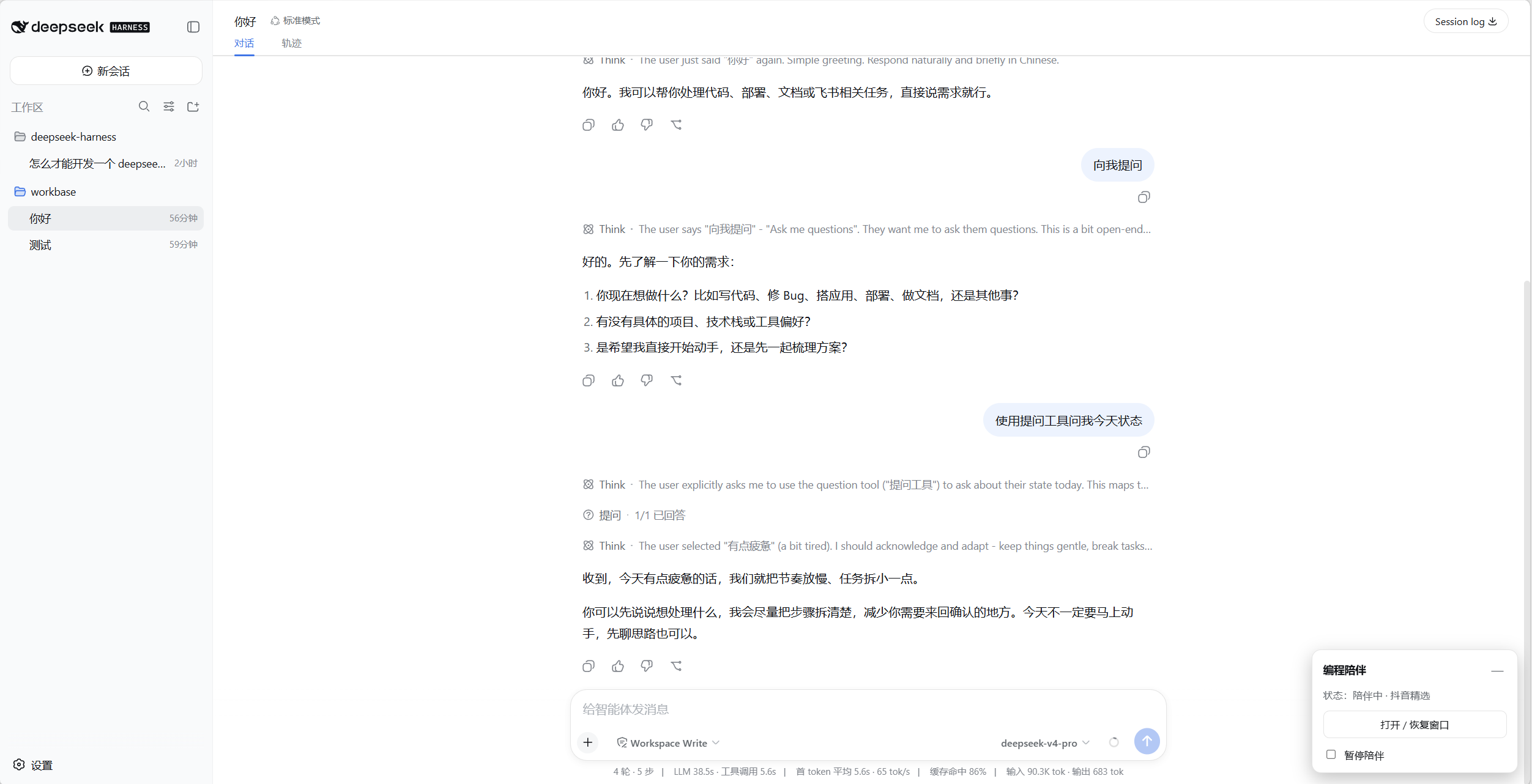
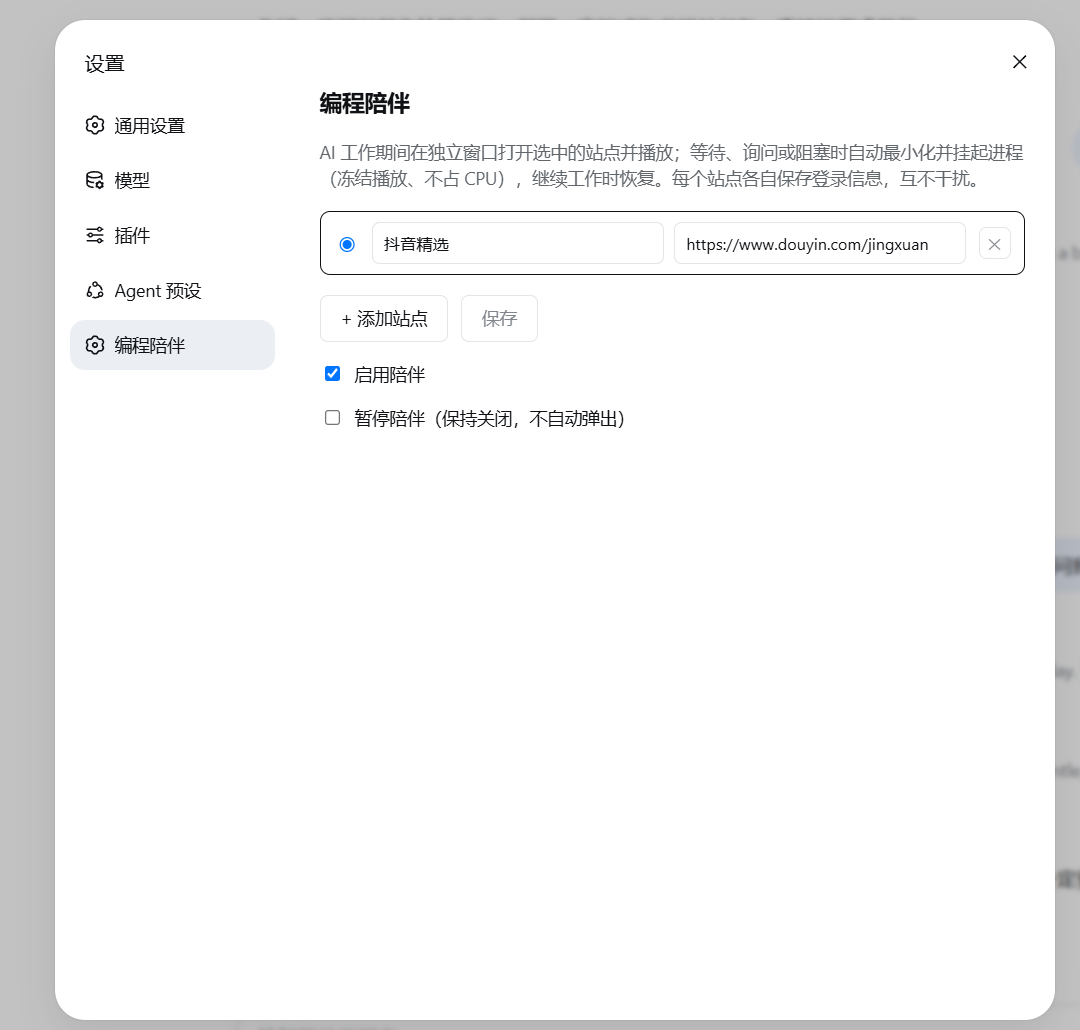
| 主界面悬浮控件 | 设置页(多站点管理) |
|---|---|
 |
 |
特性
- 跟随 AI 状态:有 AI 在后台工作且无人需要你输入时,窗口最大化置顶播放;一旦有任务需要你(提问 / 审批)或全部空闲,自动最小化 +
NtSuspendProcess挂起整棵进程树(Chromium--app是多进程,只挂根进程停不住视频 / 声音)。恢复时从冻结帧续播,页面不重载。 - 多任务不抢焦点:多个会话并行时,需要你操作就让出对话,纯后台跑才置顶。
- 登录持久化:每个站点一个固定的
--user-data-dir(~/.dsh-coding-companion/<站点id>/),cookie / 登录跨重启保留,站点之间隔离。 - 多站点:设置页维护站点列表(名称 + URL),单选切换当前站点。
- 窗口内「回到对话」:随窗加载一个轻量扩展,在页面注入悬浮按钮;点击即挂起陪伴窗、露出对话。
- 跟随父进程关闭:harness 退出(含
Ctrl+C)时先 resume 再 taskkill 整棵进程树,绝不留下「挂起」状态的僵尸进程。 - 主界面悬浮控件:右下角右边缘手柄,展开后可见状态、「打开 / 恢复窗口」、「暂停陪伴」。
安装
本插件是纯 JS 组合包(bundle),无需构建,可直接从 GitHub 安装进 web profile:
dsh plugin --profile web add github:FxRayHughes/dsh-coding-companion
从源码仓库运行时用
pnpm dsh plugin --profile web add github:FxRayHughes/dsh-coding-companion。 因为无prepare构建脚本,pnpm ≥10的安装期构建授权不需要;add完直接重启 profile 即可。
也可锁定 commit 更稳妥:
dsh plugin --profile web add github:FxRayHughes/dsh-coding-companion#<sha>
卸载:
dsh plugin --profile web remove dsh-coding-companion
配置
插件从 coding-companion 设置命名空间读取配置,全部在设置侧栏 → 编程陪伴里操作:
| 字段 | 说明 |
|---|---|
sites |
站点列表 { id, name, url },每个站点独立持久化目录 |
activeSiteId |
当前显示的站点 id |
enabled |
是否启用陪伴 |
paused |
暂停陪伴(保持关闭、不自动弹出) |
设置页由配套的仓库客户端包 @deepseek-ai/dsh-client-ui-coding-companion 提供(注册 coding-companion 命名空间与「编程陪伴」设置页)。若你的部署单独启用该设置页,记得把 coding-companion 加入 api-proxy 的 web 设置白名单。
cordis.patch.yml 里的默认配置:
- insert:
    - id: coding-companion
      name: dsh-coding-companion
      config:
        activeSiteId: douyin
        sites:
          - id: douyin
            name: 抖音精选
            url: https://www.douyin.com/jingxuan
        enabled: true
实现要点
- 窗口是 Chromium
--app独立窗口,用唯一的--user-data-dir路径同时作为进程标记,控制器据此定位根进程及其整棵进程树。 - 窗口显隐用 Win32
ShowWindowAsync/SetForegroundWindow,冻结用 ntdllNtSuspendProcess/NtResumeProcess,进程句柄用 kernel32OpenProcess,全部通过一段内联 PowerShell(P/Invoke)执行。 - 「回到对话」按钮由
return-extension/(MV3 扩展)注入,点击经后台 service worker 调用 host 的/coding-companion/return路由触发挂起;host 在启动时把带端口的回调地址写入扩展的config.js。
限制
- 仅 Windows(窗口控制与进程挂起依赖 Win32 / ntdll)。
- 部分 Edge / Chrome 稳定版可能对
--load-extension有策略限制,若「回到对话」悬浮按钮不出现,属该限制所致。
许可
MIT
Related相关推荐
-
 chuspeeism/dashi-taskboard
现代化可灵活嵌入的任务面板,支持 Codex、DeepSeek Harness
chuspeeism/dashi-taskboard
现代化可灵活嵌入的任务面板,支持 Codex、DeepSeek Harness
-
 ccch1mneyyy/working-activity
Lively Working-line extension for pi CLI and DSH
ccch1mneyyy/working-activity
Lively Working-line extension for pi CLI and DSH
-
 Aisland-SJL/dsh-worktable
🖥️ Agent-project workbench for DeepSeek Harness — sidebar app drawer + dockable split workspace + a live control room w…
Aisland-SJL/dsh-worktable
🖥️ Agent-project workbench for DeepSeek Harness — sidebar app drawer + dockable split workspace + a live control room w…
-
 zhoushoujianwork/easyeda-agent
嘉立创EDA专业版(EasyEDA Pro)自动化:给 AI harness 装上画板的「手」—— 一套 typed 原理图/PCB 动作,CLI / Agent Skill / stdio MCP 三形态融合接入。承接嘉立创「不以卖板赚钱…
zhoushoujianwork/easyeda-agent
嘉立创EDA专业版(EasyEDA Pro)自动化:给 AI harness 装上画板的「手」—— 一套 typed 原理图/PCB 动作,CLI / Agent Skill / stdio MCP 三形态融合接入。承接嘉立创「不以卖板赚钱…
-
 morluto/rea
Reverse engineer anything with agents, from app behavior down to native binaries.
morluto/rea
Reverse engineer anything with agents, from app behavior down to native binaries.
-
 linhay/harmony-next.skills
Offline HarmonyOS NEXT developer skill library for AI coding assistants. Covers API 12–26 declarations, ArkTS/ArkUI, NDK…
linhay/harmony-next.skills
Offline HarmonyOS NEXT developer skill library for AI coding assistants. Covers API 12–26 declarations, ArkTS/ArkUI, NDK…
- pax-beehive/dsh-hub-cli Open-source CLI, schemas, resolver, and DSH agent tools for DSH Plugin Hub
- ericshang98/Perfect-Web-Clone Pixel-perfect clones of any webpage. Paste a URL, get a measured Vite + React replica.