fyy99/dsh-livis-connector
将Livis连接到DeepSeek Harness,支持应用内授权与中继管理。
项目介绍Project Overview
dsh-livis-connector 是 DeepSeek Harness 的 Cordis 插件,把 Livis 接入 DSH。它在 DSH 设置页完成账号授权、生成并展示 Agent ID,引导用户在 Livis App 端绑定;将 Livis 消息交给持久 DSH Agent 处理,支持取消、确认、断线重连与 job_id 幂等。适用于希望把 Livis 消息流纳入 DSH 工作流的用户。注意:DSH 仍为 developer preview,升级前需检查插件兼容性,且 Web 监听不应暴露到 0.0.0.0。
dsh-livis-connector is a Cordis plugin for DeepSeek Harness that bridges Livis into DSH. It handles Livis account authorization in the DSH settings page, generates an Agent ID for binding in the Livis app, and routes Livis messages to a persistent DSH Agent with support for cancellation, confirmation, reconnection, and job_id idempotency. Use it to integrate Livis messaging with DSH agent workflows. Note: DSH is still in developer preview, so verify plugin compatibility before upgrading, and do not expose the DSH web listener on 0.0.0.0.
请帮我了解并安装插件:【dsh-livis-connector】【https://github.com/fyy99/dsh-livis-connector】把上面这条消息直接发给当前会话里的 DSH,让它帮你了解并安装。安装命令不一定准确,发给 DSH 更稳。Send this message to DSH in your current session. CLI install commands may not be accurate across systems — DSH will figure it out for you.
或使用命令行安装(适合开发者)Or use CLI install (for developers)
命令行安装CLI Install
dsh plugin --profile web add github:fyy99/dsh-livis-connector把 fyy99/dsh-livis-connector 加入你的 DSH 配置(web profile)即可启用。
READMEREADME
dsh-livis-connector
将 Livis 接入 DeepSeek Harness 的原生 Cordis 插件。授权、Agent ID 绑定引导与连接状态都在 DSH 设置页完成,运行时不依赖 OpenClaw。
功能
- 在 DSH 设置页完成 Livis 账号授权和连接管理。
- 生成并展示 Agent ID,引导在 Livis App 中完成设置。
- 将 Livis 消息交给持久 DSH Agent,并把结果可靠回传。
- 支持取消、结果确认、断线重连和
job_id幂等。 - 支持白名单文档上传,并限制在配置的目录内。
- refresh token 仅保存在 DSH Host,不会下发到浏览器页面。
环境要求
- Node.js
^22.19.0 || >=24.0.0 - DeepSeek Harness
0.1.0-rc.6 - 已在 DSH 中配置可用的模型和 API Key
- 可正常访问 Livis 账号授权与中继服务
DSH 仍处于 developer preview。本插件跟随其插件 API 演进,升级 DSH 前请先检查兼容性。
安装
使用 DSH 官方插件命令安装 GitHub 仓库:
dsh plugin --profile web add github:fyy99/dsh-livis-connector
dsh --profile web --dump-config
随后启动 Web profile:
dsh web
需要可复现部署时,请把 GitHub 依赖固定到经过验证的 commit SHA,而不是长期跟随默认分支。
也可以先执行 npm pack 生成 tarball,再把 tarball 路径交给同一个 dsh plugin --profile web add 命令。
连接 Livis
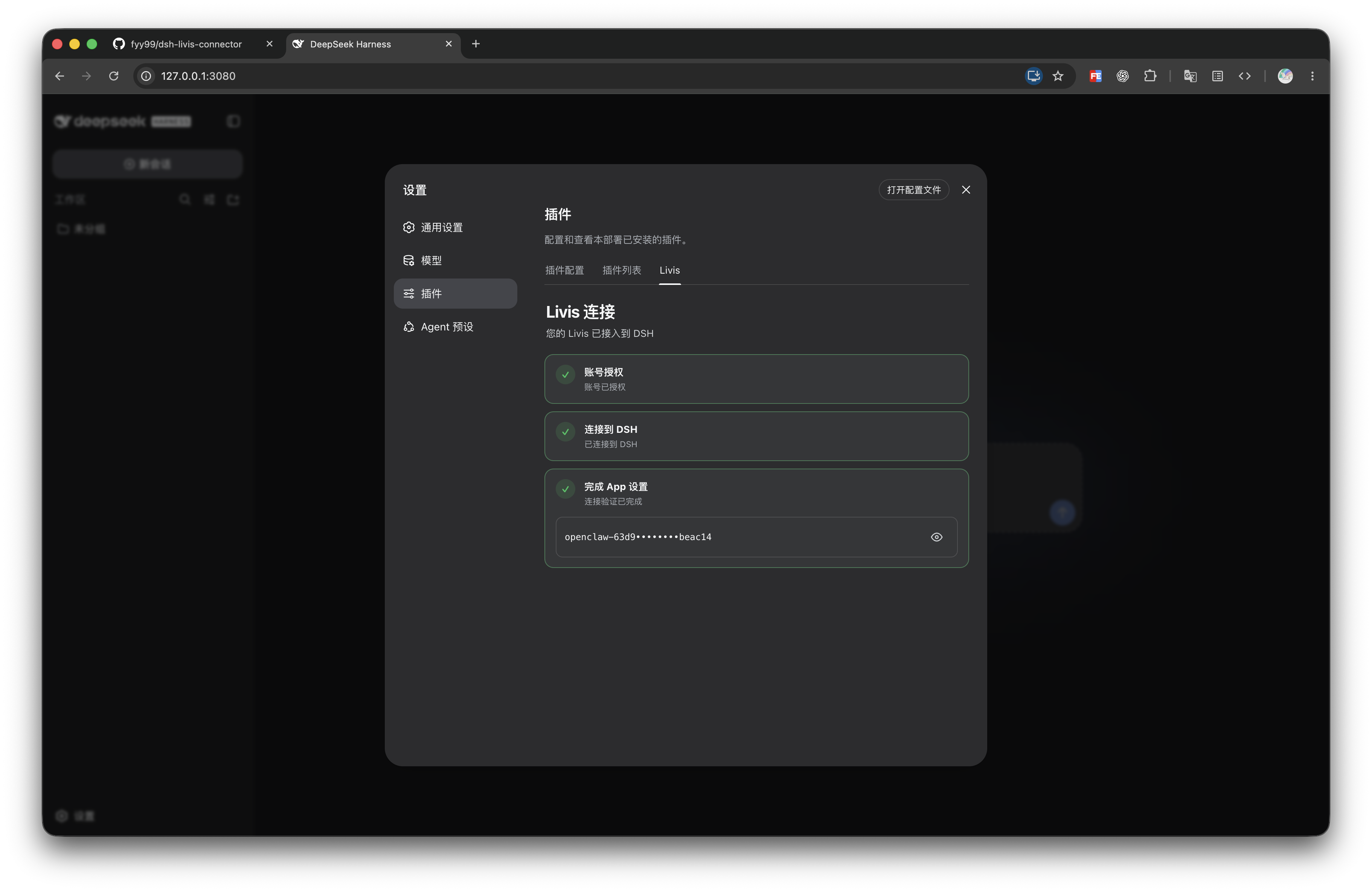
- 打开 DSH,进入「设置 → 插件 → Livis」。
- 点击「开始授权」,在打开的理想账号页面确认授权。
- 等待页面显示已连接到 DSH,并复制生成的 Agent ID。
- 在 Livis App 打开「我的 → 连接与服务 → 我的 Agent」,粘贴 Agent ID。
- 从 Livis App 发送一条测试消息。第三步点亮后即可使用。
如果授权中断或过期,回到同一页面重新发起即可。插件不会在页面加载时自动开始授权。
配置
插件可在 DSH 插件配置中覆盖以下字段:
| 字段 | 默认值 | 用途 |
|---|---|---|
enabled |
true |
启用或停用连接器 |
stateDir |
$DSH_HOME/livis |
保存授权、身份和幂等任务状态 |
workspaceRoot |
DSH 启动目录 | Livis Agent 的工作区 |
uploadRoot |
workspaceRoot |
允许回传文件的根目录 |
provider / model |
DSH 当前默认模型 | 同时设置时覆盖默认模型 |
agentPreset |
DSH 当前默认 preset | Livis Agent 使用的预设 |
三个目录字段必须使用绝对路径。生产端点强制 HTTPS/WSS;仅 localhost 测试允许明文协议。
安全与数据
- 不要把 DSH Web 监听到
0.0.0.0。管理 RPC 只允许 loopback,但 DSH Web 本身不提供用户登录认证。 - Livis relay 会处理账号令牌、设备与 Agent ID、消息、回复,以及用户明确上传的文件。
- 插件为断线恢复在
stateDir/jobs.json暂存请求与结果,终态任务默认保留 24 小时;DSH 也会保存 Agent session。 - 远端文本始终作为普通用户消息进入模型,不会作为 DSH 斜杠命令执行。
- Livis Agent 的审批策略固定为
never;需要本地批准的操作会失败,不会在不可见的页面中等待。 - 建议使用专用低权限 API Key,并让 DSH 在无敏感数据的工作区运行。不要使用
danger-full-access。
发现安全问题时,请使用仓库的 Security Advisories 私下报告,不要在公开 Issue 中提交令牌、Agent ID、消息内容或本机路径。
开发与验证
corepack pnpm install --frozen-lockfile
corepack pnpm run check
corepack pnpm test
npm pack --dry-run
测试覆盖 OAuth Device Flow、token 轮换、权限存储、DSH preset/model/turn 关联、文件边界、任务恢复与幂等、管理页脱敏,以及模拟 relay 下的握手、回执、重复消息和运行中取消。
这个包使用预构建 JavaScript,不依赖 Git 安装阶段的 prepare 构建脚本。cordis.patch.yml 通过 dsh.bundle.patch 声明,符合 DSH installable bundle 约定。
项目说明
本项目是独立的社区连接器,不隶属于或代表 DeepSeek、理想汽车或 Livis。Livis、DeepSeek Harness 及相关名称归各自权利人所有。使用本项目即表示你会使用本人有权访问的账号与服务,并遵守相应条款。
在线兼容字段沿用 Livis 当前连接方式所需的客户端标识;这不表示本地安装或运行 OpenClaw。
License
相关推荐Related
-
 nexu-io/open-design
🎨 Best DeepSeek Harness Design Plugin. The open-source Claude Design alternative. 🖥️ Local-first desktop app. 🖼️ Your…
nexu-io/open-design
🎨 Best DeepSeek Harness Design Plugin. The open-source Claude Design alternative. 🖥️ Local-first desktop app. 🖼️ Your…
-
 ruvnet/ruflo
🌊 The original agent meta-harness. Deploy intelligent multi-player swarms, coordinate autonomous workflows, and build c…
ruvnet/ruflo
🌊 The original agent meta-harness. Deploy intelligent multi-player swarms, coordinate autonomous workflows, and build c…
-
 amruthpillai/reactive-resume
A one-of-a-kind resume builder that keeps your privacy in mind. Completely secure, customizable, portable, open-source a…
amruthpillai/reactive-resume
A one-of-a-kind resume builder that keeps your privacy in mind. Completely secure, customizable, portable, open-source a…
-
 esengine/DeepSeek-Reasonix
DeepSeek-native AI coding agent for your terminal. Engineered around prefix-cache stability — leave it running.
esengine/DeepSeek-Reasonix
DeepSeek-native AI coding agent for your terminal. Engineered around prefix-cache stability — leave it running.
-
 volcengine/OpenViking
Self-evolving Context Database for AI Agents. Unify Agent Memory, Knowledge RAG and Skills.
volcengine/OpenViking
Self-evolving Context Database for AI Agents. Unify Agent Memory, Knowledge RAG and Skills.
-
 Molunerfinn/PicGo
:rocket: The Ultimate Image Uploader for Efficient Creators. Supports Obsidian, Typora, VS Code etc. and 60+ image hosti…
Molunerfinn/PicGo
:rocket: The Ultimate Image Uploader for Efficient Creators. Supports Obsidian, Typora, VS Code etc. and 60+ image hosti…
-
 titanwings/distilly
Distilly — Distill how they think into reusable Skills for any Agent or Bot. Formerly Colleague Skill(原同事 Skill).
titanwings/distilly
Distilly — Distill how they think into reusable Skills for any Agent or Bot. Formerly Colleague Skill(原同事 Skill).
-
 titanwings/colleague-skill