geohotstan/dsh-computer-use
DeepSeek Harness 的桌面计算机使用:macOS 应用列表、辅助功能树窗口捕获、截图及合成输入,克隆自 Codex Computer Use。
Project Overview项目介绍
This package is a native plugin built exclusively for DeepSeek Harness (DSH) that brings Codex-style computer use capabilities to DSH agents running on macOS. It replicates OpenAI’s Codex Computer Use window API, enabling DSH to list running apps, capture active window screenshots and accessibility trees, and synthesize mouse and keyboard input. Unlike many implementations, it delivers inputs in a background-first pattern, so semantic actions on accessibility elements do not require window focus, and raw inputs leave the user’s foreground window untouched.
The plugin follows an accessibility-tree-first design, where computer_use_get_app_state returns a numbered, tab-indented tree of UI elements for the model to act on via element index. Window-relative coordinates are only used as a fallback when the model cannot target a specific element. When capturing the same app multiple times, the plugin only returns tree diffs instead of the full tree to reduce token usage and speed up model response times. This tool is built specifically for DSH users that want autonomous macOS desktop control.
Installation is straightforward: after adding the plugin to your DSH profile via the dsh plugin add command, run the provided npx script to build the Swift daemon and request the required Accessibility and Screen Recording permissions from macOS. The daemon is installed to a fixed path under ~/.dsh/computer-use so permissions survive plugin updates, which avoids macOS TCC permission invalidation that happens when the daemon is stored in versioned node_modules paths. Released under the permissive MIT license, the plugin requires no OpenAI dependencies and includes pre-built artifacts for all common installation methods.
这是一个DeepSeek Harness(DSH)原生插件,仅支持macOS平台,为DSH提供Computer Use能力,功能复刻自OpenAI的Codex Computer Use窗口API。它可以获取应用列表、捕获目标窗口的截图与模型可读取的可访问性树,合成鼠标和键盘输入,输入交付采用后台优先模式,语义操作无需焦点,不改变用户当前的前台焦点。
它面向需要让DSH Agent控制本地macOS桌面的开发者,安装流程简洁,一条命令即可将插件添加到指定DSH配置文,之后执行npx命令编译构建Swift守护进程并申请系统权限,重启DSH后就能使用。它采用可访问性树优先的设计,模型通过元素索引操作,仅在需要时回退到坐标,同一应用重复捕获仅返回差异树,提升运行效率。
它使用MIT许可证开源,无需OpenAI相关组件,所有功能集成在单个安装包中,依赖Xcode命令行工具编译原生Swift守护进程,守护进程需要用户授权可访问性和屏幕录制权限。安装路径固定在~/.dsh/computer-use,避免权限随插件更新失效,预编译产物已提交至仓库,兼容多种安装方式。
请帮我安装这个 DSH 插件。安装前先完成【兼容性检查 + 安全性检查】,检查通过再动手。

插件:dsh-computer-use(geohotstan/dsh-computer-use)
仓库:https://github.com/geohotstan/dsh-computer-use
本站详情页:https://www.yhbd.top/plugins/geohotstan-dsh-computer-use/
本站登记:类型 client · 归类 原生 DSH 插件 · 许可证 MIT · ⭐ 6 · 最近提交 2026-08-16 · 主语言 TypeScript

按下面顺序执行,每步先把结论告诉我,再进入下一步:

【1 兼容性检查】
① 我这边:DSH 版本、Node 版本、操作系统、当前 profile(web / desktop)。
② 读它的 README、package.json、插件 manifest,列出它要求的 DSH 版本 / Node 版本 / 操作系统 / 外部依赖 / 需要另外先装的运行时。
③ 逐条比对,结论只写「满足 / 不满足 / 未知」三种;不满足的给出可行替代方案。
④ 检查是否和我已装的插件冲突:命令名重复、skill / tool 重名、端口占用、重复注册的 MCP server。

【2 安全性检查】
① 仓库可信度:和上面「本站登记」是否一致;star / fork 数、创建时间、最近提交,是否归档或长期停更。
② 安装脚本:逐行看 package.json 的 preinstall / install / postinstall,以及 install.sh、setup.ps1 之类脚本。出现 curl|bash、下载后直接执行、混淆代码、访问与插件功能无关的域名,立刻停下来告诉我,不要继续装。
③ 依赖:列出新增依赖,标出无人维护、或与知名包拼写近似的可疑包(typosquatting)。
④ 权限与副作用:它会读写哪些目录、访问哪些域名、需要哪些 DSH 权限(filesystem / network / shell / clipboard 等),以及怎么卸载和回滚。
⑤ 如果它要求 sudo / 管理员权限,或权限明显超出功能所需,先停下来问我。

【3 安装】
上面两步没有「不满足」和「高危项」时才执行;用官方推荐方式安装,不要自行提权。

【4 汇报】
用表格输出:检查项 / 结论 / 依据 / 是否需要我决策。拿不准的一律写「未知」并说明要我怎么确认——不要猜,也不要替我决定。
Send this message to DSH in your current session: it verifies compatibility and security first (answering met / not met / unknown item by item) and only installs once everything checks out — it will stop and ask you if it finds a high-risk item. The box scrolls; the copy is the full prompt. CLI install commands may not be accurate across systems, so DSH is the safer route.把上面这条消息直接发给当前会话里的 DSH:它会先核对兼容性与安全性(逐条给「满足 / 不满足 / 未知」),确认没问题再安装,有高危项会停下来问你。框内可滚动,复制到的是完整提示词;安装命令不一定准确,发给 DSH 更稳。
- Only 6 stars - very few users, little community feedback星标只有 6,几乎没人在用,遇到问题缺少社区反馈
- Desktop client: installation downloads an executable - verify the publisher and checksums桌面客户端:安装会下载可执行文件,请核对发布者与校验和
DSH walks through these 9 checksDSH 会逐条核对这 9 项
Compatibility兼容性
- DSH, Node, OS and profile requirementsDSH 版本 / Node 版本 / 操作系统 / profile 是否满足要求
- External dependencies and runtimes (Electron / Python / Docker, ...)外部依赖与运行时(Electron / Python / Docker 等)是否齐备
- Conflicts with installed plugins: command names, skill / tool names, ports, duplicate MCP registration与已装插件是否冲突:命令名、skill / tool 重名、端口占用、重复 MCP 注册
Security安全性
- Repo matches the facts registered here; archived or abandoned?仓库是否与页面登记一致,是否归档或长期停更
- Safety of preinstall / install / postinstall and install.sh / setup.ps1preinstall / install / postinstall 与 install.sh、setup.ps1 是否安全
- curl|bash, download-then-execute, obfuscation, unrelated domains → stop immediatelycurl|bash、下载即执行、混淆代码、无关域名 → 立刻停止
- Typosquatting or unmaintained packages among the new dependencies新增依赖里有没有 typosquatting 或无人维护的包
- Requested permissions vs. what the feature actually needs申请了哪些权限、是否超出功能所需(filesystem / network / shell / clipboard)
- Any sudo / admin requirement, plus uninstall and rollback是否要求 sudo / 管理员权限,以及卸载与回滚方式
Anything uncertain must be marked unknown with a note on how to confirm it. This site's signal screen is a static snapshot, not a security audit.拿不准的必须标「未知」并说明要我怎么确认。本站的信号筛查是静态快照,不能替代安全审计。
Or use CLI install (for developers)或使用命令行安装(适合开发者)
CLI Install命令行安装
dsh plugin --profile web add @zibokapi/dsh-codex-computer-use把 geohotstan/dsh-computer-use 加入你的 DSH 配置(web profile)即可启用。
READMEREADME
@zibokapi/dsh-codex-computer-use
English | 中文
A standalone plugin for the DeepSeek Harness: desktop computer use on macOS — app listing, key-window capture as a screenshot plus model-readable accessibility tree, and synthesized mouse and keyboard input — cloned from OpenAI's Codex Computer Use window API. Input delivery is background-first like Codex's own execution model: semantic AX actions need no focus, and raw events ride the private SkyLight path (SLEventPostToPid with the keyboard authentication envelope, field stamps, and focus-without-raise records, ported from the MIT-licensed trycua/cua project) with a public CGEvent.postToPid fallback per symbol, so the user's foreground never changes. It needs no OpenAI components.
The design is accessibility-tree-first: computer_use_get_app_state returns a numbered, tab-indented element tree; the model acts on element indexes, with window-relative coordinates as a fallback, and later captures of the same app return diffs instead of the full tree.
Everything ships in this one package: the seam, the local Swift-daemon provider, the computer_use_* tools, the approval policy, and a standalone MCP server. The complete feature delta against OpenAI's implementation lives in docs/codex-parity.md; that reference is the parity checklist.
Install
This repository is a DSH bundle: the root package.json declares dsh.bundle.patch → cordis.patch.yml, which inserts the three host rows under this package's own subpaths (@zibokapi/dsh-codex-computer-use/*). One install brings everything.
# 1. install the plugin into a profile
dsh plugin --profile <name> add @zibokapi/dsh-codex-computer-use

# 2. build the macOS daemon and grant it permissions (once per machine)
npx @zibokapi/dsh-codex-computer-use

# 3. (re)start the profile — the computer_use_* tools are live
dsh --profile <name> web
Step 2 is the only macOS-specific part. It builds the Swift helper from the native/ directory shipped inside the installed package (Xcode Command Line Tools required — xcode-select --install), bundles and signs it into ~/.dsh/computer-use/dsh-computer-daemon.app, then explicitly asks for the two permissions the daemon needs — Accessibility and Screen Recording — through the macOS system dialogs, polling until the grants land. It writes no configuration and none is needed: with helperPath unset, the engine falls back to that exact path.
Showing the opening section of the README — the full document lives in the repository以上为 README 开头摘要,完整文档在仓库内 · View the full README on GitHub →在 GitHub 查看完整 README →
Related相关推荐
-
 nexu-io/open-design
🎨 Best DeepSeek Harness Design Plugin. The open-source Claude Design alternative. 🖥️ Local-first desktop app. 🖼️ Your…
nexu-io/open-design
🎨 Best DeepSeek Harness Design Plugin. The open-source Claude Design alternative. 🖥️ Local-first desktop app. 🖼️ Your…
-
 EthanYoQ/AI-Novel-Writer
AI 小说创作软件:把灵感、角色、世界观、大纲、章节写作、审稿和修稿组织成可控流程;提供 Windows/macOS 桌面版,支持本地和在线模型。AI Novel Writing Software: Organizes inspiratio…
EthanYoQ/AI-Novel-Writer
AI 小说创作软件:把灵感、角色、世界观、大纲、章节写作、审稿和修稿组织成可控流程;提供 Windows/macOS 桌面版,支持本地和在线模型。AI Novel Writing Software: Organizes inspiratio…
-
 fufankeji/deepseek-harness-studio
DeepSeek Harness 零代码桌面端|一键启动,支持 Windows 与 macOS;内置插件发现、热点插件推送、一键安装与管理、AI 智能推荐和视觉增强。
fufankeji/deepseek-harness-studio
DeepSeek Harness 零代码桌面端|一键启动,支持 Windows 与 macOS;内置插件发现、热点插件推送、一键安装与管理、AI 智能推荐和视觉增强。
-
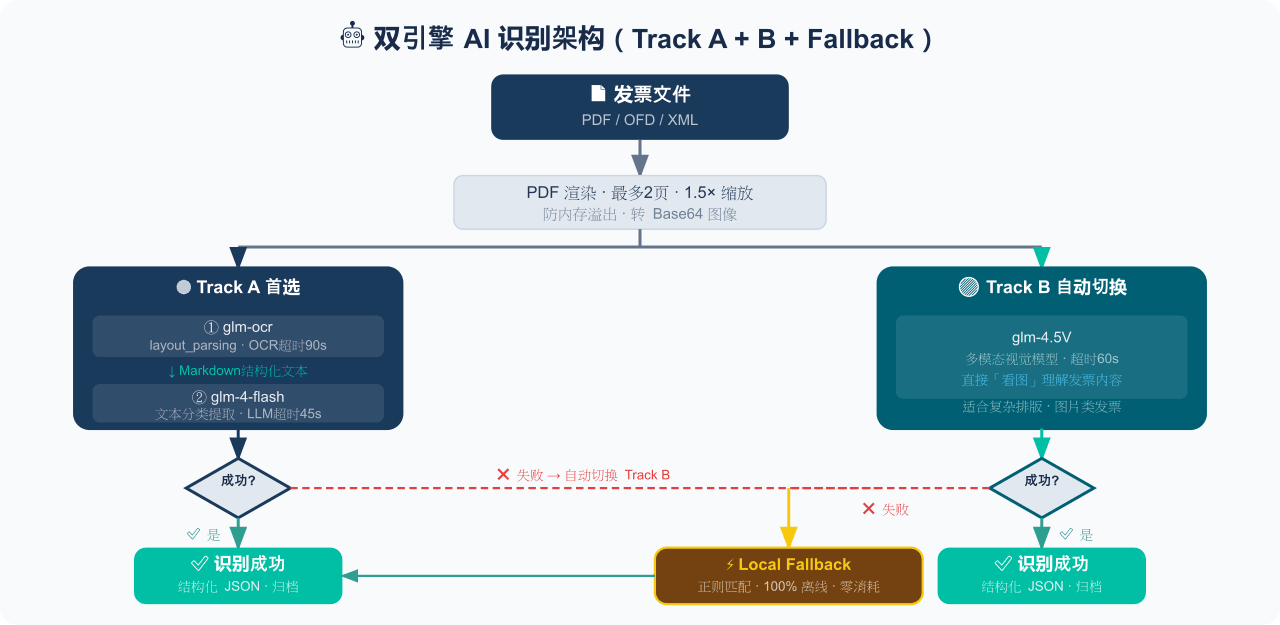 EthanYoQ/Invoice-Downloader
电子发票整理与报销准备工具:从邮箱批量收集 PDF/OFD/XML 发票,OCR 识别、分类归档并生成 Excel 汇总;提供 Windows/macOS 桌面版与 DSH 插件。
EthanYoQ/Invoice-Downloader
电子发票整理与报销准备工具:从邮箱批量收集 PDF/OFD/XML 发票,OCR 识别、分类归档并生成 Excel 汇总;提供 Windows/macOS 桌面版与 DSH 插件。
-
 Clarklevis1995/dsh-mobile
DeepSeek Harness Mobile 是一个面向 DeepSeek Harness 的原生 iOS 客户端。它通过 dsh-plugin-mobile-gateway 与 Harness 建立 WebSocket 连接,将工作区、…
Clarklevis1995/dsh-mobile
DeepSeek Harness Mobile 是一个面向 DeepSeek Harness 的原生 iOS 客户端。它通过 dsh-plugin-mobile-gateway 与 Harness 建立 WebSocket 连接,将工作区、…
-
 ZSeven-W/dsh-ios
DeepSeek Harness (DSH) plugin: a live iOS Simulator — and a USB-connected iPhone — inside the conversation. 22 agent too…
ZSeven-W/dsh-ios
DeepSeek Harness (DSH) plugin: a live iOS Simulator — and a USB-connected iPhone — inside the conversation. 22 agent too…
-
 THU-MAIC/dsh-openmaic
OpenMAIC for DeepSeek Harness: classrooms, slides, interactive widgets, and Socratic teaching
THU-MAIC/dsh-openmaic
OpenMAIC for DeepSeek Harness: classrooms, slides, interactive widgets, and Socratic teaching
-
 988hj7tczd-oss/dsh-computer-use
Cross-platform Computer Use plugin for DeepSeek Harness: observable desktop automation with an isolated virtual cursor, …
988hj7tczd-oss/dsh-computer-use
Cross-platform Computer Use plugin for DeepSeek Harness: observable desktop automation with an isolated virtual cursor, …