guo6x/dsh-palate
会生长的眼睛:为 DSH 智能体积累设计品味。
项目介绍Project Overview
dsh-palate 是 DeepSeek Harness 的设计审美插件,核心能力是维护一个会累积的“品味语料库”:通过 palate_add、palate_learn 录入正反案例与原则,palate_review 基于已学判断给出有据可查的批评,palate_feedback 让被确认有用的原则获得证据。适合在多次迭代、追求风格统一且希望审美判断随使用而提升的设计评审中使用。提醒:所有学习都需人类显式确认,不会自动从截图或 URL 中隐式学习。
dsh-palate is a DeepSeek Harness plugin for design taste that maintains a growing corpus. Its core capability is an accumulating palate: palate_add and palate_learn record examples and principles, palate_review critiques new designs using learned judgment with cited evidence, and palate_feedback reinforces only the principles the user confirms as helpful. Use it for iterative design reviews where judgment should sharpen over time. Caveat: every accept/reject decision and feedback call must be explicit; the plugin never auto-learns from screenshots or URLs.
请帮我了解并安装插件:【dsh-palate】【https://github.com/guo6x/dsh-palate】把上面这条消息直接发给当前会话里的 DSH,让它帮你了解并安装。安装命令不一定准确,发给 DSH 更稳。Send this message to DSH in your current session. CLI install commands may not be accurate across systems — DSH will figure it out for you.
或使用命令行安装(适合开发者)Or use CLI install (for developers)
命令行安装CLI Install
dsh plugin --profile web add github:guo6x/dsh-palate把 guo6x/dsh-palate 加入你的 DSH 配置(web profile)即可启用。
READMEREADME
🍷 dsh-palate — an eye that grows
 中文说明 · DeepSeek Harness plugin
Design-audit tools measure with a fixed ruler. dsh-palate trains an eye that grows.
Most design-review plugins ship a static ruleset and apply it forever — use them once or a thousand times, the judgment is identical. dsh-palate is the opposite: it keeps a taste corpus that accumulates. Every example you feed it and every principle you distill sharpens the judgment your agent draws on. The more you use it, the better its eye gets.
Why this exists
Taste is not a gift — it's pattern recognition built from exposure. See enough good and bad design, and the rules emerge. dsh-palate turns that into a mechanism an agent can actually use:
- Observe — inspect a screenshot, URL, or design and name concrete visual evidence
- Stage — turn that analysis into examples and principles that wait in a reviewable candidate queue
- Confirm — only an explicit accept/reject decision changes the corpus; rejected ideas stay visible without changing taste
- Review — critique a new design against the accumulated taste, not a generic checklist
- Calibrate — record which recommendations actually helped; only confirmed helpful principles gain evidence, so the palate compounds honestly
What the agent gets
| Tool | What it does |
|---|---|
palate_intake |
Stage a structured visual analysis as pending example/principle candidates; it never changes taste by itself |
palate_candidates |
Inspect pending, accepted, or rejected visual-training candidates and their source sessions |
palate_decide |
Apply the user’s explicit accept/reject decision; this is the only candidate-to-palate mutation path |
palate_review |
Assemble the accumulated taste (principles + relevant past examples) as context, so the agent critiques grounded in learned judgment |
palate_feedback |
Use a review_id to record whether a critique helped and which principles were accepted or rejected; only accepted principles gain evidence |
palate_add |
Feed an example (good/bad/note + reason + tags) into the corpus — grows the palate |
palate_learn |
Distill a new principle from experience and add it to the codified taste |
palate_packs |
Inspect opt-in visual-reference packs and whether they are already applied |
palate_seed |
Apply one or more visual-reference packs exactly once, without overwriting existing taste |
palate_list |
Browse the accumulated corpus |
palate_principles |
List the codified principles, ordered by evidence |
palate_effectiveness |
See which principles were accepted or rejected in real review feedback |
palate_stats |
How much taste has accumulated: examples studied, principles distilled |
Ships with a starter palate of 12 foundational principles plus four transparent teaching examples (good and bad dashboards, a readable table, and generic landing-page boilerplate), so the first review has concrete evidence — then it grows from there.
The four starter examples are inserted only when the local taste database is empty. Installing or upgrading the plugin never overwrites an existing palate.
Visual reference packs: Apple and X
dsh-palate also ships two opt-in visual-reference packs:
apple-product-storytelling— one product subject per viewport, proof-led imagery, restrained CTA choices, and a calm sequence of mini-campaigns.x-direct-utility— high-contrast identity, a decisive primary route, ranked secondary actions, and almost invisible supporting detail.
They are transparent abstractions of public pages observed on 2026-08-27, not scraped assets, brand copy, or templates to imitate. Start by calling palate_packs, then explicitly apply one or both with palate_seed. Use tag: "apple" or tag: "x" in palate_review: the tag filters both matching examples and style-scoped principles, while universal principles remain available.
For example, ask an agent:
Inspect
palate_packs, then applyapple-product-storytellingandx-direct-utilitywithpalate_seed. Review our product-launch page with tagapple, and separately review our sign-in entry flow with tagx. Cite the evidence; do not copy either brand’s assets, copy, or identity.
Visual training desk: observe → compare → confirm
palate_intake is deliberately a staging tool, not a hidden auto-learning button. First have the agent inspect a screenshot or page with a browser/vision capability. Then it records a compact, structured analysis: hierarchy, typography, color, spacing, interaction, and any other relevant dimension. The intake creates one example candidate plus any proposed principles; none are added to the corpus yet.
It can also record an explicit comparison with Apple, X, or future reference packs:
aligned— the observed evidence supports named abstract reference principlesconflicts— the evidence conflicts with named reference principlesinsufficient_evidence— the screenshot/page does not show enough to judge
Comparing against a pack that has not been seeded is allowed for research, but the record is marked reference-only and does not activate or inject the pack. This keeps analysis separate from style adoption.
Use palate_candidates to show the evidence and candidate IDs to the user. Only after they clearly say accept or reject should the agent call palate_decide. Accepted records preserve their training-session provenance; rejected records remain in training.md so a team can revisit the judgment later.
How it works
inspect screenshot / URL with vision or browser
        │
        ▼
palate_intake (structured observations + pack comparison)
        │
        ▼
pending example / principle candidates ──▶ palate_candidates ──▶ user explicitly accepts or rejects
        │                                                                  │
        └──────────────────────────── palate_decide ◀─────────────────────┘
                                           │
                   accepted only ─────────┼───────── rejected stays auditable in training.md
                                           ▼
                    taste corpus + codified principles
                                           │
palate_review (a design) ──▶ review_id + learned evidence ──▶ agent writes grounded critique
        ▲                                                               │
        └── palate_feedback (accept/reject + why) ──▶ effectiveness + accepted-principle evidence ─┘
- Storage:
node:sqlite(built into Node ≥ 22) at$DSH_HOME/palate/, plus human-readabletaste.md/principles.md/feedback.md/training.mdmirrors. Zero runtime dependencies. - Retrieval: a review ranks examples against the current description using local words, tags, and Chinese word fragments; when no precedent is relevant, it leaves the evidence empty instead of padding with recent entries.
- Feedback loop: every
palate_reviewsnapshots its evidence;palate_feedbackrecords the outcome, whilefeedback.mdand the panel show actual acceptance/rejection data. - The panel: a draggable overlay shows examples studied, principles distilled, the visual-training queue, recent review subjects, the exact example refs cited by each review, and recent judgments.
- Vision pairing: inspect screenshots with a vision tool first (e.g.
modlens_read_image) or pages with a browser, then pass the evidence topalate_intakeorpalate_review. The plugin never fetches, screenshots, or claims to see a raw URL by itself.
Honest framing
This is accumulated retrieval + codified principles + explicit decisions and feedback, not model fine-tuning. The plugin supplies learned taste as context; the model renders the critique. palate_intake does not count as learning: only a user-confirmed palate_decide adds a candidate, and only a user/agent-confirmed palate_feedback adds effectiveness evidence. That keeps judgment auditable through taste.md, principles.md, feedback.md, and training.md without retraining anything.
Install — copy, paste, confirm
# GitHub is the supported release channel.
dsh plugin --profile web add github:guo6x/dsh-palate
Restart a running dsh web process, then refresh the page. Installation is complete when a 👁️ button appears at the bottom of the sidebar. Click it to see the starter palate, its principles, feedback history, and any staged training candidates.
Requirements: the DeepSeek Harness web profile and Node ≥ 22. The plugin uses only local SQLite storage — no account, API key, or embedding service is required.
Developing from a checkout instead? Run dsh plugin --profile web add . from the repository directory. The repository commits the lib/ entrypoints, so GitHub and path installs can start immediately without running an install-time build script.
See the learning loop in 90 seconds
Start a new chat and paste this safe, local-first task:
Build our first taste record for a dense analytics dashboard. Use
palate_addto save one bad example: “all 12 KPI cards have equal visual weight, so the decision signal is buried”; tag itdashboard, hierarchy. Then usepalate_reviewto critique “an analytics dashboard with twelve equal KPI cards, one primary revenue metric, and a small trend chart.” Explain which learned principles you used.
The response should name the matched record and starter principles instead of applying a generic checklist. Open the 👁️ panel to see the example count grow and the new review appear. If you adopt a recommendation, ask the agent to record palate_feedback for that review; only confirmed helpful principles gain evidence.
Try the training desk safely
After the agent has actually inspected a screenshot or page, paste this task:
Analyze the inspected product landing page with
palate_intake. Record at least hierarchy, typography, color, spacing, and interaction observations; stage one example candidate and up to two concrete principle candidates. Compare it withapple-product-storytellingasaligned,conflicts, orinsufficient_evidence, citing the exact reference principle(s). Show me the pending candidates and do not callpalate_decideuntil I explicitly choose accept or reject.
The 👁️ panel should show a new training session and pending count, while the example and principle totals stay unchanged. Once you make an explicit decision, the agent can call palate_decide; training.md preserves both the analysis and the result.
If the 👁️ button is missing
- Confirm the plugin is installed in the web profile:
dsh plugin --profile web list dsh-palate. - Restart the
dsh webprocess after installing; a browser refresh alone cannot load new host code. - Check that Node is version 22 or newer. The plugin has no additional runtime dependency to install.
Develop
pnpm install
node build.mjs        # esbuild → lib/index.js (host ESM) + lib/client.js (ModuleLoader bundle)
node tests/smoke.mjs  # pure-logic checks (no browser needed)
MIT licensed. Ideas and examples welcome — open an issue.
Known limitations
- No embedding-based semantic matching in the plugin itself — it retrieves locally by tags, words, and Chinese word fragments; the model does the deeper reasoning from the assembled context.
- Feedback is explicit — the plugin does not guess whether a user adopted a recommendation; call
palate_feedbackafter a review to form effectiveness data. - Training decisions are explicit —
palate_intakestages evidence but does not inspect a raw URL/image or learn automatically;palate_decideneeds a clear human accept/reject decision. - Markdown mirrors are read-only exports (human edit-and-merge-back is planned).
- Vision is delegated — pair with a vision tool to inspect screenshots, or a browser to inspect URLs, before staging evidence.
- Reference packs are not cloning kits — they preserve observable layout and hierarchy lessons, not protected assets, copy, or a promise that every page from a referenced brand is appropriate for every product.
相关推荐Related
-
 liustack/modlens
The first vision plugin for DeepSeek Harness, and the vision bridge for every text-only coding agent. Paste an image, ge…
liustack/modlens
The first vision plugin for DeepSeek Harness, and the vision bridge for every text-only coding agent. Paste an image, ge…
-
 ZSeven-W/dsh-crew
DeepSeek Harness (DSH) plugin: dispatch work to DSH agents from Claude Code / Codex — native subagent progress, in-host …
ZSeven-W/dsh-crew
DeepSeek Harness (DSH) plugin: dispatch work to DSH agents from Claude Code / Codex — native subagent progress, in-host …
-
 Clarklevis1995/dsh-mobile
DeepSeek Harness Mobile 是一个面向 DeepSeek Harness 的原生 iOS 客户端。它通过 dsh-plugin-mobile-gateway 与 Harness 建立 WebSocket 连接,将工作区、…
Clarklevis1995/dsh-mobile
DeepSeek Harness Mobile 是一个面向 DeepSeek Harness 的原生 iOS 客户端。它通过 dsh-plugin-mobile-gateway 与 Harness 建立 WebSocket 连接,将工作区、…
-
 sliverp/DeepSeek-harness-qqbot
QQ Bot text and image channel plugin for DeepSeek Harness
sliverp/DeepSeek-harness-qqbot
QQ Bot text and image channel plugin for DeepSeek Harness
-
 siegfly/dsh-deepseek-vision
Vision-language gateway plugin for DeepSeek Harness - paste an image, DeepSeek sees text
siegfly/dsh-deepseek-vision
Vision-language gateway plugin for DeepSeek Harness - paste an image, DeepSeek sees text
-
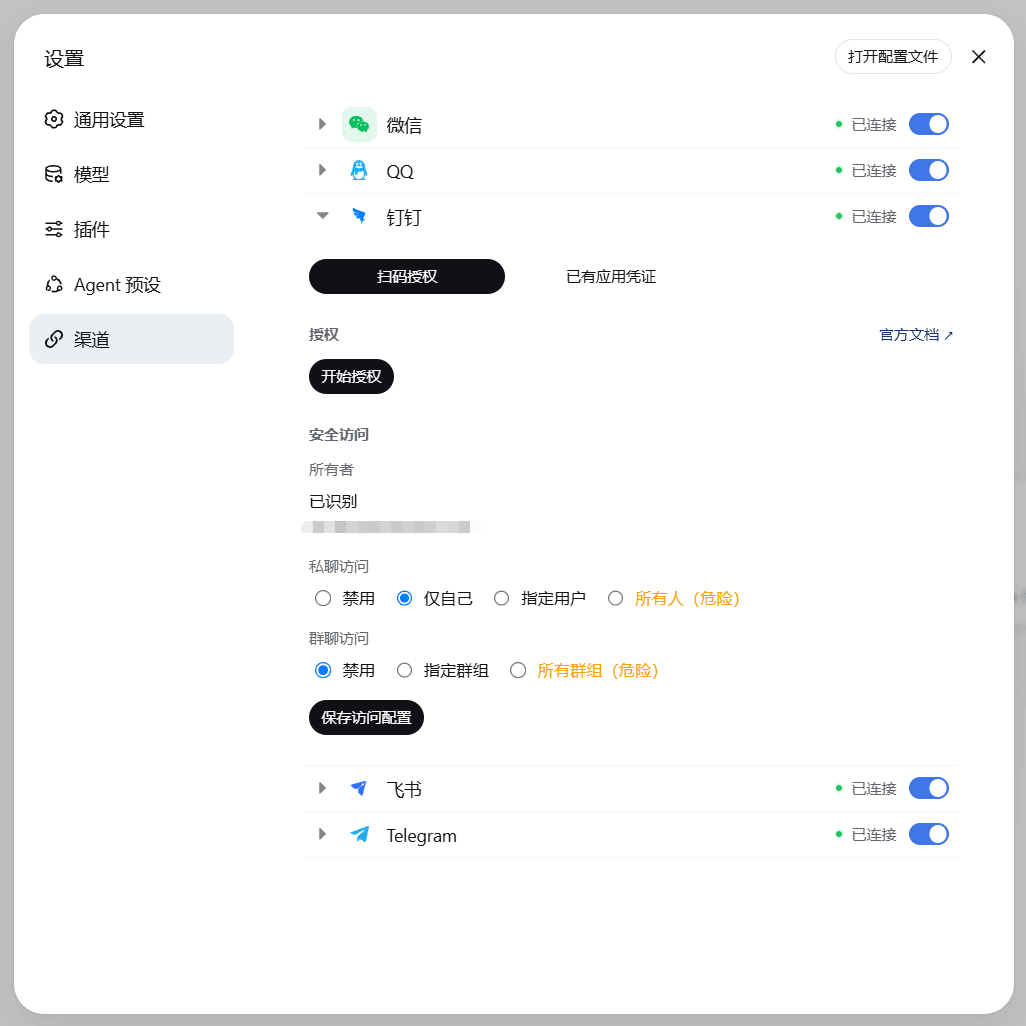 wsz987/dsh-channels
把微信 / QQ / 钉钉 / 飞书 / Telegram 接入 DeepSeek Harness:统一配置、扫码授权,直接在各 IM 与 Agent 对话;支持图片与文件收发,Agent 可读取 PDF、DOCX、XLSX 和文本内容。
wsz987/dsh-channels
把微信 / QQ / 钉钉 / 飞书 / Telegram 接入 DeepSeek Harness:统一配置、扫码授权,直接在各 IM 与 Agent 对话;支持图片与文件收发,Agent 可读取 PDF、DOCX、XLSX 和文本内容。
-
 sfyyy/dsh-vision-bridge
On-demand vision for text-only DeepSeek Harness (DSH) sessions: images become markers, and a vision_describe tool sends …
sfyyy/dsh-vision-bridge
On-demand vision for text-only DeepSeek Harness (DSH) sessions: images become markers, and a vision_describe tool sends …
-
 Sorwcyra/ds-vision-plugin
Paste images into DeepSeek Harness with a four-model vision race, OCR, and an automatic text bridge.
Sorwcyra/ds-vision-plugin
Paste images into DeepSeek Harness with a four-model vision race, OCR, and an automatic text bridge.