HaoyueQin/deepseek-harness-desktop
A desktop shell for DeepSeek Harness — the pluggable AI agent harness from DeepSeek. Wrap the official dsh web UI into a native-feeling, always-on desktop app. / 为 DeepSeek Harness(DeepSeek 开源的可插拔 AI Agent harness)打造的桌面应用壳,把官方 dsh web 界面包装成原生质感、常驻后台的桌面应用。
安装Install
dsh plugin --profile web add github:HaoyueQin/deepseek-harness-desktop把 HaoyueQin/deepseek-harness-desktop 加入你的 DSH 配置(web profile)即可启用。
READMEREADME

DeepSeek Harness Desktop




A desktop shell for DeepSeek Harness — the pluggable AI agent harness from DeepSeek. Wrap the official dsh web UI into a native-feeling, always-on desktop app, reusing the dsh CLI you already have.
English | 简体中文
Features
Backend (dsh) integration
- Zero-intrusion wrapper — spawns your globally-installed
dshCLI as a child process (node <dsh>/lib/bin.js web), loads its localhost UI; the harness source is never modified. One dsh install shared by terminal and desktop — plugins, settings, credentials, sessions and versions always match (DSH_HOME, default~/.dsh) - First-run setup page — no dsh detected? The app offers a copyable install command or a one-click in-app install, then boots automatically
- In-app dsh updates — Settings → Desktop shows your dsh version; one click checks npm for the latest release and upgrades it (no terminal needed)
Desktop experience
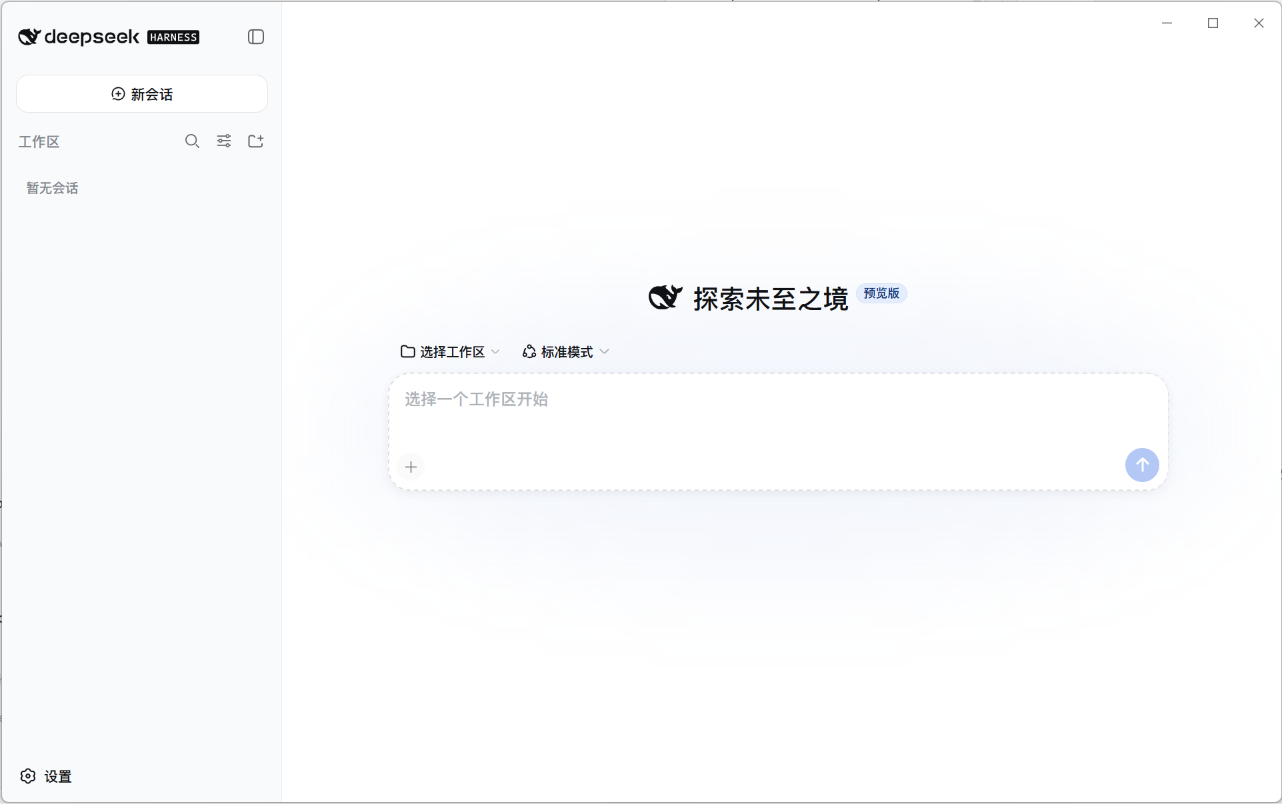
- Frameless immersive window — no native title bar; the custom window controls (minimize / maximize / close) blend into the page with DeepSeek brand-blue hover and follow the light/dark theme
- Always-on tray — closing the window hides to the system tray instead of quitting; the backend keeps running for instant resume
- Auto-start at login — toggle in the tray menu (Windows/macOS native; Linux via XDG autostart)
- Configurable port policy — fixed
3080by default (same asdsh web, giving a stable page origin so browser-side preferences survive restarts), switchable to a custom port or random in Settings; falls back to a random port with a notice when the fixed port is taken. Note: while the shell lives in the tray it holds the port — rundsh web --port <other>in a terminal to coexist; after upgrading from older releases, browser-side preferences (e.g. chat width) need one manual re-set, then persist across restarts - Single instance — launching again focuses the existing window
- Full plugin freedom — dynamic plugins (
cordis_define/cordis_run),$DSH_HOME/cordis.patch.yml, and the npm plugin ecosystem all work exactly as in the web edition - Desktop settings section — the app's Settings page gains a "Desktop" tab (styled to match the harness UI): dsh version card (check & one-click upgrade), shell auto-update check, auto-start toggle, launch-minimized toggle, About card — all in sync with the tray menu
- Shell self-update — checks silently 15s after launch: Windows downloads and guides you to run the installer (unsigned builds can't install silently); Linux AppImage replaces itself automatically; macOS excluded (needs signing)
Screenshot
Install
Prerequisites
- Node.js ≥ 22 and the
dshCLI (npm i -g @deepseek-ai/dsh) — if missing, the app shows a setup page with a copyable command or a one-click in-app install
Download
Download the installer for your platform from the Releases page:
| Platform | Package | Notes |
|---|---|---|
| Windows | deepseek-harness-desktop-<ver>-setup.exe |
NSIS installer, x64 |
| macOS | .dmg (Apple Silicon / Intel) |
unsigned — first run: right-click → Open |
| Linux | .AppImage + .deb |
x64 |
First launch
- Start the app — it locates your
dshCLI, bootsdsh webin the background and opens the UI at its ready state (no dsh? you'll see the setup page first) - Dismiss the 预览版 / preview notice
- Open Settings → Models and configure your LLM provider (API key, model, base URL) — same as the web edition
- Pick a workspace and start chatting
Everyday use
- Close window → app hides to the tray, backend keeps running (a DeepSeek whale icon appears near the system clock)
- Tray menu (right-click the icon): reopen the window, toggle auto-start at login, or quit — quitting fully stops the backend
- Quit via tray is the only way to exit the app; closing the window never does
Development
npm install        # installs electron 43 + toolchain
npm run dev        # dev mode: system Node + your globally-installed dsh CLI
electron binary download stuck? (you see
Downloading Electron binary...forever) GitHub-hosted binaries can be slow from some networks. Manually fetchhttps://npmmirror.com/mirrors/electron/<version>/electron-v<version>-win32-x64.zipinto%LOCALAPPDATA%\electron\Cache\electron-v<version>-win32-x64\, then:printf "electron.exe" > node_modules/electron/path.txt # and unzip the archive into node_modules/electron/dist/
Packaging
npm run build:runtime     # generates resources/icon.png (+ build/icon.png) from the upstream favicon
npm run dist:win          # Windows NSIS installer → release/
# npm run dist:mac        # macOS dmg (requires macOS; CI builds it)
# npm run dist:linux      # Linux AppImage + deb
The CI workflow (.github/workflows/release.yml) builds all three platforms on every v* tag and publishes the artifacts to a GitHub Release.
Data & logs
- Data (
DSH_HOME): defaults to~/.dsh(honors the$DSH_HOMEenvironment variable) — profiles, sessions, storage - Logs:
<userData>/logs/main.log - dsh CLI: the shell spawns your globally-installed
dsh(located via PATH +npm root -g); upgrade it from Settings → Desktop or withnpm i -g @deepseek-ai/dsh
Project layout
src/
  main.ts          app lifecycle: single-instance lock, window, tray, dsh orchestration, setup page
  paths.ts         dev/prod resource resolution (icon, preload, desktop plugin patch)
  dsh-locator.ts   locate the user's dsh CLI (PATH check + npm root -g) + semver compare
  dsh-updater.ts   settings-card backend: check npm latest / one-click npm i -g upgrade
  settings.ts      shell settings (userData/settings.json — launch-minimized, port policy)
  updater.ts       electron-updater (Windows guided / Linux AppImage auto)
  dsh/spawn.ts     spawn dsh web --port <policy port> --patch; parse stdout URL line; graceful stop
  dsh/ready.ts     HTTP readiness probe
  tray.ts          tray menu (open / auto-start / quit) + autostart sync
  autostart.ts     auto-start (native on win/mac; XDG file on linux)
  preload.ts       contextBridge bridge (window controls + desktop IPC; compiled to CJS)
scripts/
  install-runtime.mjs   generates resources/icon.png at build time (from upstream favicon)
  smoke.mjs             headless smoke test: spawn dsh, assert URL line + HTTP 200
resources/
  desktop-integration/  settings "Desktop" section plugin (dsh browser half)
  desktop-patch.yml     shell-injected patch mounting the plugin
assets/
  wordmark.svg          project wordmark
Known limitations (v1)
- Requires Node.js ≥ 22 and a globally-installed
dshCLI (the setup page offers one-click install); the shell no longer bundles a runtime — installer is small, but dsh itself must be present - macOS builds are unsigned — Gatekeeper requires right-click → Open on first run; macOS has no auto-update (needs a signing certificate)
- Windows auto-update is guided (downloads then runs the installer) rather than silent, due to the unsigned build
Feedback
Found a bug? Have a feature idea? Issues are very welcome — bug reports, usage questions, and suggestions all help.
- Open an issue (English or 中文, either is fine)
- For harness-level problems, also check upstream deepseek-harness discussions
License
相关推荐Related
-
 nexu-io/open-design
🎨 Best DeepSeek Harness Design Plugin. The open-source Claude Design alternative. 🖥️ Local-first desktop app. 🖼️ Your…
nexu-io/open-design
🎨 Best DeepSeek Harness Design Plugin. The open-source Claude Design alternative. 🖥️ Local-first desktop app. 🖼️ Your…
-
 ruvnet/ruflo
🌊 The original agent meta-harness. Deploy intelligent multi-player swarms, coordinate autonomous workflows, and build c…
ruvnet/ruflo
🌊 The original agent meta-harness. Deploy intelligent multi-player swarms, coordinate autonomous workflows, and build c…
-
 esengine/DeepSeek-Reasonix
DeepSeek-native AI coding agent for your terminal. Engineered around prefix-cache stability — leave it running.
esengine/DeepSeek-Reasonix
DeepSeek-native AI coding agent for your terminal. Engineered around prefix-cache stability — leave it running.
-
 Tencent/WeKnora
Open-source LLM knowledge platform: turn raw documents into a queryable RAG, an autonomous reasoning agent, and a self-m…
Tencent/WeKnora
Open-source LLM knowledge platform: turn raw documents into a queryable RAG, an autonomous reasoning agent, and a self-m…
- Nagi-ovo/voyager Enhancement suite for Gemini, AI Studio, Claude & ChatGPT — plus a prompt manager for any web UI, DeepSeek Harness inclu…
-
 anywhere-labs/deepseek-harness-desktop
为 DeepSeek Harness (DSH) 插件生态打造的现代化桌面端解决方案。万物皆「插件」,桌面本身也是「插件」。
anywhere-labs/deepseek-harness-desktop
为 DeepSeek Harness (DSH) 插件生态打造的现代化桌面端解决方案。万物皆「插件」,桌面本身也是「插件」。
-
 EverMind-AI/EverOS
One portable memory layer for every AI agent: local-first, Markdown-native, user-owned, and self-evolving across apps, t…
EverMind-AI/EverOS
One portable memory layer for every AI agent: local-first, Markdown-native, user-owned, and self-evolving across apps, t…
-
 freestylefly/awesome-gpt-image-2
Prompt as Code | GPT-Image2 工业级提示词引擎与模板库,470+ 个案例逆向工程,20+ 套工业级模板,并提炼出Skills,持续更新中
freestylefly/awesome-gpt-image-2
Prompt as Code | GPT-Image2 工业级提示词引擎与模板库,470+ 个案例逆向工程,20+ 套工业级模板,并提炼出Skills,持续更新中