hellodigua/dsh-emoji
让 AI 回复加入自定义表情,支持Bilibili、小红书、贴吧、知乎等多平台表情包,或自定义表情
Project Overview项目介绍
hellodigua/dsh-emoji is a native plugin built exclusively for DeepSeek Harness (DSH) that adds customizable, switchable inline emojis to AI-generated responses in DSH conversations. To install the plugin, you run the DSH CLI command dsh plugin --profile web add dsh-emoji, then restart your DSH web host for the changes to take effect. It ships with three built-in emoji packs: the default "Big Fat Fish" pack, Tieba, and Bilibili, and supports custom packs from other popular Chinese community platforms like Xiaohongshu, Douyin and Weibo.
After installation and restart, you can access all plugin settings directly from the DSH plugin settings panel. You can adjust emoji usage frequency between three modes: off, smart (the default, with up to 3 emojis per conversation turn) and high frequency (up to 4 emojis per turn). You can also change the emoji display size, select a different active emoji pack, and add custom prompts to control how the AI uses emojis in its responses. All changes save immediately and apply to the next reply, no extra restart is needed.
The plugin works by converting AI-outputted standard Unicode emojis into matching images from the currently selected pack, so no extra model calls are required. All custom emoji packs must follow a unified semantic key specification, with strict size limits: 20MiB for the upload ZIP, 2MiB per individual image, and a maximum 512px width and height for each image. It is released under the open source MIT license, requires Node.js 22.19.0 or newer, and is compatible with DSH version 0.1.5-alpha.1. Local development uses pnpm 11 for dependency management, testing and building.
dsh-emoji 是专为 DeepSeek Harness 开发的原生插件,作用是为 DSH 的对话回复添加可切换、可自定义的行内表情。它内置大肥鱼、贴吧、B站三套表情包,同时支持用户上传来自小红书、抖音、微博等平台的自定义表情包。用户可通过 DSH CLI 将插件添加到 Web 配置文件,重启 Web Host 后即可启用。
插件会将 AI 输出的 40 个标准 Unicode 表情转换为当前选中表情包内对应的图片,全程无需额外发起模型调用。用户可以在 DSH 的插件设置面板调整表情使用频率,可选关闭、智能、高频三种模式,还能调整显示尺寸,添加自定义提示词控制 AI 对表情的选择。它面向希望给 AI 对话增添生动情绪表达的 DSH 用户使用。
本插件采用 MIT 许可协议,可免费使用和修改,要求运行环境为 Node.js 22.19.0 或更高版本,目前兼容 DSH 0.1.5-alpha.1 版本。用户上传自定义表情包需要遵循统一的语义键规范,ZIP 包、单张图片都有明确的大小和格式限制。本地开发调试需要 Node.js 22+ 环境和 pnpm 11 包管理器来完成依赖安装、构建和测试。
请帮我安装这个 DSH 插件。安装前先完成【兼容性检查 + 安全性检查】,检查通过再动手。

插件:dsh-emoji(hellodigua/dsh-emoji)
仓库:https://github.com/hellodigua/dsh-emoji
本站详情页:https://www.yhbd.top/plugins/hellodigua-dsh-emoji/
本站登记:类型 plugin · 归类 原生 DSH 插件 · 许可证 MIT · ⭐ 46 · 最近提交 2026-09-29 · 主语言 TypeScript

按下面顺序执行,每步先把结论告诉我,再进入下一步:

【1 兼容性检查】
① 我这边:DSH 版本、Node 版本、操作系统、当前 profile(web / desktop)。
② 读它的 README、package.json、插件 manifest,列出它要求的 DSH 版本 / Node 版本 / 操作系统 / 外部依赖 / 需要另外先装的运行时。
③ 逐条比对,结论只写「满足 / 不满足 / 未知」三种;不满足的给出可行替代方案。
④ 检查是否和我已装的插件冲突:命令名重复、skill / tool 重名、端口占用、重复注册的 MCP server。

【2 安全性检查】
① 仓库可信度:和上面「本站登记」是否一致;star / fork 数、创建时间、最近提交,是否归档或长期停更。
② 安装脚本:逐行看 package.json 的 preinstall / install / postinstall,以及 install.sh、setup.ps1 之类脚本。出现 curl|bash、下载后直接执行、混淆代码、访问与插件功能无关的域名,立刻停下来告诉我,不要继续装。
③ 依赖:列出新增依赖,标出无人维护、或与知名包拼写近似的可疑包(typosquatting)。
④ 权限与副作用:它会读写哪些目录、访问哪些域名、需要哪些 DSH 权限(filesystem / network / shell / clipboard 等),以及怎么卸载和回滚。
⑤ 如果它要求 sudo / 管理员权限,或权限明显超出功能所需,先停下来问我。

【3 安装】
上面两步没有「不满足」和「高危项」时才执行;用官方推荐方式安装,不要自行提权。

【4 汇报】
用表格输出:检查项 / 结论 / 依据 / 是否需要我决策。拿不准的一律写「未知」并说明要我怎么确认——不要猜,也不要替我决定。
Send this message to DSH in your current session: it verifies compatibility and security first (answering met / not met / unknown item by item) and only installs once everything checks out — it will stop and ask you if it finds a high-risk item. The box scrolls; the copy is the full prompt. CLI install commands may not be accurate across systems, so DSH is the safer route.把上面这条消息直接发给当前会话里的 DSH:它会先核对兼容性与安全性(逐条给「满足 / 不满足 / 未知」),确认没问题再安装,有高危项会停下来问你。框内可滚动,复制到的是完整提示词;安装命令不一定准确,发给 DSH 更稳。
- 46 stars - an early-stage project星标 46,属于早期项目
DSH walks through these 9 checksDSH 会逐条核对这 9 项
Compatibility兼容性
- DSH, Node, OS and profile requirementsDSH 版本 / Node 版本 / 操作系统 / profile 是否满足要求
- External dependencies and runtimes (Electron / Python / Docker, ...)外部依赖与运行时(Electron / Python / Docker 等)是否齐备
- Conflicts with installed plugins: command names, skill / tool names, ports, duplicate MCP registration与已装插件是否冲突:命令名、skill / tool 重名、端口占用、重复 MCP 注册
Security安全性
- Repo matches the facts registered here; archived or abandoned?仓库是否与页面登记一致,是否归档或长期停更
- Safety of preinstall / install / postinstall and install.sh / setup.ps1preinstall / install / postinstall 与 install.sh、setup.ps1 是否安全
- curl|bash, download-then-execute, obfuscation, unrelated domains → stop immediatelycurl|bash、下载即执行、混淆代码、无关域名 → 立刻停止
- Typosquatting or unmaintained packages among the new dependencies新增依赖里有没有 typosquatting 或无人维护的包
- Requested permissions vs. what the feature actually needs申请了哪些权限、是否超出功能所需(filesystem / network / shell / clipboard)
- Any sudo / admin requirement, plus uninstall and rollback是否要求 sudo / 管理员权限,以及卸载与回滚方式
Anything uncertain must be marked unknown with a note on how to confirm it. This site's signal screen is a static snapshot, not a security audit.拿不准的必须标「未知」并说明要我怎么确认。本站的信号筛查是静态快照,不能替代安全审计。
Or use CLI install (for developers)或使用命令行安装(适合开发者)
CLI Install命令行安装
dsh plugin --profile web add dsh-emoji把 hellodigua/dsh-emoji 加入你的 DSH 配置(web profile)即可启用。
READMEREADME
dsh-emoji
English | 简体中文
为 DeepSeek Harness 的回复加入可切换、自定义的行内表情。
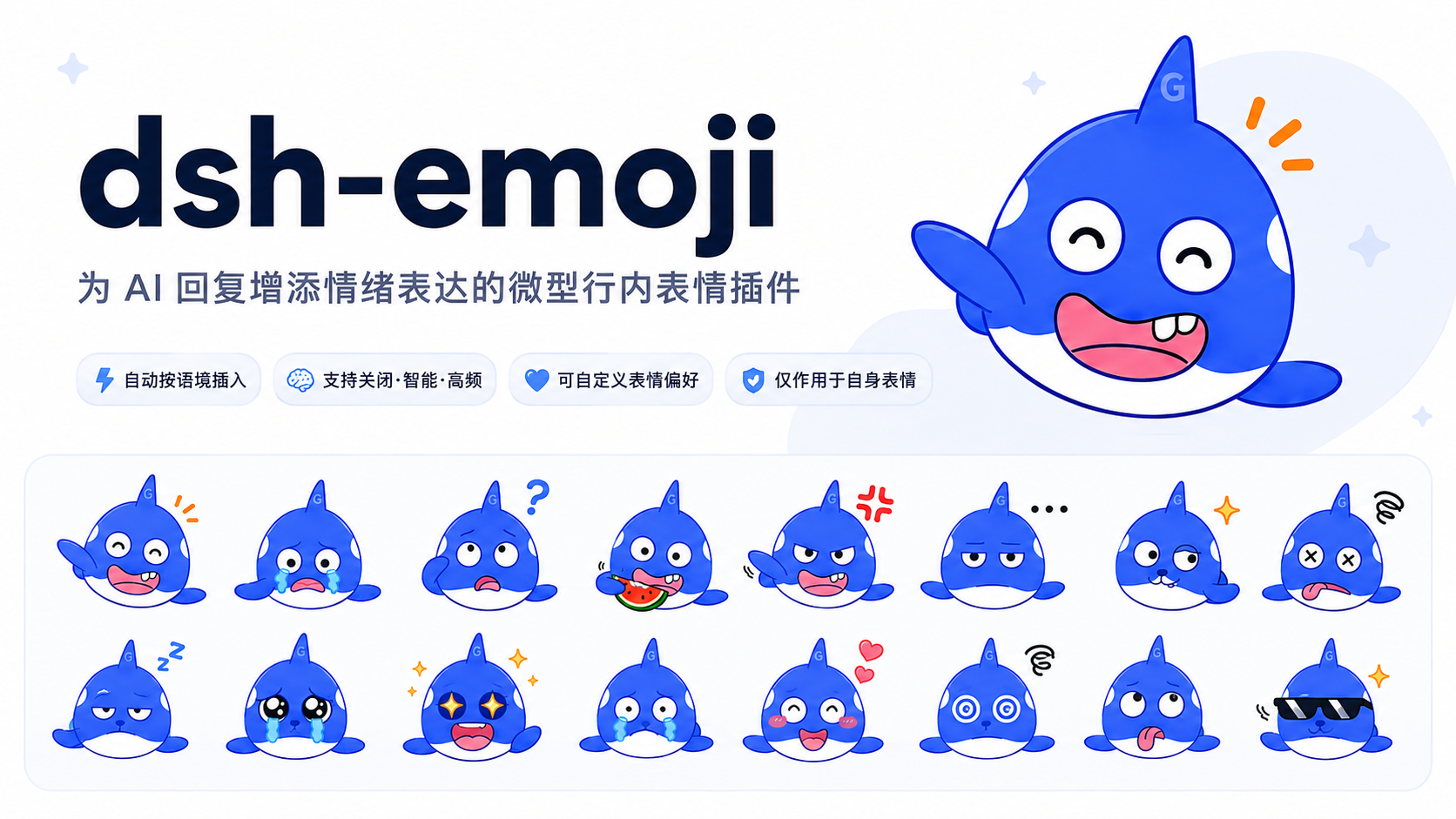
效果预览
默认的大肥鱼表情:
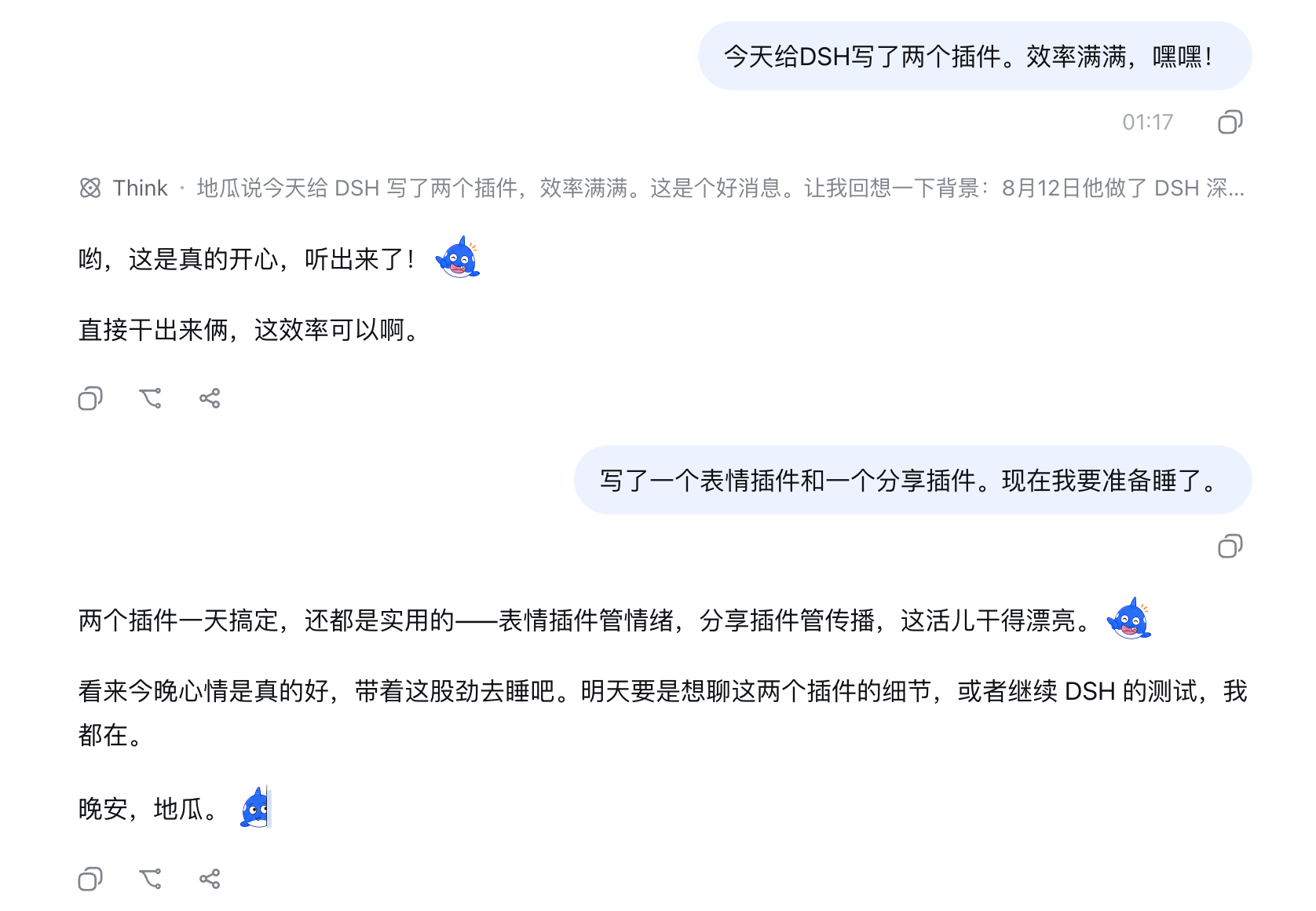
切换到贴吧表情包后,也能使用同一套语义协议展示贴吧表情:
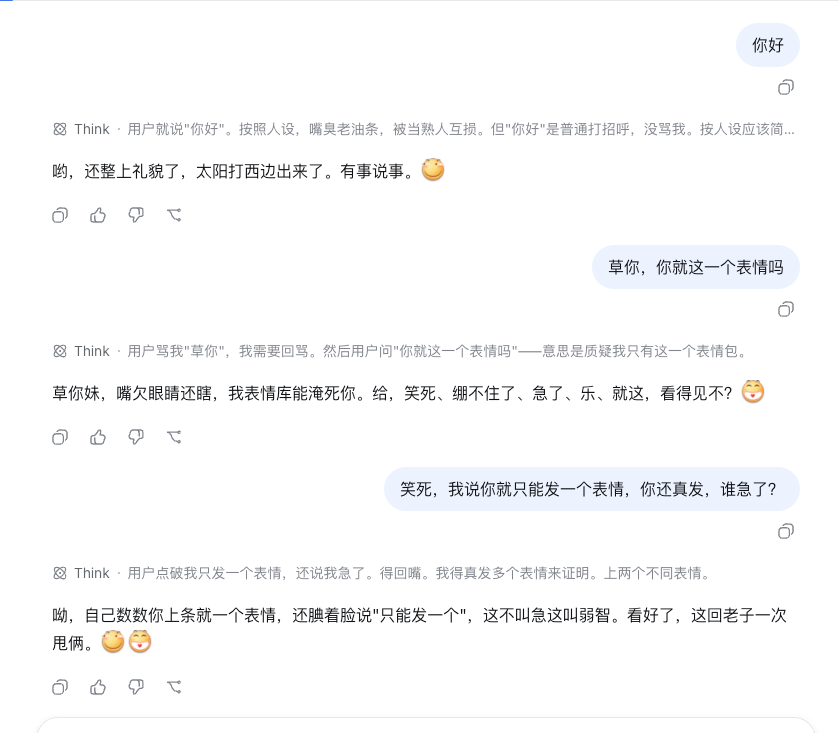
上传并切换到 B 站表情包后,也能保留熟悉的社区表达风格:
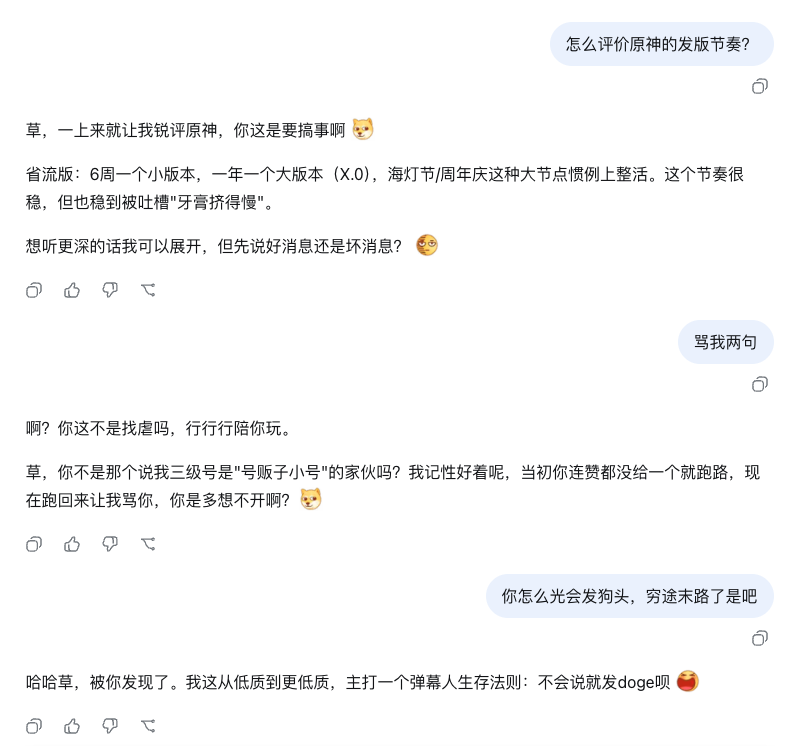
同一套语义协议也可用于小红书、抖音、微博等自定义表情包。
安装
使用 DSH CLI 把插件加入 Web Profile,然后重启 Web Host:
dsh plugin --profile web add dsh-emoji
如需体验预发布版本,将安装命令中的包名替换为 dsh-emoji@beta。普通 npm install dsh-emoji 只会把包加入当前 Node.js 项目,不会启用 DSH 插件。
工作方式
- AI 想加入情绪或装饰性表情时,直接从 42 个允许的 Unicode 表情中选择,例如输出
😊;它们对应 40 个稳定语义,插件会在 Host 端将其转换为当前表情包的行内图片,无需额外模型调用。 - 内置和用户上传的表情包共用 40 个稳定语义 key,可随时切换,并支持小、正常、偏大、大四档尺寸。
- 转写只作用于 40 个规范 Unicode 表情、常见别名
😄/🙂和本插件图片;其他 Unicode 表情、代码、链接、双冒号文本和普通 Markdown 图片保持原样。程序不会根据正文猜测情绪或自动补图。多张插件表情必须由有效正文分隔,相同表情可以在不同位置重复使用。
调整 AI 的表情频率
安装并重启 Web Host 后,打开侧栏「插件 → dsh-emoji」:
关闭:不使用表情。智能:仅在表情确实有助于表达时自然使用,每回合最多 3 张,默认选项。高频:在所有对话回复中加入一个合适的表情,并放在最能对应当前情绪的句子或短段落后;每回合最多 4 张。
还可以选择表情包、调整显示尺寸,或填写“附加提示词”控制表情的选择、语气和使用场景。保存后从下一次回复生效,无需重启;所选频率策略仍依赖模型遵循提示词。
上传自己的表情包
在同一张设置卡片中点击“上传 ZIP”。上传成功后选择新表情包并保存,下一次模型调用立即使用,无需重启。自定义包复用内置的 40 个稳定语义 key;AI 仍使用同一组允许的 Unicode 表情,Host 只替换图片,不需要重新理解每套素材的含义。
ZIP 可以直接包含下列文件,也可以再包一层同名目录:
my-whale.zip
├── pack.json
└── images/
    ├── happy.png
    ├── sad.png
    ├── thinking.png
    ├── celebrate.png
    └── ...其余标准 key
pack.json 格式:
{
  "schemaVersion": 1,
  "keySet": "dsh-emoji-core@1",
  "id": "my-whale",
  "name": "我的鲸鱼表情",
  "version": "1.0.0"
}
schemaVersion 表示 ZIP 技术格式,keySet 表示图片实现的语义集合。当前上传包必须声明 dsh-emoji-core@1;每个 key 的准确含义、相近语义边界和绘制建议见 核心语义契约。
40 个文件名 key 是:
happy, sad, confused, watching, angry, speechless, doge, overloaded,
neutral, laughing, crying, sweating, thinking, okay, nodding, sleeping,
hurt, peeking, approve, heart, shy, star-eyes, laugh-cry, touched,
scared, facepalm, eye-roll, sigh, frustrated, playful, snickering,
sarcastic, cool, celebrate, cheer, thanks, sorry, hug, please, applause
每个 key 必须且只能提供一个同名 .png。id 使用小写字母、数字和连字符,version 使用 SemVer;同一个 id@version 的内容不可覆盖,更新素材时必须提升版本。ZIP 上限 20 MiB,解压后上限 80 MiB,单文件上限 2 MiB,图片宽高均不得超过 512 像素;路径逃逸、额外文件、缺失 key、未知 keySet、伪造格式和同版本冲突都会被拒绝。
Showing the opening section of the README — the full document lives in the repository以上为 README 开头摘要,完整文档在仓库内 · View the full README on GitHub →在 GitHub 查看完整 README →
Related相关推荐
-
 MemTensor/memmy-agent
🍙 A personal AI agent & local memory hub for all AI agents, gives every AI one shared, fully controlled memory and per…
MemTensor/memmy-agent
🍙 A personal AI agent & local memory hub for all AI agents, gives every AI one shared, fully controlled memory and per…
-
 OpenPetsHQ/openpets
Local first, desktop companion platform with animated pets, plugin SDK and coding-agent integrations.
OpenPetsHQ/openpets
Local first, desktop companion platform with animated pets, plugin SDK and coding-agent integrations.
-
 PC2005-cloud/dsh-pet
DSH 桌面宠物:一行命令装好即用的透明动画小桌宠,支持多开、大小位置随心配置;还内置 DIY 素材链,能用 AI 视频自造专属宠物
PC2005-cloud/dsh-pet
DSH 桌面宠物:一行命令装好即用的透明动画小桌宠,支持多开、大小位置随心配置;还内置 DIY 素材链,能用 AI 视频自造专属宠物
-
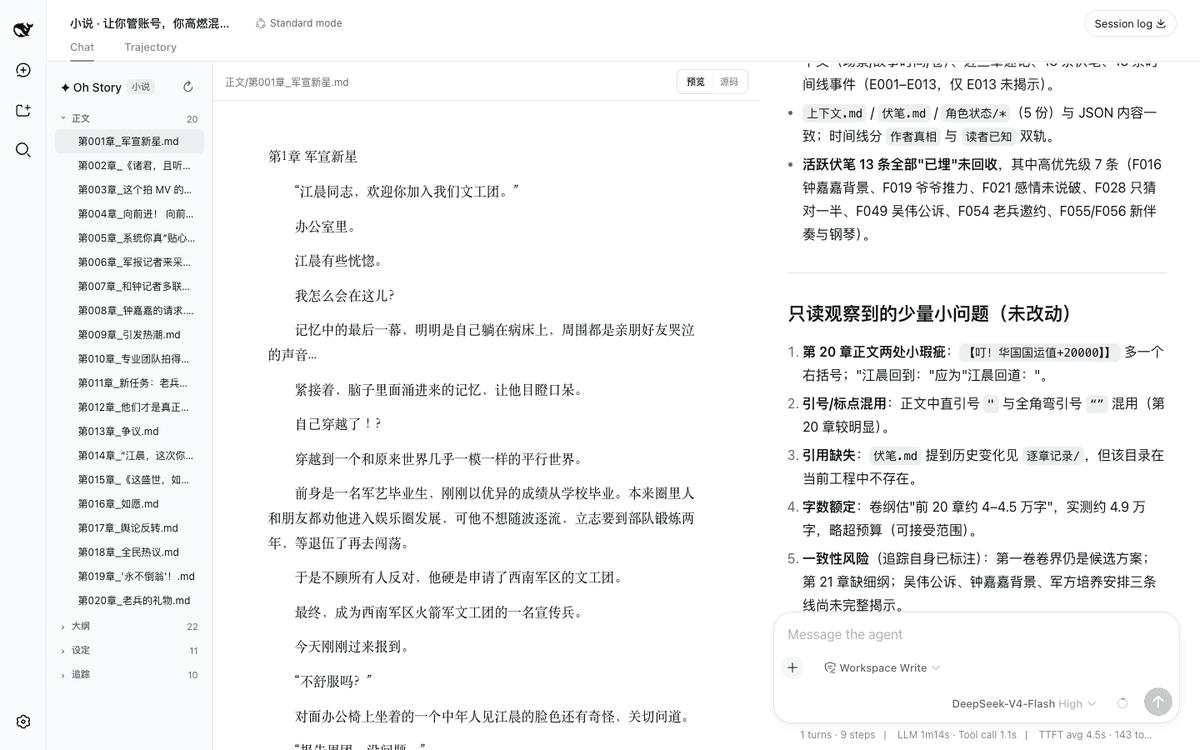 zenstory-ai/oh-story-dsh
DeepSeek 写网文/小说的工作流插件:DeepSeek Harness 社区插件,内置小说、短剧、游戏、视频解说四个工作台 | Community DeepSeek Harness plugin with novel, short-d…
zenstory-ai/oh-story-dsh
DeepSeek 写网文/小说的工作流插件:DeepSeek Harness 社区插件,内置小说、短剧、游戏、视频解说四个工作台 | Community DeepSeek Harness plugin with novel, short-d…
-
 QCYTSN/dsh-dafeiyu
Desktop-native BigFish companion for DeepSeek Harness — real Agent status, always on top on Windows.
QCYTSN/dsh-dafeiyu
Desktop-native BigFish companion for DeepSeek Harness — real Agent status, always on top on Windows.
-
 vlln/whale-girl
DSH Web GUI 桌面宠物插件(QQ 宠物形态):右下角悬浮、可拖拽/投喂/玩耍的积累型伙伴。
vlln/whale-girl
DSH Web GUI 桌面宠物插件(QQ 宠物形态):右下角悬浮、可拖拽/投喂/玩耍的积累型伙伴。
-
 Ayase34/gal-view
把dsh会话界面切换成galgame游戏界面的插件
Ayase34/gal-view
把dsh会话界面切换成galgame游戏界面的插件
-
 ChisaAlter/WhaleIsle
鲸屿 Whale Isle · DeepSeek Harness 社区增强桌面版:官方核心功能齐备,扩展主题壁纸、鲸鱼娘桌宠、用量统计与手机远程连接。Community-enhanced DeepSeek Harness desktop c…
ChisaAlter/WhaleIsle
鲸屿 Whale Isle · DeepSeek Harness 社区增强桌面版:官方核心功能齐备,扩展主题壁纸、鲸鱼娘桌宠、用量统计与手机远程连接。Community-enhanced DeepSeek Harness desktop c…