hellosz/dsh-pets
Project Overview项目介绍
dsh-pets is a native Cordis plugin built exclusively for the DeepSeek Harness (DSH) web GUI, bringing the popular Codex Pets companion experience to DSH users. Instead of a traditional progress bar, it uses animated pet behaviors to visually communicate the current working status of your AI coding agent. It comes with 10 pre-built Pokémon pets and 9 distinct animations that map directly to different agent working states. The plugin follows a zero-invasive architecture that only listens to existing DSH events, so it never blocks or alters your existing DSH workflows.
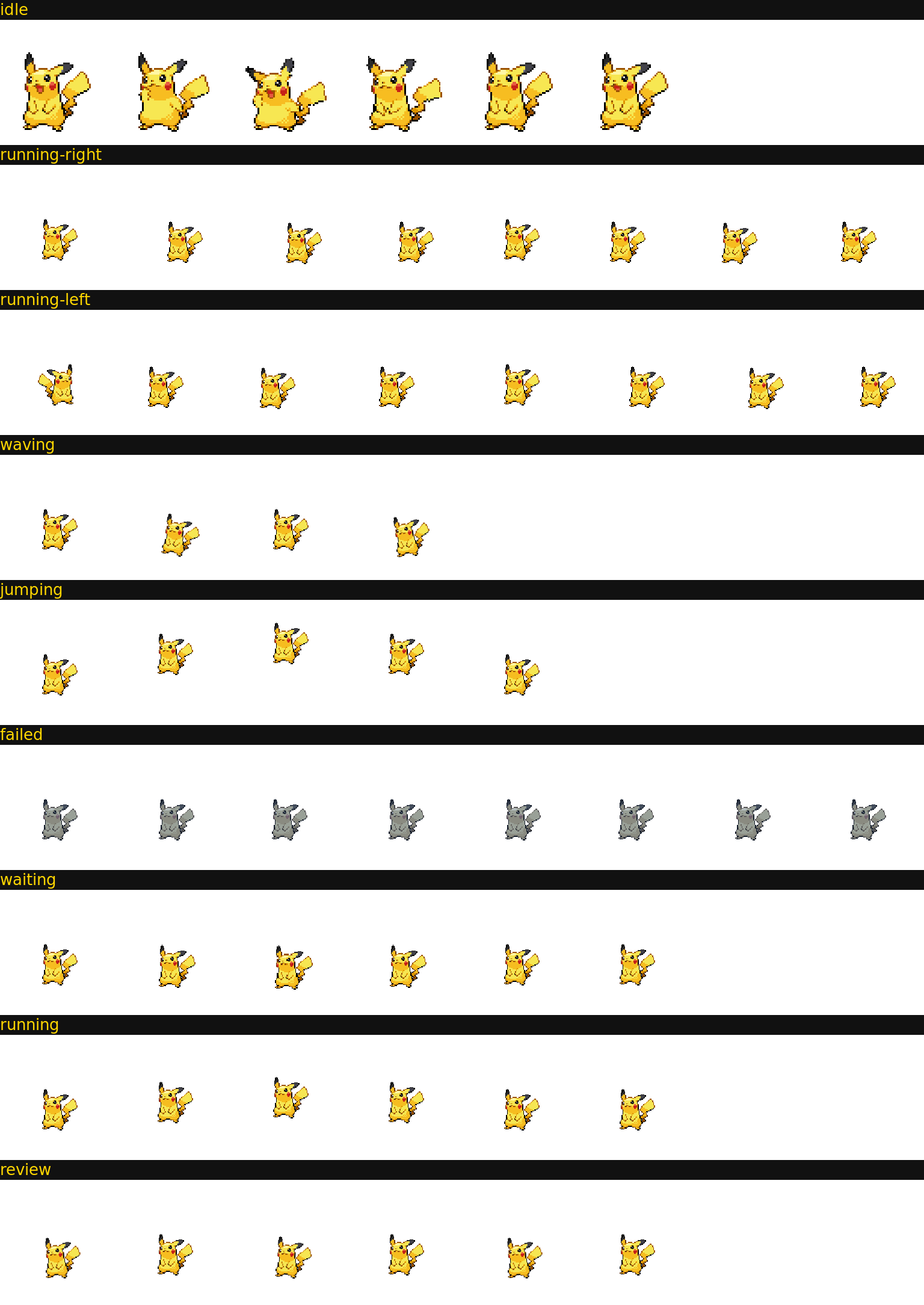
Each agent status maps to a unique pet animation: when the agent is thinking or writing code, the pet runs in place; when it is waiting for your approval, the pet stops and stares at you; when the task is done and ready for review, the pet sits upright; if the agent encounters an error, the pet turns dull blue and shakes dejectedly; when idle, the pet breathes, blinks, and occasionally waves or jumps for interaction. The floating pet stays in the bottom-right corner of your screen, can be dragged around, hidden with one click, and accessed via a click popup menu. There is also a built-in settings page where you can switch active pets, adjust the pet size from 0.6x to 2.5x, and toggle the plugin on or off.
To install the plugin, you need Node.js version 22 or higher, a globally installed DSH CLI, and the pnpm package manager (you can enable pnpm on your system via the corepack enable command). You install it directly from the DSH CLI by running the command dsh plugin --profile web add @hellosz/dsh-pets, then start the DSH web interface with the dsh web command. After installation completes, open http://localhost:3080 in your browser and you will see the default pet, Pikachu, waiting for you in the bottom-right corner. The plugin is released under the open-source MIT license, is compatible with the community-standard petdex format, and can eventually support over 4500 community-made pets.
这是专为 DeepSeek Harness(DSH)打造的原生 Cordis 插件,把 OpenAI Codex Pets 的宠物陪伴体验引入 DSH 的网页端图形界面。它用宠物的动画行为代替传统进度条,直观展示 AI 编码代理当前的工作状态,内置 10 只宝可梦宠物和 9 种对应不同工作状态的动画。它采用零侵入设计,仅监听 DSH 现有事件,不会阻塞或篡改任何原有工作流程。
插件会根据代理不同状态展示对应宠物行为:思考编码时宠物原地跑动,等待用户审批时宠物盯着用户,任务完成待审查时宠物端坐,出错时宠物呈灰蓝色沮丧抖动,空闲时宠物会做呼吸眨眼偶尔跳跃互动。它支持拖拽移动、点击弹出菜单、一键隐藏,还自带设置页可切换宠物、调整缩放大小。适合日常使用 DSH 处理长任务的开发者增加趣味性和状态感知。
安装需要 Node.js 22 以上版本、已安装 DSH CLI 和 pnpm 包管理器,可通过 dsh plugin --profile web add @hellosz/dsh-pets 命令完成安装,启动 DSH 网页端后即可在右下角看到默认宠物皮卡丘。项目遵循 MIT 开源许可,兼容社区标准 petdex 宠物包格式,未来支持导入四千多个社区宠物,目前暂无额外使用费用。
请帮我安装这个 DSH 插件。安装前先完成【兼容性检查 + 安全性检查】,检查通过再动手。

插件:dsh-pets(hellosz/dsh-pets)
仓库:https://github.com/hellosz/dsh-pets
本站详情页:https://www.yhbd.top/plugins/hellosz-dsh-pets/
本站登记:类型 plugin · 归类 原生 DSH 插件 · 许可证 MIT · ⭐ 6 · 最近提交 2026-08-15 · 主语言 JavaScript

按下面顺序执行,每步先把结论告诉我,再进入下一步:

【1 兼容性检查】
① 我这边:DSH 版本、Node 版本、操作系统、当前 profile(web / desktop)。
② 读它的 README、package.json、插件 manifest,列出它要求的 DSH 版本 / Node 版本 / 操作系统 / 外部依赖 / 需要另外先装的运行时。
③ 逐条比对,结论只写「满足 / 不满足 / 未知」三种;不满足的给出可行替代方案。
④ 检查是否和我已装的插件冲突:命令名重复、skill / tool 重名、端口占用、重复注册的 MCP server。

【2 安全性检查】
① 仓库可信度:和上面「本站登记」是否一致;star / fork 数、创建时间、最近提交,是否归档或长期停更。
② 安装脚本:逐行看 package.json 的 preinstall / install / postinstall,以及 install.sh、setup.ps1 之类脚本。出现 curl|bash、下载后直接执行、混淆代码、访问与插件功能无关的域名,立刻停下来告诉我,不要继续装。
③ 依赖:列出新增依赖,标出无人维护、或与知名包拼写近似的可疑包(typosquatting)。
④ 权限与副作用:它会读写哪些目录、访问哪些域名、需要哪些 DSH 权限(filesystem / network / shell / clipboard 等),以及怎么卸载和回滚。
⑤ 如果它要求 sudo / 管理员权限,或权限明显超出功能所需,先停下来问我。

【3 安装】
上面两步没有「不满足」和「高危项」时才执行;用官方推荐方式安装,不要自行提权。

【4 汇报】
用表格输出:检查项 / 结论 / 依据 / 是否需要我决策。拿不准的一律写「未知」并说明要我怎么确认——不要猜,也不要替我决定。
Send this message to DSH in your current session: it verifies compatibility and security first (answering met / not met / unknown item by item) and only installs once everything checks out — it will stop and ask you if it finds a high-risk item. The box scrolls; the copy is the full prompt. CLI install commands may not be accurate across systems, so DSH is the safer route.把上面这条消息直接发给当前会话里的 DSH:它会先核对兼容性与安全性(逐条给「满足 / 不满足 / 未知」),确认没问题再安装,有高危项会停下来问你。框内可滚动,复制到的是完整提示词;安装命令不一定准确,发给 DSH 更稳。
- Only 6 stars - very few users, little community feedback星标只有 6,几乎没人在用,遇到问题缺少社区反馈
DSH walks through these 9 checksDSH 会逐条核对这 9 项
Compatibility兼容性
- DSH, Node, OS and profile requirementsDSH 版本 / Node 版本 / 操作系统 / profile 是否满足要求
- External dependencies and runtimes (Electron / Python / Docker, ...)外部依赖与运行时(Electron / Python / Docker 等)是否齐备
- Conflicts with installed plugins: command names, skill / tool names, ports, duplicate MCP registration与已装插件是否冲突:命令名、skill / tool 重名、端口占用、重复 MCP 注册
Security安全性
- Repo matches the facts registered here; archived or abandoned?仓库是否与页面登记一致,是否归档或长期停更
- Safety of preinstall / install / postinstall and install.sh / setup.ps1preinstall / install / postinstall 与 install.sh、setup.ps1 是否安全
- curl|bash, download-then-execute, obfuscation, unrelated domains → stop immediatelycurl|bash、下载即执行、混淆代码、无关域名 → 立刻停止
- Typosquatting or unmaintained packages among the new dependencies新增依赖里有没有 typosquatting 或无人维护的包
- Requested permissions vs. what the feature actually needs申请了哪些权限、是否超出功能所需(filesystem / network / shell / clipboard)
- Any sudo / admin requirement, plus uninstall and rollback是否要求 sudo / 管理员权限,以及卸载与回滚方式
Anything uncertain must be marked unknown with a note on how to confirm it. This site's signal screen is a static snapshot, not a security audit.拿不准的必须标「未知」并说明要我怎么确认。本站的信号筛查是静态快照,不能替代安全审计。
Or use CLI install (for developers)或使用命令行安装(适合开发者)
CLI Install命令行安装
dsh plugin --profile web add @hellosz/dsh-pets把 hellosz/dsh-pets 加入你的 DSH 配置(web profile)即可启用。
READMEREADME
DSH Pet Companion 🐾
把 OpenAI Codex Pets 的宠物陪伴体验带进 DeepSeek Harness(DSH)Web GUI 的 Cordis 插件。
用宠物的行为状态代替进度条 —— 你的皮卡丘/小火龙会用动画告诉你 agent 正在思考、等你确认、还是完成了待你审查。
它解决了什么问题
AI coding agent 跑长任务时(几分钟到十几分钟),你无法直观知道它现在在干什么:
| Agent 状态 | 宠物表现 | 你该做什么 |
|---|---|---|
| 思考中 / 写代码 | 原地跑动动画 | 去喝杯咖啡 ☕ |
| 等待你确认 / 审批 | 停下来盯着你看 | 回 DSH 响应 |
| 完成待审查 | 端坐/专注姿态 | 去看 diff |
| 出错 | 灰蓝色沮丧抖动 | 检查错误 |
| 空闲 | 呼吸/眨眼,偶尔挥手跳跃 | 陪它玩 😄 |
这正是 Codex Pets 的核心设计哲学:"agent 正在做什么"比"agent 是什么动物"更重要。
特性
- 🖼️ 内置 10 只宠物:皮卡丘、小火龙、妙蛙种子、杰尼龟、胖丁、伊布、梦幻、波加曼、木木枭、敲音猴
- idle 动画来自 PokeAPI 第五世代官方动画帧(或 Pokémon Showdown 动画)
- 其余 8 个状态由经典精灵程序化派生(翻转/弹跳/挥手/沮丧/呼吸/跑动/审查)
- 🎬 9 状态动画:idle / running / waiting / review / failed / waving / jumping / running-left / running-right
- 📍 浮动宠物:注册到
shell.overlay,右下角常驻,可拖拽、点击弹菜单、一键隐藏;状态气泡与配置菜单跟随宠物 - 💬 性格与口头禅:每只宠物都有独立性格、台词和动画节奏("交给我吧,皮卡!"/"烧起来了!")
- ⚙️ 设置页:Settings → 宠物伙伴,切换宠物、缩放滑块(0.6x–2.5x)、开关
- 📦 petdex 兼容宠物包格式:
pet.json+ 8×9 spritesheet(每帧 192×208)——社区标准,未来可直接导入 petdex.dev 上 4500+ 个社区宠物 - 🔌 零侵入:只监听 DSH 现有事件(emit 模式),不阻塞、不篡改任何流程
快速开始
前置条件
- Node.js ≥ 22
- 已安装 DeepSeek Harness CLI:
npm install -g @deepseek-ai/dsh - 已安装
pnpm(dsh plugin内部会调用 pnpm;可执行corepack enable)
安装插件
dsh plugin --profile web add @hellosz/dsh-pets
dsh web
如果使用 npx 启动 dsh,则对应命令为:
npx @deepseek-ai/dsh plugin --profile web add @hellosz/dsh-pets
npx @deepseek-ai/dsh web
安装后验证:
dsh --profile web --dump-config | grep -A2 'dsh-pets'
浏览器打开 http://localhost:3080,皮卡丘会出现在右下角。
卸载:
dsh plugin --profile web remove @hellosz/dsh-pets
架构
dsh-pets.mjs                 # Host 入口(bundle 主入口):状态引擎 + pet/state、pet/asset 路由 + pet_say 工具
cordis.patch.yml             # dsh bundle patch:向 profile 插件树插入本插件行
lib/client.js                # Client 预构建产物:window.__ModuleLoader__.load 工厂
plugin/
├── pet-companion.host.js    # 动态插件 Host(会话内 cordis_define 用,与 dsh-pets.mjs 功能一致)
└── pet-companion.client.js  # 动态插件 Client(会话内 cordis_define 用)
packs/<id>/
├── pet.json               # petdex 元数据(10 只)
└── spritesheet.png        # 8×9 spritesheet
scripts/generate-packs.js    # 从 sprites/ 源素材生成宠物包(ImageMagick)
sprites/                     # 源素材(PokeAPI / Showdown 精灵)
docs/                        # 预览图
Showing the opening section of the README — the full document lives in the repository以上为 README 开头摘要,完整文档在仓库内 · View the full README on GitHub →在 GitHub 查看完整 README →
Related相关推荐
-
 MemTensor/memmy-agent
🍙 A personal AI agent & local memory hub for all AI agents, gives every AI one shared, fully controlled memory and per…
MemTensor/memmy-agent
🍙 A personal AI agent & local memory hub for all AI agents, gives every AI one shared, fully controlled memory and per…
-
 OpenPetsHQ/openpets
Local first, desktop companion platform with animated pets, plugin SDK and coding-agent integrations.
OpenPetsHQ/openpets
Local first, desktop companion platform with animated pets, plugin SDK and coding-agent integrations.
-
 PC2005-cloud/dsh-pet
DSH 桌面宠物:一行命令装好即用的透明动画小桌宠,支持多开、大小位置随心配置;还内置 DIY 素材链,能用 AI 视频自造专属宠物
PC2005-cloud/dsh-pet
DSH 桌面宠物:一行命令装好即用的透明动画小桌宠,支持多开、大小位置随心配置;还内置 DIY 素材链,能用 AI 视频自造专属宠物
-
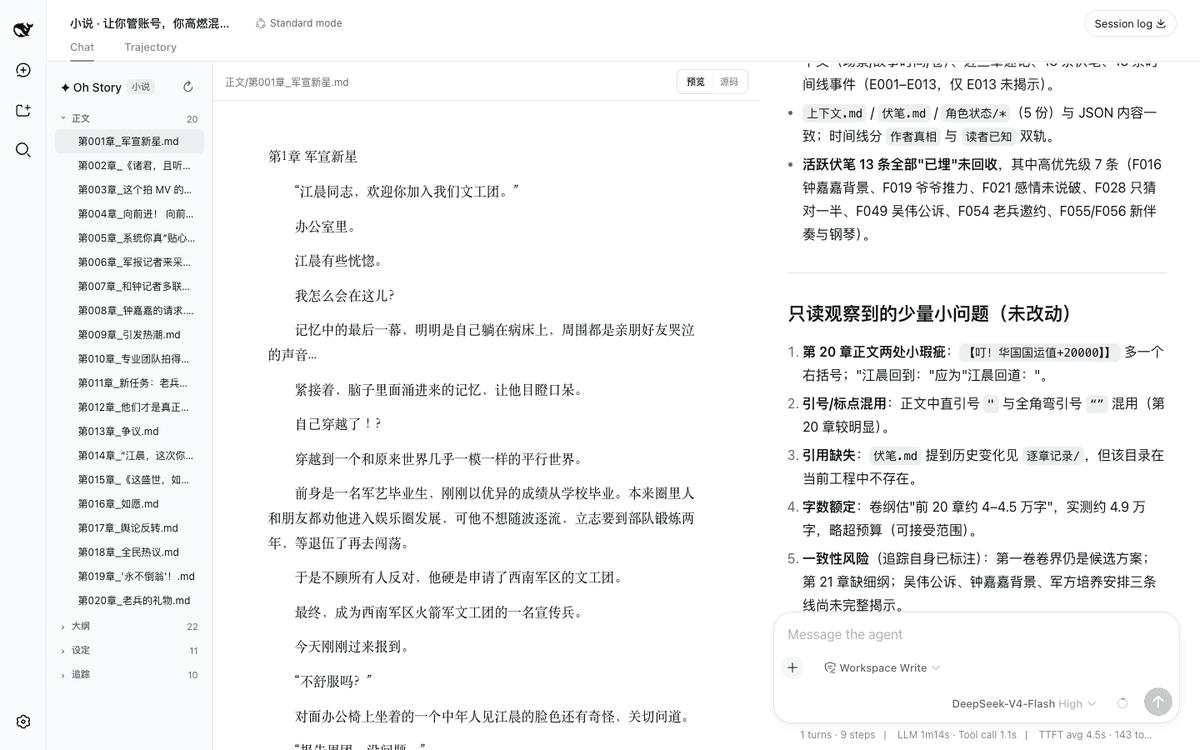 zenstory-ai/oh-story-dsh
DeepSeek 写网文/小说的工作流插件:DeepSeek Harness 社区插件,内置小说、短剧、游戏、视频解说四个工作台 | Community DeepSeek Harness plugin with novel, short-d…
zenstory-ai/oh-story-dsh
DeepSeek 写网文/小说的工作流插件:DeepSeek Harness 社区插件,内置小说、短剧、游戏、视频解说四个工作台 | Community DeepSeek Harness plugin with novel, short-d…
-
 QCYTSN/dsh-dafeiyu
Desktop-native BigFish companion for DeepSeek Harness — real Agent status, always on top on Windows.
QCYTSN/dsh-dafeiyu
Desktop-native BigFish companion for DeepSeek Harness — real Agent status, always on top on Windows.
-
 vlln/whale-girl
DSH Web GUI 桌面宠物插件(QQ 宠物形态):右下角悬浮、可拖拽/投喂/玩耍的积累型伙伴。
vlln/whale-girl
DSH Web GUI 桌面宠物插件(QQ 宠物形态):右下角悬浮、可拖拽/投喂/玩耍的积累型伙伴。
-
 Ayase34/gal-view
把dsh会话界面切换成galgame游戏界面的插件
Ayase34/gal-view
把dsh会话界面切换成galgame游戏界面的插件
-
 ChisaAlter/WhaleIsle
鲸屿 Whale Isle · DeepSeek Harness 社区增强桌面版:官方核心功能齐备,扩展主题壁纸、鲸鱼娘桌宠、用量统计与手机远程连接。Community-enhanced DeepSeek Harness desktop c…
ChisaAlter/WhaleIsle
鲸屿 Whale Isle · DeepSeek Harness 社区增强桌面版:官方核心功能齐备,扩展主题壁纸、鲸鱼娘桌宠、用量统计与手机远程连接。Community-enhanced DeepSeek Harness desktop c…