HiWhaleW/dsh-toolbox
DSH Toolbox is a DeepSeek Harness companion for individual, local-first workflows. Four plugins run as native DSH Profile Bundles. DSH Switchboard runs outside the active Harness process to inspect Profiles, run health checks, preview Bundle changes, create backups, and roll changes back safely.
catalog 简介 / catalog descriptioncatalog description:Local-first DeepSeek Harness plugins for product research, context routing, plugin preflight, and compatibility monitoring.
项目介绍Project Overview
DSH Toolbox 是本地优先的 DeepSeek Harness 工具箱,含产品研究、上下文切换、插件预检、兼容性监测及可视化控制台。用于检查 Profile、规划 Bundle 变更、备份回滚和生成报告。数据默认存本地 SQLite,变更需确认;但项目为实验性 MVP,仅限非商业使用。
DSH Toolbox is a local-first DeepSeek Harness toolbox combining product research, context switching, plugin preflight, compatibility monitoring, and a visual control panel. Use it to inspect Profiles, plan Bundle changes, back up or roll back, and generate reports. Runtime data stays in local SQLite, and writes require confirmation. It is an experimental MVP and licensed for noncommercial use only.
请帮我了解并安装插件:【dsh-toolbox】【https://github.com/HiWhaleW/dsh-toolbox】把上面这条消息直接发给当前会话里的 DSH,让它帮你了解并安装。安装命令不一定准确,发给 DSH 更稳。Send this message to DSH in your current session. CLI install commands may not be accurate across systems — DSH will figure it out for you.
或使用命令行安装(适合开发者)Or use CLI install (for developers)
命令行安装CLI Install
dsh plugin --profile web add github:HiWhaleW/dsh-toolbox把 HiWhaleW/dsh-toolbox 加入你的 DSH 配置(web profile)即可启用。
READMEREADME
DSH Toolbox
A local-first toolbox for DeepSeek Harness.
Product research, context switching, plugin preflight, and compatibility monitoring in one safety-focused visual control panel.





Live interactive demo · Five-minute installation · Report an issue
[!NOTE] The online version is a safe demo: health checks, Bundle toggles, change plans, activity, and rollback are simulated in the current browser's memory and reset on refresh. It never connects to a visitor's computer or reads DSH Profiles, API credentials, or SQLite data. Install the local version to connect to a real DSH workflow.
[!IMPORTANT] Experimental MVP · Noncommercial use only. DeepSeek Harness remains in Developer Preview, and upgrades may affect Profile Bundle compatibility. This project is independently developed and is not affiliated with or endorsed by DeepSeek.
What is DSH Toolbox?
DSH Toolbox is a DeepSeek Harness companion for individual, local-first workflows. Four plugins run as native DSH Profile Bundles. DSH Switchboard runs outside the active Harness process to inspect Profiles, run health checks, preview Bundle changes, create backups, and roll changes back safely.
There are no accounts, hosted backends, behavioral analytics, telemetry, background registry checks, or automatic upgrades by default. Real runtime data stays in local SQLite. Profile changes always begin with a plan, require user confirmation before writing, and leave an auditable transaction record.
Five components
| Component | Everyday use | Tools |
|---|---|---|
@dsh-toolbox/product-research-workbench |
Import URL or text evidence, organize findings, evaluate opportunities, back up projects, and generate Markdown/HTML reports. | 12 |
@dsh-toolbox/context-switchboard |
Route tasks into bounded contexts, activate native runtime context, and support rollback. | 10 |
@dsh-toolbox/plugin-preflight |
Inspect local Bundles before installation for package semantics, capabilities, policy, SBOM data, and fingerprints. | 2 |
@dsh-toolbox/compatibility-radar |
Discover Bundles, compare them with a target runtime, save and compare snapshots, and generate upgrade reports. | 7 |
@dsh-toolbox/dsh-switchboard |
Discover DSH Profiles, inspect Bundles, plan and validate changes, create backups and reports, and roll back safely. | CLI / control plane |
The first four components are independently installable DSH Profile Bundles. The fifth is the unified local control plane. Product Research Workbench and related reports support Markdown and HTML output, while runtime data is stored in SQLite by default.
Online demo vs. local installation
| Capability | Online demo | Local installation |
|---|---|---|
| Explore four views and a fixed activity sidebar | Available | Available |
| Switch Profiles, filter activity, and review Bundle plans | Simulated in browser memory | Connected to real local data |
Run dsh --dump-config health checks |
Simulated success result | Real command execution |
| Write Profiles, create backups, roll back, and generate reports | No writes; resets on refresh | Real execution after plan confirmation |
| Data destination | Current browser memory | SQLite and private directories on the user's computer |
Requirements
- Node.js
^22.19.0 || >=24.0.0(node:sqliteis built in) - npm, for packing the local bundles
@deepseek-ai/dsh@0.1.1-rc.2- A local DSH profile you are allowed to modify
Read-only Switchboard inspection works without the DSH CLI on PATH. Applying or rolling back a change requires the CLI by default because a successful dsh --profile <name> --dump-config is the runtime safety gate.
The tested runtime combination is:
| Component | Tested version |
|---|---|
| DeepSeek Harness | 0.1.1-rc.2 |
| DSH Tools | 0.1.1-rc.2 |
| Cordis | 4.0.1 |
| Node.js | 24.x and the declared 22.19+ range |
CI runs the full check and package dry-run matrix on Ubuntu with Node.js 22.19.0 and 24.x. A separate windows-latest job verifies that Switchboard can detect and execute npm-installed dsh.cmd shims without enabling shell execution.
Install the pinned DSH CLI if it is not already available:
npm install --global @deepseek-ai/dsh@0.1.1-rc.2
dsh --version
Five-minute installation
Clone the source, create the four npm tarballs, and install them into one DSH profile:
git clone https://github.com/HiWhaleW/dsh-toolbox.git
cd dsh-toolbox

mkdir -p dist
npm pack --workspace @dsh-toolbox/product-research-workbench --pack-destination dist
npm pack --workspace @dsh-toolbox/context-switchboard --pack-destination dist
npm pack --workspace @dsh-toolbox/plugin-preflight --pack-destination dist
npm pack --workspace @dsh-toolbox/compatibility-radar --pack-destination dist

dsh plugin --profile toolbox add ./dist/dsh-toolbox-product-research-workbench-0.2.1.tgz
dsh plugin --profile toolbox add ./dist/dsh-toolbox-context-switchboard-0.2.1.tgz
dsh plugin --profile toolbox add ./dist/dsh-toolbox-plugin-preflight-0.2.1.tgz
dsh plugin --profile toolbox add ./dist/dsh-toolbox-compatibility-radar-0.2.1.tgz

dsh --profile toolbox --dump-config
The final command should show all four bundle layers. Start DSH with the same profile:
dsh --profile toolbox
You may install only the tarballs you need. Packing does not execute plugin code and does not require repository dependencies to be installed. Direct checkout-path installation is also possible after npm install at the repository root, but tarballs match npm packaging semantics and are the validated portable flow.
Each package pins the small DSH tool-definition runtime needed for reliable out-of-tree installation. There are no install lifecycle scripts.
Open the DSH Switchboard GUI
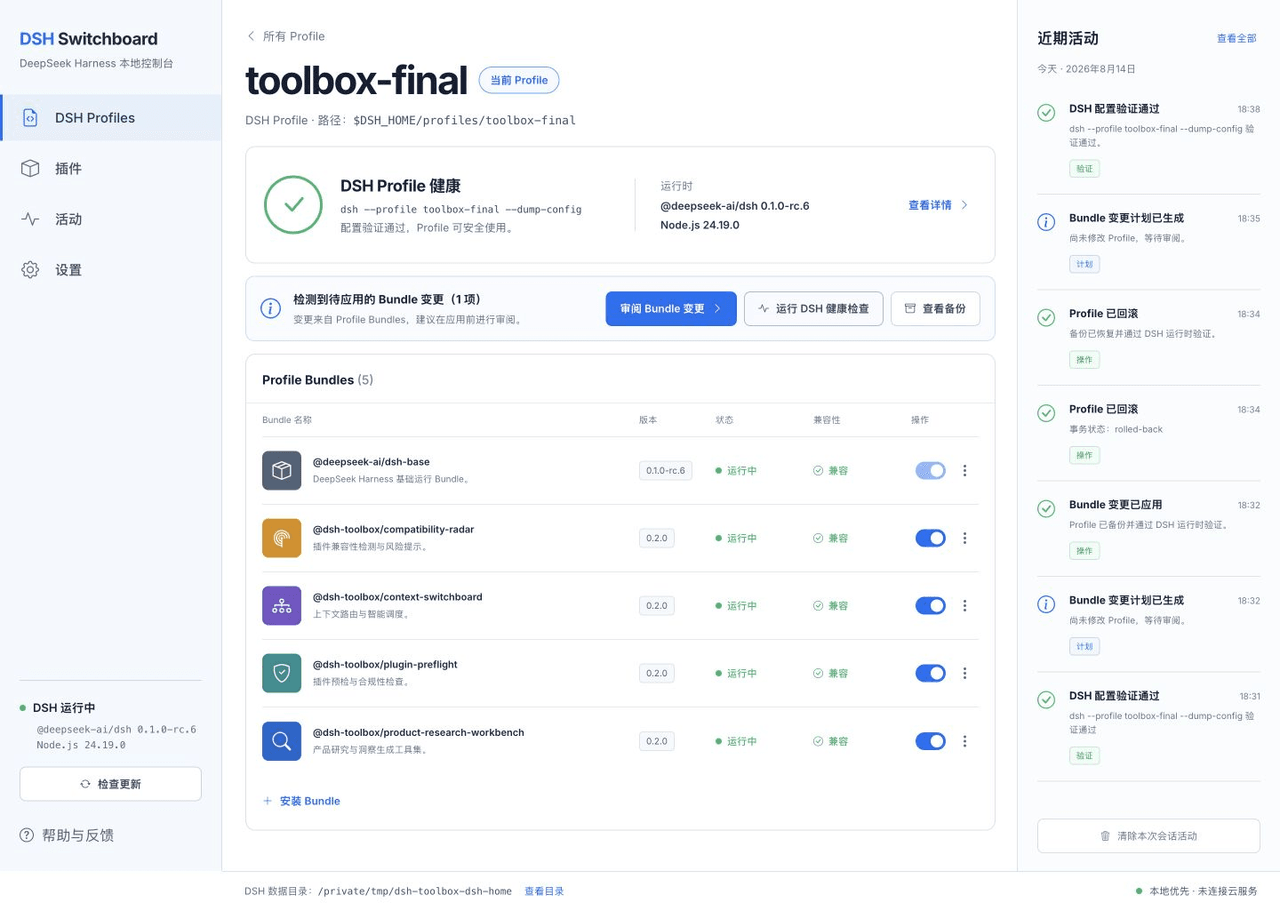
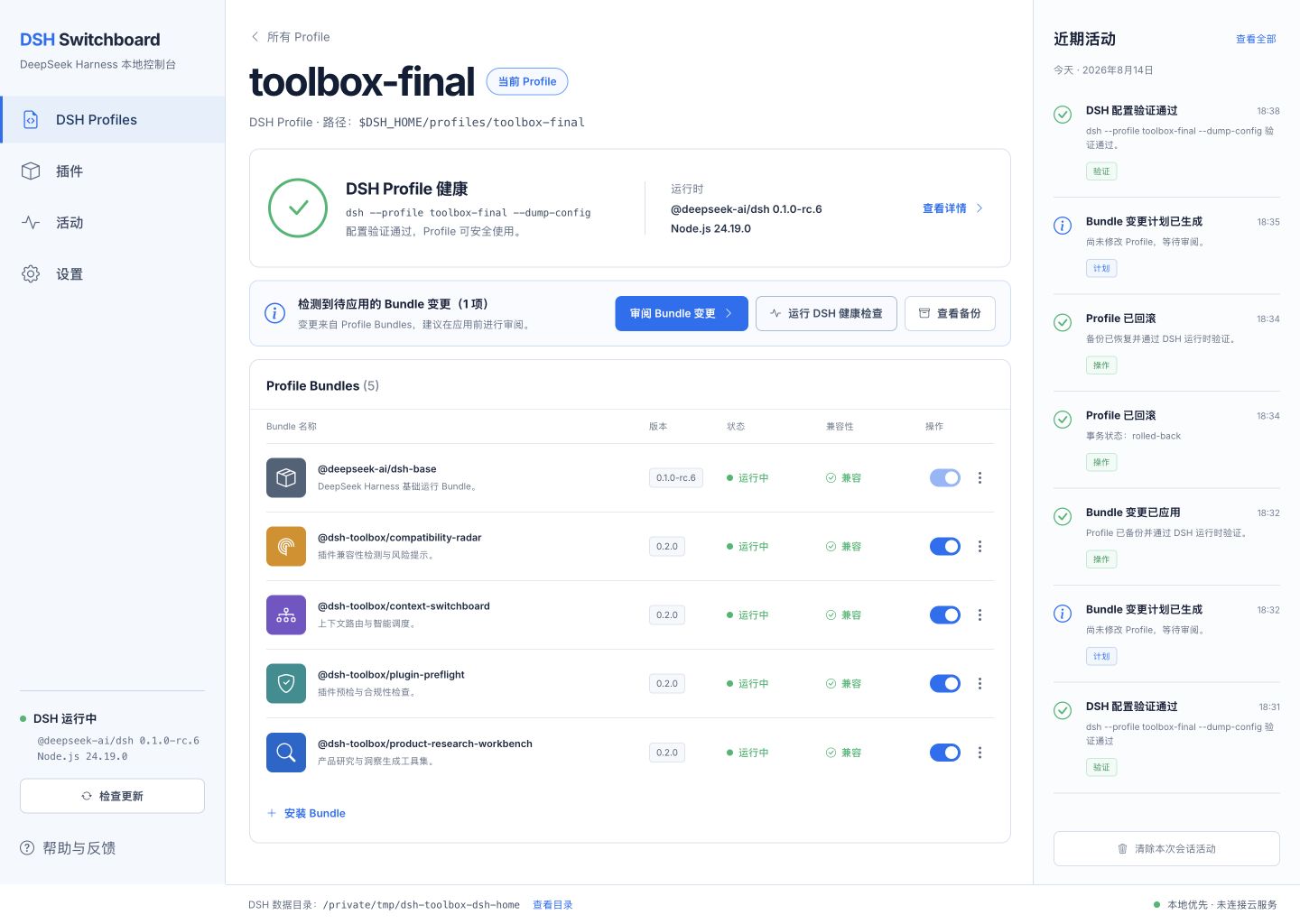
DSH Switchboard is a local settings app for DeepSeek Harness. It shows which Profiles and Profile Bundles are installed, checks whether a Profile can start, previews every change, and keeps a backup so the change can be rolled back safely.
The navigation opens four working views in the center panel:
- DSH Profiles — inspect a Profile, run its DSH health check, review installed Bundles, and plan enable/disable changes.
- Plugins — view the Bundle inventory and its compatibility status.
- Activity — inspect local plans, validations, applied changes, and rollbacks.
- Settings — review the detected DSH runtime and local data locations.
Recent activity remains visible on the right while you move between views. Long lists scroll inside their own panels, so the overall application frame stays fixed and readable.
The local backup dialog also has an explicit Back up now action. These manual Profile snapshots can be restored later; before restoring one, Switchboard first saves the current Profile as a new recovery point, then restores the selected snapshot and runs DSH configuration validation. If validation fails, it attempts to return to that recovery point automatically.
From the repository checkout:
pnpm install --frozen-lockfile
pnpm switchboard:gui
Then open http://127.0.0.1:4173/. The server listens only on the local computer. It reads Profiles from $DSH_HOME/profiles, never displays API credential values, and requires a review step before writing Profile files.
Use DSH Switchboard from the command line
Switchboard is currently a source-distributed technical preview and is not an npm dependency of any DSH profile. Run it from the checkout:
npm run switchboard -- detect
npm run switchboard -- profiles
npm run switchboard -- inspect toolbox
npm run switchboard -- health toolbox
npm run switchboard -- backup toolbox
The backup command immediately saves a restorable snapshot of the current Profile in Switchboard's private local data directory. Restoring a manual snapshot creates a fresh recovery point first and validates the restored Profile with DSH.
Mutation commands are plan-first and make no change unless --apply is present:
npm run switchboard -- bundle disable toolbox @dsh-toolbox/context-switchboard
npm run switchboard -- bundle disable toolbox @dsh-toolbox/context-switchboard --apply
npm run switchboard -- history
Switchboard keeps SHA-256 state fingerprints, atomic-write backups, and SQLite receipts. It rejects stale plans and refuses rollback over a later user edit. See the Switchboard README and architecture RFC.
How to use the plugins
These packages register tools inside DSH; they are not standalone shell commands. Ask the agent to run the named tool, or describe the outcome and let DSH select it.
Product Research Workbench
Suggested flow:
research_create → research_add_source → research_extract
→ research_evidence_add (optional human correction)
→ research_analyze → research_report
Example request:
Create a research project called "Local AI research workflows".
Import this pasted interview text, extract evidence, analyze the opportunities,
and generate both Markdown and HTML reports.
URL import accepts public unauthenticated http(s) pages. It blocks loopback, private, link-local, metadata, and other non-public destinations by default. Authenticated crawling, browser cookies, CAPTCHA bypass, and social-media scraping are outside the MVP.
Context Switchboard
Suggested flow:
context_profile_save → context_route → context_activate
→ context_current / context_history → context_rollback
Example request:
Save a context profile named "DSH plugin development" with the keywords
"dsh", "cordis", and "plugin"; use a 1,200-token budget. Route this task,
activate the best profile, and show me the activation receipt.
Activation uses DSH's native systemPrompt.context() registry. It contributes a bounded runtime-context snapshot and does not replace the deployment persona, sandbox policy, or approval policy.
Plugin Preflight
Example request:
Run plugin_preflight_scan on packages/context-switchboard and explain every
finding before I install it. Then create the Markdown and HTML audit report.
Preflight is static and read-only: it does not run scripts, install dependencies, follow symlinks, or contact registries. A clean scan is not a security guarantee.
Compatibility Radar
Example request:
Discover DSH bundles under packages, check them against DSH Tools 0.1.1-rc.2,
Cordis 4.0.1, and my current Node version, then save a compatibility snapshot.
Before changing DSH or Cordis versions, save a second snapshot and use compatibility_diff or compatibility_report to identify regressions. Radar never upgrades software automatically.
Local data and outputs
| Plugin | Default local data |
|---|---|
| Product Research Workbench | ~/.local/share/dsh-toolbox/product-research-workbench |
| Context Switchboard | ~/.local/share/dsh-toolbox/context-switchboard |
| Plugin Preflight | ~/.local/share/dsh-toolbox/plugin-preflight |
| Compatibility Radar | ~/.local/share/dsh-toolbox/compatibility-radar |
| DSH Switchboard | ~/.local/share/dsh-toolbox/dsh-switchboard |
The plugins and control plane use SQLite and create Markdown plus self-contained HTML reports where applicable. Generated reports load no remote scripts. Runtime databases, reports, exports, sessions, environment files, and cookies are excluded by the repository .gitignore, but you should still inspect staged changes before every commit.
Research reports and exports may contain source text, quotations, URLs, local paths, project names, copyrighted material, or personal information. Review them before sharing. See PRIVACY.md and SECURITY.md for the complete boundaries.
License: noncommercial use only
DSH Toolbox 0.2.1 and later is source-available under the PolyForm Noncommercial License 1.0.0.
Permitted uses include personal study, research, experiments, hobby projects, education, charitable/nonprofit work, public research, public safety, environmental protection, and government work as defined by the license.
Commercial use is not permitted. Do not use this software, modified versions, or derived works for direct or indirect commercial advantage, including paid products or services, revenue-generating operations, commercial consulting deliverables, or internal business benefit. The canonical license text controls if this summary differs from it.
This restriction applies to the original DSH Toolbox code. DeepSeek Harness, Cordis, DSH Tools, and other dependencies remain under their own licenses; see THIRD_PARTY_NOTICES.md.
Historical note: copies of earlier versions that were already distributed under MIT remain subject to the grants that accompanied those copies. The 0.2.1 license change does not retroactively revoke rights already granted.
Contributing
Read CONTRIBUTING.md and the Code of Conduct before contributing. By submitting a contribution, you agree that it may be distributed under the repository's current noncommercial license.
相关推荐Related
-
 nexu-io/open-design
🎨 Best DeepSeek Harness Design Plugin. The open-source Claude Design alternative. 🖥️ Local-first desktop app. 🖼️ Your…
nexu-io/open-design
🎨 Best DeepSeek Harness Design Plugin. The open-source Claude Design alternative. 🖥️ Local-first desktop app. 🖼️ Your…
-
 ruvnet/ruflo
🌊 The original agent meta-harness. Deploy intelligent multi-player swarms, coordinate autonomous workflows, and build c…
ruvnet/ruflo
🌊 The original agent meta-harness. Deploy intelligent multi-player swarms, coordinate autonomous workflows, and build c…
-
 amruthpillai/reactive-resume
A one-of-a-kind resume builder that keeps your privacy in mind. Completely secure, customizable, portable, open-source a…
amruthpillai/reactive-resume
A one-of-a-kind resume builder that keeps your privacy in mind. Completely secure, customizable, portable, open-source a…
-
 esengine/DeepSeek-Reasonix
DeepSeek-native AI coding agent for your terminal. Engineered around prefix-cache stability — leave it running.
esengine/DeepSeek-Reasonix
DeepSeek-native AI coding agent for your terminal. Engineered around prefix-cache stability — leave it running.
-
 volcengine/OpenViking
Self-evolving Context Database for AI Agents. Unify Agent Memory, Knowledge RAG and Skills.
volcengine/OpenViking
Self-evolving Context Database for AI Agents. Unify Agent Memory, Knowledge RAG and Skills.
-
 Molunerfinn/PicGo
:rocket: The Ultimate Image Uploader for Efficient Creators. Supports Obsidian, Typora, VS Code etc. and 60+ image hosti…
Molunerfinn/PicGo
:rocket: The Ultimate Image Uploader for Efficient Creators. Supports Obsidian, Typora, VS Code etc. and 60+ image hosti…
-
 titanwings/distilly
Distilly — Distill how they think into reusable Skills for any Agent or Bot. Formerly Colleague Skill(原同事 Skill).
titanwings/distilly
Distilly — Distill how they think into reusable Skills for any Agent or Bot. Formerly Colleague Skill(原同事 Skill).
-
 titanwings/colleague-skill