hongxin/dsh-tvision
A character-cell window manager for DeepSeek Harness agents. Overlapping framed windows on a textured desktop, a Borland menu bar, a function-key strip, mouse dragging, and five skins — installed as an ordinary dsh profile bundle, not a fork.
catalog descriptioncatalog 简介 / catalog description:Turbo Vision-style character-cell window manager for DeepSeek Harness agents
Project Overview项目介绍
tvision is a character-cell window manager built for the DeepSeek Harness (DSH) coding agent. It renders overlapping framed windows on a textured desktop, a Borland-style menu bar, a function-key strip, mouse dragging, and ships five skins — Turbo C blue, P3 amber CRT, phosphor green, Slate, and an ANSI One Dark look — inside a single binary. The project mounts as an ordinary DSH profile bundle rather than a fork: clone, npm install, npm run build, then dsh plugin --profile tvision add "$(pwd)", after which dsh --profile tvision starts an agent session in the current directory and supports --resume <session-id>, --skin amber, and --no-mouse flags. The repository carries a bundle-manifest so it slots into DSH's existing plugin surface, and once published to npm the install path collapses to a single dsh plugin --profile tvision add dsh-tvision line.
The typical workflow has a developer launching the profile inside a real terminal: the left column hosts the transcript and the agent's streaming turns, the right side shows a project tree and a Tasks panel, and the bottom status bar reports upload and download counters for the session. The menu bar exposes File, View, Agent, Tools, Window, and Help entries and is opened with F10, while F1 lists the key bindings and F2 through F7 switch between common actions. It targets users who appreciate the retro feel of Turbo Vision, Midnight Commander, or moc but still want full integration with DSH's streaming chat, reasoning traces, approval prompts, and tool round trips. A scripted demo, runnable via node lib/demo.js (with --skin amber and --list-skins options), lets newcomers try the desktop without a key, a profile, or any network access.
Dependencies are minimal: Node ^22.19 || >=24 and the dsh CLI, with DEEPSEEK_API_KEY supplied through the environment, a local .env, or $DSH_HOME, and self-hosted endpoints configured via DEEPSEEK_BASE_URL or settings.yaml's llm-deepseek.baseURL. The desktop checks GitHub for updates once per day at boot, surfaces a status cell and a one-per-version notice, and /update performs an in-place git checkout or dsh plugin --profile tvision up dsh-tvision, a behaviour that can be disabled with updateCheck: false. The project is MIT-licensed, its implementation is original, and the integration deliberately mirrors the open-source DSH terminal front end recovered as @dsh-tui/dsh-tui; tests include xterm.js headless grid comparisons, ASCII snapshots, and a real pty sweep matrix, while scripts/tv-report.py produces a self-contained bug report with terminal size, environment, final screen, and raw bytes.
tvision 是一款面向 DeepSeek Harness(DSH)编码代理的字符单元窗口管理器,提供带纹理桌面、可重叠边框窗口、Borland 风格菜单栏、功能键条与鼠标拖拽支持,五套皮肤内置于同一二进制中,包括经典的 Turbo C 蓝、P3 琥珀 CRT、绿磷、Slate 以及 ANSI One Dark 风格。它通过 DSH profile 形式挂载:dsh plugin --profile tvision add <path> 之后即可用 dsh --profile tvision 启动会话,也支持 --resume <session-id>、--skin amber、--no-mouse 等参数;项目本身在仓库中以 bundle-manifest 形式发布,发布到 npm 后将简化为 dsh plugin --profile tvision add dsh-tvision。
典型工作流是开发者在终端内启动该 profile,左侧为对话与代理回合流、右侧为项目文件树、底部为 Tasks 面板与上传下载计数器,菜单栏提供 File/View/Agent/Tools/Window/Help 等项并由 F10 激活。它面向喜欢 Turbo Vision、Midnight Commander 或 moc 那种复古 TUI 风格、但又需要与 DSH 代理流式会话、推理、审批与工具往返协同工作的用户;不安装 DSH 时,也可通过 node lib/demo.js 单独运行演示。
环境要求 Node ^22.19 || >=24 与 dsh CLI,需设置 DEEPSEEK_API_KEY(.env 或 $DSH_HOME),自托管端点通过 DEEPSEEK_BASE_URL 或 settings.yaml 中的 llm-deepseek.baseURL 指定;启动时每日检查 GitHub 更新,可用 updateCheck: false 关闭。项目以 MIT 协议发布,测试套件含 xterm.js headless 网格比对、ASCII 快照以及真实 pty 矩阵扫描,无 DSH 时仍可独立运行演示。
请帮我安装这个 DSH 插件。安装前先完成【兼容性检查 + 安全性检查】,检查通过再动手。

插件:dsh-tvision(hongxin/dsh-tvision)
仓库:https://github.com/hongxin/dsh-tvision
本站详情页:https://www.yhbd.top/plugins/hongxin-dsh-tvision/
本站登记:类型 plugin · 归类 原生 DSH 插件 · 许可证 MIT · ⭐ 2 · 最近提交 2026-09-27 · 主语言 TypeScript

按下面顺序执行,每步先把结论告诉我,再进入下一步:

【1 兼容性检查】
① 我这边:DSH 版本、Node 版本、操作系统、当前 profile(web / desktop)。
② 读它的 README、package.json、插件 manifest,列出它要求的 DSH 版本 / Node 版本 / 操作系统 / 外部依赖 / 需要另外先装的运行时。
③ 逐条比对,结论只写「满足 / 不满足 / 未知」三种;不满足的给出可行替代方案。
④ 检查是否和我已装的插件冲突:命令名重复、skill / tool 重名、端口占用、重复注册的 MCP server。

【2 安全性检查】
① 仓库可信度:和上面「本站登记」是否一致;star / fork 数、创建时间、最近提交,是否归档或长期停更。
② 安装脚本:逐行看 package.json 的 preinstall / install / postinstall,以及 install.sh、setup.ps1 之类脚本。出现 curl|bash、下载后直接执行、混淆代码、访问与插件功能无关的域名,立刻停下来告诉我,不要继续装。
③ 依赖:列出新增依赖,标出无人维护、或与知名包拼写近似的可疑包(typosquatting)。
④ 权限与副作用:它会读写哪些目录、访问哪些域名、需要哪些 DSH 权限(filesystem / network / shell / clipboard 等),以及怎么卸载和回滚。
⑤ 如果它要求 sudo / 管理员权限,或权限明显超出功能所需,先停下来问我。

【3 安装】
上面两步没有「不满足」和「高危项」时才执行;用官方推荐方式安装,不要自行提权。

【4 汇报】
用表格输出:检查项 / 结论 / 依据 / 是否需要我决策。拿不准的一律写「未知」并说明要我怎么确认——不要猜,也不要替我决定。
Send this message to DSH in your current session: it verifies compatibility and security first (answering met / not met / unknown item by item) and only installs once everything checks out — it will stop and ask you if it finds a high-risk item. The box scrolls; the copy is the full prompt. CLI install commands may not be accurate across systems, so DSH is the safer route.把上面这条消息直接发给当前会话里的 DSH:它会先核对兼容性与安全性(逐条给「满足 / 不满足 / 未知」),确认没问题再安装,有高危项会停下来问你。框内可滚动,复制到的是完整提示词;安装命令不一定准确,发给 DSH 更稳。
- Only 2 stars - very few users, little community feedback星标只有 2,几乎没人在用,遇到问题缺少社区反馈
DSH walks through these 9 checksDSH 会逐条核对这 9 项
Compatibility兼容性
- DSH, Node, OS and profile requirementsDSH 版本 / Node 版本 / 操作系统 / profile 是否满足要求
- External dependencies and runtimes (Electron / Python / Docker, ...)外部依赖与运行时(Electron / Python / Docker 等)是否齐备
- Conflicts with installed plugins: command names, skill / tool names, ports, duplicate MCP registration与已装插件是否冲突:命令名、skill / tool 重名、端口占用、重复 MCP 注册
Security安全性
- Repo matches the facts registered here; archived or abandoned?仓库是否与页面登记一致,是否归档或长期停更
- Safety of preinstall / install / postinstall and install.sh / setup.ps1preinstall / install / postinstall 与 install.sh、setup.ps1 是否安全
- curl|bash, download-then-execute, obfuscation, unrelated domains → stop immediatelycurl|bash、下载即执行、混淆代码、无关域名 → 立刻停止
- Typosquatting or unmaintained packages among the new dependencies新增依赖里有没有 typosquatting 或无人维护的包
- Requested permissions vs. what the feature actually needs申请了哪些权限、是否超出功能所需(filesystem / network / shell / clipboard)
- Any sudo / admin requirement, plus uninstall and rollback是否要求 sudo / 管理员权限,以及卸载与回滚方式
Anything uncertain must be marked unknown with a note on how to confirm it. This site's signal screen is a static snapshot, not a security audit.拿不准的必须标「未知」并说明要我怎么确认。本站的信号筛查是静态快照,不能替代安全审计。
Or use CLI install (for developers)或使用命令行安装(适合开发者)
CLI Install命令行安装
dsh plugin --profile tvision add "$(pwd)"把 hongxin/dsh-tvision 加入你的 DSH 配置(web profile)即可启用。
READMEREADME
tvision


A character-cell window manager for DeepSeek Harness agents. Overlapping framed windows on a textured desktop, a Borland menu bar, a function-key strip, mouse dragging, and five skins — installed as an ordinary dsh profile bundle, not a fork.
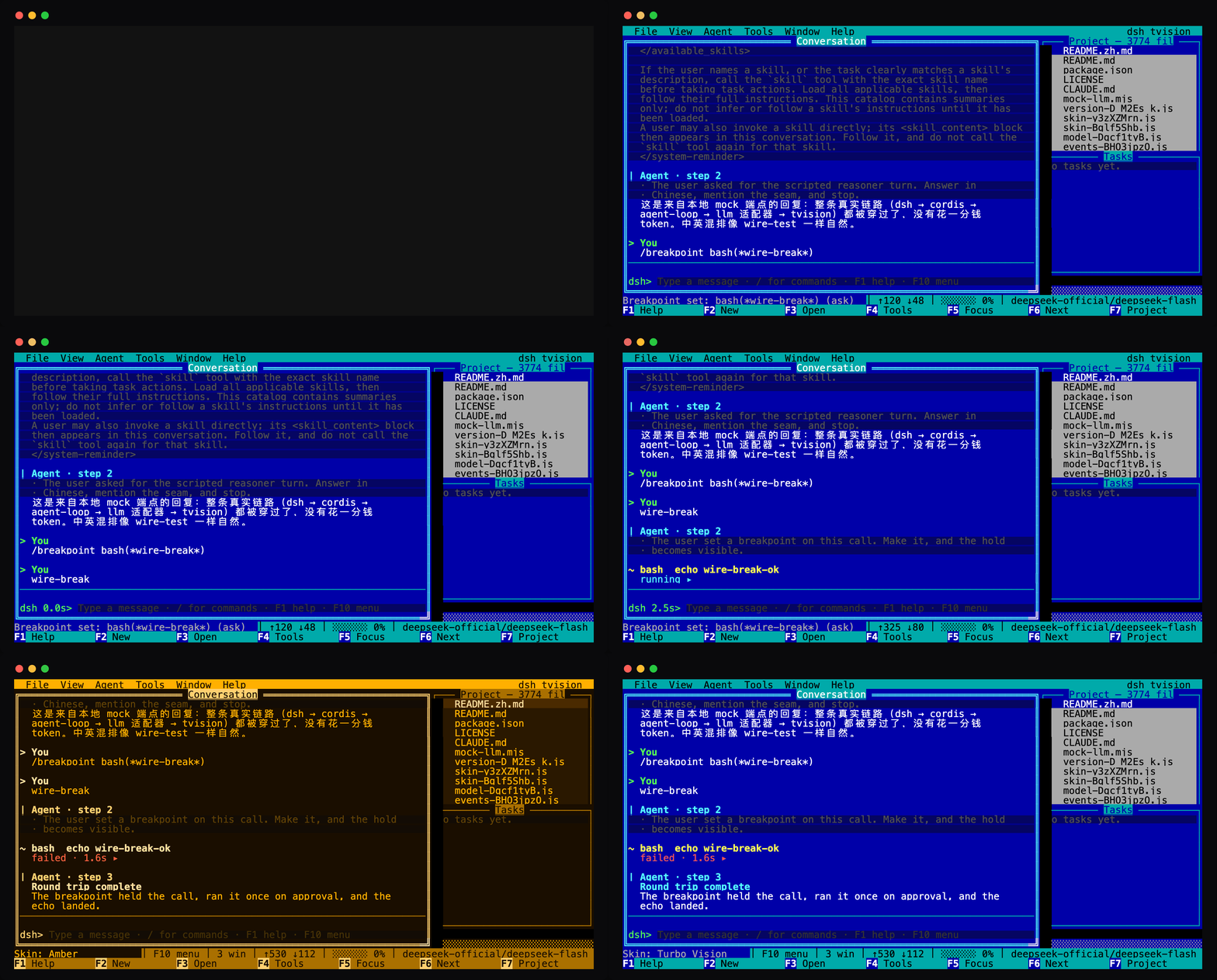
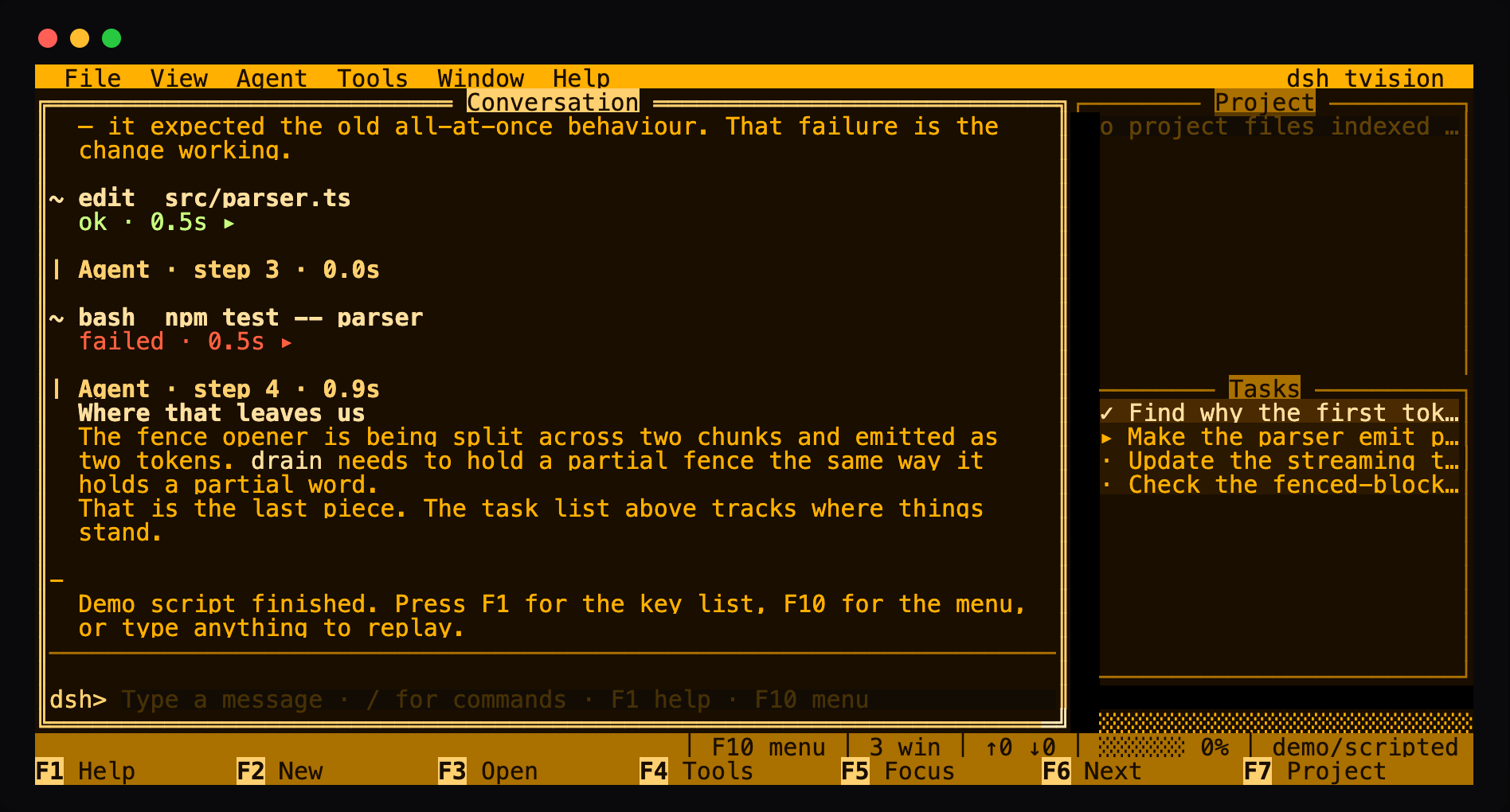
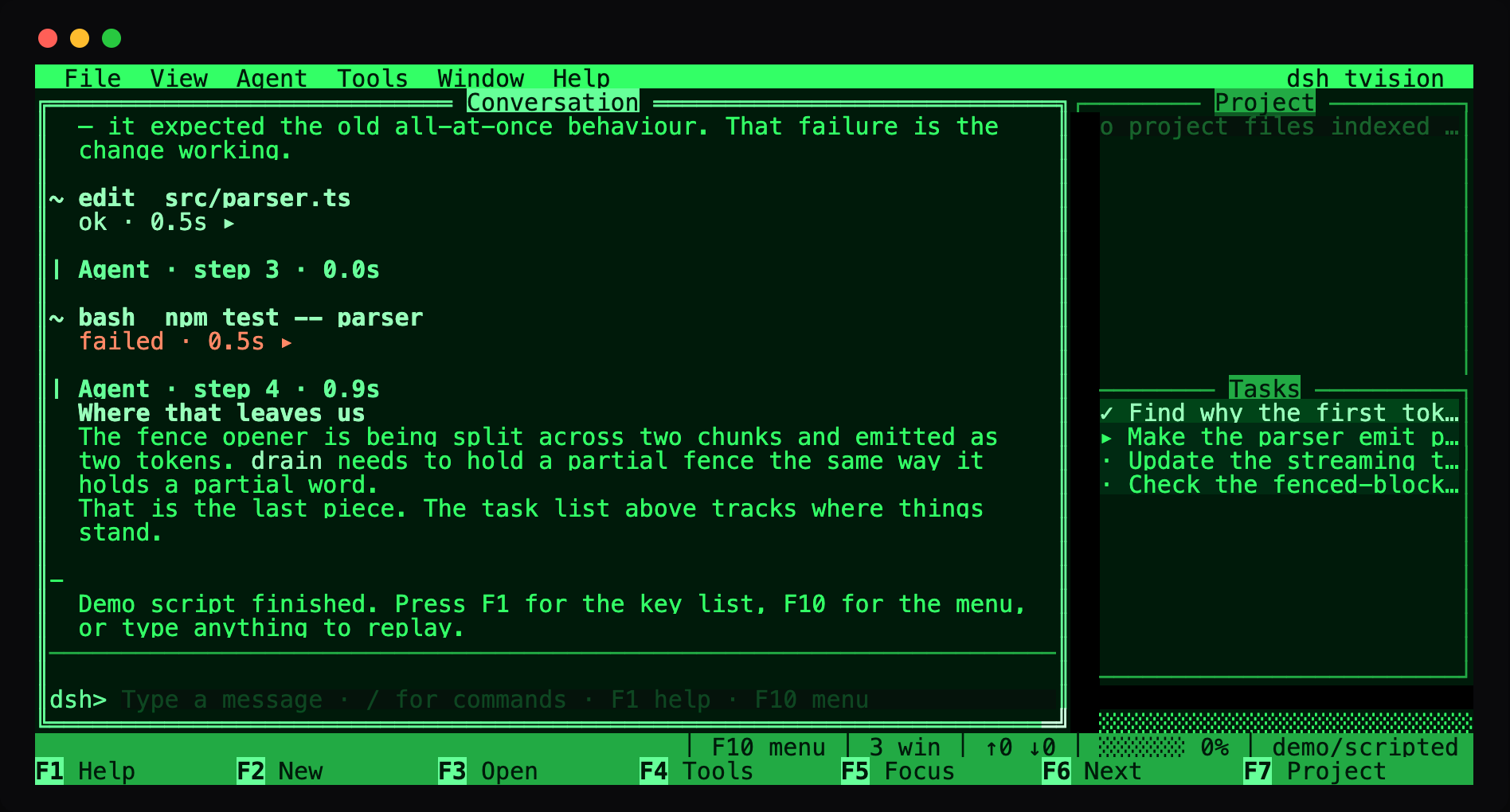
The blue your hands remember from Turbo C — and four more looks ship in the same binary:
| Amber CRT | Phosphor | Slate | ANSI (One Dark style) |
|---|---|---|---|
 |
 |
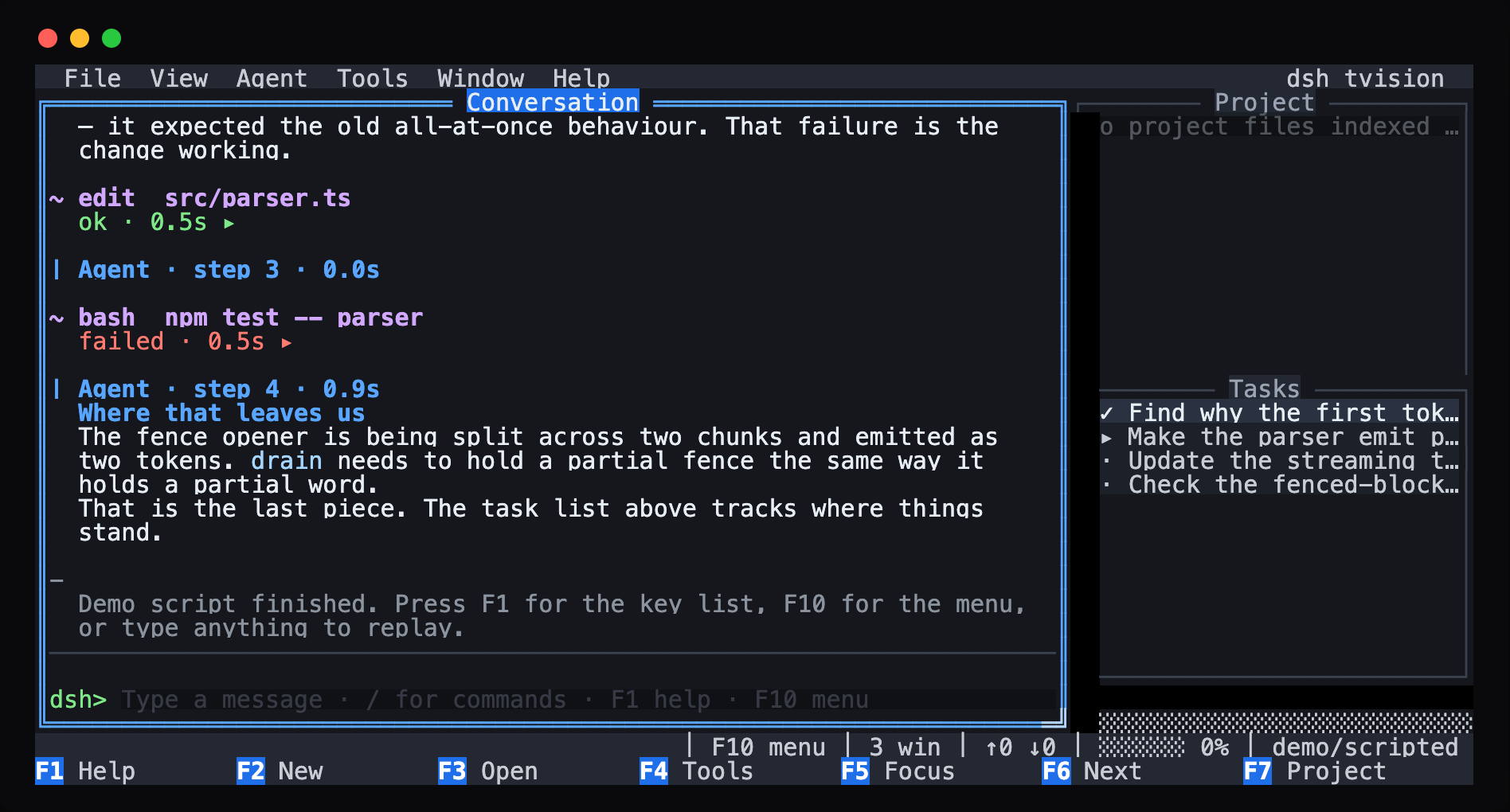 |
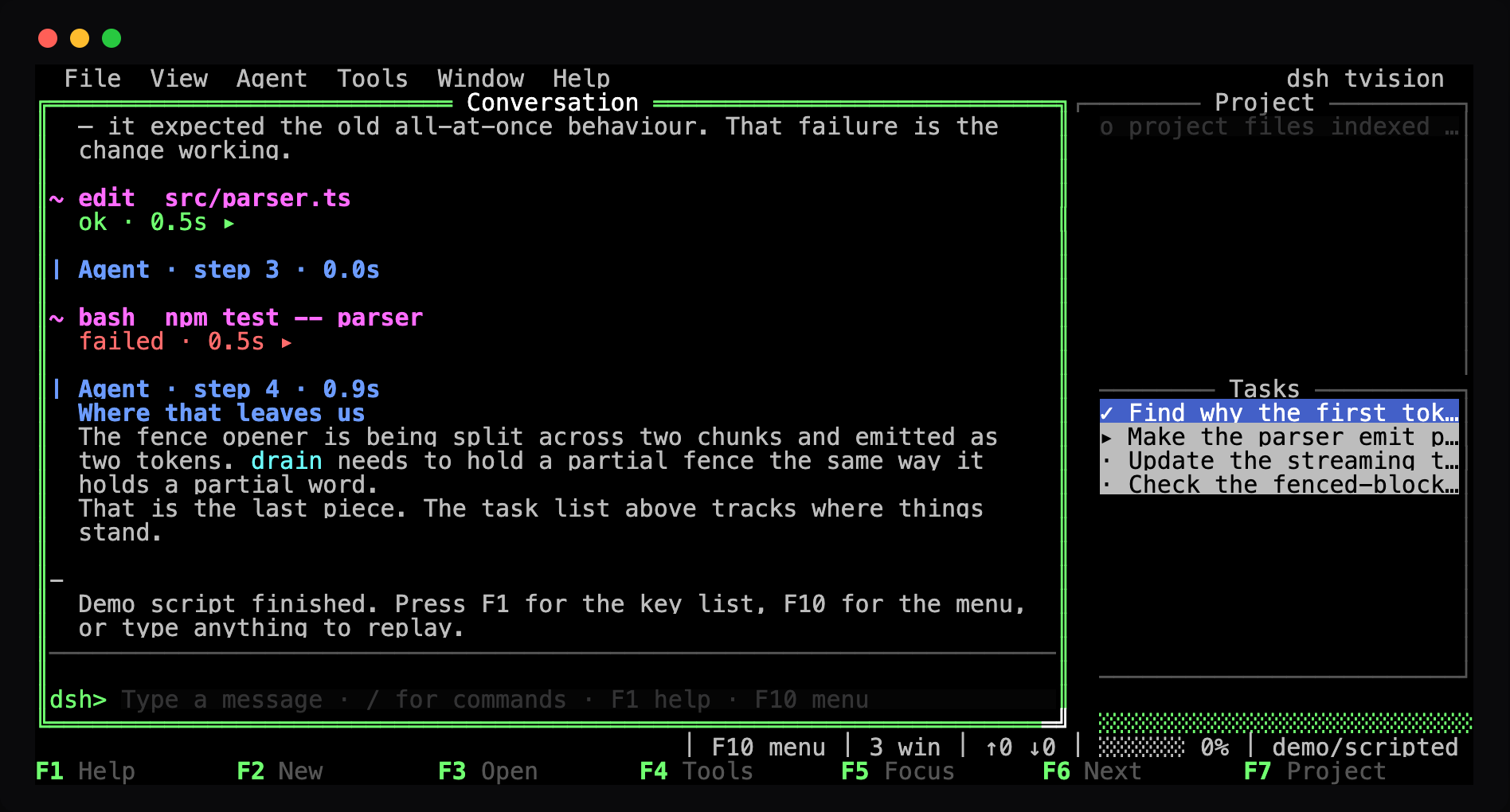 |
  File  View  Agent  Tools  Window  Help                        dsh tvision
╔═════════════════════════ Conversation ═════════════════════════╗┌───── Project ──────┐
║> You                                                            ║  o src/parser.ts   │
║  why is the first token so slow?                                ║  o src/stream.ts   │
║                                                                 ║  o README.md       │
║| Agent · 1.4s                                                   ║                    │
║  The parser buffers the whole document before it emits          ║                    │
║  anything, which is why the first token never arrives until     ║                    │
║  the whole file is read.                                        ║                    │
║                                                                 ║                    │
║~ bash  npm test -- parser                                       ║┌────── Tasks ───────┐
║  ok ▸                                                           ║  ✓ Find why it is  │
║                                                                 ║  ▸ Make the parser │
║─────────────────────────────────────────────────────────────────║  · Update the test │
║dsh> refactor it so it streams                                   ║                    │
╚═════════════════════════════════════════════════════════════════╝  ░░░░░░░░░░░░░░░░░░░
             │ F10 menu │ 3 win │ ████░░ 62% │ ↑12.4k ↓3.1k │ deepseek-flash
F1 Help      F2 New       F3 Open      F4 Tools     F5 Focus     F6 Next      F7 Project
Showing the opening section of the README — the full document lives in the repository以上为 README 开头摘要,完整文档在仓库内 · View the full README on GitHub →在 GitHub 查看完整 README →
Related相关推荐
-
 Devin-AXIS/iPolloWork
Enterprise-grade, local-first Agent Workbench for people and agent teams. A unified multi-engine workspace for Codex Har…
Devin-AXIS/iPolloWork
Enterprise-grade, local-first Agent Workbench for people and agent teams. A unified multi-engine workspace for Codex Har…
-
 ysr666/dsh-vision-router
Eyes for text-only DeepSeek Harness agents: built-in free vision chain (no key) + pixel-level vision tools (Q&A, groundi…
ysr666/dsh-vision-router
Eyes for text-only DeepSeek Harness agents: built-in free vision chain (no key) + pixel-level vision tools (Q&A, groundi…
-
 Anionex/dsh-vision-toolkit
[dsh]为纯文本模型设计更强大的视觉工具箱:一行安装使用、粘贴图片直接识别、多张图片问答、截图到前端UI 还原等|DeepSeek Harness-native integration for agent-vision-toolkit: …
Anionex/dsh-vision-toolkit
[dsh]为纯文本模型设计更强大的视觉工具箱:一行安装使用、粘贴图片直接识别、多张图片问答、截图到前端UI 还原等|DeepSeek Harness-native integration for agent-vision-toolkit: …
-
 sunchaokun/PPT-Design-Skill
Precision PPT design skill for OpenCode/Claude Code/Codex, with 40,000+ styles, pixel-perfect Build Mode control, AI ima…
sunchaokun/PPT-Design-Skill
Precision PPT design skill for OpenCode/Claude Code/Codex, with 40,000+ styles, pixel-perfect Build Mode control, AI ima…
-
 zhaoolee/notes
开源版锤子便签,复刻锤科美学,一键Docker私有化部署,支持skill调用,支持dsh plugin,支持多租户,一键生成公众号格式,支持导出便签为图片
zhaoolee/notes
开源版锤子便签,复刻锤科美学,一键Docker私有化部署,支持skill调用,支持dsh plugin,支持多租户,一键生成公众号格式,支持导出便签为图片
-
 volcengine/ark-cli
The fastest way to put Volcengine Ark in your terminal and your AI agent — go from prompt to generated media, multimod…
volcengine/ark-cli
The fastest way to put Volcengine Ark in your terminal and your AI agent — go from prompt to generated media, multimod…
-
 runzhliu/deepseek-harness-docker
Community Docker and Kubernetes packaging for DeepSeek Harness (@deepseek-ai/dsh), with a hardened image, Compose stack,…
runzhliu/deepseek-harness-docker
Community Docker and Kubernetes packaging for DeepSeek Harness (@deepseek-ai/dsh), with a hardened image, Compose stack,…
-
 labring/sealos-skills
AI agent skills for Sealos — deploy any project, provision databases, object storage & more with one command. Works with…
labring/sealos-skills
AI agent skills for Sealos — deploy any project, provision databases, object storage & more with one command. Works with…