huabai-flowerwhite/dsh-ui-skin
面向 DeepSeek Harness 的 **UI 皮肤插件**:在 UI 下方注入壁纸 / 视频背景,并把 DSH 整个界面(含侧栏)的表面背景烘焙为半透明(毛玻璃)让皮肤透出。支持拖动裁剪缩放、历史皮肤记录与可拖动悬浮窗;自定义皮肤支持网络地址或本地文件。
项目介绍Project Overview
dsh-ui-skin 是 DeepSeek Harness 的 UI 皮肤插件,向界面注入壁纸或视频背景,并通过 ctx.theme.overrideTokens() 将 DSH 全界面(含侧栏)表面背景设为半透明,让背景透出。支持拖动裁剪缩放、历史记录与可拖动悬浮窗,自定义皮肤支持网络地址或本地文件。配置存于 localStorage,视频 Blob 存于 IndexedDB。注意:侧栏半透明 0.6 是透出与可读性的折中,图片压缩为 1920px JPEG 0.85,受浏览器存储配额限制。
dsh-ui-skin is a UI skin plugin for DeepSeek Harness that injects wallpaper or video backgrounds and uses ctx.theme.overrideTokens() to bake the DSH interface (including sidebar) surfaces as semi-transparent so the background shows through. It supports drag-to-crop and zoom, history records, and a draggable floating panel; custom skins accept network URLs or local files. Configs persist in localStorage and video Blobs in IndexedDB. Note: sidebar opacity (0.6) balances translucency and text readability; local images are compressed to 1920px JPEG at 0.85, bounded by browser storage quota. Crop zoom scales up only (1.0–4.0) to avoid revealing the base color.
请帮我了解并安装插件:【dsh-ui-skin】【https://github.com/huabai-flowerwhite/dsh-ui-skin】把上面这条消息直接发给当前会话里的 DSH,让它帮你了解并安装。安装命令不一定准确,发给 DSH 更稳。Send this message to DSH in your current session. CLI install commands may not be accurate across systems — DSH will figure it out for you.
或使用命令行安装(适合开发者)Or use CLI install (for developers)
命令行安装CLI Install
dsh plugin --profile web add github:huabai-flowerwhite/dsh-ui-skin把 huabai-flowerwhite/dsh-ui-skin 加入你的 DSH 配置(web profile)即可启用。
READMEREADME
dsh ui skin
面向 DeepSeek Harness 的 UI 皮肤插件:在 UI 下方注入壁纸 / 视频背景,并把 DSH 整个界面(含侧栏)的表面背景烘焙为半透明(毛玻璃)让皮肤透出。支持拖动裁剪缩放、历史皮肤记录与可拖动悬浮窗;自定义皮肤支持网络地址或本地文件。
依据 DH-TP-SDK(
DeepSeek-Harness-Third-Party-Plugin-SDK-Specification.md)工程化第三方插件规范落地。Bronze/Silver/Gold、P0–P4、S0–S4 均非 DeepSeek 官方认证。
使用
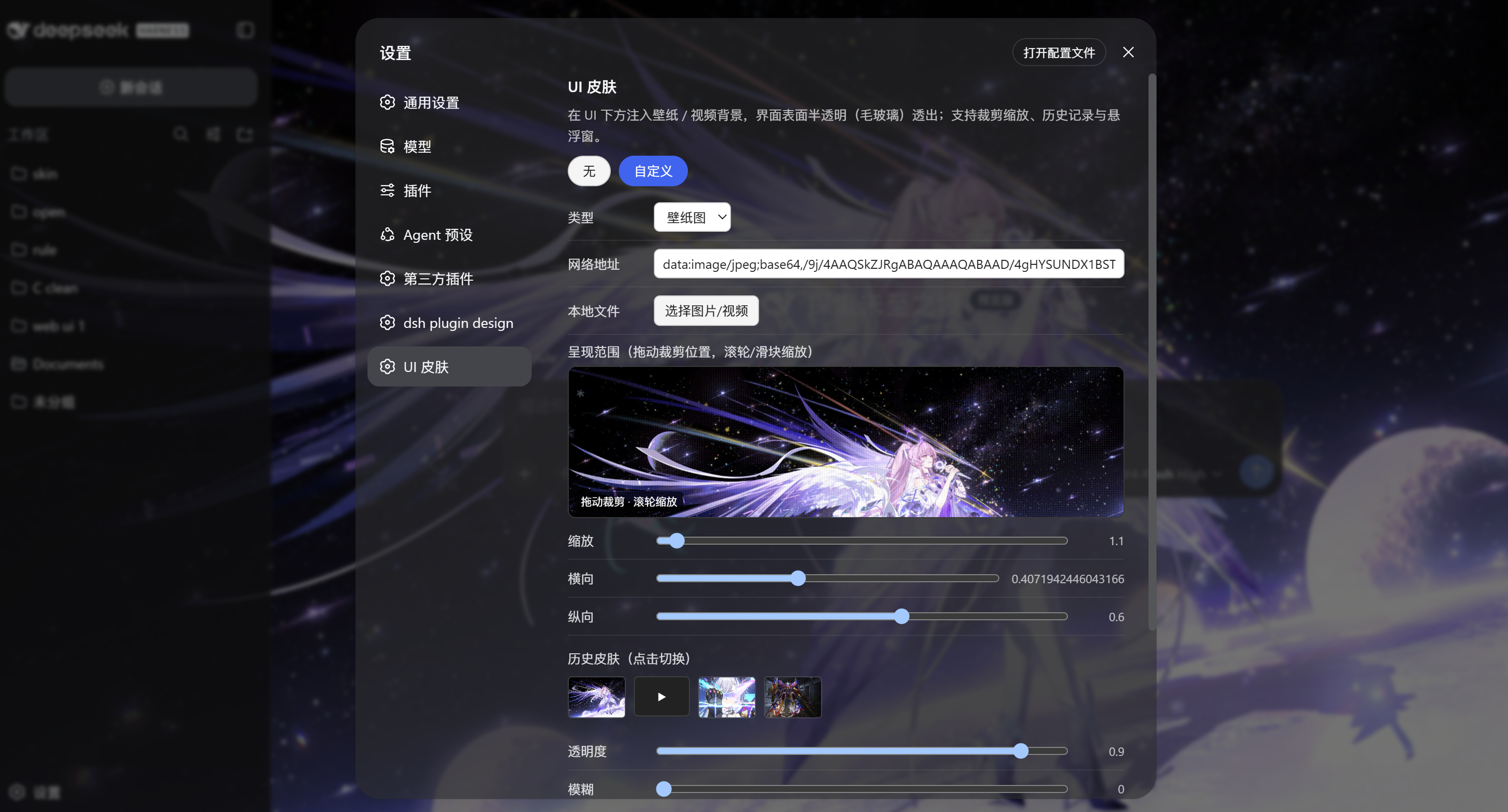
安装后重启 dsh,打开 设置 → UI 皮肤 切换皮肤与参数(配置持久化到浏览器
localStorage)。「自定义」里可填网络地址,或点「选择图片/视频」从本地文件夹选取;拖动预览区裁剪位置、滚轮缩放;上传自动进「历史皮肤」;点「展开悬浮窗」弹出可拖动快捷面板。
聊天框中可调用
skin_list查看皮肤清单。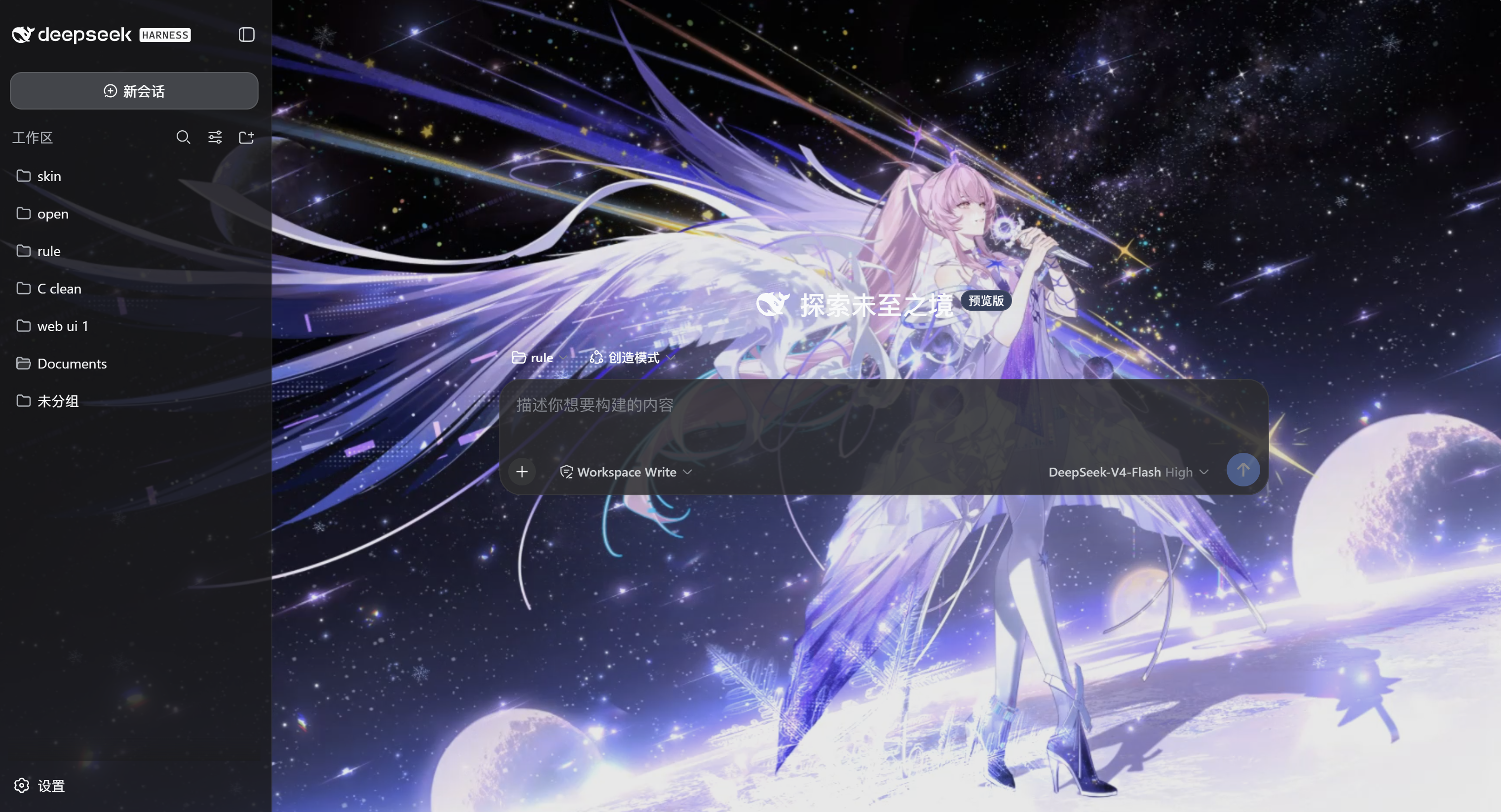
皮肤清单
| id | 名称 | 类型 | 说明 |
|---|---|---|---|
none |
无 | — | 不使用背景(原版 UI) |
custom |
自定义 | 壁纸 / 视频 | 网络地址,或从本地文件夹选择图片 / 视频文件 |
目录结构
dsh-ui-skin/
├── package.json         # exports["."]/["./client"]/["./package.json"] + dsh.client + dsh.bundle
├── dsh.plugin.yaml      # DH-TP-SDK manifest
├── cordis.patch.yml     # host composition insert row 参考
├── README.md / design.md
├── install.ps1 / install.sh
├── LICENSE
├── src/
│   ├── index.js         # Host 入口 → host.js
│   ├── host.js          # Host 半体:skin_list 工具 + /dsh-ui-skin/skins 路由
│   └── client.js        # Client 源码(ESM)
├── lib/
│   └── client.js        # Client 工厂函数 bundle(实际被加载)
└── tests/
    ├── README.md
    └── manifest.test.mjs
能力
- Host 半体:
skin_list只读工具(列出皮肤清单)+/dsh-ui-skin/skins本地路由。 - Client 半体:背景层引擎(壁纸 / 视频,支持拖动裁剪缩放)+ 毛玻璃(
ctx.theme.overrideTokens()半透明表面,覆盖整个界面含侧栏)+ 历史皮肤记录 + 可拖动悬浮窗 + 「设置 → UI 皮肤」设置页。本地图片压缩后存localStorage,本地视频存 IndexedDB。
工作原理
- 背景层:
<div data-dsh-ui-skin="background">固定层,z-index:0、pointer-events:none,插入document.body首部,位于页面背景之上、UI 内容之下。 - 毛玻璃透出:用官方扩展点
ctx.theme.overrideTokens()把 DSH 表面 token(--dsw-alias-bg-*、--dsw-specific-sidebar-fill等)烘焙为半透明 rgba,让壁纸从整个界面(含侧栏)透出;切回「无」时回收覆盖。 - 裁剪缩放:
transform: scale() + transform-origin联动——scale放大图片,transform-origin决定露出哪个区域。注意不能用background-position,它在cover下横向裁剪余量趋近 0(拖不动)。 - 存储:配置与图片历史存
localStorage(图片压缩为 1920px JPEG);视频 Blob 存 IndexedDB。
完整的技术决策与踩坑记录见 design.md §7。
安装(一条命令)
本插件是 npm 包 + host composition row 形态:Host 工具全局注册 + Client 皮肤 UI 全局加载,重启后自动加载。
Windows(PowerShell)
cd dsh-ui-skin
powershell -ExecutionPolicy Bypass -File install.ps1
Linux / macOS(bash)
cd dsh-ui-skin
bash install.sh
脚本幂等。装完后重启 dsh(Ctrl+C 后重新 npx dsh web / dsh web)。
脚本做了什么(手动安装等价步骤)
- 把本目录链接进 node_modules:
$DSH_HOME/profiles/node_modules/dsh-ui-skin -> 本目录 - 在
$DSH_HOME/profiles/<profile>/cordis.patch.yml追加:- insert: - id: dsh-ui-skin name: 'dsh-ui-skin'
安全边界
- Security Level S1 / Permission Level P1:只读 Host 工具 + 本地路由 + 纯 UI。
- 不读不写文件、不发外部网络、不跑 shell/subprocess、不含密钥。
- Client 半体仅用公开
ctx/slots能力;背景层是插件自有 DOM(pointer-events:none),不读取或修改任何业务 DOM。 - 视频背景尊重
prefers-reduced-motion(减少动效时暂停)。
已知限制
custom皮肤的网络 URL 需浏览器可访问;插件自身不发外部网络。- 本地图片压缩为 JPEG(0.85,1920px 宽)后存
localStorage,受站点配额约束;本地视频存 IndexedDB。 - 侧栏半透明(0.6)是"整个界面透出"与"文字可读"的折中,如需更强可读性,可在
lib/client.js的SKIN_TOKENS里调高--dsw-specific-sidebar-fill(如 0.75)。 - 裁剪缩放只放大不缩小(scale 1.0–4.0),避免缩小露出底色。
- Agent 反应式强度(事件 →
setIntensity)与 WebGL/Shader 渲染未实现(后续能力)。 dshpd_analyze是启发式扫描,会误报嵌套 manifest 的plugin.id等字段(参考实现dsh-plugin-design同样命中,属工具缺陷,见 design.md §7.7)。
相关推荐Related
-
 ruvnet/ruflo
🌊 The original agent meta-harness. Deploy intelligent multi-player swarms, coordinate autonomous workflows, and build c…
ruvnet/ruflo
🌊 The original agent meta-harness. Deploy intelligent multi-player swarms, coordinate autonomous workflows, and build c…
-
 Tencent/WeKnora
Open-source LLM knowledge platform: turn raw documents into a queryable RAG, an autonomous reasoning agent, and a self-m…
Tencent/WeKnora
Open-source LLM knowledge platform: turn raw documents into a queryable RAG, an autonomous reasoning agent, and a self-m…
- Nagi-ovo/voyager Enhancement suite for Gemini, AI Studio, Claude & ChatGPT — plus a prompt manager for any web UI, DeepSeek Harness inclu…
-
 freestylefly/awesome-gpt-image-2
Prompt as Code | GPT-Image2 工业级提示词引擎与模板库,470+ 个案例逆向工程,20+ 套工业级模板,并提炼出Skills,持续更新中
freestylefly/awesome-gpt-image-2
Prompt as Code | GPT-Image2 工业级提示词引擎与模板库,470+ 个案例逆向工程,20+ 套工业级模板,并提炼出Skills,持续更新中
-
 EverMind-AI/EverOS
One portable memory layer for every AI agent: local-first, Markdown-native, user-owned, and self-evolving across apps, t…
EverMind-AI/EverOS
One portable memory layer for every AI agent: local-first, Markdown-native, user-owned, and self-evolving across apps, t…
-
 MemTensor/MemOS
Self-evolving memory OS for LLM & AI Agents: ultra-persistent memory, hybrid-retrieval, and cross-task skill reuse, with…
MemTensor/MemOS
Self-evolving memory OS for LLM & AI Agents: ultra-persistent memory, hybrid-retrieval, and cross-task skill reuse, with…
-
 zhu1090093659/dsh-web-ui
Plugin and skin collection for DeepSeek Harness (DSH) Web UI - task board, git graph, right-side panel, remote mobile UI…
zhu1090093659/dsh-web-ui
Plugin and skin collection for DeepSeek Harness (DSH) Web UI - task board, git graph, right-side panel, remote mobile UI…
-
 edison7009/EchoBird
One-click install + model switch:Claude Code,Codex CLI (OpenAI), Grok Build (xAI), DeepSeek Harness, Kimi Code (Moonshot…
edison7009/EchoBird
One-click install + model switch:Claude Code,Codex CLI (OpenAI), Grok Build (xAI), DeepSeek Harness, Kimi Code (Moonshot…