HuanLinOTO/dsh-plugin-sleep
向模型暴露sleep工具,按指定毫秒暂停后返回,支持取消/限制
Project Overview项目介绍
This is a native plugin built exclusively for DeepSeek Harness (DSH). It exposes a sleep tool to the large language model called by DSH, allowing the model to pause execution for a specified number of milliseconds before resuming. It is designed for scenarios where you need to wait for time-related conditions to be met and no event-based tool is available, such as waiting for service restarts, debounce windows, or retry backoff. The recommended installation method is running the command dsh plugin --profile web add @huanlin/dsh-plugin-sleep to pull the package directly from npm. Pre-built artifacts are already checked into the repository, so no build permissions or extra steps are required after installation.
This plugin is intended for DSH plugin developers and users who need to handle time-dependent tasks with DSH agents. Instead of writing custom pause logic from scratch, developers can directly call the existing sleep tool in their automation workflows that require waiting. Before first use, users can configure two parameters in the DSH GUI settings page or the cordis.patch.yml file: maxDurationMs sets an upper limit on any single sleep request, and defaultDurationMs sets a fallback value when the model omits the duration parameter. These configuration options let users enforce safety limits that match their specific use case requirements.
The repository’s license is declared as NOASSERTION. For development, it uses pnpm as the package manager, and development dependencies include schemastery, typescript, and vitest. Common development commands include pnpm install to install dependencies, pnpm run typecheck for type checking, pnpm test to run over 35 unit test cases, and pnpm run build to compile source to the lib/ directory. The plugin respects abort signals: if a sleep is cancelled mid-execution, it does not throw an error, instead returning a result with cancelled: true to indicate the non-ideal business state. All output follows the standard JSON format required by DSH plugin development guidelines.
这是一个专为DeepSeek Harness(DSH)开发的原生插件,它向DSH调用的大语言模型暴露了一个sleep工具,允许模型按照指定的毫秒数暂停执行任务,之后再继续返回结果。该插件适用于需要等待时间相关条件成立却没有事件型工具可用的场景,比如服务重启、防抖窗口、重试退避等场景都可以使用。安装支持从npm源直接安装,也支持本地开发链路安装,预构建产物已入库,开箱即用无需额外开启构建权限。
插件面向DSH插件开发者和需要让模型处理时间依赖任务的用户,开发者在开发需要等待的自动化流程时,可直接调用这个sleep工具,无需自行实现暂停和超时处理逻辑。用户使用前可在DSH图形界面的设置页或者cordis.patch.yml配置文件中,设置单次sleep的最大时长,以及模型省略时长参数时的默认回退时长,满足不同场景下对暂停时长的安全限制需求。
该插件的license声明为NOASSERTION,开发依赖包括schemastery、typescript和vitest,需要pnpm包管理器来安装开发依赖和执行构建、测试等流程。插件支持abort信号中断,如果sleep过程中触发取消,工具不会抛出错误,而是立即返回cancelled为true的结果,方便上层处理业务非理想态。所有工具返回都遵循规范JSON格式,符合DSH插件开发指南的合规要求。
请帮我安装这个 DSH 插件。安装前先完成【兼容性检查 + 安全性检查】,检查通过再动手。

插件:dsh-plugin-sleep(HuanLinOTO/dsh-plugin-sleep)
仓库:https://github.com/HuanLinOTO/dsh-plugin-sleep
本站详情页:https://www.yhbd.top/plugins/huanlinoto-dsh-plugin-sleep/
本站登记:类型 plugin · 归类 原生 DSH 插件 · 许可证 NOASSERTION · ⭐ 9 · 最近提交 2026-09-30 · 主语言 TypeScript

按下面顺序执行,每步先把结论告诉我,再进入下一步:

【1 兼容性检查】
① 我这边:DSH 版本、Node 版本、操作系统、当前 profile(web / desktop)。
② 读它的 README、package.json、插件 manifest,列出它要求的 DSH 版本 / Node 版本 / 操作系统 / 外部依赖 / 需要另外先装的运行时。
③ 逐条比对,结论只写「满足 / 不满足 / 未知」三种;不满足的给出可行替代方案。
④ 检查是否和我已装的插件冲突:命令名重复、skill / tool 重名、端口占用、重复注册的 MCP server。

【2 安全性检查】
① 仓库可信度:和上面「本站登记」是否一致;star / fork 数、创建时间、最近提交,是否归档或长期停更。
② 安装脚本:逐行看 package.json 的 preinstall / install / postinstall,以及 install.sh、setup.ps1 之类脚本。出现 curl|bash、下载后直接执行、混淆代码、访问与插件功能无关的域名,立刻停下来告诉我,不要继续装。
③ 依赖:列出新增依赖,标出无人维护、或与知名包拼写近似的可疑包(typosquatting)。
④ 权限与副作用:它会读写哪些目录、访问哪些域名、需要哪些 DSH 权限(filesystem / network / shell / clipboard 等),以及怎么卸载和回滚。
⑤ 如果它要求 sudo / 管理员权限,或权限明显超出功能所需,先停下来问我。

【3 安装】
上面两步没有「不满足」和「高危项」时才执行;用官方推荐方式安装,不要自行提权。

【4 汇报】
用表格输出:检查项 / 结论 / 依据 / 是否需要我决策。拿不准的一律写「未知」并说明要我怎么确认——不要猜,也不要替我决定。
Send this message to DSH in your current session: it verifies compatibility and security first (answering met / not met / unknown item by item) and only installs once everything checks out — it will stop and ask you if it finds a high-risk item. The box scrolls; the copy is the full prompt. CLI install commands may not be accurate across systems, so DSH is the safer route.把上面这条消息直接发给当前会话里的 DSH:它会先核对兼容性与安全性(逐条给「满足 / 不满足 / 未知」),确认没问题再安装,有高危项会停下来问你。框内可滚动,复制到的是完整提示词;安装命令不一定准确,发给 DSH 更稳。
- Only 9 stars - very few users, little community feedback星标只有 9,几乎没人在用,遇到问题缺少社区反馈
DSH walks through these 9 checksDSH 会逐条核对这 9 项
Compatibility兼容性
- DSH, Node, OS and profile requirementsDSH 版本 / Node 版本 / 操作系统 / profile 是否满足要求
- External dependencies and runtimes (Electron / Python / Docker, ...)外部依赖与运行时(Electron / Python / Docker 等)是否齐备
- Conflicts with installed plugins: command names, skill / tool names, ports, duplicate MCP registration与已装插件是否冲突:命令名、skill / tool 重名、端口占用、重复 MCP 注册
Security安全性
- Repo matches the facts registered here; archived or abandoned?仓库是否与页面登记一致,是否归档或长期停更
- Safety of preinstall / install / postinstall and install.sh / setup.ps1preinstall / install / postinstall 与 install.sh、setup.ps1 是否安全
- curl|bash, download-then-execute, obfuscation, unrelated domains → stop immediatelycurl|bash、下载即执行、混淆代码、无关域名 → 立刻停止
- Typosquatting or unmaintained packages among the new dependencies新增依赖里有没有 typosquatting 或无人维护的包
- Requested permissions vs. what the feature actually needs申请了哪些权限、是否超出功能所需(filesystem / network / shell / clipboard)
- Any sudo / admin requirement, plus uninstall and rollback是否要求 sudo / 管理员权限,以及卸载与回滚方式
Anything uncertain must be marked unknown with a note on how to confirm it. This site's signal screen is a static snapshot, not a security audit.拿不准的必须标「未知」并说明要我怎么确认。本站的信号筛查是静态快照,不能替代安全审计。
Or use CLI install (for developers)或使用命令行安装(适合开发者)
CLI Install命令行安装
dsh plugin --profile web add @huanlin/dsh-plugin-sleep把 HuanLinOTO/dsh-plugin-sleep 加入你的 DSH 配置(web profile)即可启用。
READMEREADME
dsh-sleep

DSH 插件:向模型暴露一个 sleep 工具,让模型按指定毫秒数暂停执行后再返回。适合等待时间相关条件成立(服务重启、debounce 窗口、retry backoff)且没有事件型工具可用的场景。
安装
# 从 npm 安装(推荐):
dsh plugin --profile web add @huanlin/dsh-plugin-sleep

# 从本地 checkout 开发安装:
dsh plugin --profile web add link:D:\Projects\deepseek-harness\dsh-sleep
预构建策略:lib/ 入库,无 prepare 脚本,npm 安装开箱即用,无需 allowBuilds。
配置
在 DSH GUI 设置页或 cordis.patch.yml 中配置:
| 字段 | 类型 | 默认值 | 说明 |
|---|---|---|---|
maxDurationMs |
number | 60000 |
单次 sleep 上限毫秒数。超过会被 clamp 到此值,并在返回中标 clamped: true。 |
defaultDurationMs |
number | 0 |
当模型省略 duration_ms 时的回退值。 |
工具
sleep
暂停 N 毫秒后返回。
参数:
| 参数 | 类型 | 必填 | 说明 |
|---|---|---|---|
duration_ms |
integer | 是 | 暂停毫秒数,必须 ≥ 0。超过 maxDurationMs 会被 clamp。 |
reason |
string | 否 | 人类可读的暂停理由,会原样回显。 |
返回(规范 JSON):
{
  "requested_ms": 1000,   // 调用方原始请求值
  "actual_ms": 1002,      // 实际等待毫秒数
  "cancelled": false,     // 是否被 abort 信号中断
  "clamped": false,       // 是否因超过 maxDurationMs 被钳制
  "reason": "..."         // 可选回显
}
取消语义:如果 sleep 中途 exec.signal 被 abort,工具不抛错,而是立即返回 cancelled: true(取消属于业务非理想态,不属基础设施失败,参见 plugin-development-guide.md §3 C5)。
开发
pnpm install          # 安装开发依赖(schemastery、typescript、vitest)
pnpm run typecheck    # tsc --noEmit 类型检查
pnpm test             # vitest run 单元测试
pnpm run build        # tsc + tsdown → lib/
检查
合规自检(参见 plugin-development-guide.md §10):
- 零源码 patch:未修改 DSH checkout 任何文件
- B1:
package.json声明dsh.bundle.patch - B2: 插件自带
cordis.patch.yml(insert 行 id/name/config 齐全) - B3: patch 行
name用包名(Loader 从 profile node_modules 解析) - F1:
files含lib/+cordis.patch.yml - F2:
peerDependencies含 cordis +@deepseek-ai/dsh-tools(不用 devDependencies 冒充) - F3: typecheck/test/build script 齐全
- A4: Config 用 Schemastery schema
- A6: 不导出 default
- C4: 工具返回规范 JSON 值 + render 投影分离
- C6: 尊重
exec.signal取消在途工作 - G: Unit 测试(
tests/tools.spec.ts,35+ 用例)
目录结构
dsh-sleep/
├── src/
│   ├── index.ts        # 入口:name、inject、Config(Schemastery)、apply
│   ├── tools.ts        # sleep 工具定义 + 可取消等待逻辑 + render 投影
│   └── types.d.ts      # @deepseek-ai/dsh-tools + cordis 的环境类型声明
├── tests/
│   └── tools.spec.ts   # 单元测试(覆盖正常/取消/clamp/边界)
├── cordis.patch.yml    # bundle 层:插入 dsh-sleep 插件行
├── package.json        # dsh.bundle.patch 声明 + peerDeps
├── tsconfig.json       # NodeNext、ES2022、strict
├── tsdown.config.ts    # 单 entry(host-only,无 client bundle)
└── vitest.config.ts    # vitest forks pool
Related相关推荐
- Akimiya-z/codex-guard Quality gate for AI/Codex-generated pull requests: blocks TODO leftovers, leaked secrets, sloppy commits and red CI befo…
-
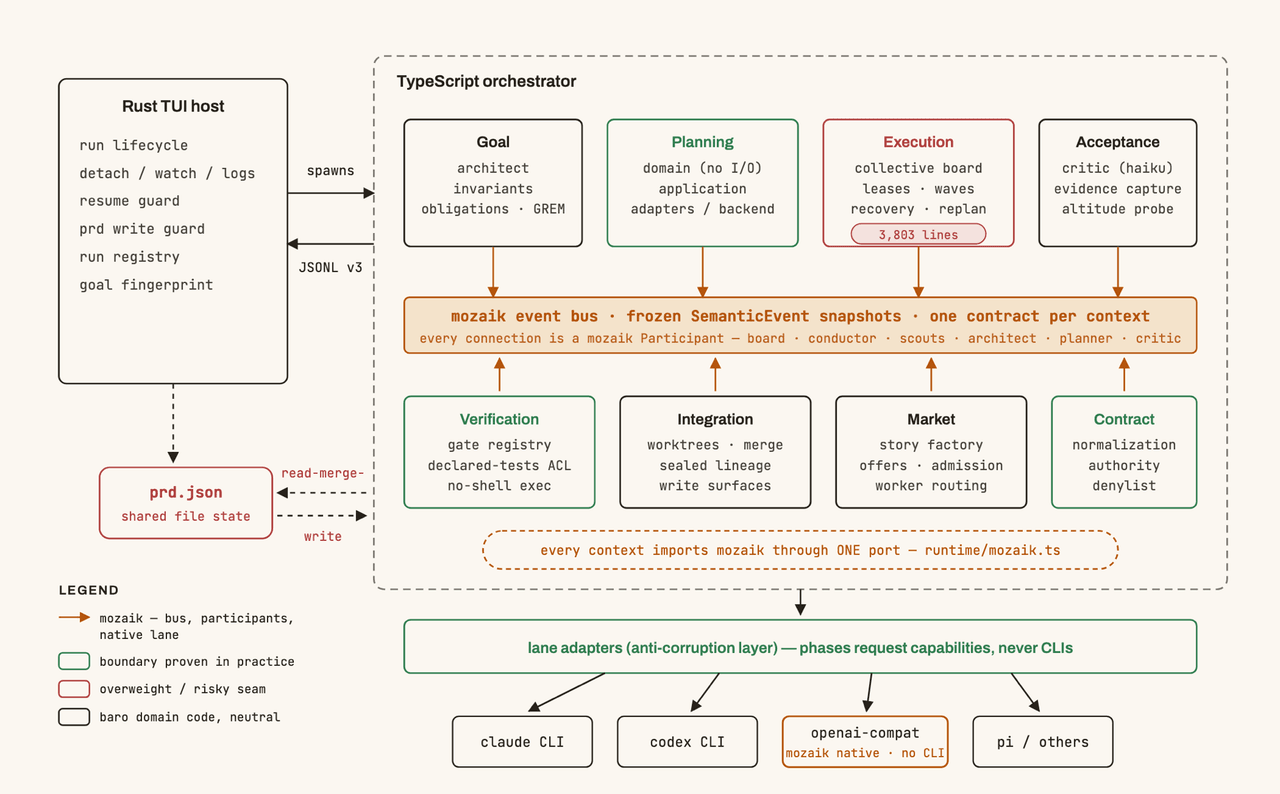 jigjoy-ai/baro
A CLI that turns a goal into a pull request - and a sandbox for testing concurrent AI coding agents on the Mozaik runtim…
jigjoy-ai/baro
A CLI that turns a goal into a pull request - and a sandbox for testing concurrent AI coding agents on the Mozaik runtim…
-
 PlutoKeating/dsh-lark-bot
DeepSeek Harness (dsh) 接入飞书/Lark bot,扫码即用:流式卡片、项目工作区、并行任务、多角色 Agent、跨会话通知、对话内模型/密钥管理与安全网守护(dsh 崩溃后飞书仍可自救)。A scan-to-conn…
PlutoKeating/dsh-lark-bot
DeepSeek Harness (dsh) 接入飞书/Lark bot,扫码即用:流式卡片、项目工作区、并行任务、多角色 Agent、跨会话通知、对话内模型/密钥管理与安全网守护(dsh 崩溃后飞书仍可自救)。A scan-to-conn…
- PerryLink/dsh-click Cross-platform native desktop control for DeepSeek Harness (Windows first): screen_shot, screen_read, click/type/scroll/…
- Yurzi/dsh-web-fetch-enhanced Configurable non-public address allowlists for DeepSeek Harness web_fetch
-
 zimzaza4/dsh-bash-win
在 Windows 环境中为 DeepSeek Harness 提供 Git Bash 与 WSL 2 bash 工具,含 bwrap 沙箱、审批模式、后台任务
zimzaza4/dsh-bash-win
在 Windows 环境中为 DeepSeek Harness 提供 Git Bash 与 WSL 2 bash 工具,含 bwrap 沙箱、审批模式、后台任务
-
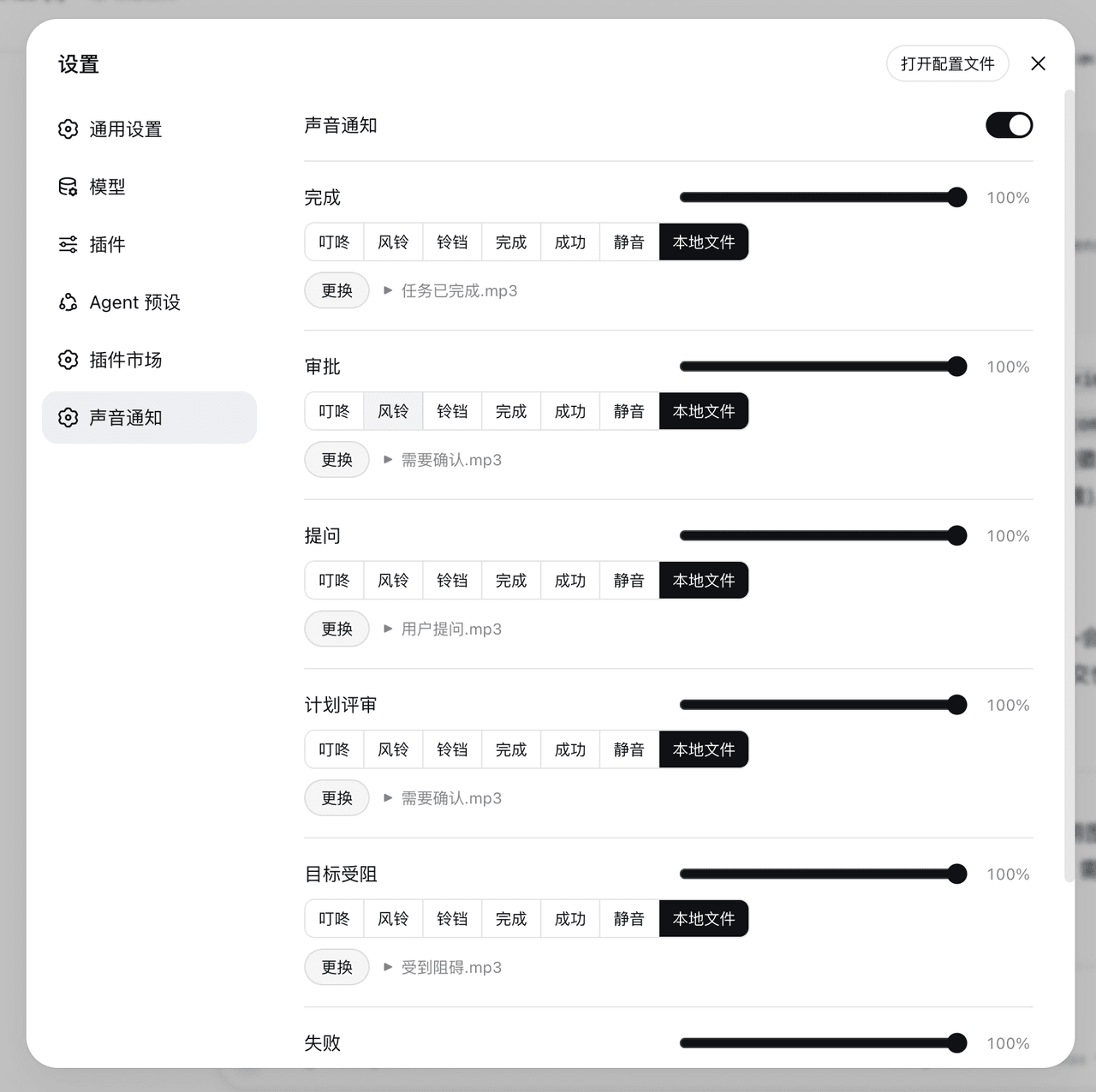 AI-Galaxy-GPU/dsh-sound
DeepSeek Harness(DSH)Web 端插件:回合完成、审批、提问、计划评审、目标受阻、任务失败各有独立提示音与音量,内置合成音 / 静音 / 本地音频文件,Web 设置面板可配置。
AI-Galaxy-GPU/dsh-sound
DeepSeek Harness(DSH)Web 端插件:回合完成、审批、提问、计划评审、目标受阻、任务失败各有独立提示音与音量,内置合成音 / 静音 / 本地音频文件,Web 设置面板可配置。
- qwe225380/dsh-omni-router Task-level reliability layer for DeepSeek Harness - decide when to intervene, prepare context, verify evidence, recover …