hxyz486/dsh-archived-conversations
归档对话查看 (archived-conversation-viewer):在 DSH 设置页查看、恢复与删除归档会话的 Cordis 插件
项目介绍Project Overview
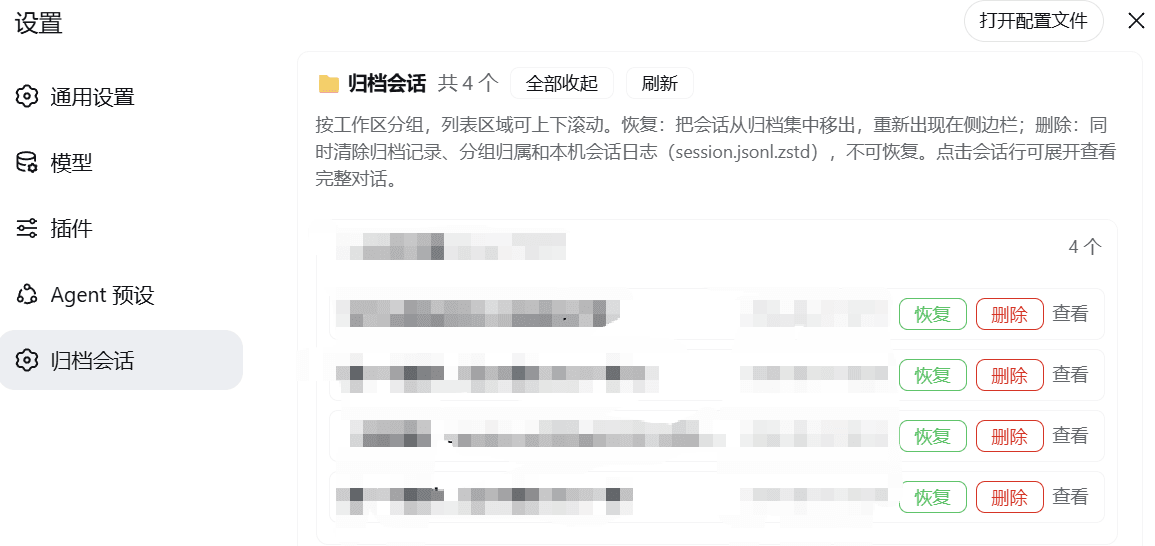
DSH 归档对话查看插件:在设置页统一管理已归档会话,按工作区分组展示,支持一键展开/收起与滚动浏览。点击会话可查看完整对话记录,并可将其恢复回侧边栏或彻底删除(含本机 session.jsonl.zstd 目录)。适用于会话较多、需要清理或回溯历史对话的场景。注意:删除为不可逆操作,且会清除本机会话日志。
Archived Conversation Viewer is a DSH Web plugin that exposes archived sessions in a dedicated settings page, grouped by workspace with expand/collapse controls and scrollable lists. Click a row to view the full transcript, restore the session to the sidebar, or delete it permanently along with the local session.jsonl.zstd log. Use it to declutter the sidebar and audit past conversations. Note that deletion is irreversible and also removes the on-disk session log.
请帮我了解并安装插件:【dsh-archived-conversations】【https://github.com/hxyz486/dsh-archived-conversations】把上面这条消息直接发给当前会话里的 DSH,让它帮你了解并安装。安装命令不一定准确,发给 DSH 更稳。Send this message to DSH in your current session. CLI install commands may not be accurate across systems — DSH will figure it out for you.
或使用命令行安装(适合开发者)Or use CLI install (for developers)
命令行安装CLI Install
dsh plugin --profile web add github:hxyz486/dsh-archived-conversations把 hxyz486/dsh-archived-conversations 加入你的 DSH 配置(web profile)即可启用。
READMEREADME
归档对话查看 (archived-conversation-viewer)
一个 DSH Web(Cordis)组合插件:在设置页查看归档会话,支持按工作区分组、一键恢复与彻底删除。刷新页面和重启 DSH 后依然保留。
功能
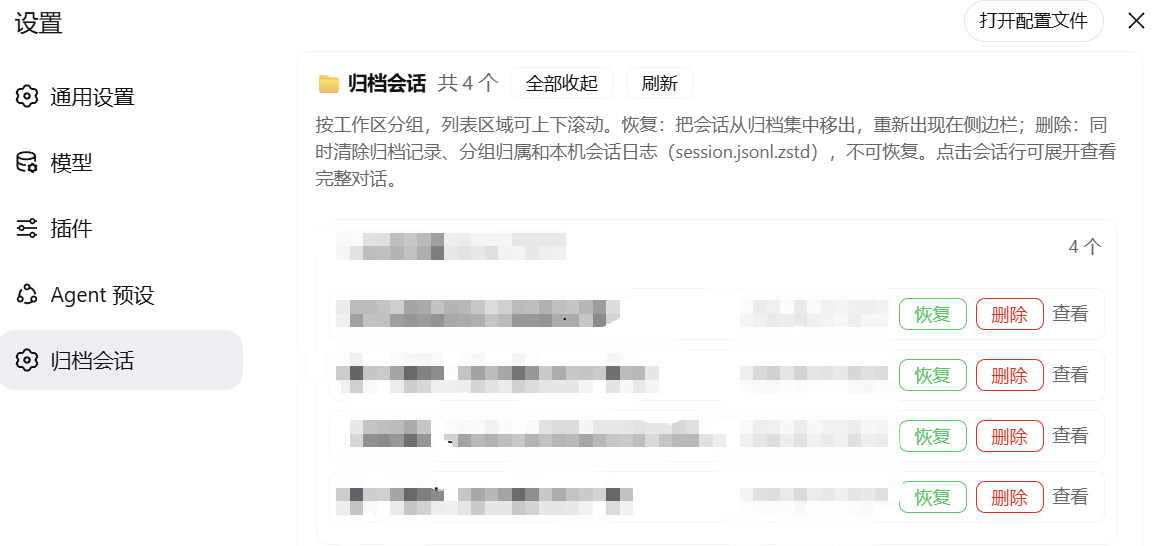
- 查看归档会话:侧边栏会话行菜单 →「归档」后,会话从列表消失,进入归档集合
- 按工作区分组:列表按工作区(含「未分组」)分组,可单独展开/收缩,也可一键全部展开/收起
- 上下滚动:列表区域可滚动,方便浏览大量归档会话
- 查看对话全文:点击会话行可展开查看完整对话记录(用户/助手/工具消息)
- 恢复:把会话从归档集合移出,重新出现在侧边栏
- 删除:彻底清除——移除归档记录、分组归属和本机会话日志目录(
session.jsonl.zstd),需两次确认,不可恢复
使用入口
设置(左下角齿轮)→ 归档会话
安装
将插件目录链接到 DSH profile 的 node_modules:
cmd /c mklink /J "C:\Users\AA\.dsh\profiles\node_modules\archived-conversation-viewer" "你的插件源码目录"或直接把本仓库克隆/复制到
C:\Users\AA\.dsh\profiles\node_modules\archived-conversation-viewer。在
C:\Users\AA\.dsh\profiles\web\cordis.patch.yml中加入(若已有- insert:块则合并到其中):- insert: - id: archived-conversation-viewer name: 'archived-conversation-viewer'重启 DSH Web(
--profile web),然后在 设置 → 插件 → 全部 中确认出现archived-conversation-viewer。
结构
archived-conversation-viewer/
  package.json        # 包声明(dsh.client 声明浏览器半身)
  index.js            # 宿主半身:archivedConversations Remote 服务(list/read/restore/deleteSession)
  client.js           # 浏览器半身:设置页 UI + 插件卡片(手写 bundle)
  typert.host.js      # 严格 Typert 清单:端点注册(运行时 ctx.typert.register)
  screenshot.png      # 界面截图
工作原理
- 宿主半身实现
archivedConversationsRemote 服务,通过workspaceRegistry(归档集合/工作区)、sessionQuery(对话读取)、sessionPersistence(日志定位)与subprocess(删除日志目录)工作 - 端点通过严格 Typert 清单在启动时用
ctx.typert.register注册,宿主网关据此认领/api/archivedConversations/*并分发 - 浏览器半身通过
connection.rpc.call('/api', 'archivedConversations/<method>', ...)调用宿主,UI 注册在settings.section(归档会话)与settings.plugin.item(插件卡片)
许可
MIT
相关推荐Related
-
 nexu-io/open-design
🎨 Best DeepSeek Harness Design Plugin. The open-source Claude Design alternative. 🖥️ Local-first desktop app. 🖼️ Your…
nexu-io/open-design
🎨 Best DeepSeek Harness Design Plugin. The open-source Claude Design alternative. 🖥️ Local-first desktop app. 🖼️ Your…
-
 ruvnet/ruflo
🌊 The original agent meta-harness. Deploy intelligent multi-player swarms, coordinate autonomous workflows, and build c…
ruvnet/ruflo
🌊 The original agent meta-harness. Deploy intelligent multi-player swarms, coordinate autonomous workflows, and build c…
-
 amruthpillai/reactive-resume
A one-of-a-kind resume builder that keeps your privacy in mind. Completely secure, customizable, portable, open-source a…
amruthpillai/reactive-resume
A one-of-a-kind resume builder that keeps your privacy in mind. Completely secure, customizable, portable, open-source a…
-
 esengine/DeepSeek-Reasonix
DeepSeek-native AI coding agent for your terminal. Engineered around prefix-cache stability — leave it running.
esengine/DeepSeek-Reasonix
DeepSeek-native AI coding agent for your terminal. Engineered around prefix-cache stability — leave it running.
-
 volcengine/OpenViking
Self-evolving Context Database for AI Agents. Unify Agent Memory, Knowledge RAG and Skills.
volcengine/OpenViking
Self-evolving Context Database for AI Agents. Unify Agent Memory, Knowledge RAG and Skills.
-
 Molunerfinn/PicGo
:rocket: The Ultimate Image Uploader for Efficient Creators. Supports Obsidian, Typora, VS Code etc. and 60+ image hosti…
Molunerfinn/PicGo
:rocket: The Ultimate Image Uploader for Efficient Creators. Supports Obsidian, Typora, VS Code etc. and 60+ image hosti…
-
 titanwings/distilly
Distilly — Distill how they think into reusable Skills for any Agent or Bot. Formerly Colleague Skill(原同事 Skill).
titanwings/distilly
Distilly — Distill how they think into reusable Skills for any Agent or Bot. Formerly Colleague Skill(原同事 Skill).
-
 titanwings/colleague-skill