InterPSS-Project/ipss-agent
InterPSS Agentic Power System Simulation Agent for AC load flow, DC-based contingency analysis, and NERC TPL style reporting. Integrated into Deepseek Harness as a DSH Plugin, one can run power system simulations in the traditional way in a local sandbox or in the native AI env.
项目介绍Project Overview
iPSS Agent 是面向 DSH 的电力系统仿真插件,基于 InterPSS 提供交流潮流、基于直流的事故分析与 NERC TPL-001-5 报告生成能力。通过 /ipss-sim 技能或直接对话指令运行单步仿真与批量案例,结果输出至 wspace/.../result/。适用于输电网规划、可靠性评估与 TPL 合规审查。注意事项:JVM 与 InterPSS JAR 体积较大,首次安装耗时长。
iPSS Agent is a DSH plugin for power system simulation built on InterPSS, providing AC load flow, DC-based contingency analysis, and NERC TPL-001-5 report generation. It runs simulations through the /ipss-sim skill or direct chat prompts in single-step or batch mode, with outputs saved under wspace/<parent>/result/. Use it for transmission planning, reliability assessment, and TPL compliance review. Note: JVM plus InterPSS JARs are large, so initial installation may take considerable time.
请帮我了解并安装插件:【ipss-agent】【https://github.com/InterPSS-Project/ipss-agent】把上面这条消息直接发给当前会话里的 DSH,让它帮你了解并安装。安装命令不一定准确,发给 DSH 更稳。Send this message to DSH in your current session. CLI install commands may not be accurate across systems — DSH will figure it out for you.
或使用命令行安装(适合开发者)Or use CLI install (for developers)
命令行安装CLI Install
dsh plugin --profile web add github:InterPSS-Project/ipss-agent把 InterPSS-Project/ipss-agent 加入你的 DSH 配置(web profile)即可启用。
READMEREADME
iPSS Agent
InterPSS Agentic Power System Simulation Agent for AC load flow, DC-based contingency analysis, and NERC TPL-001-5 style reporting. This repository ships agent-facing skills for OpenAI Codex Desktop, Claude Code CLI, and Deepseek Harness (see Setup.md). Other agent CLIs can reuse the same workflow by copying the skill content from .agents/skills/ipss-sim/ or .claude/skills/ipss-sim/.
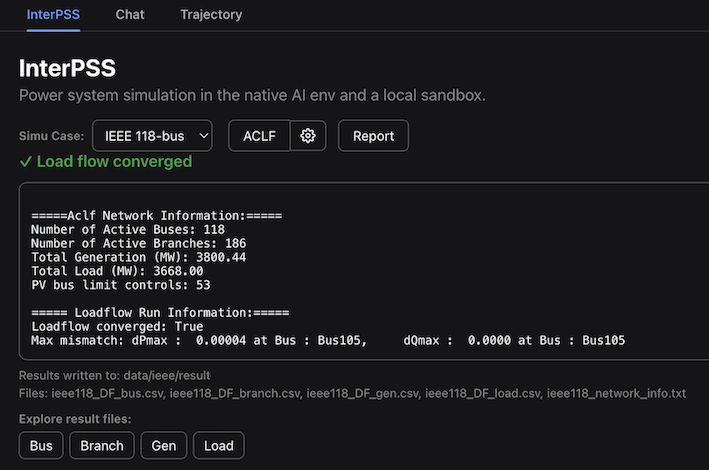
It is also integrated into Deepseek Harness as a DSH Plugin. You can run power system simulation in the traditional step-by-step way:
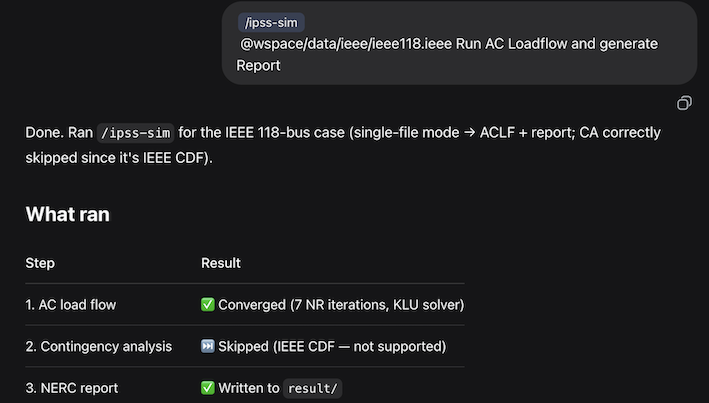
Or in the native AI Chat way:
Environment setup
Prompt Codex, Claude Code, or Deepseek Harness to install and setup ipss.agent.
Install and setup ipss.agent from https://github.com/InterPSS-Project/ipss-agent
Depending on your network speed, it may take some time to download and install ipss.agent.
Initialize the ipss-sim skill.
init
Test the setup with a sample case directory.
/ipss-sim <simu_case_directory> "<NERC Report Name>"
DSH Plugin setup
Prompt Deepseek Harness to install the InterPSS DSH Plugin.
Install the InterPSS dsh plugin
Run simulations and generate reports
After the setup, run(Chat) power-system simulations through the agent.
Skill-style simulation
Input file mode:
/ipss-sim <simu_case_file> <contingency_file> <monitored_file> "<NERC Report Name>"
Input directory mode (auto-discovers *.RAW / *.raw / *.ieee, *contingency*.json, *monitor*.json):
/ipss-sim <simu_case_directory> "<NERC Report Name>"
/ipss-sim Aclf only <simu_case_directory> "<Loadflow Report Name>"

/NERC Report HTML         # generate Html report
/NERC Report Slides       # generate PPT report
Direct prompt simulation
Run ACLF format psse <case_file>
Run CA format psse <case_file> <contingency_file> <monitor_file>
Gen NERC TPL report "<NERC Report Name>" <result_dir>
Explore simulation results
Results are written under wspace/<parent_of_case_file>/result/ (the directory that contains your case file, plus a result subfolder). You can inspect them with the LLM, for example:
# Load flow
Find the lowest voltage bus
Find the highest loading branch
# Contingency analysis
Find the top N-1 loaded branches
Reference
| Topic | Document |
|---|---|
Layout, JARs, config.json, JVM |
Setup.md |
src/ipss_cmd.py usage |
IpssCmd.md |
| Report generator | GenReport.md |
相关推荐Related
-
 nexu-io/open-design
🎨 Best DeepSeek Harness Design Plugin. The open-source Claude Design alternative. 🖥️ Local-first desktop app. 🖼️ Your…
nexu-io/open-design
🎨 Best DeepSeek Harness Design Plugin. The open-source Claude Design alternative. 🖥️ Local-first desktop app. 🖼️ Your…
-
 ruvnet/ruflo
🌊 The original agent meta-harness. Deploy intelligent multi-player swarms, coordinate autonomous workflows, and build c…
ruvnet/ruflo
🌊 The original agent meta-harness. Deploy intelligent multi-player swarms, coordinate autonomous workflows, and build c…
-
 amruthpillai/reactive-resume
A one-of-a-kind resume builder that keeps your privacy in mind. Completely secure, customizable, portable, open-source a…
amruthpillai/reactive-resume
A one-of-a-kind resume builder that keeps your privacy in mind. Completely secure, customizable, portable, open-source a…
-
 volcengine/OpenViking
Self-evolving Context Database for AI Agents. Unify Agent Memory, Knowledge RAG and Skills.
volcengine/OpenViking
Self-evolving Context Database for AI Agents. Unify Agent Memory, Knowledge RAG and Skills.
-
 Molunerfinn/PicGo
:rocket: The Ultimate Image Uploader for Efficient Creators. Supports Obsidian, Typora, VS Code etc. and 60+ image hosti…
Molunerfinn/PicGo
:rocket: The Ultimate Image Uploader for Efficient Creators. Supports Obsidian, Typora, VS Code etc. and 60+ image hosti…
-
 titanwings/colleague-skill
将冰冷的离别化为温暖的 Skill,欢迎加入数字生命1.0!Transforming cold farewells into warm skills? It's giving rebirth era. Welcome to Digital …
titanwings/colleague-skill
将冰冷的离别化为温暖的 Skill,欢迎加入数字生命1.0!Transforming cold farewells into warm skills? It's giving rebirth era. Welcome to Digital …
-
 nocobase/nocobase
NocoBase is an open-source AI + no-code platform for building business systems fast. Instead of generating everything fr…
nocobase/nocobase
NocoBase is an open-source AI + no-code platform for building business systems fast. Instead of generating everything fr…
-
 Tencent/WeKnora
Open-source LLM knowledge platform: turn raw documents into a queryable RAG, an autonomous reasoning agent, and a self-m…
Tencent/WeKnora
Open-source LLM knowledge platform: turn raw documents into a queryable RAG, an autonomous reasoning agent, and a self-m…