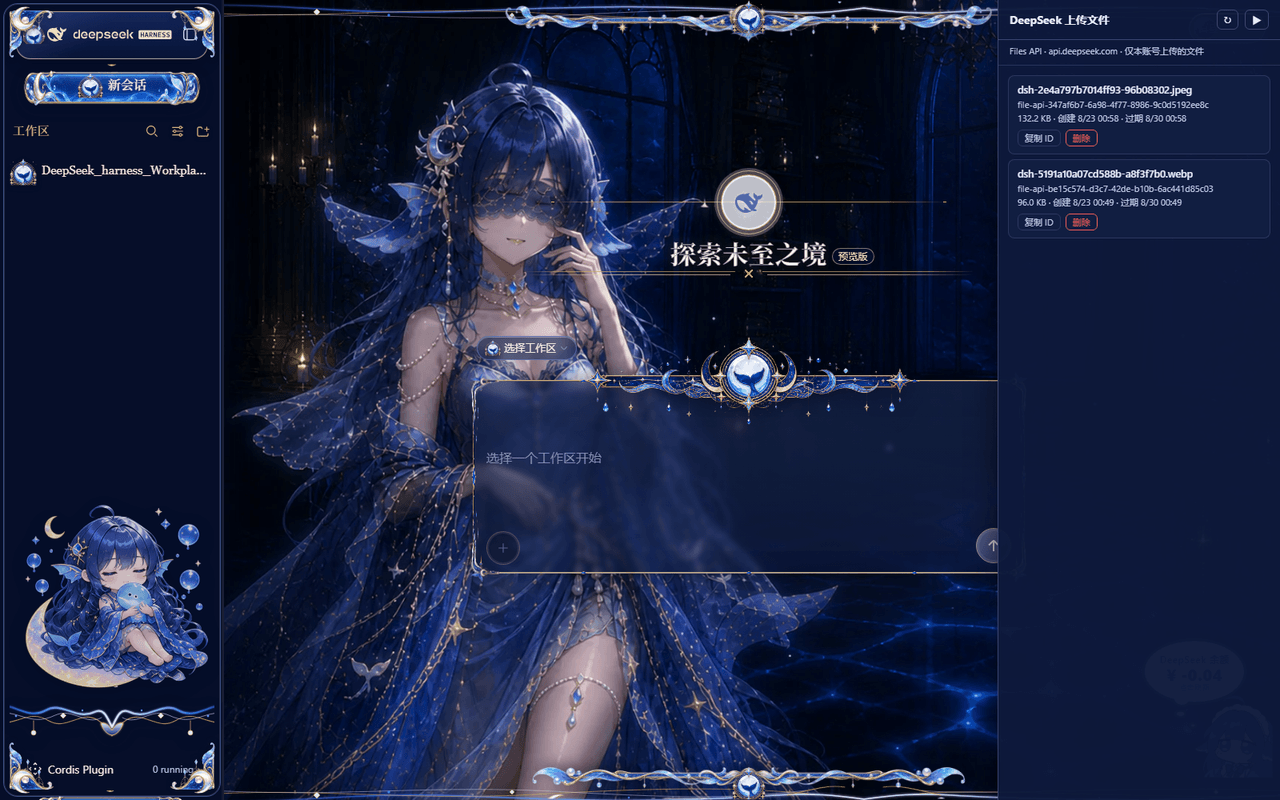
iskshadow195563/DeepSeek_Harness_Files_Panel
📁 右侧可折叠的 DeepSeek 上传文件管理面板(dsh 插件):列出/复制/清理 DeepSeek Files API 上传的图片,密钥零暴露,一条命令安装
项目介绍Project Overview
DeepSeek Files Panel 是 DSH Web 界面的右侧可折叠侧边栏插件,用于列出、查看、复制 file_id 并删除通过 DeepSeek Files API 上传的图片文件,支持刷新同步与二次确认删除。需要在 DSH 中管理或复用已上传文件时使用。注意:它仅管理经 Files API 上传的文件,纯文本对话不在范围内,且需配置 DEEPSEEK_API_KEY。
DeepSeek Files Panel is a collapsible right-sidebar plugin for the DSH web interface. It lists files uploaded through the DeepSeek Files API, shows metadata, copies file IDs, refreshes the cloud list, and deletes files with confirmation. Use it when managing or reusing uploaded images in DSH. It only covers Files API uploads, not plain chat content, and requires a configured DEEPSEEK_API_KEY.
请帮我了解并安装插件:【DeepSeek_Harness_Files_Panel】【https://github.com/iskshadow195563/DeepSeek_Harness_Files_Panel】把上面这条消息直接发给当前会话里的 DSH,让它帮你了解并安装。安装命令不一定准确,发给 DSH 更稳。Send this message to DSH in your current session. CLI install commands may not be accurate across systems — DSH will figure it out for you.
或使用命令行安装(适合开发者)Or use CLI install (for developers)
命令行安装CLI Install
dsh plugin --profile web add deepseek-files-panel把 iskshadow195563/DeepSeek_Harness_Files_Panel 加入你的 DSH 配置(web profile)即可启用。
READMEREADME
DeepSeek Files Panel · DSH 上传文件管理面板
为 DeepSeek Harness(DSH)Web 界面提供的一个右侧可折叠侧边栏:列出、查看并清理你的 DeepSeek 账号通过 Files API 上传的图片,支持复用已上传文件的快速管理。
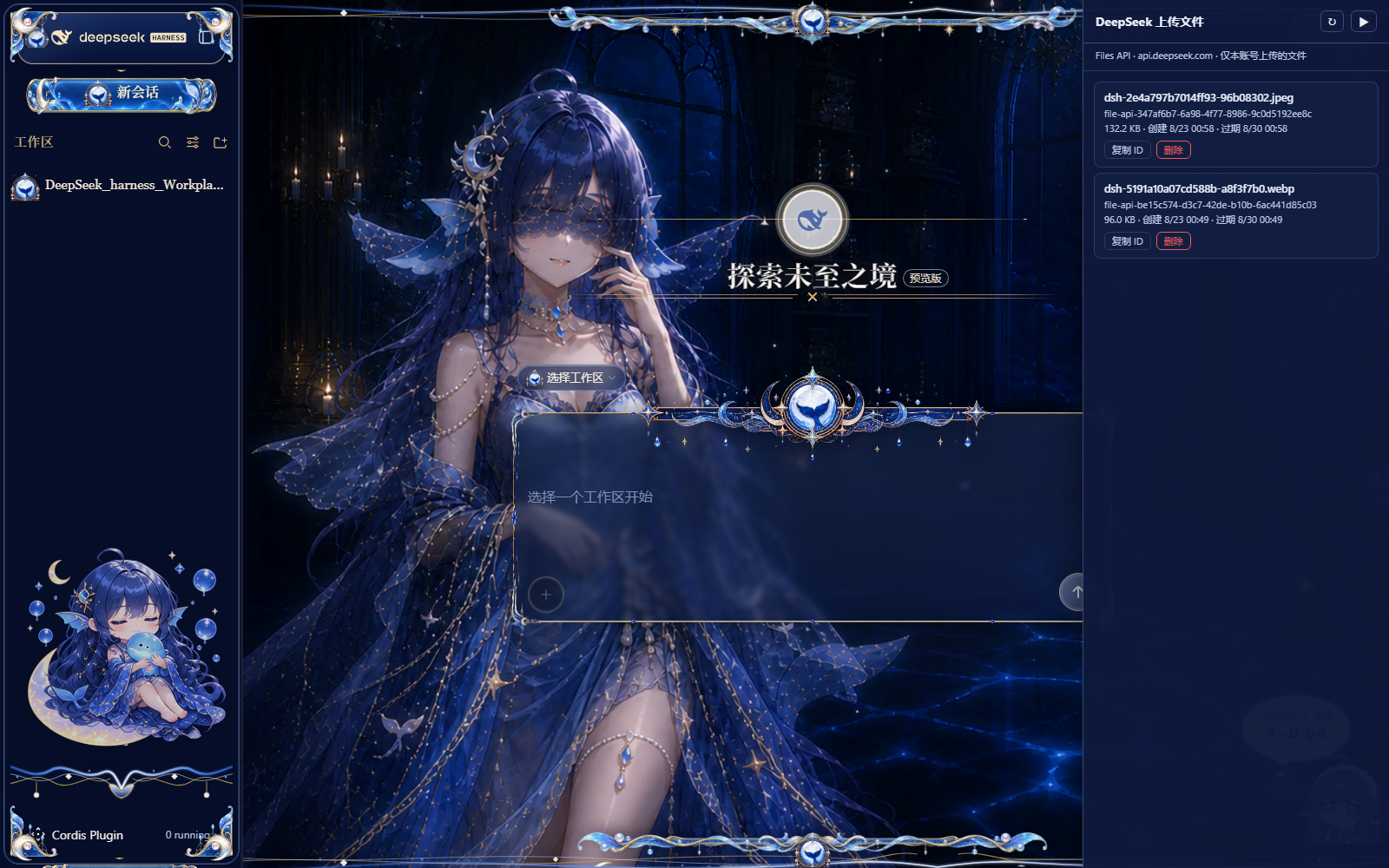
折叠为右侧竖排手柄(📁 DeepSeek 文件),点击展开;也可用 ?dsf-open=1 直达展开态。
功能
- 📋 列出全部已上传文件:文件名(DSH 自动命名
dsh-<内容哈希>.<ext>)、file_id、大小、创建时间、过期时间(默认 7 天) - 🔁 一键刷新:随时与 DeepSeek 云端同步
- 📋 复制 file_id:方便在请求或脚本中引用
- 🗑️ 删除文件:红色按钮 + 二次确认(3.5 秒内再点击才真正删除),防止误删
- 🎨 主题自适应:跟随 DSH 页面主题变量(
--dsw-*),深色/浅色皮肤均可 - 🔐 无密钥泄露:插件本体不含任何密钥;调用 DeepSeek Files API 时通过 DSH 的凭据服务(
DEEPSEEK_API_KEY)在宿主侧解析,浏览器页面只访问本机路由
前置条件
| 要求 | 说明 |
|---|---|
| DeepSeek Harness | dsh >= 0.1.0-rc.6(推荐 0.1.1-rc.2+,即官方适配器支持 Files API 的版本) |
| API Key | 已在 DSH 凭据中配置 DEEPSEEK_API_KEY(用于调用 https://api.deepseek.com/files) |
| Web Profile 目录 | $DSH_HOME/profiles/web/(Windows 默认 %USERPROFILE%\.dsh\profiles\web\) |
说明:本插件只管理通过 Files API 上传的文件(图片走 Files API 上传时产生)。纯文本对话、未经过 Files API 的内容不在此列。
安装
方式 A(推荐)∶一条命令安装
本插件是标准的 DSH bundle 包(package.json 声明 dsh.bundle.patch),可直接通过官方插件命令安装:
# 从 GitHub 直装(推荐,不需要 npm 账号)
dsh plugin --profile web add github:iskshadow195563/DeepSeek_Harness_Files_Panel#v1.1.0

# 或从 npm 安装
dsh plugin --profile web add deepseek-files-panel
--profile必填;换成你实际使用的 profile 名(web为默认 Web 界面 profile)。- 安装完成即加入 Profile 的 bundle 层;重启
dsh web后生效(与官方皮肤插件同机制)。- 本仓库带
dsh-plugintopic,可被 YELEBAI/dsh-plugin-marketplace 等社区插件市场自动扫描收录。
方式 B:手动安装(Windows / macOS / Linux 通用)
下载
dsf-files-panel.mjs(本仓库根目录,或 Release 附件),放入你的 Web profile 目录:# macOS / Linux($DSH_HOME 未设置时默认为 ~/.dsh) cp dsf-files-panel.mjs "${DSH_HOME:-$HOME/.dsh}/profiles/web/" # Windows PowerShell Copy-Item dsf-files-panel.mjs "$env:USERPROFILE\.dsh\profiles\web\"合并补丁:编辑同一目录下的
cordis.patch.yml,在顶层数组追加以下条目:- insert: - id: deepseek-files-panel name: ./dsf-files-panel.mjs?v=1- 若文件为
[]或不存在:直接粘贴上面整段; - 若已有其他
insert条目:把- id: deepseek-files-panel这一行追加到已有的insert列表中(?v=1用于破 ESM 缓存,升级插件时数字 +1)。
- 若文件为
保存即热生效(profile 补丁文件被实时监视,无需重启);若 5 秒内没生效,重启
dsh web。刷新浏览器页面(F5)——右侧中部会出现「📁 DeepSeek 文件」手柄。
方式 C:一键脚本
Windows(PowerShell)
$dest = "$env:USERPROFILE\.dsh\profiles\web"
New-Item -ItemType Directory -Path $dest -Force | Out-Null
Invoke-WebRequest "https://raw.githubusercontent.com/iskshadow195563/DeepSeek_Harness_Files_Panel/main/dsf-files-panel.mjs" -OutFile "$dest\dsf-files-panel.mjs"
$patch = Join-Path $dest "cordis.patch.yml"
$entry = "`n- insert:`n - id: deepseek-files-panel`n name: ./dsf-files-panel.mjs?v=1"
if (Test-Path $patch) { Add-Content -Path $patch -Value $entry } else { $entry | Set-Content -Path $patch }
# 然后按 F5 刷新页面
macOS / Linux(bash)
DEST="${DSH_HOME:-$HOME/.dsh}/profiles/web"
mkdir -p "$DEST"
curl -fsSL "https://raw.githubusercontent.com/iskshadow195563/DeepSeek_Harness_Files_Panel/main/dsf-files-panel.mjs" -o "$DEST/dsf-files-panel.mjs"
{
echo
echo "- insert:"
echo " - id: deepseek-files-panel"
echo " name: ./dsf-files-panel.mjs?v=1"
} >> "$DEST/cordis.patch.yml"
# 然后刷新浏览器页面
使用
| 操作 | 说明 |
|---|---|
| 展开/收起 | 点击右侧手柄展开;点面板右上「▶」收起 |
| 刷新 | 标题栏「↻」按钮重新拉取云端列表 |
| 复制 ID | 每个文件的「复制 ID」按钮,复制 file-api-... |
| 删除 | 点「删除」→ 变红色「确认删除?」→ 3.5 秒内再点一次才会真正从云端删除 |
| 直达展开 | 浏览器地址栏加 ?dsf-open=1(如 http://127.0.0.1:3080/?dsf-open=1)自动展开 |
卸载
包形态(推荐安装方式)卸载:
dsh plugin --profile web remove deepseek-files-panel
文件型(手动安装)卸载:
- 从
$DSH_HOME/profiles/web/删除dsf-files-panel.mjs; - 从
cordis.patch.yml的insert列表中删除deepseek-files-panel那两行; - 刷新页面。
已上传到 DeepSeek 云端的文件不会因此删除;需要清理请在面板里删除,或调用
DELETE https://api.deepseek.com/files/{file_id}。
工作原理
浏览器页面 ──(同源 fetch)──> 本机 dsh web(/dsf-files/list, /dsf-files/delete)
│ ctx.credentials 解析 DEEPSEEK_API_KEY(不落页面)
▼
https://api.deepseek.com/files (GET 列表 / DELETE 删除)
- 宿主插件(
dsf-files-panel.mjs)注入页面脚本panel.js,并把Files API列表/删除路由挂在本机dsh web上; - 页面脚本只与本机通信,API Key 永不进入浏览器;
- 与 DeepSeek 官方 Files API 兼容;配合 DSH 0.1.1-rc.2+ 的官方适配器(图片经 Files API 上传并复用
file_id)效果最佳。
发布 Release(v1.x)
本仓库按 语义化版本 发布。发布步骤:
1. 提交并推送新版本
git add -A
git commit -m "feat: <本次改动>"
git push origin main
2. 打标签(推荐 v1.0.0 起)
git tag v1.0.0
git push origin v1.0.0
3. 创建 Release
方式 A —— GitHub CLI(推荐):
gh release create v1.0.0 \
--title "v1.0.0" \
--notes "• 右侧可折叠文件面板
• 列出 / 复制 / 删除 DeepSeek Files API 文件
• 主题自适应" \
./dsf-files-panel.mjs
方式 B —— GitHub 网页:
- 打开仓库页 → 右侧 Releases → Draft a new release;
Choose a tag→ 选择v1.0.0(或输入新标签自动创建);- 填写标题与说明(可参考下方模板);
- 把
dsf-files-panel.mjs文件拖入 Attach binaries 作为安装产物; - Publish release。
建议的 Release Notes 模板:
## 安装
下载 `dsf-files-panel.mjs`(本 Release 附件)→ 放入 `$DSH_HOME/profiles/web/`
→ 在 `cordis.patch.yml` 追加 insert → 刷新页面。
```yaml
- insert:
    - id: deepseek-files-panel
      name: ./dsf-files-panel.mjs?v=1
变更
- ...
### 版本策略

- `v1.0.0` 首次稳定发布;Bug 修复 `v1.0.1`;新功能 `v1.1.0`;
- 每次发布请同步更新插件内 `?v=` 数字(安装侧用于破 ESM 缓存)。

## 常见问题(FAQ)

| 问题 | 解决 |
|---|---|
| 右侧手柄没出现 | 确认 `.mjs` 在 profile 目录、补丁行已合并、`dsh web` 已加载(等待几秒)并 **F5 刷新页面** |
| 列表报「未配置 DEEPSEEK_API_KEY」 | 在 DSH 设置/Models 页配置该凭据 |
| 显示「HTTP 401/403」 | API Key 无效或过期 |
| 面板不跟随皮肤 | 请确认 DSH 页面提供 `--dsw-*` 主题变量(标准 DSH Web 均提供) |
| 删除后文件仍在列表 | 点「↻」刷新;云端删除是即时的,本地为已删条目 |

## 安全设计

- 插件不含任何密钥;密钥仅由 DSH 凭据服务在宿主进程内解析;
- 页面与 API 之间只经本机 `dsh web` 同源路由,不跨域;
- 删除操作带二次确认,避免误删云端文件;
- 已上传文件默认 7 天过期(过期时间由 DeepSeek 管理),过期前面板会显示剩余有效期。

## License

MIT License — see [LICENSE](https://raw.githubusercontent.com/iskshadow195563/DeepSeek_Harness_Files_Panel/HEAD/LICENSE).

---

<p align="center">
  由 DSH 用户社区维护 · 与 DeepSeek 官方 API 兼容 · 图片上传复用见 <a href="https://api-docs.deepseek.com/zh-cn/guides/files_api/">DeepSeek Files API</a>
</p>
许可证选择
仓库将使用 MIT License。若你有其他偏好(如 Apache-2.0 / 专有),告诉我。
中文安装教程:从零到 Release 的完整版(也适合写进你自己的笔记)
A. 首次把插件放上 GitHub(本仓库即为此例)
git init
git add .
git commit -m "initial release: deepseek-files-panel"
gh repo create deepseek-files-panel --public --source . --push
B. 别人如何安装(终极简化版)
- 打开本仓库 Release 页,下载附件的
dsf-files-panel.mjs; - 放进
$DSH_HOME/profiles/web/(Windows:%USERPROFILE%\.dsh\profiles\web\); - 在同目录
cordis.patch.yml的数组里追加:
- insert:
    - id: deepseek-files-panel
      name: ./dsf-files-panel.mjs?v=1
- F5 刷新页面,右侧出现「📁 DeepSeek 文件」手柄。
C. 以后每次发布新版本(3 条命令)
git tag v1.1.0 && git push origin v1.1.0
gh release create v1.1.0 --title "v1.1.0" --notes "变更: ..." ./dsf-files-panel.mjs
以及记得把补丁里的 ?v=1 → ?v=2(否则浏览器可能缓存旧脚本)。
相关推荐Related
-
 nexu-io/open-design
🎨 Best DeepSeek Harness Design Plugin. The open-source Claude Design alternative. 🖥️ Local-first desktop app. 🖼️ Your…
nexu-io/open-design
🎨 Best DeepSeek Harness Design Plugin. The open-source Claude Design alternative. 🖥️ Local-first desktop app. 🖼️ Your…
-
 freestylefly/awesome-gpt-image-2
Prompt as Code | GPT-Image2 工业级提示词引擎与模板库,530+ 个案例逆向工程,20+ 套工业级模板,并提炼出Skills,持续更新中
freestylefly/awesome-gpt-image-2
Prompt as Code | GPT-Image2 工业级提示词引擎与模板库,530+ 个案例逆向工程,20+ 套工业级模板,并提炼出Skills,持续更新中
-
 anywhere-labs/dsh-desktop
为 DeepSeek Harness (DSH) 插件生态打造的现代化桌面端解决方案。万物皆「插件」,桌面本身也是「插件」。
anywhere-labs/dsh-desktop
为 DeepSeek Harness (DSH) 插件生态打造的现代化桌面端解决方案。万物皆「插件」,桌面本身也是「插件」。
- Nagi-ovo/voyager Enhancement suite for Gemini, AI Studio, Claude & ChatGPT — plus a prompt manager for any web UI, DeepSeek Harness inclu…
-
 walkinglabs/learn-harness-engineering
Harness engineering beginner tutorial, from 0 to 1
walkinglabs/learn-harness-engineering
Harness engineering beginner tutorial, from 0 to 1
-
 awesome-dsh-plugin/awesome-dsh-plugin
A curated list of plugins for DeepSeek Harness (dsh) · DeepSeek Harness 插件精选列表
awesome-dsh-plugin/awesome-dsh-plugin
A curated list of plugins for DeepSeek Harness (dsh) · DeepSeek Harness 插件精选列表
-
 MemTensor/MemOS
Self-evolving memory OS for LLM & AI Agents: ultra-persistent memory, hybrid-retrieval, and cross-task skill reuse, with…
MemTensor/MemOS
Self-evolving memory OS for LLM & AI Agents: ultra-persistent memory, hybrid-retrieval, and cross-task skill reuse, with…
- yjh051108/dsh-routing-suite dsh-routing-suite — injector + router-standard kit: install the runtime injector first, then the task-aware reasoning-mo…