ItBayMax/dsh-replay-theater
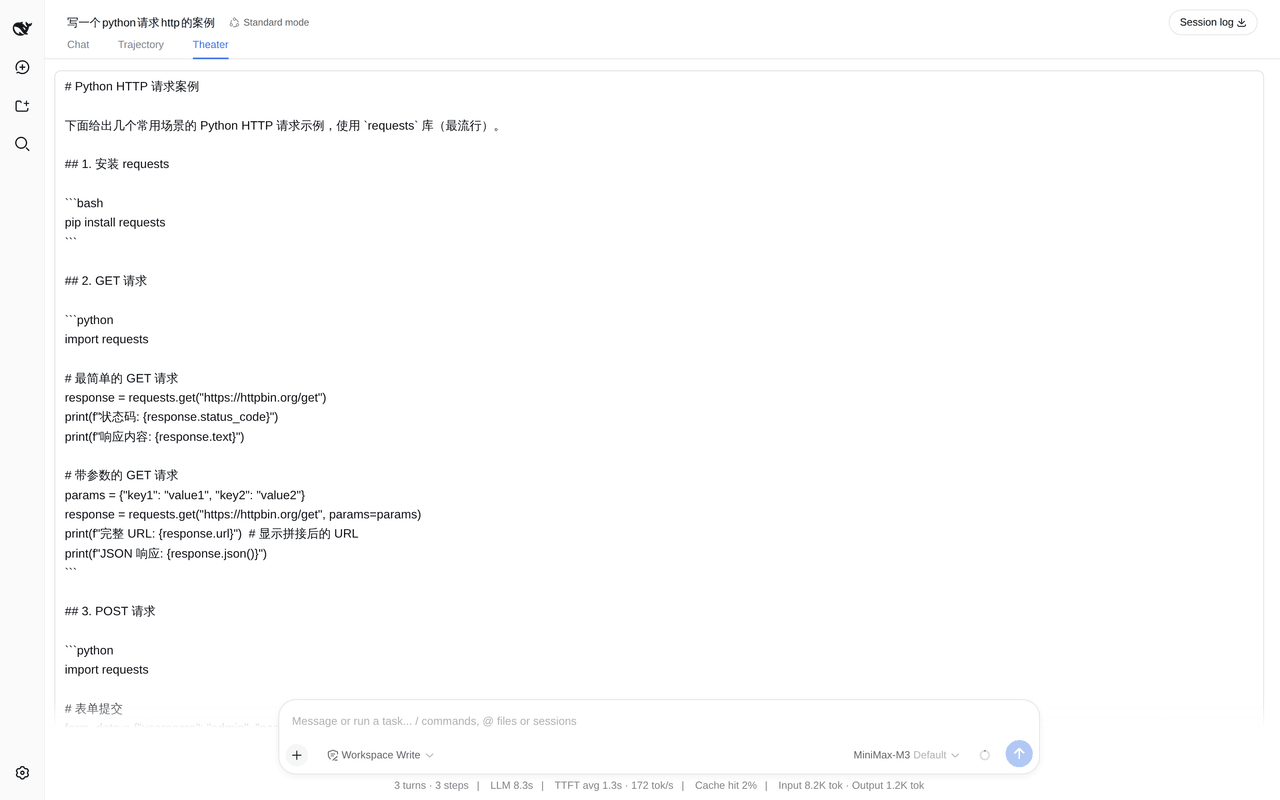
Replay a DeepSeek Harness session at its original token cadence — an in-app playback theater with play/pause/step/speed/seek.
Project Overview项目介绍
dsh-replay-theater is a DeepSeek Harness plugin that replays a recorded session at its original token cadence. Its core capability is reconstructing generation timing token-by-token, with play, pause, single-step, speed, scrub, and side-by-side comparison controls. Use it to inspect or debug long agent sessions. Caveat: only the currently loaded window is replayable, and silences longer than 2000 ms are compressed by default.
dsh-replay-theater 是 DeepSeek Harness 的会话回放插件,以原始 token 间隔播放已记录会话,适用于调试与回溯长会话的助手行为。核心能力是逐 token 还原生成节奏,并提供播放、暂停、单步、变速、跳转等传输控制,同时支持两个会话的差异比对。需注意:浏览器仅能回放已加载窗口,更早历史需手动加载;静音默认会被压缩至 2000 毫秒。
请帮我了解并安装插件:【dsh-replay-theater】【https://github.com/ItBayMax/dsh-replay-theater】Send this message to DSH in your current session. CLI install commands may not be accurate across systems — DSH will figure it out for you.把上面这条消息直接发给当前会话里的 DSH,让它帮你了解并安装。安装命令不一定准确,发给 DSH 更稳。
Or use CLI install (for developers)或使用命令行安装(适合开发者)
CLI Install命令行安装
dsh plugin --profile web add dsh-replay-theater把 ItBayMax/dsh-replay-theater 加入你的 DSH 配置(web profile)即可启用。
READMEREADME
dsh-replay-theater


English | 中文
Replay a DeepSeek Harness session at its original token cadence — an in-app playback theater with play, pause, single-step, speed and seek.
Not a static timeline: the assistant's answer grows token by token, spaced by the real millisecond gaps recorded when it was generated.
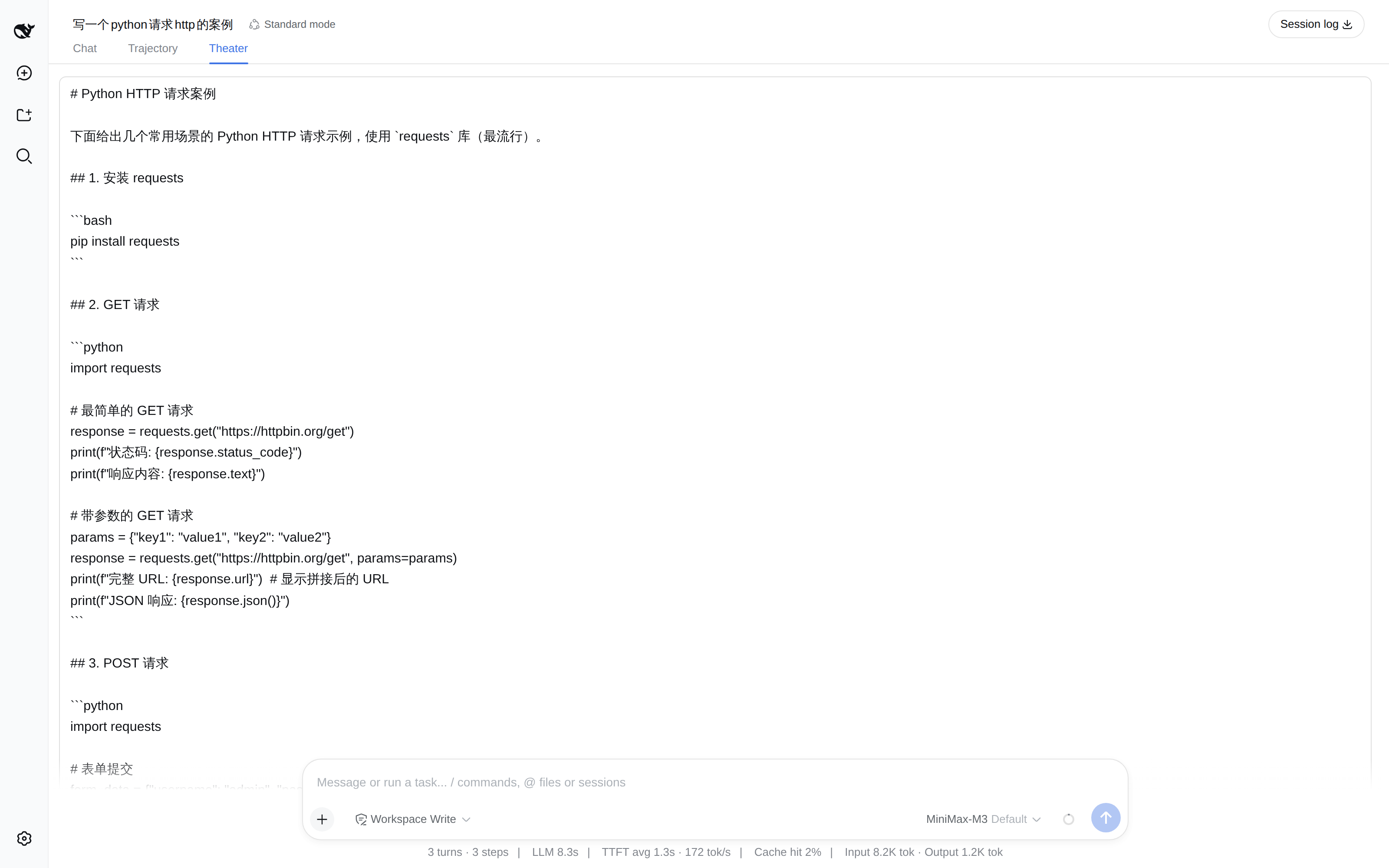
More screenshots — transport controls, and side-by-side comparison
Transport bar and marker rail. Play/pause, single-step, restart, scrub, speed, and a
"max pause" ceiling. Scalar events (step/start, tool/result, …) sit on their own rail, and
the bar states how much silence was compressed — playback alters timing, so it says so.
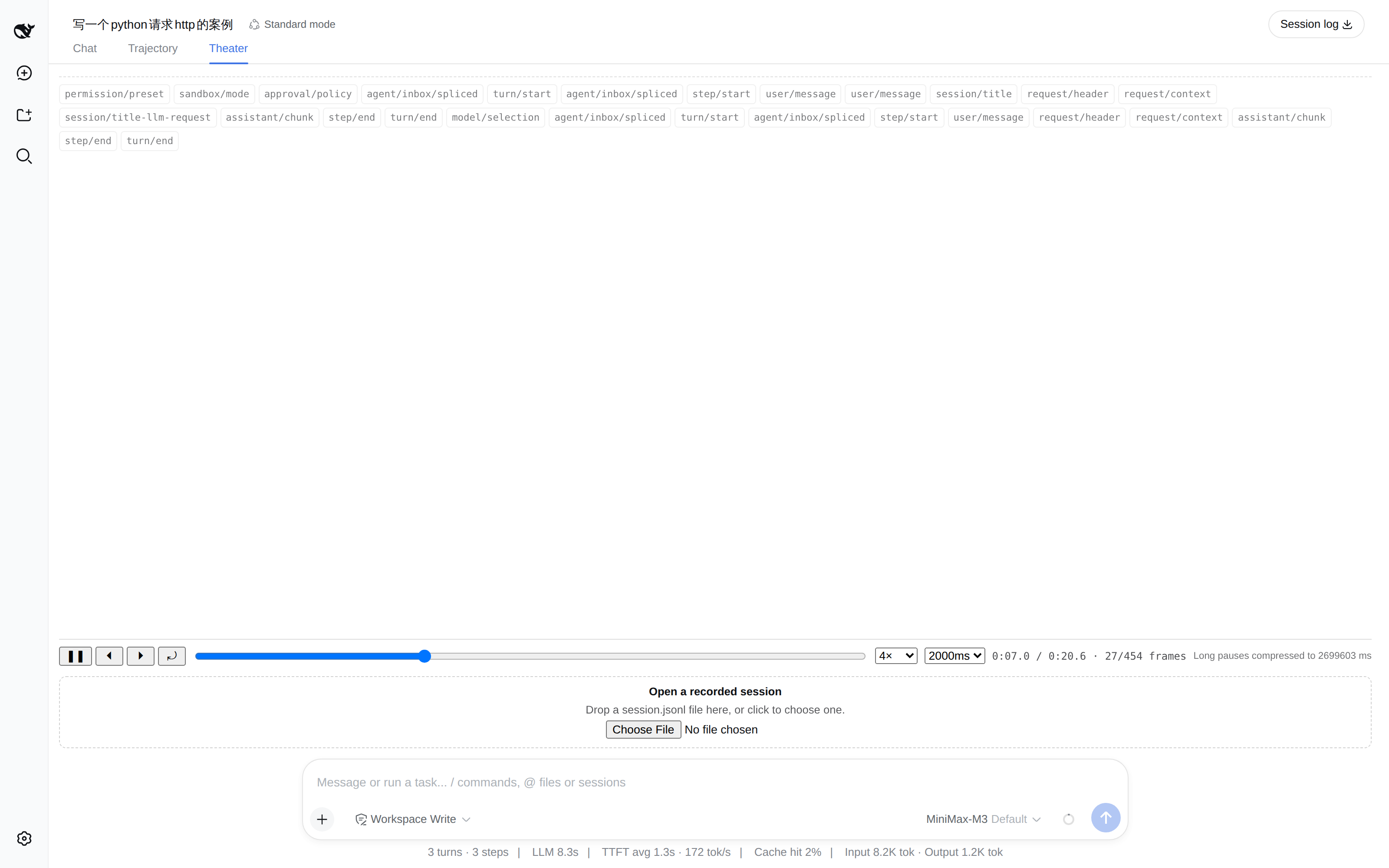
Side-by-side comparison (v2). Load a recorded session.jsonl next to the live one and the
theater reports where the two runs stop matching, with a seek coordinate for each side.
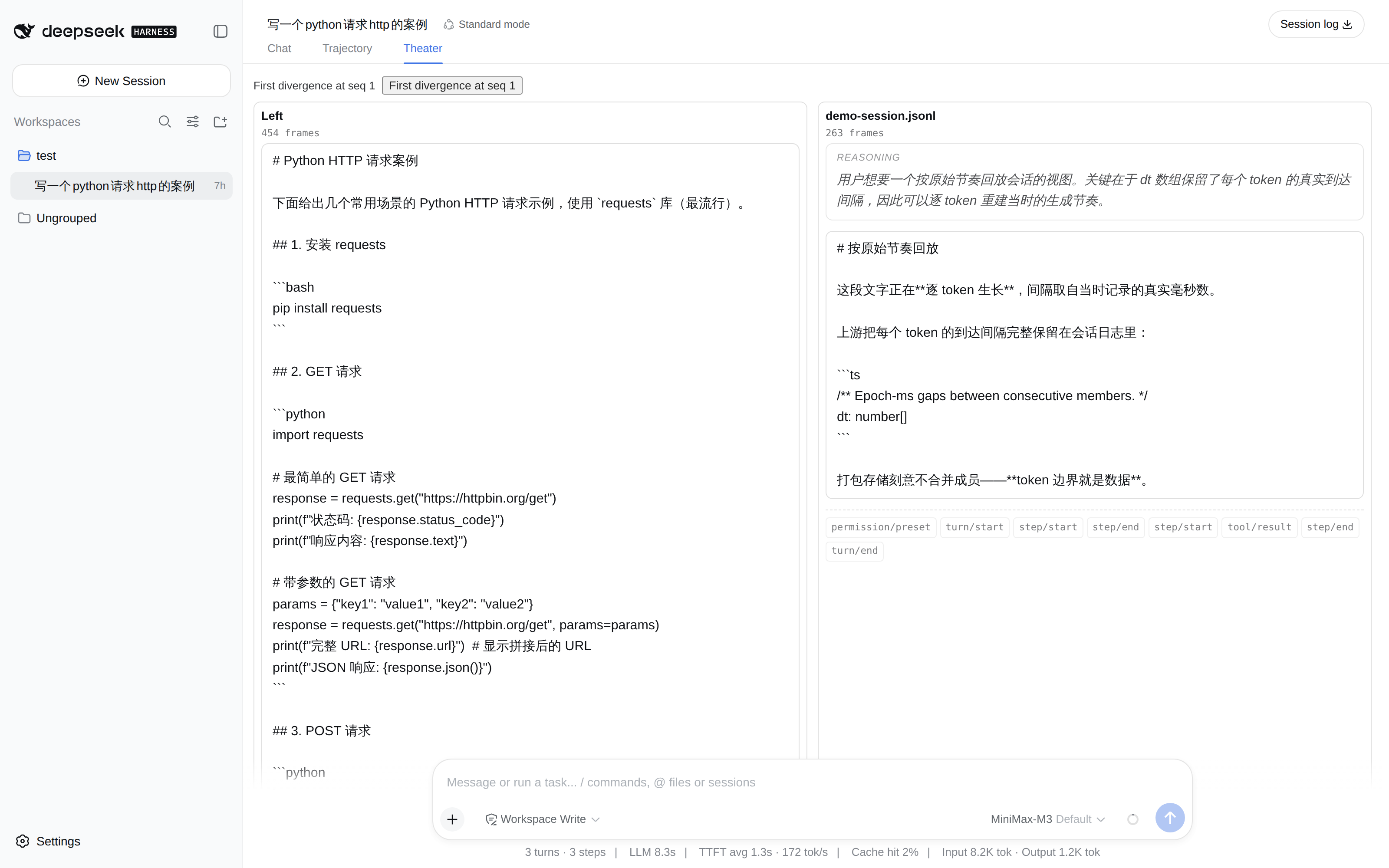
Why this exists
Upstream keeps every token's real inter-arrival gap in the session log, and says why:
// packages/core/session/src/chunk-rows.ts:44
/** Epoch-ms gaps between consecutive members; length is one less than the member count. */
dt: number[]
"one entry per member, never joined — token boundaries are data" — chunk-rows.ts:48
Packed storage deliberately does not join a run's members into one string, so the cadence survives. Nothing in the harness used that data. This plugin does.
Install
dsh plugin --profile web add dsh-replay-theater
Or from a checkout:
dsh plugin --profile web add "github:ItBayMax/dsh-replay-theater#main"
The package declares dsh.bundle, so the CLI reconciles it into the profile's layer list automatically — no manual cordis.patch.yml edit. Restart dsh web and open a session: a Theater tab appears beside Chat and Trajectory.
Use
| Control | Behavior |
|---|---|
| ▶ / ❚❚ | Play or pause. Playing at the end restarts from the beginning. |
| ⏴ / ⏵ | Step one frame (one token) back or forward. Stepping pauses. |
| ⤾ | Restart, paused, keeping the chosen speed. |
| Scrub | Seek to an absolute position. |
| Speed | 0.5× to 8×. |
| Max pause | Compress silences longer than this (200 ms … ∞). ∞ keeps true wall-clock cadence. |
| Load earlier history | Page one older window in. Playback keeps its position. |
When any silence was compressed, the transport bar says so and by how much. Playback alters the data's timing, so it tells you.
What it replays
Everything the browser's session window holds: assistant text, reasoning, and tool-call arguments — each as its own stream — plus scalar events (step/start, tool/result, …) as markers.
Tool calls show as accumulating JSON plus the tool name, not as full tool cards. Cards are ui-tool's job; this plugin is about cadence.
Limits
- No random access. The dsh client cannot request an arbitrary sequence: history pages backwards only, one window at a time (
session.loadOlder()), and a production tail page can hold hundreds of thousands of events. So the theater replays the loaded window and gives you an explicit "load earlier" action rather than silently pulling an entire log into the browser. - Long silences are compressed by default (2000 ms ceiling). Set
∞for true cadence. - Live sessions grow under you. The window is followed, and playback keeps its position when frames are appended.
- Types are mirrored, not imported.
@deepseek-ai/dsh-api-session-controlleris not published to npm, sosrc/core/wire.tsandsrc/client/dsh.tscarry structural mirrors of the upstream shapes, each annotated with thefile:lineit was read from (pinned to dsh0a53fb5/0.1.2-alpha.2). They are structurally compatible, so swapping them for real imports later needs no call-site changes.
Compatibility
Developed against dsh 0.1.2-alpha.2 (upstream commit 0a53fb5). It reads only the public client surface — session.eventSource and session.loadOlder() — because upstream removed an entire client package (client/runtime) in 0.1.2; depending on internals is not survivable.
Development
npm install
npm test          # 158 tests
npm run typecheck
The replay core (src/core/) is framework-free and dsh-free, so its rules are unit-tested without a browser or a harness checkout:
npx vitest run tests/timeline.spec.ts tests/player.spec.ts
Test fixtures come in two kinds, for a documented reason:
tests/fixtures/synthetic.ts— hand-built records with exactdtarrays. Cadence assertions live here.tests/fixtures/corpus-*.json— derived from an upstream recorded session bymake-corpus-fixture.mjs, to prove the wire mirror accepts real shapes. It cannot carry cadence assertions: the upstream corpus normalizesseq/timeaway, and the longest consecutive same-block delta run in all 118 snapshot sessions is 2 members.
See docs/ for the architecture and per-phase implementation notes.
Offline CLI
The replay core is framework-free, so the same functions the browser tab uses also work in a script:
npm run build
node scripts/replay-cli.mjs path/to/session.jsonl --frames 20
node scripts/replay-cli.mjs run-a.jsonl run-b.jsonl        # compare two runs
Comparing two upstream snapshots, for example, reports where they stop matching:
comparison: diverged at frame 14 (marker-type), left seq 15 / right seq 15
License
MIT
Related相关推荐
-
 liangmianya/dsh-synapse
A visual, non-linear conversation workspace plugin for DeepSeek Harness ; A canvas-based session explorer and branching …
liangmianya/dsh-synapse
A visual, non-linear conversation workspace plugin for DeepSeek Harness ; A canvas-based session explorer and branching …
-
 alaliqing/claude-paper
📖 Cross-agent research paper toolkit for Claude Code, Codex, OpenCode, and DeepSeek Harness—quick summaries, deep study…
alaliqing/claude-paper
📖 Cross-agent research paper toolkit for Claude Code, Codex, OpenCode, and DeepSeek Harness—quick summaries, deep study…
-
 omdsh-dev/dsh-annotation
DSH Web 选中批注插件:选文字→批注→回车随消息发送;气泡隐藏批注块(零闪烁);回复按 Annotation N 逐条对照(可悬浮芯片)。官方 bundle,零核心改动
omdsh-dev/dsh-annotation
DSH Web 选中批注插件:选文字→批注→回车随消息发送;气泡隐藏批注块(零闪烁);回复按 Annotation N 逐条对照(可悬浮芯片)。官方 bundle,零核心改动
-
 Anionex/dsh-turn-rewind
deepseek harness对话和代码状态回退插件 | DSH — rewind conversation and workspace state, powered by a persistent Change Ledger
Anionex/dsh-turn-rewind
deepseek harness对话和代码状态回退插件 | DSH — rewind conversation and workspace state, powered by a persistent Change Ledger
-
 hanshenmesen/dsh-turn-delete
Delete one complete turn from a DeepSeek Harness session without deleting the session
hanshenmesen/dsh-turn-delete
Delete one complete turn from a DeepSeek Harness session without deleting the session
-
 qkycir-123/dsh-run2skill
Automatically turn successful DeepSeek Harness sessions into reusable, reviewable Agent Skills.
qkycir-123/dsh-run2skill
Automatically turn successful DeepSeek Harness sessions into reusable, reviewable Agent Skills.
-
 Tyan66666/billion-context-dsh
Model-driven context management (Active Context Pruning / ACP) for the DeepSeek Harness — the model decides when and wha…
Tyan66666/billion-context-dsh
Model-driven context management (Active Context Pruning / ACP) for the DeepSeek Harness — the model decides when and wha…
-
 PKUfudawei/dsh-capability-menu
Unified capability menu for DeepSeek Harness: manage exposure level (context footprint) and execution mode of MCP tools …
PKUfudawei/dsh-capability-menu
Unified capability menu for DeepSeek Harness: manage exposure level (context footprint) and execution mode of MCP tools …