JarszmLovesAI/dsh_upload_file
DeepSeek Harness(DSH)网页插件:将文件粘贴到编辑器,收件箱存储,缩略图。通过read_inbox读取文本;图像理解需要您的视觉技能(捆绑图像阅读器+ARK_API_KEY)。
项目介绍Project Overview
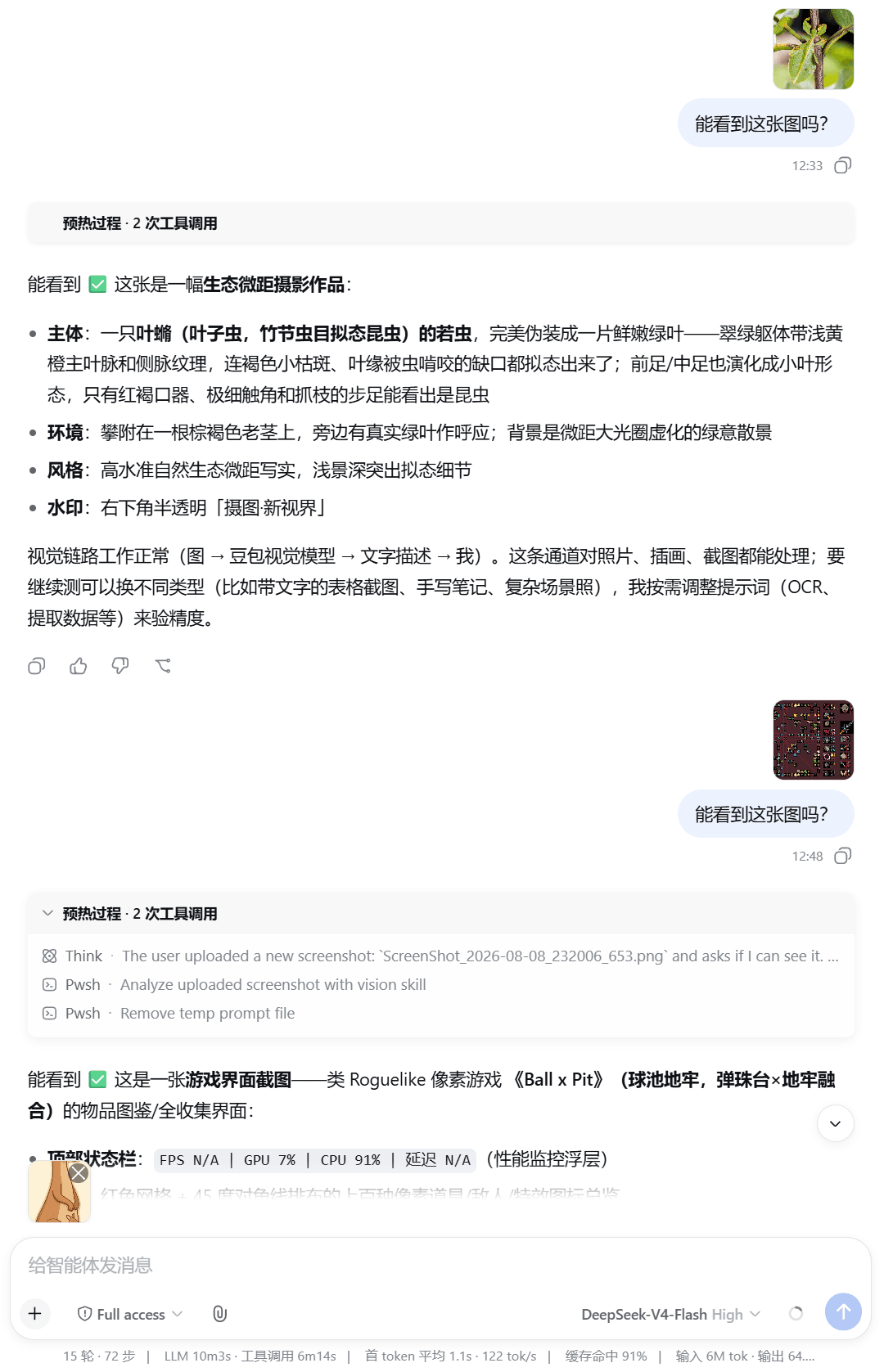
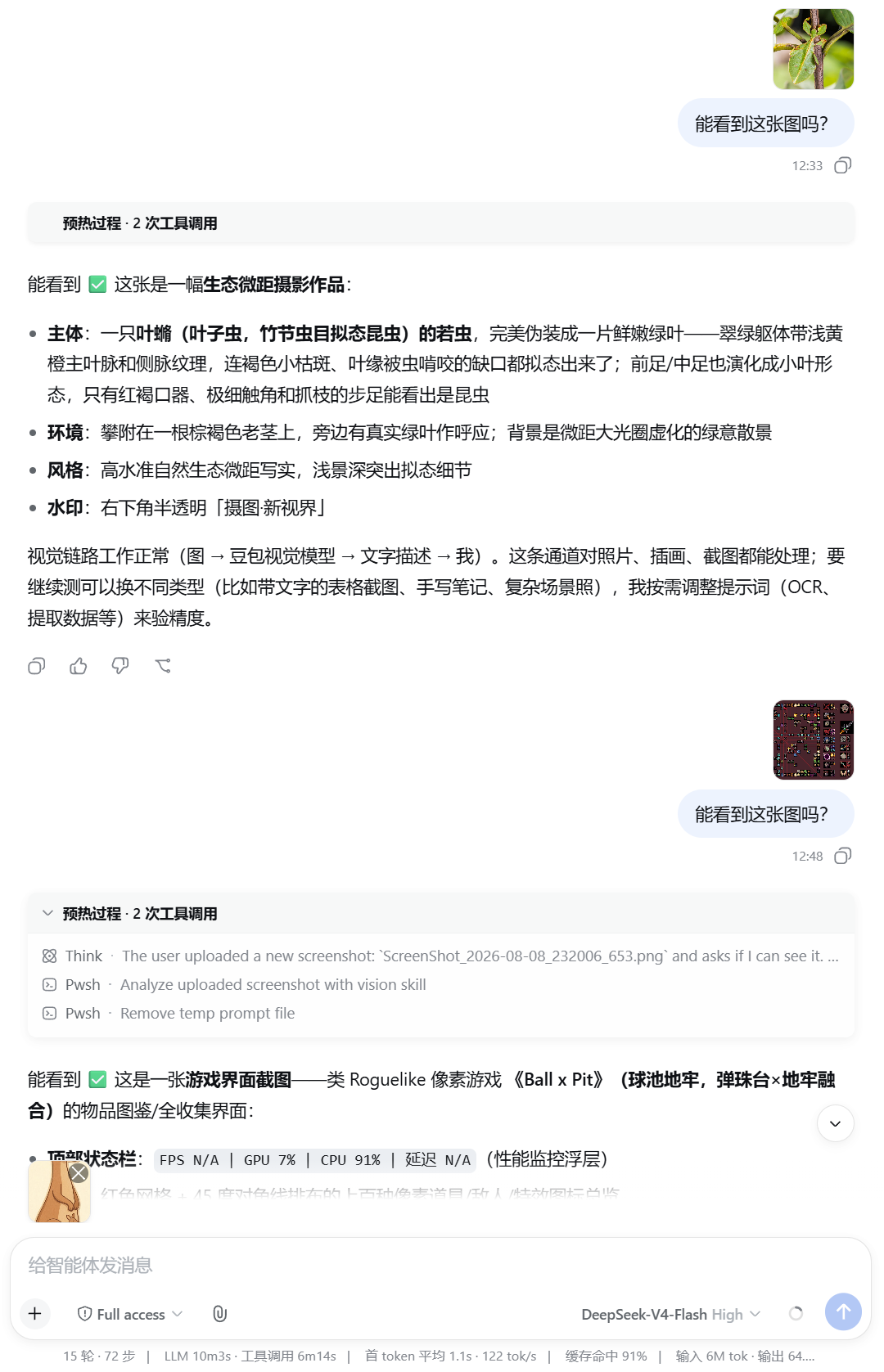
DSH 浏览器插件,支持在会话中粘贴或选取文件,预览缩略图后存入 {session.cwd}/inbox/,代理可通过 list_inbox、read_inbox 读取文本内容。需要图像理解时,应搭配自带的 image-reader 技能(需配置 ARK_API_KEY)或外部视觉模型/工具。该插件不替代多模态理解:未启用视觉能力时,主模型仅获得路径标记。
A DSH web-bundle plugin that lets users paste or pick files in the composer, preview thumbnails before sending, and store them under {session.cwd}/inbox/. Agents can read text via list_inbox and read_inbox; image understanding needs the bundled image-reader skill (set ARK_API_KEY) or your own vision tooling. The plugin does not provide multimodal understanding on its own—without vision, the main model only receives path markers.
请帮我了解并安装插件:【dsh_upload_file】【https://github.com/JarszmLovesAI/dsh_upload_file】把上面这条消息直接发给当前会话里的 DSH,让它帮你了解并安装。安装命令不一定准确,发给 DSH 更稳。Send this message to DSH in your current session. CLI install commands may not be accurate across systems — DSH will figure it out for you.
或使用命令行安装(适合开发者)Or use CLI install (for developers)
命令行安装CLI Install
dsh plugin --profile web add github:JarszmLovesAI/dsh_upload_file把 JarszmLovesAI/dsh_upload_file 加入你的 DSH 配置(web profile)即可启用。
READMEREADME
dsh-inbox-paste
DSH web bundle: paste or pick files in the composer, store under {session.cwd}/inbox/, show thumbnails before/after send. Agents use list_inbox / read_inbox for text; image understanding requires your own vision skill or model (see below).
Requirements
- DeepSeek Harness with the web profile
- Node.js ≥ 22,
dshCLI
Install
dsh plugin --profile web add github:JarszmLovesAI/dsh_upload_file
dsh web
Remove: dsh plugin --profile web remove dsh-inbox-paste
Usage
- Paste (Ctrl+V / Cmd+V) or use the paperclip in the composer.
- Pending thumbnails appear above the input; remove with × before send (no disk write yet).
- On send, files land in
inbox/; the bubble can show thumbnails (see config). - Agent:
list_inbox→read_inboxfor text; for images, use the bundled image-reader skill or your own vision tooling.
Upload ≠ multimodal understanding
This plugin does not use Harness native image attachments. The main model only gets path markers unless you add vision:
- Install the optional image-reader skill and set
ARK_API_KEYin~/.dsh/.env, or - Bring your own vision MCP / skill / multimodal model.
Configuration
~/.dsh/profiles/web/cordis.patch.yml (adjust profile name):
- id: inbox-paste
  config:
    uploadMaxBytes: 26214400
    inboxDirName: inbox
    allowedExtensions: []
    customizeUserBubble: true   # false = built-in user bubble (may show raw paths)
Restart dsh web after changes.
vs dsh-file-upload
| dsh-inbox-paste | dsh-file-upload | |
|---|---|---|
| Paste | ✅ | ❌ |
| Storage | {cwd}/inbox/ |
{cwd}/.dsh-uploads/ |
| Built-in PDF | ❌ | ✅ |
Tests
npm test
License
MIT
相关推荐Related
-
 jing-hy/picturereader
DSH plugin: pixel-to-text image reading for text-only models. image_scan/image_ocr/image_sample tools + image-reading sk…
jing-hy/picturereader
DSH plugin: pixel-to-text image reading for text-only models. image_scan/image_ocr/image_sample tools + image-reading sk…
-
 liustack/pptwise
A real PowerPoint, not a picture or HTML. Tell your AI what to cover and pptwise builds an editable deck on your own mac…
liustack/pptwise
A real PowerPoint, not a picture or HTML. Tell your AI what to cover and pptwise builds an editable deck on your own mac…
- Lee-Hilex/dsh-mineru 基于 MinerU 的 DeepSeek Harness 多模态文档解析插件:PDF/Word/PPT/Excel/HTML/图片 → 结构化 Markdown(免 Token 的 Agent 轻量解析 / 精准解析双 API 模式)
-
 nexu-io/open-design
🎨 Best DeepSeek Harness Design Plugin. The open-source Claude Design alternative. 🖥️ Local-first desktop app. 🖼️ Your…
nexu-io/open-design
🎨 Best DeepSeek Harness Design Plugin. The open-source Claude Design alternative. 🖥️ Local-first desktop app. 🖼️ Your…
-
 Anionex/dsh-vision-toolkit
[dsh]为纯文本模型设计更强大的视觉工具箱:一行安装使用、粘贴图片直接识别、多张图片问答、截图到前端UI 还原等|DeepSeek Harness-native integration for agent-vision-toolkit: …
Anionex/dsh-vision-toolkit
[dsh]为纯文本模型设计更强大的视觉工具箱:一行安装使用、粘贴图片直接识别、多张图片问答、截图到前端UI 还原等|DeepSeek Harness-native integration for agent-vision-toolkit: …
-
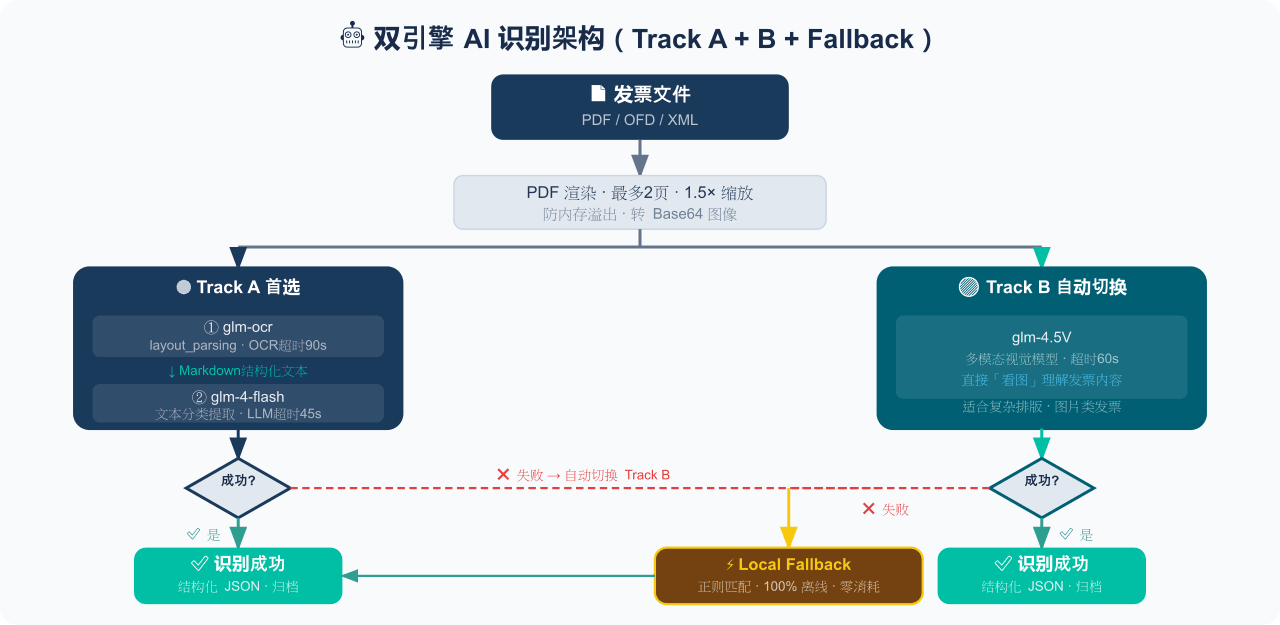 EthanYoQ/Invoice-Downloader
电子发票整理与报销准备工具:从邮箱批量收集 PDF/OFD/XML 发票,OCR 识别、分类归档并生成 Excel 汇总;提供 Windows/macOS 桌面版与 DSH 插件。
EthanYoQ/Invoice-Downloader
电子发票整理与报销准备工具:从邮箱批量收集 PDF/OFD/XML 发票,OCR 识别、分类归档并生成 Excel 汇总;提供 Windows/macOS 桌面版与 DSH 插件。
-
 zhaoolee/notes
开源版锤子便签,复刻锤科美学,一键Docker私有化部署,支持skill调用,支持dsh plugin,支持多租户,一键生成公众号格式,支持导出便签为图片
zhaoolee/notes
开源版锤子便签,复刻锤科美学,一键Docker私有化部署,支持skill调用,支持dsh plugin,支持多租户,一键生成公众号格式,支持导出便签为图片
-
 Fishsb/dsh-prompt-enhancer
DeepSeek Harness (DSH) 插件:✨ 提示词一键增强 + 💬 语音识别(说完自动停·云端/本地双引擎)· 附 🔁 服务异常一键重启
Fishsb/dsh-prompt-enhancer
DeepSeek Harness (DSH) 插件:✨ 提示词一键增强 + 💬 语音识别(说完自动停·云端/本地双引擎)· 附 🔁 服务异常一键重启