Jinsong-Zhou/dsh-html-canvas
A DeepSeek Harness plugin that turns AI-generated HTML into a click-to-edit canvas beside the chat
项目介绍Project Overview
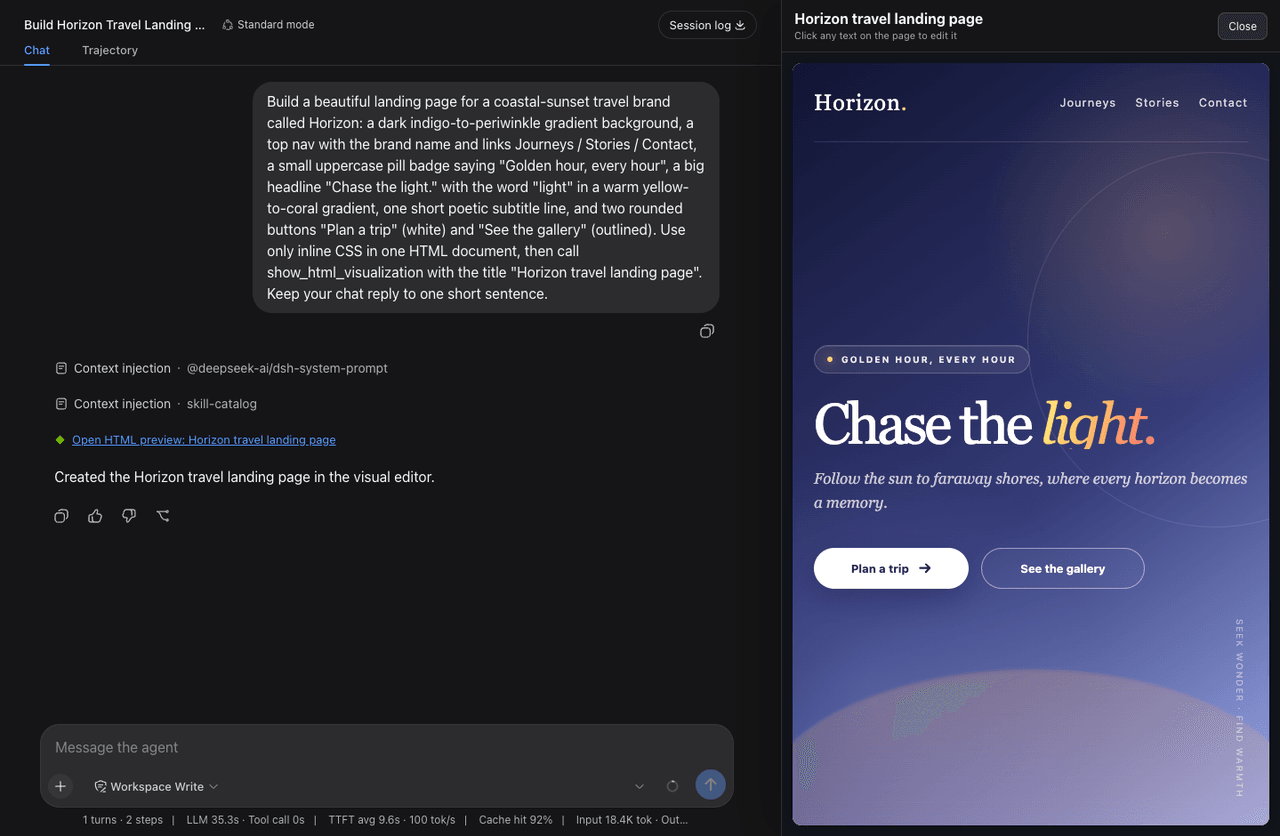
dsh-html-canvas 是 DeepSeek Harness 插件,把 AI 生成的 HTML 渲染成聊天旁的可视化画布。核心能力是点击页面任意文字即可编辑,包括标题、按钮、导航及脚本后插入文本;画布并排显示、可拖拽调宽,工具链接可随时重开并保留修改,采用沙箱 iframe。适合让代理生成页面后非技术用户直接改文案。注意:宿主端刻意零依赖,勿打包 @deepseek-ai/* 依赖,否则会遮蔽宿主副本导致工具调用失效。
dsh-html-canvas is a DeepSeek Harness plugin that renders AI-generated HTML into a click-to-edit canvas beside the chat. Its core capability lets users edit any rendered text by clicking—headings, buttons, nav links, and script-inserted text—with a resizable side-by-side panel, persistent reopen links, and a sandboxed iframe. Use it when an agent builds a page and non-technical users need to change copy without source code. Caveat: the host half stays dependency-free by design; bundling @deepseek-ai/* dependencies shadows the host copy and breaks tool calls.
请帮我了解并安装插件:【dsh-html-canvas】【https://github.com/Jinsong-Zhou/dsh-html-canvas】把上面这条消息直接发给当前会话里的 DSH,让它帮你了解并安装。安装命令不一定准确,发给 DSH 更稳。Send this message to DSH in your current session. CLI install commands may not be accurate across systems — DSH will figure it out for you.
或使用命令行安装(适合开发者)Or use CLI install (for developers)
命令行安装CLI Install
npx -y @deepseek-ai/dsh plugin --profile web add @jinsong-zhou/dsh-html-canvas@latest把 Jinsong-Zhou/dsh-html-canvas 加入你的 DSH 配置(web profile)即可启用。
READMEREADME
dsh-html-canvas
English | 简体中文
A DeepSeek Harness plugin that turns AI-generated HTML into a click-to-edit canvas beside the chat.
A DSH agent can build a complete HTML page, but the Web UI only shows it as a code block that most people can't read, let alone edit — this plugin closes that gap: the agent hands the finished page to one tool, it renders in a canvas beside the chat, and anyone can change it by clicking the text on the page, no source code ever.
Features
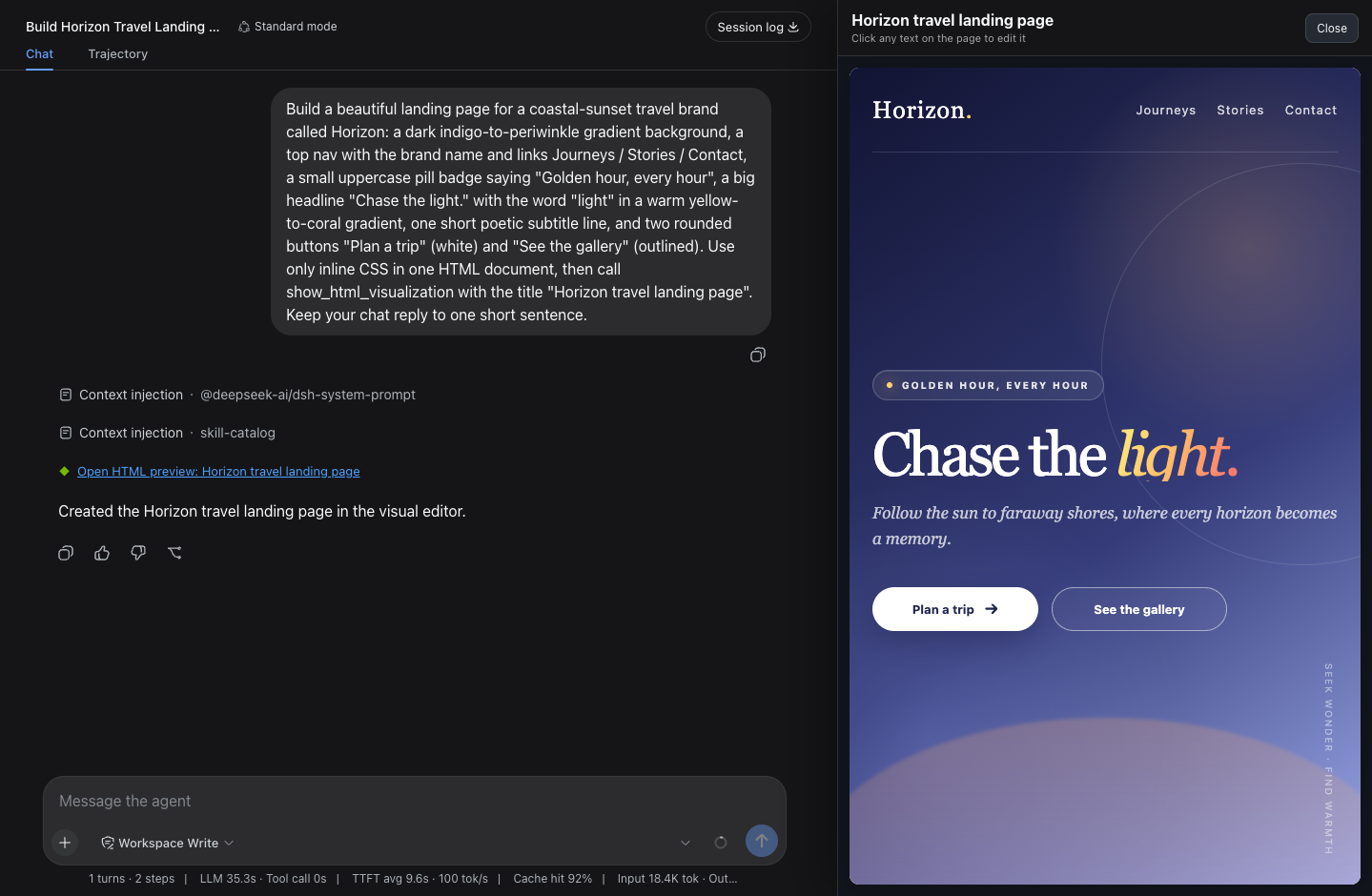
- Click-to-edit — any text on the rendered page is editable: headings, buttons, nav links, bare
<div>text, even text inserted later by page scripts. - Side-by-side, not overlapping — the canvas squeezes the chat column instead of covering it, and resizes with a drag handle.
- Lives in the chat — the tool call renders as a link; close the canvas anytime and click the link to reopen it with edits and width intact.
- Safe and localized — sandboxed iframe, no editor artifacts in the output, UI text follows the DSH locale (English / 中文).
Install
npx -y @deepseek-ai/dsh plugin --profile web add @jinsong-zhou/dsh-html-canvas@latest
Then restart the DSH web process and refresh the browser. For a local checkout, declare a file: dependency in the profile's package.json and insert it in cordis.patch.yml:
- insert:
    - id: html-canvas
      name: '@jinsong-zhou/dsh-html-canvas'
Usage
Ask the agent for any page — "make me an Apple-style personal homepage" — the canvas opens with the result, and you click the text to change it.
Development
node tests/host.test.mjs      # host contract (plugin must stay dependency-free)
node tests/client.test.mjs    # client behavior
DSH_WEB_URL=http://127.0.0.1:<port> node tests/verify-deployment.mjs
Note: the host half imports nothing by design — a bundled @deepseek-ai/* dependency gets hoisted into the profile and shadows the host's copy, which breaks every tool call. The tests guard this.
License
相关推荐Related
-
 nexu-io/open-design
🎨 Best DeepSeek Harness Design Plugin. The open-source Claude Design alternative. 🖥️ Local-first desktop app. 🖼️ Your…
nexu-io/open-design
🎨 Best DeepSeek Harness Design Plugin. The open-source Claude Design alternative. 🖥️ Local-first desktop app. 🖼️ Your…
-
 freestylefly/awesome-gpt-image-2
Prompt as Code | GPT-Image2 工业级提示词引擎与模板库,530+ 个案例逆向工程,20+ 套工业级模板,并提炼出Skills,持续更新中
freestylefly/awesome-gpt-image-2
Prompt as Code | GPT-Image2 工业级提示词引擎与模板库,530+ 个案例逆向工程,20+ 套工业级模板,并提炼出Skills,持续更新中
-
 anywhere-labs/dsh-desktop
为 DeepSeek Harness (DSH) 插件生态打造的现代化桌面端解决方案。万物皆「插件」,桌面本身也是「插件」。
anywhere-labs/dsh-desktop
为 DeepSeek Harness (DSH) 插件生态打造的现代化桌面端解决方案。万物皆「插件」,桌面本身也是「插件」。
- Nagi-ovo/voyager Enhancement suite for Gemini, AI Studio, Claude & ChatGPT — plus a prompt manager for any web UI, DeepSeek Harness inclu…
-
 walkinglabs/learn-harness-engineering
Harness engineering beginner tutorial, from 0 to 1
walkinglabs/learn-harness-engineering
Harness engineering beginner tutorial, from 0 to 1
-
 awesome-dsh-plugin/awesome-dsh-plugin
A curated list of plugins for DeepSeek Harness (dsh) · DeepSeek Harness 插件精选列表
awesome-dsh-plugin/awesome-dsh-plugin
A curated list of plugins for DeepSeek Harness (dsh) · DeepSeek Harness 插件精选列表
-
 MemTensor/MemOS
Self-evolving memory OS for LLM & AI Agents: ultra-persistent memory, hybrid-retrieval, and cross-task skill reuse, with…
MemTensor/MemOS
Self-evolving memory OS for LLM & AI Agents: ultra-persistent memory, hybrid-retrieval, and cross-task skill reuse, with…
- yjh051108/dsh-routing-suite dsh-routing-suite — injector + router-standard kit: install the runtime injector first, then the task-aware reasoning-mo…